A visitor to our Outlook Forums wanted to know how to change a subject and forward a message using rules:
I want to create a rule that I can run on a folder containing a number of messages that forwards each message to a new email address (a dropbox for a database). I need to write my own subject line, so that the database will read the subject line and then know to parse the document and extract the required information.
You can do this using either VBA or a Run a Script rule. If you using a rule to move the messages to another folder, the run a script rule is probably the best and can easily forward mail meeting specific conditions. You can run the rule as messages arrive or run it on the messages in the folder at any time using Run Rules Now.
Outlook 2003 users will receive the dreaded "something is trying to access your address book. Allow?" message. To avoid this, install ClickYes or Mapilab's Advanced Security software. Both are free. Mapilab's product will bypass the dialog (after you OK it the very first time), while ClickYes does the clicking for you.
Run a Script Rule
Press Alt+F11 to open the VB Editor and paste the following code into ThisOutlookSession. Create the rule in Outlook and select the script.
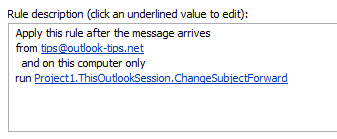
Don't forget to change the subject and email address!
Sub ChangeSubjectForward(Item As Outlook.MailItem)
    Item.Subject = "Test"
 Item.Save

Set myForward = Item.Forward
myForward.Recipients.Add "alias@domain.com"

myForward.Send

End Sub
To Delete the Sent Copy of the Message
To delete (or not save) the sent copy after it is forwarded, use myForward.DeleteAfterSubmit = True before the Send command.
Sub ChangeSubjectForward(Item As Outlook.MailItem)

Set myForward = Item.Forward
myForward.Recipients.Add "alias@domain.com"

' To BCC an address or DL, try this:
'myForward.BCC = "alias"

myForward.DeleteAfterSubmit = True

myForward.Send

End Sub
Find a code in the message body, then forward
This example combines the first script above with the macro at Use RegEx to extract text from an Outlook email message to look for a tracking code in the message body, then forward the message and include the code in the message subject.
Sub CodeSubjectForward(Item As Outlook.MailItem)

' Set reference to VB Script library
' Microsoft VBScript Regular Expressions 5.5

    Dim M1 As MatchCollection
    Dim M As Match

    Set Reg1 = New RegExp

    With Reg1
        .Pattern = "(Tracking Code\s*(\w*)\s*)"
        .Global = True
    End With
    If Reg1.Test(Item.Body) Then

        Set M1 = Reg1.Execute(Item.Body)
        For Each M In M1

'allows for multiple matches in the message body
        Item.Subject = M.SubMatches(1) & "; " & Item.Subject

        Next
    End If

 Item.Save

Set myForward = Item.Forward
myForward.Recipients.Add "alias@domain.com"

myForward.Send

End Sub
Forward Attachment & Change Subject
This version of the run a script macro gets the attachment name and puts it in the subject field. If there are multiple attachments, it exits the macro after the first matching attachment (and Excel file in this sample).
Sub ChangeSubjectForwardAttachment(Item As Outlook.MailItem)
Dim oAtt As Attachment
strAtt = ""
For Each oAtt In Item.Attachments
Debug.Print oAtt.FileName

' check extension
If Right(oAtt.FileName, 5) = ".pdf" Then

' check filename
'If InStr(oAtt.FileName, "keyword") > 0 Then

  Set myforward = Item.Forward
   myforward.Recipients.Add "alias@domain.com"
   myforward.Subject = oAtt.FileName
   myforward.Display 'Send
   Exit Sub

End If
Next oAtt

End Sub
Forward from another account
This script will forward the message from a different email account. As written, it will send from the second account in the Account list in File > Account Settings > Account Settings, under Email accounts. Change the number as needed.
myForward.SendUsingAccount = olNS.Accounts.Item(2)

Sub ChangeAccountForward(Item As Outlook.MailItem)
Dim olNS As Outlook.NameSpace
Set olNS = Application.GetNamespace("MAPI")

Set myForward = Item.Forward

myForward.Recipients.Add "alias@domain.com"
myForward.SendUsingAccount = olNS.Accounts.Item(2)

myForward.Send

Set olNS = Nothing
End Sub
"Change subject then forward" VBA Macro version
If you prefer a macro you can run on all messages in a folder at any time, use this code sample. This macro was put together using the script above and the code sample at Add a file number or keyword to the subject line of messages.
To use, paste into ThisOutlookSession and run, or add to a toolbar, ribbon, or QAT button.
Don't forget to change the subject and email address.
Sub ChangeSubjectThenSend()
Dim myolApp As Outlook.Application
Dim aItem As Object

Set myolApp = CreateObject("Outlook.Application")
Set mail = myolApp.ActiveExplorer.CurrentFolder

For Each aItem In mail.Items
      aItem.Subject = "New Subject"
    aItem.Save

    Set myForward = aItem.Forward
    myForward.Recipients.Add "alias@domain.com"
    myForward.Send

Next aItem
End Sub
Forward messages in a quarantine mailbox
This macro forwards messages that were sent to a quarantine folder by antispam software back to the original recipient. The original subject is restored.
To use, add the macro to the ribbon or toolbar. Select the message and click the button.
Use myForward.Send to automatically send the message.
You need to set a reference to the VB Script library:
Microsoft VBScript Regular Expressions 5.5 in the VB Editor's Tools, References menu.
Sub ChangeSubjectThenForward()
Dim oItem As Outlook.MailItem
Dim strSendto, strSubject As String
Dim myForward As MailItem

' Set reference to VB Script library
' Microsoft VBScript Regular Expressions 5.5
    Dim Reg1 As RegExp
    Dim M1 As MatchCollection
    Dim Reg2 As RegExp
    Dim M2 As MatchCollection
    Dim M As Match

Set oItem = ActiveExplorer.Selection.Item(1)
Set myForward = ActiveExplorer.Selection.Item(1).Forward

 ' regex from http://slipstick.me/2k3zf
 ' check the original, not the forward
    Set Reg1 = New RegExp
    With Reg1
        .Pattern = "(To[:](.*))"
        .Global = True
    End With
    If Reg1.test(oItem.Body) Then

        Set M1 = Reg1.Execute(oItem.Body)
        For Each M In M1
           strSendto = M.SubMatches(1)
        Next
    End If

    Set Reg2 = New RegExp
    With Reg2
        .Pattern = "(Subject[:](.*))"
        .Global = True
    End With
    If Reg2.test(oItem.Body) Then

        Set M2 = Reg2.Execute(oItem.Body)
        For Each M In M2
           strSubject = M.SubMatches(1)
        Next
    End If

    myForward.Recipients.Add strSendto
    myForward.Subject = strSubject
    myForward.Display ' change to .send to automatically send

End Sub
Add the sender name to a read receipt
Michal wanted to add the sender's name to a read receipt subject. Because it's a Report item and not a Message, you need to tweak the script a bit. The Reports also don't have a sender name, but you can use Regular Expressions (regex) to grab the name from the message body.
Unlike the scripts above, this script is using late-binding with the regex library. This makes the macro more portable, as you don't need to set the reference to the Regex library. If you are using multiple macros with regex, it's generally better to use early binding.
The Rule condition will be "uses the Report form" (choose Reports from Application Forms in the dialog). Note: if run script is not an option in Actions, see "Run-a-Script Rules Missing in Outlook".
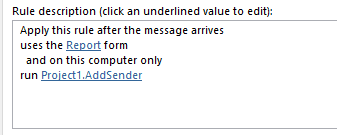
Sub AddSender(Item As Outlook.ReportItem)

Dim Reg1 As Object 'RegExp
Dim Matches As Object 'MatchCollection
Dim Match As Object 'Match
Dim strSender As String

Set Reg1 = CreateObject("VBScript.RegExp")

Reg1.Pattern = "To[:]\s*((.*))\r"

Set Matches = Reg1.Execute(Item.Body)

For Each Match In Matches
  strSender = Match.SubMatches(1)
Next

 Item.Subject = Item.Subject & " - " &  strSender
 Item.Save

End Sub
Testing Run a Script Macros
Testing run a script macros tends to be a PITA, since they only run when new messages arrive or when you run the rule manually. Sending new messages takes time and using Run Rules Now with a bad script or the wrong conditions can really screw up your day.
Tip: If you need to test the rule conditions, you can't avoid using Run Rules Now but you can minimize risk if you copy messages to a new folder and run it on messages in that folder.
When you just need to test the script, you can use a simple "stub" macro that calls the script, running it on the selected message.
Sub RunScript()
Dim objApp As Outlook.Application
Dim objItem As Object ' MailItem
Set objApp = Application
Set objItem = objApp.ActiveExplorer.Selection.Item(1)

'macro name you want to run goes here
YourMacroName objItem

End Sub
Tools
ClickYes Pro is a tuning tool for Microsoft Outlook security settings. It allows you to configure which applications can automatically send emails using Outlook and access email addresses stored in Outlook address book. ClickYes Pro runs as a background task providing a convenient icon in the taskbar notification area to manage allowed applications. It uses an encrypted storage and is highly secure and safe. Client and Server versions available. Works with Outlook 2000 - Outlook 2010. | |
Developers can use this to avoid the security prompts in Outlook. |
First: You will need macro security set to low during testing.
To check your macro security in Outlook 2010 or 2013, go to File, Options, Trust Center and open Trust Center Settings, and change the Macro Settings. In Outlook 2007 and older, it’s at Tools, Macro Security.
After you test the macro and see that it works, you can either leave macro security set to low or sign the macro.
Open the VBA Editor by pressing Alt+F11 on your keyboard.
To put the code in a module:
- Right click on Project1 and choose Insert > Module
- Copy and paste the macro into the new module.
More information as well as screenshots are at How to use the VBA Editor
More Information
More Run a Script Samples:
- Autoaccept a Meeting Request using Rules
- Automatically Add a Category to Accepted Meetings
- Blocking Mail From New Top-Level Domains
- Convert RTF Messages to Plain Text Format
- Create a rule to delete mail after a number of days
- Create a Task from an Email using a Rule
- Create an Outlook Appointment from a Message
- Create Appointment From Email Automatically
- Delegates, Meeting Requests, and Rules
- Delete attachments from messages
- Forward meeting details to another address
- How to Change the Font used for Outlook's RSS Feeds
- How to Process Mail After Business Hours
- Keep Canceled Meetings on Outlook's Calendar
- Macro to Print Outlook email attachments as they arrive
- Move messages CC'd to an address
- Open All Hyperlinks in an Outlook Email Message
- Outlook AutoReplies: One Script, Many Responses
- Outlook's Rules and Alerts: Run a Script
- Process messages received on a day of the week
- Read Outlook Messages using Plain Text
- Receive a Reminder When a Message Doesn't Arrive?
- Run a script rule: Autoreply using a template
- Run a script rule: Reply to a message
- Run a Script Rule: Send a New Message when a Message Arrives
- Run Rules Now using a Macro
- Run-a-Script Rules Missing in Outlook
- Save all incoming messages to the hard drive
- Save and Rename Outlook Email Attachments
- Save Attachments to the Hard Drive
- Save Outlook Email as a PDF
- Sort messages by Sender domain
- Talking Reminders
- To create a rule with wildcards
- Use a Macro to Copy Data in an Email to Excel
- Use a Rule to delete older messages as new ones arrive
- Use a run a script rule to mark messages read
- Use VBA to move messages with attachments

Antony joseph says
Hi, I would like to get a message "Mail not sent" if I have recipients of domain x and domain y i.e. tony@x.com; tony@y.com. This would be a safety measure to ensure I do not mistakenly send an email to both companies. Any help scripting this out woud be appreciated
Scott Van Heurck says
Not sure I should be messing with VBA - is it inbuilt now?
Diane Poremsky says
VBA and run a script rules are Outlook features.
What did you need it to do?
Emily Cain says
Hi, when I select "on this computer only" option in the rules there is no "run" button to select the macro?
Josh says
I want to run a simply rule that ends in running a script that does the following: when forwarding the message (that always has 1 attachment), rename the subject line of the email to the file name of the attachment. Nothing else. Even with the examples that are posted here, I am unable to get it to work. Please help. Many Thanks. Josh
Diane Poremsky says
The rule conditions might be able to completely handle choosing which messages to forward - the Forward Attachment & Change Subject
macro above should have adding the attachment name using this line:
myForward.Subject = oAtt.Filename
Checking the attachment type or attachment name is optional and can be removed.
If you can't get the rule conditions to work, you'll need to add an if statement to the macro to filter out which messages to forward.
David says
I want to just change the subject line of messages in my mailbox. I've adapted your script and that works OK for the subject shown in the reading pane, but not the subject shown in the message list. This holds even after switching to a different folder and back, or even restarting Outlook. I've looked through the object model (https://docs.microsoft.com/en-us/office/vba/api/outlook.mailitem), but don't see any "rebuild the inbox table of subjects" method.
Diane Poremsky says
The problem is most likely that you are using the conversation view - it picks the conversation up from the header, not from the subject field.
https://www.slipstick.com/outlook/email/change-the-subject-of-an-incoming-message/#edit
kelli stark says
How can I add a comment on the subject? just into the email I am auto-forward and keeping the original subject in my inbox. you can check the link if you have problems related to the Microsoft support service.
Diane Poremsky says
if you want to edit the subject of the forward, do it like this:
Sub ChangeSubjectForward(Item As Outlook.MailItem)
Set myForward = Item.Forward
myforward.Subject = "Test"
myForward.Recipients.Add "alias@domain.com"
myForward.Send
End Sub
Amr says
Hi,
Is there a way to change the subject and forward the email with no FW in the subject line. Also, could it be forwarded for just emails with a specific words in the subject line rather, or from a specific email, please?
Cheers,
A.E.
Elizabeth.vangorkom says
Hi Diane;
I hope you can help me; I have used the script above as you described (it is all I need to be honest):
"Sub ChangeSubjectForward(Item As Outlook.MailItem)
Item.Subject = "8980 - RCB"
Item.Save
Set myForward = Item.Forward
myForward.Recipients.Add "xxxx@xxx.com"
myForward.Send
End Sub
but what I would like to do is to only run this on a specific sub-folder and then delete the email from said sub-folder after the email has been sent.
Many thanks
Diane Poremsky says
That is set up as rule... so you can run the rule manually on a folder, but that is not automatic... if you need automatic, you can use an Itemadd macro to watch the folder and do the forward. See https://www.slipstick.com/developer/itemadd-macro/ for a sample.
Clint says
Hi Diane, I have found your site very helpful however I am lost between a few of your scripts.I'm am trying to create a macro that Checks the subject line for key words "Unclassified" "Private" "Restricted" and if these exist or don't exist prompt a Userform with a radio button to add "Unclassified" to the existing Subject or provide a check box to edit the Subject line prior to sending. Can you help? Thanks Clint
Diane Poremsky says
i don't have any that complicated posted on the site - will see if i have one in my cache. The macros at https://www.slipstick.com/developer/code-samples/add-secure-message-subject-sending/ add 'secure' - i don't thnk any of the samples check for the keyword first, but that isn't difficult to do using instr function.
Stephanie says
Hi Diane,
I am trying to add a time delay to the script below, any suggestions?
Sub WCBClearanceLtrEmail(Item As Outlook.MailItem)
Set myForward = Item.Forward
'forward to a distribution list'
myForward.Recipients.Add "WCB"
'change subject'
myForward.Subject = "WCB Clearance Denied List"
'adding font information for signature block and body of message'
Arial75 = ""
Arial10 = ""
Arial11 = ""
EndFont = ""
'my message info'
BodyText = Arial11 & "The contractors on the attached list do not have proper WCB coverage or are not in good standing with WCB.
Please ensure they are not on site or being utilized by your location in any way.
Thank you and have a safe day,
" & EndFont
myForward.HTMLBody = BodyText & BodySig & Disclaimer
myForward.Send
End Sub
Diane Poremsky says
You can set a deferred delivery time using code - samples are here: https://www.slipstick.com/developer/code-samples/delay-sending-messages-specific-times/ - those are itemsend macros, so you'll only want to swipe the revelant code to add to your macro - this should delay it 6 hours or you can set a specific time (which the examples on that pages do).
SendAt = Now + .25
myForward.DeferredDeliveryTime = SendAt
Stephanie says
Thank you.
Oscar Jara says
Also, how can I add a comment on the subject just into the email I am autoforward and keeping the original subject on my inbox
Diane Poremsky says
Yes, you'd make the change on myforward, not on the item.
Set myForward = Item.Forward
myForward.subject "New Subject"
if you want to include the old subject, use
myForward.subject "New Subject " & item.subject
Oscar Jara says
Even with "myForward.DeleteAfterSubmit = True", I am still having an email on my send folder.
Diane Poremsky says
This is on your gmail account? Gmail always saves a copy of sent items - it's independant of outlook. In fact, auto account setup in outlook 2013 and up set gmail imap accounts to not save sent items to avoid duplicated sent messages.
sam says
I tried the "change subject and forward" but its is not working for me.
any suggestion
Diane Poremsky says
any error message? what happens when you try? did you set macro security to low?
Michal says
Hi Diane, Hope you're well. I would like to ask you for help creating a rule for Outlook 2013. The rule shoudl add a sender to the subject for received notification of request read receipts
Basically, I'll send a email with request read receipts and receive confirmation with Subject: "Original Subject"-"Sender". I hope this is possible, unfortunately, my attempts do not work.
Diane Poremsky says
The problem is in getting the sender name - this run a script rule errors but if you remove sendername and put something in the quotes, it works. You would need to use regex to get the to field from the body - https://www.slipstick.com/developer/regex-parse-message-text/ has the basics of how to do it.
Sub AddSender(Item As Outlook.ReportItem)
If Item.MessageClass = "REPORT.IPM.Note.IPNRN" Then
Item.Subject = Item.SenderName & " " & Item.Subject
Item.Save
End If
End Sub
Diane Poremsky says
i added a sample at the end of the article
Michal says
Thank you very much, the report-script works perfectly. Michal
Gary says
I'm wondering if there is something I can add to the script below that will allow me to automatically insert specific text in the body of the message when the forward occurs.
Sub ChangeSubjectForward(Item As Outlook.MailItem)
Item.Subject = "Test"
Item.Save
Set myForward = Item.Forward
myForward.Recipients.Add "alias@domain.com"
myForward.Send
End Sub
Diane Poremsky says
Yes. use myforward.body = "new text" & item.body
if the message is html, you may need to use .htmlbody for one or both or hyperlinks will be ugly.
Gary says
Do I just add that line in the middle somewhere and change the quoted area to what I want? Sorry, I don't speak code.
Diane Poremsky says
it can be the line after myforward.recipients.add - anywhere between set myforward and send.
Gary says
I'm still confused on this.
The text I'd like to add to the forwarded message is:
technician = text
status = assigned
Diane Poremsky says
Sub ChangeSubjectForward(Item As Outlook.MailItem)
Item.Subject = "Test"
Item.Save
Dim strTech, strStatus
strTech = "whatever"
strStatus = "assigned"
Set myForward = Item.Forward
myForward.Recipients.Add "alias@domain.com"
myforward.body = strTech & vbcrlf & strStatus & item.body
myForward.Send
End Sub
if you are picking with the values from elsewhere, you need to assign the values to the strings.
Gary says
Now I'm even more confused.
What is
Dim strTech, strStatus, strTech and strStatus?
When I was giving the example of the text that needed to be added, that was the actual text. Not code.
Diane Poremsky says
Those are string variables. Put your text inside the quotes.
Gary says
That part I get. But what is the Dim... line? And what does the str mean? I'm trying to understand this. And is "Tech" supposed to be "technician"?
Diane Poremsky says
dim used to declare variables and put them in memory. Way beck in the early BASIC days, it was used to define the Dimensions of an array but is now used to define all variables.
https://docs.microsoft.com/en-us/dotnet/articles/visual-basic/language-reference/statements/dim-statement
str commonly used to identify string variables - it's good programming form to use variable names that match the variable type. I used strTech to identify the technician string, but you could call it anything you want.
Gary says
The reason I ask is because the word must be "technician" or where it's being sent will not read it correctly.
But, what is "& vbcrlf"?
Diane Poremsky says
the str variable will contain the phrase you need to insert - it holds what you put in it.
vbcrlf adds line feed and & is used to ties different elements together. (the letters read as 'visual basic carriage return line feed' - vbcr and vblf are also valid) https://msdn.microsoft.com/en-us/library/microsoft.visualbasic.constants.vbcrlf(v=vs.110).aspx
Gary says
So this is what I have but it didn't seem to work...
Sub ChangeSubjectForward(Item As Outlook.MailItem)
Item.Subject = "FootPrints Account Management"
Item.Save
Dim strtechnician, strstatus
strtechnician = "username"
strstatus = "assigned"
Set myforward = Item.Forward
myforward.Recipients.Add "email"
myforward.Body = strtechician & vbCrLf & strstatus & Item.Body
myforward.Send
End Sub
It sent the e-mail, same as before, but only included the word "assigned" in the message. The "status = " was not in front of it and nothing was included for the "technician = username" line.
Diane Poremsky says
That's due to the oldest bug known to man... a typo. :)
This works:
myforward.Body = strtechnician & vbCrLf & strstatus & Item.Body
Gary says
Well, imagine that!
Guess I'll see how this one works. :)
Thanks!
Gary says
Fixing the typo didn't seem to work. I still am only getting the words "whatever" and "assigned" in the body of the message. The "technician = " and "status = " are still missing.
Diane Poremsky says
you need to put the entire phrase in the string - the string name is a variable that makes it easier to read the code
(especially with long phrases), update it or update it automatically using a variable from the email or computer (like computer user name)
strtechnician = "technician = username"
strstatus = "status = assigned"
if its easier for you, you can put it in the body line -
myforward.Body = "technician = username" & vbCrLf & "status = assigned" & Item.Body
Gary says
Well now THAT actually makes sense.
I'll see what happens.
Gary says
Looks good now.
Thank you!
Gary says
Well, things were working fine and now all of a sudden I'm getting a message about this rule that says "This action is not available in the current mode.". I don't know what mode it's talking about as nothing has changed. Any ideas?
Diane Poremsky says
Could it be this: https://www.slipstick.com/outlook/rules/outlook-2016-run-a-script-rules/
Gary says
Not if this only applies to 2016.
Diane Poremsky says
Is the run a script action missing from rules? if so, then change the version # and try it. (They often backport security changes to older versions.)
What does the rule do?
Diane Poremsky says
AS an fYI, i just checked 2013 and the latest security update removed run a script (and run an application) rules - the registry key restores them. (Checking 2007 and 2010 next)
Gary says
Made the change and it seems to be working again.
Tim Wilson says
This is all very useful, but Microsoft removed the ability to run VBA scripts as part of a rule in Outlook 2016.
Is there a way to retain this functionality with Outlook 2016?
Perhaps an add-on that brings back VBA scripts for rules?
Gary says
I have been trying to get the forward-change subject script to work for a couple of days with Outlook 2016. Thanks for this info. I hope there is another option as I will need something next week.
Diane Poremsky says
You need to set a registry key to tun it back on - see https://www.slipstick.com/outlook/rules/outlook-2016-run-a-script-rules/
Gary says
This doesn't seem to work with Outlook 2013 in an Office365 environment either. Unless I'm doing something wrong. Perhaps someone could let me know for sure.
Diane Poremsky says
The macros on this page will work with outlook 2013 and Office 365 mail. What exactly happens when you try? Are macros enabled?
Gary says
I didn't know macros had to be enabled. Is it just the "Trust access to VBA..." option or is the "Enable all macros..." option necessary?
Also, Excel doesn't need to be running for this to work, does it?
Diane Poremsky says
You will need to set the trust center to allow all macros - after testing it, you can sign the macro and change the setting to allow signed macros. If the macro is "properly" written, Excel won't need to be running (unless its an Excel macro accessing outlook)
Gary says
It's just the "Run a Script Rule" mentioned above.
Sub ChangeSubjectForward(Item As Outlook.MailItem)
Item.Subject = "Test"
Item.Save
Set myForward = Item.Forward
myForward.Recipients.Add "alias@domain.com"
myForward.Send
End Sub
Diane Poremsky says
The macro doesn't use Excel, onlt outlook - so Excel won't need to be running but outlook definitely will need to be open - macros don't run if its closed.
Derek Patrick Daya says
Hi Diane,
Trust you're well! I hope that you could help me on my query below:
You've recently helped me create a VBscript that adds certain word to a subject then forwards it to an email address. It was working perfectly until I have updated my outlook to new version office365. All the rules are working, marking the new email as read and adding it to a category but the VBscript that forwards it do not. Can you please advise me what went wrong and how can I fix it? Thank you in advance.
Sub ForwardEmail(Item As Outlook.MailItem)
Dim str, strSubject As String
Set myForward = Item.Forward
Select Case True
Case InStr(1, Item.Subject, "Indeed") > 0
strSubject = " Indeed"
Case InStr(1, Item.Subject, "PinoyJobs") > 0
strSubject = " PinoyJobs"
Case InStr(1, Item.Body, "s1JOBS") > 0
strSubject = " S1Jobs"
Case InStr(1, Item.Body, "jobsDB") > 0
strSubject = " JobsDB"
Case InStr(1, Item.Subject, "TradeWindsJobs") > 0
strSubject = " Tradewinds"
Case InStr(1, Item.Body, "LinkedIn") > 0
strSubject = " LinkedIn Advert"
Case InStr(1, Item.Body, "Splash Jobs Support Team") > 0
strSubject = " Splash"
Case InStr(1, Item.Body, "RIGZONE") > 0
strSubject = " Rigzone"
End Select
If True Then
myForward.Subject = Item.Subject & strSubject
End If
If InStr(Item.SenderEmailAddress, "auto@oilandgasjobsearch.com") Or InStr(Item.Body, "oilandgasjobsearch.com") Then
myForward.Subject = Item.Subject & ("Oil&Gas JobSearch")
End If
Dim Reg1 As Object
Dim M1 As Object
Dim M As Object
Set Reg1 = CreateObject("VBScript.RegExp")
With Reg1
.Pattern = "Contact Information (([w-.]*@[w-.]*)s*)"
' use false to stop at first match
.Global = True
End With
If Reg1.Test(Item.Body) Then
Set M1 = Reg1.Execute(Item.Body)
For Each M In M1
Debug.Print M.SubMatches(1)
myForward.To = M.SubMatches(1)
Next
End If
Item.Categories = "Added to Safesforce"
Item.Save
myForward.Recipients.Add "derekpatrickdaya@yahoo.com"
myForward.Send
Set M1 = Nothing
Set M = Nothing
Set Reg1 = Nothing
End Sub
Tony Thackray says
I'm tying to write a script to forward and email and change the subject for a mailbox that has multiple accounts.
So if a mail is received to one account I want to forward to another, if received to another account I need it sent to a second one.
I have tried:
Sub ChangeSubjectForward(Item As Outlook.MailItem)
Set myForward = Item.Forward
myForward.Recipients.Add "alias@domain.com"
' To BCC an address or DL, try this:
'myForward.BCC = "alias"
myForward.DeleteAfterSubmit = True
myForward.Send
End Sub
But cannot work out how to sort it to specific accounts/names.
Any ideas?
Diane Poremsky says
are these separate email addresses delivered to the mailbox or multiple mailboxes in your profile? you can use an if or select case statement to get the correct values to use.
if item.to = "address" then
strForward = "anotheraddress"
elseif item.to = "thisaddress" then
strForward = "newaddress"
end if
then use:
myForward.Recipients.Add strForward
Hussain Hakim says
Hi Diane,
Thanks for the useful info you have shared on the site.
How to detect new mails on shared mailbox and then forward?
Diane Poremsky says
You need to either use an ItemAdd script to watch the mailbox or set the shared box up in an outlook profile and set up a rule - it needs to be a server side rule to work.
This is itemadd: https://www.slipstick.com/developer/code-samples/monitor-secondary-mailbox-messages/
Rules method: https://www.slipstick.com/exchange/create-rules-and-oof-shared-mailbox/
Ron Banerjee says
Hi there
I need to forward an e-mail as attachment to specific people using a template, how would I script that?
Diane Poremsky says
myforward.attachments.add item, olEmbeddeditem
will add the original email to the new message.
Najam says
Hi Diane,
In the code above for 'Find a code in the message body, then forward' I want to find a numbers separated by dots written such that they are between:
0.0.0.0 and 999.999.999.999
and reply in the body such as:
Sir,
please address Order: {the above number found}.
Let me know once the process is completed.
Thanks,
Diane Poremsky says
This should get the #
(\d{1,3}\.\d{1,3}\.\d{1,3}\.\d{1,3}) - use M.SubMatches(0) to get all 4 in a series.
Assign it to a variable then use a template with the position of the code marked with a unique keyword:
please address Order: [number]
use the replace function to replace it
objMsg.body = replace(objMsg.body, "[number]", strNumber)
the web generate form code sample at https://www.slipstick.com/developer/run-a-script-rule-autoreply-using-a-template/ would be a good place to start.
Najam says
Thanks and I need some more help....
I found out that I am getting many messages with the same strings and I only need to reply once for each unique string. So I need to save the string of numbers of every message I send and, for every message received, compare with the saved strings. If the string is not found (not responded previously), I need to auto reply otherwise no action is needed on a found string that I responded to previously.
Any guiding sample available would be a great help.
Diane Poremsky says
Will they be replies? It would be much easier to check the subject for RE: (or the body for some other keyword that is only in the additional messages) than to try and save and search a list of codes.
Mike says
Do any one have a script to alert me when i use multiple email ID's with different domain. Eg: TO: ABC@gmail.com CC: XYS@gmail.com; KY@yahoo.com. For this case it should alert me that i am using two different domain email ID's as gmail and yahoo
Diane Poremsky says
look at the macros on this page. https://www.slipstick.com/how-to-outlook/prevent-sending-messages-to-wrong-email-address/
QuoteMachine says
Hi Diane - I love your site :)
How would I run the ChangeSubjectForwardAttachment(Item As Outlook.MailItem) as a Public Sub, I've tried calling it with the below code but get an "Argument Not optional" error...
Sub CallChangeSubject()
Call ChangeSubjectForwardAttachment(Item As Outlook.MailItem)
End Sub
The part I need is the auto-fill the Subject line with attachment name, to be used on it's own in some cases, and called from other macros in other situations. All my attachments are pdf files.
Diane Poremsky says
Try this with a selected item - if it errors on set item, change application. to session.
Sub CallChangeSubject()
dim Item As Outlook.MailItem
Set Item = Application.ActiveExplorer.Selection.Item(1)
Call ChangeSubjectForwardAttachment Item
End Sub
Diane Poremsky says
Also, to use it with open or selected items, see https://www.slipstick.com/developer/outlook-vba-work-with-open-item-or-select-item/
Manuel says
I'm using a macro for Outlook which saves emails with attachments to a specific folder in my disk. Initially I used a simpler macro and it worked.
It was automatically saving the attachment to the disk. However, when I checked a few days later it didn’t work. I checked Vba and it seems that when the first line has “itm As Outlook.MailItem” in the parenthesis it’s not able to save the macro anymore and it won’t even run it. If I save the macro without that line I’m able to run it but not to find it as a script in Outlook, reason why I need to add that line in order for Outlook to find it as a script.
Sub GetAttachments(itm As Outlook.MailItem)
I know this may not be part of HelpDesk services but I was wondering if you guys new a fix for this issue. I can’t find the answer anywhere. Thanks!
Diane Poremsky says
If you are running the script from a rule, or another script, you need to name it
Sub GetAttachments(itm As Outlook.MailItem)
When you remove that, it can only be run manually but needs a line to identify the selected message.
Olwyn says
Hi Diane, thank you for sharing this.
Is possible to run a script against Fax to email documents? These always have the same subject information regardless of who it is from. I need to change the subject line and forward any fax from ABC company to a designated email recipient (always the same), I can't see anything to distinguish one email from another. The attachment is a tif and will always have the same subject line. Because it is in the attachment I cannot see how to identify the line and take the action. Some days there are 3 other days there are 63.
Appreciate your thoughts.
Regards Obwan
Mike says
I receive email with a specfic subject and attachments in excel. I need to forward the same email with the subject as attachment name. Can this be done?
Diane Poremsky says
I'm adding a macro to this article that adds the attachment name to the subject field.
Rita says
Good morning Diane,
I receive an email with a date format on the subject line.
I would like to be able to identify if this date is within the next 48H and if it doesn't fall on the next 48H range to delete it. If its the case to follow on the 48H range to highlighted it or mark it.
is there any script or VBA I can create to identify this?
Thanks for your help.
Diane Poremsky says
You'd need to grab the date and compare it - this is actually fairly easy. What format is the date in?
once you identify the message, you'd need to flag or categorize it.
Joe says
Is there a way to set a rule/script to delete a link from an email subject and then forward it? Want to leave the rest of the subject intact, just delete the link that is by the end of subject line before forwarding.
Thanks
Diane Poremsky says
yes, you can do that as long as you can identify the text to delete. If the part before the url or the url itself is always the same number of characters, you can use left(.subject, #ofcharacters) or left(.subject, len(.subject) - #ofcharacters). If you need to calculate the length of the url, it would be something like left(.subject, len(.subject, instr(.subject, "http")+1)
Jake says
Diane,
I was hoping you might be able to help me out with an issue I'm seeing trying to run this code. I need to select the data from my message body that looks like this:
Text: DISA ASI #12345 / YELLOWBRICKROAD, MI
051000Z - 051500Z JAN 10
The problem I am getting, is all the strings I have tried only pull the "spaces" after text, or the first word "DISA". How can I get VBA to select the information from 'DISA' all the way through the dates in the line below?
Thank you in advance,
Jake
Lovey says
Hi Diane,
I'd really appreciate If you can help me this script:
1) I need to forward all the emails from specific domain to another email address.
2) I need to edit the subject line while forwarding to reflect the email address of original sender.
Sub SubjectForward(Item As Outlook.MailItem)
Set myForward = Item.Forward
myForward.Subject = Item.SenderEmailAddress & " " & Item.Subject
myForward.Recipients.Add "lovey.sohi@yahoo.com"
myForward.Send
End Sub
please advise further
Stephen M says
Hello i am trying to find a scrip to that automatically BCCs all incoming messages and change the subject.
I have usind this VB to auto BCC and it works. i do not know how to add to the subject or replace the subject.
Dim myolApp As Outlook.Application
Dim aItem As Object
Set myolApp = CreateObject("Outlook.Application")
Set mail = myolApp.ActiveExplorer.CurrentFolder
For Each aItem In mail.Items
aItem.Subject = "New Subject"
aItem.Save
Set myForward = aItem.Forward
myForward.Recipients.Add "cmari@"
myForward.Send
Next aItem
End Sub
Diane Poremsky says
After myforward.recipients.add "address", add
myforward.subject = "new subject"
or
myforward.subject = "new " & aitem.subject
Ernesto says
Hello experts, I need your help.
I have a main PC configured with several accounts that receive all the incoming emails directed to the company and then they're assigned. Some of the accounts of the company need to have an autoreply option enabled.
When someone in the company send any outbond message, in the object line appear the unique id of the user, like [EM] or [VZ].
When someone reply to those messages, in the object line, the main PC will receive an email starting with Re: [EM] ....
I tried to forward those messages to the user [EM] using simple rules.
And that's easy.
The problem is that [EM] has an autoreply option enabled, so when he receive the email, the autoreply send a new message to the main PC, with [EM] in the object line.
So, I have a loop.
For various reasons the only solutions is removing [EM] from the object line when the simple rule is trigged and replace part of the object, with something different like [R-EM].....
Any help with this?
I imagine that with VB I can do it but I'm not expert in VB.
Thank you
Diane Poremsky says
You can do this with a run a script rule. An example is here: https://www.slipstick.com/outlook/rules/run-script-rule-reply-message/
You'll need to remove the [em] - you can do this with myReply.subject = right(item.subject, len(item.subject) - 4)
David Nestlebush says
Hello,
I am trying to find a script that will allow me to reply to the sender, but add "accept" or "reject" to the end of the subject line.
Diane Poremsky says
Use
myForward.subject = myforward.subject & " accept"
if you want to choose accept or decline at the time you forward, you can use something like
Dim strChoice as string
strChoice = inputbox("Accept or Decline?")
myForward.subject = myforward.subject & " " & strChoice
If you want to automate it based on other factors that code can easily pick up, that is possible too.
Hunter says
Diane,
What would the full script be for the accept. This is what i am currently using and its not seeming to work correctly.
Sub ForwardEmail(Item As Outlook.MailItem)
Set myforward = Item.Reply
myforward.Recipients.Add "compass@starbucks.com"
myforward.Subject = myforward.Subject & "ACCEPT"
End Sub
Its for dispatching service calls and the only thing i need to do is add "ACCEPT" to the end of the subject line in the reply.
Diane Poremsky says
That should work in a rule. Oh, you need myforward.send or myforward.display
David Nestlebush says
Thank you Diane.
What would I use to send it back to the original sender?
Diane Poremsky says
the easiest is to use reply:
Set myForward = Item.reply
David Nestlebush says
Ideally, I would like a button for accept or reject that will automatically add the appropriate string and send it back right away.
I apologize for the multiple questions. I'm new to VBA and it's definitely a lot to learn.
Thank you so much!
Diane Poremsky says
That not really hard to do - you can use 2 macros - one that accepts, one that declines (good if the macros are short) or use 3 (if the macros are long) - one to accept that sets the accept variable, the decline one sets the decline variable and the 3rd macro takes the variable and does the work.
southeastslimdown says
It appears my outlook 2013 won't run the rule even though it's been created and tested as an unlinked macro. When I boot up in the morning, the status bar shows it running, but the output email doesn't put anything in the draft folder. Then won't run again unless I reboot my machine (and sometimes it still will not run). One site said it's may be an installation issue or possibly a compatibility issue. I have enabled all macros in the security settings, so I know it's not that.
Diane Poremsky says
Do you have other outlook macros? Do you get a lot of mail in at once? It's possible you're trying to do too many things at once and it's hanging.
If too much mail is coming in at once you can try filtering it better or using an itemadd or newmailex macro.
martin says
Hi, Diane.
I'm totally new to this, but i need to delete certain site's url before forwarding the message. Do you know the script that could do it?
Diane Poremsky says
Will the url always be the same? Is the message plain text?
This macro will do it - if the messages are html, you can use myForward.HTMLBody
Sub DeleteURLForward(Item As Outlook.MailItem)
Set myForward = Item.Forward
myForward.Recipients.Add "drcp@cdolive.com"
myForward.Body = Replace(myForward.Body, "https://www.slipstick.com", "url removed")
myForward.Send
End Sub
Derek Patrick Daya says
For some reasons my replies are not getting posted.
Thank you for helping me on this Diane! :) To be honest, i really do not have any idea on how should I include the regex functionality on the current script. :( Can you provide me the code instead?
LinkedIn email that we receive contains the email address of the applicant, is they anyway we can add the regex code on the below script? It will be like if subject contains linkedin and if has no attachment it will send out an email to the email address on the email requesting for a cv.
If the message with subject linkedin but has attachment it should be forwarded to derekpatrickdaya@yahoo.com
Here is the current code that I have.
Sub ForwardEmail(Item As Outlook.MailItem)
Dim str, strSubject As String
Set myForward = Item.Forward
Select Case True
Case InStr(1, Item.Subject, "Indeed") > 0
strSubject = " Indeed"
Case InStr(1, Item.Body, "s1JOBS") > 0
strSubject = " S1 Jobs"
Case InStr(1, Item.Subject, "jobsDB") > 0
strSubject = " JobsDB"
Case InStr(1, Item.Subject, "TradeWindsJobs") > 0
strSubject = " Tradewinds"
Case InStr(1, Item.Subject, "LinkedIn") > 0
strSubject = " LinkedIn Advert"
End Select
If True Then
myForward.Subject = Item.Subject & strSubject
End If
If InStr(Item.SenderEmailAddress, "auto@oilandgasjobsearch.com") Or InStr(Item.Body, "oilandgasjobsearch.com") Then
myForward.Subject = Item.Subject & ("Oil&Gas JobSearch")
End If
Item.Categories = "Added to Safesforce"
Item.Save
myForward.Recipients.Add "derekpatrickdaya@yahoo.com"
myForward.Send
End Sub
Thank you!
Diane Poremsky says
The replies were posted, but they won't show to the public until I'm ready to answer them - this keeps me from losing comments that are looking for answers. :)
This code (replace the end of your code with it) gets the first address - use global = true to get the last address (this gets the first, which happens to be the sender's address in the header block). If the address you need is not first or last, there needs to be a label or something to identify the address as the correct address.
Item.Categories = "Added to Safesforce"
Item.Save
'----
Dim Reg1 As Object
Dim M1 As Object
Dim M As Object
Set Reg1 = CreateObject("VBScript.RegExp")
With Reg1
.Pattern = "(([\w-\.]*\@[\w-\.]*)\s*)"
' use false to stop at first match
.Global = False
End With
If Reg1.Test(Item.Body) Then
Set M1 = Reg1.Execute(Item.Body)
For Each M In M1
Debug.Print M.SubMatches(1)
myForward.To = M.SubMatches(1)
Next
End If
'----------
myForward.Recipients.Add "you@yahoo.com"
myForward.Display 'Send
Set M1 = Nothing
Set M = Nothing
Set Reg1 = Nothing
End Sub
Derek Patrick Daya says
Hahaha I am really sorry for spamming. :)
I have a few questions for you, if you dont mind.
1. Will the code that will be added will identify if the message receive contains linkedin on subject and has no attachment?
2. Where can I place the message that will be forwarded to the email address found on the body of the email?
3. I have set the global to true as it's not the sender who I wanted to email but I am not sure if its the last. The only thing I can see on the email that is being forwarded to us it that the body contains the email address and it's right beside "Contact Information" and above of a set of numbers. Where can I send you screen shot?
I have replaced the VBscript with the code below:
Sub ForwardEmail(Item As Outlook.MailItem)
Dim str, strSubject As String
Set myForward = Item.Forward
Select Case True
Case InStr(1, Item.Subject, "Indeed") > 0
strSubject = " Indeed"
Case InStr(1, Item.Body, "s1JOBS") > 0
strSubject = " S1 Jobs"
Case InStr(1, Item.Subject, "jobsDB") > 0
strSubject = " JobsDB"
Case InStr(1, Item.Subject, "TradeWindsJobs") > 0
strSubject = " Tradewinds"
Case InStr(1, Item.Subject, "LinkedIn") > 0
strSubject = " LinkedIn Advert"
(NOTE: I WOULD LIKE TO ADD HERE ANOTHER CRITERIA WHEREIN IT SHOULD HAVE AN ATTACHMENT BEFORE IT PUTS IN A "LinkedIN Advert" ON SUBJECT BEFORE ITS GETS FORWARDED.)
End Select
If True Then
myForward.Subject = Item.Subject & strSubject
End If
If InStr(Item.SenderEmailAddress, "auto@oilandgasjobsearch.com") Or InStr(Item.Body, "oilandgasjobsearch.com") Then
myForward.Subject = Item.Subject & ("Oil&Gas JobSearch")
End If
Item.Categories = "Added to Safesforce"
Item.Save
Dim Reg1 As Object
Dim M1 As Object
Dim M As Object
Set Reg1 = CreateObject("VBScript.RegExp")
With Reg1
.Pattern = "(([\w-\.]*\@[\w-\.]*)\s*)"
' use false to stop at first match
.Global = True
End With
If Reg1.Test(Item.Body) Then
Set M1 = Reg1.Execute(Item.Body)
For Each M In M1
Debug.Print M.SubMatches(1)
myForward.To = M.SubMatches(1)
Next
End If
(NOTE: THE ABOVE CODE NEEDS WILL FIRE FOR SUBJECT THAT CONTAINS "LinkedIn" BUT HAS NO ATTACHMENT.)
myForward.Recipients.Add "derekpatrickdaya@yahoo.com"
myForward.Send
Set M1 = Nothing
Set M = Nothing
Set Reg1 = Nothing
End Sub
Thank you so much for the help Diane!
Diane Poremsky says
If you only want the regex code to fire for certain linkedin messages, i would wrap it with an if.. end if statement.
Not sure I understand what you are asking in #2.
Assuming it is Contact Information: email@address, try something like this:
.Pattern = "Contact Information (([\w-\.]*\@[\w-\.]*)\s*)"
Derek Patrick Daya says
I mean the aim of this regex would be to capture the email address and then be able to send out a message to the email address like "Hi, We receive your application, please send a doc copy of your resume with at least one valid email address on it. Please make sure as well that you do not change the subject of this email. Thanks!"
I have include the .Pattern = "Contact Information (([\w-\.]*\@[\w-\.]*)\s*)", I am not sure how will I add the if statement for certain linkedin message. But I think, what I just need to add here is the "with attachment".
Derek Patrick Daya says
Hi Diane, sorry if I am not really following on you on this one as I really do not have any idea.
is the code to check if the message receive "if myattachment > 0"? If so, I have no idea how to insert that on the current script.
For this one:
Case InStr(1, Item.Subject, "LinkedIn") > 0 && *myattachment > 0*
strSubject = " LinkedIn Advert"
For this one:
Dim Reg1 As Object
Dim M1 As Object
Dim M As Object
Set Reg1 = CreateObject("VBScript.RegExp")
With Reg1
.Pattern = "(([\w-\.]*\@[\w-\.]*)\s*)"
' use false to stop at first match
.Global = True
End With
If Reg1.Test(Item.Body) && *myattachment = 0* Then
Set M1 = Reg1.Execute(Item.Body)
For Each M In M1
Debug.Print M.SubMatches(1)
myForward.To = M.SubMatches(1)
Next
End If
also for this one, where do I place the text that will be on the body of the email that will be forwarded? and i hope it will not change the subject of the original email.
Dim Reg1 As Object
Dim M1 As Object
Dim M As Object
Set Reg1 = CreateObject("VBScript.RegExp")
With Reg1
.Pattern = "(([\w-\.]*\@[\w-\.]*)\s*)"
' use false to stop at first match
.Global = True
End With
If Reg1.Test(Item.Body) && *myattachment = 0* Then
Set M1 = Reg1.Execute(Item.Body)
For Each M In M1
Debug.Print M.SubMatches(1)
myForward.To = M.SubMatches(1)
Next
End If
Many thanks to you Diane!
Derek Patrick Daya says
Hi Diane,
Can you help me on this request. I am currently planning on creating a rule that will auto forward an email to a another email address. before it forwards it, it needs to check the subject or the body if it contains a Job Portal. If it does, lets say jobsDB. It should add on JobsDB on the subject + the original subject. Lets says original subject is "Test" then before it forwards it to the other email address it the subject should be change to "JobsDB Test". Email that should only be forwarded are new email and which has an attachment.
Please please. Thanks!
Diane Poremsky says
As long as the job portal is always the same you can do this using a rule. Look for the word in the subject or body and use the script as the Action. If jobsdb can vary, you need to use regex or instr to find it - so it needs to be identifiable, either always following a specific word (Portal: jobsDB) or in a specific format (always ends in capital DB).
To use with a rule that looks for jobsDB:
Set myForward = Item.Forward
myForward.subject = "jobsdb " & item.subject
myForward.Recipients.Add "alias@domain.com"
Derek Patrick Daya says
Hi Diane,
Thank you for your reply. I created a rule and a script.
Sub ForwardEmail(Item As Outlook.MailItem)
Set myForward = Item.Forward
myForward.Subject = Item.Subject & ("Indeed")
myForward.Recipients.Add "derekpatrickdaya@yahoo.com"
myForward.Send
End Sub
and it worked. but when I tried to add IF on the script it stop working.
Sub ForwardEmailIndeed(Item As Outlook.MailItem)
Set myForward = Item.Forward
If Item.Subject.Contains("Indeed") Then
myForward.Subject = Item.Subject & ("Indeed")
If Item.Body.Contains("s1JOBS") Then
myForward.Subject = Item.Subject & ("S1 Jobs")
If Item.Subject.Contains("JobsDB") Then
myForward.Subject = Item.Subject & ("JobsDB")
If Item.Subject.Contains("TradeWindsJobs") Then
myForward.Subject = Item.Subject & ("Tradewinds")
If Item.From.Contains("auto@oilandgasjobsearch.com") Or Item.Body.Contains("oilandgasjobsearch.com") Then
myForward.Subject = Item.Subject & ("Oil&Gas JobSearch")
If Item.From.Contains("LinkedIn") Or Item.Body.Contains("LinkedIn") Then
myForward.Subject = Item.Subject & ("Linkedin Advert")
End If
myForward.Recipients.Add "derekpatrickdaya@yahoo.com"
myForward.Send
End Sub
Since it did not work, I used the first one but it no longer works.
Diane Poremsky says
This is wrong: If Item.Subject.Contains("TradeWindsJobs") Then
use
if instr(item.subject, "tradewinds") then
(oops, sorry for spamming you when i tested it - i forgot to change send to display :))
Derek Patrick Daya says
Hello Diane,
Thank you for helping me on this. :)
I recreated the rule and used this:
Apply this rule after the messages arrives
with Indeed in the Subject
and on this computer only
assign it to the Added To Salesforce category
and run Project1.ThisOutlookSession.ForwardEmail
The rule works until assign it to the Added To Salesforce category but it never forwards the email to derekpatrickdaya@yahoo.com
Sub ForwardEmail(Item As Outlook.MailItem)
Set myForward = Item.Forward
If InStr(Item.Subject, "Indeed") Then
myForward.Subject = Item.Subject & ("Indeed")
If InStr(Item.Subject, "s1JOBS") Then
myForward.Subject = Item.Subject & ("S1 Jobs")
If InStr(Item.Subject, "JobsDB") Then
myForward.Subject = Item.Subject & ("JobsDB")
If InStr(Item.Subject, "TradeWindsJobs") Then
myForward.Subject = Item.Subject & ("Tradewinds")
If InStr(Item.From, "auto@oilandgasjobsearch.com") Or InStr(Item.Body, "oilandgasjobsearch.com") Then
myForward.Subject = Item.Subject & ("Oil&Gas JobSearch")
If InStr(Item.Subject, "LinkedIn") Or InStr(Item.Subject, "LinkedIn") Then
myForward.Subject = Item.Subject & ("Linkedin Advert")
End If
myForward.Recipients.Add "derekpatrickdaya@yahoo.com"
myForward.Send
End Sub
Diane Poremsky says
You should do all actions in the script - so move 'assign it to the Added To Salesforce category' this to the script:
item.categories = "Safesforce"
if you think some messages might come through with categories that you want to keep, use
item.categories = "Safesforce;" & item.categories
Derek Patrick Daya says
Hi Diane,
How should I go with adding item.categories = "Added to Salesforce" to the script?
Diane Poremsky says
Add it either before or after the If statements and add a Save.
item.categories = "Added to Salesforce"
item.save
myForward.Recipients.Add "derekpatrickdaya@yahoo.com"
myForward.Send
End Sub
Derek Patrick Daya says
Hi Diane,
Thank you for your assistance. I have added the code below:
Sub ForwardEmail(Item As Outlook.MailItem)
Set myForward = Item.Forward
If InStr(Item.Subject, "Indeed") Then
myForward.Subject = Item.Subject & ("Indeed")
If InStr(Item.Subject, "s1JOBS") Then
myForward.Subject = Item.Subject & ("S1 Jobs")
If InStr(Item.Subject, "JobsDB") Then
myForward.Subject = Item.Subject & ("JobsDB")
If InStr(Item.Subject, "TradeWindsJobs") Then
myForward.Subject = Item.Subject & ("Tradewinds")
If InStr(Item.From, "auto@oilandgasjobsearch.com") Or InStr(Item.Body, "oilandgasjobsearch.com") Then
myForward.Subject = Item.Subject & ("Oil&Gas JobSearch")
If InStr(Item.Subject, "LinkedIn") Or InStr(Item.Subject, "LinkedIn") Then
myForward.Subject = Item.Subject & ("Linkedin Advert")
End If
Item.Categories = "Added to Safesforce"
Item.Save
myForward.Recipients.Add "derekpatrickdaya@yahoo.com"
myForward.Send
End Sub
It still did not work. :(
Derek Patrick Daya says
BTW when I try to debug it it gives me error that says "Compile Error: Block If without End If"
Diane Poremsky says
Block if without end if means the If and End If lines are mismatched - you should have one end if for each if.
Derek Patrick Daya says
Hi Diane,
I did what you have advised but still it's not working.
Sub ForwardEmail(Item As Outlook.MailItem)
Set myForward = Item.Forward
If InStr(Item.Subject, "Indeed") Then
myForward.Subject = Item.Subject & ("Indeed")
If InStr(Item.Subject, "s1JOBS") Then
myForward.Subject = Item.Subject & ("S1 Jobs")
If InStr(Item.Subject, "JobsDB") Then
myForward.Subject = Item.Subject & ("JobsDB")
If InStr(Item.Subject, "TradeWindsJobs") Then
myForward.Subject = Item.Subject & ("Tradewinds")
If InStr(Item.From, "auto@oilandgasjobsearch.com") Or InStr(Item.Body, "oilandgasjobsearch.com") Then
myForward.Subject = Item.Subject & ("Oil&Gas JobSearch")
If InStr(Item.Subject, "LinkedIn") Or InStr(Item.Subject, "LinkedIn") Then
myForward.Subject = Item.Subject & ("Linkedin Advert")
End If
Item.Categories = "Added to Safesforce"
Item.Save
myForward.Recipients.Add "derekpatrickdaya@yahoo.com"
myForward.Send
End Sub
When I try to click on debug it says block if without end if and it highlights the End Sub part of the script.
Diane Poremsky says
You are missing the End if's for most of the lines - or, use ElseIf instead of if on all but the first one. Also, item.from should be Item.SenderEmailAddress
If InStr(Item.Subject, "Indeed") Then
myForward.Subject = Item.Subject & ("Indeed")
' missing end if here
If InStr(Item.Subject, "s1JOBS") Then
To make it easier to test the macro, use this code - select a message then run it. It'll call the script.
Sub RunScript()
Dim objApp As Outlook.Application
Dim objItem As MailItem
Set objApp = Application
Set objItem = objApp.ActiveExplorer.Selection.Item(1)
'macro name you want to run goes here
ForwardEmail objItem
End Sub
Diane Poremsky says
Sorry for spamming you earlier - I was testing the macro and didn't see your address in it.
Since you are using a lot of if's for the subject, it might be better to use a case statement or an array in the code instead of so many if's
Dim arrSubject As Variant
arrSubject = Array("Indeed", "s1JOBS", "JobsDB", "TradeWindsJobs", "Quartz")
For i = LBound(arrSubject) To UBound(arrSubject)
If InStr(Item.Subject, arrSubject(i)) Then myForward.Subject = Item.Subject & strSubject
Next i
If InStr(Item.SenderEmailAddress, "auto@oilandgasjobsearch.com") Or InStr(Item.Body, "oilandgasjobsearch.com") Then
myForward.Subject = Item.Subject & ("Oil&Gas JobSearch")
End If
I'll post a file with the correct Select case format and full macros of each in a bit.
Diane Poremsky says
Here is a text file with 3 versions - using select case, and two using arrays - first adds the same word you are looking for to the end of the subject, second uses 2 arrays so you can add a different word to the subject
array-case-samples.txt
Diane Poremsky says
Oh, and one more thing - if you only want to forward if the subject matches, you need to have the forward commands inside the if block.
Derek Patrick Daya says
Hi Diane,
Thank you so much! you are truly a big help. I decided to use the case one which is kinda similar to the codes that I am familiar with. IT DID WORK!!!! NICE!!!!
Thank you Thank you Thank you!!!
Derek Patrick Daya says
Hi Diane,
I have a follow up question if you don't mind. For LinkedIn we receive the application without a resume. On the application the email of the applicant is included their and we manually send them an email requesting for their email address. Should I create a new module for that? and do you have sample codes which I can look at so I can try writing it?
Thank you so much for the big help!
Diane Poremsky says
So the address is in the message from linkedin? You can use regex to grab the address (example in Find a code in the message body, then forward macro sample). It can go in the same module with other macros, or in a new one, whichever is easier for you to avoid confusion.
Eric says
I want to make a script that will execute a cleanup rule if I send myself an email with a subject of "Clean-UP" Basically If i send myself a message with a specific subject line I want outlook to exceute a set of predefined rules already in my outlook client.
Diane Poremsky says
you can do this using VBA - and its actually a very small macro. Makes a good idea for an article too. :)
https://www.slipstick.com/outlook/rules/run-rules-now-using-macro/
Nathan says
I have successfully written a script that can change the subject and then forward to a new recipient. My current script is as such
enter code here
With FwdMsg NewLine = "Dear users,Please note that we are affected by the incident below and will be corrected after systems recovers. Please email the team for more information.Thank you." FwdMsg.HTMLBody = NewLine & FwdMsg.HTMLBody
FwdMsg.Recipients.Add "john@gmail.com" FwdMsg.Subject = "Incident affecting you" & Format$(Now, " dd-mm-yyyy hh.mmam/pm") FwdMsg.send
However I now need to delete certain sentences in the email and replace them with " please call me."
This is my email body
Impact: ABCD EFG RSTUV ASDFT Corrective Action
I need to remove the AABCD EFG RSTUV ASDFT and replace with a sentence "please call me" such that the new email body is
Impact:
please call me with this number
Corrective Action
How do I do that with regex?
I tried this but it doesnt seem to work
enter code here
Dim pattern As String
pattern = "Impact:.*Correction"
Msginput " " & pattern
Dim Msginput As String
Msginput = FwdMsg.HTMLBody
MsgBox " " & Msginput
Dim replacement As String
replacement = "please call me"
Dim rgx As New RegExp
Dim result As String
result = rgx.Replace(Msginput, replacement)
FwdMsg.HTMLBody = result
Diane Poremsky says
I'm assuming ABCD EFG RSTUV ASDFT will vary? You can use regedit to find the string that follows impact: then use word vba to replace it with the sentence.
Nathan says
Hi,
here is my code.
I have a bunch of sentences between the word Impact: and Corrective Action that I need to remove.
Dim pattern As String
pattern = "Impact:([\S\S]+)Correct"
Dim MsgInput As String
MsgInput = FwdMsg.HTMLBody
Dim replacement As String
replacement = "Email me if you require the impact of this incident."
Dim result As String = rgx.Replace(input, replacement)
It doesnt run. Any idea?
Nathan says
Hi,
I am able to run a script that autoforward the original email to a new list of recipents and that new email has a new subject.
However, some information on the original email is sensitive and needs to be omitted before sending. Could you guide me on how to locate a specific field or sentences in the body of the original email, delete it and then forward the remaining contents of the body to a new recipent?
Thank you
Diane Poremsky says
Is the text always in the same location? (Same # of lines from top or bottom)
Is it always the same words or will it vary from message to message?
Is it clearly identifiable so you could find it using regex?
You can either use word commands to delete - this works best if the text is always in the same position - you can find and replace if the text is always identical. If it varies but always has the same unique lead in, then regex can get it.
Nathan says
Hi,
The contents which I wanted to omit varies from message to message. In the email, there are some sentences that start with the character $ and end with the character $.
How do I remove all the contents including tables and words between the characters $ ?
Diane Poremsky says
This would probably be easier to do if you find the position of each $ and use word commands to delete the stuff in between. Regex (at least at my skill level) doesn't find across multiple lines. Unfortunately, I don't think I have any code samples handy that remove the lines.
ashish says
HI...I have checked my Macro settings its is showing me -- Notifications for digitally signed macros,all other macros disabled
is it the correct one or do i need to change them
Diane Poremsky says
Digitally signed will only work if you used selfcert to sign the macro. If the macros are signed, then it is the correct setting
to use.
Ashish says
What should ne my Macro setting..sam thing haapened with my colleague..it worked fro me next day he logout from system it stops working...pls suggest the Macro setting which i need to use
Diane Poremsky says
Check the macro security setting in Trust center - that is the usual cause of working the first day and not working the next day.
Ashish batra says
HI..sorry to disturb you once again..but something stange happening with me now...Script which i intially used is stop working..dnt knw why even i have not make any changes...
This is the script..even i have used script which u have given recently but its still not working...This time not working means not responding at all...Do i nned to make any specific changes in my out look....It worked intially for 1 day and then stopped...
here is the script which i am using
---------------------
Sub CodeSubjectForward(Item As Outlook.MailItem)
Dim M1 As MatchCollection
Dim M As Match
Set Reg1 = New RegExp
With Reg1
.Pattern = "(technician\s*[:]+\s*(\w*)\s*)"
.Global = True
End With
If Reg1.Test(Item.Body) Then
Set M1 = Reg1.Execute(Item.Body)
For Each M In M1
Item.Subject = M.SubMatches(1) & "; " & Item.Subject
Next
End If
Item.Save
Set myForward = Item.Forward
myForward.Recipients.Add "ashish.batra@colt.net"
myForward.Display
End Sub
---------------------------------------------
Rule i am using is match a word in subject and run script..i am using VB library 5.5
Diane Poremsky says
did you check the macro security setting in file, options, trust center? Changed settings is the usual cause when macros stop working after 1 day.
Ashish batra says
HI sorry for disturbing you again...i am facing a stange problem now...Till 2 days ago my script was working but now its not working means not giving any output..its not running at all.
THis the script which i intially told you was working for me.
Sub CodeSubjectForward(Item As Outlook.MailItem)
Dim M1 As MatchCollection
Dim M As Match
Set Reg1 = New RegExp
With Reg1
.Pattern = "(order\s*(\w*)\s*)"
.Global = True
End With
If Reg1.Test(Item.Body) Then
Set M1 = Reg1.Execute(Item.Body)
For Each M In M1
Item.Subject = M.SubMatches(1) & "; " & Item.Subject
Next
End If
Item.Save
Set myForward = Item.Forward
myForward.Recipients.Add "ashish.batra@colt.net"
myForward.Display
End Sub
-----------------------------
But now its not dispalying any thing to me when i get a message..i am applyin a rule that wheneveri recieve mail with Subject as New....it will run this script..i have already working with library 5.5
Please help
Diane Poremsky says
Did you check the macro security settings? It may have been reset.
Ashish batra says
HI,,Thanks alot for help i have tried to make some changes..its still not working..here is the data from which i need to extract
______________________________________________________________
A new order 12345678 is in the queue for a connectivity test.
Phone number of technician: 0012999988665544
________________________________________________
i need to extract order number and technician: number from this and send this to a different mail id in subject..
example of Subject : 12345678-0012999988665544
as per your advise i have tried to implemt case but it is still not working..here is the script which i have made...
--------
Sub CodeSubjectForward(Item As Outlook.MailItem)
Dim M1 As MatchCollection
Dim M As Match
Set Reg1 = New RegExp
For i = 1 To 2
With Reg1
Select Case i
Case 1
.Pattern = "(order\s*+\s*(\w*)\s*)"
.Global = True
Case 2
.Pattern = "(technician\s*[:]+\s*(\w*)\s*)"
.Global = True
End Select
End With
If Reg1.Test(Item.Body) Then
Set M1 = Reg1.Execute(Item.Body)
For Each M In M1
Item.Subject = M.SubMatches(1) & "; " & Item.Subject
Next
End If
Next i
Set Reg1 = Nothing
Item.Save
Set myForward = Item.Forward
myForward.Recipients.Add "ashish.batra@colt.net"
myForward.Display
End Sub
Diane Poremsky says
this works here - as long as there is only one match, or you only want the first match, use global = false.
Sub CodeSubjectForward(Item As Outlook.MailItem)
Dim M1 As MatchCollection
Dim M As Match
Set Reg1 = New RegExp
For i = 1 To 2
With Reg1
Select Case i
Case 1
.Pattern = "(order\s*(\w*)\s*)"
.Global = False
Case 2
.Pattern = "(technician\s*[:]\s*(\w*)\s*)"
.Global = False
End Select
End With
If Reg1.Test(Item.Body) Then
Set M1 = Reg1.Execute(Item.Body)
For Each M In M1
If i = 1 Then strOrder = M.SubMatches(1)
If i = 2 Then strTech = M.SubMatches(1)
Next
End If
Next i
Set Reg1 = Nothing
Item.Save
Set myforward = Item.Forward
myforward.Subject = strOrder & "-" & strTech
'myForward.Recipients.Add "ashish.batra@colt.net"
myforward.Display
End Sub
ashish says
HI,My query is regarding i need to extract 2 items from a body and need to send to a mail id in the Subject..with provided example i can only able to extract one field at a time..can you help me how can i do it for 2...here is the data i need to extract
new order 1111
Phone number: 2222222
I need to extract order(1111) and number (2222222) and send fwd it to a new mail id mentioning both these in subject..
PLease help
Here is my code
Sub CodeSubjectForward(Item As Outlook.MailItem)
Dim M1 As MatchCollection
Dim M As Match
Set Reg1 = New RegExp
With Reg1
.Pattern = "(number\s*[:]+\s*(\w*)\s*)"
.Global = True
End With
If Reg1.Test(Item.Body) Then
Set M1 = Reg1.Execute(Item.Body)
For Each M In M1
Item.Subject = M.SubMatches(1) & "; " & Item.Subject
Next
End If
Item.Save
Set myForward = Item.Forward
myForward.Recipients.Add "er.ashishbatra@gmail.com"
myForward.display
End Sub
Diane Poremsky says
Are both numbers prefixed with "number:" ? That is the pattern this is looking for:
Pattern = "(number\s*[:]+\s*(\w*)\s*)"
if you need two patterns you can use a select case statement and use i = 1 to 2 to run through it twice. I have sample code on this page: https://www.slipstick.com/developer/regex-parse-message-text/
Ashish says
HI,My query is regarding i need to extract 2 items from a body and need to send to a mail id in the Subject..with provided example i can only able to extract one field at a time..can you help me how can i do it for 2...here is the data i need to extract
new order 1111
Phone number: 2222222
I need to extract order(1111) and number (2222222) and send fwd it to a new mail id mentioning both these in subject..
PLease help
Bharath says
Well, when i do that the it goes with the same subject which is noticed in my inbox and not the REAL subject. Below is my code :
Sub addsubject()
Dim myolapp As Outlook.Application
Dim aitem As Object
Set myolapp = CreateObject("Outlook.Application")
Set mail = myolapp.ActiveExplorer.CurrentFolder
For Each aitem In mail.Items
Set myforward = aitem.Forward
myforward.Recipients.Add "bharath-kumar.subramani-ext@sgcib.com"
myforward.Send
Next aitem
End Sub
Diane Poremsky says
Try adding the following to the code - it gets the PR_CONVERSATION_TOPIC field and uses it as the new subject.
'at the top, with the other Dim's
Dim propertyAccessor As Outlook.propertyAccessor
' after for each aitem
Set propertyAccessor = aitem.propertyAccessor
' in with the other myforwards =
myForward.subject = propertyAccessor.GetProperty("https://schemas.microsoft.com/mapi/proptag/0x0070001E")
Bharath says
Do you think if there is any other way to get the "Subject" back ?
Diane Poremsky says
The subject is changed using the .subject property - so remove that line and it retains the original subject.
In the case of the first example, remove these lines (it doesn't need saved if you don't change the subject).
Item.Subject = "Test"
Item.Save
Bharath says
I didn't get you sorry, could you please post the complete code?
Diane Poremsky says
Assuming you are using the first code sample, you'd remove the lines that change the subject, leaving this:
Sub ChangeSubjectForward(Item As Outlook.MailItem)
Set myForward = Item.Forward
myForward.Recipients.Add "alias@domain.com"
myForward.Send
End Sub
Bharath says
Hello,
i misunderstood the concept of ""Change subject then forward" VBA Macro version" in this section and did a blunder. I misunderstood that code for adding subject to all new mail item and applied the code in my VBA window and it replaced subject of all the existing mails in my INBOX. Is there any way that i could get back my mail subjects like before ?
my code is below :
Sub addsubject()
Dim myolapp As Outlook.Application
Dim aitem As Object
Set myolapp = CreateObject("Outlook.Application")
Set mail = myolapp.ActiveExplorer.CurrentFolder
For Each aitem In mail.Items
If InStr(aitem.Subject, "[BCD012]") > 0 Then
aitem.Subject = Left(aitem.Subject, 9)
aitem.Save
End If
Next aitem
End Sub
Diane Poremsky says
Oops. :) You're the first person to do something stupid with a macro... NOT! :) As goofs go, its not the worst one you could do. The original subject is in the message header, I'm just not sure how to grab it.
Try this macro - it won't do anything but write some fields in the selected message to the immediate window (View menu > Immediate window) - is the subject the new one or the old one? If it shows the old one, I'll put together one that changes the subject back. If not, I'll look for other ways to grab it.
Option Explicit
Public Sub ShowCreatedDate()
Dim oItem As Object
Dim propertyAccessor As Outlook.propertyAccessor
Set oItem = Application.ActiveExplorer.Selection.Item(1)
Set propertyAccessor = oItem.propertyAccessor
Debug.Print "Sender Display name: " & oItem.Sender
Debug.Print "Sender address: " & oItem.SenderEmailAddress
Debug.Print "Subject " & CheckBlankFields("PR_SUBJECT", propertyAccessor.GetProperty("https://schemas.microsoft.com/mapi/proptag/0x0037001E"))
Set oItem = Nothing
End Sub
Private Function CheckBlankFields(FieldName As String, FieldValue As Variant)
CheckBlankFields = ""
If (FieldValue <> "") Then
CheckBlankFields = FieldValue
End If
End Function
Bharath says
When i copy pasted the code mentioned by you, and when execute it, am getting "Run time error".
Run-time error '438' : Object doesn't support this property or method.
what is the possible issue?
Diane Poremsky says
Are any lines highlighted in red or yellow? Are you using it on an email message?
Bharath says
Diane, unfortunately am not a newbie to VBA coding and to outlook, but my stupidity in the code made me suffer.
None of the lines are highlighted when i got the run time error. it just breaks. I had put that code in Visual Basic editor only :)
Diane Poremsky says
Which one are you using? I'll see if I can repro the error. The code samples look good (WordPress sometimes replaces "&<> with html code).
Bharath says
I have no idea which part of the code is causing "Run Time" Error.
I have put this code in "ThisOutlookSession" and the code is in right pane. In Outlook, "Inbox" is selected when am trying to execute this code. i pressed "F5" in VBA editor and i got the Run Time error. (Run-time error '438' : Object doesn't support this property or method.). There is no "Debug" button, just OK & HELP button is displayed.
Diane Poremsky says
Which macro are you using? F5 works with two of the samples, the others are called from a rule.
Bharath says
Did you got any update or clue? (my last posts are not visible yet :( )
Diane Poremsky says
I haven't had time to look at it, I was called out of town on a family emergency. Sorry. I don't approve comments until I answer them, otherwise I forget which ones need answered. :-)
Bharath says
okie, Take care, i will wait for your reply :)
Bharath says
it doesn't work for me with F5..
Bharath says
but i think there is a way to retain SUBJECT of the mail, because i have added some mail for Followup and those emails SUBJECT haven't changed.. so i really need your help to get back my subject line back in form.. and is there any other way to contact you? thru any forum or something.. Because this page seems to be lined up with our discussion :P
Diane Poremsky says
you can use Outlookforums.com - it's better suited for longer and more complicated discussions.
Remove these lines to keep the original subject:
Item.Subject = "Test"
Item.Save
(assuming you are using the first macro)
Bharath says
I kept a "BreakPoint" on line "Debug.Print "Sender Display name: " & oItem.Sender". And i notice run time error at this line. So i guess the issue is with the declaration & Set method :
Dim oItem As Object
Set oItem = Application.ActiveExplorer.Selection.Item(1)
What is your thought?
Diane Poremsky says
The code works on the selected message. The debug.print line an be removed, it is just used for debugging. Normally you'd use Dim oItem As Outlook.MailItem, but dimming it as an object allows it to work with meeting requests etc too.
Bharath says
Hello again, i tried to execute the code given by you in my personal PC and it works seamlessly. but it doesnt work in my office.. so i think there is either something is blocking or something needs to be changed. does it got anything to do with the version of outlook?
Diane Poremsky says
the version shouldn't matter, as long as its not a super old version at work. Are macros disabled at work?
Bharath says
version used at work is 2007 and Macros are enabled. maybe some firewall is blocking to retrieve the <>
what do you think ?
Diane Poremsky says
A firewall wouldn't affect the macro directly, only Outlook or the email account.
Tony F says
Thank you soo much!!!! You just saved me hours and hours of menial work, so I can forward a lot of messages to another email address by running this Macro! There are thousands of messages I would have had to forward!
-Tony
Nigel says
Hi Dianne,
I did reply to this, no idea where it went. I have checked the settings, all seem OK. I wonder if I made an error stitching the pieces of code together?
Diane Poremsky says
The reply might still be in the queue - I'm way behind in answering comments. :( It's possible the error is in putting the code together.
k r says
Thanks Diane, I responded last night but I wasn't logged in properly and it didn't post. So Here's the process, A Report Server sends a message with the report as an attachment to the Outlook Client. I need to forward the message using a template while retaining the attachment and the message to a list of users. All I need is a script that can forward using the template. The template will do all the work from there. Outlook has a rule that can REPLY WITH TEMPLATE, but not FORWARD WITH TEMPLATE. This is why now I need a script that can do this. Not sure why Microsoft left this out of the built in rules.
Thanks!
Diane Poremsky says
Use the script here as a base - https://www.slipstick.com/developer/run-a-script-rule-autoreply-using-a-template/ - it uses a template and adds the original message as an attachment.
k r says
Thank you Diane,
The message arrives to the Outlook Client with an attachment, then the message has to be forwarded with that attachment using a template that I have created., The template has special settings that has to be used, that is the reason it cannot just be forwarded to the recipient.. I will take a look at the script and let you know if that works for me.
k r says
Hi Diane, I have been assigned the task by management of creating an Outlook 2010 rule to forward an entire email with an attachment using a template. I see your script that detail changing the subject then forwarding to a recipient. I am very new to scripting. Can you point me in the right direction to get me going?
Diane Poremsky says
Start with https://www.slipstick.com/developer/run-a-script-rule-autoreply-using-a-template/ - rather than reply to the sender, you'll use whatever address you are forwarding to.
Is the message that triggers this the attachment, or where does the attachment come from? The script at the link attaches the original message.
Nigel says
Hi Diane,
Checked security settings. At one point the rule got disabled due to an error, but even if I do Run Now it doesn't do anything :(
Perhaps I have got something mixed up in assembling the parts of the code.
Diane Poremsky says
Scripts don't always run using run now, but should work if you send yourself a message that meets the condition of the rule.
Change .send to .display and remove all conditions - do the messages pop up when new mail arrives?
myForward.Send tpo myForward.Display
Frederick Hung says
Hi Diane,
I refer to regex tutorial trying to grab those lines but failed... here is my script:
Sub removeLines(Item As Outlook.MailItem)
Dim objMsg As MailItem
Dim Reg1 As RegExp
Dim M1 As MatchCollection
Dim M As Match
Set objMsg = Application.CreateItem(olMailItem)
objMsg.HTMLBody = Item.HTMLBody
objMsg.Subject = "This email copy the whole content and sent as a new email.check no header info"
objMsg.Recipients.Add "ispy8338@gmail.com"
Set Reg1 = New RegExp
With Reg1
.Pattern = "Summary\s*(.*)\s*Contact"
.Global = False
End With
If Reg1.Test(objMsg.HTMLBody) Then
Set M1 = Reg1.Execute(objMsg.HTMLBody)
Debug.Print M.SubMatches(1)
End If
End Sub
I wonder if you can help as it doesn't give desired output. Thanks
Diane Poremsky says
Try .Pattern = "(Summary\s*(.*)\s*Contact)" and turn on the Immediate window (Ctrl+G) so you can see if it's working at all.
CHC says
On friend's computer == First email received > "To: friend@mail.com"
Second email received > "To: friend@mail.com; myemail@hello.com"
(this email we don't want)
**************************************************************************************
On myemail's computer == email received > "To: myemail@hello.com"
Diane Poremsky says
Something other than this code is causing the second message - if you forward the message manually, is a second message sent?
Frederick Hung says
I was looking for a script that can delete the first 3 rows and the last 5 rows of the HTML body before fowarding. Thanks
Diane Poremsky says
Will the text you want to delete be identical in every message? Have some sort of delimiter the code can look for? You can use a regex to look for line breaks, but it will be less complicated if you have something better and more unique to search on.
Frederick Hung says
Hi Diane,
You are correct, text are identical in every message.
In the first 3 rows, it starts with 'From', ends with 'Summary'
In the last 5 rows, it starts with 'Contact us'; ends with '63509'.
Can you show me how these lines can be deleted?
Currently, this is my code:
Sub SendNew(Item As Outlook.MailItem)
Dim objMsg As MailItem
Set objMsg = Application.CreateItem(olMailItem)
objMsg.HTMLBody = Item.HTMLBody
objMsg.Subject = "US Market Summary"
objMsg.Recipients.Add "abd@testing.com"
objMsg.HTMLBody = objMsg.HTMLBody & "Disclaimer section."
objMsg.Send
End Sub
Besides, what's syntax to insert a blank line before the Disclaimer? Appreciated your help.
Diane Poremsky says
I'd probably use regex to grab the lines I wanted - https://www.slipstick.com/developer/regex-parse-message-text/
Something like this should work for the pattern-
.Pattern = "Summary\s*(.*)\s*Contact"
.Global = False ' probably not necessary, but false stops the search on the first match
Line breaks are vbcrlf
CHC says
Pop-up = The original recipient address & forwarded address in the "To" field.
Type of acct ? = using Outlook to access hosted email
CHC says
Hello,
The copies are deleted in the sent folder and works perfectly.
But on the original recipient pc(outlook 2010), it shows 2 emails received =
1- original that was sent, and then another
2- copy of original email with the recipient's address and forwarded address in the "To:" field
Thanks for replying !!
Diane Poremsky says
You're adding the address using this line - myForward.Recipients.Add "myemail@hello.com" - I'm not sure where the recipients address is coming from. Forwards don't add an address. Do you have another rule or script running that could be hijacking it?
Gonen says
Hi
Is there a way to forward an email message when it is moved to the deleted folder ?
I am looking for a script to forward an email message when it is deleted.
thanks
Diane Poremsky says
You'd need to use an itemadd macro to watch the folder and it could forward the messages that are added to the folder. This would be a good base macro to start with - https://www.slipstick.com/outlook/rules/mark-items-read/ then add the code to forward to it.
Set myForward = Item.Forward
myForward.Recipients.Add "alias@domain.com"
myForward.Send
CHC says
Hello,
I think the scripts are great !! (Outlook 2010)
I am using this part of the script =
Set myForward = Item.Forward
myForward.Recipients.Add "myemail@hello.com"
myForward.DeleteAfterSubmit = True
myForward.Send
It works great when it sent a copy of email to the added address above, but I found out it sends another 2 copies of the original email to the original recipient (sends 3 emails).
What would be needed so that it just sends the original email and then sends it again one time only with forwarded address ?
Diane Poremsky says
it shouldn't resend the original. Are the extra copies also in the sent folder? Change Send to Display so you can see the message before its sent. Does only the forward pop up?
What type of email account are you using in outlook?
Nik says
Hi Diane,
Just to correct the subject format I posted earlier.
Valid subject format : ID Number:;
Example : ID Number:00000261; xxxxxxxxxx xxxxx
Nik says
Hi Diane,
I'm glad that I found your site. I went through all the rules provided in the comments but I don't find one that meets my requirement. I wonder if you could help me with the script as I don't know anything about the script.
1) All incoming emails will be diverted to "Incoming" folder by mail rules.
2) From "Incoming" folder, the Agent will automatically check the emails in the "Incoming" folder and move them to Inbox (whether or not user opens his Outlook) if subject format (as show below) is valid. Emails that do not match the subject format will be forwarded to “Invalid” folder.
Valid subject format : ID Number:;
Example : ID Number:00000261; xxxxxxxxxx xxxxx
Appreciate if you can help me with this.
Diane Poremsky says
By agent, do you mean a person? The 'whether or not user opens his Outlook' sounds like a script is doing the moving. A script won't run if outlook is closed. Is there a reason why a rule can't do it all? if subject contains ID number, then move to folder, except if subject contains Re: (to catch replies).
Frederick Hung says
Thanks Diane, this is helpful.
In the fowarding email, the recipient will see some info in the emal header:
From: Company XYZ
Sent: Wednesday, February 26, 2014 3:24 PM
To: person ABC
Subject: original subject
We want to hide this info from the fowarding email, is there anyway to do it using script?
Diane Poremsky says
Try the last script on this page: https://www.slipstick.com/outlook/rules/send-a-new-message-when-a-message-arrives/
Colby says
okay so here is what i took our of it:
"If Not FSO.FolderExists(StrFolderPath) Then
FSO.CreateFolder (StrFolderPath)
End If"
This works if i only need one folder created. but lets say i need two folders created C:\created1\created2
I tried adding another if not then but that didn't work: let me know if you need me to repost the current code. I tried adding a loop but got an invalid call of arguments err. im officially Jellybrained
Diane Poremsky says
you need to loop and check the parent folder, then loop again and check the subfolder -
Sub MakeFolder()
Dim FSO As Scripting.FileSystemObject
Dim strParent, strPart As String
strParent = "c:\Parent"
strPart = "subfolder"
Set FSO = New Scripting.FileSystemObject
If Not FSO.FolderExists(strParent) Then
FSO.CreateFolder strParent
'parent exists
If Not FSO.FolderExists(strParent & strPart) Then
FSO.CreateFolder strParent & "\" & strPart
End If
End If
End Sub
Nigel says
Hi Diane,
Thanks very much, that all works well. Just a thought though: is it possible to set *all* the task parameters? Such as:
Start date: in 4 days
Due date: in 4 days
Reminder: in 4 days at 14:00
Diane Poremsky says
it is, just need to know the field names. :) I think for 4 days, you need to use + 3 - you'll find out when you test it. :) Press F2 when in the VBA editor to open the object model browser - search for Tasks and you can find the other field names too.
.StartDate = date +3
.DueDate = date + 3
.FlagRequest = "something to follow up"
.ReminderSet = True
.ReminderTime = Date + 3.25 ' remind at 6 AM 4 days from now
Nigel says
Hi Dianne,
I don't know what has happened, but this is no longer working, even the earlier version (Diane Poremsky February 24, 2014 at 2:31 pm)
I'm using Outlook 2013, not sure if that is the problem.
Diane Poremsky says
Double check your macro security settings. SP1 maybe have changed the settings (it shouldn't, but stranger things have happened). Is the rule enabled?
Frederick Hung says
Hi Diane,
I am glad that I come to this blog and see all the ariticles you have written.
I want do write a script rule in Outlook (2010) that allows
1. Adding a disclosure (few lines of text) at the end of the email
2. Then foward to particular email address.
Diane Poremsky says
use the first version, remove these line:
Item.Subject = "Test"
Item.Save
To add text at the end, add this before the .send line
myForward.body = myForward.body & "text"
if it's HTML you might need to use HTMLbody istead of Body.
Sameer says
I am also trying to add disclosure text to the email body then forward. However, I have a signature in my emails when forwarding so I'd like the .body "text" to appear above the signature instead of at the bottom of the email. Is this possible? If so, how would I modify the following script?:
Sub ChangeSubjectForward(Item As Outlook.MailItem)
Set myForward = Item.Forward
myForward.Recipients.Add "alias@domain.com"
myForward.Body = myForward.Body & "test"
myForward.Send
End Sub
Diane Poremsky says
If the signature is added automatically, this line should have the original message body, then the signature, then the word "test"
myForward.Body = myForward.Body & "test" (use myForward.Body = myForward.Body & vbcrlf & "test" to add line break before test)
Nigel says
>You want to flag the message in the script - the rule should contain only the conditions.
That was quick!
So should the script also set the category?
I'll have to buy something now to try it :)
Diane Poremsky says
Yes, set the category in the macro too.
.Categories = "my category"
Nigel says
And more ...
If there was a way to change the follow-up to 4 days time, it would be perfect!
Nigel says
I should add that I tried your code:
Sub EditSubject(Item As Outlook.MailItem)
Item.Subject = Mid(Item.Subject, 43)
Item.Save
End Sub
Which changes the email suject, but Outlook flags the message *before* it does so.
Diane Poremsky says
You want to flag the message in the script - the rule should contain only the conditions.
Try
Sub EditSubject(Item As Outlook.MailItem)
with Item
.Subject = Mid(Item.Subject, 43)
.MarkAsTask olMarkThisWeek
.TaskDueDate = Now + 4 'actually i think you need 3, now = 1
.Save
end with
End Sub
Nigel says
Hi Diane,
Very impressed with the above. I currently have a rule that filters my eBay mail:
Apply this rule after the message arrives
from eBay
and with Confirmation of your order of in the subject
flag message for Follow up This Week
and assign it to the eBay category
The only problem is that the list of items my Task List doesn't have enough room to show the full subject. Is there a way to remove the "Confirmation of your order of " from the subject?
Kasper says
Hi,
Great script! Can I make outlook ask for the subject line - so before forwarding, Outlook actually prompts what the subject for the forwarded mail shold be?
Diane Poremsky says
Yes, you can.
Use something like this:
Subject$ = InputBox("What is the new subject?")
' this exits the sub if no subject or you click cancel
If Len(Subject) = 0 Then Exit Sub
Set myForward = aItem.Forward
myForward.Recipients.Add "alias@domain.com"
myForward.Subject = Subject
myForward.Display 'use .send to send
Colby says
Sorry for the long delay in the response. i need to check for (from above code) to see if it exists. (after my if then for "XX" which works ;-)
"\\ServerNAMEhere\OPERATIO\AS400_Reports\" & f
f would equal something like this in the subject of the email.
290\2013\FARMS\
Diane Poremsky says
If you are saving to the hard drive, you need to use filescripting object - I have a macro here - https://www.slipstick.com/developer/saving-messages-to-the-hard-drive-using-vba/ - that uses it.
BholaBhala says
I need some help with this:
I am trying to move emails from Junk/Trash folders to Inbox, when they contain certain text. So when a message comes in and lands in Trash/Spam folder, this script will immediately move this message to Inbox, upon detecting certain code int he body of the message.Any help will be appreciated.
Diane Poremsky says
You're in the right ballpark. The last macro here is better for this - https://www.slipstick.com/outlook/rules/mark-items-read/
You'll need to change it to watch the junk folder (olFolderJunkEmail) and change this line:
Set MovePst = Session.GetDefaultFolder(olFolderInbox)
Colby says
the path i need to check is going to be partially set in the above code \OPERATIO\AS400_Report\ and the rest in the subject line '290\2013\Lucky_Charms\' for example.
Colby says
Thank you so much for your assistance! everything in this script works. Is there a way to have this do two additional things? im new to VBA and not sure what all can be done in this rule. 1) check the path to see if it exists Then create it if it doesnt. 2) check the subkect line for "XX" (our error code) to have the message skipped.
Diane Poremsky says
Assuming the error code is the same all the time, that is fairly easy to do - add something like this
If instr(1,Item.Subject, "XX") then
exit sub
end if
What path do you need to check / create? That is possible too, but requires more than 3 lines of code. :)
Colby says
Excellent! Onto the next part of my task: Checking to see if the path exists and creating the directory. Can that be done in the same script? Or should it have a separate Rule?
Diane Poremsky says
I'm not sure if i understand what path you are looking for. It should be doable via code if its a file path.
Colby says
'yes and no. it works sometimes.... just not consistently. code in below
Public Sub SaveAttachments2(mail As Outlook.MailItem)
On Error GoTo GetAttachments_err
Dim ns As NameSpace
Dim Inbox As MAPIFolder
Dim Item As Object
Dim Atmt As Attachment
Dim FileName As String
Dim i As Integer
Dim f As String
Dim strSubject As String
Dim w As Integer
Set ns = GetNamespace("MAPI")
Set Inbox = ns.GetDefaultFolder(olFolderInbox)
For Each Item In Inbox.Items
strSubject = Item.Subject
f = strSubject
Rem MkDir ("Z:\OPERATIO\AS400_Report\" & f)
For Each Atmt In Item.AttachmentsFileName = "\\ServerNAMEhere\OPERATIO\AS400_Reports\" & f & "\" & Atmt.FileName
'popup window to confirm its working for now.
MsgBox "Attachment and path " & Atmt.FileName, vbOKOnly, "What and Where"
Atmt.SaveAsFile FileName
i = i + 1
'commented out and added rule option to delete the item
Next Atmt
'Item.Delete
GetAttachments_exit:
Set Atmt = Nothing
Set Item = Nothing
Set ns = Nothing
Exit Sub
GetAttachments_err:
MsgBox "An unexpected error has occurred." _
& vbCrLf & "Please note and report the following information." _
& vbCrLf & "Macro Name: SaveAttachments2" _
& vbCrLf & "Error Number: " & Err.Number _
& vbCrLf & "Error Description: " & Err.Description _
, vbCritical, "Error!"
Resume GetAttachments_exit
Next
End Sub
Diane Poremsky says
This may not be the cause of your problem, but you should do all actions in the script, the rule is only used for conditions. Once the rule passes the mail off to the script, the script should do everything- if you need to delete the item, do it in the script.
Diane Poremsky says
Oh... and if its a run a script rule, you don't need a For each - For Each Item In Inbox.Items
and mail As Outlook.MailItem sets the object -
Try this - i think it changed all the Item to mail.
Public Sub SaveAttachments2(mail As Outlook.MailItem)
On Error GoTo GetAttachments_err
Dim Atmt As Attachment
Dim FileName As String
Dim i As Integer
Dim f As String
Dim strSubject As String
Dim w As Integer
strSubject = mail.Subject
f = strSubject
Rem MkDir ("Z:\OPERATIO\AS400_Report\" & f)
For Each Atmt In mail.AttachmentsFileName = "\\ServerNAMEhere\OPERATIO\AS400_Reports\" & f & "\" & Atmt.FileName
'popup window to confirm its working for now.
MsgBox "Attachment and path " & Atmt.FileName, vbOKOnly, "What and Where"
Atmt.SaveAsFile FileName
i = i + 1
'commented out and added rule option to delete the item
Next Atmt
'mail.Delete
GetAttachments_exit:
Set Atmt = Nothing
Exit Sub
GetAttachments_err:
MsgBox "An unexpected error has occurred." _
& vbCrLf & "Please note and report the following information." _
& vbCrLf & "Macro Name: SaveAttachments2" _
& vbCrLf & "Error Number: " & Err.Number _
& vbCrLf & "Error Description: " & Err.Description _
, vbCritical, "Error!"
Resume GetAttachments_exit
End Sub
Colby says
Hi Diane,
i am stuck wondering why my rule doesn't work when an email comes in. its a script to save an attachment to a mapped network drive folder. If i run the rule manually it works. please let me know if i need to email you my code.
Diane Poremsky says
Does it work if you save to a local drive?
Diane says
Hi Diane,
I am wondering if it is possible to extract a portion of the text from the body of the email message itself and place it in the subject line before forwarding the message. We receive a canned email from another system and it would be helpful if we could include the req number that is listed in the message in the subject line before forwarding the message.
Thanks,
Diane
Diane Poremsky says
Yes, it is. You need to have something to search on, then add the string to the subject like so:
myForward.subject = results & " " & myForward.subject
See https://www.slipstick.com/developer/regex-parse-message-text/ for some regex code samples.
Pete says
Hi, If i'm bcc'd on an email, how to I find the original email address. If I use 'to'or 'recipients' I can only find my bbc email address
Diane Poremsky says
Original as in Sender? You need ot get the .SenderEmailAddress field from the original message.
Alex says
Hi Diane,
I'm looking to create a rule that will change the color of a message when it is copied to another folder (for example, to a folder in Windows Explorer). Is this possible? Thanks in advance.
Diane Poremsky says
If you are using a script to move the message, you could add a category to the message. Then you could use views to color the text of messages in a specific category.
FL Khong says
Hi Diane,
Yes, I am aware of that. In the example above, the native code accepts values.
I am able to get the subject words, but the "Item.Body" seems to be empty.
Regards,
FL Khong
Diane Poremsky says
Ah. First, test the code by adding
debug.print item.body
as the first line then open the Immediate window (View menu)
What do you see? I'm guessing it might start with a line break or something you can't pass directly. In that case, try this
Dim strBody as string
strBody = Chr(34) & item.body & Chr(34)
then pass strBody in the command.
FL Khong says
Hi Diane,
In continuation to my question above, I would like to ask further about passing subject and body text into the external program.
I did this:
Sub OpenApp(Item As Outlook.MailItem)
Shell ("External_Program.exe " & Item.Subject & Item.Body), vbNormalFocus
End Sub
...but does not seem to work.
: (
Please help!
Regards,
FL Khong
Diane Poremsky says
That only works if the external program accepts values - if you are using a script, you can usually pass values to it, but the script needs to be designed to accept the values.
FL Khong says
Hi Diane,
Thank you so much for the reply. It works!
I will have to do further modifications but this is a great start for me.
Thanks again!
Regards,
FL
FL Khong says
Hi Diane,
I am very impressed by your knowledge in this area and I hope you can help me out in this.
I have this requirement of upon receiving emails of particular format in "Subject", trigger an external program (either batch file or Java code).
The "Subject" exists in form of "WO=12345 ; Task=1".
The parameters "12345" and "1" will need to be fed into the external program as variables.
May I know what is the best way forward to achieve this?
I also tried the "Change subject then forward" script. On the outlook, it kep asking "Do you want to run the macro?" again and again. How do I make it run only once?
I also tried to configure email rules in Outlook with "run a script", but I cannot find the newly created "Change subject then send" script. How do I make Outlook see it so that I can make it run according to the criteria set?
Thanks in advance!
FL
Diane Poremsky says
To use a macro in a run a script rule, the macro name line needs to be in this format to show up in the run a script list.
Sub MacroName(Item As Outlook.MailItem)
if the position and length of the codes is always the same, you can use mid, if not you need to find the wo= or task= in the subject.
Sub OpenApp(Item As Outlook.MailItem)
Dim strWO As String
Dim strTask As String
strWO = mid(item.subject, 3, 5)
strTask =mid(item.subject, 9, 1)
Shell ("Notepad.exe " & strWO & strTask), vbNormalFocus
End Sub
https://www.slipstick.com/outlook/tasks/open-webpage-task-reminder-fires/
https://www.slipstick.com/developer/parsing-text-fields-in-outlook/
Chris says
Thank you so much for sharing your knowledge. The change "subject and forward script" is very helpful. How would I include the date and time in the Subject field? Or, if that is not possible, is there a way to insert text into the Subject from an external document?
Again, thank you.
Diane Poremsky says
you need to use .subject = now & " " & aitem.subject if you want to use the date of the forward. You can also format the date and time using something like this for the date:
format(now, "mm-dd-yy hh:mm")
The date format can be almost any format you want as long as you use valid d,m,y - ie, d,dd,ddd, m, mm, mmm,mmmm, yy, yyyy etc.
Nathan says
Hi, I got your script running. It now forwards the email to an intended recipient and it can add in a new subject to the forwarded email. However, I now want the forwarded email to be saved in a folder in my network drive or a common folder so that my friends can view the forwarded email in case they couldn't receive the email.
Here is what I insert
FwdMsg.Recipients.Add "xxx@hotmail.com"
FwdMsg.Subject = "Weather for today " & Format$(Date, "dd-mm-yyyy")
FwdMsg.Send
FwdMsg.SaveAs (c:\)
It wont run.
Diane Poremsky says
You'll need to add in code to save to the file system. See https://www.slipstick.com/developer/code-samples/save-selected-message-file/ for a code sample. You can either call the macro by adding the macro name to the forward script or add the code directly to the forward script.
Mark says
Disregard. I simply added another myForward.Recipients.Add "alias@domain.com" line. Thanks again!
Mark says
Hi Diane, Looking to add multiple recipients but the ; separator does not seem to work. Is there a way to use this to send to multiple?
Thanks!
Edison says
Hi Diane,
I am currently looking on this site to find a script that:
1.) Will search the inbox based on the subject and automatically reply to it.
2.) The recipient will be read from the text file, loop around all the list until it finishes.
Unfortunately, I haven't found a script here (or maybe I overlooked it).
Please can you assist me if there is a script around here.
Thanks in advance.
Diane Poremsky says
I don't have any code samples ready to use, but 1. is possible. I'm not quite sure what you mean by #2 though.
Nathan says
Hi, no, there are html links on the forwarded emails if it is a picture. On the other hand, if it is an excel table on the email, the excel table will lose its format.
Diane Poremsky says
That sounds like it is being converted to plain text. In tests here, with the first code sample on the page, forwards html as html (all of the code samples should forward in the same format as the original). Do you have a contact for the address you are forwarding to? If so open it and see if the address is set to use plain text only. Also, delete the autocomplete entry for that address.
Nathan says
Hi, Nathan here again. I used your suggestion and it works! Thank you. However the original email contains a picture embedded. When the script autofrwards the email, the picture becomes an html code in the forwarded email. How do I correct this?
Diane Poremsky says
Are the message being converted to plain text?
nathan says
Hi,
thank you for the script "Change subject then forward" VBA Macro version. It works. However I noticed the original email in the inbox has the new subject. How do I restore the original subject to the original email? I only wanted the forwarded email to have a new title.
Thank you.
Diane Poremsky says
You have two options:
1. Remove item.save. This will put FW: New subject in the forward but not save the new subject in the original message.
2. Remove both the item.subject and item.save lines and use myforward.subject = "new subject" after adding the recipients.
woodstock99woody@hotmail.com says
Hi, thank you for the script "Change subject then forward". I tried to use it and it works. Unfortunately, I want the original email that I received to retain its original subject. Only the forwarded email has a new subject. How do In do that?
Jon L says
Hi, I was wondering if anybody knows how to automatically insert the words "NOT PROTECTED" in the subject field everytime I send, reply or forward an email?
Diane Poremsky says
You can use an itemsend macro or one that adds it when you open a reply, forward, or new message. See https://www.slipstick.com/developer/code-samples/mark-mail-merge-messages-as-urgent/ for one example where its done on send.
You'll change it to use something like this:
If Not InStr(LCase(Item.Subject), "not protected") Then
With Item
.subject = "Not protected " & items.subject
end with
vikas says
Hi Folks , All helpful chats up there.
Can Please Someone help with below
i get a auto mail from a link and i have set a rule to forward to team .
now i need an INCIDENT ticket along with the mail i forward to team and the Subject also should get modified . Can anyone please help .
Diane Poremsky says
The macro on this page can do that for you. Is the incident ticket a separate message or just a ticket #? How is the number generated?
jimmy greencorn says
I would appreciate some help in regards to this delimea . I need a script that would run a rule on an inbound email with a daily attachment. The goal is to take the attachment, forward it to a distrobution list that is saved in outlook contacts, deleting the original body and subject, add a simple 1-2 line body, the abilty to modify or change the subject line so and ensure that each recepient does not know the identity of the other recipients by using bcc or some other method. I'd also like to have the ability to change the "reply to" email address
Diane Poremsky says
You'd put this in the run a script version of the rule -
Set myForward = Item.Forward
With myforward
.Subject = "my subject"
.Body = "body goes here" & vbCrLf & "another line"
.Recipients.Add "alias"
.ReplyRecipients.Add "alias"
.Save
.Display
End With
William Eadie (@williameadie) says
Just made the Cert (should have read the rest of that page!) and fingers crossed.
Thanks!
Will
William Eadie (@williameadie) says
While this works great, I get a macro warning periodically while Outlook is running. "trust everything from this publisher" option is greyed out. This hangs the forwarding, which is a problem in my time-sensitive application. Is there a way to avoid this without lowering security to zero? Can I make "thisoutlooksession" act as a publisher, which I can then "trust"?
Thanks for all your help and useful information.
Diane Poremsky says
Did you use selfcert to create a certificate then sign the macro? Instructions are at the bottom of this page.
William Eadie (@williameadie) says
Thanks for this helpful information. Could not figure out what was wrong until I read the comments and saw your response on macro security level. For us noobs, this might be a helpful item to include in your posts proper.
Diane Poremsky says
Thanks for the reminder. I'll make sure its in there.
Patrick says
Diane,
Thank you so much for your feedback and suggestions!!
Ultimately I was able to get it working with the following script:
Sub ChangeSubjectReplyAll(Item As Outlook.MailItem)
Set myReplyAll = Item.ReplyAll
myReplyAll.Subject = "Hard-coded Subject"
myReplyAll.Send
End Sub
Patrick says
Diane,
Thank you for your reply, but can I please trouble you for a little more feedback?
Here is the code I have now:
Sub ChangeSubjectReplyAll(Item As Outlook.MailItem)
Item.Subject = "Subject of Email"
Item.Save
Set myForward = Item.ReplyAll
myForward.Recipients.Add "mygmailaddress@gmail.com"
myForward.Send
End Sub
The rule calling the script has been validated, so I'm sure my problem is with the script.
What am I doing wrong? I made the change you suggested, but don't see any difference.
Any additional feedback or suggestions would be so great appreciated!
Diane Poremsky says
What exactly is happening? Change myForward.Send to myforward.display so you can see what is happening without sending messages.
Also, if you want to use the original address without the RE, use
myforward.Subject = Item.Subject
Actually, if you are just forwarding and keeping the original subject, try this
Sub ChangeSubjectReplyAll(Item As Outlook.MailItem)
Set myForward = Item.ReplyAll
myforward.Subject = Item.Subject
myForward.Recipients.Add "mygmailaddress@gmail.com"
myForward.Send
End Sub
Patrick says
I have a manual task at work where I get a certain type of email (from a specific sender, with specific subject line, with essentially the same body). This email is sent to two distribution lists, and one individual email address.
My task is to reply to all and remove the 'RE:' from the subject, so the email that I send has exactly the same subject as the one I received (and subsequently replied to all).
This situation sounds like something that would easily lend itself to automation, yet I am having some difficulty.
Using a combination of Outook Rule and VB Script (attached to outlook rule) I have gotten a solution that is pretty close.
I hit Alt+F11 in Outlook to access the VB Script and entered the following code:
Sub ChangeSubjectForward(Item As Outlook.MailItem)
Item.Subject = "Subject of Email"
Item.Save
Set myForward = Item.Forward
myForward.Recipients.Add "email@email.com"
myForward.Subject = Item.Subject
myForward.Send
End Sub
- This code works, but there are issues:
1) how do I send it to more than one recipient? I've read that you can out multiple address, in parenthesis, but when I try that in turns red and is not acceptable. Please offer some advice or suggestions.
Also, two of the intended recipients are distributions groups. Can I use 'DistributionListName' (ie 'seattle office') - the way I would send it directly if I were manually writing an email in Outlook? Or do I have to do 'distributionlistname@emaildomain.com' (ie seattleoffice@myjob.com)??
2) The code above uses 'forward', which is a tip I read on something Diane had posted on another site. While this gets to message sent out, I believe it's causing problems with the recipient. Remember, if I do it manually, I'm using the 'reply to all' function in Outlook, not just forwarding the message. Can someone help me out with the correct syntax for actually using 'reply to all' instead of forward in the code above?
So, I think that's it - I need to use 'reply to all' and want to be able to reply to all to multiple recipients - while keeping the subject the same. Any suggestions, tips, or comments are so greatly appreciated!!!
Also, thinking outside the box - if you want to suggest a totally different way to accomplish the same end result I'm certainly willing to try it!
Again, I need to:
Email comes in. I need to reply to all and change the subject to not contain 'FW:' or 'RE:' - just have it be the same. Then I need to send that email to all of the same recipients that were on the original mail. That's it.
Diane Poremsky says
Grrr. I had an answer typed and hit the wrong key and erased it. :(
1. Semi-colons. Separate the addresses or aliases with semicolons. As long as the alias or name is in the address book, it will resolve, so you can use a distro list name.
2. You will need to use Reply all. You can change it to Set myForward = Item.ReplyAll
- note that this will add the original recipients too- if you don't want them included, you need to delete them. i don't have code handy to remove them, but another option is to copy the message to a new message. See the macro at the end of this article . You may need item.htmlbody if urls are not formatted right.
Samuel Kwan says
Hello, how can I change the Conversation Title/Subject so that the emails can be grouped by Conversation view in outlook 2010?
Diane Poremsky says
sorry, you can't, The conversation is not editable. The displayed subject is editable just by opening the message and typing over it, but it won't help the conversation view in most cases.
Bland O says
Diane,
I can see you are very helpful to a lot of folks and just maybe you can help me out. I use a special email account for clients to send me weekly information. I then use rules to forward that information to another email address and then move to a folder. All this works great. My question is....is there a way I can move the sending email address in front of the existing subject line before I forward it so that you can easily see who it was sent from without opening each email?
I hope I made myself clear. If not let me know
Diane Poremsky says
You are using Outlook to download then forward? You can use a run a script rule.
Sub SubjectForward(Item As Outlook.MailItem)
Set myForward = Item.Forward
myForward.Subject = Item.SenderEmailAddress & " " & Item.Subject
myForward.Recipients.Add "drcp@cdolive.com"
myForward.Send
End Sub
The code above gets the sender's email address, this gets the display name
myForward.Subject = Item.Sender & " " & Item.Subject
merium says
i want to use 2 codes togather for forwarding all emails from inbox and delete from sent itmes.
To Delete the Sent Copy of the Message
To delete (or not save) the sent copy after it is forwarded, use myForward.DeleteAfterSubmit = True before the Send command.
Sub ChangeSubjectForward(Item As Outlook.MailItem)
Set myForward = Item.Forward
myForward.Recipients.Add "alias@domain.com"
' To BCC an address or DL, try this:
'myForward.BCC = "alias"
myForward.DeleteAfterSubmit = True
myForward.Send
End Sub
AND FOR DOING BCC ALL MESSAGES
(https://www.slipstick.com/outlook/email/automatically-bcc-all-message/)
Private Sub Application_ItemSend(ByVal Item As Object, _
Cancel As Boolean)
Dim objRecip As Recipient
Dim strMsg As String
Dim res As Integer
Dim strBcc As String
On Error Resume Next
' #### USER OPTIONS ####
' address for Bcc -- must be SMTP address
' or resolvable to a name in the address book
strBcc = "address@domain.com"
Set objRecip = Item.Recipients.Add(strBcc)
objRecip.Type = olBCC
If Not objRecip.Resolve Then
strMsg = "Could not resolve the Bcc recipient. " & _
"Do you want to send the message?"
res = MsgBox(strMsg, vbYesNo + vbDefaultButton1, _
"Could Not Resolve Bcc")
If res = vbNo Then
Cancel = True
End If
End If
Set objRecip = Nothing
End Sub
KINDLY HELP ME OUT FOR RUNNIGN BOTH CODES AND TELL ME THE SETTING.
Diane Poremsky says
if you want to forward and delete, the first code should do it. That uses a rule or you can use item add macro and let it process everything that comes in. I'm not sure if it will run before or after the junk filter.
Dim WithEvents fwdMsg As Items
Private Sub Application_Startup()
Dim NS As Outlook.NameSpace
Set NS = Application.GetNamespace("MAPI")
Set fwdMsg = NS.GetDefaultFolder(olFolderInbox).Items
Set NS = Nothing
End Sub
Private Sub fwdMsg_ItemAdd(ByVal Item As Object)
Set myForward = Item.Forward
myForward.Recipients.Add "diane@domain.com"
' To BCC an address or DL, try this:
myForward.BCC = "drcp@poremsky.com"
myForward.DeleteAfterSubmit = True
myForward.Send
End Sub
Lee.Bailey says
Can you post your solution? I have tried using
myForward.Subject = Item.Subject to no avail (also tried specifying the subjest, the script simply fails to run
Diane Poremsky says
Do you have macro security set to low?
V. Nguyen says
Sorry for the many emails. I figured it out. Thank you!
V. Nguyen says
Hi Diane,
I didn't see my reply posted here so not sure if it went through. I tried the above command, but it did not work. Did I enter it correctly?
Sub ChangeSubjectThenSend()
Dim myolApp As Outlook.Application
Dim aItem As Object
Set myolApp = CreateObject("Outlook.Application")
Set mail = myolApp.ActiveExplorer.CurrentFolder
Dim strFilenum As String
For Each aItem In mail.Items
aItem.Subject = "/parse /tag:facilities/source:RCI
aItem.Save
Set myForward = aItem.Forward
myForward.Recipients.Add "enter email address here"
myForward.Subject = Item.Subject
myForward.Send
Next aItem
End Sub
V. Nguyen says
Hi Diane, is this correct? If so, it's not working.
Set myForward = aItem.Forward
myForward.Recipients.Add "email address to be added here"
myForward.Subject = Item.Subject
myForward.Send
V. Nguyen says
Hi Diane, it worked. I accidentally added a quote somewhere. How do I make it so that the "fwd" does not show up in the subject line when forwarding the email? Thank you!
Diane Poremsky says
try
myForward.subject = Item.Subject
V.Nguyen says
Thank you for the quick reply Diane. It did not work and I got an error message.
V.Nguyen says
One more thing...so here is my dilemma. I have a number of emails that were forwarded to me with a resume in the body of the email. I liked how I could change the subject of the email and then forward to another email address. The only problem is, when I forward that email, I don't want to show the original senders email/sent information. Is there any way to get around that? Hopefully that makes sense. Thank you!
Diane Poremsky says
In the header thingy that is added to the body? See the last script on Send a new message.
if the resume is in an attachment, you need to copy that over too - basic code is in the macro here.
V. Nguyen says
Hi Diane, for the change subject then forward script, I have a subject line that I need to have quotes around a couple words; however it won't let me put quotes around certain words. How can I do that? For example, my subject line needs to read: /parse/tag:"facilities" Hopefully that can be done because that would save me a ton of time! Thanks!
Diane Poremsky says
Try chr(34) for the quotes: item.subject= "/parse/tag:" & chr(34) & "facilities" & chr(34)
Luke Fultz says
Hello, Thanks sooooo much for the script its saved me a lot of time and frustration! For anyone who reads this interested in forwarding to multiple recipients, it took me a while to get the right syntax but I finally got it. You simply add the email addresses separated by a space but inside quotes:
myForward.Recipients.Add "alias@domain.com" "alias2@domain.com" alias3@domain.com"
I still do have a question though. What if I wanted the forwarded email to contain just like one line of text in the body. Is it possible to accomplish this? Thanks again, soo much for your help, you're providing a GREAT service here to your "Community" ;)
Diane Poremsky says
Try myForward.body = "This is is the body"
To get the first 100 characters, try
myForward.body = Left (myForward.body, 100)
Galaxy says
Hi Diane,
Thanks for your scripts! It works like a miracle.
Is there anyway that I can reply from the forwarded email (e.g. from gmail) to the original sender. The sender will see that it received the reply from the original email and not from gmail.
Also is there any way to let the scripts run without running outlook?
Thanks!
Diane Poremsky says
No, on running the scripts without outlook running.
Is the original account set up in outlook? If so, yes. If the address is in the From field, I have a macro that can pick it up.
Reply using the address a message was sent to
Viviane says
Hi Diane,
I'm looking for a run a script rule allowing to do the following actions:
1/ Search for emails having a subject containing the words "validation RH" (ie: "RE: validation RH W3 for Sodex"
2/ then update the subjet to add always the same code "F59" at the beginning of the subject (ie subject becomes: "F59 RE: validation RH W3 for Sodex")
3/ then forward this email to a specific address (ie: fwdaddress@bla.com)
Thanks in advance
Diane Poremsky says
Do you want to check mail already delivered?
You can use the code in ChangeSubjectThenSend() macro and change it to something like this
For Each aItem In mail.Items
If Mid(aItem.Subject, 1, 13) = "validation RH" then
aItem.Subject = "F59 " & aItem.subject
aItem.Save
Set myForward = aItem.Forward
myForward.Recipients.Add "alias@domain.com"
myForward.Send
end if
next aitem
parsing text
Walter says
Hi Diane, Your script for changing the subject line works great. Is there a way to have it only insert [PGP] into the subject line? and leave the original subject line in as well?
Diane Poremsky says
I should review the comments old to new. :) This line does the subject:
aItem.Subject = "New Subject"
you can change it to anything you want or remove it.
aItem.Subject = "[pgp] " & aItem.Subject
will tag the subject and keep the original subject.
Pravin Rane says
can we script to disable the send receive in outlook witin predefined time for e.g. only in 9 AM to 5 PM automatic send receive works
Diane Poremsky says
You'd have to do it with reminders - basic idea is here (it turns rules on and off, which won't work for you). Unfortunately, I don't think the send and recieve dialog is exposed by VBA. Is there a reason why you don't close Outlook when you want the S/R to stop?
Douglas Whitehead says
I would like to change the subject line of forwarded emails from FWD: blah blah blah to my Thuraya number which is 0088216********** If possible I would like the email server to do this for me is there an email server that will run this or have I got to write a script in outlook?
Diane Poremsky says
This script will not run on a mail server. If you control the mail server, it could be possible to do it on the server but unless it's an option when you log into your account via web access and set up server forwarding rules, it's not something an end user could do.
Jinson says
How would i change the script if i want to add a message to the auto forwarded email?
Diane Poremsky says
Use something like myforward.body = "my message" & vbcrlf & myforward.body
Luke Byers says
I have implemented the 'Change subject, then forward' script. I am finding that upon Outlook forwarding the email to the the recipient, it also includes my signature, which ends up being the first text at the top of the body seen by the recipient.
In the forwarded email, the recipient ends up seeing the header and body of the primary email, then my signture, with a blank body.
Is it possible to:
1. add a template to the script in place of the signature, and
2. suppress the signature from showing upon the email being forwarded?
In respect of #1, some of the relevant parts of a recent script you (Diane) developed, may apply: https://www.slipstick.com/outlook-developer/run-a-script-rule-autoreply-using-a-template/
Diane Poremsky says
No on #1, but it might be possible with a template if we can take advantage of a bug in Outlook. What version do you use?
Diane Poremsky says
BTW, do you care if there is a signature at all? How much of the forwarded header (To, subject etc) do you need? The last one at Send a new message copies the body to a new message - it looks like a new message rather than a forward.
James says
My company's Exchange Server does not allow autoforwarding to an external address via rules. Will this script allow me to autoforward messages, or will the same restrictions apply as-if it were a 'rule'? Thanks!
Diane Poremsky says
Because you are using a script, it will look like you forwarded it yourself.
Lili says
I am trying to create a macro that will make sure that every new email and every time i reply to email that the subject line contains the statement "Privacy", and if it doesn't to add it
Diane Poremsky says
For that, I'd use an item send event. Add "Privacy" to the subject using ItemSend
jaykayo@hotmail.com says
Is there a way to remove the "FW:" in the subject for the Run the Script Rule?
Thanks!
Diane Poremsky says
Yeah - try adding myForward.subject = Item.Subject as the next line under recipients.add. If it doesn't work, you'll need to use parse the subject and trim off the FW: part.
Claus says
I'm trying to run your script rule in Outlook 2007:
Sub ChangeSubjectForward(Item As Outlook.MailItem)
Item.Subject = "Test"
Item.Save
Set myForward = Item.Forward
myForward.Recipients.Add "alias@domain.com"
myForward.Send
End Sub
BUT the problem is that it doesn't work for me. I want it to forward a specific message from one email adress to a new email adress containing an image as attachment (a Facebook email adress). If it works it should update my Facebook wall with this attachment containing a changed and edited subject line (which will be them be the image comment at Facebook).
How do I do this, and why doen't it work?
thanks
Claus Rosenblad
Diane Poremsky says
Does it do anything at all? Are macros enabled in File, Options, Trust Center (2010) or Tools, Trust Center (2007)?
Bob Vance says
I was trying to find a script that would delete the first 42 characters in the subject line (Outlook)from an incoming email address nztr@xtra.co.nz is that possible.....Thanks for any help............Bob
Diane Poremsky says
You'd use len and mid - you'll need to count the characters in the subject, subtract 42 then start at 43 and get the rest of the characters.
i = len(item.subject)
item.subject = Mid(item.subject, 43, i-42)
Diane Poremsky says
Oops, you don't need to get the length of the subject. It might be a good idea to use the trim function - trim(item.subject) - to remove leading or ending spaces though.
Try this in a run a script rule:
Sub EditSubject(Item As Outlook.MailItem)
Item.Subject = Mid(Item.Subject, 43)
Item.Save
End Sub