To work with the currently selected item (not opened) in the message list, you will need to reference the ActiveExplorer and will use the ActiveExplorer method to get the item in the Explorer window. (This is used for all Outlook items that are selected but not opened: appointments, contacts, tasks, etc.)
Set objItem = objApp.ActiveExplorer.Selection.Item(1)
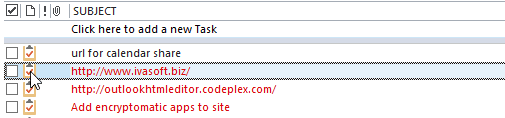
When you are working with an Outlook item that is open and has focus, it uses the ActiveInspector method. The code you need to work with Inspectors is.
Set objItem = objApp.ActiveInspector.CurrentItem
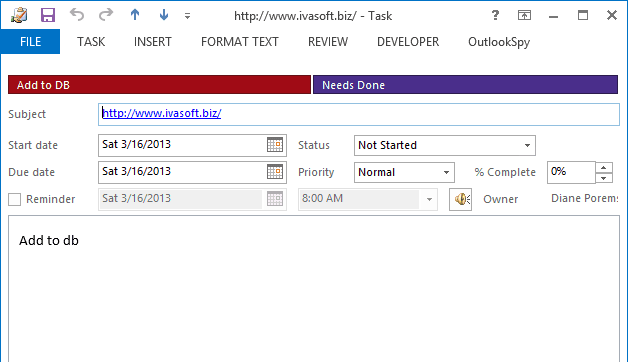
To help remember which is which, think of the main Outlook window as Windows Explorer. When you work with items in this window, you'll use Explorer.
Use macros with both opened and selected items
When you want to use the macro with both open or selected items, you'll use this function to determine if the item is open or selected. You'll call the function in your code in this manner:
Set objItem = GetCurrentItem()
You'll need to put one copy of this function in a module and can use the function in many macros.
Function GetCurrentItem() As Object
    Dim objApp As Outlook.Application

    Set objApp = Application
    On Error Resume Next
    Select Case TypeName(objApp.ActiveWindow)
        Case "Explorer"
            Set GetCurrentItem = objApp.ActiveExplorer.Selection.Item(1)
        Case "Inspector"
            Set GetCurrentItem = objApp.ActiveInspector.CurrentItem
    End Select

    Set objApp = Nothing
End Function
These articles are applicable to all versions of Outlook:
More Information
Application.ActiveInspector Method
Application.ActiveExplorer Method

Dennis Foreman says
Thanks for the great explanation and code examples. I have your GetCurrentItem function running but using ".Parent" on it only gives me the name "inbox", But I need the object (and name) of the Mailbox this item is in (or the Mailbox currently being processed), because my Outlook .OST file has about a dozen mailboxes from which it gathers mail. Do you have any examples or hints on how to get that name WITHOUT LOOPING, because I need to use it for each mail item being processed (I get 100's/day) and will use this as an Outlook Rule to move the item to a folder in the current mailbox.
Gedhe ND says
Hi Diane,
can you give an example script for minimize all opened items (appointments) at once?
I want to create custom button in outlook ribbon so when I hit it can minimize all the opened appointment window.
Thank you
Philippe Gonin says
Bonjour,
Super fonction et mille mercis
Comment modifier cette fonction pour travailler sur un mail en cours d'édition ?
Je vous remercie
Meilleures salutations
Philippe
https://www.developpez.net/forums/d2121684/logiciels/microsoft-office/outlook/suivi-d-message-outlook/#post11788404
Philippe Gonin says
Bonjour,
Comment récupérer le nom du dossier sélectionné dans un mail en cours d'édition ?
Voir image
Je vous remercie
Meilleures salutations
Philippe
Diane Poremsky says
You need to use getinspector. Depending on what you want to do, you might need to use word object model and inspector.
This has a sample - it formats text, but you can use the same method to insert text or the clipboard contents..
Use Word Macro to Apply Formatting to Email (slipstick.com)
Yohann says
Hello Diane,
is there any way to know, in Inspector case, whether the email has been opened from the hard disk or from Outlook?
Thank you.
Yohann
Diane Poremsky says
No, not to my knowledge. You can get the parent - it will always be inbox for messages opened from the file system - but that may not be all that helpful if you are running it on items in the inbox too. .
Yohann says
Thank you for the reply.
Totally... there is no differentiation. It appears as it was in the inbox.
I wanted to know that because I propose to user to delete the email from the mailbox once he has exported it in msg format (it is an saving tool); the tool can also be used for an email opened from the file system (for example to make a copy in another folder), but in that latter case, if the user chooses to delete the email source in the mailbox, it generates an error as the email does not come from the mailbox but from the file system.
I get around the problem in resuming the deletion in case of error. It is better than nothing.
Philip GILMAN says
Hi Diane,
Thanks for all your help in the past!
Using this GetCurrentItem code has been great for me except for one thing I can't figure out.
If in Explorer, a conversation is selected by the header row of that conversation, this function fails to find the item (or any item) within the conversation. I tried something like:
Set GetCurrentItem = objApp.ActiveExplorer.Selection.GetSelection(olConversationHeaders).GetConversation.Item(1)
but haven't gotten too far. Can you help?
Thx,
Roland B says
I've used this to validate attachment sent outside of my organization. The problem I have with using Set GetCurrentItem = objApp.ActiveExplorer.Selection.Item(1) is if I forward an email with attachments, then delete one or all of those attachments, the script still thinks the attachments are there.
Is there a workaround for that?
Jeremy Gura says
Diane,
I know this is an OLD issue, but I still use the Journal and want to get this to work inside Outlook. I am a neophyte in VBA, but I managed to add Modules for CreateJournalForcontact and I also have a Module for GetCurrentItem as per your instructions, but I continue to get the "Sorry you need to select a contact" error. Can you help me figure out what I may have done wrong???
Kim A says
For me to get this to work I had to remove objApp. I.e. I changed this:
Set objItem = objApp.ActiveExplorer.Selection.Item(1)
to this:
Set objItem = ActiveExplorer.Selection.Item(1)
Otherwise I got some error, I believe run-time error 424 Object required
K Arun Kumar says
Hi Diane.
I have a requirement of Reading subject line of a mail in my Microsoft outlook inbox from excel. Once i receive a mail of the desired subject line, it has to trigger my database query through excel.
I need a help on reading a mail from outlook inbox and triggering my Microsoft excel macro for running database query.
Thanks.
Diane Poremsky says
I think what you want to do is watch the folder in outlook then send it to Excel - outlook can run the query or it may be able to trigger a macro in Excel. The macro at https://www.slipstick.com/developer/vba-copy-outlook-email-excel-workbook/ shows how to interact with excel from outlook.
David Jones says
Thanks for this. I've had to use it to get round a stupid "design" feature in Outlook 2016 where doing a save all attachments doesn't now prompt you to overwrite existing files. This results in multiple versions of downloaded files. Using your code I've created a macro that appears on the ribbon and our users can then click it and it will download the attachments and overwrite any with the same name. Not always what people might want but exactly what this particular application needed. Many thanks.
Jon Read says
Hi Diane.
I don't have access to Outlook VBA due to onsite security, but I do to Excel VBA. What changes would I need to make to enable this to run from Excel. PS. It would be handy if it could cycle through all items in the calendar writing the recipients to a spreadsheet.
Thanks
Diane Poremsky says
Really? One is as safe as the other. :) You basically just need to fix the references to read outlook from excel. The macro at https://www.slipstick.com/developer/code-samples/macro-export-outlook-fields-excel/ has an excel version (linked to a text file) - while it can easily be tweaked to work on any folder. If you don't need recurring events, that should actually work.
I'll take a look at it tonight - it shouldn't be too much effort to convert it. (Will add the macro to https://www.slipstick.com/developer/list-meeting-attendees-responses/ when it's updated).
Jake says
Hi Diane,
The .ActiveExplorer.Selection.Item(1) doesn't work when using it together with Outlook send button. I'm trying to add something on the body after clicking the send button. What it does is send the email then change the currently selected item's body.
Regards,
Jake
Diane Poremsky says
For that, you need to use an itemsend macro. There is an example here that adds attachment names to the body:
https://www.slipstick.com/developer/code-samples/add-attachments-names-to-message-before-sending/
Lackel Hung says
I am beginner on Outlook VBA. I'm trying write a VBA on Outlook calendar. the requirement is when user click one of selected shared calendar, all others are deselected and change view to List mode. But I struggle on how to handle this steps. Please help for assist!
Diane Poremsky says
The macro at https://www.slipstick.com/developer/code-samples/select-multiple-calendars-outlook/ shows how to enabled/disable calendars - the second does it when you select the calendar module. I'm not sure if you can do it when a calendar is selected, it would need to use an on change event and I'm not sure the module supports that.
Albert says
I am new with VBA in Outlook (I am using Outlook 365). I want a piece of vba to insert a message line in an already open email. the email comes via Word and has a file attached. I want to use a button to insert the subject and message.
I put "Set objItem = objApp.ActiveInspector.CurrentItem" as first line, but when I run the vba I just get an error. where can I find some examples, please, of vba to insert subject, message, etc
Diane Poremsky says
you want to add the subject to the email message or to the file attachment (which i assume is a word document)?
Albert says
yes, the attachment is a word document, I make the word document and then want to email it to someone, in word I use the "email" button in the tool bar... then I have a new email in outlook created automatically with the document word file attached. I have managed to work out how to insert the subject and email message when creating a new email message, but of course that won't work with an email message that is already open. I understand that I have to use the ActiveInspector command, but I just can't get it to work ... hence I would be very grateful if I could find some examples of how to add subject, email message, etc to a new email that is already open. with many thanks ... Albert
Diane Poremsky says
this would work with the active outlook item:
Set objmail = application.ActiveInspector.CurrentItem
with objmail
.subject = "my subject"
.body = "this is my message"
end with
Albert says
Great, thanks.
R.Albert Ottaway says
my previous reply has been deleted? where can I buy a copy of your beginners book for VBA in Outlook
thanks ... Albert
Diane Poremsky says
Not deleted, just not approved yet. I keep everything that needs an answer in the moderation queue until i have time to answer. This makes it easier to find the comments that need an answer.
I'm assuming you are looking for one of Sue Mosher's books? Her most recent outlook programming book is for outlook 2007 - although out-of-date in some ways, the basics of vba haven't changed much. It won't touch on some features new to outlook though.
https://www.amazon.com/Sue-Mosher/e/B001H6GL4K/ref=dp_byline_cont_book_1 - used book prices aren't too bad, the kindle prices are out of sight.
Albert says
In your header to the page you say that you are the author of several books, one of them is Outlook 2013 Absolute Beginners Book. I thought that perhaps that would help me learn about using VBA in Outlook (although I am using Outlook 365, I think Outlook is v15). what do you recommend, please?
Diane Poremsky says
I touch a little on VBA in the book, but not much (it's targeted to new outlook users) - at this point, you'd learn more from my web site. A book specific about programing would be better. Most of the "modern" books on VBA cover all office apps. I have not looked at any of them, but they would give you a grounding in VBA in general. There is a lot of VBA knowledge that is transferable between the applications, but Outlook adds a layer of complexity with the main outlook window and each item type and the reading / open / compose message options.
Nick from London says
Thanks I was struggling with this.
I wanted two similar macros one operating on selections from the Inbox list and the other on an open mail item. Had no idea how to do the latter.
Foosy says
Set GetCurrentItem = objApp.ActiveExplorer.Selection.Item(1)
will fail if the selection is a header. So for example if the selection is on a header "Today" of a collapsed groupo containing all of Today's messages then Selection.Count returns zero.
How do we obtain all the messages in that collapsed group?
Diane Poremsky says
Correct, you need to select a single item in a group (or a single item, which is a group too). At this time, i don't think you can select them using a single command. You'd need to check the date (or another value) and loop through all.
Rob says
I am very inexperienced in programming. Do we need to do garbage collection for GetCurrentItem in the calling function? If so, how?
Diane Poremsky says
No. it picks up the open item and clears when you close the item. At most, you can use Set objItem = Nothing at the end of the macro.
Jun Wei Ng says
Hi Diane,
I am implementing something but keep fails.
I have an outlook email which located in my desktop.
Inside that outlook email contains attachment.
I want to get the attachment.
I'm using the way you posted which is "objApp.ActiveExplorer.Selection.Item(1)".
But the email is not the email located in my desktop but instead it is an email in my outlook.
So how am I going to get the email in my desktop instead get the email in my outlook?
Please help.
Best Regards,
Jun Wei
Diane Poremsky says
Because its not stored inside outlook, you need to open it then you can use objApp.ActiveInspector.CurrentItem
Manish says
Hi Diane,
Is there anyway I can open the email address properties window pop and capture it?
Steps :-
Enter the email ID or name in the "Find a contact" window.
Email Address window popup, capture it and paste in the word document.
Thanks in Advance
Regards,
Diane Poremsky says
in that window, no, not to my knowledge, but you can do a look up in the contacts folder to grab the address or other details.
Set oNS = Application.GetNamespace("MAPI")
Set folContacts = oNS.GetDefaultFolder(olFolderContacts)
Set colItems = folContacts.Items
Set oContact = colItems.Find("[fullname] = '" & strFullname & "'")
If Not oContact Is Nothing Then
strAddress = oContact.email1address
End If
Jim says
Hi,
I am trying to find some sample VBA code to use in Outlook 2016.
I would like the code to be able to send an email when an email arrives from particular senders.
Previous code worked in previous version of Outlook but the Inbox configuration seems different in Outlook 2016.
Thanks Jim
Diane Poremsky says
The same code should work in Outlook 2016 with minimal editing. Were you using a run a script rule or ItemAdd macro previously?
Brian says
Hi, I have this code and I want it to run on my selected item using your function. How do I incorporated the function into my code.
Sub Inkind(myItem As Outlook.mailItem)
Dim myNameSpace As NameSpace
Dim myFolder As Folder
Dim myAttachment As Outlook.Attachment
Dim xlApp As Object
Dim xlWB As Object
Dim xlWB2 As Object
Dim xlWB3 As Object
Const File_Path As String = "x"
Set myNameSpace = Application.GetNamespace("MAPI")
Set myFolder = myNameSpace.GetDefaultFolder(olFolderInbox)
On Error Resume Next
Set xlApp = GetObject(, "New Excel.Application")
If xlApp Is Nothing Then Set xlApp = CreateObject("Excel.Application")
On Error GoTo 0
xlApp.Visible = True
For Each myAttachment In objApp.Attachments
myAttachment.SaveAsFile File_Path & myAttachment.FileName
Set xlWB3 = xlApp.Workbooks.Open("x")
Set xlWB = xlApp.Workbooks.Open(File_Path & myAttachment.FileName, UpdateLinks = True)
xlApp.Run xlWB3.Name & "x"
xlApp.Run xlWB3.Name & "x"
Next myAttachment
End Sub
Thank you
Diane Poremsky says
Sorry I missed this earlier. At the top, change the name line to this:
Sub Inkind()
Dim objItem As Outlook.mailItem
Replace
Set myNameSpace = Application.GetNamespace("MAPI")
Set myFolder = myNameSpace.GetDefaultFolder(olFolderInbox)
with
Set objItem = GetCurrentItem()
Amrit Gautam says
Hi Diane, Thank you so much for the post. It helped me a lot. One small question, How do I get the recipients of the selected appointment.??? Please review the code I wrote below so you can better assist.
Sub testCode()
Dim objItem As Object
Dim objApp As Outlook.Application
Set objApp = Application
Set xlApp = CreateObject("Excel.Application")
xlApp.Application.Visible = True
xlApp.workbooks.Open "C:\data.xlsm"
For i = 1 To 49
Set objItem = objApp.ActiveExplorer.Selection.Item(i)
xlApp.Range("A" & i & "").Value = objItem.Subject
xlApp.Range("B" & i & "").Value = objItem.To //This line doesnot work on appointments but works for E-mails
Next i
End Sub
Once again Thank you so much.
Diane Poremsky says
you need to get the recipients collection.
For Each Recipient In objItem.Recipients
strRecip = Recipient.Address & ";" & strRecip
Next Recipient
Ashley Steenson says
Hi Again thanks for this article. i am trying to get my Macro to run when a new item is selected is there an event which could run a process each time a new item is selected(previewed). Thanks
Diane Poremsky says
That would be selection change events. https://msdn.microsoft.com/en-us/library/office/ff869813.aspx
Ashley Steenson says
Hi
i have a method written to do a task when the user selects a mail item then edits the text. currently the process works when the item is selected then the macro is run manually. How can this run from the current outlook session. i can see lots of examples for when an item is opened rather than simply selected and previewed. can you help?
Diane Poremsky says
You can use the itemchange event - https://www.slipstick.com/developer/code-samples/create-task-message-flagged/
If they are changing text, aren't they opening it?
Depending on exactly what you are doing, the function to work with open or selected items might work - https://www.slipstick.com/developer/outlook-vba-work-with-open-item-or-select-item/
Iqbal says
I am trying to detect when new compose email is opened and when the email in Active window is opened.
The ActiveExplorer.Selection.Item(1) will work if my active position is the email in the active explorer however when it is on the date group i.e. Today, yesterday etc it gives error. I am working on myItem open event to check when a new email is composed or when an email is opened from active explorer.
I tried the above function to identify the current item but it gives Nothing as output. Please let me know how do I go about doing this.
Thanks
Diane Poremsky says
when you are on the group headers, you have all of the messages in the group selected - but that shouldn't cause the error as (1) tells it to grab the first one. one new messages, you would use newinspector.
rashid says
Hi,
i need to have pst name for this statement
Set GetCurrentItem = objApp.ActiveExplorer.Selection.Item(1)
Diane Poremsky says
I'm not sure what you are trying to do with that code. GetCurrentItem allows you to use a macro with the open or selected item. If you need to access a pst that is not set as default, see https://www.slipstick.com/developer/working-vba-nondefault-outlook-folders/
Vincent Mitchell says
Hi, I have a simple question, hopefully you have a simple answer. I need a macro to detect when a template is opened in outlook (from windows explorer I can double click an ".oft" file and it opens the template to a new outlook email. I need to detect the event and perform some steps after that which I have already written the vba code for. The detection of the event eludes me. Please help!!! :)
Diane Poremsky says
You'd probably want to use an inspector event and look for something specific that is in the template.
Yogesh says
Hi,
i need that function for the excel VBA, i wrote the below code but i am not able to write the code for importing selected mails or filtered by date like i want to import only yesterday mails from my inbox. i am using the below code :-
Option Explicit
Sub sample_macro()
'reference -> microsoft outlook
Dim oitem As Outlook.MailItem
Dim ol As Outlook.Application
Dim olns As Outlook.Namespace
Dim oinbox As Outlook.Folder
Dim j As Long
Dim olFolder As Outlook.MAPIFolder
Dim olObject As Object
Dim olMail As Outlook.MailItem
Dim oRow As Integer
Dim iRow As Integer
ThisWorkbook.Sheets(1).Range("a2:d" & ThisWorkbook.Sheets(1).Range("a1048576").End(xlUp).Row + 1).Clear 'clear existing data if any
Set ol = New Outlook.Application
Set olns = ol.GetNamespace("MAPI")
Set oinbox = olns.GetDefaultFolder(olFolderInbox) 'select the inbox
Set oinbox = oinbox.Folders("Ap") ' select if you want to choose any specific folder
oinbox.Items.Sort "[ReceivedTime]", True
j = 2
For Each oitem In oinbox.Items ' loop outlook emails
ThisWorkbook.Sheets(1).Range("a" & j).Value = oitem.SenderName
ThisWorkbook.Sheets(1).Range("b" & j).Value = oitem.Subject
ThisWorkbook.Sheets(1).Range("c" & j).Value = oitem.ReceivedTime
ThisWorkbook.Sheets(1).Range("d" & j).Value = oitem.LastModificationTime
ThisWorkbook.Sheets(1).Range("e" & j).Value = oitem.UnRead
ThisWorkbook.Sheets(1).Range("f" & j).Value = oitem.Categories
j = j + 1
Next
Set oinbox = Nothing
Set olns = Nothing
Set ol = Nothing
End Sub
DevArt says
Really this helped me a lot, thanks a ton :)
Bao Nguyen says
Excellent post. Thanks to this I make my script worked with correctly moving emails to sub-folders (opened vs selected).
Thank you and cheers,
Bao Nguyen
houtenteam says
Hello Diane,
I need to forward the entire email string (body + attachements).
Most important are the attachments though.....
What would be the easiest way to do a "Foward" ? (haven't bene able to figure this out)
Kind regards,
Marijke van der Maas
Diane Poremsky says
Just call .forward:
Set myForward = Item.Forward
The is a sample at the end of the article at https://www.slipstick.com/outlook/rules/run-script-rule-change-subject-message/ the forwards the selected message.
Marijke van der Maas says
Hello Diane,
I have a challenge I hope you can help me with.
I have a small VBA setup in Excel that creates a PDF document for me that I need to add to a selected email and then send out to specific distribution list.
The process we normally use is: open the email, copy some data over to Excel, create the PDF document with the Excel VBA, go back to the email, add the PDF attachment and send it out.
And on those last 2 steps is where I need help.
I have no problems creating a new email with the PDF document I just created, but the initial email that I received contains some documentation I need to forward along to the next group of people.
I was hoping I could somehow incorporate the ActiveExplorer or ActiveInspector, but so far no luck....
Is any of those 2 options useable in my situation, and how can they be applied?
Kind regards, Marijke
Diane Poremsky says
Could you use Forward instead? that would be easier than creating new and copying the content.
If not, how much content do you need to copy to the new email?
Sascha K. Mierbach says
Hi Diane,
good to find you at this post.
My problem, I have opened the GAL and would like to get that Object with the selected Name to copy that information into a db.
Can you help me with this one, please.
Thanks Sascha
Antoine Bapst says
Here's my code :
Private Sub Application_ItemLoad(ByVal Item As Object)
Set contactsFolder = Application.ActiveExplorer.CurrentFolder
Dim objApp As Outlook.Application
Set objApp = Application
'On Error Resume Next <= commented for debug
Select Case TypeName(objApp.ActiveWindow)
Case "Explorer"
Set GetCurrentItem = objApp.ActiveExplorer.Selection.Item(1)
doIt = True
Case "Inspector"
doIt = False
End Select
If GetCurrentItem.Class = olContact And contactsFolder = "Site d'équipe - FNAEM CONTACTS" And doIt = True Then
doIt = False
strForm = "IPM.Contact.FNAEM3103"
GetCurrentItem.MessageClass = _
strForm
GetCurrentItem.Save
'GetCurentItem.Display <= THERE is my main concern
Set objApp = Nothing
End If
End Sub
Antoine Bapst says
Thanks Diane !
I used an adapted program to get rid of an ennoying behavior with SharePoint (office365) and Outllok. When you assign a custom Message Class to a contact, it gets restored to default value ('IPM.Contact') as soon as the contacts are synced.
Starting from there, I've modified Outlook VBA "Application_ItemLoad" procedure, so that I can force change (temporary) the Message Class for a selected Item.
Now, I need to finetune this, to open the custom form with my contact informations with the good timing (Message class must be saved and not overwrite yet by SP).
I think I miss something, as I try to use the "Display" method, but this results in an error ("missing object"). In fact, the code bellow would override the double click to open a contact (yes, this is ugly), provided I can open the custom form populated with contact informations.
Any help greatly appreciated, I'm 24/365 on this project for weeks and I'm supposed to deliver on Tuesday (no hassle intended). [sample code in next message]