I need a macro that adds a specific text, plus the content of my clipboard, at the end of the subject of all messages I have selected. How do I get the content of the clipboard automatically, without first pasting it into an Input Box?
Although Outlook VBA doesn't include a paste from clipboard function directly, you can use the MSForms dataobject to transfer the clipboard contents to a string which is then called from VBA. You could also use use the Word object model to copy the message body to the clipboard.
You can also use Word's 'Keep Source Formatting' to paste formatted text into an Item Body. Code sample is at Paste formatted text using VBA
Add code similar to this to your macro:
 Dim DataObj As MSForms.DataObject
 Set DataObj = New MSForms.DataObject
 DataObj.GetFromClipboard

strPaste = DataObj.GetText(1)
The finished code will look something like the following. Note, you will need to have a reference to the Forms library in Tools, References.
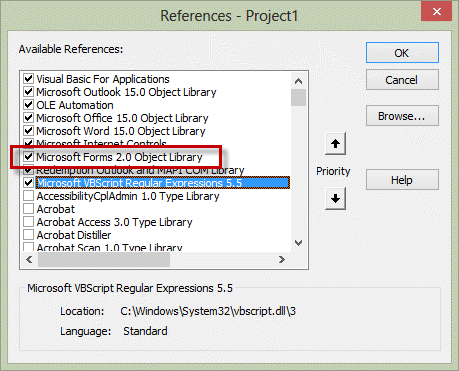
If you receive a "User-defined type not defined" you are missing the reference to Microsoft Forms 2.0 Object Library. If its not listed, add C:\Windows\System32\FM20.dll or C:\Windows\FM20.dll as a reference.
Sub AddtoSubject()
 Dim ex As Explorer
 Dim mail As MailItem
 Set ex = Application.ActiveExplorer
 Dim strPaste  As Variant

Dim DataObj As MSForms.DataObject
Set DataObj = New MSForms.DataObject
DataObj.GetFromClipboard

strPaste = DataObj.GetText(1)

If strPaste = False Then Exit Sub
If strPaste = "" Then Exit Sub

 For Each mail In ex.Selection
    mail.Subject = mail.Subject & " my text " & strPaste
    mail.Save
 Next mail

Set DataObj  = Nothing
End Sub
Copy to Clipboard
What about going in the other direction: copying text to the clipboard? Use PutInClipboard to capture the text.
Remember, if you receive a "User-defined type not defined" you are missing the reference to Microsoft Forms 2.0 Object Library. If its not listed, add C:\Windows\System32\FM20.dll or C:\Windows\FM20.dll as a reference.
Sub CapturetoClipbaord()
Dim oMail As MailItem
DataObj As MSForms.DataObject

    Set oMail = ActiveExplorer().Selection.Item(1)
    Set DataObj = New MSForms.DataObject
    DataObj.SetText oMail.Body
    DataObj.PutInClipboard
End Sub
Use Word Object Model to Copy (and Paste)
Current versions of Outlook use Word as the email as the email editor and can use the Word object model library to do things not normally supported in Outlook.
This sample copies the body of the selected message to the clipboard. To paste, use
objSel.PasteAndFormat (wdFormatOriginalFormatting)
Don't forget to set a reference to Word's Object model in Tools, References.
Sub CopyMessage()
    Dim objMail As Outlook.MailItem
    Dim objInsp As Inspector
    Dim objDoc As Word.Document
    Dim objSel As Word.Selection

Set objMail = Application.ActiveExplorer.Selection.Item(1)

  If Not objMail Is Nothing Then
        If objMail.Class = olMail Then

            Set objInsp = objMail.GetInspector
            If objInsp.EditorType = olEditorWord Then
                Set objDoc = objInsp.WordEditor
                Set objWord = objDoc.Application
                Set objSel = objWord.Selection
        With objSel
            .WholeStory
            .Copy
       End With
            End If
        End If
    End If

    Set objMail = Nothing
End Sub
This sample shows how to paste the copied content into a new message:
    Dim objMail As Outlook.MailItem
    Dim objInsp As Inspector
    Dim objDoc As Word.Document
    Dim objSel As Word.Selection

Set objMail = Application.CreateItem(olMailItem)
With objMail
  .To = "Alias@domain.com"
  .Subject = "This is the subject"
  .Display
End With

Set objInsp = objMail.GetInspector
If objInsp.EditorType = olEditorWord Then
    Set objDoc = objInsp.WordEditor
    Set objWord = objDoc.Application
    Set objSel = objWord.Selection

objSel.PasteAndFormat (wdFormatOriginalFormatting)
End If

Set objMail = Nothing
End Sub
Paste format types are below. For more information see WdRecoveryType Enumeration (Word).
| Name | Description |
|---|---|
| wdChart | Pastes a Microsoft Office Excel chart as an embedded OLE object. |
| wdChartLinked | Pastes an Excel chart and links it to the original Excel spreadsheet. |
| wdChartPicture | Pastes an Excel chart as a picture. |
| wdFormatOriginalFormatting | Preserves original formatting of the pasted material. |
| wdFormatPlainText | Pastes as plain, unformatted text. |
| wdFormatSurroundingFormattingWithEmphasis | Matches the formatting of the pasted text to the formatting of surrounding text. |
| wdListCombineWithExistingList | Merges a pasted list with neighboring lists. |
| wdListContinueNumbering | Continues numbering of a pasted list from the list in the document. |
| wdListDontMerge | Not supported. |
| wdListRestartNumbering | Restarts numbering of a pasted list. |
| wdPasteDefault | Not supported. |
| wdSingleCellTable | Pastes a single cell table as a separate table. |
| wdSingleCellText | Pastes a single cell as text. |
| wdTableAppendTable | Merges pasted cells into an existing table by inserting the pasted rows between the selected rows. |
| wdTableInsertAsRows | Inserts a pasted table as rows between two rows in the target table. |
| wdTableOriginalFormatting | Pastes an appended table without merging table styles. |
| wdTableOverwriteCells | Pastes table cells and overwrites existing table cells. |
| wdUseDestinationStylesRecovery | Uses the styles that are in use in the destination document. |

Hi. Thanks a lot for this useful tip. I however can't fidn the reference to Microsoft Form, nor the FM20.dll library.
I bought the Microsoft Office in September 2019. Is there a new name for this library ?
Many thanks in advance
You need to click Browse and paste the path in. C:\Windows\System32\FM20.dll
Hi Diane,
Is there a way to paste a picture from clipboard directly using VBA?
Thanks.
No, not in Outlook. You need to use the word object. (Could probably use Excel's object model too.)
How can you save clipboard content to a folder in Word without using userform even if it is using the windows api
As far as I know, you need to use the msforms data object -
Thank you for the info
This is so helpful. Thanks Admin and all the member of this page.
How can "Sub CopyMessage" be modified to copy text up to the first "From" in an email (copy text from the most recent email reply)?
You'd need to find it the select everything above it -
With objSel
.Find.ClearFormatting
With objSel.Find
.Text = "From: "
.Replacement.Text = ""
.Forward = True
.MatchCase = False
.MatchWholeWord = False
.MatchWildcards = False
.Execute
End With
.MoveUp Unit:=wdLine, Count:=1
.HomeKey Unit:=wdLine, Extend:=wdExtend
.MoveUp Unit:=wdScreen, Count:=1, Extend:=wdExtend
' .WholeStory
.Copy
End With
I'm sorry, I'm having trouble implementing this new code into the older code. I appreciate the fast reply and help!
I would need to see the code to help.
Unfortunately the above code does not locate the text "From"... the Sub still copies the entire email body. Any suggestion?
correct, it only copies the body. you need to use oMail.sendername or oMail.senderaddress to get the frm information.
I got it to work! Thank you for your help!!
Hello Diane, I'm have a need to pass the value of a highlighted text within an email body directly to a URL. so basically, I would double-click (select) on a specfic key word, click some button on my ribbon and have that run a macro to take the selected key word and insert it into a pre-defined URL. I already have the URL code working. I'm stuck trying to get the selected keyword (in the email message body) copied and passed in my code. I'm not trying to copy the entire message body. Any ideas? Thank you!
Try using just .copy, removing .wholestory.
With objSel
.Copy
End With
Hi Diane,
I'm trying to paste a collection of Excel cells I've copied into the clipboard into an Outlook email's .body. I'm trying to paste using destination styles so as to preserve the table grid of the cells I'm copying from my spreadsheet. While I can dump the contents unformatted easily from the clipboard, I can't seem to get anything to work using the Word references for using destination styles. I've tried playing around with the code in this post but no joy. Any help would be greatly appreciated.
You definitely need to use the word code https://www.slipstick.com/developer/code-samples/paste-clipboard-contents-vba/#word
do you get any error messages?
This should work to paste -
If objInsp.EditorType = olEditorWord Then
Set objDoc = objInsp.WordEditor
Set objWord = objDoc.Application
Set objSel = objWord.Selection
objSel.PasteAndFormat (wdUseDestinationStylesRecovery)
End If
Valid Format types are here: https://msdn.microsoft.com/en-us/library/office/ff844915.aspx