Getting text out of a message body isn't as hard as it sounds, provided there is something in the body to search on. For example, if you are looking for a tracking code in an email and it's always identified as "Tracking code:" you can use InStr, Len, Left or Right functions to find and extract the tracking code.
Or you can use Regular Expressions.
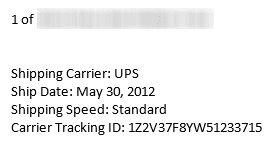
For example, to extract the UPS tracking numbers for packages sent by Amazon.com and formatted as shown in the screenshot, I need to look for the words "Carrier Tracking ID", followed by possible white space and a colon (:).
.Pattern = "(Carrier Tracking ID\s*[:]+\s*(\w*)\s*)"
This returns the next alphanumeric string, or in my example, 1Z2V37F8YW51233715. (There are two tracking numbers in the email message and both are returned.)
Use \s* to match an unknown number of white spaces (spaces, tabs, line feeds, etc)
Use \d* to match only digits
Use \w* to match alphanumeric characters, such as are used in UPS tracking codes.
To use this code sample, open the VBA Editor using Alt+F11. Right-click on Project1 and choose Insert > Module. Paste the following code into the module.
You'll need to set a reference to the Microsoft VBScript Regular Expressions 5.5 library in Tools, References.
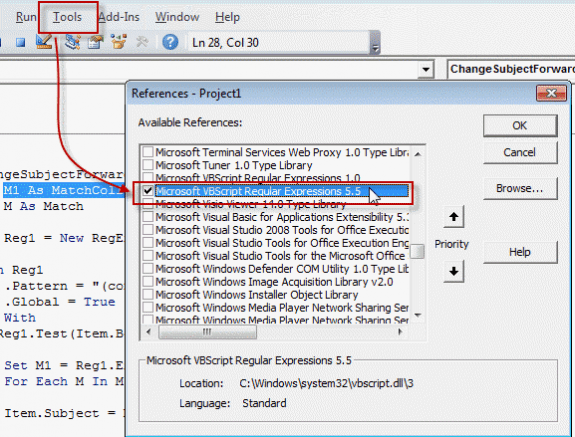
Note: if VBScript Expressions 1 is selected, deselect it. You can't use both v1 and v5.5.
Don't forget, macro security needs to be set to low during testing.
Sample macros using regex are at the following links. Use Copy to Excel code sample to copy a row of text to a row of cells in Excel and Select a name in a Word document then create a Contact to create a contact from a resume or similar file.
Sub GetValueUsingRegEx()
 ' Set reference to VB Script library
 ' Microsoft VBScript Regular Expressions 5.5

    Dim olMail As Outlook.MailItem
    Dim Reg1 As RegExp
    Dim M1 As MatchCollection
    Dim M As Match

    Set olMail = Application.ActiveExplorer().Selection(1)
   ' Debug.Print olMail.Body

    Set Reg1 = New RegExp

    ' \s* = invisible spaces
    ' \d* = match digits
    ' \w* = match alphanumeric

    With Reg1
        .Pattern = "Carrier Tracking ID\s*[:]+\s*(\w*)\s*"
        .Global = True
    End With
    If Reg1.test(olMail.Body) Then

        Set M1 = Reg1.Execute(olMail.Body)
        For Each M In M1
            ' M.SubMatches(1) is the (\w*) in the pattern
            ' use M.SubMatches(2) for the second one if you have two (\w*)
            Debug.Print M.SubMatches(1)

        Next
    End If

End Sub
If we look for just the colon (.Pattern ="([:]+\s*(\w*)\s*)" ), we get just the first word in the results:
UPS
May
Standard
1Z2V37F8YW51233715
Diane
This is because (\w*) tells the code to get the next alphanumeric string, not the entire line, and strings do not include spaces.
Get two (or more) values from a message
If you need to use 2 or more patterns, you can repeat the With Reg1 through End if for each pattern or you can use Case statements.
This sample code looks for 3 patterns, creates a string and adds it to the subject field of a message.
Each case represents a different pattern. In this sample, we want just the first occurrence of each pattern; .Global = False instructs the code to stop when it finds the first match.
The data we are looking for is formatted like this:
Order ID : VBNSA-123456
Order Date: 09 AUG 2013
Total $54.65
\n at the end of the pattern matches a line break, and strSubject = Replace(strSubject, Chr(13), "") cleans any line breaks from the string.
Sub GetValueUsingRegEx()
    Dim olMail As Outlook.MailItem
    Dim Reg1 As RegExp
    Dim M1 As MatchCollection
    Dim M As Match
    Dim strSubject As String
    Dim testSubject As String

    Set olMail = Application.ActiveExplorer().Selection(1)

    Set Reg1 = New RegExp

For i = 1 To 3

With Reg1
    Select Case i
    Case 1
        .Pattern = "(Order ID\s[:]([\w-\s]*)\s*)\n"
        .Global = False

    Case 2
       .Pattern = "(Date[:]([\w-\s]*)\s*)\n"
       .Global = False

    Case 3
        .Pattern = "(([\d]*\.[\d]*))\s*\n"
        .Global = False
    End Select

End With


    If Reg1.test(olMail.Body) Then

        Set M1 = Reg1.Execute(olMail.Body)
        For Each M In M1
            Debug.Print M.SubMatches(1)
            strSubject = M.SubMatches(1)

         strSubject = Replace(strSubject, Chr(13), "")
         testSubject = testSubject & "; " & Trim(strSubject)
         Debug.Print i & testSubject

         Next
    End If

Next i

Debug.Print olMail.Subject & testSubject
olMail.Subject = olMail.Subject & testSubject
olMail.Save

Set Reg1 = Nothing

End Sub
Use a RegEx Function
This function allows you to use the regex in more than one macro.
If you need to use more than one pattern with the function, set the pattern in the macro regPattern = "([0-9]{4})" and use this in the function: regEx.Pattern = regPattern. Don't forget to add Dim regPattern As String at the top of the module.
Function ExtractText(Str As String) ' As String
 Dim regEx As New RegExp
 Dim NumMatches As MatchCollection
 Dim M As Match

'this pattern looks for 4 digits in the subject
 regEx.Pattern = "([0-9]{4})"

' use this if you need to use different patterns.
' regEx.Pattern = regPattern

 Set NumMatches = regEx.Execute(Str)
 If NumMatches.Count = 0 Then
      ExtractText = ""
 Else
 Set M = NumMatches(0)
     ExtractText = M.SubMatches(0)
 End If
 code = ExtractText
 End Function
This simple macro shows how to use the Regex Function. If the subject matches the regex pattern (in function example, a 4-digit number), a reply is created; if it does not contain a 4 digit number, a message box comes up. To use the function with different macros, uncomment the lines containing regPattern.
Dim code As String
'Dim regPattern As String

Sub RegexTest()

Dim Item As MailItem
Set Item = Application.ActiveExplorer.Selection.Item(1)

' use this to pass a pattern to the function
'regPattern = "([0-9]{4})"

ExtractText (Item.Subject)

If Not code = "" Then
Set myReply = Item.Reply
myReply.Display

Else
MsgBox "The subject does not contain a 4 digit number"
End If

End Sub
More Information
Introduction to Regular Expressions (Scripting)
Regular Expressions Quick Start

Hi Diane, I have some code that formats .Subject lines, and I have been asked to add a check that if there's a date in the subject line, remove it and prefix the .Subject line with .ReceivedTime. before passing it on to the next If statement.
GetValueUsingRegEx() using your Date Pattern is working however due to my lack of knowledge I'm not sure how to remove the date.
Any assistance is greatly appreciated.
Damian
Hi Diane,
Hope you are doing well and keeping safe.
I need your help with below situation.
I am looking for a macro that can find Matching Keywords from an excel cell within a Saved Outlook email in a windows folder and Copy such matching emails to different folder.
For example, I have 3 texts in excel in Column A.
Tom
Dick
Harry
And I got 300 outlook emails saved in a windows folder. I would like a VBA macro that would search for these 3 texts within these 300 emails and if found a match, copy such matching emails to a different windows folder for my further review.
Not sure if you can assist.
I use an application called email templates (emailtemplates.com) that installs on Outlook 2000. It uses RegEx to parse a highlighted email, rewrite parts of it to a new email, that is ready to send. When I upgraded to Outlook 2003, my templates broke since 2003 changed the CSS engine from IE to Word.
The problem I am having is that the company website is dormant and they seem to have gone out of business, but I will be forced to upgrade to a later Outlook as 2000 will not run on later windows. I upgraded to windows 10 and Outlook 2010. The templates install without error, but they do not appear on the Ribbon.
Do you know if there is a way to install an Outlook 2000 application on Outlook 2010? any suggestions?
I purchased a couple of your books and hope that they may help solve my issue. Expect them at month end.
Hi Diane, Thanks for all your commendable work with respect to VBscript.
I have been searching for a solution since the past two weeks for one of my critical projects. We have configured emails to be triggered for multiple instances and we receive approximately 1000 emails alerts a day stating the configured URLs are down. Most of them are false positives and it has become a tedious job for me to check all the urls manually. I am a novice in writing macros, but I have tried multiple ways for my problem and no luck.
I need a macro that will open the first url from all the selected emails in an excel and then checks for the http status of the same and return the status in the excel. I was able to find few solutions to check the http status automatically, but getting all the first urls from a set of emails is the toughest part where I have been stuck since the past 2 weeks. Could you please let me know if this can be ever achieved through a macro. If yes, how?
Thanks in advance.
Hi Diane,
My data in body is like -
Survey ID
123456
Ticket No
1234
Entered
08-Feb-19 03:45 PM
How to extract this data in excel so that under survey Id, ticket no, entered column I get respective data.
Are the values under the labels or to the right of the label? If they are on the line above, this format should work:
.Pattern = "Survey ID\s*\r(\d*)\s*"
if \r doesn't work, try \n.
Hi ,
I would like to extract the E-mail Content ( Subject and Message) as input & pass this to some other variable through VB script , Do you have any sample code for this ?
Deeps
sorry I missed this earlier. There are several macros here that do basically this - you need to use something like
strSubject = objectname.subject
strBody = objectname.body
then pass those two strings along.
Just to add : My aim is to create a rule which will run the script on arrival of a new email
and extract a text (ticket number) from the email body and pass it to a batch script/js script for further action.
I simple question.
how can i pass the variable to a batch script or command line.
MsgBox var - prints its value
but when i try to send it to batch script the value is not transferred but the variable name
eg
shell.Run "C:UsersjsDesktopcreateIndexcreateindex.bat var"
is the shell run line in the same macro where msgbox var is? if not, you need to dim var outside of the macro so its global.
Try this - you may be able to drop the strArgument lines and use var in the shell command.
Dim strBat As String
Dim strArgument As String
strBat = "C:\Users\jsDesktop\createIndex\createindex.bat"
strArgument = "/" & var
Call Shell("""" & strBat & """ """ & strArgument & """", vbNormalFocus)
Hi Diane,
I am using this for extracting a ticket number from the email body. For this I have created a rule which runs the script on arrival of a new email. But
Set olMail = Application.ActiveExplorer().Selection(1)
this line often shows the body of old email and not the current one. (I have added MsgBox to display the email body) Am i missing out something. I am new to this and any guidance would be very helpful to me.
Apart from setting the reference to Microsoft VBScript Regular Expressions 5.5, do we need to do anything else as set up?
As my requirement is exactly same but somehow this is not working for me.
Please help.
if you are using run a script rules, you won't use Set olMail = Application.ActiveExplorer().Selection(1) to identify the message - the rule chooses the message that matches the condition and "item as outlook.mailitem" (item can be changed to olmail) passes it to the script.
change the top part of the first macro to this to use it in a rule -
Sub GetValueUsingRegEx(olMail as outlook.mailitem)
' Set reference to VB Script library
' Microsoft VBScript Regular Expressions 5.5
Dim Reg1 As RegExp
Dim M1 As MatchCollection
Dim M As Match
' Debug.Print olMail.Body
Dear Diane,
I have tried the code you have posted to Get two (or more) values from a message and it fails on, Set olMail = Application.ActiveExplorer().Selection(1).
I get a run-time error 438:
Object doesn't support this property or method..
I am completely stuck Can you help?
Michael
Do you have an email message selected when you run the macro?
same 438 error for me as well