We're seeing complaints from users with 32-bit versions of Office 2010, plus Outlook 2007, and Outlook 2003 installed on Windows 10 that hyperlinks in email won't open after they've set Internet Explorer as the default browser.
For solutions to the "This operation has been cancelled due to restrictions in effect..." or "Your organization's policies are preventing..." messages, see "This operation has been cancelled due to restrictions". If you removed Internet Explorer as an Optional Feature, see Albert's discovery. (You'll need to reinstall IE.)
The user will see a dialog that asks what program you want to use to open the link. Clicking the Always use this app box does not save the changes - the next time you click a link, the dialog comes up again.
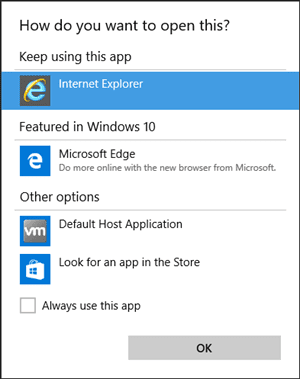
Some users will see the Locate Link Browser window, while one Outlook 2003 user reported that Internet Explorer opened to the site's home page.

Only Internet Explorer has a problem opening links, they work fine in Edge or Chrome, just not in Internet Explorer.
To fix it, add this value to the registry:
HKEY_CLASSES_ROOT\htmlfile\shell\opennew\command
Default value: "C:\Program Files\Internet Explorer\IEXPLORE.EXE" %1
The Default value above will open the link in a new browser window. If you want to use a new tab in an open browser, use cmd /c START "C:\Program Files\Internet Explorer\iexplore.exe" "%1" instead.
Links containing an & should open properly in new tabs using the command line above. The original CMD version offered by Microsoft did not work with & signs in the URL. The registry file was updated with the new command line.
You'll need to create both the opennew and command keys then add the url to the default value. (It's the same value found in the open\command key)

Do It For Me
If you don't want to edit the registry yourself, you can run this prepared .reg file:
opennew-win10 (opens New Window)
opennew-win10-cmd (opens New Tab)
To remove the OpenNew key (and Command subkey), use this reg file:
opennew-win10-remove.reg
Double click on the link to run it. If it opens as a text file in a new browser window, you'll need to right click on the link and choose 'Save target as' (or 'Save link as' in Chrome). You may need to change the file extension from txt to reg then double click to run it.

Michael L says
Iv figured out the issue with part of these instructions. first of all, YOU DO NOT NEED TO REINSTALL INTERNET EXPLORER. A lot of people and businesses are removing the depricated browser for security reasons and so should you and keep it off.
So, in keepin it simple, All you have to do (and in Windows 10, by default, Edge is going to be a 32 bit application unless you install the 64 bit version) is simply change that registry entry to Microsoft Edge's path instead of Internet Explorer, and it works. I imagine you can do this for Chrome as well.
Open Regedit, go to HKEY_CLASSES_ROOT\htmlfile\shell\opennew\command
and double click on Default, and change it to: "C:\Program Files (x86)\Microsoft\Edge\Application\msedge.exe" %1 for default MS Edge. Restart outlook, and that's it. You're done.
I hope this helps.
Michelle O. says
Hi
When I tried to open malto hyperlink in Outlook 2016 it keeps on asking "always use this app" selected Outlook and tick always use this app but after I logged off from VDI its not saving. We are using DEM to capture changes HKCU. I'm looking on registry key this might fall.
Hope to hear some answers. Thank you.
Jacque Zegel says
I have been using Chrome as my default browser for some time. Links opened using Chrome within Outlook 2007 until I upgraded to Windows 10. Now I get the restricted message. I was running Windows 7 Pro, so assume it upgraded to Win 10 Pro. Someone else wrote that other browsers work, but Chrome isn't working for me. Thoughts?
paul sakakeeny says
Diane, outlook worked fine until October 24, 2019—KB4522355 (OS Build 18362.449) was applied. Now I get the "restricted message" when opening a link. I'm an SE and tried every setting I could think of, even attempted to remove the update (which failed) also tried installing ie11 which fails (missing module). running 10 pro. Also having issues certain executables (addLEDs is one) where it executes but no video presents, and with VM box w10 trying to access an HP printer (can't find it).
Mark W says
My browser is Brave (Chromium based) not Explorer. I'm on Windows 10 Pro.
Recently, a hardware failure during a botched RAM upgrade corrupted my OS and I had to restore the last good image (where links worked inside Outlook 2003). But I'm finding that when I click on a link in Outlook, nothing happens at all. This worked at the time I backed up the image of my system on July 1. But the restored image doesn't work properly.
These keys are missing from the registry. But I don't want Explorer. I want Brave to open. Is there a way to default to Brave?
David Patterson says
After trying multiple fixes this one worked. Thank you so much.
Sam Moss says
I use Chrome and have it set as my default everything yet each time a restart is done I get the "How to you want to open" thing on my desktop after the initial log in without opening anything at all.
Graham Lyons says
Diane,
I suggest that a better title for this article would be "Outlook hyperlinks - prompts to specify browser every time"
Jesse says
To simplify all this, keep in mind that this is almost always a browser problem in that the Office app has to fire up a browser to follow the link and does not know which one. Essentially, that's it. Fooling around with browser default settings can clobber a line in the Registry. Go to Settings and set the default browser to IE. Try the ctrl-click on a link. If it works, reset the default browser to another browser and try again. This is the easiest check and should be done first before getting crazy with reloads, uninstalls, and Registry editing. If it doesn't work, go crazy!
Diane Poremsky says
It depends on the cause. For the scenario on this page, changing the browser to IE does not work. You need to use one of the registry fixes or use Edge.
Jake says
So this happened to a few computers on my network but i don't have the "opennew" folder in my registry. Any idea why or a work around?
Diane Poremsky says
If a registry key (folder) or value doesn't exist, create it. But... it seems odd that that key doesn't exist.
REZ says
I have tried manual change and sub-routine change and still receiving same message on all hyperlink opening attempts. I am running Windows 10 & IE10 although had been running Firefox (reinstallation is what I believe caused my problem originally) and Google Chrome. I have since uninstalled both just trying to get IE to work properly. Can Microsoft's pushing for the use of Edge be a possible culprit here?
Diane Poremsky says
Are you using Outlook 2010 and older? Only those Outlook versions are affected by this. Microsoft made a change to the OS that caused it - I'm not sure if the change gets blamed on Edge or not.
Are you getting this exact error? There are other things that cause problems too, those issues are listed at https://www.slipstick.com/problems/this-operation-has-been-cancelled-due-to-restrictions/
Mats says
I'm using Edge and it is not working?
Diane Poremsky says
do you receive any error messages?
Saturn5 says
Your fix is absolutely perfect!
In my case, M.Outlook 2003 SP3 with Windows 10 64bits.
Once again, thank you so much.
Richard says
Tool Doesn't work
Diane Poremsky says
Is your problem and error message the same as on this page?
Did you restart outlook after running the reg file?
Which version of outlook do you use?
MORIJAN says
I am unable to confirm subscription to you via the link in your email as since the latest Windows 10 update I can no longer open links. I've tried the Repair All Windows Live Programs procedure but after 100% it tells me there's no internet connection when there is. I'm stuck!
Diane Poremsky says
This is the Live Mail 2011 client that replaced Outlook Express?
MORIJAN says
I'm no geek so have no idea if it replaced Outlook Express. But I think so. My PC doctor, bless him, did something so now I can open the links. The 'advanced settings' in 'Accounts/Properties' had somehow got changed after the update. Why? However, emails don't open automatically any more but will open via the 'send/receive button' and clicking on 'default e-mail'. Had to update Adobe Reader as well as PDF files wouldn't open either. I just wish someone would give us ordinary folk who don't do games or watch videos or need complicated graphics software, etc., a simple OS that would: let us use old software that worked up to Windows XP - how I miss my Quicken 2000 Deluxe - need a separate computer just for that!; didn't screw up internet and e-mails; worked on a PC as old as 8 years.
MORIJAN says
After a massive Windows 10 update a couple of days ago, I can now no longer open links in emails in Windows Live Mail 2011. I followed the repair procedure, it uploaded 100% then said there was 'no internet connection' when there was. What next?
Diane Poremsky says
What is set as your default browser? What antivirus and firewall software are you using?
SKC says
After an update two days ago, I cannot open any hyperlinks in Outlook 2016 (Windows 10).
The problem is not limited to a certain browser. I have tried Edge, Chrome, and Firefox as default browsers. Hyperlinks do not work for any of them.
I read that this may occur following a Chrome uninstall. Chrome was not affected by the update, but Firefox was apparently uninstalled automatically. Re-installing did not help.
Error message is "Your organization's policies are preventing us from completing this action for you. Fore more info, please contact your helpdesk."
Diane Poremsky says
That error message definitely indicates a problem - https://www.slipstick.com/problems/this-operation-has-been-cancelled-due-to-restrictions/
Was firefox set as default before it was unistalled? If so, try setting it as default again.
SpJam says
Hi there!
If you tasted all default fixes, you can try my solution :)
To fix this issue in Any Browser just find registry key
HKEY_CLASSES_ROOT.html(Default)Key may have different value for Your Default Browser:
1. IE = htmlfile
2. Firefox = FirefoxHTML (my case)
3. Chrome = ChromeHTML
4........
Now, you must find the keys:
HKEY_CLASSES_ROOT[YourBrowserString]
HKEY_CURRENT_USERSOFTWAREClasses[YourBrowserString]
In my case, when default browser is Firefox, I didn't find string FirefoxHTML. But, I found similar:
1. FirefoxHTML-308046B0AF4A39CB
2. FirefoxURL-308046B0AF4A39CB
I suppose that is happend when I changed Firefox 32-bit to 64-bit.
So, I did some easy steps:
1. Export both ~308046B0AF4A39CB keys
2. Open stored files in any Text Editors and remove this text
-308046B0AF4A39CBanywhere3. Save files
4. Import .reg files
Voila! All is works.
PS: you can change value FirefoxHTML to FirefoxHTML-308046B0AF4A39CB in the registry key
HKEY_CLASSES_ROOT.html(Default)but, as I find, many keys in registry for other applications have the value is FirefoxHTML to start browser.
So, it is take too many time to change all keys, therefore more easy to fix this issue it is restore default keys for Firefox = HKEY_CLASSES_ROOTFirefoxHTML & HKEY_CLASSES_ROOTFirefoxURL.
Regards, SpJam
Mike Corlett says
Thank you! Excellent! A recent automatic Firefox upgrade did the same thing to me and I've been trying to get this to work for 3 days now with lots of bad guidance on the internet. This works, and now I better understand what's driving these browsers.
Sean Doyle says
Hi 10 days ago my Windows 10 was updated and Edge became the default browser. A search of Microsoft indicates Edge does not support Outlook derived hyperlinks and recommends install IE11. With the Win 10 update it appears to block an IE11 re-install even though installed. Took multiple goes to get windows-features to accept the tick. Checked registry entry and all good. Still could not get hyperlinks to work (went to default page)Found your page and ran the opennew-win10 and it worked. Thanks a heap dead hyper links is a serious pain
Diane Poremsky says
Outlook supports edge, but there is a issue with outlook 2010 and how windows 10 handles hyperlinks and default browsers. Edge works fine with outlook 2013 or 2016.
KFE says
If you have Windows 10 and Office 2010 (maybe 2007 and 2013) and you get
"Error Message: This Operation Has Been Cancelled Due to Restrictions in Effect on This Computer"
when you try to open a hyper link here is a easy solution.
As everyone has said its a default browser issue.
Open programs and features in control panel
Click "turn window features on or off" in the upper left
Scroll down and find Internet explore 11 and put a check mark in the box
Click OK and restart your computer when its complete
After the restart go into pc settings and click on default apps
Scroll down to web browser and choose Internet explore 11
Your hyper links will now open in IE11 which you probably don't want so
simply change it back to the browser of your choice and it should work.
You may remove IE11 at this point by going back and unchecking the IE11 box in windows features.
This error can happen if you run a repair on office 2010.
Diane Poremsky says
The error message changes in newer versions - "Your organization's policies are preventing us from completing this action for you. For more info, please contact your help desk"
https://www.slipstick.com/problems/this-operation-has-been-cancelled-due-to-restrictions/
techfan says
Thank you, thank you, thank you. This was driving me nuts! Your fix (reg script) worked. In my case, it was Outlook 2010 64 bit with Windows 10 Pro.
Patrick says
Hi Diane,
I have exact the same problem but we are using Outlook 2016.
This fix is not working for me.
HKEY_CLASSES_ROOThtmlfileshellopennewcommand
Default value: "C:Program FilesInternet ExplorerIEXPLORE.EXE" %1
I want to open all the url's with Internet Explorer 11.
We are using Windows 10 (1607) in combination with Citrix XenDesktop 7.*
Do you have any idea?
Diane Poremsky says
Any error messages? The issue on this page is limited to older versions of Outlook.
A different issue is addressed here: https://www.slipstick.com/problems/this-operation-has-been-cancelled-due-to-restrictions/
Omi Azad says
I have removed Internet Explorer and the "opennew" did not work for me. So later I set a "open" and pointed to Chrome, that worked. Writing here, so that others can get benefited. This is a common problem when you ditch IE from your computer, so this is the right solution. :)
Bert says
MANY THANKS! Been bugging me for a long time, this one worked. Appreciated !!
Andrew says
I cannot open hyperlinks in Excel 2016 in Windows 10 Home. I've tried changing the reg entries, default programmes, enabling IE 11 again, running the entry from this page, everything. Nothing seems to work. I still get the same error when trying to click a link in Excel "Your Organization's policies are preventing us from completing this action for you. For more info, please contact your help desk.
Help!
Diane Poremsky says
Newer applications don't need the fix on this page - they should work with the default browser, regardless of which it is.
see https://www.slipstick.com/problems/this-operation-has-been-cancelled-due-to-restrictions/ - that error message is often caused by uninstalling Chrome when chrome is set as default.
Brian Mooney says
Hi Diane,
I have this issue with Outlook 2016 and Server 2012 R2 running Citrix XenApp. Any clues or ideas? I have tried both registry fixed and they still do not work for me. Every time I click on a URL in Outlook I get prompted for which browser to use. I have Google Chrome, Mozilla, IE. I am this close to saying forget it and uninstalling Chrome and Mozilla entirely but I want to give our users options. Any ideas?
Diane Poremsky says
Is it the same error message? You shouldn't have this error with 2016, only with the older versions. i would set Edge as the default and see if it works... that could rule out other issues.
Russ says
I get the same 'This operation has been cancelled...etc' when trying to click on hyperlinks on my new PC. I'm using Windows 10 and MS Edge and Outlook 2007. Is there a simple fix?
Diane Poremsky says
See https://www.slipstick.com/problems/this-operation-has-been-cancelled-due-to-restrictions/ for fixes. A common cause is setting chrome as default then uninstalling it.
mike malone says
does anyone know how to find my lost calendars and files on a windows 10 operating system for the outlook program
Diane Poremsky says
What type of email account? If they are in a pst file or pop account's data file, the default location is under My Documents, Outlook files. If you have them in IMAP folders labeled "this computer only", the data file is stored at %localappdata%\microsoft\outlook but its deleted if you delete the account from outlook.
Steve says
Thanks you so much. I ran the "Do it for Me" file & it fixed the problem.
Ronald says
Hello, I just want to share my solved case. It took me 3 hours to find the clue for my issue (I used Outlook 2007 on my new Notebook with windows 10 Home). So after everything I do as any web suggestion (including the microsoft itself), I just remember that I disable the Internet Explorer 11 through "Windows Features". Installing it back and restarting the PC solve all the problem. I hope this helps for everyone with the same case. Cheers... :)
David says
Thank you Ronald, I've spent days trying to resolve this issue in Outlook 2016/Windows 10 Pro after doing a clean install. As soon as I read your comment I remembered turning off Internet Explorer at the same time I turned off other Windows 10 features. I turned it back on, restarted and yipee! Hyperlinks in emails using Outlook 2016 are now working with Chrome as the default browser. Thank you, today you can be Batman!
Allan L says
Hello Diane, I read the comments and my problem is with the 2003 outlook and when I changed my browser from edge to IE it tells me to Locate Link Browser but It won't let me do anything and I can't open any attachment from outlook. I am scared to death to make any changes like you have listed because I don't know anything about doing something like this and I can't afford to lose the use of my computer. My question is do you do anything on remote to fix things like I'm having a problem with?
Diane Poremsky says
sorry I missed this earlier - yes, i do remote support. My calendar and fees are at https://shop.slipstick.com/services
Allan L says
Hi again Diane, Thank you for replying to my comment and t will be using your services. I will go into your site and see what you have available.
Allan L says
Hi again Diane, I went into your site and before I set up a date and time I may need other work done while your working on fixing my edge to IE issue listed above. Is there another way I can email you other than through this way so I can explain what's going on with my computer, what's been done in the past by an IT person and if it would be something you would even think about repairing/fixing? I see every one with issues here keep them short and sweet. I'm 68 years old and by reading your responses you do know your stuff and I feel you could get my computer running like it's suppose to be.
Thank You
Diane Poremsky says
my email address is on my scheduling calendar page.
Trevor says
My links still wont open despite making the regedit
Diane Poremsky says
Did you restart Outlook?
Jeremy says
Thank you for your "Do it for me" files. The problem is now fixed.
PJB says
I have added the "C:Program FilesInternet Exploreriexplore.exe" "%1" change to the registry but I still get the "we are unable etc" message when I attempt to open a Hyperlink in Outlook.
Any suggestions
Mike J says
I have suffered from this problem for several months. Microsoft appear to have now produced a downloadable fix as described in article on KB3094186. . This seems to have worked for me (W10 & Outlook 2010). Fingers crossed!
Diane Poremsky says
Yes, that is the same fix as on this page.
pier says
Got Windows 10, Microsoft Edge, Chrome as default, Outlook 2013,Hyperlink don't work since some days. Any ideas?
Diane Poremsky says
First guess would be this: https://www.slipstick.com/problems/this-operation-has-been-cancelled-due-to-restrictions/
If not that, what happens when you click a link?
wirelessrobin says
This worked! Thank you. I have been trying many of the other online solutions and they have not helped. I thought I was going to have to uninstall Outlook and start over!
Claudia says
https://www.ebay.co.uk/itm/112195378696?_trksid=p2050601.m570.l5999&_trkparms=gh1g%3DI112195378696.N36.S1.R5.TR8
This would be the online link, but not my outlook message
Diane Poremsky says
this is what i wanted - i want to test it and see where the code fails. The one fix breaks on the & in the url - the second fix should work with it.
Claudia says
Tried the second fix (cmd...), no change.
Claudia says
Diane, I am using cmd /c START "C:\Program Files\Internet Explorer\iexplore.exe" "%1", which will open all hyperlinks in Outlook 2007 under Win10, EXCEPT for any Ebay links (examples are emails "Item ending" or " new items found". What can I do???
Diane Poremsky says
can you post a sample link? there might not be a way around it, but i can take a look.
Claudia says
tried to copy and paste the message here. did not work. can I send you the email via pm?
Diane Poremsky says
I'm not sure i need to see the message - the url that fails may be enough.
Claudia says
https://www.ebay.co.uk/itm/291940192589?_trksid=p2055119.m1438.l2649&ssPageName=STRK%3AMEBIDX%3AIT
By the way, even right-clicking on pic and then clicking "open hyperlink" does not work.
Diane Poremsky says
it sounds like something else might be wrong - have you tried repairing the office installation?
oOLokiOo says
Thanks a lot!!
Frank says
I have followed you instructions and modified my registry. It made the system work. Thank you for the information.
John says
I am using Windows 10 and MS Office Professional Plus 2010. I am also using IE11. When I click on a link in my email, the link will not open in IE11. I have tried several fixes that I found at various sites online. Are there any that actually work?
Diane Poremsky says
The fixes on this page should work, unless it's a different problem. Do you get any error messages?
Margaret Abbott says
You are always amazing! Thank you so much!
Shannon says
Thank you so much, this error has been the cause of much frustration in our house! It's now fixed :)
Gus says
I had the problem using Outlook 2003 on Win 10. When it provided the windows explorer window, I went to my programs file and selected IE and it worked.
Chris says
This worked for me!
InnocentByStander says
Thank you for providing this fix! Microsoft seems to be ignoring IE and pushing everyone to Edge.
Jim Kinsey says
thank you for the help
Neale says
Thank you very much for this. How hard would that of been for Microsoft to fix what they broke in a subsequent update!!
Diane Poremsky says
They were supposed to fix it in Outlook 2010 but 2007, 2003 are long out of support.
work at home mom says
Thank you!!! The 'Do it for me' link worked!!!! :)
Phil says
I should add that the upgrade had automatically added the line to point it to iexplore, so I just edited it to replace it with Firefox as in my previous post.
Initially tried to fix the issue by de-selecting and then re-selecting Firefox as the default browser, but that had no effect.
I should also add that you need a reboot after making the change in the registry for the change to take effect.
I also should add that I did not get any prompts to select a program when clicking on a link - just no response. This is with Office 2010.
Phil says
I had the same issue after an update for Win10 just a couple of days ago.
I use FireFox and I had to replace the Registry entry to have it point to my Firefox browser (Vs 42)
So I now have the entry in the HKEY_CLASSES_ROOT\htmlfile\shell\opennew\command lines as:
C:\Program Files (86)\Mozilla Firefox\firefox.exe" %1
All is now well again in computer land :).
Larry Wallis says
The idea half worked, but I should have read the warning that the cmd version won’t work correctly with urls containing an &. You guessed it, most of my links contain &s and I’ve been getting really confused with hardly anything working for the past few days.
I’ve removed the registry entry, but have to ask the obvious question: how do you make the cmd version work WITH &s?
Diane Poremsky says
Try this as the registry path.
cmd /c START /d iexplore.exe "C:\Program Files\Internet Explorer\iexplore.exe" "%1"
or
cmd /c START "C:\Program Files\Internet Explorer\iexplore.exe" "%1"
I think either works (I prefer the second one) but my test mailbox doesn't have a lot of messages with links in the format that normally fails so I can't be 100% sure they work.
Dave Duncan says
I have run the prepared .reg file and it works sometimes but not for the links that I encounter most often. I think I would prefer to go back to the original situation where I have to choose to open the link with IE. Can you please tell me how to undo the change? PS I am not comfortable with editing the Registry.
Diane Poremsky says
What is an example of a link that doesn't work?
use this script to remove the opennew key and it's subkeys.
opennew-win10-remove.reg
David Duncan says
Thanks for the script. That seems to have worked.
An example of one that does not work is:
If I hover over the link, I see:
https://app.getresponse.com/click.html?x=a62b&lc=kaa1q&mc=iq&s=rmxqku&u=ubpr&y=a&
and this should open the page at:
https://www.houseofbruar.com/ladies-wax-jackets/?utm_source=getresponse&utm_medium=email&utm_campaign=coat%20hall%20aug16%20vB
(a great shop if you ever get the chance to visit Scotland).
Diane Poremsky says
does the getrespnse link work if you copy and paste it? It's not working here so i can't test it with any of the regs.
David Duncan says
Apologies, despite taking great care in typing out the link, I did not spot that "amp;" had appeared at the end. However, even if I remove these letters, copy & paste does not work for me either.
Diane Poremsky says
i tried a link in an email from twitter than had a lot of & and = and the links worked fine with this key:
cmd /c START "C:\Program Files\Internet Explorer\iexplore.exe" "%1"
Yaspar Kyashred says
Only IE has links problem? Uhhh...wrong. Only Edge has links problem in my W10 machine. Better investigate before you opine.
Diane Poremsky says
For the specific problem and solution on the page, yes, only IE is affected. This was related to an early issue that is now fixed for anyone with updates installed. That is not to say there aren't other issues, especially with newer versions of Windows 10 (the anniversary edition doesn't appear to play nice with Outlook 2016 or icloud).
What version of Outlook do you use? do you get any error messages?
NormfromGA says
When trying to use a link on an Outlook message to view a message on my credit union website, using Edge, a pop-up said "You'll need a new app to open this outbind."
When I click the link that says "Look for app in the Store" I am told that "Your search for 'Outbind' had no results."
Diane Poremsky says
Is the the only sender that has a problem? outbind identifies the link as being embedded, which usually is used for images. It sounds like the url format is confusing Windows. If it has a typo (such as ; instead of :) this can happen.
Frank T. Clark says
Windows Registry Editor Version 5.00
[HKEY_CURRENT_USERSoftwareClasseshtmlfileshellopennewcommand]
@=""C:\Program Files\Internet Explorer\IEXPLORE.EXE" %1"
JasonAdmin says
Brilliant! Saved the day. My users and I thank you
HappyUser says
Thank you! Perfect!
CloudCatcher says
Thanks for the .reg file .. brilliant!
Matt Hughes says
have been struggling to get a work computer that updated it seld to windows 10 to open outlook links for weeks very glad i found this!!! thank you very much
Lee says
Thank you. Resolved my problem with Outlook 2007
Roland says
thank you. I just changed default browser to Edge (had to google to find out how to do this!), and it's working now.
Steve says
This worked great for Outlook 2003!
Many
Thank you, Thank you, Thank you Diane
Howard says
Thanks for the much needed help. I have been having trouble since up grading to "10" three weeks ago.
Alexandra King says
Windows 10 and Outlook 2003 are seemingly not a match made in heaven and all my email hyperlinks stopped working. I spent hours trawling through the so-called Windows help pages and none of their solutions worked. Thank goodness I stumbled across this website and found your handy fix - it worked like a dream. THANK YOU SO MUCH - you're a star :o)
Hector says
Thank. It Works Great for windows 10.
Bill says
Hi Diane. I've tryed various suggestion to eliminate the "how do you want to open this?" prompt when opening email links in Outlook 2016. Nothing has worked so far and I'm afraid the suggested fixes here may not apply to my configuration. I am running Win10 home with outlook 2016 and want to use Chrome as my default browser. My problems started when I turned IE11 back on to configure its internet options to eliminate the "Red x" problem when viewing mail in Outlook. What do you suggest as a solution for my configuration? Thanks.
Diane Poremsky says
It only occurs when you set Chrome as the default?
Bill says
No, I also tried setting Edge as the default and have the same issue with the persistent prompt from outlook 2016. I have not tried setting IE as the default, although IE is not shown in the left-hand list of "Set Your Default Programs" within control panel for some reason. I would also note that a link embedded in an Excel spreadsheet worked fine, as it went straight to Chrome.
Diane Poremsky says
That's definitely a different problem. It sounds like installing Chrome messed something up. Setting a different browser as default usually fixes stuff like that. I'll see what i can find out.
Bill says
Just to be clear, links in Chrome were opening fine without the prompt, until I reinstalled IE11 via control panel's windows features. I did this to disable IE's "Do not save encrypted pages to disk" setting. This fixed the RedX errors I was getting when viewing my emails, but apparently triggered my current issue. Thanks for your help!
Bill says
Diane, thought I'd let you know I was able to fix my Outlook 2016 links issue while having Chrome set as my default. All I did was uninstall IE11 from my Win10 system. As mentioned earlier, my problems started when I reinstalled IE11 to disable IE's "Do not save encrypted pages to disk" setting. I did this to fix the "RedX" errors when viewing my emails in Outlook. Now that I have uninstalled IE11, both of my problems have been resolved. Thanks for your help.
Jill says
This is a recent development for me and I'm using
Firefox as my browser. I've restarted my computer but still have this problem
John D. says
Diane: You're awesome. Your registry script fixed the problem. My Outlook 2007 links didn't work after the W 10 upgrade. Everything I tried failed until I found your came your script. Thanks.
Barbara says
Wow. Thanks for this! I really wasn't keen on Win10 in the first place but after saying "later" enough times, it just installed itself one day. I am running Outlook 2003, because it works fine for what I need. The hyperlinks quit working and since I have Windstream (ugh) I was struggling for another way to handle my e-mail. This "Do it For Me" fix of yours worked perfectly. Thank you SO much!
robajz says
Hi Diane,
I have a similar problem with opening hyperlinks from Outlook 2010 (under Windows 10 Pro 64) and unfortunately Your fix didn't help me.
I tried to apply registry-fix and it results in the same situation - some links from (mostly magazine) emails can't open and IE11 says:
No URL found for this tracker ID
There is one example for all - https://forbes.us9.list-manage.com/track/click?u=5b8c945a2a8bd4124bbe2c1cc.
If there is a way to fix this issue, can You help me, please? As someone in this thread said, as workaround can I open it over right click-> copy hypertext link.
But this is very annoying and dilatory.
Many thanks for an answer in advance.
Robajz
Diane Poremsky says
Which fix did you use? The first one that opens pages in a new browser should work. The one that uses CMD in the reg entry won't.
This should work - https://www.slipstick.com/developer/code-samples/open-hyperlinks-email-message/ - it can open either first link or all links in a message.
robajz says
I have used this thread with opennew-win10.reg file because not all of hyperlinks are nonfunctional. Some of the hyperlinks shows text above (track ID), this is my problem. I am not sure I should use this VB-Script that You recommends ... ?
Diane Poremsky says
This should work with tracking id's
HKEY_CLASSES_ROOT\htmlfile\shell\opennew\command
Default value: "C:\Program Files\Internet Explorer\IEXPLORE.EXE" %1
But if not, try the macro at https://www.slipstick.com/developer/code-samples/open-hyperlinks-email-message/ - you'll need to click a button to run it and it will open all links in the message.
Webpermand1 says
Thanks for the solution of this problem. It's helpfull for me.
Vince says
Thanks Diane, the Reg-file you made worked fine for me.
I'm running Windows10-64bit, Outlook 2007, and IE11 (in 64bit Protected Mode). If anyone is having problems ... try downloading the file to a safe place, close everything, go to it's Properties and un-block it, double-click to use/open, allow security prompt, and it should work.
Peter says
Thank you Diane you are n angel!
Bill says
I had the problem of links in Outlook 2003 not opening after upgrade to Windows 10. I would get the “Locate Link Browser” error: In that error box I put: “C:\Program Files (x86)\Google\Chrome\Application\chrome.exe” thinking it couldn’t find my browser. Now, every time I click a link it goes to my Chrome home page rather than the link in the Outlook e-mail. I put the new string in my registry as outlined but have the same issue. How do I fix what I’ve broken?
Diane Poremsky says
Sounds like the %1 isn't passing the url. I'll have to test it and see if i can make it work.
vieze says
When you want tho solve this yuse sthis link.
Select your operating system en download.
After that restart your pc finisch
Autospuiter Nederland.
Download this program:
https://support.microsoft.com/kb/310049
Diane Poremsky says
This KB applies to a different problem (the one described here: https://www.slipstick.com/problems/this-operation-has-been-cancelled-due-to-restrictions/).
The issue in the article on this page is about a reg key that is missing if you use windows 10 and older versions of Outlook.
T. Shea says
Hi, I cant access links by double clicking via Outlook2016. I am also having a problem attaching files (my resume) when applying on job websites. I thought the problem had to do with my computer reverting to MSEdge so I found a tool on-line to get Edge off of my computer. Now I tired to use the the path listed above and it still doesn't work. Any advice?
Diane Poremsky says
Do you get any error messages? Have you seen this article https://www.slipstick.com/problems/this-operation-has-been-cancelled-due-to-restrictions/ ?
Tony Carr says
I have the same problem but my browser of choice is Cyberfox. After a fight with Win 10, which I went to from W7 Pro x64 last week, I got it set as my default browser but I still get asked if I want to continue using it every time I click a link in Live Mail. Same pic as above, but with Cyberfox instead of IE
I am almost ready to revert to W7 Pro X64 as I took a system image to external drive immediately before the 'upgrade'.
Diane Poremsky says
Try using the cyberfox path in the reg key
"C:\Program Files\Internet Explorer\IEXPLORE.EXE" %1
Tony Carr says
Tried that thanks Diane, but still stuck on the 'How Do You Want To Open This' popup with both Live Mail and Outlook 2007. I am wondering whether it would be worth running the original script to change to IE and then the one I have edited for Cyberfox?
Diane Poremsky says
It's certainly worth a try.
Tony Carr says
Problem permanently solved by ditching Live Mail as my email client. I have installed OE Classic, a client that looks and feels exactly like Outlook Express. Free version does two accounts which is all I need.
https://www.oeclassic.com/
Diane Poremsky says
em Client is a good choice too, also free for up to 2 accounts. it syncs gmail, outlook.com, exchange, and yahoo calendar and contacts too.
James Dorf says
Hi. I'm having this issue with Outlook 2016 (Office 365) under WIn10x64.
Every time I click on an http link in an email, it prompts me to confirm that I still want to use xxxxx to open the file (in my case firefox).
Help?
Diane Poremsky says
Try setting this key but use the path to firefox
HKEY_CLASSES_ROOT\htmlfile\shell\opennew\command
Default value: "C:\Program Files\Internet Explorer\IEXPLORE.EXE" %1
Colin Harwood says
Here is the fix https://support.microsoft.com/en-us/kb/310049 choose windows and click download set M/S Edge as your default browser if your using IE as your browser go to settings in Edge and it will open go down and import your saved internet links.
Diane Poremsky says
That KB article applies to a different problem. (Restrictions in effect) - the problem discussed on this page relates specifically to a problem when older versions of Outlook installed on Windows 10.
Karl says
I'm not comfortable editing the register and the "do it for me" link keeps opening the file with notepad. I saved the file with a ".reg" extension as suggested and click on it - same thing. I try to run the file and it again opens as a text file. I feel pretty stupid as what works for everyone else doesn't for me.
Diane Poremsky says
it sounds like you are just changing the name to opennew-win10.reg.txt... You have two ways to check and change it:
1) Right click on the file, choose Properties from the bottom. The file name on the General tab is editable. Change txt to reg.
2) In windows explorer, click on View tab then add a checkmark to File name extensions on the right. This will show the full name so you can change the file extension to reg.
Fentonius says
Joe, I had the same problem. The solution I came up with was
cmd /c START /d iexplore.exe "C:\Program Files\Internet Explorer\iexplore.exe" "%1"
It seems to have been working for a few days now. Hope it helps
Peter
Joe says
Thanks Fentonius! I got the 'cmd /c start %1' to work, then switched over to the full path of "C:\Program Files\Internet Explorer\IEXPLORE.EXE" %1 and that worked also. Don't understand it but my issue is resolved. Thanks again to you & Diane.
Gerry says
Your solution worked for opening links in a new tab without getting the Tracker ID error message. I'm a very happy camper now.
Joe says
After applying this patch on Windows 10, using Outlook 2007, I receive the following: 'General failure. The URL was "xxx.yyy.zzz.......". Application not found. This message is generated by Outlook. Any guidance would be appreciated.
Diane Poremsky says
The usual fix for that error is to reset the web settings. Sometimes it helps to set a different browser as default then IE again.
Joe says
Thanks Diane. Tried the reset of the default Apps and used Firefox as the default browser prior to switching to IE. Continue to get the Application not found error. Was the reset you referred to something other than the Default Apps?
Diane Poremsky says
It was that reset.
Bob says
Many thanks for the prepared reg edit file, worked a treat on Office 2003
boardertune says
Thanks heaps! The fix it for me worked a treat for my Outlook 2007. Links were being truncated at any "&" character.
Walter says
Nothing has solved the problem for me IE11 restriction problem or hyperlink problem in outlook 2010. Been searching for months for solution
Lori Canfield says
Well, I blew it. Ran the "do it for me file" on the wrong computer. Just was not thinking. My PC is the one having this issue and I ran it on my laptop. My laptop does not use Outlook, it uses Windows Live Mail. Now, Windows Live Mail will not come up at all. It freezes on "starting." Is there a way to remove the change the "do it for me file" made? Would really appreciate help.
Diane Poremsky says
It shouldn't have an effect on other apps as only office programs use that key. You can open the registry editor and delete the default value or edit the regfile (open it in Notepad), replacing the path to IE with a minus sign, then save and run it. The - sign will delete the value from the registry.
[HKEY_CLASSES_ROOT\htmlfile\shell\opennew\command]
@=-
Diane Poremsky says
BTW, which version of Windows did you run it on? That key doesn't exist in windows 10, but it might in older versions and have a different value - i can verify.
SteveF says
The solutions to this problem as proposed certainly work to the extent you quote. Which is great! But as you've noted, the "cmd /c start %1" solution doesn't work when there are certain characters in the hyperlink. Can't we get a solution to this problem that does not have that serious limitation, but still allows link to be opened in a new tab rather than a new window?
Diane Poremsky says
I've had success in a batch file by wrapping the url in double quotes but AFAIK that won't work here - at least I can't get it to work.
Edward says
Wow. I've been struggling for hours trying to fix this issue after "upgrading" to Windows 10 - - and in less than 4 seconds, problem solved. Thank you! For anyone reading this that is concerned about all the security warnings about running the "fix it for me" solution - - relax. I was a little worried myself, but after verifying the legitimacy of this website on http://www.scamvoid.com, I took the leap of faith - - and I am very glad I did. Thank you Diane! I am tempted to tell my wife that I was the creative genius that fixed this problem on our computer - - but I know in my heart of hearts that I will have to come clean and give you the credit. Thanks again. - ed. : )
Chris says
just click do it for me....wow....I've been going nuts for a month now and in 3 clicks...bam problem solved...thank you so much!!!
mike says
I fixed this for my boss using the MS 'Fixit' program.
However now there's a long link in an email that won't open in IE because apparently the link is truncated.
The same link worked before the 'fix.'
Diane Poremsky says
Did you use the path to IE or cmd method? I know ? and other characters commonly found in long urls will fail in the cmd dialog.
Brian says
Worked perfectly for me - been trying to fix this for ages - THANK YOU
Melinda says
I spent over an hour trying to fix this myself, and the "do it for me" took 10 seconds! Thanks a bunch Diane :)
Carol Nelson says
Please tell me where to find the do it for me link. I am having the same problem.
Diane Poremsky says
it's at the end of the article - https://www.slipstick.com/doit/opennew-win10.reg
Gary says
The 'Do it for me' link worked like a champ, thanks!!
billb says
I used the "do it for me" with great results. Many thanks. Will I have any problems with Outlook links if I use edge or chrome as a default in the future?
Diane Poremsky says
You shouldn't. That key is specific to IE.
billb says
The "do it for me" solved he problem. Many thanks.
Chris says
I moved from Vista Premier to Windows 10 on a new computer. I am trying to move the nk2 file from 2007 outlook to 2010 outlook on the new computer. I downloaded Outlook.nk2 in the appdata file on the new computer and I am typing the outllook.exe/importnk2 but I continue to get an error message each time "windows cannot find outlook.exe/importnk2. Make sure you type the name correctly, then try again." It is my wife's computer and she uses the autocomplete to store all of her addresses. I also tried using the easyfix download link I found at another MS support link but it did not work either. Thanks.
Diane Poremsky says
Do you have a space between exe and / ?
outllook.exe /importnk2
Doug Clayton says
Hi
I used the Registry Edit from your suggestion and it worked right away, loading Internet Explorer each time I clicked on a Hyperlink.
I thought that would then solve my longstanding problem with Windows 10.
However, after the registry modification, my Internet explorer crashes every time I try to open an Adobe .pdf file from within the newly opened web page.
Any ideas ?
Many Thanks
Doug
Diane Poremsky says
Did it crash with pdf before you set the reg key? Do you have all adobe updates installed?
Doug Clayton says
Hi
No it didn't crash before I set the reg key and I do have all the latest adobe update.
Incidently, when I remove the registry edit, I can again open pdf files, but of course internet explorer will not open as the default.
Doug
Diane Poremsky says
I'll see if i can repro and figure out why it's not working. Loading IE in this manner shouldn't affect pdf files, especially if you use the version that opens new windows.
HKEY_CLASSES_ROOT\htmlfile\shell\opennew\command
Default value: "C:\Program Files\Internet Explorer\IEXPLORE.EXE" %1
Bern. says
What a star. Spent three day searching/trying solutions. Took two minutes to fix through the "Do It For Me" link. Thank you sooo much Dianne.
Aeneas says
Not wishing to mess with the register, I just downloaded Google Chrome and made it my default browser. After the no-brainer import of bookmarks and history, along with a couple of minor tweaks, everything is working smoothly.
Alec says
The do it for me worked perfectly. Many thanks Dianne
jane says
thank you!! You're a star!!!
Miriam says
Brilliant - thank you so much - fixed instantly
Michael says
Fix worked great using the "do if for me" link. Thanks for the help.
clark says
Wow THANK YOU VERY MUCH.
This has been bothering me since I was "Forced" to use Windows 10 on a new computer.
Jen says
I am so grateful I found this! It was a super-easy fix and it works perfectly. Thank you.
Brett says
With IE 11 as the default browser for Outlook links, the problem is that links with an & do NOT load. A window will open with the URL with everything up to the &. Anyone have a fix for this?
Diane Poremsky says
Is this with the path to IE or with the cmd version?
Brett says
https://www.dhl-usa.com/en/express/tracking.html?brand=DHL&AWB=3129300801 - clicking that link only displays https://www.dhl-usa.com/en/express/tracking.html?brand=DHL in the address bar
Diane Poremsky says
Yeah... using the cmd version skips everything past the & sign.
Tom Searcy says
Outlook 2003 would not open hyper links in emails after upgrading from Win 7 to Win 10. I used the little patch Diane provided--worked perfectly!
Adam says
Thank you. I agree. This is the ONLY one that actually fixed the problem.
Lisa says
I am not having this problem. My problem is that a box pops up and say "unable to open" followed by the path of the link. How do I fix this one?
Diane Poremsky says
Does the link work if you copy and paste it into the browser? That error should mean the path is invalid.
Bridget says
Thanks so much for this fix have tried several others including Microsoft one and this is the only one that has worked. Curse the day I downloaded Windows 10 I have had nothing but problems ever since :( Not being that computer savvy the Do It For Me was wonderful. Yayyy!!
John says
Thanks a lot. This worked for me using Windows 10.
MissDagny says
Thank you! It worked perfectly
Freek says
Thanks a million!!
James says
Thank you so much for the Do it for me, Thanks all is working fine
Derek Andrews says
I have now upgraded to Office 2016 in another attempt to overcome this problem. It is running as 32 bit because I updated my previous 2010 Office which was 32 bit. My Win10 is up to date. Still no luck. I still can't open hypertext links in my Outlook messages. However, the error message has now changed. It now says: "Your organization's policies are preventing us from completing this action for you. For more info, please contact your help desk." - Since this is my own personal computer at home, there is no one to call except me! Grrr! This is what I have done:
1. I downloaded and ran the utility opennew-win10.reg, rebooted -> no luck
2. I checked my Win10 registry entry for ComputerHKEY_LOCAL_MACHINESOFTWAREClasseshtmlfileshellopencommand and it had the same entry for (Default) as you say it should. However there was also a line below it that I did not see in your example Name: DelegateExecute Type: REG_SZ Data: (I won't include it here but there was a long string of letters and numbers. - Is that supposed to be there?
Diane Poremsky says
That error message sounds like the other links problem - https://www.slipstick.com/problems/this-operation-has-been-cancelled-due-to-restrictions/ -
Mandy says
Excellent! Solved an annoying problem. Thanks!
DocFrog says
Truly grateful for spot-on info.
DocFrog says
Truly grateful for spot-on info,
GG says
Excellent! Solved an annoying problem. Thanks!
Bernie Cass says
Thank you so much for this solution. After trying different settings in both Outlook and IE, I finally found this page. Running your script solved my problem immediately.
Bernie
gary says
after reading your instructions it solve the issue. thank you very much
GVCom says
New laptop with w10 and have always used outlook 2003, used 'Do it for me' process and worked perfectly!
Thank you,
Jerry
Mats Lindman says
Perfect, thanks a lot !!! Best rekommendations!!
TH says
Used the link, perfect, now works, thanks!!!!!
Troy says
Worked like a charm! Thanks.
Sue de Nym says
Thank you so much. I went through the 'Do it for me' process and it worked immediately. It's been annoying me for ages, so much relieved.
Chrissy says
Thank you! That fixed my problem in a bout 2 seconds!
James says
The reg link works for me in any link to IE but still getting the same popup box when I try and open a photo from an e-mail.
Diane Poremsky says
What photo app is set as your default? What app do you want to open it in?
Bruce Haase says
Thank You Diane! It's Saturday afternoon and I've been working since yesterday trying to fix compatibility issues with W-10 and Outlook 2003. This was a biggy! And since it is on my boss's machine -- it needed to be fixed before Monday!
MartyReads says
I am running Win10, Outlook2010, and only since I installed Win10 have I had this problem. First, when I go to open a message, I see the line about it "containing Active Content" . I get the error message 'operation canceled due to restrictions' when I try to open links in Outlook messages -- including the one to 'view this message in browser'
My account is the Administrator, so I am hoping someone has an idea for a solution.
Diane Poremsky says
Did you see this? https://www.slipstick.com/problems/this-operation-has-been-cancelled-due-to-restrictions/
Steve Dell says
THANK YOU!!!!! for months Windows 10 has sucked for me because of this...(and other issues). one little piece of mind resolved! Thanks!!!!
Phillip Holmes says
Thanks heaps.
I initially had a little trouble finding "htmlfile" - ensure when searching the registry you search with "whole string only". Also extra care with "exact" syntax. This definitely works with Outlook 2003/Windows 10.
Every error with MSO 2003 feels like a conspiracy... don't you just dislike "Gates & Co".
I am a 30 y + user and MSO 2003 I just fine for me!
Davida Davies says
Just ran 'do it for me' and it worked. Thank you Diane. FYI - when I activated the program, I was warned that the certificate was not current.
Cori Solomon Frady says
THANK YOU! After hours of researching and trying different fixes, I came across this and in 2 seconds the problem was solved with a couple of clicks. Thank you again!
John Collier says
That works for me. Thanks.
Colin says
Yep, things are now back to how they used to be, just by adding "cmd /c start %1" as the registry value. I can put up with the quick flash of the command window but why do Microsoft have to make this simple requirement so hard? It's not even as though you wanted to use a competitor's browser instead of one of their products. Strange! Thanks again Diane.
Brad Wilson says
You Guys are amazing!!!!! Thank you so much... I am set, it may seem like a trivial thing to have it open a tab but when I have over 400 emails I am opening in IE it is a pain to open each in a new window.
Awesome fix!!!!
Brad Wilson says
Thank you So much for the fix... It is awesome and i thank you. I have the same issue as Martin with the tabs and i tried the sessionmerging but it was a no go... Thanks again for your help
Diane Poremsky says
Try changing the value to this - cmd /c start %1 - I think it will pop up a cmd window for a split second though.
Colin says
Hi Diane,
Did you have any joy finding a tweek for Martin's problem?
"....September 24, 2015 at 7:35 am
To clarify my question above, my IE tabs setting is set to open a new tab with links from other programs but opens a new window with the fix above...."
I have the same issue with it now firing off a new instance of IE when a link is clicked rather than just a new tab. Apart from that it was a great fix; Good job.
Diane Poremsky says
i'm on the road so I can't verify it works, but try adding the ‑sessionmerging switch to the command line.
"C:\Program Files\Internet Explorer\IEXPLORE.EXE" ‑sessionmerging %1
sarah says
Hi... i have exactly the same problem, but i use waterfox or firefox...it simply wont remember the choice of browser. I dont get an error message, just have to check the same box time and time again.
Diane Poremsky says
You set the other browser default in Control Panel\All Control Panel Items\Default Programs\Set Default Programs ? What antivirus/security software are you using? If it "protects" the registry or other settings, it would prevent changes from sticking.
Logging in as the admin then making the change could help too - if your user has standard permissions.
Calabria Technology says
I have the same issue. I dont use IE or Edge. I have Chrome. I set all defaults to Chrome but still same problem. The link above is to change reg command to IE, I dont want that. How to fix Link to Chrome?
Diane Poremsky says
What error message do you get? (The specific problem on this page affects only IE.)
William Halper says
I'm hoping you can help. Everything was working perfectly in Outlook 365/2015 until I updated to Office 2016. Since then, links in Outlook are basically dead. It displays links correctly, but double clicking selects the word under the cursor..it doesn't recognize the link as a link. Hovering over the link shows the "click on..." box with the link address, so I know that that info is there.
Diane Poremsky says
Hmmm. That's a new one. Does it work if you hold Ctrl key as you click?
Try using the quick repair option in control panel, programs and features - select office then click Change.
Karl Vacek says
Thank you !! Like others, fighting this for weeks. I was sure it was something evil Microsoft did to promote Edge. I tried Edge immediately upon upgrading to Win 10, but really didn't like it, and so many websites didn't work in it.
Diane Poremsky says
I don't think it was to promote edge, more like an 'oops, did i do that?' thing. But yeah, Edge is not ready for prime time.
Paul Coddington says
Hi Dianne, Internet Explorer is an optional Windows component that can theoretically be disabled without affecting other programs (the core remains) using "Turn Windows features on or off" in the "Programs" section ("Add and Remove Programs" was my typo).
Turns out Outlook 2016 does not like that, even though Edge is the default browser.
Edge is working well for me, but I had to use the hosts file as a temporary ad-blocker, use Outlook for RSS and Microsoft Download Manager for podcasts to make it so.
Rickie Budnek says
Thanks. Found it.
Rickie Budnek says
I really appreciate all your help. After going through everything you've offered, I found that when I put in my iCloud password on that little Internet E-mail box, Outlook opened right up. Thanks for your help!!!!!
Paul Coddington says
Anyone know the fix for Outlook 2016 on Windows 10 where Internet Explorer is disabled in Add/Remove Programs and Microsoft Edge is the default browser?
Diane Poremsky says
I'm not sure what you mean by being disabled in add/remove programs - it shouldn't be listed there. :) But if you want to use IE as the default (because Edge is junk right now!) go to Control panel, Default Programs, Select Internet Explorer then select Set this program as default at the bottom of the dialog.
Rickie Budnek says
I cannot find control panel in the new Windows 10??
Diane Poremsky says
Right click on the Start menu button - it's in the middle section - 5 or 6 from the bottom. You can also open it by searching for it - type control panel in the search box or on the start screen (click the Windows key then type control - it should be found before you get panel typed in.)
Rickie Budnek says
I tried starting Outlook in Safe Mode. It is not opening. Just get the same "Profile Loading" and the Internet E-Mail request for user name and password (I did notice that the username that is already listed is a me.com so this must be the cloud, right?)
Diane Poremsky says
That is an apple address. If you only use it for iTunes/iCloud, the account was added when you configured the iCloud addin. You can delete the account from your profile in the mail applet in control panel.
Rickie Budnek says
Internet Explorer is NOT my default browser. I use Google Chrome as my default browser. When I first downloaded 10 Outlook opened up. This time when I restarted and tried to open Outlook 2010 it will not open. Why not and how do I fix this?
Thanks.
Rickie Budnek says
I don't get an error message. I use the little button for Outlook on my Task Bar at the bottom to open Outlook, as I've always done. The yellow box comes up and says, "Loading Profile". Sometimes I get a box on top of that from "Internet E-mail" wanting my username, which is already in the box, and my password. I've never had this kind of password. In the past, I have always just hit the "X" in the upper right corner of that box to make it go away, and the yellow "Outlook" box just sits there with "Loading Profile" for hours, even overnight. I've restarted the computer...same thing happens.
Diane Poremsky says
That sounds like the dialog for your email password. Try starting Outlook in Safe mode. Does it load? If yes, the problem is a support file or an addin.
If it doesn't work, go to Control panel, find Mail and make a new profile with this account in it - see if that works.
Diane Poremsky says
Start with Safe mode. To open Outlook in Safe mode: Close Outlook then hold Ctrl as you click on the Outlook icon. You'll get a message asking if you want to start in Safe mode. Click Ok. Does Outlook open?
ChrisP says
Excellent - THANK YOU !!! - This was bugging me since I upgraded to Windows 10, although my sanity will never be restored this goes a little way to repairing it.
Rickie Budnek says
I recently upgraded to Windows 10. My Outlook 2010 will not open. I use it for contacts and calendar, but not for email. A window pops up about "IMAP" for internet email and needs a password which I've never had and never used. I do sync Outlook to my iphone. How can I get my Outlook 2010 to open. It just tried for hours and nothing happened?
Rickie Budnek says
Also, Google Chrome is my default search engine. I do not use IE. I tried the "Do it for me" approach above, but it did not work for me. :-(
Diane Poremsky says
What is the error message? What version of Outlook? If you use chrome, it's probably something else.
Colin Harwood (mcdst) says
Open your internet options set Google chrome as your internet browser
then go settings-then system-Default Apps scroll down and click on reset button, then click on internet browser and list will come up and click on Google Chrome and will appear under words internet browser.
Then scroll down and click on set defaults by App and new window will open look on left and scroll down to Google chrome and click on it and click on set as default app and click ok which on the bottom right then do the same for your email your are using that should fix it. The other way is to Edge to open your default browser by opening Edge clicking on the 3 dots at the top and go settings- then go to open a specific page then click custom and copy and paste the Google Chrome link in the box and if you use Edge it open the Google Chrome page both ways are workable as I tested them
Diane Poremsky says
Is this supposed to fix the problem in the article where clicking links in email in outlook 2010 and older open a dialog asking which program to use, when Edge is NOT set as the default?
Diane Poremsky says
I need to start reading oldest to newest. :) If you never had it set up for email, go to Control panel, Mail and open the profile - make sure there is no account on the Email account tab. If one is listed, delete it.
Martin says
The fix works great but just to be picky, is there a way that the fix could open a new tab in an existing IE browser window rather than open a new window ?
Martin says
To clarify my question above, my IE tabs setting is set to open a new tab with links from other programs but opens a new window with the fix above.
Diane Poremsky says
I will check on it.
Graham says
Upgraded on Sept 20 and the problem's been bugging me (Ho Ho!) ever since. This has fixed it - many thanks.
Laura McBee says
Amazing, I have been fighting this problem ever since the Win 10 upgrade. Thank you. I just clicked the "Do It For Me" link and a few seconds later my email is finally working like it used to. Thank you again
Chun Leung says
I have just clicked the 'do it for me' for Win10, and still receive the same restrictive notice in Outlook 2010. The 'opennew-win10.reg' did not work for me-Win10Pro/Outlook2010.
Diane Poremsky says
Did you restart Outlook? That is required.
Jon says
awesome. fixed it. edge/Microsoft was really pissing me off. Their stuff never works right. And the money we spend for their software THEY should be the ones providing these fixes.
thanks for the fix :)
Mark Chase says
I had been fighting the "Outlook 2003 link opens IE11 Homepage" headache since I updated to Windows 10. Your fix is perfect! Even the Folks at Microsoft couldn't or wouldn't help.
Thank you!!!!
Russ Shoemaker says
Thank You so much
Brett says
After fixing IE11 in Win10Pro to become the default for Outlook URLs, IE ignores "&" and beyond in the URL.
For example, https://tools.usps.com/go/TrackConfirmAction.action?tRef=fullpage&tLc=1&tLabels=9261299995663620214975 does not load but instead loads https://tools.usps.com/go/TrackConfirmAction.action?tRef=fullpage.
This was not the issue in Windows 7 Pro with Outlook 2010. It doesn't matter how long or short the URL is - have many other examples - anytime there is an "&" the full URL isn't loaded. Any help on this issue?
Diane Poremsky says
I'll look into it - Are you using this value "C:\Program Files\Internet Explorer\IEXPLORE.EXE" %1
or the one to open a new tab (cmd /c start %1) ?
Pam says
Same problem of IE ignoring the complete URL using the command to open a new tab (cmd /c start %1). So, the URL https://www.amazon.com/b?ie=UTF8&node=9433645011&ref_=pe_1534260_160249940 page will come up fine in a separate tab using the value "C:Program FilesInternet ExplorerIEXPLORE.EXE" %1, but if I use the command to open a new tab, only https://www.amazon.com/ opens up.
Diane Poremsky says
It's a limitation of the cmd method. I think it would work if we could wrap the url in quotes, but I don't think we can do that. I'll see if there is a better way to do it.
CAM says
I have a similar problem to Pam except the URL won't open at all. It displays this message: No URL found for this tracker ID. This is the link in the email (https://thepeachtruck.us12.list-manage.com/track/click?u=658d77465654aa45f4ded807c&id=9eaec6a1c1&e=7e60489b8f) gets truncated to: (https://thepeachtruck.us12.list-manage.com/track/click?u=658d77465654aa45f4ded807c) I see it has the &, which seems to be the issue. Any progress on fixing that?
Diane Poremsky says
The tracker ID error should only occur if you click a link in an email campaign that is from an old, expired campaign - the tracking code is no longer valid so it errors. The page still loads find though, or should.
The full url (including the part after the &) should load properly if you use this fix:
HKEY_CLASSES_ROOT\htmlfile\shell\opennew\command
Default value: "C:\Program Files\Internet Explorer\IEXPLORE.EXE" %1
Jeffrey says
I've added Diane to my contacts. She's amazing! I can't follow links that are on the web pages in Edge. Thoughts?
Diane Poremsky says
All links or just some? I gave up on Edge and set IE as the default browser for everything.