• Outlook User
  • New Outlook app
  • Outlook.com
  • Outlook Mac
  • Outlook & iCloud
  • Developer
  • Microsoft 365 Admin
    • Common Problems
    • Microsoft 365
    • Outlook BCM
    • Utilities & Addins

Microsoft Account Aliases vs. Separate Accounts

Slipstick Systems

› Outlook.com › Microsoft Account Aliases vs. Separate Accounts

Last reviewed on July 23, 2026     No Comments

Applies to: Outlook.com

I saw an interesting Reddit thread from someone who was confused about the difference between Microsoft account aliases and separate accounts.

The user had opened the Microsoft account page for managing account names. At the bottom of that page, they saw the option to "Add email" and then choose “Create a new email address and add it as a username.”
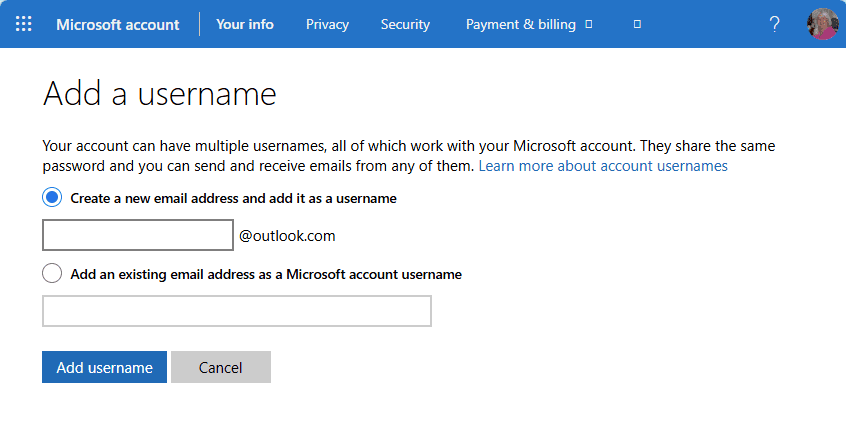
Add a username4 dialog
They thought this would create a separate but linked Microsoft account. In reality, it adds a new alias to the existing account.

Can an alias become a separate Microsoft account?

No. An address that is added to a Microsoft account as an alias cannot be moved to another account later. If you remove that address from the account, it is permanently retired and cannot be reused by anyone.

The same principle applies in reverse: separate Microsoft accounts cannot be merged into one account.

How aliases work

An alias is an alternate email address for the same mailbox. Messages sent to the alias arrive in your existing inbox, and replies are sent from the address the message was sent to.

You can make aliases easier to manage by using rules. For example, you can:

  • Move messages sent to a specific alias into a dedicated folder.
  • Apply a category so you can quickly identify which address received the message.

Why use aliases?

Aliases are useful for many of the same reasons people use multiple mailboxes: they help limit who has your main address and make spam easier to manage.

For example, you can use an alias when signing up for websites. If that address starts receiving too much spam, you can delete the alias or use a rule to move those messages to a folder.

If you only use aliases for website sign-ups, consider disabling sign-in for those addresses. Then, if a site database is compromised, the exposed address cannot be used to sign in to your Microsoft account.

Alias limits

Microsoft limits how many aliases you can create and keep on an account:

  • You can have up to 10 addresses on one Microsoft account.
  • You can create only one new alias every two weeks.
  • You can create no more than 10 aliases per year.

For example, if you add one alias per month for nine months and then delete one, you may need to wait until the oldest alias is a year old before you can add a replacement.

Sending mail from an alias

Aliases work especially well for incoming mail and replies. Replies are sent from the address that received the original message.

Sending a new message from an alias takes a little more attention. You need to choose the alias in the From field, and the display name is the same for all aliases on the account.

Changing the From address works in Outlook apps. Many other mail apps send only from the primary address. If you have not disabled sign-in for the alias, you may be able to configure the account in another mail app using that alias and a different display name.

Changing the default sending address

If you use Outlook on the web, you can change the default sending address for new messages by going to File > Settings > Mail > Forwarding and IMAP.

This setting applies only to Outlook on the web. It does not change the default sending address in other Outlook apps.
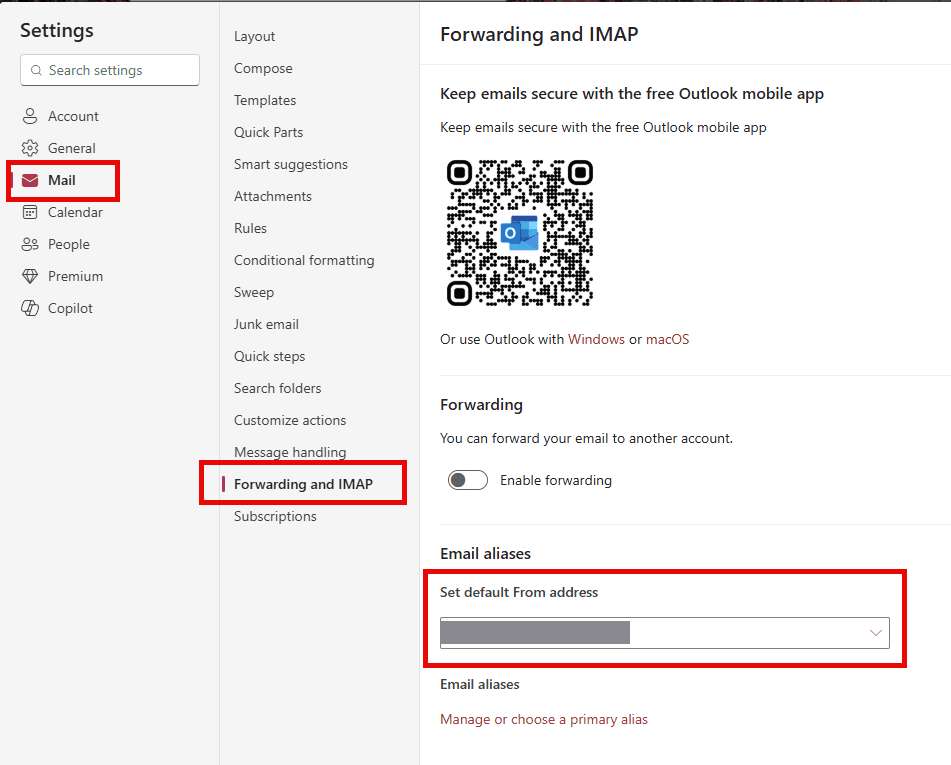
Set the default from address in outlook.com

Changing the primary alias

If you want a different address to be the primary address for the account, make that change in your Microsoft account settings.

Be careful not to remove an address unless you are certain you no longer need it. Removed Microsoft aliases cannot be recovered. Microsoft also limits primary alias changes to once every two weeks.
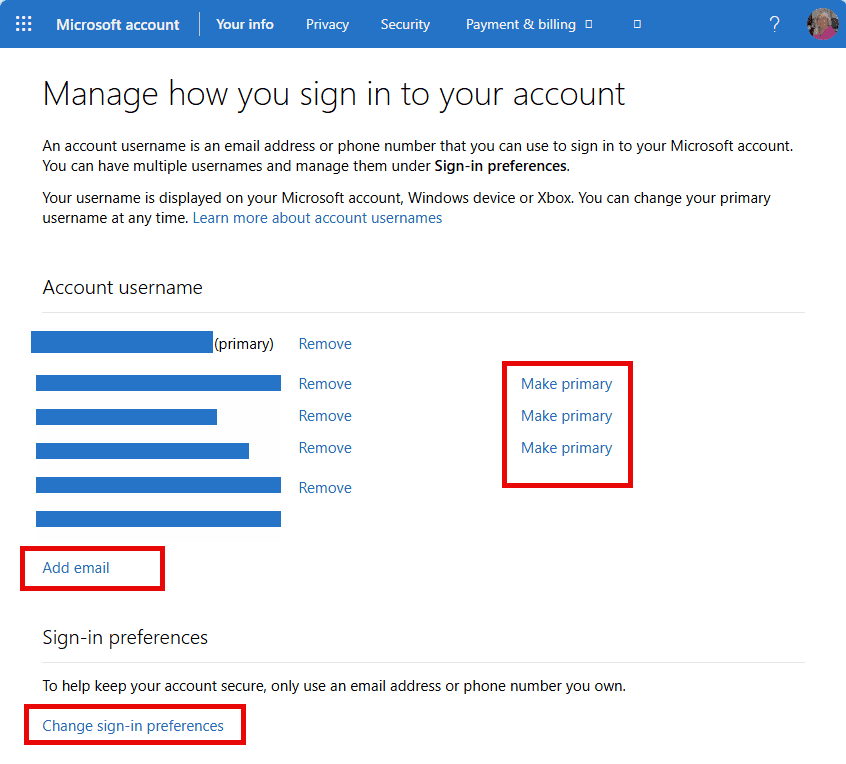
manage how you sign into Microsoft account

When a separate account may be better

A second account can be useful when you need to send mail from a different address and want to keep that identity separate for privacy reasons.

However, I would not use a second Microsoft account as the recovery account for the first one. Too many people end up locked out of both accounts, or they forget to use the second account and it is eventually deleted.

Keep inactive accounts from being closed

If you do not sign in to an account regularly, Microsoft can purge the mailbox after one year and delete the account after two years.

The exception is an account with an active Microsoft 365 subscription. In that case, mailbox purging and account deletion are paused while the subscription remains active. When the subscription ends, the inactivity clock starts again.

My recommendation

I prefer aliases over multiple accounts because they are easier to manage and help simplify email use. They also let me use different addresses when signing in to websites, which helps protect my main account from attackers.

If you truly need a second account, consider using a different email service, such as Gmail or Yahoo. For two-step verification and recovery, it is often best to use accounts from two different services. Just make sure you sign in to every email account at least once a year so the account is not closed for inactivity.

Microsoft Account Aliases vs. Separate Accounts was last modified: July 23rd, 2026 by Diane Poremsky
Post Views: 4

Share this:

  • Share on Facebook (Opens in new window) Facebook
  • Share on X (Opens in new window) X
  • Share on Reddit (Opens in new window) Reddit
  • Share on Bluesky (Opens in new window) Bluesky
  • Share on Mastodon (Opens in new window) Mastodon
  • Email a link to a friend (Opens in new window) Email

Related Posts:

  • In Outlook.com, you can select the "From" account, while in Outlook, a
    Using Outlook.com Aliases in Outlook
  • Outlook 2016: Outlook.com replies use the wrong email address (Fixed)
  • Ads in New Outlook
  • Add an Alias to an Outlook.com Account

About Diane Poremsky

A Microsoft Outlook Most Valuable Professional (MVP) since 1999, Diane is the author of several books, including Outlook 2013 Absolute Beginners Book. She also created video training CDs and online training classes for Microsoft Outlook. You can find her helping people online in Outlook Forums as well as in the Microsoft Answers and TechNet forums.

Leave a Reply Cancel reply

Your email address will not be published. Required fields are marked *

Visit Slipstick Forums.
What's New at Slipstick.com

Latest EMO: Vol. 31 Issue 14

Subscribe to Exchange Messaging Outlook


Support Services

Do you need help setting up Outlook, moving your email to a new computer, migrating or configuring Office 365, or just need some one-on-one assistance?

Our Sponsors

CompanionLink
ReliefJet
  • Popular
  • Latest
  • Week Month All
  • Use Classic Outlook, not New Outlook
  • Deleting Auto-Complete Entries No Longer Works
  • How to Remove the Primary Account from Outlook
  • Disable "Always ask before opening" Dialog
  • How to Hide or Delete Outlook's Default Folders
  • Reset the New Outlook Profile
  • This operation has been cancelled due to restrictions
  • Use Public Folders In new Outlook
  • Change Outlook's Programmatic Access Options
  • Moving Outlook to a new Windows computer
  • Microsoft Account Aliases vs. Separate Accounts
  • Deleting Auto-Complete Entries No Longer Works
  • Sync Issues and Errors with Gmail and Yahoo accounts
  • Error Opening iCloud Appointments in Classic Outlook
  • Opt out of Microsoft 365 Companion Apps
  • Mail Templates in Outlook for Windows (and Web)
  • Urban legend: Microsoft Deletes Old Outlook.com Messages
  • Buttons in the New Message Notifications
  • Move Deleted Items to Another Folder Automatically
  • Open Outlook Templates using PowerShell
Ajax spinner

Recent Bugs List

Microsoft keeps a running list of issues affecting recently released updates at Fixes or workarounds for recent issues in classic Outlook (Windows).

For new Outlook for Windows: Fixes or workarounds for recent issues in new Outlook for Windows .

Outlook for Mac Recent issues: Fixes or workarounds for recent issues in Outlook for Mac

Outlook.com Recent issues: Fixes or workarounds for recent issues on Outlook.com

Office Update History

Update history for supported Office versions is at Update history for Office

Outlook Suggestions and Feedback

Outlook Feedback covers Outlook as an email client, including Outlook Android, iOS, Mac, and Windows clients, as well as the browser extension (PWA) and Outlook on the web.

Outlook (new) Feedback. Use this for feedback and suggestions for Outlook (new).

Use Outlook.com Feedback for suggestions or feedback about Outlook.com accounts.

Other Microsoft 365 applications and services


New Outlook Articles

Microsoft Account Aliases vs. Separate Accounts

Deleting Auto-Complete Entries No Longer Works

Sync Issues and Errors with Gmail and Yahoo accounts

Error Opening iCloud Appointments in Classic Outlook

Opt out of Microsoft 365 Companion Apps

Mail Templates in Outlook for Windows (and Web)

Urban legend: Microsoft Deletes Old Outlook.com Messages

Buttons in the New Message Notifications

Move Deleted Items to Another Folder Automatically

Open Outlook Templates using PowerShell

Newest Code Samples

Open Outlook Templates using PowerShell

Count and List Folders in Classic Outlook

Insert Word Document into Email using VBA

Warn Before Deleting a Contact

Use PowerShell to Delete Attachments

Remove RE:, FWD:, and Other Prefixes from Subject Line

Change the Mailing Address Using PowerShell

Categorize @Mentioned Messages

Send an Email When You Open Outlook

Delete Old Calendar Events using VBA

Repair PST

Convert an OST to PST

Repair damaged PST file

Repair large PST File

Remove password from PST

Merge Two Data Files

Sync & Share Outlook Data

  • Share Calendar & Contacts
  • Synchronize two computers
  • Sync Calendar and Contacts Using Outlook.com
  • Sync Outlook & Android Devices
  • Sync Google Calendar with Outlook
  • Access Folders in Other Users Mailboxes

Diane Poremsky [Outlook MVP]

Make a donation

Mail Tools

Sending and Retrieval Tools

Mass Mail Tools

Compose Tools

Duplicate Remover Tools

Mail Tools for Outlook

Online Services

Calendar Tools

Schedule Management

Calendar Printing Tools

Calendar Reminder Tools

Calendar Dates & Data

Time and Billing Tools

Meeting Productivity Tools

Duplicate Remover Tools

Productivity

Productivity Tools

Automatic Message Processing Tools

Special Function Automatic Processing Tools

Housekeeping and Message Management

Task Tools

Project and Business Management Tools

Choosing the Folder to Save a Sent Message In

Run Rules on messages after reading

Help & Suggestions

Submit Outlook Feature Requests

Slipstick Support Services

Buy Microsoft 365 Office Software and Services

Visit Slipstick Forums.

What's New at Slipstick.com

Home | Outlook User | Exchange Administrator | Office 365 | Outlook.com | Outlook Developer
Outlook for Mac | Common Problems | Utilities & Addins | Tutorials
Outlook & iCloud Issues | Outlook Apps
EMO Archives | About Slipstick | Slipstick Forums
Submit New or Updated Outlook and Exchange Server Utilities

Send comments using our Feedback page
Copyright © 2026 Slipstick Systems. All rights reserved.
Slipstick Systems is not affiliated with Microsoft Corporation.