Many users would like to set the iCloud data file as their default data file, if only because they want to see their appointments on the To-do Bar. It doesn't work with all Outlook versions, all account types, or all iCloud versions. It is not recommended, but generally speaking, if it works on your system and does not crash Outlook, you can try it.
When iCloud is set as default and you use an IMAP account, you can't send email in older versions of Outlook. This is because IMAP accounts need a default data file for sent items, even if you have Outlook configured to move sent items to the IMAP folder. The iCloud does not support a Sent Items or other mail folders. (Outlook 2013 and up do not have this problem.)
When the iCloud folder is set as default data file, you can only create Notes (or Journal entries) when you are viewing a (non-IMAP) pst file. If you use RSS feeds, you need to select a delivery folder in local pst file when you add the feed to the profile.
There are no workarounds for IMAP accounts in older versions of Outlook. You'll need to use a POP3 account to send email. There may be other errors and issues I'm not aware of.
General Outlook and iCloud issues are at Outlook and iCloud Sync Issues. iCloud & Outlook Calendar issues are at iCloud and Outlook Calendar Sync Issues and Contact issues are at iCloud and Outlook Contact Sync Issues
"Cannot Start Outlook..." Error
If you receive this (or a similar) error message
Cannot start Microsoft Outlook. Cannot open the Outlook window. The set of folders cannot be opened. Unsupported folder class (IPF.Contact)
You don't have the default delivery location set to a pst.
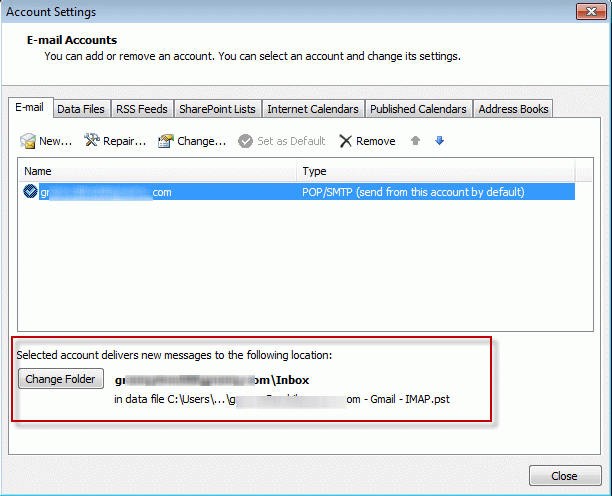
To change the default data file to a local pst file, open Control panel and find Mail, open the profile, Account Settings, then select Change Folder at the bottom of the dialog or set the PST file to default on the Data Files tab.
"Do not have permission to create entry..." error
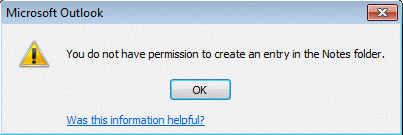
When an IMAP account is set as the default email account and iCloud is set as the default data file, you'll receive this error message when you attempt to create a new message:
You don't have permission to create and entry in this folder. Right-click the folder, and then click Properties to check your permissions for the folder. See the folder owner or your administrator to change your permissions.

You'll receive a similar message when you try to create a new Note (or Journal item).
Before creating the note, you need to select a folder in a non-IMAP pst file before trying to create the item.
"Service provider does not support operation..." error
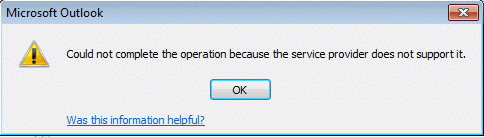
When you try to compose a message while viewing the IMAP folders or send reply to a message received on an IMAP account, you'll receive the following error. The default service provider (the icloud data file) does not support mail items.
Could not complete the operation because the service provider does not support it.
More Information
- iCloud error: Outlook isn't configured to have a default profile
- iCloud Add-in is not listed in Outlook Add-ins
- iCloud is hijacking Meeting Invitations
- How to fix the iCloud APLZOD.dll error in Outlook
- iCloud Doesn't Sync
- iCloud, Outlook 2016, and Windows 10
- iCloud for Outlook 2016
- Save New Contacts to iCloud Contacts
- Transfer POP3 Mail on an iPhone to Outlook
- Outlook crashes when syncing iCloud calendars
- Syncing iPhone Sent Messages with Outlook
- After Installing iCloud, Mail Won't Send?
- Create a Task and copy to another Tasks folder
- iCloud and Outlook Repair Now error
- Outlook and iCloud: What you need to know
- Save appointments to a non-default Outlook calendar folder
- iCloud and Outlook Problems: Syncing Calendar
- Issues Syncing Outlook and iCloud Contacts
- Outlook and iCloud Sync Issues

Martin says
Hi Diane,
I'm having an impossible time with iCloud in Outlook 2016. It worked fine and then I lost the iCloud sync button and now I can't seem to create a data file - i.e. after trying to configure the iCloud configuration I can't get it a data file sent to Outlook. One thing I've noticed is that the iCloud configuration screen often an unchecked display Contacts, Calendars and Tasks (with Outlook) even though I've selected and applied.
Any suggestions? I have done all the obvious - new iCloud downloads, Account on/off etc.
Diane Poremsky says
is the addin listed in outlook's file, options, addins? Did you try signing out of icloud then back in?
Richard Krauland says
Hi Diane,
I did some updates to apple software on my pc on friday, and it caused my Outlook to stop functioning totally. I use Outlook through Exchange (OST). It added my apple ID to my Outlook profile, and that caused email not to flow anymore. Now when I open my Outlook, I had a new "data file" attached to it. I have my email, my coworkers email, and iCloud "data fle" and now the Apple ID data file. Outlook was spitting out errors that because my Apple ID email wasnt configured properly, Outlook couldnt send or receive. So I deleted it. As soon as I deleted it, mail functioned normally again. Unfortunatly, it not only deleted the Apple ID email, but also the iCloud "data file" as well. I havent backed up my contacts to iCould or my iPhone in a very long time. I believe that those files are still on my PC somewhere. Do you think that you cna help me out?
Diane Poremsky says
Yeah, for some reason, the icloud addin is causing send & receive issues for some users. Make sure you have the newest icloud installed - 5.2,
If you use Exchange, the only reason to use icloud is to have personal contacts or appt on your phone also in outlook (the phone can sync directly with exchange unless your admin turned it off). If you are using icloud to add the email account to outlook, you can set the Apple email account up in your profile as an imap account - use autoaccount setup to add it.
To get the icloud contact file back in outlook, sign back into icloud. if you need to add contacts or appt to the icloud, copy them over then sign out of icloud.
Gordon says
Hi Diane:
I had a PC crash but have a backup file called "Icloud Archive.pst" I believe the PC was running Outlook 2013 that this was created with. It is a large file. When I try to open it using a new PC with a current Windows 10 PC with Office 365 in outlook when I try to open this file it does not display an error but just says "no data found" I really need to get into this file, thanks in advance for your help.
-Gordon
Diane Poremsky says
that file should be an archive created by icloud and will only have calendar, contacts, and tasks. It won't have email in it. You only need this if you are no longer going to use icloud to sync.
What type of email account did you use on the old computer? If it was an imap account you won't need the data file, everything is on the server. If you upgraded the old computer from an older version, the pst could be in %localappdata%\Microsoft\outlook. (Paste that in the address bar of windows explorer and press enter.)
Steven says
I've read and re-read this, but can't seem to make sense of it. I'm running Outlook 2007, using iCloud calendar, and I want my iCloud calendar to display on my Outlook Today. I've attempted what you outlined in the article above, but no love. Please advise.
Diane Poremsky says
To see the calendar on Outlook Today, you need to set the icloud data file as default, but it won't work if you are using an IMAP account (and may cause outlook to crash). Go to tools, account settings and on the Data Files tab, select the icloud data file and set it as Default.
Stephen says
So i had to reinstall icloud because there was a sync issue with outlook...when I did that...it eliminated all of my folders and all the emails that were in them...very bad...how do I get them back?
Diane Poremsky says
It should not have affected the email - unless it was an icloud email account, which would be added back to outlook when you signed into icloud.
Greg K says
Hi Diane, love your site. Great info. Here is my question: I use Yahoo mail with an IMAP setup in Outlook 2010. I use iCloud to manage my calendar and contacts, and have it synced to Outlook 2010 using the iCloud addin. My problem is with calendar invites. When I receive them via my Yahoo email inside Outlook and I accept them, they show up onto the default calendar in Outlook, not in iCloud. I then have to copy them to iCloud to see them on my phone,and if the invite gets changed the iCloud copy is disconnected from the original and isn't update.
Is there a way to have the calendar invites go directly onto the iCloud calendar in Outlook directly?
Diane Poremsky says
This is a known issue - the only way around it is to copy the meetings or use a macro to move or copy them. When your outlook.com account moves to office 365, you'll add it to Outlook as an Exchange account and the problems should be solved. That will be sometime later this year.
Peg says
Hi, and thanks,
But I need more specifics than that. I am assuming I am to open Outlook and do Ctrl 6 to access the Folder list. Correct?
Please then tell me what is scanpst. and where do I find that and how do I use it and what will it do?
Will this address the inability to delete, add or manipulate things in Local Folder and Local Contacts?
Diane Poremsky says
Yes, open outlook and do a Ctrl+6 to switch to the folder list. This will allow you to see where the folders are in relation to the data files and other folders. Are the folders mentioned in the error message in the pst with other Outlook folders or in the iCloud?
Instructions to use scanpst are here https://www.outlook-tips.net/beginner-user/use-scanpst-to-repair-outlook-files/ -
Peg says
Hi-
I have a Toshiba PC laptop running Windows 7. I use Google Chrome. You seem to know how to do stuff with outlook 2007 and icloud. I have a really weird problem that I can not see here (or anywhere). In a recent sync yesterday I got the message that some of the data would not sync and could be kept or deleted. I chose to keep it and it ended up in "Local Contacts" and "Local Calendar" folders under icloud. When I open either of those folders and try to delete any items that are unneeded I get this error message:
"You don't have appropriate permission to perform this operation."
I have already tried "delegates" (no button and no way to install it AND its NOT an email account) and "open outllook.exe as administrator" . I'm really good at looking up fixes for problems but can't find this one anywhere. Can you help me be able to delete or manipulate those items in the local folders that I no longer need in outlook or icloud?
Thanks,
Peg
Diane Poremsky says
The folders were added to a pst file? Or are they in the iCloud data file? Go to Folder list to check (Ctrl+6). If in a pst file, try using scanpst.
Chris Good says
Hi Peg, Did you manage to resolve this? I have exactly the same problem. "Local Contacts" is under iCloud not the pst file. Scanpst did not help.
Diane Poremsky says
Go to the Folder list (Ctrl+6) and you'll see where all of the contacts folders fall within the different data files in your profile. Are they in the icloud data file, your default data file or did icloud create a new data file to back them up to?
Z-Bar says
Hi Diane,
Can you please suggest how can I setup Outlook/iCloud so that Contacts and Calendar data will still be stored in the PST file? I am using a PST backup program, and I want it to be able to backup the Contacts and Calendar items as well.
Will the suggested method restrict other possibilities?
Thanks for this wonderful page
Diane Poremsky says
You can either copy or export the contacts and appointments to a pst file to back them up or sign out of iCloud and let it create a backup copy on the local computer - this creates an iCloud archive pst containing your contacts, appointments, and tasks.
FWIW, I don't worry too much about backing the iCloud up. The only risk is the iCloud losing them (not aware of that happening but that doesn't mean it never will) or accidently deleting them from a device, which also removes them from the iCloud (more likely).
Kim says
Hi,
I'm really struggling and would appreciate any advice on this. I was previously working with iCloud 1 and Outlook 2010. I was able to send meeting requests from both my pop3 and imap work accounts (there was a "From" pull down on the invite request), but they were saved directly in my iCloud calendar which was great. After setting up Outlook 2010 and iCloud 2 on a new computer, I cannot find a way to replicate this. When using my iCloud calendar, I have no option to choose the account to send it from. It sends from "noreply@insideicloud.icloud.com". Otherwise I have to use my pop3 calendar to send a request, which doesn't save to my iCloud. To move it to my iCloud, it sends a notification to everyone invited. Help please! Thanks!
Diane Poremsky says
I'll look into it - I haven't had a lot of time to look at the new icloud addin, seems like I should make time now. :) I have this macro that might be a good workaround - copy appointments to another calendar - that can add an appointment to your icloud calendar.
Akash Kumar Sharma says
Thanks for the response.
But i was was wrong in framing the question maybe. I found the resolution. It was an IMAP fodler subscription issue. I learned about IMAP protocol and came to know that a folder can't be deleted from Outlook, it has to be "unsubscribed" and deleted from iCloud. This worked like a charm.
Thanks a lot for your response.
Akash Kumar Sharma says
Hi,
Could anyone please let me know where does iCloud store all its data on a Windows computer. From the above post its clear that .aplzod folder in %appdata% has calendar, tasks and contacts store. But I somehow got into an issue where a custom icloud folder in icloud mail got stuck in Outlook during deletion. Its not in icloud (as i saw at icloud.com) but i can't delete it from Outlook. New profiles don't help at all. If I could reset iCloud completely by deleting the local store from where its loading the data, i might be able to remove the whole folder as well as the deletion operation in queue.
I need the icloud local data location for everything. Is it that itunes also could be caching some data ?
Please, please, please I'm in so urgent need of this. This is so annoying to see that stuck folder in Outlook.
Diane Poremsky says
Mail is not in the iCloud folder - it's in an ost (or pst in older versions of outlook). Mail accounts for iCloud.com (or me.com) is an imap account.
Try renaming the imap data file - it's at %localappdata%\microsoft\outlook.
Alex HG (@thaipirate) says
i had this problem with other IMAP items... this is a very helpful page... thank you!
Tom says
Just done this and now I'm back to the old issue of whenever I start up iCloud, Office says
"We're sorry, but Microsoft Office has run into an error that is preventing it from working correctly. Microsoft Office will need to be closed as a result. Would you like us to repair now?'
I'm going round and round in circles on this and have wasted many hours.
Any further thoughts? When I try to create a new profile the same problem occurs.
Tom says
Okay so I've done this. I now have another issue. The default calendar in Outlook 2013 is called 'Calendar (this computer only)'. For some reason this has found itself in the deleted items of my email account (IMAP). This means it does not show in the Calendar by default and all my new meeting requests go to this folder. When I try to move this to the Outlook default data file it refuses to move or copy it. Any suggestions as to how I can move this?
Diane Poremsky says
Close outlook and restart it using the reset folders switch. If that does not recreate it in the proper location, move the appointments from that calendar (use list view, then select all) to the icloud - move contacts or tasks too, close outlook and delete the imap ost file. Outlook will recreate it.
Tom says
I'm using iCloud 2.1.2 and Outlook 2013.
What I would like to do is a totally clean reinstall of Outlook 2013 and try again. However when I try to do this it reinstalls with the old settings. How can I do a completely clean reinstall?
Diane Poremsky says
Go to Control panel, search for mail. Delete your profile. You don't need to uninstall Outlook, just make a new profile.
Tom says
This is the whole problem. Outlook 2013 crashes when I try to install iCloud even with the pst as default.
Diane Poremsky says
I haven't had that problem - as long as icloud is not set to default, it works.
What type of email account do you use and which version of icloud? (2.1.2 is the newest AFAIK)
Oh, and which suite? I'll see if I can repro.
Tom says
I have a new computer with Windows 7 Pro and Outlook 2013
I am having problems setting up iCloud
Whenever I start up iCloud, Office says
"We're sorry, but Microsoft Office has run into an error that is preventing it from working correctly. Microsoft Office will need to be closed as a result. Would you like us to repair now?
Allowing it to repair does not work and I cannot get iCloud to Sync. I have tried deleting data files and setting a .pst as default and deleted the apple data file as suggested in another forum but to no avail.
Any suggestions?
Diane Poremsky says
You need the pst as default. Once its working, you may be able to set the iCloud file as default, depending on your version of outlook.
Does outlook work if you sign out of iCloud?
Chris says
Hi Diane,
I have iCloud 2.1.2.8 and Outlook 2013. Do you know when or if I will be able to set the iCloud data file as the default? I really would like my appointments and tasks on my To Do Bar.
Diane Poremsky says
No, I don't know. I know there are two companies working on add-ins that will sync directly with the icloud server and use Outlook's data file, eliminating the need for the Apple addin.
peterasmith says
Hi Diane,
Thanks for the great site - really helpful in understanding the limitations here and what will and will not work. I have just installed icloud 2.1.2 with Outlook 2007, however if I make icloud the default data file, Outlook crashes when you access the calendar. I have a POP3 email account. Any suggestions? Otherwise it looks like we are still stuck with copying and multiple reminders/calendars to deal with...
Diane Poremsky says
If it crashes, you need to use set a pst as default. Sorry. :( I'll double check it again on 2007 with different configs and see if i can repro.
Cem says
Hi Diane,
I had two email accounts one IMAP one POP, previously I upgraded my
POP to IMAP. now I am getting "you don't have permission to create an entry in this folder outlook 2010" error.
ICloud is set as my default Data File, I have been trying to change this but "set as default" button is gray.
Thank you.
Diane Poremsky says
This error is because icloud is set as default and it can't supply the outbox for IMAP accounts. In Outlook 2010, you need to add a pst file to the profile then set the pst as default.
varghese scaria says
Dear Diane Poremsky,
hi i wan to syc my outlook 2010 with icloud. if it possible please help me regarding this
Diane Poremsky says
Yes, it is possible. Close Outlook. Install icloud then sign in to it. Check the box to sync mail, calendar, contacts, tasks. icloud will do the rest.
If you'd done this and something is not working, I need more details about the problem.
Sam says
My pc will not allow me to reset the default data file. I no longer want to use icloud and have deleted the program but it is still set as the default data file preventing me from even opening Outlook.
Any help would be greatly appreciated as it is sending me mad!!
Thanks
Sam
Diane Poremsky says
Go to Control panel, search for Mail - set a pst as the default and remove the icloud folders. Have you changed the setting in the icloud control panel? Make sure you disable outlook sync or sign out.
Sebastian says
same problem as Matthieu JOBERT described. What am I missing?
Diane Poremsky says
You probably aren't missing anything - it works in iCloud 2.1. iCloud 2.1.1 is crashing my system. My guess is that they changed something in that .1 update and broke it.
Matthieu JOBERT says
Hello,
I am using iCloud 2.11 and would like to set iCloud as default data file (to get my appointments in the task bar). But when I set the .aplzod file as the default data file, I cannot start Outlook and get this error:
"Cannot start Microsoft Outlook. Cannot open the Outlook window. The set of folders cannot be opened. Unsupported folder class (IPF.Notes)"
On Microsoft website, it is said it's not possible: https://support.microsoft.com/kb/2668932/en-us
Any idea?
Diane Poremsky says
That error is common in the old version (v1) of iCloud but v2 can be set as the default. The machine I have it set as default on uses v2.1 - I guess i need to upgrade it to 2.1.1 and see if it errors.
Rick Hodel says
Really appreciate your site. I found it much more in depth and helpful then searching for hours about these issues on Apple's Support website. I am using Outlook 2007 and I've had horrible problems with iCloud trying to synch my task list (no Exchange server involved) with iCloud 1.x and now still with iCloud 2.1.1. I logged a case # with Apple telephone support 6 months back and demonstrated my issue with a senior technician who recorded our session where we recreating the bug. Apple stopped respond to me about this issue, as if that's a surprise...
At first I was told it was probably an issue with my PC, registry, Outlook installation, etc. I did a fresh install of Win7 64 bit and installed Outlook 2007 with all necessary patches and demonstrated the issue again which caused Outlook to crash when Tasks were modified in iCloud via Outlook about 50% of the time. It's extremely annoying. I don't have this crash issue with iCloud's calendar, email or contacts functionality...only when using tasks, which I do a lot of.
Just wanted to mention that when I set iCloud as the default data file and restart it, Outlook will not start. You've highlighted the issues that impact not having iCloud as your default folder in other posts. I was looking forward to trying this, but it doesn't work for me. I had to set the default folder back to my Personal Folder via the control panel mail settings and go back to the orginal settings.
Thanks for your comprehensive website; it really is a enjoyable to read. /Rick
Diane Poremsky says
Thanks for your comments. I'll see if i can repro your problems with Outlook 2007. I did most of my testing in Outlook 2010, until icloud 2.1 supported 2013.
Diana says
I would rather not change my default data file to iCloud but need to add tasks to outkook programmatically from Access via vba to sync with my ipad. How do I point to the iCloud task folder to add or change tasks?
Diane Poremsky says
Use the GetFolderPath function - Working with non-default folders.. You have two options- if you are using code in Access, you can call the function or use an itemadd procedure to move the tasks as access adds them. Adding the function to the code you use with access would be the best, using itemadd is sloppy IMHO.
Fred says
Thank you Thank you Thank you.
Can't tell you how many posts I read before I got to this one which WORKED!!
Tom Combs says
Question. What happens to your data, (calendar, contacts) If you remove Icloud? I just started using it and I see my local calendar is now blank. Should I decide to stop using Icloud, how would I get my data back?
Diane Poremsky says
If you decide to stop using icloud, before you remove it from outlook you need to drag, move or copy the items in the icloud calendar to your local outlook calendar.
Simon Clark says
Sorry, if I am being dumb (as is often the case!) but can I have iCloud 2 and NOT have it as the default data store, therefore using IMAP and sending happily?
(my set-up in case it matters - Outlook on a PC, iphone and MacbookAir use Mail, calendar, contacts. Gmail manage our domain and host our IMAP mail)
thanks in Advance
Simon
Diane Poremsky says
As long as the icloud data file is *not* set as the default data file, imap accounts will work great with icloud. You'll have 3 data files - the default pst, the icloud, and the imap folder.