A user complained that iCloud stopped working after installing a security update and returned the following error message when he tried to view iCloud folders.
The set of folders cannot be opened. An unexpected error has occurred. MAPI was unable to load the information service C:\PROGRA~2\COMMON~1\Apple\INTERN~1\APLZOD.dll. Be sure the service is correctly installed and configured.

The usual fixes of signing out of iCloud and signing back in or reinstalling iCloud won’t fix this problem. It's due to a change in how Outlook determines if it should trust an addin and unfortunately, due to Outlook 2007's age, it doesn't handle it properly. You'll need to add one of the registry keys below to allow iCloud to work. These keys are not necessary in Outlook 2010 and above as these newer versions do trust properly written addins.
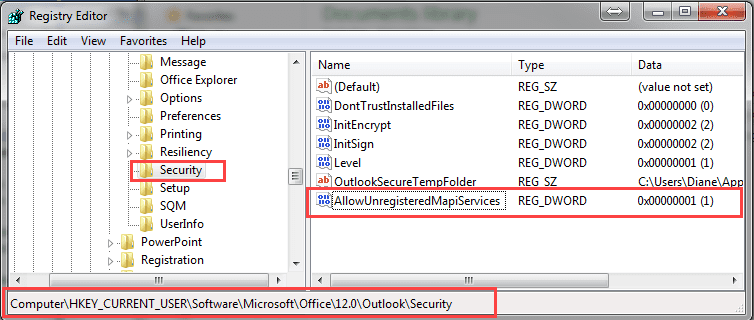
Consumers and others not using group policies will use this key:
HKEY_CURRENT_USER\Software\Microsoft\Office\12.0\Outlook\Security\
DWORD: AllowUnregisteredMapiServices
Value: 1 (disable the security checks)
The group policy key is at
HKEY_CURRENT_USER\Software\Policies\Microsoft\Office\12.0\Outlook\Security\
DWORD: AllowUnregisteredMapiServices
Value: 1 (disable the new security checks)
You will need to restart Outlook for the key to take affect.
Do it for me
Ready-to-use registry files are available:
AllowUnregisteredMapiServices
Policy key: AllowUnregisteredMapiServices
More Information
"Outlook's June 13 2017 Security Update"More Outlook and iCloud integration articles:
- After Installing iCloud, Mail Won't Send?
- Create a Task and copy to another Tasks folder
- iCloud Add-in is not listed in Outlook Add-ins
- iCloud and Outlook Problems: Syncing Calendar
- iCloud and Outlook Repair Now error
- iCloud Doesn't Sync
- iCloud error: Outlook isn't configured to have a default profile
- iCloud for Outlook 2016
- iCloud is hijacking Meeting Invitations
- iCloud, Outlook 2016, and Windows 10
- Issues Syncing Outlook and iCloud Contacts
- Outlook and iCloud Sync Issues
- Outlook and iCloud: default data files
- Outlook and iCloud: What you need to know
- Outlook crashes when syncing iCloud calendars
- Save appointments to a non-default Outlook calendar folder
- Save New Contacts to iCloud Contacts
- Syncing iPhone Sent Messages with Outlook
- Transfer POP3 Mail on an iPhone to Outlook

Lisa Clark says
Even a few MORE years later!
Something went haywire with my Microsoft (Office) 365 installation so a couple of days ago I uninstalled and reinstalled (repair didn’t work). Now I can’t see my contacts or calendar on my PC for the iCloud Contacts and Calendar that has everything and syncs with my phone. I get an error message that says “The set of folders cannot be opened. MAPI was unable to load the information service C:\ProgramData\Apple Inc\iCloud\Outlook\APLZOD64.dll. Be sure the service is correctly installed and configured.”
My iPhone and my iCloud account online have all my contacts and calendar info. When I look for a file called APLZOD64.dll using the path in the error message, I see files called aplzod32.dll and aplzod6432.dll, but not aplzod64.dll. I clicked "Contacts & Calendars" off and then back on in my Windows iCloud app, but nothing changed.
Karen Wilcox says
This post is a few years old - does anyone know if this fix applies to Office 365 installations? I just installed Office 365, and I am receiving the same error message when I try to sync my Outlook calendar with iCloud. So frustrating!
Diane Poremsky says
What is your build number? There is a mapi bug in one of the current builds that could trigger this error message.
See File, Office Account for the information.
Shirley says
Thak you, Thank you. Awesome fix. End to frustrations. You are brilliant
BCha says
After 14 months of frustration, this fix finally fixed my icloud contacts! Thank you thank you and thanks again! the "do it for me" was tremendous help!
Karen says
Hi...thank you so much for this page. I have outlook 2007 and fixed registry as you have said and it worked perfectly....for less than a week. I then closed outlook. closed ICloud , uninstalled it, reinstalled it like you said and it worked perfectly again!!!.....for less than a week. I find myself no longer able to sync from my phone up to outlook, but seamlessly sync from outlook to my phone. It is an I phone. I will again go through the uninstall Icloud process, and am sure it will work. I am just wondering if there is some kind of update that somehow reinitializes ??? Any help would be great.....thank you
Diane Poremsky says
Is the icloud addin loaded? I've looked at a lot of client computers when they had issues syncing and the addin was disabled or wouldn't stay enabled.
https://www.slipstick.com/outlook/icloud-sync-failure/
ktmking says
re Outlook 2007
Thanks for the tip! I was about to stop using Outlook. After reading the comments, the final fix that worked was to logout of icloud, completely uninstall icloud, reboot, and reinstall. I kept missing the uninstall icloud.
Mary says
Diane, you are a marvel! Many thanks
bobinski says
Thank you, after changing the registry restarting Outlook was all that was needed.
willem says
It works, even down in South Africa with Icloud for pc at 6.2.2 and Windows 10 pro 1703. Thanks for publishing this, was a great help.
john says
God bless you Diane ... this is soooooo frustrating, but now I found you
Laura Nesteriak says
Brilliant! After changing registry, i had to sign out and sign back into Icloud, then restart Outlook 2007. All good now!
Eric says
Hello,
Thanks for your assistance Diane.
I used the registry key fix a couple of months ago, and it worked beautifully. Unfortunately, the error message is back and I cannot use my calendar again. I checked the registry, and the new key AllowUnregisteredMapiServices is still there and set to 1.
Any idea about what may have caused the error to reoccur, and how to fit it?
Thanks
Diane Poremsky says
Are you using Outlook 2007 or a newer version? The August update disabled the key for newer versions, because its not needed for icloud. Sign out, Uninstall icloud, then reinstall it if you get the error with Outlook 2010, 2013, or 2016.
Eric says
Diane,
I thought I was running 2007, but I am indeed running a later version. I uninstalled/reinstalled iCloud as suggested and it is running again.
Thanks again.
Eric
Jook says
Thanks Diane. Outlook 2007 user. The fix worked perfectly.
Jessica Swift says
I am now receiving this error, as well as STILL being unable to search my emails in Outlook 2016. Please help!
Diane Poremsky says
sign out of icloud, uninstall icloud, reboot, then reinstall it and sign back in.
Outlook 2010 and newer should not have this problem - icloud properly intefects with newer versions, but the install was messed up for some people and uninstall, reinstall fixed it for everyone (so far).
Philip says
thank you, it works
Zach says
I am receiving this error along with everyone else. Last month it was the security issue and was able to disable KB3191898 from the security updates and everything worked great. This morning I signed in (Outlook 2007) and getting the same error as above. I looked into the registry and I do not see the above entry in the registry. Thoughts on what I could try? FYI I've signed out of icloud and re-installed as well, nothing seems to work and I can't see my calendars in outlook.
Diane Poremsky says
if you are using Outlook 2007, you need to add AllowUnregisteredMapiServices to your registry (and set it to 1) if you want to use icloud. (The key won't exist, you need to add it).
Using the reg file is usually the easiest way to edit the registry - http://www.slipstick.com/doit/AllowUnregisteredMapiServices.reg
Tanz says
Great help !
I have resolved the issue based on your recommendations.
Thanks Diane, however I noticed that :
Public Folder Script REG_DWORD (value 1) in the same registery. Any idea?
Diane Poremsky says
Yo9u have scripts enabled for public folders in Tools, Trust Center, Email Security.
jeremy says
thanks so much !
worked brilliantly !!!!
GIOVANNI says
Thank you!!!
Simon says
f***** special, skim read the page, found the do it for me fix, clicked the link, and voila fixed.
your page rocks guys, well done kudos
Greg says
Thank you, thank you!!!!!! Worked awesomely.
Robert says
Perfekt, this solved my problem, thanks!
Ron Lee says
Hey folks..... this fix worked perfectly for me. The only area in Outlook 2007 where I noticed this problem was in the Contacts list.
massimo says
Wow ! Wonderful ; for me now all is working fine. Congratulation to Diane Poremsky
Joe says
Same thing is happening to me as Katy
Diane Poremsky says
We have reports that unistalling icloud app then reinstalling it works - make sure you sign out of icloud before uninstalling.
Katy says
I am getting the error and I have Outlook 2016 via Office 365.
Diane Poremsky says
Try setting this registry key (it's not needed for outlook 2010 and newer, because you shouldn't get this error message) - and make sure you are using the newest icloud.
HKEY_CURRENT_USER\Software\Policies\Microsoft\Office\16.0\Outlook\Security\
DWORD: AllowUnregisteredMapiServices
Value: 1 (disable the new security checks)
Charlotte says
I tried this and it didn't work - I then tried it on 14,0 rather than 16.0 and it did ! not techie enough to know why - but thanks !!
Diane Poremsky says
Which version of Outlook do you have? The number should match your version - but if you get this error with outlook 2010 or newer, you should first try uninstalling them reinstalling icloud as it should work without this key.
Diane Poremsky says
Can you look for these files and email them to me (diane at slipstick com)- it should work with all versions except 2007 and we're trying to figure out why it's not for some users.
C:Program Files (x86)Common FilesSYSTEMMSMAPI1033mapisvc.inf
C:Program Files (x86)Common FilesSYSTEMMSMAPImapisvc.inf
C:WINDOWSsystem32mapisvc.inf
Milton Smith says
I have this exact issue & received the error message shown above. Most frustrating when all is working OK & then stops after an update ! Can you please clarify how to 'add a registry key' as you describe above as I have not made any registry changes in the past - so is unfamiliar to me. I am using Outlook 2007 & an iPhone 4 & have synced calendars & contacts OK till now. Many thanks for any help.
Diane Poremsky says
The easiest way is to use the reg files - right click on the link and choose save as... otherwise, press Win key + R to open the run command, type regedit and press run. Browse to the path in the registry key then right click on it and choose New DWORD. paste AllowUnregisteredMapiServices in as the name. Right click on it and choose Modify. Set the value to 1. Close the editor and restart outlook.
Dustie Montgomery says
Hi Diane-
I am getting this same error since the recent Windows update and am trying to follow your recommended fix above. I am in no way a technical person, but seem to be following your instructions that are pretty clear for even a non-techie :) With that being said, I am not finding the path in the registry key that you are indicating in your instructions. I stall out here: HKEY_CURRENT_USERSoftwarePoliciesMicrosoft. The next options are either System Certificates or Windows, but not an Office option. Also, I double checked my version of Outlook and it looks like I am on Outlook 2013. Any thoughts?
Diane Poremsky says
if the path does not exist in the registry, you need to add it. (You don't need both the user key and policies - one or the other).
We are seeing the errant error message in 2010 and up - some users are reporting that uninstalling and reinstalling iCloud fixes it. Sign out of icloud, uninstall it from programs and features then reboot and reinstall. If you still get the error, then you need to set the registry key.
D\'Ann Bartley says
Thank you so much for giving details, Diane! Very proud to tell you that I followed instructions carefully (so carefully!), and I now have access to all my contacts and calendars again! iCloud is now synching with Outlook 7 in my Windows 10!!! Scary, but it worked beautifully!