The June 13 2017 Outlook Security Update is causing all kinds of issues for users. Attachments won’t open, iCloud doesn’t work, custom forms don’t work.
Microsoft is investigating. As of June 21 2017, we have a registry key to fix the iCloud issues. To correct other issues, you will need to uninstall the update
Is it dangerous to uninstall it? There is a risk, but for many people, the risk is very low. The exploit, like most, if not all Office exploits these past few years, will not run automatically – the user needs to be convinced to open the document and possibly, change security settings.
"Uninstall Updates in Office 'Click to Run'"
Uninstall the update in Outlook 2007 / 2010
While all four versions of Outlook are affected by the bugs, Outlook 2007 and Outlook 2010 seem to have the most issues with this update.
Attachments won’t open
This issue was fixed in the July 27 2017 update.
Description of the security update for Outlook 2016: July 27, 2017
Description of the security update for Outlook 2013: July 27, 2017
Description of the security update for Outlook 2010: July 27, 2017
Description of the security update for Outlook 2007: July 27, 2017
Outlook known issues in the June 2017 security updates
The security update is targeting “specially crafted office documents” and part of the “specially crafted” applies to file names. Multiple dots and certain characters (including ?*<>|!) in a file name will trigger the Open or Save dialog, or in the case of attachments on Contacts, Tasks, Appointments, or in RTF formatted messages, a silly dialog stating that Outlook isn’t installed.
The program used to create this object is Outlook. The program is not installed on your computer. To edit this object, you must install a program that can open the object.

When you open an attachment, you may get the "open or save" dialog when you didn't previously. After saving the attachment to your hard drive, it should open without issue. If you prefer dragging the attachment to File Explorer, that should work too.
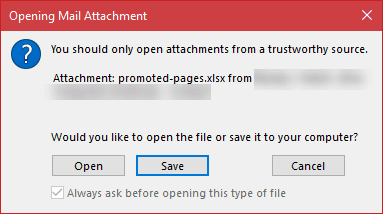
There is one (previously) known issue: if a message whose subject ends with a file extension that is on the unsafe extension list, the message will be blocked as an unsafe file type. You need to save the message to the hard drive and rename it, then attach.
iCloud doesn’t work
The solution for this problem is at
A user complained:
iCloud had been working perfectly for years syncing with Outlook until yesterday. When I started getting this message: The set of folders cannot be opened. An unexpected error has occurred. MAPI was unable to load the information service C:\PROGRA~2\COMMON~1\Apple\INTERN~1\APLZOD.dll. Be sure the service is correctly installed and configured.

The usual fixes of signing out of iCloud and signing back in or reinstalling iCloud won’t fix this problem.
Add one of the following registry keys to allow iCloud to load.
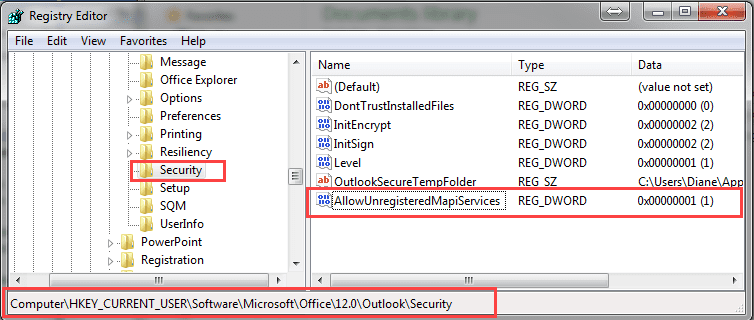
Consumers and others not using group polices will use this key:
HKEY_CURRENT_USER\Software\Microsoft\Office\12.0\Outlook\Security\
DWORD: AllowUnregisteredMapiServices
Value: 1 (disable the security checks)
The group policy key is at
HKEY_CURRENT_USER\Software\Policies\Microsoft\Office\12.0\Outlook\Security\
DWORD: AllowUnregisteredMapiServices
Value: 1 (disable the new security checks)
You will need to restart Outlook for the key to take affect.
Ready-to-use registry files are available:
AllowUnregisteredMapiServices
Policy key: AllowUnregisteredMapiServices
Custom Forms won’t open
Users are complaining about published custom forms too. VBScript and some controls are blocked.
The solution for this problem is at
I have a custom form that's published to my personal forms library that I use for new contacts. When I create a contact, I get the following message and the VBScript behind the form doesn’t run. If I uninstall the security update the problem goes away.
"To help prevent malicious code from running, one or more objects in this form were not loaded. For more information, contact your administrator."
As with the other problems, the short-term solution is to uninstall the security update.
BCM Crashes Outlook
I haven’t discovered any issues between the security update and BCM, however, an old issue with the Microsoft Chart controls is popping up again, most likely due to .NET framework updates.
When the chart controls are missing or corrupted, the BCM dashboards won’t display and Outlook may crash. Reinstalling the chart controls will fix it.
Get the file at Microsoft Chart Controls for Microsoft .NET Framework 3.5
June 2017 Non-Security Office Updates
The KB articles related to the non-security updates released in June 2017 for Office 2013 and Office 2016 applications and available through the Download Center and Microsoft Update are available in the following article at Microsoft TechNet.
June 2017 Non-Security Office Update Release
These downloads are for organizations with "MSI" installations; these updates are installed automatically in Office 2675 subscription software.
More Information
Description of the security update for Outlook 2016: June 13, 2017 (KB3191932)
Description of the security update for Outlook 2013: June 13, 2017 (KB3191938)
Description of the security update for Outlook 2010: June 13, 2017 (KB3203467)
Description of the security update for Outlook 2007: June 13, 2017 (KB3191898)
The complete list of KB article for all Office applications is at June 13, 2017, update for Microsoft Office

Jeff Freedman says
Diane: thanks for the great Registry mod suggestion. Added your consumer route, however, did not have any effect on the problem. Still get the nasty "set of folders cannot ... " pop-up. Any other suggestions please?
Diane Poremsky says
Which version of outlook? If 2010 or newer, reinstall iCloud. It definitely should work with 2007.
Kirk Peel says
How do I delete the folder for i cloud in outlook lastest version. Use windows 10 64 bit? I have delete the program under remove programs but I cannot get rid of the folder in my account in the email folder. I do not use the cloud. The email catpoop@cox.net works now that I corrected the profile. I do not receive email in my KirknDee@cox.net, default setting foe outlook. Thanks Kirk
Diane Poremsky says
Did you sign out of icloud or untick Sync calendar & contacts before removing icloud? That should have removed it... otherwise, go to File, Account Settings, Data Files tab and delete the icloud data file.
Richard Jaffee says
Hi Diane
I use icloud calendar on iphone
i use icloud calendar on outlook 2010
appointments typed into laptop on outlook icloud calendar appear on iphone calendar but appointments typed into iphone calendar do not sync up to laptop
It used to sync both ways
Ive tried so many things to correct but no progress ...can you please help
Diane Poremsky says
Log into icloud.com - are the appointments there? If not, the problem is on the phone. First thing to check is that the appointments are added to the correct calendar on the phone - this shouldn't be a problem if there is only one calendar, but can be if you have multiple email accounts.
Jimi Ball says
Dear Diane
I have exactly the same problem. The appointments typed into Outlook sync with icloud.com and iPhone. The reverse does not work, ie. any amendments or new appointments in icould.com or iphone do not update into Outlook. Please help! This was working fine until last Friday....
Diane Poremsky says
Hmmm. If they are in icloud.com and sync up works, sync down should work too. The usual cause is the phone is using the wrong calendar as default, and nothing syncs to the icloud.com server, which means it won't sync to outlook.
I would try signing out of icloud in outlook and sign back in.
Jimi Ball says
I've fixed it!!
I deleted the .aplzod data file and then "repaired" iCloud for Windows (v7) and PRESTO!!
Let's hope it continues to work!
Thanks for the reply!
Jay says
I made the Registry Change as recommended to allow my icloud.com contacts and calendar to be available on my Outlook 2010. Still no joy on access. I went to iCloud.com and unchecked and rechecked the link to contacts, calendars and tasks. Still no joy. What is the problem? What should I do next ?
Thanks, Jay
Diane Poremsky says
Sorry I missed this earlier. Is it still not working? The registry key isn't needed with 2010 (and may have been disabled in 2010 and newer by later updates). What has helped many people is reinstalling icloud.
Susanne Cox says
Hi-- I have Office 365 on my macbook pro and have never been able to sync contacts, mail and calendar with iCloud. I read that there are communication issues with Office 365 and iCloud. Any ideas how I can get it to work? Thanks in advance.
Diane Poremsky says
Correct, icloud calendar & contacts aren't supported in outlook for mac.I'm not aware of any way to make it work in outlook for mac, short of import/export. Sorry.
Rob Sexton says
Thanks for that advice. Has worked a treat.
Ann Saunders says
Help. I am not computer literate at all but I found this site but I have no idea what to do with the registry key or how to install it. I have lost the
ability to synch icloud to my Outlook 2007. Can anyone help explain in simple answers. Sorry for being dim. lol
Diane Poremsky says
Either double click or Right click on this link http://www.slipstick.com/doit/AllowUnregisteredMapiServices.reg. If offered to run or save, you can choose Run, if not, you'll need to choose the option to save the file. This should save it with the file name AllowUnregisteredMapiServices.reg if you use IE or Chrome - if it is saved as a text file (.txt extension), you'll need to show file extensions in File Explorer and remove .txt from the name.
double click on the reg file to run it - you'll be asked to OK (or click Yes) 3 or 4 times.
shane says
I had this issue a few weeks ago on a Surface Tablet running Win 10 and Outlook 2013. I applied the fix but in the 15.0 key (theres nothing in the 12.0) and it appeared to work. WIn 10 has done another update and it looks like the issue has returned. Any information on this error with outlook 2013/Win 10?
Diane Poremsky says
when they released the june update, the key worked for all versions of outlook but was only intended for outlook 2007 - the later versions don't need it. For security reasons, the August update closed this security hole. If icloud is giving this error with outlook 2010 or newer, sign out of icloud, uninstall, reboot and reinstall icloud. That fixed it for others who had the error.
Tess says
Win 10, Outlook 2016.
ICloud Calendar and Contacts was synching fine with Outlook until the 1 August update.
I've followed all the advice on the support forums including uninstalling and reinstalling iCloud several times.
No success however.
Should I try the Registry fix outlined below?
Or should I just uninstall the 1 August update?
Thanks v much.
Tess
Diane Poremsky says
You can try the registry setting, but i doubt it will do any good, plus i believe it was disabled for outlook 2010 and newer because it reduced security. (It cant be avoided with 2007.)
Do you get any error messages? I assume you signed out of icloud then back in?
Tess says
Hi Diane, no error message.
After reinstalling, I get an 'all OK message' but when I open Outlook, I can't see the iCloud calendar or contacts.
I have also unticked the iCloud add in, then rebooted and ticked it after restarting outlook.
Tess
Diane Poremsky says
is the icloud addin loaded in outlook? Does the icloud control panel say it is set up in outlook?
Tess says
I have never had error messages. After uninstalling and reinstalling iCloud, I just get an 'all OK' message.
However, the calendars and contacts do not show.
Should I just uninstall the 1st August update of Office?
Diane Poremsky says
That is one option - especially if signing out of icloud and signing back in don't fix it and the icloud addin is enabled in Outlook's addins.
Garry says
Thanks heaps - worked a treat :)
Paul says
Registry update worked for me after many frustrating hours deleting singing out etc.
Thank you
Melissa says
Hi Dianne, I have been following this thread. From 5/7 or before my outlook stopped syncing with icloud.I have signed out of icloud and signed back in. I have also uninstalled icloud and reinstalled it. On the icloud panel it will now only allow me to sync mail only.At the top of the icloud panel it says 'icloud contacts,calenders,and tasks are not set up in outlook and then it gives the option to set them up. I click this and get the error message "Your setup couldnt be started because of an unexpected error (0x80070005)". Im not sure if i should use the registry fix or not. Outlook has been syncing fine for years. Are you able to help me at all please?
Melissa says
Sorry, I should have also said i am using microsoft office pp 2013, thankyou
Diane Poremsky says
i don't think the registry key will fix this, but if you used outlook 2007, it is required - since you use 2013, it is not needed.
Did you uninstall (sign out first), reboot, then reinstall icloud?
Melissa says
Yes I did sign out of icloud, uninstall it, reboot, reinstall icloud.
Diane Poremsky says
I suspect there is something else going on here - will see if support has any reports.
Melissa says
Thankyou Diane, I would really really appreciate that. I noticed Tess
from message 9th Aug has same problems as me with a later outlook.
Should I try to registry key fix? The only place that I have to put it is
under 15.0.(I also have 8.0 11.0 12.0 16.0 but security is not listed
under outlook under these)
Ive also tried to attach a screen shot of what the icloud panel looks like
now that I have uninstalled and reinstalled it. I have also put below it-
what happens when I click 'icloud contacts,calenders,and tasks are
not set up in outlook' that you see at the top of the icloud panel
[however the error message does not show on the screen shot - it
says "Your setup couldnt be started because of an unexpected error
(0x80070005)"]
Prior to reinstalling icloud, my original problem was that icloud stopped
syncing with outlook out of blue after working fine for years.
Diane Poremsky says
the registry fix should no longer work for outlook 2010 and up - they don't need it for icloud. if you use outlook 2007, you will need the key.
Did you sign out of icloud, uninstall it, reboot then reinstall it?
Melissa says
Thankyou for replying Dianne. Yes i did this twice. You actually already asked me this above. I have signed out of icloud, uninstalled it, rebooted then reinstalled it. It actually made it worse.
Diane Poremsky says
I have so many people needing help with icloud that i forget who i already asked about that. :) (comments threading isn't all that great either.)
This error: "Your setup couldn't be started because of an unexpected error (0x80070005)"] isn't something that comes up much - so its odd to have 3 or 4 (or more) people experiencing it now. One of the older solutions suggested it was either a corrupt profile or corrupt default data file. If you don't have a lot of accounts in the profile, I'd try a new profile. When you sign in to icloud, choose the option to choose what outlook folders to sync then don't select any folders.
Melissa says
Thankyou Diane, I really appreciate your help. Sorry I dont really understand what you mean by this above---<One of the older solutions suggested it was either a corrupt profile or corrupt default data file. If you don't have a lot of accounts in the profile, I'd try a new profile. When you sign in to icloud, choose the option to choose what outlook folders to sync then don't select any folders>
One thing with the icloud panel is, it will not let me unselect mail. And it will not let me select calenders contacts and tasks.
This is my original messages in short below:-
From 5/7 or before my outlook 2013 stopped syncing with icloud. Outlook has been syncing fine for years. I have signed out of icloud uninstalled it, rebooted and re-installed it (3 times now). It actually made it worse – Ive also tried to attach a screen shot of what the icloud panel looks like now that I have uninstalled and reinstalled it. I have also put below it- what happens when I click 'icloud contacts,calenders,and tasks are not set up in outlook' that you see at the top of the icloud panel [however the error message does not show on the screen shot - it says "Your setup couldnt be started because of an unexpected error (0x80070005)"]
Im not sure if I should try the registry key fix - The only place that I have to put it is under 15.0.(I also have 8.0 11.0 12.0 16.0 but security is not listed under outlook under these)
Diane Poremsky says
The registry key won't work for you - it is for Outlook 2007 only. Do you get that error message immediately?
A variation of the solution at https://discussions.apple.com/message/16417893#message16417893 worked for another person that had this error, but his failed after the sync started. When the dialog came up to choose which outlook folders to sync, he deselected all of the folders and it worked.
Diane Poremsky says
Sorry I missed this earlier. Did you get it working? When others had this problem, they said that making a new profile fixed it. Since you already tried the standard suggestion of sign out/sign in and reinstall, a new profile would be the better option. Sign out of icloud, make a new profile and sign back in.
Diane Poremsky says
BTW, what firewall software do you use?
Nina says
The fix for the iCloud and outlook is brilliant! Nothing else worked for me. Thank you!
Garry says
The register fix you suggested for Outlook and iCloud worked great. Thanks so much!
Johnny S. says
I use Outlook 2007 with a new WIN 10 Computer. I did the Regedit patch and after several attempts I am good again. Now to see if it stays for awhile. I had this issue on a WIN 7 system a few month's back and had not seen this Registry fix. A happy Outlook / iCloud for now.
Johnny Stigler says
I did the RegEdit add a line per the above. Took several attempts to get the string correct. So for iCloud is again working in Outlook 2007 on a new WIN 10 computer
Chris says
ty - redtedit AllowUnregisteredMapiServices (=1) worked perfect
David says
I applied the key and voila it worked. Thank you very much for helping me sort this frustrating problem..
John C says
please advise which of the various secdurity updates in June 2017 / July 2017 have caused the problem with Outlook and icloud calendar and contacts.
If you coudl give the KB..... reference that would help me to know which one to uminstall
Diane Poremsky says
The KB's are at the end of the article in the More Information section.
Neil says
Hi, Thanks but the 12.0 reg folder you show is empty. The 16.0 folder contains Outlook & Security, so I put the key in that. Restarted Outlook. Restarted Windows. Still get the same error though.
Diane Poremsky says
if you use outlook 2016, that is the correct place for it, but we don't recommend it - only outlook 2007 much use the registry key. Are you getting the error with icloud or another program? If icloud (and you use 2010 - 2016), sign out of icloud, uninstall, reboot then reinstall icloud and sign back in. I'd try something similar with other programs too.
guido says
Many Thanks mate ...
Dan Parker says
I have a Vista ultimate computer running Office 2007. Problem was with Apple ICloud Calendars that would not work after the update. This corrected the problem in a few minutes! Thanks!
Angelika says
I have Windows 10 and Outlook 2016. My outlook calendar does not open anymore. I`ve already uninstalled and reinstalled icloud and it still does not work.
Diane Poremsky says
the iCloud folder won't open? Did you sign out of icloud and sign back in? Do you get the error message listed on this page? if so, did you set the registry key?
Angelika says
I already uninstalles and reinstalled icloud. Unfortunatelly it did`t solve the problem.
Diane Poremsky says
Any error message? Did you sign out of icloud and sign back in?
Angelika says
I have Office 2016 and Windows 10 and Outlook does not open anymore sinde the update in June. The Error is: The set of folders cannot be opened.The informaiton service APLZOD.dll cannot be loaded. What can I do?
Diane Poremsky says
Set the registry key listed on he page, but change 12.0 to 16.0
Diami says
I don't have DWORD: AllowUnregisteredMapiServices in my folder. I am running Office 2016 windows 10. It just has "default" and "Outlooksecuretempfolder"
Diane Poremsky says
if it doesn't exist, add it, but you should only need that key if you use outlook 2007. If you have outlook 2010 or newer and get the error, it's due to a corrupt installation - sign out of icloud, uninstall it and reboot, then reinstall it.
It is not recommended to set the key with 2010 or newer (that's why I did not include reg files for the newer versions) but if you decide to use the key, make sure you put it under the correct version path - 14, 15, or 16.
Diami says
I misread your original post....I did add it to version path 16 and it still doesn't work, so I will delete it and sign out of icloud, uninstall icloud and reboot, then reinstall it.
It used to work fine before that darn update!
Nick Gutfreund says
This fix doesn't work
Diane Poremsky says
The iCloud fix? What version of outlook do you use? Did you reboot? A few people said they needed to repair iCloud too.
Hero E (NL) says
Thank you Diane! I just fixed my office 2007 icloud issue with the reg key and reinstalling icloud. Happy again with a working system!
Garry S says
I added the new key to the office 15 folder as i use Outlook 2013.
it did not work, so i guess i added to incorrect registry key.
please advise where i should add the allowunregisteredmapi key
for Outlook 2013.
thanks
Diane Poremsky says
You shouldn't need the key with 2013, Did you try uninstalling and reinstalling iCloud? That has fixed it for several people.
Garry S says
only after last office update in last several days , did i start getting the APLZOD.dll error message.
i am using version 15.0.4937.1000
Microsoft Office Pro 2013
Diane Poremsky says
First try uninstalling then reinstalling icloud - make sure you sign out of it first. That fixes the error in outlook 2010 and up for the people using those versions. Outlook 2007 definately needs the registry key.
Linda R says
Thank you very much.
Inserting the registry key gets iCloud Contacts and Calendar displaying again in my Outlook 2007 on W10.
There are problems with Search Inbox, search terms are highlighted but unwanted emails remain in the
list.
René Vetjens says
I had problems with Outlook 2007 under Windows 10. The Icloud map could not be openend anymore. Using the solution stated above for consumers I added the key.
After starting Oultook again, it works perfectly.
Andy says
Another workaround to Outlook not opening certain file attachments or inclusions is to
edit the troublesome email, which is likely in RTF format:
All attachments jump into the header and can now be accessed.
Ian says
OK, got it to work now -
just had to add a new folder called 12.0 alongside the 14.0 and 8.0 f
olders and then copy the new HKEY in there too (It is now in six places!!!)
AND sign out of iCloud , (it removes any data from the PC) -
and then sign back in which takes a while as it rebuilds everything
it has removed
, so back up and running now. Many thanks
Doug S says
We have 100 folks with Outlook 2013 using a macro that no longer works after the update. Odd thing is that it's not uninstalling KB3191932 that gets it working again, but uninstalling KB3203386 Security update for Office does get the macros working again. This is consistent across all users. Corporate IT is not going to like us uninstalling security patches and besides there's no way in this case to block the update from reinstalling itself. Anything we can do other than uninstall the patch?
Diane Poremsky says
I will see what i can find out.
Doug S says
Thanks Diane, any more info on this?
Diane Poremsky says
Well, they pulled the patch that was supposed to fix some of the problems - its expected in Aug, along with fix for custom forms.
Ian says
This might be why it aint working..?
Under the OFFICE Folder, I dont seem to have 12.0 as a folder,
only 14.0 or 8.0
I have added Diane's Key under each of these without success. Also
have tried under
ComputerHKEY_CURRENT_USERSoftwareMicrosoftOfficeOutlookAddinsApple.DAV.Addin ,
ComputerHKEY_CURRENT_USERSoftwareMicrosoftOfficeOutlookAddinsAccessAddin.DC
and ComputerHKEY_CURRENT_USERSoftwareMicrosoftOfficeOutlookAddinsColleagueImport.ColleagueImportAddin
....All to no avail...
Any further ideas welcome... We have lost all contact to iCloud Contacts and Calendars like everybody else.
Thanks
IAn
Diane Poremsky says
Are you using outlook 2007? The icloud reg key is only for outlook 2007 - the other versions are not affected by the bug.
Ian says
I have tried enetering all these registry keys , to no avail.
No change at all...
What else can be tried..?
Thanks
Ian
Diane Poremsky says
What version of Outlook and what are the symptoms?
trih says
How do I fix this error message "the set of folders cannot be opened an expected error has occured MAPI was unable to load the information service C:progra2common 1appleintern 1aplzod.dll I'd appreciate help
Diane Poremsky says
Set the registry key at https://www.slipstick.com/outlook/updates/outlooks-june-13-2017-security-update/#icloud - you can either edit it yourself or download and run the .reg file i provided.
Sean Ryan says
Hi Diane. I wonder if my problem - which started very recently - is related to this update. The "Search People" box on the ribbon no longer finds matches on Company, which it used to do.
Diane Poremsky says
Possibly... it's not one of the symptoms I am aware of, but if it just started, then it is likely the cause.
Sean Ryan says
After some weeks of lost functionality, the "Search People" box is matching on Company again. I suspect it was fixed in the July 11th 2017 update.
Robbie says
I'm new to registry editor, and don't know what to do/where to enter the key you cite.
I got to HKEY_...OutlookSecurity but then don't see DWORD: AllowUnregisteredMapiServices
Diane Poremsky says
The value won't exist - you need to add it as a DWORD then set the value to 1. Or just run the registry key - http://www.slipstick.com/doit/AllowUnregisteredMapiServices.reg
Ian says
Hi Diane,
So all I need to do is run the downloaded file?
thanks
Diane Poremsky says
Yes. Download & Save it - the file extension needs to be .reg - If you right click on the link and choose save as, it should save it as a .reg file, if not, you'll need to change it to reg. (IE, Chrome, and Edge should save it as a reg file, Firefox saves as txt file).
Ian says
Awesome, that worked a treat. Thank you.
Ian
Bob says
Hello Diane, I have been successfully using CodeTwo to synch Outlook
with iCloud for several years (based on your recommendation back then).
However, at some point in the past 2-3 weeks, either CodeTwo or Outlook 2010
has changed such that now the CodeTwo synching operation freezes Outlook
for about 2 minutes whenever I make any change or addition to my Calendar.
I have run Scan.pst and did a Repair operation on Outlook. I have deleted
iCloud Control Panel and CodeTwo and then reinstalled the latest versions
(in that order). I have done everything I can think of but the problem persists.
Any ideas? Do you think this is related to the Update problems you described?
Thanks (again). -Bob
Diane Poremsky says
It could possible be due to the patch. Does it sync but is slow or does sync fail? I would try setting the registry key used to fix the icloud problem and see if that helps. You should also reinstall or repair the codetwo product install.
Bob says
Diane, I have done everything possible, including removing and
reinstalling Office on 2 systems, but to no avail. Everything works fine
until I activate the CodeTwo Add-in, after which any Calendar action
(such as accepting a meeting notice) takes about 2-3 minutes during
which ALL of Outlook is frozen. I have also removed Security Update KB3203467
but that did not help.
What amazes me is that others do not
seem to be having this problem(?). I have been using CodeTwo for
several years because I believe there is no way to sync the Outlook
calendar in Office with the iCloud calendar that is also in Office. I
think the only alternative would be to only work in the iCloud calendar
while in Outlook. Is that what other users are doing?
I was tempted to set iCloud as the default data file (and then would
not need CodeTwo), but I do not know what other problems
that would create.
P.S. I also tried Topsync, but it did not work at all. I am going to try
AkudoSync next unless you have an idea about how I could still
use iCloud.
Thanks again for the advice...
Diane Poremsky says
Did you reinstall the codetwo addin? I know some people needed to reinstall icloud to make it work - so it might work for codetwo too.
Bob says
Diane, yes I reinstalled iCloud and then CodeTwo. No help.
Would it be possible to set my Default Calendar to the iCloud
calendar (and eliminate the need for CodeTwo)? I started to do that
but it appeared that iCloud would also become the default
for e-mail (I do not know how that would work!). I understand
that Outlook puts incoming calendar events into my default
calendar (which I assume is the same as the default profile).
Any advice on changing my default profile (and calendar)
to iCloud? Thanks again...
Diane Poremsky says
Dang, every time i went to answer this, i got pulled away... some versions of outlook will let you set the iCloud as default but it might be buggy and outlook will "complain" about it.. try it and see if it works. go to file, account settings, data files tab and set icloud to be the default. If it doesn't work, i have some macros that can move or copy events between calendars.
https://www.slipstick.com/developer/save-appointments-to-a-non-default-calendar-folder/
Len Segal says
Hi Diane, Still running OL 2007 and latest update has trashed our ability to spell check documents and add to dictionary. Any clue how to get this back?
Thanks,
Len Segal
ex-MVP
Diane Poremsky says
Did you try uninstalling it? That is the only fix I am aware of at this time, but since this is a new issue, i will ask support about it.
Len Segal says
I prefer to not uninstall security updates, so for now my Wife and I (different machines) are suffering with the problem. Thank you, hopefully MS will figure it out and release a new fix that doesn't break anything else.
Len Segal
ex-MVP
Diane Poremsky says
Which problem? iCloud is fixed via a registry key, custom forms will be fixed (probably also a reg key). Attachments can be saved and aren't considered a bug - there *might* eventually be a registry key that can disable some of the attachment stuff.
Malcolm Davies says
Outlook 2007 / iCloud Contacts / Calendar
Not only does the security update for Outlook hinder opening attachments but it also deletes iCloud Contacts and iCloud Calendar in Outlook. The only way to re-install these to Outlook 2007 is to uninstall KB3191898.
However, the next time Windows Update runs, KB3191898 gets automatically re-installed thus deleting iCloud Contacts and Calendar all over again. TOTALLY AGGRAVATING!
The only way to stop this happening is to untick "Give me updates for other Microsoft products" in Windows Update / Advanced Options.
This is ludicrous, because that stops you getting Security updates for all other Microsoft Office products. VERY DANGEROUS.
Please try to get Microsoft to redo KB3191898 OR allow us to uninstall and hide individual updates in Windows Update running on Windows 10 Home edition.
Diane Poremsky says
You can hide the update (in win 7/8) - instructions at https://www.outlook-tips.net/#uninstall
Roy Sharp says
Just another version of the problem I guess. My custom form opens OK but the VBScript doesn't run (no errors reported).
Do we know if Microsoft are treating this as an urgent problem which needs fixing quickly or just a 'feature'?
Diane Poremsky says
It's both. :) The security update is supposed to treat published forms with code behind them or containing certain controls as trusted. Code or controls in templates in the file system, even those loaded from the custom form menu, is supposed to be disabled. It has a bug an code/controls are not trusted anywhere. They (finally) identified the issue late yesterday. They are working on a fix but i don't have an ETA.
In the only form I tested, the code won't run in new items (used to as long as it was saved) - but does run if i save and close then reopen. The controls i tested were blocked everywhere.
Rogerio Martins says
Diane, thank you for your most valuable posts indeed!
I have an issue that I suspect is related to the Jun-17 update ( 1705.8201.2102)
We use POP3 for receiving at least three different accounts on the 10 PCs in the office and after having updated the computers, the messages research stop working only for the latest emails (of today, for instance).
The remainder messages appear on the search results normally.
I have recreated the index; excluded Outlook from Indexing options; compacted all messages and none worked.
Diane Poremsky says
Does it work if you search current folder or current mailbox? (Search seems fine here with either search scope.)
Microsoft is still investigating and are not sure if it's a windows update, outlook update or a combination of them that are causing it.
If you want to remove the patch in Outlook 2013/2016, you need to roll back the office install to a previous build then turn off updates.
The suspect windows update is KB4022726 in Windows 8.1, KB4022715 in Windows 10, and probably KB4022725 in other systems - this might be easier to uninstall (but harder to avoid having reinstalled).
Rogerio Martins says
Dear Diane,
Thank you for your prompt reply.
I set to search on the 'current mailbox' as default and it was my surprise learning that if I change to search for the 'current box' then it remains searching infinitely with no result at all.
I will uninstall some updates and report back with results.
Rogerio Martins says
Hi,
Well, the search turned to work as soon as I uninstalled the update 1705.8201.2102 from two PCs using the command
officec2rclient.exe /update user updatetoversion=17.05.8201.2102. However, it did not work on the third PC using the very same process. Furthermore, the version 1705.8201.2102 persists on the "current update version" on the Product Information tab on the three PCs.
Rogerio Martins says
Just a line to say you were right. Upon uninstalling KB4022715 from the PC with Windows 10, Outlook indexation backed to work. Of course, I had to re-create the indexation on every PC. Thank you very much!
Diane Poremsky says
This should be fixed in a windows update due out June 27.
Rogerio Martins says
Thanks again! I'm using Show or Hide Updates tool to prevent the said KB from being installed.