The latest Outlook security update is causing problems with iCloud (and attachments). A registry key is now available that will allow iCloud (and other affected MAPI services) to work with the patch installed. See "Outlook's June 13 2017 Security Update" for instructions. Outlook 2007 is the only version where iCloud is affected by the June 13 2017 security update, but attachments are blocked in some scenarios in Outlook 2010, 2013, 2016.
If Outlook keeps disabling the iCloud add-in, see "iCloud Doesn't Sync"
We're seeing a lot of questions (and complaints) about Apple's iCloud service and it's integration with Microsoft Outlook. iCloud is supported in current versions of Outlook and with Office 365 subscriptions.
iCloud & Outlook Calendar issues are at iCloud and Outlook Calendar Sync Issues and Contact issues are at iCloud and Outlook Contact Sync Issues. iCloud 2 users should check Outlook and iCloud 2: What you need to know and Outlook and iCloud: default data files
Users with POP3 accounts seem to have the most problems (but could benefit the most from iCloud), since the data is local to one computer.
Users with both a Blackberry and iPad or iPhone seem to be the worst off. iCloud cleared out the mailbox and the appointments were deleted from the Blackberry on the next sync. Ouch.
Outlook Integration | Default Data Files | iCloud folders won't expand
Sync Stops Working | General Issues | Instant Search doesn't find in all fields
Sync Blackberry & iCloud data | Disabling iCloud Sync
Configure Me account without iCloud | More Information
Calendar Sync Issues | Contact Sync Issues
Can you use iCloud with Outlook 64-bit? Yes, it will work with 64-bit Outlook. You will need to install the 64-bit version of iTunes.
One user asked if iCloud would work with Office 365. Yes, Office 365 will work with iCloud (in the same way iCloud works with other accounts). However, we do not recommend using Office 365 Exchange or Outlook.com mailboxes with iCloud. These accounts support syncing your calendar and contacts between the server, the phone, and Outlook on your desktop, so you can get your calendar, contacts, and email on your iPhone or iPad over-the-air and on any device you access Office 365 from. You do not need iCloud to share Office 365 data between computers and should not enable it. When iCloud is enabled, it moves calendar and contacts to the iCloud folders, removing them from the Office 365 server.
Exchange, Gmail, and Outlook.com users don't need to use iCloud for their calendar and contacts. These accounts support syncing to the device and all data is already in the "cloud" and syncs to all devices and computers.
Outlook Integration
After installing the iCloud service (either as part of iTunes or standalone), you need to configure it using the iCloud control panel. Although you will see iCloud listed as a data file option in Outlook, you need to use the iCloud service to add the data file and configure the service.
The iCloud control panel needs to set up Outlook. You cannot add a iCloud data file using Outlook's Account Settings, Data files, Add.
Close Outlook, open the Control panel, locate iCloud and sign in, then enable calendar and/or contact sync. If you are using an Apple email address (mac.com, me.com), select Mail also. (To set up the email account manually, see Configuring Me accounts, below.)
In current versions of iCloud you'll sync calendar, contacts, tasks, along with email if you are using an icloud.com or me.com account. If you don't have an Apple email account, an email account won't be created in Outlook when you sign in to iCloud, only Contacts, Calendar and Tasks will sync.

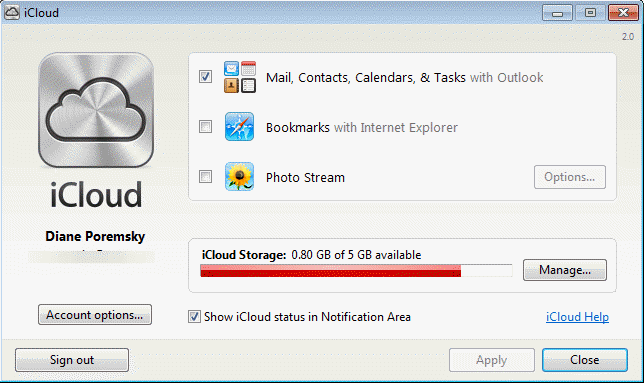
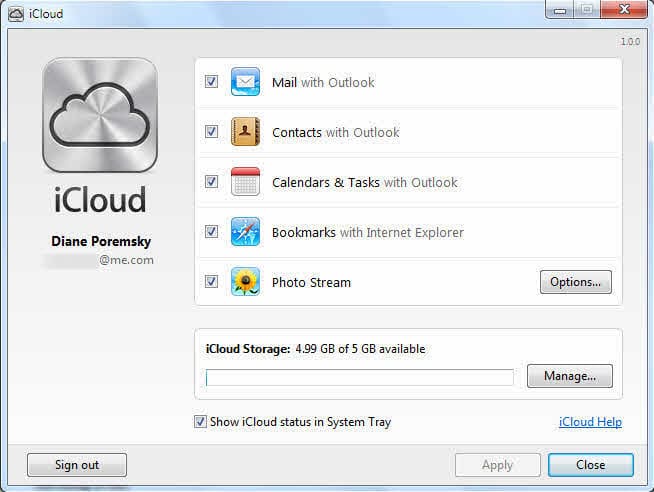
When you configure iCloud to sync Outlook calendar, contacts, and tasks data, the service creates a custom data store in Outlook, storing the data stream under the local appdata folder (your GUID may vary):
C:\Users\username\AppData\Local\974B7CD6-7080-4CDD-8C8F-564E6C7223DF.aplzod
There are two data files and two temp files in this folder. The "main.db-wal" file is a temp file and contains calendar data that syncs with the iCloud CalDAV server. This is a separate calendar and when it works correctly, your default calendar in Outlook will sync to iCloud.
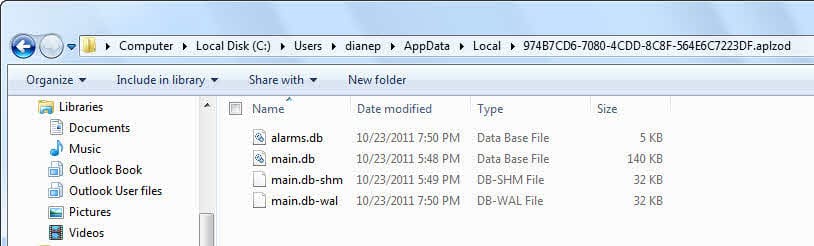
Tip: To quickly find this folder, open your Account Settings dialog, switch to the Data files tab then select the iCloud line and click the Open File Location button. (Although there is nothing you can do with them. At this point I'm not even sure it's worth backing them up, since everything is in the cloud)
Default Data Files
The ability to set the iCloud data file as the default so appointments display in the To-Do Bar depends on which iCloud version you are using. The data file used by iCloud 1.x (from iOS5) cannot be set as the default data file. The data file created by iCloud 2 (iOS6) can be set as the default data file if you use a POP3 account. It won't work for IMAP accounts. When iCloud is set as default and you use an IMAP account, you can't send email.
More information is available at Outlook and iCloud: default data files
Outlook opens, iCloud folders won't expand
When you receive the following error when trying to expand the iCloud folders:
Cannot expand the folder. The set of folders cannot be opened. The information store could not be opened.

Open the iCloud control panel and sign out of the iCloud, then sign back in (and enable syncing, if not enabled when you sign in).
If you added the iCloud service in Outlook's Account settings, Data files tab prior to receiving this error, you'll need to remove it from Outlook before the iCloud can add it back. Only the iCloud service can add the iCloud data file to the profile.
Sync Stops Working
We're seeing reporting that sync stops working. The symptoms vary, from new Contacts and Calendar created in Outlook syncing up to the iCloud but changes made on the iPhone or iPad not syncing down to Outlook to all of the Outlook Contacts disappearing from Outlook's "iCloud Contacts" folder and new calendar items not showing in Outlook.
There are three solutions, listed in the order of use. If the first one doesn't fix it, move on to the next one. (Repair is rarely needed.) In each case, you need to close Outlook first.
1. Deselect Calendar and Contact sync in the iCloud control panel, Apply, then re-enable it.
2. Sign out of the iCloud in the iCloud control panel, then sign back in.
3. Repair the Outlook installation in Control panel, Programs and Features. After rebooting the computer, everything should show up in Outlook again.
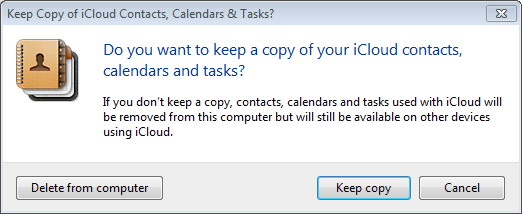
When you sign out of the iCloud, you'll receive a message asking if you want to keep a copy of the iCloud data or Delete then from the computer. If you are going to re-enable the iCloud, it doesn't matter as everything will sync back when you re-enable iCloud. If you are removing the iCloud from your computer, you should keep a copy.
General Issues
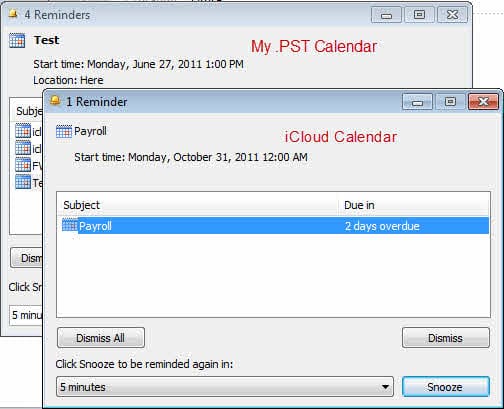
We're seeing reports from users that Outlook is hanging. Outlook goes into a hung state after the reminders fire and some mail downloads. In my case, I was getting two reminder dialogs, one for the iCloud and one for my other calendars. Removing the iCloud data file from your profile (open it using Control Panel, Mail) and stopping sync in the iCloud applet may allow Outlook to work for you. When you re-enable sync (using the Control panel, iCloud applet), the iCloud calendar and contacts folder will be recreated and the data synced down from the iCloud.
Along with Outlook hanging, I have two reminders dialogs coming up when I use iCloud 1. (This does not happen with iCloud 2.)
Instant Search doesn't find in all fields
When instant search doesn't find fields when searching records in the iCloud, verify the iCloud is enabled for search.
Press Ctrl+E or click in the search field then choose Search Tools, Locations to search. Is the iCloud enabled for search?
- If Instant search still won’t find content, you need to add the field to your view.
- If you aren’t using a List view (like phone list), you need to switch to it.
In Outlook 2010, switch to the View ribbon and click the Change View button to select a list view. In Outlook 2007, expand the View menu and select the phone list, By Category, or By Company view.
When in List view, right click on the row of field names above the contacts and choose Field Chooser. Find “Notes” in the field chooser dialog and drag it to the row of field names. (It should be in the Frequently used fields that display first.)
Now when you can search for Notes, you'll find them.

Sync Blackberry with Outlook's iCloud data file
I use the Blackberry desktop software to sync Outlook and my Blackberry. When I go into the Organizer, Configure settings, Advanced to map the iCloud folder, it returns an error.
This is because the desktop software syncs with an Outlook data file, not the iCloud's data file. Copy the items to your Outlook calendar or contacts folder to sync. (If the iCloud worked properly, it would not empty the local calendar or contacts folder, only sync with them.)
Disable iCloud Sync
To disable iCloud sync, open the iCloud control panel and deselect calendar and contact sync then sign out. Sign back in.
I turned off the iCloud sync but I get a message in iTunes which says that the Contacts and Calendars are being synced through Microsoft Exchange. I have never been connected to Microsoft Exchange. How can I stop this message and sync?
You need to reconfigure the device in iTunes. To do this, open iTunes and select the iPhone. Next, select the "Info" tab and scroll to the bottom, under Calendar and Contacts, and select how you want to sync.
Configuring @me.com Account in Outlook
When you create a @me.com account and enable email in iCloud, it creates an IMAP account in Outlook. The email is stored in a pst file.
Note: you can use this utility to set up only email. You do not need to sync calendar, tasks, and contacts.
The iCloud utility in Windows Control Panel configures the email account for you, including setting the Sent and Deleted items folder for the IMAP account (if using Outlook 2010). If you want to configure the email account yourself, try the following server names and port numbers. If they don't work, try changing the 6 in po6 to another number up to 99. However, it might be easier to configure the account on one computer using the iCloud utility then use those server names when you configure the account on other computers.
Incoming server names:imap.mail.me.com
More Settings, Advanced tab: Use port 993 and enable SSL
Outgoing Server:smtp.mail.me.com
More Settings, Advanced tab: Use port 587 and enable TLS
Username: alias only (not full email address)
More Information
iCloud: Troubleshooting iCloud Reminders and Tasks (Apple)
iCloud: Troubleshooting iCloud Contacts (Apple)
"Unsupported folder class" error when Outlook starts (MSKB)
More Outlook and iCloud articles at slipstick.com:
- iCloud error: Outlook isn't configured to have a default profile
- iCloud Add-in is not listed in Outlook Add-ins
- iCloud is hijacking Meeting Invitations
- How to fix the iCloud APLZOD.dll error in Outlook
- iCloud Doesn't Sync
- iCloud, Outlook 2016, and Windows 10
- iCloud for Outlook 2016
- Save New Contacts to iCloud Contacts
- Transfer POP3 Mail on an iPhone to Outlook
- Outlook crashes when syncing iCloud calendars
- Syncing iPhone Sent Messages with Outlook
- After Installing iCloud, Mail Won't Send?
- Create a Task and copy to another Tasks folder
- iCloud and Outlook Repair Now error
- Outlook and iCloud: What you need to know
- Outlook and iCloud: default data files
- Save appointments to a non-default Outlook calendar folder
- iCloud and Outlook Problems: Syncing Calendar
- Issues Syncing Outlook and iCloud Contacts

Matt Gant says
Hi Diane
Can you tell me why my icloud archive folder does not show up in Outlook 365 on Windows 10 PC? It is visible in Gmail and in Apple Mail on my iPhone, Mac, iPad and on the web browser icloud mail!
Diane Poremsky says
It should be visible - if its in other imap apps, it is subscribed. If you click the Archive button in Outlook, does it ask you to select a folder or move the message to the (hidden) archive folder?
right click on the inbox, choose imap folders... then query. Is the archive folder listed? if it doesn't have a folder icon next to it, subscribe to it.
Steven Van Linden says
HI,
I am using icloud for years on my Mac and on Windows.
I recentley bought a new windows computer and have troubels with outlook.
The check box for mail, contacts and calanders isn't even shown.
Working with office 2016 proffesional, windows 10.
Have the new version of icloud for windows.
Thanks.
Diane Poremsky says
Do you have the windows store version of icloud or the download from apple?
bhavin shah says
i want to attach my documents as a copy in Hotmail.com
Glenn says
Outlook configuration problem in iCloud.
Twice before I had this issue when I installed on a new laptop disk. Now I've got a new notebook have the same issue. I cannot remember how I solved it. I know I got help off the internet.
"Setup cannot continue because Outlook isn't configured to have a default profile. Check your Outlook setting and try again."
Diane Poremsky says
I'm guessing office was preinstalled and it was the store version and you installed another version - this is based on new computer and the error. AFAIK, all new computers are now shipping with the store preinstalled (Dell is for sure)... and many people are getting that error with icloud after installing the c2r or other non-store version (which does not yet work with icloud). We don't know why (yet) and the only fix is to reinstall windows. :( Microsoft is trying to figure out the cause and fix it without a reinstall.
1goetzylla says
Problem as of February 2018:
When adding an Icloud Account on a PC that runs Windows 10 all works with exception of the sync of sent messages.
The issue:
The folder for sent messages in outlook is called "Sent Items"
The folder for sent messages in icloud is called "Send Messages"
The solution:
To enable syn for sent messages from OUTLOOK you need to:
1. Subscribe to the "Sent Messages" folder from Icloud
1a) Right Click on Inbox in folders panel
1b) Select IMAP FOLDERS
1c) Click on QUERRY
1d) Select "Sent Messages" from Tab ALL and click on SUBSCRIBE
2) The SENT MESSAGES folder will show up in your folder panel. You will have to move sent messages manually into this folder from SENT ITEMS after sending them. RULES TO THIS AUTOMATICALLY WILL MOVE THE MESSAGES FOR YOU BUT THEY WILL NOT SYNC. IN ORDER FOR THE SYNC TO WORK YOU WILL NEED TO MOVE THEM MANUALLY.
This is obviously a workaround at this point. Please post a better fix if you know one.
Diane Poremsky says
My preference is to change the sent folder on the phone to use the same folder outlook is using. In iPhone settings, Accounts & Passwords, choose the Account, then click 'Account email@address' then Advanced and choose the Sent (and deleted) folder that outlook uses.
Garry says
Diane,
So I have always used Icloud for windows, never has it synced for me. It displays my Icloud calendars in outlook. But never has my outlook calendar synced with an Icloud calendar so that the appointment shows up in both calendars. Same with contacts, never have I entered a contact in either one and had it show up in the other. I should be using the latest Icloud for windows. the only time I have been able to truly sync a contact between the two and have it show up in Outlook contacts and icloud contacts is when I used Codetwo. however, that no longer works as it is just continually placing an outlook calendar item into Icloud calendar over and over and doesn't stop. I found Topalt, that also has bugs, it synced some items but not others, it didn't update if something was deleted from one to the other.
What I need,
If I enter a contact in outlook, that it syncs/gets added to icloud contacts or vise versa. I need the same thing for calendars.
How can I get something working? For years of using Icloud for windows I have never had it do what I listed I need. I have had it show my calendars and add my icloud account to the left side of the outlook. Also many companies block icloud email. However, the calendar and contacts still will show/work, it just won't send/receive icloud emails.
Latest Icloud for windows (not sure where to verify that)
Outlook 2016
Latest CodeTwo
Latest Topalt
Suggestions?
Diane Poremsky says
>> If I enter a contact in outlook, that it syncs/gets added to icloud contacts or vise versa. I need the same thing for calendars.
Are you creating the new items in the icloud calendar or contacts folders? icloud only syncs what is in the icloud folders.
If you create something on your phone or in icloud.com, does it sync down to outlook? if not, the addin could be disabled.
Srinivas B says
Hi.
I have been using icloud to sync my contacts between Outlook and my iphone/ipad since around 2011. Have faced intermittent issues but it has largely worked and had made my life easy! Some times for many months I have had to manually select icloud add-in everyday in Outlook. Sometime updates used to solve the issue and at other times reinstalling iCloud used to work.
However, the recent update to icloud about a few weeks back seems to have broken my back. ICloud add-in does not load. I have tried everything from all kinds of blogs including reinstalling icloud several times, deleting and reimporting contacts, manually changing registry values, etc. Nothing seems to work. Even if I manually select iCloud add-in nothing happens. When I try the next time, I notice the message "Not Loaded. A runtime error occurred during the loading of COM Add-in." under "Load Behavior".
Would you know anything about this?
I am currently using Outlook 2013 on a ThinkPad running Windows 7.
Thanks,
Srinivas
Jim Bolinski says
Hi Diane, and thank you for your contributions. I am using Outlook 2013, and have tried all the steps listed above. When doing the initial "sync" the contacts get to 44% then stops with an "Unexpected Error" I though it might be corrupted contact so I exported the contacts to a CSV, deleted them all, then re-imported the contacts, and still get the same error.
Diane Poremsky says
Are the contacts in icloud already? If not, import the contacts into the contacts folder in your pst then move a few at a time into the icloud folder (select and drag). If you don't have a ton of contacts, move maybe 30 at a time, if you have a lot, move 50 or so. If the error comes up, it most likely is with one of the contacts in the group you are trying to move. Try moving the contacts one or two at a time, to see which contact it is.
Bob says
Hi Diane, First, thanks for all the great tips. Having similar issues as the Barbara's below. Outlook 2007 syncs to icloud/iphones x2, but not back. Tried all 3 suggested fixes, including repair of icloud sync and aplzod reg fix. Sign in/out worked for a few days. Running W7 pro, icloud v7 (had issue on V5 also), outlook 2007 on Lenovo E560 .
Interesting is that I have exact setup on my old laptop, Lenovo thinkpad edge, and do NOT have this issue. It is specific to E560. Haven't uninstalled icloud sync yet~~ Also, I hid the offending aplzod crashing updates from earlier this summer on both. Thanks, Bob
Diane Poremsky says
All the same addins on both systems? There does seem to be a problem with 2 way sync all the time - I believe all of the complaints I've seen are using outlook 2007. At this time, the only fix i know is to uninstall/reinstall. I'm not sure if it is permanent though.
PeterGn says
G5 Close Outlook
G6 Copy xxx.ost: High-light it > Ctrl + c
G7 Paste xxx.ost: Ctrl + p. A new file "xxx - Copy.ost" is created in the same folder
H Restore the Outlook file in question
H1 Execute G1 trough G3
H2 Delete the file "xxx.ost"
H3 Delete the part " - Copy" in the file name of "xxx - Copy.ost" (do not delete the file itself)
so the file will be named "xxx.ost"
Diane Poremsky says
Copying a data file and using the copy fixes icloud sync how?
Barbara says
My icloud is not syncing with Outlook. Outlook is syncing with icloud but not vice versa. I have done the above steps except for repairing outlook. I have called apple and they have had me go through several steps. The signing in and out of icloud ap works for a few days but now does not work again. I have outlook 2013 and when I look under program and features it does not list outlook separately. I am assuming that It is just part of the microsoft package. I am wondering if the update had something to do with this since it worked fine until a few weeks ago.
Any help would be appreciated.
Diane Poremsky says
Something definitely broke it, just not sure what - the icloud update or outlook update. So far, no one who is affected can pinpoint a date when it started, so we can't trace it to a specific update.
Barbara Klenovich says
My icloud is not syncing from my phone to outlook but is syncing from outlook to iphone. When I do step 2 above, sign out and sign back in, it works for a few days and then goes back to not working. I have outlook 2013 and windows 8.
I am not sure how to repair outlook installation since my programs and features does not list outlook 2013 separately.
I have spoken repeatedly with apple support and they just have me do step 2 above.
Diane Poremsky says
This seems to be a problem for several people. One person used to delete the icloud email account from the profile after it was set up (he didn't use it for email) - he's leaving it in this time, we're waiting to see if this helps. (it's only been a few days).
Dan Casi says
I'm also in this situation. Did someone find any solution so far?
Ivonne says
good afternoon,
I have a DELL laptop Windows 10, office 2016, in which I set up an email account that connects to the exchange server 2010. It has the icloud calendar configured and is not synchronizing correctly. I uninstalled the icloud and installed again, same with the office, all the updates of windows were done, but it works a couple of days and it returns and it fails.
Diane Poremsky says
>> connects to the exchange server 2010
In most cases you don't need to use icloud with Exchange accounts as the account will sync with phones directly (as long as the admin didn't disable the functionality).
That said, it sounds like the addin might be getting disabled. See https://www.slipstick.com/outlook/icloud-sync-failure/ - there is a ready-to-use reg key at the bottom you can run to force Outlook to keep it enabled.
Julian Maples says
Having tried everything to get my new installation of Outlook 2016 to sync with iCloud like my outgoing 2007 did, I finally noticed that the applezod folder had not updated. So I deleted it and iCloud created a new one and the sync took place. Thank you for such a brilliant site. it had already saved my bacon when the Microsoft june update blew everything up,
Diane Poremsky says
Thanks for letting us know what worked!
Yann Shukor says
Finally this is how I fixed it:
Uninstalled iCloud, iTunes and other Apple modules
Removed Outlook profile, and uninstalled MS-Office
Cleaned local files and registry entries pertaining to Apple
Ran CCleaner
Reinstalled and reconfigured
Sync tested : OK
Yann Shukor says
A client's Outlook 2016 calendar isn't synchronizing with iCloud
The initial download functions properly and so the contacts and calendar objects are correctly populated
But updates made within Outlook aren't synchronized with iCloud.
Incidently there isn't an iCloud folder in the calendars screen
I disconnecte d the account and then reconnected it : no change
I uninstalled and reinstalled iCloud : no improvement
I repaired and reinstalled MS-Office : same
I installed iTunes : same
I temporarily disabled Eset NOD32 : no improvement either
I have now disabled two factor authentication and am waiting to test the clients computer
Any ideas ?
Adrian S says
Hi Diane,
Can you help?
icloud sync of mail, contacts and calendar all worked fine till the latest major update by MS. When I go to icloud contacts I get
"The set of folders cannot be opened. The information store could not be opened".
I followed the advice and deselected Mail link in icloud settings on my PC. When I hit apply the link reappears ie it won't disconnect.
I have read the threads and can't see an equivalent case.
Any advice?
Adrian
System fully up to date on checks
WIN10-64 (1703-15063.540), Office 365 (32 bit) (16.07726.1049) PC AMD Phenom II X6 - 8GB
Diane Poremsky says
Did you sign out of icloud and sign back in? (Don't save calendar and contacts locally when asked - they will sync back down)
Trevor says
Thanks! Logging out of iCloud and back in worked for me.. I also updated the iCloud app from V5 to V7.
Douglas A. says
i encountered the issue with Outlook 10 after Microsoft's recent
update. I have a Lenovo laptop and it has iCloud so I can sync
Mail, Contacts, Calendars and Tasks. i can no longer access
those items in Outlook. I have uninstalled iCloud and changed
the laptop registry to allow for the 'AllowUnregisteredMapiServices'
. I clicked the check box in iCloud to turn off, rebooted the computer,
and turn back on Mail, Contacts...then clicked the check box
to turn on the Mail, Contacts, etc. Nothing has worked.
Outlook continues to spews the message 'the set of
folders cannot not be accessed.'
HELP! What do I have to do to fix this? thanks.
Diane Poremsky says
Which version of Office do you have have installed? The key is only needed for outlook 2007 but should work with all versions, but is not recommended - you need to change the 12 in the path to use the correct office version.
Douglas A. says
MS Office Professional 2010 vers. 14.0.7185.5000 (32 bit)
Outlook setup as IMAP.
Diane Poremsky says
The registry AllowUnregisteredMapiServices key is not needed for Outlook 2010 (it was disabled in a later update.) Did you sign out of icloud or just untick calendar & contact sync? (You need to sign out).
Jim Mc says
I used to have distribution lists in my contacts in Outlook 2007. They would not show up in the iCloud but I could still use them by clicking on my contacts on Outlook. Now they are gone. I wonder if this has anything to do with uninstalling KB3191898. I actually had to do that twice. Do you know anyway to retrieve these distribution lists?
Thanks
Diane Poremsky says
that shouldn't have deleted the contact groups but i'm not sure if icloud would delete them when it merges contacts with the icloud. Have you looked in the Deleted items folder? Turn off the reading pane and sort by the icon column so they sort by item type then look for the group icons.
Derick says
Diane,
I backed up all the files for Outlook 2010 before switching computers. The calendar is shared
by a few users. Now, the calendar for Outlook is showing unwanted or added
events on the calendar. It is always for past dates that this appears. Any
idea what is going on? Thanks.
Diane Poremsky says
What type of email accounts - pop, imap, exchange?
Did you import the calendar or open the data file the calendar was in?
Are they valid items, just older or things you don't recognize?
Robert Hall says
iCloud contacts do not sort properly by category.
They used to until new updates to Apple iPhone OS and Win10 Creator.
I need my outlook contact categories.
Help, please
Diane Poremsky says
How are they sorting? I'm not able to repro any unusual behavior so far - it seems to work ok here.
Deb says
Is there ANY way to sync my iphone notes with Outlook 2010? I have read that this is no longer allowed. Somehow all my notes are on my phone and no longer exist on the desktop anymore. I really need a solution!
Diane Poremsky says
Notes were lost when icloud updated the notes on their end. I don't recall if companionlink syncs notes but a 3rd party utility or app is your only option.
If you use outlook.com or exchange server, notes will sync without an additional utility or app.
Ann H Sablosky says
So, as I have read this thread, in order to get Outlook 16.0 to synch with
iCloud calendar with the latest Win10 update the 2 factor identification has
to be turned on??? Really? The registry fixes for 7.0 don't seem to apply.
KB3191828 doesn't exist on my machine. The latest updates on my machine
on 6/15/17 was 4022725 and 4022405
Diane Poremsky says
Correct, the registry key is only for outlook 2007. icloud sync works without 2-factor (it's an apple utility) but to add the imap account, you need an app password. (i'm using icloud here and refuse to enable 2-factor as it's too annoying when you have multiple devices but i don't use icloud email. )
Ann H Sablosky says
I don't use icloud email either but I still want to
sync my calendar and contacts without going
thru a 2 factor log in. Any ideas?
Diane Poremsky says
if you are only syncing calendar & contacts, you should be ok as is - i did not need to enable it for my account. After the account is set up in outlook, delete the imap account from your profile.
John Hughes says
Outlook 2007 KB3191898. Thanks for that. Followed procedures you suggested.
iCloud toolbar and data file reappeared in Outlook but Calendar & Contacts
not populated. Uninstalled KB3191828. Re-start. Reloaded Outlook. ICloud
Calendar & Contacts now visible in 'All Calendars'/'All Contacts' and could be
selected. Both repopulated. but showing the other calendars side-by-side.
(Somewhat crowded!) Deselected the others. All is well. Thanks a lot!
Diane Poremsky says
Now that you uninstalled the update, we have a registry key that disables the security block that broke iCloud. https://www.slipstick.com/outlook/updates/outlooks-june-13-2017-security-update/#icloud
:)
CMA says
Diane, how and where do you add the registry key? I am not using a group policy.
Diane Poremsky says
I have ready to use registry files at https://www.slipstick.com/outlook/updates/outlooks-june-13-2017-security-update/#icloud - down load the first one and double click to run it (if it's saved as a txt file, change the extension to reg).
Margot Laue says
When I click on your link, I get a text file in Chrome. How does one change the extension to .reg? Sorry, but I need really simple instructions.
Diane Poremsky says
There are a few ways:
If you right click on the link and choose Save as, it won't open in a new browser window and here, it does save as a reg file.
If you open in a new window, put the filename in quotes (and remove .txt, if present): "filename.reg"
Using quotes around the filename works in my Chrome - it may not work in all browsers though.
If it is already saved as text file, change file explorer to show file extensions (in windows 8/10, it's on the right side of the View ribbon - add a check to File name extensions) then select the file and press F2 (or right click and choose Rename) - backspace to remove .txt, press Enter to save.
Mike F says
I just was notified that apple recognizes that there is instability and fixes that are needed for iCloud email to work properly in the MS-Outlook 2007 or later versions. I am currently down loading it now. I will post the results of the installation after completed.
Mike F.
Diane Poremsky says
thanks for letting me know - i will check it out. I was expecting them to tell everyone to set the key rather than updating their software - hope it doesn't just set the key. :)
Diane Poremsky says
What version did it install? I have 6.2.1 and downloaded a fresh copy - its the same build.
Mikkel Torup says
Hello Slipstick,
Finally I found a place on the internet which described the problem i have with my synchronisation of my contacts, calendar etc.
I have a Lenovo laptop running Windows 10, with the latest version of iCloud for Windows and have Microsoft Outlook 2007 installed as my email client. When I used Microsoft Outlook Connector to synchronise my data, there were no problem synchronising there were no problems.
Now Microsoft has changed the synchronisation to use Microsoft Exchange and now I only have archives of my data, and not updated for some time. Is there a way to get my data synchronised again or shall I live with it? Is Microsoft aware of the bug and work on a solution?
I would also like to export my data from iCloud to my Hotmail, is that possible in a way?
I look forward to have a comment on my question and will recommend your site to everybody that I know. I am living in the little country of Denmark and use my programs on Danish.
Have a great day :)
I look forward to hear from you
Thank you in advance
Mikkel Torup
Diane Poremsky says
>> Now Microsoft has changed the synchronisation to use Microsoft Exchange and now I only have archives of my data, and not updated for some time. Is there a way to get my data synchronised again or shall I live with it? Is Microsoft aware of the bug and work on a solution?
The connector isn't supported after the account is moved to Exchange... but as long as all updates are installed, Outlook 2007 will sync with Outlook.com using Exchange services until Oct 31 2017 (when they turn off support for the older protocols and only support MAPI over HTTPS). You don't need iCloud for this.
Mikkel Torup says
Thank you for your reply Diane, I removed KB3191898 and now my synchronisation works fine again.
I do not use Microsoft Outlook Connector anymore, I use Microsoft Exchange. So what do you mean with 'when they turn off support for the older protocols and you don't need iCloud for this' ?
Diane Poremsky says
The connector doesn't work anymore - it died when outlook.com accounts moved to office 365 hosting. You need to set the account up as Microsoft Exchange services to sync calendar and contacts.
>> they turn off support for the older protocols and you don't need iCloud for this'
In October 2017, they will turn off RPC over HTTPS protocol - that is what outlook 2017 uses to sync with Exchange. https://www.slipstick.com/office-365/deprecation-rpc-http/
I'm not exactly sure what i meant about not needing icloud in that sentence - except that when you use Outlook.com or Exchange mailbox, iPhone (and android) can sync with the server and the server syncs with outlook - no need for icloud in this situation.
Vince says
Looks like I got caught by the Outlook 2007 KB3191898 glitch. Has iCloud for Windows v6.2.1 finally dropped support for Outlook 2007?
iCloud Contacts disappeared from both of my machines in the past few days. Logging out/in fixed it on the Outlook-2010 machine, but no such luck on the machine with Outlook-2007.
Both are running Windows-10/64bit. Is there hope for the Outlook 2007 machine? Do you think upgrading it to Outlook-2010 will fit it? While we have these Windows machines, we also have Macs and plenty of iOS devices. We are heavy into Apple EcoSystem and rely on iCloud Syncing.
Diane Poremsky says
No, AFAIK, Apple hasn't dropped support. Microsoft just screwed up. :) Only Outlook 2007 is affected - upgrading will fix it, or uninstall the update until Microsoft releases an update. (Unless there is a reason you need outlook 2007, i would upgrade to 2010.)
Vince says
Well, something changed, that affected BOTH machines. Maybe it was the “Two-Factor Authentication” because both of our iCloud Accounts appear to have it on now. To recap …
Machine #1
Windows-10/64bit v1703 (CU)
iTunes/iCloud (latest installed)
Office-2010 Pro
-
Contacts disappeared from Outlook 2010 (in the last few days), but Sign-In/Out fixed it.
I also noticed that KB3191898 was never installed on this machine.
Machine #2
Windows-10/64bit v1607 (AU)
iTunes/iCloud (latest installed)
Office-2007 Pro
-
Contacts disappeared from Outlook 2007 (in the last few days), and Sign-In/Out DID NOT fix it.
I noticed that KB3191898 WAS installed on this machine (thanks so much for pointing this out).
Steps to Fix:
Sign Out of iCloud (all iCloud data and Plugins seem to get removed)
Uninstall KB3191898
Used Windows-10 Update Show-Hide Tool … to Hide KB3191898
https://support.microsoft.com/en-us/help/3183922/how-to-temporarily-prevent-a-windows-update-from-reinstalling-in-windows-10
Reboot
Start iCloud for Windows and Turn-on Outlook sync. Tell it to Merge Everything
Start Outlook-2007
Contacts (iCloud) and IMAP Email for Apple Account are WORKING AGAIN !
I live in Outlook, so upgrades are scary. I also do some Access VBA for a client, and they are still on Office-2007.
I could probably get us both upgraded if I could find some cheap licenses for Outlook-2010.
Neither of us are too keen on Outlook-2013 changes (I guess we are both too old school).
Thanks Diane, you saved me once again. Hopefully my post above will help someone.
Diane Poremsky says
>> Maybe it was the “Two-Factor Authentication” because both of our iCloud Accounts appear to have it on now.
I need to test this - trying to avoid it with my own account as it's a PITA. :(
>> I also noticed that KB3191898 was never installed on this machine.
An update was installed - Outlook 2010 has a different #. But - it didn't have the iCloud bug.
>> I could probably get us both upgraded if I could find some cheap licenses for Outlook-2010.
Good luck finding legal copies at this point. :( If you do find some, go for it. Security updates will soon be ending for outlook 2007.
Vince says
>> I need to test this - trying to avoid it with my own account as it's a PITA. :(
After latest iOS upgrade, it's just ON, and I don't see a way to turn it off. I guess I'll just go-with-the-flow (it's better I guess). However, it seems to be linked to a phone number so I guess I can't get them on iPad-Pro.
I wonder who is gonna help me when/if I switch to my Mac full-time and I'm running Office Home and Business 2016 for Mac? :)
Well, if not you ... you are still on-the-hook. I will still be supporting some Windows machines running iCloud for Windows :)
>> Outlook 2010 has a different #. But - it didn't have the iCloud bug.
Thanks. That explains that.
>> Good luck finding legal copies at this point. :( If you do find some, go for it.
I was hoping you would tell me the secret place :)
>> Security updates will soon be ending for outlook 2007.
Yeah, I figured that was coming soon. Hard to believe it's been 10 years. If that doesn't get me, Apple's iCloud support for Outlook-2007 will :(
Diane Poremsky says
>> After latest iOS upgrade, it's just ON, and I don't see a way to turn it off.
When the phone comes back to life after the update, it asks to turn it on but you can decline - its easy to miss it though. Twice i went thru the setup screen too fast and enabled it. My daughter shares some apps in my iTunes account which made it really annoying and I had to turn it off in Settings > Apple id/account.
I don't consider myself an outlook for mac expert, but i do have one and know a little about the office software. I'm still trying to get comfortable with the os tho.
Vince says
>> When the phone comes back to life after the update, it asks to turn it on but you can decline - its easy to miss it though.
Good tip.
>> My daughter shares some apps in my iTunes account which made it really annoying and I had to turn it off in Settings > Apple id/account.
Yes, my family also shares the Apple-ID for our iTunes/App-Store Purchases. And then we all have our own personal Apple-IDs for iCloud and Email. It was the only way to do it in the beginning and it still works for us. I haven't really explored the new Family Sharing feature or if it's compatible with how we have been running all these years.
>> I don't consider myself an outlook for mac expert, but i do have one and know a little about the office software. I'm still trying to get comfortable with the os tho.
Oh really? Have you published any "Office for Mac" articles? Yes, I know what you mean about switching back-and-forth between OS. My optimistic view of it is that ... I already learnt and use iOS and Android, so what's one more? :)
Diane Poremsky says
>>> Have you published any "Office for Mac" articles?
Yeah, but I know a lot of people who know a lot more about it than i do - I'm not the smartest person in the room when we discuss mac. :) On the other hand, in a room full of outlook for windows product team members, i often know more than any one person because they are focused on the particular area they work in. They have depth, I have breadth.
David says
Just like a lot of others I have 'lost' my contacts on Outlook2007. I've tried to uninstall KB3191898 but keep getting the message: "Error applying transforms. Verify that the specified transforms paths are valid" Now that's an error message beyond my pay grade! Any ideas? Thanks in advance.
Diane Poremsky says
It's beyond mine too. LOL. Actually, it sounds like the installation file is corrupt. I'll check with Microsoft on how to fix it (and try and find out when we can expect and updated update. :))
Diana says
I did what Vince suggested regarding SFC for answer to
"Error applying transforms". Windows Resource Protection
didn't find any integrity violations for my Windows 7 Dell PC. Reads
like I'm unlikely to get past this error. Last Windows update
installed on 6/17/2017 at 3:07 am, but there isn't any 'history'
to show that happened. Reads like you might check with MS
on how to fix a corrupted installation file, Diane, but how promising is it
that Microsoft will update with a repair for KB3191898? Should I wait
a while longer, or call in the Geek Squad? I'm at a loss to know what
I'm suppose to do RE apple's 2-way authentication. You said
I need to enable 2 factor and use an app password in outlook. I'm
assuming this is an ID & pswd 'different' from my roadrunner email
Account?
If I call Apple support, will they help with enabling for 2 factor for
iCloud? I don't know how to determine whether this feature is already
enabled for my Outlook 7 app, nor do I know how to look for where its turned
"on" for iCloud. I'm assuming its already 'on' for iCloud?
Diane Poremsky says
I'm pinging Microsoft again on this error. No idea yet on when we can expect an update - they know what caused it, which is step 1 in fixing it.
I don't think 2-way auth is causing it - that would give you a password - either not accepting the password or telling you it is wrong.
Apple can certainly help you set it up tho - you need to do it from the phone and (AFAIK) create the app passwords at icloud.com, not on the phone.
Vince says
Try Window's-10 SFC and DISM commands (Google it). If you can get it uninstalled successfully, see my post above for the rest of the fix.
David Bray says
Having encountered the same "Error applying transforms..." message while attempting to uninstall the offending patch, I ran SFC as Vince suggested, resulting in no issues found by SFC with the final message "Windows Resource Protection did not find any integrity violations."
Based on this, I didn't attempt to run DISM.
Has anyone found a workaround or solution, or must we simply wait and hope a fix is released sooner than later?
Thx, all.
Diane Poremsky says
I think it's a bad file in mso cache folder but the fix is a PITA (and may not apply to 2007 - it was for 2000). In 2000, the error came up with copies of office installed by the OEM and required you to reinstall office. That is not necessarily a good solution, and won't work if you don't have a disk.
https://support.microsoft.com/en-us/help/299699/-error-applying-transforms.-verify-that-the-specified-transform-paths-are-valid-error-message-when-you-run-the-office-2000-setup-program
This article deals with general installer errors - of which the transforms error is one.
https://support.microsoft.com/en-us/help/2438651/how-to-troubleshoot-windows-installer-errors
Vince says
Maybe follow accepted procedures to "repair your Office 2007-2010" installation? I don't really know them, but somehow I think it involves re-installing Office, or doing a repair or overlay install.
In light of Diane's post, maybe this will help:
https://social.technet.microsoft.com/Forums/ie/en-US/14c7bca4-39ab-4c8f-9f22-9d59fbc16ffa/office-repair-and-msocache?forum=officeitproprevious
Jason says
THANK YOU!!! I'm so glad I found this. I'm running Outlook 2007 with Windows 10
I have been searching for a fix for days. regarding the APLZOD.dll error. I have uninstalled (But not blocked) the Windows update Outlook 2007 KB number is KB3191898 and my icalendar in working again! Thank you, Thank you.
Diane says
I have not uninstalled KB3191898. Have they updated the glitch so that my icloud calendar should now be syncing with my Outlook 2007 calendar?
Diane Poremsky says
To the best of my knowledge, no, not yet. It should be fixed "soon" but i have not been given an ETA yet.
Miles says
I spent all day on why my icloud contacts were not showing up in Outlook 2007. Thank you for this info!
KB3191898 was the culprit. I uninstalled it, then restarted my computer, then had to sign out of iCloud.
It works!
Diana says
I'm so excited to believe you have provided an answer, Diane, to 'Business Contact
Mgr could not complete your last action .
Outlook launches okay to inbox. Yesterday, when going to contacts, the system
responded with 'Set of folders cannot be opened. MAPI was unable to load the information service
C:PROGRAM...COMMON...AppleINTERNET SERVICES... APLZOD.dll .
Be sure the service is correctly installed & configured. Today, I don't get the error
anymore, but all indications of my connectivity with calendar and contacts
in icloud have vanished.
Today, when I try to delete the offending Microsoft update install 6/15/2017,
KB3191898, I receive message "Error applying transforms.
Verify that the specified transform paths are valid." I've never tried uninstalling a
single line item out of a bunch of Microsoft updates installed on the same date.
Do I have to log on my PC as 'administrator'?
I am running Windows 7 Home Premium - version 6.1.7601 service pack 1, build 7601
I have Apple's iphone 4S. Syncing was working just fine before june 15.
Diane Poremsky says
microsoft may have pushed out an update to fix the icloud issue if you didn't uninstall the update (they knew what happened by yesterday afternoon). Now... as if the bad update wasn't enough hassle for icloud, apple also forced icloud access from 3rd party apps to require 2 factor authentication. I'm not sure if this also affects syncing calendar & contacts (i need to test it)- it will affect icloud mail.
David Bray says
Any fix yet for the "Error applying transforms ..." issue? I'm likewise afflicted. :(
Diane Poremsky says
No, but we do have sone to fix the issue that prevents icloud from loading, so uninstall is not needed:
https://www.slipstick.com/outlook/updates/outlooks-june-13-2017-security-update/#icloud
Kevin says
I have the same issue with Outlook 2016 a under Windows10
Fixed the issue at the office with Outlook 2007... Now can't find a fix for Outlook2016
Diane Poremsky says
the very same symptoms? i tested outlook 2010 and it was ok - the testers at microsoft said 2013 and 2016 were ok too.
On June 15, apple began forcing users to use 2 factor auth if they are using 3rd party apps - you need to enable 2 factor and use an app password in outlook. i have not tested the behavior with the icloud addin (since its not 3rd party) but imap accounts will need the app password.
Chris says
Hi,
The latest update (~15/6/2017) did break the link between 2007 Outlook and iCloud for me.
The solution below isn't so easy with Windows 10 though, as I think the home edition doesn't allow automatic updates of windows to be turned off, or for specific updates to be turned on.
There is an option not to update other Microsoft products automatically though (under Advanced settings in Windows Update), so I'm presuming that would work.
I would agree with the identified update with outlook (KB3191898)... uninstalling it has corrected this
Thanks for the help
Chris
Diane Poremsky says
did you try the 'block updates' utility? it's about halfway do the page at https://support.microsoft.com/en-us/help/3183922/how-to-temporarily-prevent-a-windows-update-from-reinstalling-in-windows-10
Angela says
Thank you very much for the link - I didn't know about this utility. Appreciate it!
Angela says
Thank you! It helped tremendously to know which update (KB3191898) was the culprit.
Dana Larmon says
Using Outlook 2013. Outlook keeps asking for my iCloud passwords (two accounts). Happily retrieves my Gmail account. Noticed the issue this morning, and issue has continued throughout today.
Diane Poremsky says
its a new icloud policy - you need to enable 2 factor authentication and use an app password in non-apple programs. This went into effect june 15.
Vince says
You know the passwords, but pretty sure the "Login Name" is the FULL Apple-ID (formatted like a good email address).
Diane Poremsky says
Correct.
TJSchuetz says
Had this issue in Outlook 2010 on Windows 10. System had been updated from 2007 to 2010 Office but found KB3203467 to be the issue - uninstalled it and voila!
Vince says
Interesting. On my other machine (Machine #1 with Office-2010) it still has KB3203467 installed (I didn't mess with it) but iCloud Contacts and Apple-ID IMAP email are working fine in this machine's Outlook-2010.
If did go wonky recently, but Sign-In/Out fixed it.
Diane Poremsky says
The icloud problem is only in 2007.
Andy Balik says
Hi Diane,
I have outlook 2007 and am now no longer seeing my iCloud calendar listed and contacts are blank. When I click on the iCloud mail folder I get this error message. MAPI was unable to load the information service C:PROGRA~2COMMON~1AppleINTERN~1APLZOD.dll. Be sure the service is correctly installed and configured. I am running windows 10. I logged out of icloud and signed back in and it is saying that it is synced with outlook? Any help would be appreciated! Thanks Andy
Diane Poremsky says
It's a bug in the latest outlook update - KB3191898 - uninstall it from programs and features then hide it in windows update so its not installed again.
Liz says
Diane - I uninstalled the update, but when I try to stop the update again and hide it, I cannot. It just automatically installs.
Margot Laue says
When I go to Control Panel>All Control Panel Items, I don't find a Windows Update icon. I was able to uninstall the security update and got my iCloud contacts back! Yay! But I am afraid the security update will reinstall because I didn't hide it. How do I hide it if I can't change the update schedule or where can I find that option. I have Windows 10.
Diane Poremsky says
try the show or hide troubleshooter here - https://support.microsoft.com/en-us/help/3073930/how-to-temporarily-prevent-a-driver-update-from-reinstalling-in-windows-10
Mike says
This was for drivers, but had a link to 3183922 How to temporarily prevent a Windows Update from reinstalling in Windows 10 at https://support.microsoft.com/en-us/help/3183922/how-to-temporarily-prevent-a-windows-update-from-reinstalling-in-windows-10
Jon says
Having a problem with icloud for windows 6.2.1 and Outlook 2007 since
the recent large windows 10 update (or possibly the 6.2.1 update not sure)
icloud calendar and contacts are not available in Outlook with the cant find APLZOD error. Icloud refresh add-in is no longer present as well.
Problem is happening on multiple PC's. I have tried all of the prior
recommended fixes for similar issues :
Log out/in of iCloud
Uncheck/recheck the calendar/contacts/task option in ICloud control panel
reinstall incloud
Delete the icloud data file from outlook
repair OUtlook 2007 .
In all cases icloud for windows resynchs with icloud and
creates the APLZOD folder and files, but those are not visible to outlook 2007 and
the add-in refresh button does not reappear.
Any assistance would be greatly appreciated.
Diane Poremsky says
I have several reports - we know for sure there are issues with attachments and the Outlook update. I'm assuming this the same update affecting iCloud but haven't had a chance to test it yet to be sure and the people who brought it to my attention uninstalled all updates that could be uninstalled, rather than a couple at a time. (I know, it's a PITA to do one at a time. :))
Jon says
Thanks Diane, Are you referring to uninstalling all of the Icloud updates or Windows updates?
Diane Poremsky says
windows, specifically the outlook update. I am just getting ready to start uninstalling - I'll start with outlook and hope that is the problematic one. (Another user reported uninstalling all windows updates installed yesterday and it worked again - he did a mass install rather than one at a time so I don't know which is at fault for sure. :()
I already tried reinstalling iCloud and signing out/in - that does not fix it.
Zach says
What happens when you turn off the auto updates and hide the update. Can I then turn the auto updates back on? My company has some features "locked down" and the auto update feature is one of those, I can get the admin to switch it - but is going to want to turn it back on. Will it automatically install that update afterwards? Thanks!
Diane Poremsky says
Yes, it can be undone later - if they release an new patch rather than updating the old one, you'll get it without unhiding the update, but it's also easy to unhide the update if they fix it.
Diane Poremsky says
Ok... you just need to uninstall the Outlook update - KB3191898 - that fixed the icloud here. After removing it, you'll need to hide it so windows doesn't install it again. Do a check for updates then select the outlook update, right click and hide it.
Bruce Lorie says
After several attempts at other suggestions, this one worked perfectly the first time. Thank you!
Margot Laue says
I found it, but it doesn't give me an option to hide it. It only allows me to uninstall it.
Diane Poremsky says
See https://www.outlook-tips.net/tips/icloud-work-outlook-2007/#uninstall - make sure you do the steps in that order - if auto updates are left enabled, it will come right back. You can turn auto updates back on after hiding it.
Tim says
Can you tell me how to do this? Or the steps to take in order to uninstall an Outlook update at least?
Diane Poremsky says
See https://www.outlook-tips.net/tips/icloud-work-outlook-2007/#uninstall for the steps to uninstall and hide the update. Make sure you turn off auto updating first or it will be reinstalled!
Christine says
I am trying to fix this for my boss but can you explain it set by step so I can do it on his computer with out him yelling at me lol
Diane Poremsky says
Steps to hide the update are here - https://www.outlook-tips.net/tips/icloud-work-outlook-2007/#uninstall
John Hall says
Thank you Diane. This resolved my issue instantly. You are a star!
CMA says
Diane, you are a lifesaver! Thank you for your guidance and detailed instructions for restoring the icloud link following this security update. Unfortunately, it took me several hours and much troubleshooting to finally make it to this forum. I was going a bit nuts!
Jen says
I just loaded the icloud software on my PC in order to access a shared photo folder. Arrggg. Hours later I am in crisis mode. Outlook will not open, no matter what I do. Help! Running MS365 and Outlook 2013
Diane Poremsky says
When you set up icloud, did you tell it to sync with outlook (on the icloud control panel) ? Sign out of icloud and see if that fixes outlook - then sign back in, and don't enable calendar & contact sync. You could also try starting outlook in safe mode and unticking the icloud addin.
To open Outlook in Safe mode: Close Outlook then hold Ctrl as you click on the Outlook icon. You'll get a message asking if you want to start in Safe mode. Click Ok.
Franc says
After the today`s update of Windows 10, syncing of iCloud with Outlook iCloud items failed. I removed add-in, logged out from iCloud in my PC, restarted computer and logged in iCloud again. Everything seems to go well but iCloud add-in for Outlook did not install again which results in Outlook not syncing with iCloud. I can not find a way to get iCloud add-in back to Outlook. It is not disabled only, I went through the lists but it does not show even in registry. I need to install it again. Please help. Thanks. Franc
Diane Poremsky says
I don't think you needed to uninstall it - just sign out and sign back in.
>> but iCloud add-in for Outlook did not install again
Do you get any error messages?
Lindsay Graham says
Just starting to research problems my partner is having with multiple calendars and multiple reminders in Outlook 365 (running under Windows 10). It may be related to the presence of iCloud which she installed to facilitate syncing with her iPhone. I see above that Office 365 does not need (and may conflict with) iCloud as it supports Exchange ActiveSync.
1. Can she safely get rid of iCloud? At this stage, she wants to sync only her calendar and contacts list, but not emails.
2. Any useful sources for sorting out multiple calendars/reminders in Outlook 365?
Diane Poremsky says
1. If she uses Outlook.com email or Exchange server mailbox, yes, she can get rid of icloud and just sync directly with the server. (Just having Office 365 software subscription isn't enough.)
2. Offhand no. What problems are you having? As an FYI, Reminders will fire from any calendar in a mailbox in the newer versions of outlook. This cannot be disabled.
Lindsay Graham says
Thanks, Diane, and my apologies for not responding earlier.
1. She uses POP3. Would syncing directly with the server (is that Exchange ActiveSync?) enable her to seamlessly sync emails, calendar, address book, notes etc with her iPhone?
2. She has 3 calendars, but uses only one and we can't remove the other 2. She was getting 2 sets of reminders with slightly different layouts (one for recurring, one for non-recurring). Then I did /cleanreminders as suggested elsewhere on your site, and the non-recurring reminders no longer pop up.
Any thoughts? Snips or screenshots would make it easier to explain, but I can't seem to put them in here.
Diane Poremsky says
1. She has two options: use icloud addin to sync or an outlook.com account. Either will work. Outlook.com will add a second account to the profile as an exchange account (not ActiveSync - that is no longer supported in the desktop client) - if she is looking to get a new address, this would be the best solution but if she is keeping her pop account, icloud might be better.
2. It sounds like she has multiple data files that were set as default as some point. https://www.slipstick.com/outlook/delete-outlooks-default-folders/ has steps to delete the folders in the non-default data files.
You should be able to add up to 3 files using the little camera icon on the lower right of the comment field.
Lindsay Graham says
Thanks again for all your help, Diane.
1. We'll try to solve a few peripheral problems before deciding. Probably iCloud, because she wants to retain her email address.
2. Deleting folders is not the problem. She has 3 calendars (see snip 1) -- only the iCloud calendar is used, but how can we delete the other 2 when R-click 'Delete Calendar' is greyed out? It is not greyed out for the iCloud calendar.
3. Outlook > Account settings > Data files (see snip 2) shows 3 pst files of the same name. There is only one pst file on E:/ (an internal hard drive). On the C:/ drive the only pst file is Owner.pst (very small, in a printer folder in Program Data). Why are 3 pst files shown and how do I get rid of 2 of them?
How do I get word wrap when composing a reply in this thread?
Diane Poremsky says
2. Normally, You need to use code to delete these - or create a new pst. But it looks like one is a second iclous cander - that should be able to be deleted. You might need to log into icloud.com to delete it. Calendar -Outlook is your default calendar. You cannot delete the folder in your default pst file - you can try hiding it, but it might come back. instructions are at https://www.slipstick.com/outlook/delete-outlooks-default-folders/
3. Those are ghost pst files. Try this: close Outlook, open control panel and find Mail. Open your profile and remove all 3 pst files (it might only let you remove 2). If you do remove all 3, add it back.
I don't know why word wrap isn't working - it used to. :( Definitely highly annoying. (I type it in notepad then paste the text in.)
DennisG says
Recently outlook started to strip out a certain email address from anytime I send an email to that email address. For example, if I am emailing a few people and xxx@yyy.com is in that list of receipients, they never get it and it is removed when people reply to all. It's super odd. Every hear of this before? Not sure if iCloud associated or not.
Thanks in advance!
Diane Poremsky says
I doubt it is icloud related... more likely the mail server or security software. Is this happening with the gmail account? What security software do you use? Is it filtering email? Is the address removed from the sent item in your mailbox? If you send it using web access, is it removed?
I'm seen something similar happen to the autocomplete list if an address bounces, but never had one removed from the address fields.
John McCarthy says
I can put an appointment into my sycd diary with outlookicloud which connects to my phone. However, when I go back into my desktop outlook and make a change. It makes the time come up as AM? eg: I have a 1pm meeting to 2pm. Then it changes to 3pm. I go into update it and the 3pm changes to 3am and I can't get it to go back to 3pm? How can I fix this?
Here's the problem here recorded. Love to be able to fix it.
http://screencast-o-matic.com/watch/cbfFhOX1u0
Diane Poremsky says
I haven't seen all of those issues, but I'm looking into it. What I'm seeing is the icloud web access is creating appointments on Pacific time, I'm on eastern time, icloud is set to eastern time. I haven't been able to repro any other weirdness though.
Mike says
Diane,
This seems to be the most informative discussion board for what appears to have been a problem for users since about 2012?
I first encountered this issue when outlook (which version I couldn't say) stopped syncing with itunes (version no idea). I then started using icloud because I was told it work solve the issue. It seems to me that syncing issues crop up to coincide with updates to either platform - microsoft or apple.
I have a yahoo account that I have used for years and with various iterations of windows/outlook/iOS. I am now using outlook 2013 on Windows 10 and I am having no end of problems.
I am not a computer person and become frustrated at spending hours trying to get programs to talk to each other. Surely there must be a simply solution? I want to spend my time dealing with the emails - not trying to fix syncing issues. Any suggestions?
Thanks
Diane Poremsky says
>>>It seems to me that syncing issues crop up to coincide with updates to either platform - microsoft or apple
pretty much... the biggest problems seem to be that outlook disables the icloud because it causes it to crash.
Yahoo email should works ok - but depending on what security you use, you might need to use an app password.
Gerhard Wagner says
My Outlook 2016 stopped syncing the folders with the iCloud after I did an update to iOS10.3.1, on my iPhone, which forced me to change my Apple ID password eventually during the setup, when the Two-Factor Authentication was switched on automatically during the update.
I followed pretty all of the suggestions to re-instate the Outlook/iCloud collaboration like switching off and on the Mail option in iCloud, signing out and in to iCloud, re-installing iCloud, repairing Outlook, installing the Office Analysis tool from Microsoft, etc.
Finally, I decided to simply remove the .ost file from the profile in C:Users'username'AppDataLocalMicrosoftOutlook'file.ost' and a restart of Outlook. Outlook created a new .ost and all data were successfully synced.
chris says
trying to reset my ipad 2 --downloaded ver 9 --then was asked to enter the first login info to icloud---help!!
Diane Poremsky says
This is on the ipad? You'll need to enter the address you use for your Apple ID. You'll use this is with the icloud app in outlook too.
John Perryman says
None of this stuff worked for me, not even reinstalling the previous version. Apple seems to think there is some "click to run" thing in Windows 10 that is the source of the problem. However, all my contacts were resident tin iCloud so could share them across Outlook, iphone and ipad. I was able to recover my contacts from iCloud and migrate them to Outlook. I first migrated them to contacts in my gmail account and then moved them from gmail to outlook. Now I just have to wait for Apple and Microsoft to learn to play nice with each other.
Diane Poremsky says
It's easier to blame the other guy. :) It's not a click to run thing, but there were known issues with icloud and windows 10 and outlook 2016 - the newest icloud supposedly fixed it. (But i have a few clients that still lose sync every couple of weeks and need to sign out and back in to fix it.)
Juan Lopez says
I have signed out and back in, reinstalled, changed the registry to mark icloud as 1 (always run) still won't load.
Diane Poremsky says
Is it loaded in Outlook's Addins? Which version of icloud are you using?
Tony says
I am having an issue with the iCloud add in for outlook. The refresh icon on the tool bar keep disappearing every time I click on an iCloud calendar item. I have uninstall iCloud for Window and reinstall it, ran it as administer but still having the same problem. When the icon disappears the calendar item will not update between Outlook and iCloud calendar.
Eric Bostrom says
Thanks for the tips. As of a few weeks ago all my Outlook 2016 users are having issues with iCloud sync. They're mostly getting the "Cannot expand the folder. The set of folders cannot be opened. The information store could not be opened." issue. Wish there was a permanent fix. I'm moving our mail server off-prem to office365 soon and I'm hoping I can migrate them to exchange from icloud.
Diane Poremsky says
Signing out of icloud then back in usually fixes the problems... but yes, once you are on office365 for email, the problems should go away. iphone will sync directly with the exchange server and you can quit using icloud. You can use drag and drop to move things to a new calendar folder, assuming you can open icloud in outlook.
Bruce Williams says
I've run into a problem after de-selecting the Outlook setting in the iCloud control panel. When I tried to re-enable the outlook setting I get an error message stating that the operation failed (right after step 3). I've tried multiple times now with no joy.
I tried re-installing iCloud, signing out and back in, and disabling the iCloud plugin in Outlook. None of the usual steps seem to work. However, when I open Outlook the 'Calendar from iCloud' is still there, along with my various entries.
Any thoughts on a fix for this? It was all working fine until a couple of days ago when it started taking 4-5 minutes to make an entry into my iCloud calendar within Outlook.... hence the search for a solution.
I'm using Outlook 2010 in Windows 7 Professional 64 bit, 16 gb RAM, all windows updates installed.
Cheers,
Diane Poremsky says
Sorry I missed this earlier (was slammed with work and have a lot of comments to go through) - 'Calendar from iCloud' sounds like a backup created by icloud when you signed out and told it to make a local copy. Offhand, i don't have a solution for the error (and I'm assuming you fixed it by now) but signing out and verifying the addin is enabled in Outlook usually fixes problems. I have noticed that the icloud seems to be buggier than usual, with a lot of people losing the sync.
barbara says
My outlook message is that some add ins are in conflict with icloud and gets hung up with calendar entries or changes. Is anyone expressing this issue with outlook 2010? All of ,m calendar entries in outlook are not making it to the iphone. So frustrating
Diane Poremsky says
What addins do you have installed?
Andrew Thibodeau says
Thanks Diane. I followed your insight and it was step 2, signing out of iCloud, then, signing back in that reconnected it to my Outlook after my Windows 10 update yesterday. It is so helpful having wonderful people like you sharing your insight on line for us. Thank you!!!!
David says
I have a MacBook and an iMac both running Outlook 2016. These worked perfectly until about a week ago when they started having authentication issues with the iCloud server. The password is correct and I can access email through the Mac email software, but Outlook no longer communicates, sending or receiving email. Frustrated as I've been through a number of forums, checked the settings and the ports, ssl etc. Nothing's changed - can you offer any advice?
Teri says
There is a lot of content here and my mind is boggled. I just upgraded to Outlook 2013 and suddenly cannot sync my calendar with my iphone SE. Using outlook 2007 last week it was fine, as soon as I installed 2013, nothing. I have tried EVERYTHING. all systems are up to date, I have icloud installed for windows.. still nothing. Is this still not fixed? Does anyone know? Am I reading correctly that Outlook 2016 will work? Why would 2016 work and not 2013? Can anyone help?
Dennis Turner says
I am using MS Office Professional Plus 2010 (v 14.0.7172.5000 32bit) and I just cannot get Outlook to see my iCloud (@me.com) calendar (or my contacts). I can see my mail ok. I have checked the data folder and only alarms.db and mains.db are in the AppData Local folder. main.db-wal is nowhere to be seen. I have EM Client on my laptop and that syncs to iCloud and my calendar automatically with no drama at all. I have tried unistalling iCloud and reinstalling it but that does nothing. Help? What more can I do?
IT London says
I was searching for most recent version of icloude for free, I had searched and tried many free version but it was not working properly. Finally I got an link which says it need key , can you guys help me out here is the link [link to site with incorrect information removed]
Diane Poremsky says
sorry, that site is wrong - it could be a fake support site, they always give out bad advice and lie to gain your trust.
You do not need a key to install and use iCloud, only an iCloud account (also free). Download iCloud from apple - iCloud for windows is here - https://support.apple.com/en-us/HT204283
Neil says
Help, updated W10 to the anaversiary version and lost link in outlook 2016 to contacts and calendar. Logged out of iCloud and back in and now find iCloud will not set up the link to outlook. I have reinstalled iCloud but still will not set up. Help!
Diane Poremsky says
Do you have the newest version of iCloud? I know some are having problems with it - but it's working for others, so there is more to it than just the Anniversary edition.
My recommended steps are sign out of icloud, reinstall icloud, sign back in.
Diane Poremsky says
BTW, did you also try to repair your office installation? That worked for some people.
Alex. says
Hi, I had this same issue: I tried to log out, repair installation, and event uninstall and reinstall iCloud, but it didn't work.
At the end I tried to repair the Microsoft Office 365 installation, and the problem was that!
Now it works fine :-)
Paul Moys says
I had the same issue but i solved it by plugging the iphone directly into the laptop and then closing icloud and reopening
Diane Poremsky says
Do you have iTunes installed?
Michael Segal says
There is a new problem with iCloud and Outlook sync for those who have installed the August 2016 Windows 10 Anniversary Update. This is being discussed at https://answers.microsoft.com/en-us/msoffice/forum/msoffice_outlook-mso_win10/after-anniversary-update-outlook-cant-find-icloud/8f127bbd-35f1-49d8-a250-5835608090fa
So far there is no solution, but some workarounds have worked for some people.
Diane Poremsky says
I can't repro problems with the icloud so far - using anniversary version and the latest outlook 2016 with icloud 5.2. I would definitely sign out, uninstall, reboot, download a fresh version of icloud and reinstall as the first step. (I just have icloud, not itunes installed, if it matters.)
Michael Segal says
The Microsoft Community thread referenced above now has a workaround involving going back to Outlook version 16.0.6868.2067 and there is a Microsoft page at https://support.microsoft.com/de-de/kb/3178906 describing the underlying problem. It says "Microsoft is researching this problem and will post more information in this article when the information becomes available" so hopefully we will know when we have not just a workaround but a solution.
This is the 3rd time I've been affected by an iCloud - Outlook sync problem. It sounds like there is something very brittle that keeps getting broken. When you put it in the context of other problems such as https://answers.microsoft.com/en-us/office/forum/office_2016-outlook/icloud-kills-touch-scrolling-for-outlook-messages/3f085788-c0a4-446e-a3e9-85522d055adf it seems like Microsoft and Apple are not doing as much as they could be make some of their core products interoperable.
Diane Poremsky says
I'm not sure I'd say brittle, but addins can be problematic and this one even more so since it adds a new outlook data file type and handles sync.
Sheevawn Hill says
Hi - I am running Windows 10 and MS365. iCloud will sync and is installed on my ipad and iphone but it won't install correctly on my PC. The iCloud add-in for MS365 installs during the setup process but the iCloud data file area on the C drive (*.aplzod) is not created. I have tried using pop and imap mail accounts and reinstalled all the software (iCloud and MS365) at least a dozen times. Even tried 2 hours of Apple support and they suggest it is not their problem as the add-in has installed correctly... Any suggestions? Thank you
Diane Poremsky says
Any error messages in the event viewer? Is this the most recent version of icloud?
Nick says
hi - got a surface pro last month. I-cloud boxes will not allow calendars/contacts or photos to remain checked therefore, not syncing with outlook. every time i re-open icloud, the boxes are unchecked. using office365. been on the phone with apple and outlook...they can't figure it out. ive done it all.
Diane Poremsky says
Do you have the newest version of icloud? You need 5.1 or higher to work with windows 10 and outlook 2016.
Gregg says
New Surface today, having the same problems as above. Running 5.2.1, the calendars/contacts/task tab will not stay checked. I just noticed when I first open "mail" is also included in the description. After a few moments, "mail" disappears, and it reads "contacts, calendars and tasks"
Diane Poremsky says
Do you have an iCloud address? if not, mail won't be set up - which is why it disappears. I'll try to repro the problems.
Ekki says
Hello all!! After days of struggling.. the minute I posted here I found a solution! After telling iCloud to sync mail etc. I didn't select sync all, but only selected the calendar and the contacts I really needed (and didn't select 'tasks' etc). Then it synced again!! I hope it stays that way! ..and maybe it will work for you, too :) good luck!
Diane Poremsky says
It's hard to say what was wrong with one of the folders without seeing them, but only syncing specific folders is usually the best anyway, especially if you allowed icloud to create a backup of the icloud contacts - syncing it causes duplicates. :)
Ekki says
Dear Diane, I saw you helped many people already. Thank you for that! Maybe you can help me, too?
I use Windows 7 Professional and Outlook 365 and Outlook 2013. I do have an iPhone 6s.
Until recently syncing between Outlook (on my PC), my iPhone and my MacBook via iCloud worked nicely: All contacts and calendar appointments synced. But recently it just stopped working. I tried several things: repair iCloud, repair Office, but even though I activated the Outlook iCloud add-on again I can't sync. I tried as well logging off iCloud and logging back in. I tried un-ticking "Mail, Contacts, ...", pressed apply, logged out, logged back in, ticked "Mail, Contacts, .." --- but when I pressed apply and confirmed that I'd like to sync all tasks etc. it took a while and then the error "Your setup couldn't be started because of an unexpected error" pops up. What can I do? I restarted the computer as well and tried so many different ways.. I am getting desperate. Especially since it worked like a charm until about 2 weeks ago. I'd be so happy if you could help me or maybe point me in the right direction. Many many thanks! Best regards, Ekki
Mike Kozlow says
I am running Office 10 with Outlook on a PC running Win 7. I had iCloud 3.1 installed which worked perfectly. I needed to change my Apple ID. After doing so, my calendars would not display. Apple worked with me and uninstalled iCloud. Install of iCloud 5.2.1.69 has failed to install. After many tries, iCloud was successfully installed in a test account on the same computer. Calendars and contacts show up perfectly. When I switch to the user account, I get a message that the program failed to install! The add-in is active. I am totally mistified as is Apple.
Diane Poremsky says
It sounds like the update didn't remove the old version - if it failed to install, you shouldn't have it listed in the addins list. Sign out of icloud and unistall. Reboot and reinstall it then sign back in.
Keiran Harris says
Hi Diane, great to see someone tackling this.
My company last week moved to o365 exchange (away from exchange 2011) and with it a whole heap of new security polices came with it! Unfortunately one of which stops over-the-air active-sync to my iDevices :-(.
I can probably live without MAIL (its probably better for my health!) but losing my work CALENDAR is a real pain.
I thought for sure there would be many options for a local agent that runs on my machine (probably only when outlook is open, thats ok i can live with that) and was capable of auto-exporting my outlook calendar to iCloud (one way sync here is fine)... Ive seen a few options for this in windows, but i run outlook 2016 for mac and have been unable to uncover any option.
Seems like you are a guru in this soace, do you have any suggestions for me ?
Thanks in advance,
Keiran.
Ps- im very techie, so no problems fiving deep
Diane Poremsky says
It's a shame they blocked activesync. AFAIK, your options are limited on the mac. If you can run windows in a virtual machine (or have a windows machine), then you could sync using iTunes but there is no iCloud/outlook integration on the mac.
David Rossiter says
Hi Diane
I too am pulling my hair out with Icloud. I have used icloud since it first came out and have had faultless integration with Outlook on multiple PCs. Just in the last 6 months my PC wont sync with icloud. It wont go through the repair 3 step you recommend. When I deselected Mail and outlook, all my mail accounts crashed. I cannot receive any mail now. I cannot complete the deselect Outlook. When I clear the box, and click apply, the box re ticks itself, but a message up the top says oputlook calender is not synced. Any attempt to use repair doesnt work. I deleted icloud completely, and reloaded. Didnt work. My emails are important of course. I am on Win 10 and Outlook 2013.
Diane Poremsky says
did you sign out of icloud? You'll need to close Outlook before signing out - then open outlook and verify the iclouse was removed from the profile. if the icloud data base is still in the profile, remove it in file, account settings, data files tab. Then close outlook and sign back into the icloud. (You might want to see if the accounts work correctly before closing outlook and signing in.)
Vince says
I just got iTunes v12.4 and iCloud for Windows (Control Panel) v5.2. Says it still supports Outlook 2007 (and higher). But reason I'm posting is it said it finally truly supports Outlook in Windows-10. Hmm ... well v5.1 was working pretty good except I did manage to get an iCloud based Task that's won't delete. Also, maybe iC-CP v5.2 PhotoStream syncing will be more reliable. I'm running Win10-64, Outlook 2007, IE11. Diane, thanks again for continuing to write about and help support this unique Apple/Microsoft software solution.
Ron says
Outlook 2010 Not Syncing to iCloud on ongoing basis.
Just recently, my Outlook stopped synching to iCloud (and thus my iphone). It seems like it started just after a recent iCloud update (I have Windows 10). Outlook used to have an iCloud refesh button out to the far right of the tool bar, it doesn't any more. Following the instructions above, I got it to synch once (that is, a couple of test contacts and calendar items that I created before I went through the Synch Stops Working instructions showed up on my iphone after going through the instructions), but any new contacts or calendar items that I add to Outlook on my PC are not coming through. Thoughts?
p.s. Thanks for the "Instant Search doesn't find in all fields" solution!
Diane Poremsky says
is the icloud addin loaded? Did you try signing out of icloud then back in? That usually fixes sync issues.
Ron says
THANK YOU!!! It was the add-in. I had already signed out and back, that's what caused the one time sync. I checked the add-ins and sure enough, iCould was in the Disabled category. Re-enabled it, closed and reopened Outlook, and we are syncing again!
Ben says
My addin is disabled, but I can't reenable it. Help! I need your expertise Diane, this is driving me crazy!
Diane Poremsky says
You may need to set the resiliency key - https://www.slipstick.com/outlook/always-load-an-outlook-addin/ -
ETA: steps for icloud are here https://www.slipstick.com/outlook/icloud-sync-failure/
Diane Poremsky says
LOL. I already did the icloud steps. https://www.slipstick.com/outlook/icloud-sync-failure/
Craig says
I am having a problem receiving e-mails to my Outlook account. this just happened recently. I don't use iCloud really but in the past by error I set up iCloud using my email address in Outlook. At that time and now I was unable to receive any e-mails as the server did not know where to send them as the id and password were identical at the iCloud and on Outlook. I somehow had that problem corrected but now it seems to have resurfaced. I need simply to turn off iCloud and not have it interface with Outlook at all. Any suggestions?
george759 says
On March 02 I submitted a post. I haven't got any feedback. I want to admit that there was a message, that this post was going to be sent for moderation.
Thank you
Diane Poremsky says
I'm way behind in answering comments - I try to keep them in the moderation queue until i answer them so i can find them easier.
Abe says
I've been using Outlook 2010 and iCloud for years now without problems, and about a week ago, I couldn't edit/delete calendar entries in Outlook. After trying multiple things, I finally am at the stage of having re-installed Office 2010, re-installed iCloud, and keep getting an error when trying to setup iCloud: "Your setup could not be started because of an unexpected error". A report generator shows "Error: 0x8004010F: ZebraMapiCopySession::CreateZebraMessageStore: SetupMessageService failed". I've tried various searches on this error and tried a few things, but nothing seems to work. Help!
Diane Poremsky says
Is iCloud set as the default data file? Set a pst as the default. The error code means profile is corrupt or the data file can't be found. While you can set the iCloud as the default in some versions of iCloud and builds of outlook, it's not recommended.
Abe says
SinceI can't even install iCloud, there is no iCloud data file to set as default. FWIW, File>Info>Account Settings>Data Files shows the default data file is Outlook.pst
Lennart says
I've had exactly the same problems as Abe! After reading some of the discussions I decided to delete all doublets i my contacts folder. I also deleted “Local contacts”. The only folder left was “Contacts”. And I checked the whole folder and deleted every doublet. For some reason there where very lots of doublets. Then I opened iCloud and tried to setup for syncing with Outlook. AND IT WORKED!
george759 says
Diane,
I own a notebook (Windows 7,Outlook 2010) and an Iphone 3GS with Icloud (syncing Contacts and Calendar). I installed iCloud for Windows in my notebook and I synced it for Contacts & Calendar (quite successfully).
In the Contacts section a new group was initialized and the Contacts were imported. But the contacts were listed strangely sorted. I tried to fix the order that the contacts appeared, but in vain - there was no logic how they were sorted.
I selected all the contacts and copied them to a new group. At the new location the contacts were sorted correctly and behaved nicely to the view options that I was setting. Probably there is somewhere a bug. Could you assist me in this problem. Meanwhile I tried to remove these contact list (they had some subfolders) and I ended up in deleting their content.( I wished that I wouldn't have tried this). Anyhow the group of 'icloud' cannot be removed.
Thanks
Diane Poremsky says
I'm assuming by group, you mean a new iCloud folder (on the outlook side)? Did you try resetting the view? That is the only logical thing i can think of that would cause weird sorting.
On the delete problem, they should have been in the deleted items folder in outlook (if you deleted them from Outlook) but yeah, if a contact is not in two iCloud groups, deleting a group could delete the contact.
george759 says
Hi Diane and Thanks for your reply.
After setting up (initializing Icloud),i could see all my IOS-Icloud contacts but weirdly sorted(supposed to be by 'file as').
I tried to change view-fields nothing
I also tried to change the names of the contacts so they would be sorted differently, nothing.
The last thing I did was to copy all contacts (ctrl+A) to a new group outside icloud. The contacts were copied nicely, and they appeared correctly sorted.
Something is wrong with the Icloud.
I also googled this problem in the web, and I found out that this thing happened to many others.
I posted to your site because of you Diane, as your experience regarding Outlook and Windows is more than Great.
Thanks very much for your time.
Karl Heidar says
Hi Diane,
Nice post! It helped me realize what the problem is.
NOw the quickest and easyest way i figured out is to just run Office installation, then run icloud installation. After Icloud installation is complete, open the Mail properties in the control panel of windows.
Select the iCloud datafile and make that default.
Restart Outlook, and everything works-
Diane Poremsky says
Keep in mind that setting the iCloud as default is "not supported" and not recommended by Microsoft If outlook is buggy and crashes too much, set a pst as default and see if it's better.
Nick says
I am using Outlook in Office 365 and iCloud to sync with my iPhone and iPad. I operate as a sole trader, and for several weeks now have found my email is very slow to send, even simple emails with no content other than a header. My ISP and web hosting providers both tell me there is no issue at their end. Hence it must be something to do with Outlook or iCloud. As the problem occurs from my PC, iPhone and iPad, I'm wondering if it's iCloud. Can anyone help? Thanks.
Diane Poremsky says
When you say it's slow, is it just slow to leave the outbox? How slow? Things like security software, other addins, or even after sending rules can keep mail in the outbox longer than expected, but they would only affect outlook, not the devices.
icloud should only cause slow sending if the address is an icloud address (me.com, icloud.com, mac.com etc). Just using icloud won't cause other accounts to be slow on the devices. In Outlook using some icloud builds is known to cause mail to hang in the outbox and never send but that won't affect the devices. You can test this by starting Outlook in Safe mode and seeing if the problem goes away - if it does, it is either icloud addin or another addin.
Nick says
Hi Diane. By slow I mean it typically takes 30 seconds for an email to leave the outbox, on my laptop, iPad and iPhone. It's this problem across all devices that has me stumped. I have McAfee security software running, but that's all. Other than that I have no other add-ins running.
Diane Poremsky says
The fact that is it slow everywhere puts it on the network or the server.
buckeye_guy says
Note that your data on icloud for Outlook 2013 is inaccurate. Icloud does function with Outlook 2013, but does not function if it is the first email account installed. Why? One can only guess. In any case, if you install say an outlook.com account FIRST. Close outlook, reboot windows (to complete the install processes) and then install i-cloud with the connector, (Make sure it is not listed as the primary account, although you may be using it as such) the email configures properly and I have had no issues to date.
Diane Poremsky says
Which icloud version are you using? Are you also using an apple (me, icloud, or mac.com) imap account? If you aren't adding an imap account, the icloud is being set as default and it's not supposed to be set as default.
Mark R says
I use Outlook 2007 with iCloud 5.1 and have not been able to use search within Calendar or Contacts. Mail search has worked. On yet another search for solutions I found your article 'Instant Search doesn't find in all fields' and adding 'Notes' to the List view from the 'Field Chooser'. I appreciate this article was aimed at solving search problems from other fields such as 'Notes' I did this to experiment which didn't work as obviosuly this only applied to Notes. What did work is that I added 'Only seach the currently selected folder' from the 'Instant Search Pane'. This worked and I am so pleased. Now I am able to search within contacts folders. I found this worked in Calendar as well so thanks for helping me make search work. A good day! Hope this helps others and apologies if you have given this advice before already. Mark
Dennis Gaudenzi says
Hi Diane, last week there was a conflict with a meeting request and it caused outlook & icloud to crash. Ever since then, iCloud will not load. It is not on the disabled list. It is set to never be disabled. To load it, you just need to go to add ins and check the box and it loads & functions fine. Is there a way to get it to load normally again? I tried to repair iCloud, did not work. I tried to deselect and reselect outlook in the iCloud control, did not work. I really do not want to start over with iCloud as I am SURE that it will not go well and I will end up with duplicate content or something, lol. Any help would be appreciated - thank you in advance!
Diane Poremsky says
Is it syncing when you enable it? Did you try signing out - close outlook, sign out of icloud and do not create a local copy when asked - then sign back in.
Dennis Gaudenzi says
yes, it's syncing fine. I did not try signing out - I fear everything when Apple & Microsoft are trying to play nice in the sandbox together. :) No data loss issues if I sign out of iCloud? Just to confirm, this is what you meant right:
1) close outlook
2) sign out of icloud and do not create a local copy when asked
3) sign back in to iCloud
4) open outlook again
Thank you,
Diane Poremsky says
No, no data lose if you sign out - as long as everything synced up. If you created new appointments or contacts in outlook that haven't synced up yet, then you might lose them. It will offer an option to make a local copy - if you choose this option, you'll have duplicates. I recommend only making a backup if you plan to stop using icloud.
Yes, follow those steps.
Dennis Gaudenzi says
Hi Diane, I just got around to trying to fix this. I had upgraded to office 365 outlook 2016 (which I love) since I thought that it might fix the issue of the add in not loading when I open outlook - it did not. I was also hoping that icloud would push down an update to see if that would fix, but there have no been any. So.... on to this fix again. :)
When I click "sign out" on iCloud the message seems to be different than I know of in the past. It now says "do you want to keep a copy of your icloud contacts, calendars, and tasks". That's not a big deal, but the next part seems to be scary. "If you dont keep a copy, contacts calendars, and tasks used with icloud will be removed from this computer but will still be available on other devices using icloud". So, is that the local copy message? The only button options and "delete from computer" and "Keep Copy". You are saying to "delete from computer" and when I sign back in, it will just rebuild everything from icloud that is stored on the icloud servers (which SHOULD be the same as my current computer & iphone) right?
Please let me know - thank you for the assistance!!!
Diane Poremsky says
that is the local copy message - if you are going to keep using icloud, you don't need a local copy, unless you are worried that things created or edited in outlook didn't sync up.
when you sign in, everything on the icloud will resync to outlook.
Dennis Gaudenzi says
I did all of this and nothing. I actually got the new icloud version update and installed and that did nothing too. Today though, I tried something. If I open outlook 2016 as administrator, the iCloud plugin loads automatically! Something is odd here since I am the admin on the computer. There must be some permission somewhere that is blocking it. Any thoughts??? THANK YOU!!!
Diane Poremsky says
A small % of people have that problem with icloud. I don't recall seeing a cause - my guess would be that icloud (or office) was installed using run as admin. Do any addins work if you start Outlook normally?
Dennis Gaudenzi says
Yes, my CodeTwo does load fine. It's just iCloud and it all started when there was that conflict alert with a calendar entry that I did not choose "delete" for and it crashed outlook. Ever since then, it will not load.
Something else now too - I cannot sync two way, only one way from Outlook. That will push updates to my phone using CodeTwo, but when I delete, add, or update that entry on my phone, it will not change in outlook. VERY annoying!
Honestly, there has to be a better way to do all of this - without moving all my accounts on my server to hosted exchange!!
Diane Poremsky says
And you've signed out of icloud and redid the codetwo setup - removing the old sync relationship and setting up a new one?
Dennis Gaudenzi says
Yes, I did that.
Dennis Gaudenzi says
More info - I cannot even see updates I do on my phone on the "iCloud" calendar in outlook either. It sounds like CodeTwo is working, but the updates are not coming from my phone to my iCloud calendar now for CodeTwo to pick up.
Dennis Gaudenzi says
UPDATE - randomly today, two-way synch started to work again. Now, i just cannot get the iCloud plugin to load without starting as admin or manually doing it. Grrrr
Diane Poremsky says
did you install it using run as admin? that will cause this behavior.
Dennis Gaudenzi says
No, i installed it normally. NOT run as admin. It's super odd!
Dennis Gaudenzi says
I logged out and back in and it did not fix the issue. It's really odd. Something is stopping outlook from loading that add in. Hmmmm
Josh Kalter says
I installed Outlook 2013 and icloud desk top and now its all messed up, as you said above.
My contacts in my PST folder have been wiped clean and transferred to icloud.
I want to get rid of icloud altoghter.
But HOW DO I GET MY CONTACTS BACK INTO THE .PST folder???
Diane Poremsky says
You can select all and drag them to the contacts folder, or just sign out of the icloud applet in the system tray. When you are offered a backup or copy of the icloud contents, say yes. This will create a calendar & contacts folder in your data file - after you restart outlook, drag the contents to your default calendar and contacts folders then delete the ones created by icloud.
Wilena Thayer says
I just uploaded and synced Outlook 2007 with ICloud. Now I have lost my list of contacts as they appeared in Outlook 2007. How do I restore those contact files? Should I uninstall ICloud and will this restore my Outlook to the previous content and file folders?
Diane Poremsky says
Are the contacts in the iCloud contacts folder? If so, you didn't really lose them - they just moved. You can set the icloud contacts to display first when you click To.
If you really want them back in outlook, sign out of iCloud and when it asks if you want a backup of the contacts, say yes. Or you could just copy the contacts from the iCloud folder. :) Either of these will create duplicates in the profile as long as you are using icloud in Outlook. If you sign out of iCloud then sign back in, iCloud will move the contacts back into iCloud - creating duplicates in icloud.
john says
i can not open my calendar or contacts in the icloud. it not affect my two iphones. Below id the error message. need help fact!! thanks in advance.
The set folder cannot be open. The information stored could not be opened.
Diane Poremsky says
Close Outlook, sign out of the icloud control panel in Windows then sign back in.
Steve says
I allowed I-Cloud to download and install by mistake. I am running Outlook 2010 on Windows 7 Professional. Outlook now opens only in the safe mode and will not go back to normal on program close or computer shutdown. When I-Cloud took over (loaded or whatever the term would be) it erased my Contacts-Outlook folder and moved all the contacts to a Contacts I-Cloud folder which I can't seem to get where it is the one to open (i.e. I have to physically select Contacts - I-Cloud each time.
Any solutions/suggestions? Can I undo the I-Cloud and my contacts go back to where they were?
Diane Poremsky says
Are you sure iCloud is to blame for Safe mode and not this bad patch?
https://www.slipstick.com/problems/outlook-starts-safe-mode/
As for the erased contacts, they were sucked into the iCloud folders. You can drag them back to outlook if you aren't going to use icloud or you can enable iCloud as your default address book so it shows up when you click the To button.
https://www.slipstick.com/outlook/icloud-outlook-problems-syncing-contacts/#first
Steve says
Thank you very much. It was the patch. When I uninstalled it, everything went back to normal. My contacts folder was moved but the I-Cloud contacts are the ones coming up so I am good there.
Pradee says
How the already send mail is automatically going again???? How to stop tht......
Diane Poremsky says
Messages are being resent or sent twice? Is this an imap account? If so, go to file, account settings, double click on the account and then click More Settings - on the Advanced tab, untick the option to save sent items. (The server saves a copy - this eliminates duplicates.)
Leslie says
Hi Diane, do I really need outlook in syncing anything?
Diane Poremsky says
Hard to say if you need to sync with outlook.
Alex Beilin says
I installed Outlook 2016 and it does not sync with ICloud. How do I transfer my contacts from ICloud to Outlook 2016? Thank You
Diane Poremsky says
Can you wait a little longer? an iCloud update is due this month (December 2015) that will fix it. Otherwise, you need to save a multicard vcard on the phone, import it into a gmail account then export to Outlook. Or use a utility to import the vcard - https://www.slipstick.com/outlook/contacts/import-vcards-in-bulk-into-outlook/
Lawrence says
Same thing happened to me...I can't even uninstall icloud. I get an error everytime I try.
AndyB says
Great bit of work. Thanks. I could not get this to work. I must have read countless threads and comments, which seemed to imply this was all fixed by Apple in March 2015 and yet here I am in November 2015 still with the problem. I am using Outlook 2010 64 bit PC, Windows 10 (but the same applied to W8.1). iCloud 5.0.
First step on the road to getting it working (as it does now) was that I realised my iCloud plug in was disabled. I enabled it and then realised why it had been disabled. It crashed/hung Outlook. This is another well documented problem. It must have happened some time back and I had forgotten. No plug in enabled and simply no sync will take place.
I then tried disabling and enabling the Mail/Calendar button in iCloud CP. This did not actually remove the effect of iCloud on my laptop (as all my calendar and contacts were still sitting in iCloud versions of calendar and contacts in Outlook navigation pane). I also tried logging out and back into iCloud (again on the PC). That would probably clear iCloud entirely if you ticked the "delete everything" option but I was worried I could lose data and so didn't.
But each time adding the add in would cause it to hang. Usually the add in was visible in the COM add in sections but either in the disabled section at the bottom or simply listed but unticked.
Then by chance I went into Outlook add ins and found I had managed to clear any evidence of the add in. It did not appear at all - even unticked. This is the desired state. This requires you to then manually add in the .dll (look for APPLZODxxxx.dll on your system). Then I was able to tick it, click on OK and exit options.
It now syncs perfectly. Takes about 5-10 secs to catch up. There is also a manual refresh button on the ribbon bar if you cant wait 5-10 seconds!
So sorry I can't be more precise in what exact sequence fixed this but focus on the add in rather than reinstalling Outlook, creating new profiles, upgrading to Office 20xx, upgrading to Win 10 etc. And despite some comments it has nothing to do with Internet calendars or adding the URL of your iCloud calendar (which does not show as a .ics and so was a non starter for Outlook to touch it).
Anyway, hope it might help someone as I was helped by articles like this.
StefanZ says
Hi Diane & everyone.
I have a client with Outook 2010 on Win7 Pro that I simply cannot get to sync with iCloud. Using the latest iCloud (downloaded a few days ago). I have deslected/selected calander & contact sync, signed in & out of iCloud several times, repaired iCloud, fully removed & reinstalled iCloud once, repaired MS Office, run ScanPST.exe on the data files, changed the suggested registry entries specified - all to no avail.
The issue is definitely tied to the add-in. When I initially installed, the add-in was not working at all. Removing the add-in manually and putting it back made it "try" to work (the iCloud tab showed up with the Refresh button, etc). But when it tries to work, Outlook 2010 will often become hung or unresponsive for minutes at a time. Clicking on the Refresh button does no good, nothing syncs.
Curiously, I have seen the Refresh button change its name to Wrong Password a few times. But this is crazy, as the iCloud panel lets me login with the same credentials.
Anyway - I am running out of ideas. Do you have any for me? Please...?
Diane Poremsky says
Offhand, no i don't have any ideas - it should work as long as the icloud addin is enabled in outlook. There is a new iCloud coming out soon - maybe that will fix it.
Wanetta says
My question is this: everytime the icloud updates, it deletes my Outlook 2010 calendar. I have limited computer knowledge so forgive my stupidity on this issue. Also, I no longer even USE the icloud as I have moved to an Android and would like to remove the iCloud from my Outlook altogether but need my Outlook 2010 calendar restored first. I am at a loss.
Diane Poremsky says
sign into icloud app on the desktop. if already signed in, sign out then sign back in. this should restore the icloud to outlook - signing out might offer the option to create a local backup. If so, say yes/ok. It will export to a pst or to a calendar in your current default data file called 'calendar in icloud'. Your appointments should be in it - use a list view and drag everything to the default calendar.
If it doesn't create a backup, sign in and use a list view, drag to the calendar in your pst.
Uninstall icloud when you are done.
Kevin says
Outlook 2013 + Windows 10 + latest iCloud. Has never synced calendar/tasks/contacts to PC/Outlook since installing Win 10. Have reinstalled iCloud multiple times, spent hours deduping files when iCloud has copied data when told not to, huge problems understanding iCloud's unpredictable behaviour. Thoroughly fed up with it.
Diane Poremsky says
Do you have the updated icloud? Apple released an update that works on Windows 10. They will be releasing another update this month that works with Outlook 2016.
nwag says
I am using Outlook 2013 (365) and iCloud. I am having trouble syncing emails. I have lost messages, too. Some have disappeared from my outlook inbox, some from folders within icloud. The folder hierarchy is not syncing between my iphone, laptop, and icloud.com. The most disturbing is these lost messages - I cannot find them in any inbox, trash, folder, junk, etc. They are missing and it is extremely frustrating. The only thing that is partially saving me right now is that my sent folder seems to be intact - so if I happened to have forwarded a message I can pull it from there. Can I find these lost messages anywhere? I am not tech savvy. Thank you!
Diane Poremsky says
What type of email account is configured in Outlook? (IMAP, POP3, Outlook.com, Exchange)
Are they missing by date (all older ones) or just random messages?
dgeasan says
I think I know the answer, but is there a way to set the default Tasks folder to the iCloud Tasks folder? Better yet, is there a way to assign the To-Do Bar to the iCloud tasks folder?
Diane Poremsky says
No and No. Sorry. The default calendar, contacts, and tasks are in the default data file, and the iCloud folder can't be set as default.
dgeasan says
Darn! Oh well. The reason I asked is because I really like the Outlook View that presents the mail and To-Do/Tasks list in one page. And of course I want the tasks synced to my iPhone. So I'll take a different tack and open two sessions of Outlook, one focused on mail and the other on my Tasks stored on iCloud. Not much different really, just a little extra work up front each time I start my day.
Thanks again. Much appreciated.
DG
dgeasan says
In the Windows 8.1 "Windows Search" indexing options, is there a way to designate the iCloud contacts folder as a search item?
dgeasan says
Meant to say - " is there a way to designate the iCloud contacts folder as an indexing item?".
Diane Poremsky says
iCloud should be listed as a location to index within Outlook's Search Options but I'm not aware of a way to include it in Windows Search (so you can search it from Windows).
dgeasan says
I have that set. I guess it is being indexed but the behavior is slightly different when using the search box. For the Outlook contacts, the display of contacts updates as you type in the Search box. For the iCloud contacts you have to either click the magnifying glass icon or press the 'Enter' key. Because of the that difference in behavior I was assuming the iCloud contacts was not being indexed.
Thanks for your help.
Diane Poremsky says
Yeah, that's a limitation of the search function and iCloud integration.
dgeasan says
I have the same problem as Ted Blank in the comment dated March 9, 2015. Can this be solved if I set the default data file to "C:\Users\Dennis\AppData\Local\E020A8FE-E32D-4612-8269-BBEFC93307CB.aplzod" ? Otherwise I don't see that there is any real synching of the Contacts. The two are being treated as separate items in Outlook and the user has to be sure to select the correct Contacts folder in Outlook.
Another idea I am considering is deleting all contacts in the 'Outlook Contacts' folder. That way, it will always appear empty in Outlook and will visually remind me to switch to the 'iCloud Contacts' folder. If I do this will Outlook email still find contacts? I have set the iCloud contacts to show in the Outlook Address Book.
DG
Diane Poremsky says
No, you can't set iCloud data file as default. It's only used by iCloud. iCloud iu supposed to suck contacts and appointments from outlook into the iCloud folders on first use. After that you need to make them in the iCloud and move ones created in the default folders to the iCloud.
if everything that is in the outlook contacts folder is in the iCloud or you don't them, then yes, delete them so its empty.
dgeasan says
Darn again! Now that I have removed all the contacts from the Outlook Contacts folder, all my incoming mail goes to the junk folder. There is just no way around it. I have to manually sync the iCloud and Outlook contacts folders. Any suggestions? I'll never remember to do that and I'm sure I'll forget that I have to always add contacts only to the iCloud contacts folder and then manually export/import to Outlook Contacts, or vice-versa. Or writing some code to do that. Is there any existing code to support this? The other option of course is to give up using Outlook. Rather not but the PIA level is getting high.
DG
Diane Poremsky says
Are you using the junk mail setting for Safe lists only? Try High instead.
dgeasan says
The HIGH setting works good enough. Thanks. DG
James says
Thank you very much, Diane. I appreciate your thoughts.
James says
Diane,
Thank you very much for the terrific information you provide. I have followed you for years. You provide a valued service to all who read your info.
My goal is to integrate, with automatic wireless updates, email, contacts and calendars on a desktop, iPhone and iPad, with Outlook on the desktop. I achieved this with Outlook 2010 and iCloud on a prior PC and iOS devices, so I know I can make that combination work. My question is whether or not I can achieve the same thing using Outlook 2013 as provided by Office 365 Personal, and if so, you still recommend using EAS rather than iCloud even though my calendar data is in iCloud, it works (at least with Outlook 2010), and I have no intention of using an outlook.com account for email. (I currently have six or more email accounts that I would set up as IMAP in Outlook and the native Mail app on the iOS devices, unless you have thoughts on a better way to have access to current Sent folders as well as Inbox folders.)
On a related matter, am I inviting disaster to use Office 365 and automatic software updates, or should I use an Office Suite that won't "update" beyond the current versions in order to avoid potential problems once the seamless integration is achieved? From what I've researched, I can't request security updates but no major upgrades in Office 365 Personal; it appears to be all or nothing.
Thank you very much in advance for your thoughts. I'm hopeful others might be facing the same question about which combination of software and service is best for them.
James
Diane Poremsky says
If you are using apple devices, iCloud is fine. It will work with Outlook 2013. Since you used it before, you are aware of the annoyances - mainly, how it sucks calendar and contacts out of the default folders. That is the main reason i recommend Outlook.com for some people.
You should update the office suite every few months, if not monthly.
Bob says
Hi Diane. I have Windows 10, Office 365 and several Ipads and iPhones synching contact and calendar info (held in iCloud) and everything is working great. But I would like to upgrade to Office 2016 but I am aware that there is a problem with Outlook 2016 being incompatible with iCloud as Ive seen many reports of problems. Right now I have deferred the automatic update of Office 365 to the 2016 version hoping for an iCloud fix from Apple - but they dont always seem to play nice.
I considered installing Office 2016 uninstalling Outlook 2016 and re-installing Outlook 2013. But I dont believe I can do that with my "Click To Run" type installation options. So that doesnt seem viable.
I read on one forum that somebody had got Outlook 2016 working with an additional piece of software called CodeTwoSynch. But having looked at their web site I confess I dont see how that would work ?. Any comments ?.
So I am now wondering if there is an alternative solution to either just use Outlook for email and switch to using the Windows 10 apps for contacts and calendar ?. However I have looked at these today and the People App doesnt seem to display all of the Outlook data and I cant see any obvious way to set up synch with iCloud. So it doesnt look very promising.
Can you suggest a viable alternative ?. I am sure that many other people are in the same situation.
Thanks In Advance
Bob
Diane Poremsky says
1. Yes, iCloud is broken with Outlook 2016. Including the newly released iCloud 5. It should be fixed "soon".
2. If you want to try office 2016, you can install it - as of a couple of weeks ago, Microsoft made office 2013 available if people wanted to downgrade.
3. CodeTwo software won't fix this problem.
There isn't a good alternative if you need outlook and iCloud. eM client is a good solution if you don't need Outlook but want an outlook-like interface. I'd probably just be patient and wait a couple of weeks - i honestly don't think it will be long before apple fixes the problems.
Ted Blank says
Hi Diane,
I have Outlook 2010, iCloud add-in file version 4.8.12.0, on a Windows laptop running Win7-64.
When I installed the iCloud add-in, it created a new heading on the left called "iCloud" with a folder called "contacts in iCloud".
However, the original "Contacts" folder under the heading "My Contacts" is still there, and it is the default every time I start Outlook.
So what keeps happening is I add contacts, but unknowingly I am adding them to Contacts in "My Contacts" instead of Contacts in "Contacts in iClouds". Then I wonder why they never sync to the iPhone...
(Same exact problem with "Calendar" vs "Calendar in iCloud).
Is there some way to make "Calendar in iCloud" and "Contacts in iCloud" the default?
Thanks,
Ted
Diane Poremsky says
No, you can't make them default. I have macros that will copy the appointments and contacts to the icloud folders.
https://www.slipstick.com/developer/save-appointments-to-a-non-default-calendar-folder/
mrsadmin says
Hi Dianne,
I'm using:
Outlook 2010 14.0.7140.5002 (32);
Calendar Assistant for MSO 2007 (updated version for 1020) 12.0.6520.3001;
iCloud 4.0.2;
Windows 8.1 (64)
When I load a profile that contains iCloud calendars, everything stops & Outlook crashes, leaving the Cal Assistant open with an error message:
- Object reference not set to an instance of an object OR
- The remote procedure call failed. (Exception from HRESULT: 0x800706BE
I'd happily use the print option in Outlook but I need to be able to print overlaid calendars. School, home, business etc and this looked to be the only way around it.
Could there be some conflict between iCloud & the rest? I've set everything to use Admin & I've reloaded the .DLL files in my office directory.
Cheers
Diane Poremsky says
It sounds like there is a problem with iCloud and CPAO not getting along. This macro should work - https://www.slipstick.com/outlook/combine-outlook-calendars-print-one/ - it copies all appointments within a date span in the selected calendars, to a calendar folder for printing.
Jontine says
I have just bought an iPad Mini 2 and downloaded the Apple/Outlook software so that I can sync my Outlook calendar and contacts wirelessly to the iPad. However, I also want to synchronise with my Samsung Android phone which I am happy to do using Samsung Kies with a USB connection. The problem seems to be that, whilst the calendar/contacts transfer to iCloud versions, I'm left with empty calendar/contacts on my PC. How can I ensure that the synchronisation process copies the Outlook calendar/contact and doesn't simply move them? If there is no way of doing this I guess I'll just forego the wi-fi option and use the USB for both phone and iPad.instead.
Diane Poremsky says
The only way to keep copies in the calendar is using a sync utility such as CodeTwo's iCloud sync. There are several iCloud sync apps in the play store - they'll sync calendar and contacts from iCloud to the android. That might be the easiest way to sync between the devices.
Ron says
Okay, I managed to find a solution by doing some experiments:
I decided to try to isolate the problem by using the second option: synchronize only one agenda, my contacts en not the tasks. This resulted in the following: all my agendas were synchronized, including my contacts plus my tasks. Not the result that I expected, but it did the job and I am glad to have everything back. Thanks for your help......... Ron
Ron says
Thanks for your prompt reaction. Outlook is part of Office 2010 and worked perfectly with iCloud until iOS8, but it could be a coincidence
Diane Poremsky says
Well so far, it's working fine on outlook 2013, so it could be a coincidence, but I will check using Outlook 2010.
Ron Baats says
Since the introduction of iOS8 iCloud disappeared from my Outlook and I tried to reinstall icloud numerous times. Every time I get the message 'Could not set up Outlook because of an unexpected error'. Hope you can help me out here.
Diane Poremsky says
Which version of Outlook? I hadn't updated iCloud on my windows yet (did ipad last night) - will set it up next.
Dennis says
Hi Diane, I am having this Outlook issue again where the iCloud Add In will not load. This is a brand new system - I just rebuild it from scratch, redid all settings from scratch, etc. We were going good for about 2 months and the iCloud add in crashed outlook and got added to the disabled list. No big deal, i removed and reenabled and it worked. Some time in the last couple days, it stopped working. I tried all the usuals. Logging out and back in to iCloud, making sure the enabled key is "3" in all instances, the enable as admin trick, etc. Nothing. I am at a loss now. I am on outlook 2013. Ever since that stupid crash, i cannot help to think that it is holding on to some setting somewhere. If you look in event log after enabling and closing outlook, it just says that the add in was not loaded (not listed in the event log but CodeTwo and my others are listed). One other thing - what add ins are required to be enabled? Exchange? Change Notifier? Avast? Thank you so much for the help!!!! Dennis
Sandee says
i installed icloud on my Win7 machine using Outlook. Unfortunately, all my email distribution groups are not showing up in my address book. I want to remove icloud for mail, calendar but need to know how to get my old pst file back with my distribution lists. Any ideas??
Will Geiger says
If you're still using Vista, there's a gadget (remember those?) that gives you the equivalent of the To-Do appointment list, and it WILL let you choose iCloud calendar. It's called Outlook Appointments (Mod).
Diane Poremsky says
I have the appointment and tasks gadgets at https://www.slipstick.com/outlook/using-windows-gadgets-with-outlook/
Michael Farmer says
I had an "Outlook 2013-to-iCloud 3.1 problem" this week -- my contacts and calendar ceased syncing. I followed the usual steps outlined above (uninstall, reinstall; sign out, sign in; repair...etc. None of these worked. Then I looked in Outlook/File/Options/Add Ins on a whim and discovered that my iCloud Outlook Add-in had been disabled for some reason or other. I re-enabled it, and the syncing began immediately.
This is a system with many moving parts! It only takes one of them to screw up syncing.
Dennis says
I just tried another fix that seems to have worked!! I went in to the registry and set the "HKEY_LOCAL_MACHINE\Software\Microsoft\Office\Outlook\Addins\[[[ICLOUD]]]\LoadBehavior" key to "3". I had to do it a couple times and learned that it must be done in this order: With Outlook open, load the add in. Then go to the registry and find the icloud add in (it's in a few places - search for "icloud outlook") and make them all "3". Close the registry and open outlook. Boom!
Vince says
Sign-out of iCloud Control Panel. Uninstall iCloud Control Panel and reboot. Update Outlook 2013 (and whole 2013 Suite if you have it) to latest version. Reboot. Be sure Office 2013 and Outlook 2013 is working and emailing.
Install iCloud-CP v3.1 .
Dennis says
I thought you were on to something here! I signed out and signed back in (thank god I use CodeTwo to copy from iCloud to my outlook since signing out blew away all my calendar and contacts data even though I selected "keep data") and I turned on the add in. I shut down and restarted Outlook, still not started. :/ I have repaired and I uninstalled and reinstalled iCloud. I even created a new profile and tried it, nothing. I did get the error some time ago that others say they have gotten that the iCloud add in crashed and cannot load, but when that happened a long time ago, i just reenabled it and all was fine. Not sure what to do next.... Grrr.
Dennis says
I have been running Outlook 2013 with iCloud Add In to synch contacts & calendar for some time without issue. But recently (not sure exactly when), iCloud stopped loading 7 working. I would have to just go in to add in's and enable it. I just created a new profile (one part in hopes that I would not have to do this anymore other part since outlook was just running buggy) and now I cannot get iCloud add in to load at all, meaning I cannot synch contacts and calendar anymore. Ugh. I am running all POP accounts with an old PST I imported in.
Anyone have any ideas? This is a killer!
Thanks in advance,
Dennis
Diane Poremsky says
Have you signed out of the iCloud and signed back in? That fixes a lot of problems.
Richard Baker says
Found a solution online by finding an old copy of Outlook.exe in Programs Files (X86) Microsoft Office Office and renaming it.
Diane Poremsky says
You didn't have anything listed in Add/Remove programs? If not, you can delete the older outlook.exe.
Richard Baker says
ICloud control panel says I have multiple versions of Outlook running but my control panel only shows Microsoft Office Standard 2007. How do I get ICloud to stop thinking there are multiple versions of Outlook?
Diane Poremsky says
Do you have another version of Office - either an older version you used before Office 2007 or a trial version of 2010 or 2013? Check in Control Panel, Add and remove programs.
Cartlon L. says
I wonder if someone has an answer to this calendar search problem with Outlook 2007 with iCloud synced. With "Advance Search", Outlook returns correct results of my iCloud calendar appointments. When performing the search in "Instant Search", Outlook returns no result no matter what criteria I use. I have tried rebuilding the index and attempted all the suggestions this website has but to no avail. One thing I notice is that under "Search Option" the iCloud data file is not listed as one of the options among the files to be searched. Am I still missing something to get my iCloud appointments searchable in Outlook? Thanks in advance for any input!
Diane Poremsky says
Unfortunately, if its not available as an option, you can't add the icloud data file. Advanced find might work, since it doesn't use the windows search index.
Allen says
I'm looking to change the timed appointments, I know the all day appointments cannot be changed.
Diane Poremsky says
So timed appointments are coming into outlook with an 18 hour reminder? That shouldn't be happening. I'll see if i can figure it out.
Allen says
Yes but only in my outlook iCloud calendar.
SuzieQ says
I am trying to sync my contacts on my personal PC with my iCloud. It worked the first time, but then I noticed that when I updated contacts on the PC the changes were not carrying to my iPhone, iPad or the iCloud. I've tried deselecting the sync function and redoing, removing all contacts from the iCloud and trying to re-sync, trying different browsers, etc. etc. Nothing is working.
Note that I sync my calendar data with my work Exchange account, which is going just fine.
Any ideas?
Diane Poremsky says
Is the icloud addin enabled in Outlook? That is the usual cause of changes not syncing. Also, make sure you are working in the icloud folders, not the folders outlook created.
Allen says
How do I change the default reminder time in Outlook for my iCloud calendar from 18 hours in Outlook 2007? I have changed the default under Tools>Options>Calendar to 30 minutes and done the same in my preferences on iCloud.com however everytime I create an appointment in Outlook on my iCloud calendar, the reminder time gets set to 18 hours. So annoying!! I've searched everywhere for an answer and cannot find it.
Diane Poremsky says
The default all day reminder time can't be changed - the reminder time in the calendar is for "timed" appointments (anything not all day).
You'll need to use VBA to set a different reminder automatically. See Remove reminder from birthdays for code samples to either remove or change the reminder time.
Jill Levenhagen says
Vince, my problem is not ongoing. It is solved and since I found this thread to be helpful but not give the answer I needed, I came back to post my solution so that others might see it.
The solution was that I needed the 64-bit install. Nothing else worked. 5 1/2 hours of "professionals" trying, and I knew the answer...he finally listened...I paid $99...hope that my info saves someone else from paying that. :)
Roxana says
Thanks for the tips of this page, they are very useful.
After I setup the ICloud in my PC, I turn-off the calendar sync in the Control Panel.
Leave only sync for photos.
Hoping that the program will stop deleting my calendar events after 3months old.
But, the calendar events are stilled being deleted from the Outlook.
How I can cancelled the deletion of my calendar events in my PC ?
Any idea/tip?
Diane Poremsky says
Do you have autoarchive enabled? Right click on the calendar folder(s), choose Properties and look at the archive tab. Untick the box that enables it for archiving.
Vince says
Jill,
Please take 5 minutes to setup a Forum account. It's much easier than Blog for troubleshooting an on-going problem. https://forums.slipstick.com/using-outlook/
A 32bit version of Microsoft Office should work on 64bit Windows just fine. iCloud Control Panel 2.x works fine with 64bit Windows, and Office 2007 or newer. The new iC-CP v3.x should also work fine, but I haven't actually tested it yet.
Jill Levenhagen says
Here is Part 2 of my Message:
A tech had to do that for me (I told him what I thought the problem was and then he spent 2 hours trying to fix it other ways before I finally gave him a lecture and asked when he was going to try installing a 64-bit version of Outlook...AND Microsoft charged me $99), because I could not find a tutorial online that made me be able to get the 64-bit install myself. And maybe it was because my Product Key was for the 32-bit version.
So anyway, it would be good to know if there is a way to get the 64-bit version with a Product Key that you used to get a 32-bit version of Office 2010. Diana...maybe a post for this?
I appreciate any comments here letting me know if this saved you time or money! Then my investment will be redeemed!
Diane Poremsky says
Hmm. That's interesting - the bitness shouldn't matter. The keys are by suite, not by bitness. If you installed from a CD, unnisnstall office and reinstall, choosing the 64biut. If you bought online from Microsoft, the 64bit can be downloaded from the store - log in using your Microsoft account.
Or, you can download it direct from digitalriver (they provide downloads for the MS store). This is what you need (assuming us English) - it's a full file, all suites. You need to enter your product key and it will install the correct suite.
https://msft.digitalrivercontent.net/office2010/X17-75161.exe (64bit)
Jill Levenhagen says
Here is Part 1 of my comment:
I wasted 5 hours of my life on this this week, and $99 that could have been saved. 2 hours with Apple, 3 hours with Microsoft. Here it is:
Everything worked fine last week with my old computer. The only thing that changed is I got a new computer. I installed the same Outlook 2010 and iCloud and it did not work.
So I figured out that one thing did change. My new computer is 64-bit instead of 32-bit.
Outlook 2010 will not work with iCloud and a 64-bit computer UNLESS you install a 64-bit version of Outlook.
Jill Levenhagen says
Something is wrong and when I try and leave a long comment, the Post Comment button disappears so I can't send my message!
Diane Poremsky says
You can keep typing and then tab when finished - it will bring the button back into view.
Vince says
Jill L.,
If properly configured, Outlook2010 will send messages without iCloud ControlPanel even being installed. Setup a POP account first ... maybe the (non-Apple) one linked to your AppleID. Then you know Outlook2010 is working. The IMAP setup of @me/@icloud account comes later (with iC-CP).
Also, getting IOS devices working on a new computer is a little tricky (especially if you have purchases). I suggest you use the Forum and start a thread if you need help.
Jill Levenhagen says
Hi, my motherboard failed and I just got a new computer. iCloud with Outlook 2010 was working perfect with my old computer. Then, I got it all up on my new computer (installed Itunes 64bit as you suggested) and I still cannot send a message. None. I have no idea what to try next but this is not good. What can I do?
Diane Poremsky says
icloud may not be the problem. Do you get any error messages? Do the messages send if you use safe mode?
To open Outlook in Safe mode: Close Outlook then hold Ctrl as you click on the Outlook icon. You'll get a message asking if you want to start in Safe mode. Click Ok.
patrick p says
TX for your help for Outlook sync probl !
Gene L. says
I swear, Apple and its iCloud offering have caused me so much aggravation over the past two years. BlackBerry syncing no longer works on the Mac if iCloud is enabled; was this an objective of Apple to drive more people to iDevices? Who knows and who cares… It's just that nothing works well anymore, and fruit-based electronic systems are not the only ones on the planet. I've found a work-around, but it's a pain in the tush, and not very straightforward, and even that has shown problems and inconsistencies.
Diane Poremsky says
Or... they wanted drive people away from mac's if they didn't use iDevices.
Vince says
Ok, I see it above (been a while since I read the actual blog article :-) . These are my notes. This page wouldn't accept this, so had to post in forum.
https://forums.slipstick.com/threads/90783-icloud-configuring-%40me-com-outlook-updated/
Vince says
I'm running Win7, iCloud 2.x and Office 2007
Not sure I remember how my @me account got setup in Outlook, but it works fine. Also, the "Test" in the Account Setup screen works. Setup as @me ... not @icloud. If there is no online tutorial on how to config, I might be able to throw something together for you. Not sure it would help if you have to know server number.
Hugo says
Hi Diane, thanks for your quick response. It still not working. The error:
Task 'Synchronizing subscribed folders for scheduling_ibmbraga@me.com.' reported error (0x800CCC0E) : 'Outlook cannot synchronize subscribed folders for scheduling_ibmbraga@me.com. Error: Cannot connect to the server. If you continue to receive this message, contact your server administrator or Internet service provider (ISP).'
I have tried IMAP from P01 until P15, outgoing server is ok, incming server doesn't work, always prompt an input box to insert credentials. If I access by web (icloud.com) everything works fine. I test another 2 accounts and works fine! Thank you
Diane Poremsky says
If outlook connects to other iCloud accounts, then the problem is with the account. How many accounts are in outlook? Some imap servers limit the number of connections by one client.
Hugo says
I have 2 accounts, one is exchange, and the other is this account @me.com that is not working. Do you have some idea how can I fix this problem?
Diane Poremsky says
That last message is common when antivirus scanner hook into Outlook. What antivirus are you using?
Hugo says
Hi Diane, thanks in advance for your response. I didn't explained myself clearly, actually I have installed:
- Windows 7/ iCloud 3.0/ Office 2010
iCloud configured automatically my account on Outlook, but, when tested the account I have an error in the inbound server. The test to send an email, from outgoing server, is ok. If I access to iCloud by webmail, it's ok, only not work on Outlook.
I don't want the calendar, the most important for me is the emails. My account is xxxx@me.com and also alias to xxxx@iCloud.com, I have tried configuration for IMAP from P01 until P14 and also P99.
Thank you
Hugo says
Hi everyone,
I'm with really serious problems since iCloud 3.0. I install windows 7, office 2010 and iCloud 3.0, since this upgrade I cannot access to my account from outlook.
I made tests from incoming and outgoing, it works finr the outgoing, but I can't receive, always appear the following error: Log onto incoming mail server (IMAP): Your server unexpectedly terminated the connection. Possible causes include server problems, network problems, or a long period of inactivity.
I have tried IMAP: p01-imap.mail.me.com until p14-imap.mail.me.com, Could someone help me to solve that problem? iCloud control panel have only mail option verified. Windows 7 x64 / iCloud 3.0 / Office 2010/ Outlook 2010, with one exchange account sync
Thank you,
Diane Poremsky says
What value did iCloud use for the initial server name? do you use the iCloud/me email account? If you only use it for the iCloud logon and don't send mail, you can delete the iCloud imap account from outlook's Account Settings. This won't affect sync for calendar and contacts. Also, if you are using only Exchange server and don't have a pst file containing calendar and contacts, you don't need to use iCloud, you can sync over the air between Exchange and iphone.
Stan Bailey says
I have not the time to go thru all of the other comments, but my Outlook 2007 emails on Windows 8 were hanging up in the Outbox for past several weeks and could not figure out what was the problem. After looking at some of the above comments/suggestions, and trying some out, still did not work. Finally I decided to delete the iCloud Board, which did not delete iCloud and all of my backup data, and when I reinstalled this Board, all of a sudden Outlook is now fixed and all emails are being sent as they should be. Hope it stays this way and this info helps others having this same problem.
Martyn says
Hi Diane
I have noticed that my iCloud calendar appointments are not highlighted bold in Outlook 2010. Although syncing is working nothing is shown bold in the left hand side calendar.
Any thoughts would be appreciated.
I am using win 7 64 bit with Outlook 2010
Martyn
Diane Poremsky says
Try resetting the view - and if that fails, reset the navigation pane (which will reset the pane to default).
Close Outlook. Press Windows key + R to open Run command, type or paste
outlook.exe /resetnavpane
Then press Enter (or OK button) to restart Outlook.
Note: Make sure there is a space between the words.
Mike Spalding says
I solved the problem - I went out and bought myself a mac!
rescuefoot says
I am having trouble syncing my Outlook 2007 Calendar with iCloud 3. When the program is setup, it sync's the initial data with no issues. I have tried disabling Norton to see if that is the issue, with no avail. I have also uninstalled iCloud and reinstalled it with no avail. Deleting the iCloud data folder on the computer hasn't helped. The only thing I haven't tried is looking in the trust center to ensure iCloud is in there and not disabled. Any help with this will be greatly appreciated.
Diane Poremsky says
when it stops syncing, check trust center, addins and make sure the iCloud addin wasn't disabled - outlook seems to disable it fairly often.
Chuck says
My Outlook has been working fairly well for several months with iCloud. About three days ago, my calendar began refusing to accept "reminders" in the iCloud calendar/db (it will do so when using the normal "calendars" file/db). I get the message:
"The reminder for "subject name" will not appear because the item is in a folder that doesn't support reminders. Is this OK? YES or NO"
What's up?
Thanks - Chuck
Diane Poremsky says
That is a normal error message for iCloud folders. The reminder should still be set, but Outlook will annoy you with the warning.
Mike Spalding says
Yes, they are both affected. Mike
Diane Poremsky says
Is Outlook disabling the iCloud addin? Look in File, Options, Trust Center.
Mike Spalding says
Thanks Vince I have done that.Regards Mike
Vince says
Marcus and Mike,
Just a suggestion, but you might want to start a thread in the SlipStick Outlook forum. I find it's a better format to work problems over time. Maybe we can figure it out over there. I'm running Outlook 2007 with iCloud, but should be upgrading to Outlook 2010 pretty soon. I use many POP3 accounts, and my Apple @me.com via IMAP. Of course, with iCloud ControlPanel.
Mike Spalding says
I have had a very similar problem. My Outlook 2010 calendar on my PC was syncing perfectly with my iPhone and my iPad, but it has now stopped syncing with my iPhone and iPad. I have tried several things and logging out of iCloud, and logging back in, and this works initially, but then it fails again! Any ideas?
Diane Poremsky says
Are calendar and contacts both affected or just calendar?
Marcus Street says
I have outlook 2010 and i had the calender sync'd with my ipad and iphone. I used to be able when someone sent me an diary invite i could move it to my icloud calender however for some reason this tab has disappeared and i'm now copying it across and its not showing on my phone or ipad.
Can anyone help
Diane Poremsky says
is the icloud addin enabled in outlook? Have you tried logging out of icloud then logging back in.
Vince says
Personally, I use 2 running Tasks (Home and Business ToDo) but I also wondered about Notes. They are not the usual Notes (Stickies) in Outlook 2007. I can confirm they show up in the Notes folder inside the @me.com account I setup to sync ... A separate email for each note/line.
Diane Poremsky says
That is how iphone/ipad notes work and why notes created in Outlook won't sync back to the phone app.
Brandon says
Hi, I am trying to sync my IOS notes into my Outlook notes via the iCloud add-in. All of my note changes on either my iPhone or iPad do correctly change in the iCloud but don't make it to Outlook. I have tried creating new "test" notes but with no success. By the way, all of my tasks, calendar, and contacts changes do make it through.
Thanks
Diane Poremsky says
Do you have the Notes folder in the iCloud folders in Outlook? (I don't) Have you seen https://help.apple.com/icloud/#mm6704cac5 ?
Diane Poremsky says
Ok... notes are synced to outlook via an imap account and are stored in a notes folder in the imap account. Each imap account on the device has a notes folder. Is the account the notes are in, one you have configured in Outlook?
Caroline says
I just spent 3 days being very frustrated about this problem. icloud deleted all the entries in my calendar. I finally found a very helpful Apple rep. There is a really simple solution (note, I was using icloud 2 and Outlook 2010. You can go to icloud.com, login, go to your calendar and make it public. Copy the link there and replace the "webcal" at the beginning of the link with "http" (no quotes). Paste the link into your web browser. This will create an icf file that you can download to your computer. The, go into Outlook, choose File - Open - Import - Import an iCalendar. Then find the icf file and import it into your default Outlook calendar. It's important that you choose the option to import, rather than open. Opening simply creates a new calendar. Importing it merges it with your default calendar. This was so easy, and I could not find any solutions like this on the web. hope it helps. Also, I recommend syncing with the cable rather than via iCloud. This will avoid the deleting of data in your Outlook.
Diane Poremsky says
Was the data moved to the iCloud folder in Outlook? That is normal procedure - it's removed from the Outlook calendar but is still in Outlook - just in the iCloud folders in Outlook. You can open the iCloud folder, switch to a list view, select all and copy everything back to the Outlook calendar.
Vince says
RE: Email … Thanks for the clarification. I now see that iCloud Mail switch on iPad itself does something else. Good to hear I’m on the right path. Still not sure why it iCCP says "Mail" when email isn't synced (unless it's just talking about IMAP accounts).
RE: Tasks. Yes, that’s the only way I see around it. It’s just so easy to tag the email but I’ll check out the Macro.
RE: No, it’s a recent account. I thought @me and MobileMe was the same. On mine, I think it would just be a matter of setting up an Alias (like you can on Outlook.com). My wife had an old MobileMe account we migrated ... maybe that's what threw me off.
RE: PST … I went ahead and turned the Outlook option off in iCCP to see what would happen (and told it to save data). It actually did a pretty good job of putting everything back the way it was. I ended up with a few duplicated Tasks, but no data was lost. I still restored my old PST.
I did then have a little problem getting the Outlook sync option in iCCP to stay off (tried logon-off trick). Also, iTunes WiFi Sync (mainly for music) seem to still think I'm using iCloud syncing Outlook items when I'm currently not.
I tried Outlook Hotmail (Outlook.com) Connector. It seems to modify the PST files in a similar way. So, it seems that’s the only way to do cloud syncing without an Exchange server. I guess I'm going to just have to accept it and move forward. It's notes also said something about some Outlook versions not syncing Tasks. Also, moving all POP3 accounts into Outlook.com seems problem-matic. I thought a Microsoft solution (to match my desktop OS) was worth exploring (and not picking cloud provider based on end devices ... iPad2 and iPhone5). I think my Android tablet wouldn't be left out that way. I'm probably going back to iCloud though ... it's just "cleaner".
iTunes has some Outlook sync but who wants to be running iTunes all the time when you can have iCloud (basically effort-less real-time) functionality.
So, what determines the iCloud version? Is it just the iCloud Control Panel version? I’m using the latest 2.1.2 (actually 2.1.2.8).
Also, please verify that with iCloud, I can get Windows-7 Outlook-2007/2010, iPad2, and iPhone5 all syncing together (and changes will propagate between all).
Diane Poremsky says
Yes, iCloud will sync those devices.
Vince says
Excellent blog. Thank you so much for compiling all this information. My setup:
Windows 7-64 Ultimate SP1
Outlook 2007 SP3
iPad2 16gb WiFi-Only iOS v5.0.1
I live in Outlook and have for about 10 years (been carrying-over my PST file). It’s currently about 3gb is size. I backed up PST file before turning on iCloud Control Panel’s Outlook Sync. PhotoStream and IE Bookmarks were already turned-on and working.
Due to amount of email items (filed away and otherwise) I was thinking of just syncing Contacts, Calendar, and Reminders/Tasks (single iCloud Mail option switched off on iPad2) . If I want email from this time forward, I figure I would just add required POP3 accounts to iPad2 and get a copy there as well. Is this a valid config? Is the only problem that Tasks linked to emails don’t appear in Reminders?
I’m very protective of my PST file. I don’t care for the way it has manipulated my DataFiles. I’m already thinking of using my backed-up PST file to try to put things back. However, it would be great to have my above Outlook data synced to my iPad and future iPhone5.
I’m reading about iCloud 1.x vs 2.x . Sounds like that is linked to iOS version. I suppose I really should update iPad2 and I’m sure iPhone5 will come with latest. I was also thinking of switching over to the offered @iCloud.com domain. Seems like both changes would have wide-spread ramifications (kinda why I’ve been avoiding them).
Would it be a good idea to restore Outlook 2007 PST file and put Outlook back the old way. Upgrade Outlook 2007 to 2010. Upgrade iPad2 to iOS6. Migrate from @me.com to @iCloud.com. Upgrade iTunes to latest. Get that all working again, THEN try setting up iCloud Outlook Sync?
There are 2 main questions above. Thanks again for your help. I can send some PayPal $ if you want.
Diane Poremsky says
Email won't sync over iCloud - it would need to be moved into an IMAP account to sync. You plan sounds like a good one to me (it's how I do it). Calendar, contacts, tasks/reminder - i don't use my me.com address for real mail so i quit setting it up in iCloud.
Flagged messages don't work well with apple/iCloud - I recommend creating tasks instead. 9I have a macro around here that can create a task from a message when you flag it.)
Yeah, iphone 5 will have ios6, soon to be 7. I don't think you need to change from @me to @iCloud addresses - both domains should be on the same server - unless maybe you have an old mobileme account that was not migrated.
If you current pst is messed up, then restoring a backup can be helpful, but it doesn't sound like it got messed up, and iCloud should mess it up, save for moving calendar and contacts out of the pst and into the iCloud.
I'd definitely use the newest iCloud with outlook - its a lot more stable and less buggy.
Kevin Stanford says
Has anyone else had this problem? When my iCloud Outlook Add-in is enabled, my Scheduling Assistant disappears. I'm using Windows 7 and Office 2010 with iCloud 2.1.2 Thanks in advance for any advice.
Diane Poremsky says
What type of email account do you use? Are you in the icloud calendar or the outlook calendar?
Nancy Hudson says
Gosh, what a lot of information. However I can't quite see my specific problem here. I have installed iCloud on my new PC which is running windows 8 and office 2013. Now I am thinking I should not have done this. I also run an iPad 2 and iPhone 4s. I have switched off all the syncing options on all three devices but still my e-mail is syncing. If I delete a mail on my iPhone then it gets deleted from my desktop. Whilst I'm happy for the sync to happen between iPhone and iPad, I really don't want the mail to sync with Outlook. Nothing I try switches off this sync. It's driving me mad. How can I completely uninstall iCloud from my PC. I have tried uninstalling the control panel but the sync still happens. Please can you help me?
Diane Poremsky says
The behavior is normal for IMAP accounts. If you don't want the IMAP account in Outlook, go to File, Account Settings, Email tab and delete the account from the list.
If you want the mail in Outlook but want to use POP3, you can add the account back as a POP3 account - you need to manually configure it though as outlook will use IMAP by default.
Nigel says
Yes both using the same account. What else might it be?
Diane Poremsky says
I have no idea. The phones are syncing so the data is on the cloud server - so you should see it when you go to icloud.com.
Nigel says
Yes it was disabled. I have enabled and now the Outlook icloud calendar syncs with the icloud calendar via webpage and vice versa. I now get an appt entered on either Outlook icloud or webpage icloud replicated on my iPad and iPhone. However, If I enter an appt on my iPad/iPhone it does not replicate with either Outlook icloud or icloud webpage? It does replicate to the other mobile device? Can you advise what I need to do to resolve please Diane.
Almost there Thanks.
Diane Poremsky says
That is weird - if the devices are using the icloud to share, you'd see it online. Are the devices using the same icloud account as outlook?
Nigel says
When I logged out and back into iCloud Control Panel all appointents were moved from the outlook calendar to the icloud outlook calendar. I now have no appts in my outlook calendar now although notes suggest the pst file is moved to the deleted items - I cannot find it. If I then add an appt to the Outlook icloud calendar it does not appear on my ipad/iphone. If I add an appt to my iphone/ipad it syncs with each other but does not appear on my Outlook iCloud calendar.I have checked all hardware requirements and iTunes/iCloud are 11 and 2.1.2.
Diane Poremsky says
The first part is normal with iCloud - it moves everything to the iCloud calendar (and contacts, tasks). The data file they were in is not deleted.
Adding new events to the iCloud calendar in Outlook or on the devices should sync to all of your iCloud folders.
Is the iCloud addin enabled? Look in File, Options, Trust Center Addins in 2010/2013 (Tools, Trust Center in outlook 2007) - is the icloud addin disabled? If so, select Disabled items next to the Go button and click Go. Add a check to enable it. Does it work now?
Nigel says
Hi Diane
I have Outlook 2010 and a iPad and iPhone 4.5.
My icloud calendar syncs between devices but not with the iCloud calendar in Outlook 2010.
I have tried to log out of iCloud control panel and untick the 'Mail/Contacts etc both failed to fix.
When I logged back into cloud control panel I got my icloud calendar appointments in outlook but when I add a appointment from outlook of ipad/iphone I get nothing synced - Please can you Help!. Thanks Nigel
Diane Poremsky says
Are you adding the appointment to the icloud calendar in outlook? icloud is supposed to sync from the outlook calendar to the icloud calendar in outlook but it sometimes doesn't. You need to create the appt on the icloud calendar.
Do appt added to the calendar on the devices sync down to the icloud calendar in outlook?
Darrell Curtis says
Can you simplify/clarify what you mean by this, "Delete the icloud file at %localappdata% - paste it into the address bar of windows explorer and press enter."? When I enter "%localappdata% in the search bar from the Windows button, I get a list of folders, one of which is "Local" where I find the ".aplzod" folder. Is the purpose of "delete the icloud file at..." to delete this folder? Does it contain the "icloud file"? Thanks for your patience. ;)
Diane Poremsky says
Yes, delete that folder. It's a cache of outlook stuff that is in the icloud - appointments, contacts.
Darrell Curtis says
Hi, Diane! Great webpage. Can you clarify something for me? At the top of the page this info is posted in yellow: "iCloud 2.1 update, released in late November 2012, supports Outlook 2013, 32 and 64 bit as well as Windows 8." I'm running a 64-bit Home version of Windows 7 and a 32-bit version of Outlook 2013 and cannot get it to sync with iCloud. When I first installed Outlook 2013 and opened the iCloud panel, Outlook kept trying to repair its installation. Now I get nothing. I installed iCloud 2.1.2 and still nothing. Help???
Diane Poremsky says
That is a different problem / bug. Prior to 2.1, iCloud couldn't "see" Outlook 2013 at all.
V2.1.2 fixed some iCloud bugs, brought back the RTF editor in Appointments and Contacts, and restored the ability to set it as default. I haven't used it enough to know if they "got it right" this time but it's looking good.
To fix the sync error:
Close Outlook.
Open iCloud and sign out.
Uninstall icloud.
Delete the icloud file at %localappdata% - paste it into the address bar of windows explorer and press enter.
Delete the folder with a long number ending in .aplzod
Download icloud and reinstall.
tonreg says
Hello Dian, evwrything works perfect between Macbook Pro, iPhone 4 iPhone 5 and iPad 2 except syncing Birthdays with icloud. Do you know any fix?
Diane Poremsky says
Which device or calendar were the birthdays created on?
Jennie says
I'm also perfectly happy to sync with Outlook through itunes using my usb cable (that's how I did it before I upgraded to Outlook 2013). I could never get those to sync up (itunes says syncing calendar but nothing would actually sync) which is why I was trying the icloud approach
Jennie says
The apple data file isn't listed there. Only my outlook.pst and the gmail data file (which is an ost). I've never actually been able to link the icloud with outlook so maybe a data file was never created? I've got the icloud linked with my ipod touch and thats it (which didn't require the icloud control panel)
Jennie says
I've installed iCloud 2.1.1 on my computer. When I try and select to sync 'contacts, calendars & Tasks' with Outlook (by checking the box), when I press apply I get the message "The iCloud Control Panel did not install properly. To repair it, you need to go to Programs and Features, select iCloud from the program list and click Change. When prompted, click on Repair."
I've repaired iCloud a few times in this way. Uninstalled and Reinstalled it. Repaired my office package a few times. I still get the same message every time. I've seen this problem listed a couple times in the apple support community, but no answers. Anyone here have something else I can try??? I have looked for the icloud add-in in Outlook, but it's not there (not even on the disabled list) -- maybe because I've never actually been able to click the sync with outlook button?
Diane Poremsky says
Is the apple data file listed in File, Account Settings, Data Files? If so, remove it.
Close Outlook sign out of icloud.
Sign in.
Do you get the repair message?
John says
Thank you! I'm so glad I found your good work on the internet, allowing an iCloud search of contacts to match an Outlook search. As you instructed, I first added iCloud to the indexed search. No joy. Then as you further instructed if that didn't work, I added the notes field and Bingo! Thank you again!
Dan says
Outlook 2010 issues with iCloud. Before doing anything else go to Outlook Add-ins (File>>Otions>>Add-ins) and make sure the iCloud add-in is enabled. I tried everything else first not knowing there was an iCloud add-in. Enabled, restarted computer and volia...Outlook is back insync with my iClod contacts and calendar.
Diana says
I did as you suggested, Diane - used Ctrl+A to select all the iCloud contacts, Ctrl+C to copy them (as right drop down menu didn't have a copy option, only "move") and Ctrl+V to paste them into the My Contacts folder in Outlook - worked like a dream! Phew, what a relief. Thank you so much.
Diana says
Diane, I hadn't realised you had kindly already replied to the earlier post - my apologies. I see I have the answer there - although I'm not sure how/where to log back into the iCloud app. As in I haven't signed out of the iCloud software on my laptop. But I have now reticked the box for syncing Mail, Contacts, Calendars and Tasks with Outlook. Do you happen to know if it is possible to still get iCloud1 instead of version 2? I like that you can separate those Mail, Contacts, Calendars and Tasks options out with the earlier version! Or is it a retrogressive step to hang on to an old version when a new one is up and running, maybe? However, I guess I don't have an option to remail mail sync from iCloud version 2 - not without stopping it from syncing all the other stuff, too. That pop up box asking for Username and Password is driving me nuts! Thanks for all your help; your knowledge is a godsend!
Diana says
I am sorry to post another issue so quickly, but I have just checked in my Outlook Contacts and have found that iCloud has moved them all to the iCloud, not just backed them up! so I have no contact details now in the proper Contacts area of Outlook. Help! How do I get them back, please?
Diane Poremsky says
Not a problem. :) That is normal icloud behavior. Is the icloud still open in Outlook? If so, go to the icloud contacts folder, select all (Ctrl+A) and right-click drag or use the Move to Folder command and Copy them to the contacts folder. (If you Move them to the folder, I think it will delete them off the icloud server.)
Diana says
What a brilliant source of information! I have the same problem posted by Dan on March 25, 2012 at 1:42 pm - he said:
"I use an @me.com email through MS Outlook 2007 and with the icloud and all was working perfectly! Until last Tuesday when, without me doing anything, Outlook started asking repeadtly for password to @me.com email account and it won't stop asking! Any suggestions?"
I have spoken to Apple iCloud support about this. They recommended removing the me.com email account from Outlook 7. I did so. Still got the pop up box about the me.com account, keep popping up! So then I unticked the box to sync Mail, Contacts, Calendar and Tasks with Outlook and it does stop the pop up box from keep requesting Username and Password, but it is obviously not going to provide any syncing of those items now. I guess this must be iCloud 2, as all those items are grouped together.
Any insight on how to deal with this issue would be very welcome. Having read all the posts regarding iCloud wiping out contacts, calendar entries etc, I am feeling quite nervous about re-ticking that box at all!
Diane Poremsky says
Well, when my me account wouldn't accept my password, I removed mail sync from icloud for a few weeks. This was with icloud 1 and i could sync calendar and contacts but not mail. It's been behaving pretty good since I put it back, but with one annoying issue - the password is not saved and I do need to enter it once a session. (once a day is better than every 20 min or more.)
As long as everything is in the icloud, you shouldn't lose data for good - it will disappear from outlook until you log back into the icloud app unless you copy the icloud folder contents to your outlook folders (but you'll eventually end up with duplicates.)
TMal says
Just a follow-up waiting for your comments on this matter. I started to explore a workaround by abandoning the icloud and moving to Microsoft Exchange via a hosted solution. I called several hosted Microsoft exchange providers and asked about the set-up import process. Across all vendors, the import of categories and custom views is not supported and to end up where you are now you must manually recreate post import. In other words pivoting back to Microsoft is practically a dead-end given the amount of work it would take to recreate the mapping.
As I suggested to each vendor developing and offering to users a script solution would seem to be a straightforward matter and would then give the vendor a marketing tool to advertise this as a solution to this category limitation on icloud. Its not clear to me how many users would actually use the script but even if this is not a large number it would seem the advertising benefits would be a nice general hook to push users having any problems with outlook and icloud towards the Microsoft ecosphere.
Finally a question. Is there anywhere I can see a list of fields in outlook that are supported by apple / icloud. If there is some way to port my categories to a new set of fields actually moving the assignments within my existing the outlook is quiet easy compared to manually recreating in the migration to a new hosted Microsoft exchange set-up. What I would need to know is the list of fields that are supported so that views would execute correctly assuming my filter criteria are also updated to reflect the fields structure. Ideally this could be done with user defined fields to minimize the kluge.
Diane Poremsky says
The vendors are wrong. :)
Categories: use Outlook's Upgrade to color categories. To keep the same colors (upgrade process picks a random color), I have a VBA script that creates a list of names and colors and a second one there that installs them in the new profile.
Custom view: I don't have any vba samples to bulk copy views, so for now, it requires more effort on your part. Views are stored in the data files, either in the root or in an individual folder, depending if you created it for this folder or all folders. If you have this folder views and move the entire folder, the views move with the folder (not export, but open the data file and move the folder - copy should work too). All folder views need to be copied to the new default data file - it's a 3 step process. Copy the view as a view for this folder only, open the data file with the folder in it in new profile, copy view as all folders. (I have not tested copying This folder views using the Outlook 2010/2013 option to apply view to all folders.)
Use MFCMAPI or OutlookSpy to review the raw appointments in Outlook and the icloud to see if anything is missing.
Jeff Horton says
I am continuing to have problems getting iCloud to work again after upgrading from Office 2007 to Office 2013. From my windows 2010 machine when I start iCloud the icons for Mail do not show up. This started after I installed Office 2013 and deinstalled Office 2007. iCloud is acting like Office 2013 is not even installed. I've tried to reinstall iCloud, rebooted, and a variety of other options, but can't seem to get iCloud to recognize my Outlook. Please advise
Diane Poremsky says
Do you get any error messages? Try a new profile? Also, see https://www.slipstick.com/outlook/icloud-and-outlook-problems/#comment-208530
TMal says
Per another link on your website … outlook categories IMAP protocol doesn't support the Category and Flag properties ... that is probably part of the answer .. but if so you would think someone would develop some code to work around this problem .. certainly I am looking at this from a user’s perspective starting with 1000s of outlook contacts organized with the core category feature of outlook .. along comes iCloud and without clearly informing the user sucks you into apple world only to find out later that this has imposed severe limitations on use of your contact information that has accumulated in outlook over many years. Further I use another outlook addin that relies on the execution of views so this software is now useless.
TMal says
Just ran across this website. Useful information and thanks for you efforts.
Interested in your thoughts on something I consider a bug in icloud panel that affects a core feature of outlook. The issue has been known to to both Microsoft and Apple for more than 1 year through several versions so would seem no serious efforts have been made to resolve or fix. Specifically if one installs and configures icloud panel on PC with outlook and that uses custom categories, views and filters the icloud software prevents views from executing correctly. If you log out of icloud even with the software still installed the contact records are returned to the normal location under my contacts and the same views then function correctly. Log back into icloud contacts are again shifted under icloud group and views do not execute correctly. Here are some links to user forums that further memorialize efforts and feedback on this issue.
https://discussions.apple.com/message/20439459#20439459
https://discussions.apple.com/message/20439461#20439461
https://discussions.apple.com/message/20439464#20439464
https://answers.microsoft.com/en-us/office/forum/office_2010-outlook/outlook-install-of-icloud-views-and-filters-stop/f914b243-7273-480e-acb4-161cfc89a05e?tm=1354285116000
Diane Poremsky says
I will check it out.
John Donnelly says
I'm using Windows 7 64 bit and Outlook 2010. Running the iCloud Control Panel appl has moved all my Outlook events to icloud and removed them from my Outlook Calendar. As noted in previous notes, this is not a good situation as any deletes or changes to Outlook events first, yields a indication of "event not found on my calendar" sinceits only on icloud, and second, do not automatically pass thru to the icloud calendar. So merging calendars as was noted previously is only a valid action if the only new events are additions. The calendars apparently don't really SYNC. I spoke with Apple Care and I am apparently using the latest versioin of the Icloud Control Program (v2.0.2.187)...they sent me in your direction.
I have also tried to move the icloud calendar events back to my Outlook calendar folder but it came back with an error saying that it couldn't accomplish it. It also gave me pre-requisite options if i wanted to proceed...e.g you must Accept all invites" to move the events to Outlook. I had selected this and it actually generated "acceptance responses" to the meeting coordinators for all events it moved...what a mess...until it aborted completely.
Also, I tried moving the event from my Outlook calendar to icloud using the "Move to icloud" feature of the Outlook addin. The result was that it created an event in icloud with the prefix of "Copy of..." even when I selected Move. ...and it lost all the original event owner info and made me the event owner...another mess. ANY WAY THAT I CAN FORWARD THE CALENDAR EVENT .ICS FILE TO ICLOUD AND HAVE IT PROCESS IT LIKE OUTLOOK DOES?
So now I have a couple of calendar events in Outlook (from my attempt indicated in para 2) and most all other events. IS THERE ANY WAY I CAN GET MY CALENDAR EVENTS BACK TO OUTLOOK? I still want them in icloud since that's the only way I can get a calendar on my iphone 5.
Thank you for standing up and working this forum...apprecaite whatever you can provide to help.
MarkH says
I want to be able to access my personal email Outlook inbox and email folders remotely (I have setup Outlook using POP not IMAP).
Diane Poremsky says
So you aren't using an @me.com account (or one of apple's other domains) ? If you want to move local mail into the cloud you need to set up an email account with the icloud and drag the mail over to the new imap account. It's really not a good solution though, as replies will be from the apple account, not your own.
MarkH says
Hi Dianne. Now using CodeTwo to sync Outlook and iCloud Calendar and Contact folders - Great stuff. But hadn't realised that it wouldn't allow syncing of Outlook and iCloud INBOXES - Is there anyway to do this ? [Thanks again. You are a great help !]
Diane Poremsky says
What do you want to accomplish by syncing them? The icloud inbox is an imap account and needs to have it's own folder sets. That's not a limitation of the icloud or codetwo's product, it's just how imap works.
Kathleen M says
Hi Diane -- I FINALLY got around to following your steps above to fix my Outlook calendar. It worked like a charm -- Thanks for fixing it!
Bob W. says
Thanks....works
Bob W. says
I'm running Widows 7 -64 bit and Outlook 2010.32-bit. Recently, when I open calendar and try to edit the text field in an appointment, I receive the message "icloud does not support notes in rich text format", and the text size and style of my entered text changes. Also, I cannot cut and paste... in fact the right-click feature is not working (works everywhere else0including the subject and location of the same calendar item). Any suggestions. I am using the latest iCloud.
Diane Poremsky says
Icloud2 breaks some features - notes field is plain text and to paste into appointments, you need to use Ctrl+V.
Jens BP says
I had this problem on Outlook 2010 and Windows 7, 64 bit:
Outlook opens, iCloud folders won't expand
When you receive the following error when trying to expand the iCloud folders:
Cannot expand the folder. The set of folders cannot be opened. The information store could not be opened.
Open the iCloud control panel and sign out of the iCloud, then sign back in (and enable syncing, if not enabled when you sign in).
If you added the iCloud service in Outlook's Account settings, Data files tab prior to receiving this error, you'll need to remove it from Outlook before the iCloud can add it back. Only the iCloud service can add the iCloud data file to the profile.
When I followed your recommendation in your last section it solved my problem and all is back up and running. Thank you. :-)
Kathleen M says
Diane this is an awesome font of info on this issue -- thanks! My Outlook calendar is completely EMPTIED on my PC (Outlook 2010), however all the info is still there on my iPad. I just want to run quickly and completely away from iCloud as fast as possible and go back to how everything was before I stupidly went down this iCloud road. Can you recommend the steps to follow to do that? I want to (A) Sever all ties between iCloud & Outlook, and (B) put my calendar back to how it was before I did this (I assume by restoring it from my iPad?) Any advice you can offer would be appreciated. I use my Outlook for business and I can't begin to say how badly this has messed me up. :-(
Diane Poremsky says
No need to get it off the ipad.
BTW - i have a tutorial at Merge two calendars that shows how to do it.
Robert McClintock says
Thanks Diane -- especially for the speedy reply.
I might take you up on the offer. As it is, on my iPhone 4S the text in the appointments is fine, but in Outlook 2012 it is tiny. I'll see if I can get used to it and live with it.
It is exasperating though. :-)
Bob
Brenda Wiggins says
Help Please. I have 2 PCs and and IPhone and iPad. On my 32 bit PC windows 7, Outlook 2007 the new iCloud Control Panel v2 installed with no problems and seems to just update as I was using iCloud v1. On my 64 bit PC with Vista SP3 and Outlook 2007, the iCloud setup wil not show the options to sync the calendar, contacts, etc. There is just a note there suggesting you go to the web iCloud.com.
I have reinstalled after uninstalling and removing everything Apple twice. The 'iCloud Outlook addin' does not appear in Outlook's add ins. itunesaddin is present. There is no Hotmail Connector installed. so, the setup always returns a request to perform a CHANGE- Repair of iCloud thru the Programs and Features on Control Panel.
I do not know what to try next. I do question to which Program FIle (or Program file x86) itunes should have installed to. The default using iTunes64 v10.7 is Program Files x86. I thought that folder was used just for 32 bit software and that 64 bit software goes into the "Program Files" folder. Conerned about this but can not find a answer online so far.
If iTunes64 is properly installed to the Program Files x86 folder then this is not my problem.
The iCloudOutlookAddin is missing and there was no setup in Outlook by the iCloud setup for any data file or Apple ID related email account. The iCloud Controal Panel is logged into my Icloud ID/Apple ID and the Photo Stream seems to be working from the 64 bit PC.
I tried creating the mail account (IMAP) and hoped an iCloud data file would be created but NOT.
Is there some coding or value in a registry or executable file that is causing the failure of setup to make the connection to Outlook?
Before I go nuts here, please someone respond to the specific issues here. icloud outlook addin is missing as well as the data file needed to support icloudsyncing in Outlook 2007 on a 64 bit Vista sp 3 PC. Setup repeated asks to Repair the iCloud in the Control Panel >Programs.
Benjamin says
Hm, so how do I know if i'm on Icloud 1 or 2. Did 1 automatically update to 2? I used to be able to store items in my calander that were more than plain text. But also, I can't even right click and paste plain text into a calander item.
This seems like a huge step backwards for Icloud....
Diane Poremsky says
if you installed itunes update, you have icloud2 - if you open the icloud control panel, there is one option to sync calendar and contacts, not 3. If the icloud control panel looks like the screenshots on this page, its version 1 as i haven't had a chance to update the screenshots yet. (i had to go out of town for a wedding this week)
Robert McClintock says
This looks like a promising site. Good and thorough answers; thanks.
I have had little to no problems with iPhone 4S and Outlook 2010 (don't know if it's 32- or 64 bit), UNTIL I updated the most recent iTunes, 10.7.0x a couple days ago. I had also updated my iPhone 4S to iOS6, so updating iTunes seemed like a good idea, as well.
First, I noticed my Contact link at the bottom of any appointment has disappeared. I checked File/Options/Contacts to make sure the "Link to contacts..." was checked, and it was.
Then, I noticed that my option to format text disappeared. Not only can I no longer format text in an appointment (calendar item), when I paste sometime into the appointment window, I no longer have the formatted options that had automatically appeared when I pasted.
The calendar syncs with my iPhone just fine, but Apple seems to not want me to format text in the appointment window on my computer, perhaps because it does not retain the formatting on the iPhone's Calendar.
I can find NO where that addresses these new anomalies; perhaps someone here can.
I had considered Restoring my computer to before updating iTunes, but I am concerned about compatibility with iOS6.
Hope you can shed some light on this.
Thanks.
Diane Poremsky says
items in icloud 2 are plain text only - i'll check on the other stuff. if you revert to icloud 1 and you cant save changes to existing items (i got an unknown error), you need to delete the existing icloud data file and let it resync. If you need a copy of icloud1 and can't find it, i have the exe for icloud 1.1.
Benjamin Buren says
Wow, Diane you are a wealth of knowledge. I actually used a previous post to get my Outlook 2010 operating on a Windows 7 to work properaly and behave with the Icloud and my Iphone4s. Thanks. Everything was working amazingly well till a few weeks ago. Then I had the same issue as some others in that items enterd to my Iphone did not show up in Outlook (although they did show up in Icloud). I did the Control Panel, Icloud, uncheck sync and then recheck and it worked.
The probelm I'm having now is one I've not seen here and I spend a bit of time reading everything to date. Item in my Icloud calander "were" in HTML or RFT, and appear that way when I look at them. BUT, if I try to alter notes (not headings or titles), I can't right click, copy, paste, etc. In fact, no formatting tabs appear along the top of the calander entry or anything. This causes a huge problem because I always paste info from e-mail, etc. into my calander items and now I can't do this. ODD thing is that if I click on any other clandar in outlook from my My Calandar, everything is fine. I compared a new entry in the Outlook Icloud calendar to one I created in My Calenders and noted that their are five tabs on the My Calendar entry (File, Apppointment, Insert, Format Text, and Review). On the Icloud Outlook Calendar entry, only the File and Appointment tabs show up.
So, it appears that for some reason outlook isn't supporting anything other than plain text in my calenders. I tried "fixing" my microsoft Office 2010 Professional Plus by going to programs uninstall and chooing fix. This did not work. I've looked everywhere on the net and find no metnion of this issue. Weird...
One other piece of info. If I click a calendar item that was entered last week which might have some HTML, or RTF (like a weblink, or anything like that), if opens fine, I can see the RTF or HTML, and if I save it, it stays there. BUT, if I click in teh notes field fo the entry I get a message "ICloud does not support notes in rich text format (RTF). When you make changes to this note, it will be converted to plain test" and an option to edit the note. Thing is, this was not happenng and ICloud seemed to be supporting fine till about a week ago (or until i fixed my other issue) ANyway, any ideas?
Diane Poremsky says
I'm looking into a similar problem with icloud 2 (which came out about a week ago - did you upgrade?) - I'm a little slow since icloud doesn't support Outlook 2013 yet and need to use a different computer to test it.
Mike says
When my iPad syncs with my Outlook (exchange server) the dismissed tasks (just the recurring ones) come back as new iterations. For example, I have a recurring task that occurs on the 5th of every month, I dismiss it when finished, when Outlook syncs with my iPad the task for that same event and day is recreated as not dimissed (while the dismissed one remains grayed out).
What can I do
Diane Poremsky says
Is the one the ipad creates recurring or just not dismissed? I'm assuming because you are using Exchange, that you are syncing over the air, using the Exchange Active Sync feature in ipad?
Ikhtiar says
Diane,
Hi,
I wondering if the new updates of icloud control panel will manage to control the strange outlook behavior?..
If we look at the updates items, says like they already fix this issue...
With the release of iOS 6 yesterday..icloud control panel is also being updated. Here is the update:
Hopefully this solves our problems.
iCloud Control Panel 2.0
This update includes improvements and bug fixes, including:
Support for Shared Photo Streams
Single checkbox to set up Outlook Mail, Contacts, Calendars, and Tasks with iCloud
The ability to create or respond to shared calendar invitations directly in Outlook
Improved Outlook event invitation behavior
Built-in Outlook calendar notifications
Resolves an issue where adding a reminder to an event would cause an inaccurate alert
Improved reliability with iCloud Contacts, Calendars, and Tasks in Outlook
Access to iCloud.com Mail, Contacts, Calendar, and Find My iPhone from the Windows Start menu
Diane Poremsky says
I will check it - I had enough trouble updating my ipad that i didn't want to mess with the icloud.
Ikhtiar says
Diane,
Thanks for your prompt reply. Actually i'm using the latest version of the iCloud when i do the sync but unfortunately it still happened.
Now i'm using Code Two to sync outlook calendar folder with iCloud (in outlook) calendar. Is it any possibility the reason for this problem?. As per your suggestion above, i think Code Two will help me do the copy things between Outlook's calendar and iCloud's calendar.
Right now i try to repair the iCloud control panel and retry to sync again. I'm really afraid to try coz, if it's fail again, the whole members in my company will receive the "spam" invitation mail from me again.
Please help me if you've any idea to solve this problem.
Thanks
Ikhtiar says
Hi Diane,
I'm using iPhone 4S and also MS Office 2010.
I would like to sync my work calendar with iCloud calendar.
Already configure the iCloud control panel to sync with outlook calendar.
The sync thing working great but there's some problem with the invitation that i accepted.
Invitation that created by others and i already accepted it, after synced to iCloud, another new invitation (exactly the same content with invitation that i accepted earlier) will send out to all person in that invitation by me. And it was send out by email address as noreply@me.com or xxxxxxx(somes number)@imip.me.com .
It seems like iCloud (or something else maybe email @me.com) will forward back all the invitation that already synced to all invited person and changed the organizer to me. It's like i copy all the invitation and send it back to all.
it's happen 2 times already and happened every time i wanted to sync with iCloud.
now i stop sync it again.
Could you please help me out to figure what is the problem here.
Thanks in advance.
Diane Poremsky says
This is a common problem - v1.0.1 of icloud is supposed to have fixed this. If not, go into the icloud applet in Control panel and click the repair option. ETA: the newest icloud version is 1.1 - the fix is in that one as well.
Also, one workaround is to create meetings in Outlook's calendar then copy them to the icloud calendar - this only works if icloud <> outlook sync isn't working though, and you are creating everything in the icloud calendar.
Simon Bendall says
Hi Diane,
Fantasic information you have with Outlook and iCloud, I have a general question which you may be able to help answer and resolve.
My wife and I have one computer (Windows 7) and we use just the one profile for Windows login, each of us have our own Outlook profile although.
We also each have an iPhone 4s and iPad, the issue that we have is I can only have my outlook (email, contacts and calander) synch between the computer and my phone and iPad due to my profile is the default profile.
My wife can only sync between her phone and iPad
Is there any way (or third party tool) that can be used to allow my wifes outlook profile to sync with her profile to all of her devices ?
Thanks
Simon
Diane Poremsky says
I don't think there are any tools, but I really haven't looked. She really should use a separate windows profile - you can use 'fast user switching' so you don't need to log off to switch between windows accounts.
Tom MacDonald says
Basic problem - Outlook 2010 copies appointments to iCloud calendar but they are grayed out.
Secondary problem - The iCloud calendar syncs with my iPhone. So no calendar entries show up on iPhone except one I accidentally entered directly into the iCloud calendar (which is not grayed out).
If those weren't grayed out I think all would be fine.
Windows 7 64bit, Outlook 2010.
Thoughts?
Bob Bragdon says
Several times now I've had Outlook randomly disable both the iCloud add-in and the Norton Anti-Spam add-in. When I try to re-enable the iCloud add-in a dialog box says that you have to be the administrator to do so. This is my personal computer and I have full administrator rights. When I try to re-enable Norton, Outlook apparently just ignores it and won't re-enable it although no dialog boxes come up. Help!
Diane Poremsky says
When an addin causes problems, outlook disables the addin,so apparently, outlook thinks these two are acting up. To enable the addin, try closing outlook and restarting using Run as Administrator - it's on the right click menu of the shortcut. If you don't see it, hold Ctrl+Shift as you right click.
Anne Pride says
If Tools/Trust Center/Add Ins does not show the iCloud Add-In, then how do I make that add-in available in Outlook?
Diane Poremsky says
is it in Control panel? Close outlook, run the Control panel's icloud applet and enable calendar and contacts (and email if you have a me/mac account).
jennifer says
I have never been so filled with regret as on the day I upgraded from Outlook 2003 to Outlook 2010 because I thought that's what I needed to use ICloud. They are evil twins that have ruined my social life. Between losing and finding and losing my contacts and calendar and then finding them again only now I've got 4 copies of each entry ...I also lost my address book function so no auto-entry email addresses pop up in outlook unless I've just used them. I have to look up each address before I can send an email.
What a waste of time.
Does anyone know how to get contacts into the address book? (the option on the contact properties box is grayed out and not available)
Cry baby.
Diane Poremsky says
Ouch. iCloud isn't usually not that bad.
Re: looking up addresses. If the address book is working, you should be able to type the name in the To field and Outlook will find it for you after you tab out of the field - or you can press alt+K.
If you have Contacts in the Contacts folder but they are not accessible when you click on the To button, make sure the Contact folder is enabled as an email address book. Right click the Contacts folder, choose Properties then Outlook Address Book. Is the box to enable as email address book is checked? If this is grayed out, you'll need to make a new profile or remove the accounts from the profile and add them back. From: Contacts are missing when you click the To button
Rusty says
Diane I want to join the chorus of thank you's for the smarts you have provided. I too am trying to get Apple iPhone, iPad, Blackberry, and Window Active Sync to play together. I have given up on the Blackberry due to it constantly messing with my contacts. I read you note that says if one uses Hosted MS Exchange working with iCloud is not necessary. The client likes plug and play not dealing with exceptions with managing contacts and calendars differently. I see you recommend the "twocode" products with Exchange. If I am trying to use iPhone, iPad, and Android (Active Sync) devices what will be my pain points.
The only additional piece I would like to add is getting the wives part of the calendaring so the business and family calendars are available.
Lynnette says
You are the BEST! Thank you!
Lynnette says
Since I cancel and modify my meetings in Outlook and it send numerous notifications to those I have invited, is there any other solutions to stop this? Any input is GREATLY appreciated on behalf of my colleagues especially!
Diane Poremsky says
I'll see what I can find out / figure out.
Lynnette says
I do it in Outlook.
Lynnette says
I have Outlook 2007 and have an i-phone 4S. I have everything uploaded and synched to the i-cloud. When I modify or cancel a recurring event, recipients receive multiple copies of the change. It is irritating them and I would like to know how I can fix this so they only receive one. I have spent a few hours researching this, but to no avail at this point. Does anyone have a solution? I would greatly appreciate it!
Diane Poremsky says
Are you modifying or canceling on the phone? Don't - always do it from Outlook.
Mike F says
Diane it is very good of you to enable such help and thanks for all the useful tips etc
There is an issue which crops up and I have pasted a question from Jan which remains unanswered from earlier in this thread. Here it is:
Hi, I saw a post of Al with the following: the iCloud Outlook Add-in disappeared from Outlook 2007 and I cannot get Outlook to sync with icloud. How do I get it back?’ Also with your remark to check the Trust center, which I did, but iCloud was still active. Also I have problems opening the iCloud agenda in my agenda, where I get the message that Oultook is unable to open the information archives. On top of this all my contacts have disapeared from Outlook. Is there a possibility to repair this?
My problem is the same as Jan's, all contacts and calendars gone In outlook 2007 but still on iCloud and iPhone 3GS os5 the iCloud add in has disappeared although when looking to re enable it says it is already enabled?
Clicking on any ICloud contacts folders - cannot oper folder folder not accessible etc
Please help I do a lot of charity work and with several email accounts and distribution lists and categories all gone please advise a fix. I do have the data on a laptop but am scared to start fiddling in case all is gone for good
Diane Poremsky says
Sorry for missing the earlier question - I sometimes get so many that I don't have time to answer all immediately and then forget to go back and answer them. If the icloud folder won't open in Outlook, I would go to the control panel and 'turn it off' - then after restarting outlook and closing it again, turn the icloud back on. This will rebuild the icloud folders in Outlook.
If you want a copy of the icloud data in a local contacts folder, select all and copy it to the local folder (on the laptop). however, it's my belief that its safe in the icloud as long as you don't delete it from the iphone/ipad.
Carolyn Gollings says
I am using Windows 7 and Outlook 2007. I have an IPhone 3gs and am on ICloud. Suddenly I cannot save new contacts into the address book on my laptop and the new Iphone contacts do not sync to the laptop although I have the "Contacts" turned on on the phone. Is this an ICloud issue or is it something wrong with the Outlook software?
Diane Poremsky says
It could be either... are you trying to save new contacts to the actual address book dialog or to a Contacts folder? The address book (when you click To in a message or click the Address book button on the toolbar) is not write-able. You need to use the Contacts folder.
Syncing is another matter - contacts in the icloud should be in Outlook's iCloud folder but they may not sync to the default Contacts folder (icloud bug). If they are not visible in the icloud folder in Outlook, the problem is with the icloud. It might work to remove the icloud from Outlook and add it back.
Rick says
When I create an appointment on my laptop in Outlook 2007 it goes to Calendar in my iPhone 4S. When, however, I create an appointment on my iPhone 4S, it does not go to Outlook. I have tried unchecking and checking in the iCloud Control Panel. No help. Any ideas?
Diane Poremsky says
It's supposed to sync but the update feature does not work correctly. TRy This utility from CodeTwo - https://www.codetwo.com/downloads/SyncForiCloud/CodeTwoSyncForiCloudSetup.exe - they don't have a web page ready yet so i haven't added it to the page, but it will do a one way sync (unlike the tool listed in the article).
Steve says
Thanks Diane.
Your reference to Code Two's sync for iCloud has fixed my problem. I use Outlook primarily for the calendar and I was looking to have it sync through iCloud to my iPhone. The sort of functionality you'd think would work out of the box. Code Two's program is simple to use and works like a charm. Simply set up the folders to sync (in my case the Outlook Calendar and iCloud Calendar) and the type of synchronization you'd like (one way, two way) (I selected two way). I've tested it out and it seems to do the job nicely.
I would think this tool would also work for syncing multple Outlook Calendar folders to iCloud, but in my case I'm just working with a single Outlook calendar.
Thanks again.
Diane Poremsky says
I tested it with multiple calendars -works (and not just with icloud - can use with hotmail or any others) - only problem duplicates. CodeTwo has released a sync tool specifically for icloud that offers one-way sync. As soon as they get the web page up, I'll add it to the tools list.
Thurman says
Thanks for your patience Diane. I believe the calendars are in multiple data files. I did disable icloud in control panel, restarted OL and then re-enabled it. no change. Here is what i have in OL: in left pane there is a section labeled My Calendars and it contains 6 entries (calendar, calendar in archive, calendar from icloud, calendar from icloud(3), calendar from icloud(2), and birthday calendar in icloud). I am able to check and uncheck any of the 6 items and the corresponding calendar appears in the right pane.
Right below My Calendars is a section labeled icloud, containing 3 items (calendar in icloud, Gmail calendar in icloud, and outlook calendar in icloud). I am not able to check these items. The way the problem started was I was not able to sync so i unchecked these 3 items and have not been able to recheck. If i attempt to recheck I get the error, "The set of folders cannot be opened. The information store cannot be opened." The Gmail account is from work and was set by verizon as default calendar on iphone4. I did set system restore to april 12, 2012 and was able to check the items, but when unchecked could not recheck.
I am ready to uninstall iphone from OL, if i knew how (smile) and reinstall. My phone has good contact and calendar information.
Does Bill Gates make house calls? smile.
Thurman says
thank you for reply. I did try the /resetnavpane switch, but no change. I cannot open icloud fold on OL. I now have 3 versions of icloud calendar on OL. icloud, icloud(2) and icloud(3)
Diane Poremsky says
Are they all in one icloud data file or =multiple icloud data files? I would probably disable icloud in the Control panel, restart Outlook then re-enable it.
Thurman says
I am using Office 2007, successfully until recently. Now I am getting error message on outlook:"The set of folders cannot be opened. The information store cannot be opened." I cannot access any icloud calendars or the icloud folder. My research tells me that a lot of folks are having problem, but none of the solutions have helped me. If i go to icloud.com i can input calendar data and it will sync. Any thoughts? Thanks.
Diane Poremsky says
Assuming you didn't try setting the icloud folders as your default, did you try starting Outlook with the /resetnavpane switch?
David says
Everything has been working fine with my Outlook 2007 syncing with the iCloud/iphone. I only use the contacts and calender options for back and forth syncing. Mail and everything else have never been synced. All of the sudden, outlook will not download updates to calender and contact updates I make on my iphone. But, my iphone still continues to make updtates I make on outlook on my PC. I don't think I made any changes to any settings...it just started doing this. Any ideas?
Diane Poremsky says
I don't think you did anything - there is not an option to do a one way sync or anything. I wonder if the latest updates did something, especially if the problem just started, like that within 24 hours of your posting. Do you know if your computer was updated right before the problem started?
Annette Wellman says
I have Windows 7 and Outlook 2007 and an iPhone 4. Once I installed iCloud, my contacts in Outlook were gone.They were in the iCloud contacts folder so I copied the iCloud contact file into Outlook contacts, but it's listing it as a subfolder and not in the primary Contacts folder. Any new contacts I add are going to the primary Contacts folder. I want my existing contacts on my Outlook so I can import to Constant Contact, LinkedIn, etc. I also think that when I sync my iphone, i'll get the few new contacts that are in the primary contact folder. Apple is telling me that I need to add new contacts to iCloud instead and use that only. Any advice. Thank you so much!
Rich says
I have read through here and see that there is no official way to make Outlook use the iCloud folders as default, but is there a workaround anyone has come up with to keep from having to enter your contacts and appointments twice?
Diane Poremsky says
You can use a Sync tool, such as the CodeTwo tool listed on this page. CodeTwo is releasing an enhanced sync tool specifically for icloud that will sync one way and automatically. Their website isn't ready, but the sync utility can be downloaded if you'd like to try it - https://www.codetwo.com/downloads/SyncForiCloud/CodeTwoSyncForiCloudSetup.exe
Nick Blong says
Thanks for that Diane.
As you say, the Sync or "Refresh iCloud" button seems to just force a communication with iCloud (like forcing Send/Receive email..
I've now tested Meeting Requests and they go to the original Outlook Calendar. Of course, if I sync through iTunes, it will update my iPhone. Or I can simply move or copy the entries to the iCloud Calendar; it's not such a big task, just a little annoying.
Sorry, I've just read my initial email and see that it does imply that I'm expecting emails to synchronise through iCloud. However, I do understand that they are delivered directly from the mail server. But some mails come through and some don't. It seems to have nothing to do with the account to which they are being delivered - just erratic. I'll see if I can take it up with Apple and I'll let you know if I have any success.
Thanks, once again, for your help.
Nick Blong says
Diane
Thanks for the prompt response. I've now looked again at this and it seems to be an "optical illusion". Basically, the entries are now all in the Outlook iCloud Calendar. There's nothing in the original Outlook Calendar. When Original Calendar is unchecked, it seems (using Month view) to alter the view of the iCloud Calendar so that all the entries do not appear, although opening the specific days reveals the entries. Re-checking Original Calendar bring the entries back into view. As the calendars are overlayed it gave the illusion that the entries were in the Original Calendar. (I discovered this as iCloud calendar has taken to opening in Day view rather than my preferred Month view). .Adding an entry in Original Calendar produces the entry there and does not sync with the iCloud Calendar when the button is pushed - perhaps this is how it's supposed to work. I would have expected the Outlook Calendar to sync with iCloud all the time. I've yet to determine what happens if I'm sent a Meeting Request. If this end up in my Original Calendar, it seems that I will have to manual copy it to iCoud, which doesn't sound right. Any thoughts?
Still not resolved why emails are intermittently arriving at my iPhone and why some are not - possibly some accounts working and others not, but I can't see a pattern. Perhaps I'll try some tests to see if I can isolate the fault.
Many thanks.
Diane Poremsky says
The sync button is supposed to sync new items to the cloud AFAIK - in my experience, it works just like it does for you - it does nothing.
I haven't tested it extensively with meeting requests, but others said the meeting request is copied to the icloud calendar - and it resent. Let me know how it works for you.
The iphone should be getting the email directly from the mail server, not through the icloud. I have noticed my ipad doesn't seem to get all my gmail, but I haven't noticed a problem with my other accounts. I never really looked into the why's since gmail is just a secondary account i use mostly for testing.
Nick Blong says
I've just sync'd Outlook 2007 (SP3) with iCloud and have a few issues. Firstly some emails do not seem to come through to my iPhone (and I can't see any pattern). Then my normal Outlook Calendar was blank with all the content being in the iCloud Calendar, now that position has reversed and all that seems to have changed is that I closed and re-opened Outlook. Confused? You will be! Any helpful comments received gratefully.
Diane Poremsky says
I'm confused too - content moved to icloud is typical, i have not heard from anyone who said it moved back to the local calendar. What happens if you push the sync button on the outlook toolbar?
Boudewijn Cop says
Hi,
I've got 2 iCloud accounts. One for my maps and calendar. A second for my address book so we can share our addresses within the family.
I used a mac before and there it was no problem (added a second iCloud account within address book)
Now I made the switch to Win 7 and outlook 2010.
How do I get these addresses in to my outlook so they still can be shared over iCloud with the other users?
The calendar and e-mail need to remain my own and shared as del oven my iCloud for my mobile devices.
We do not have a exchange server at home!!!
Please advice.
Thanks
Diane Poremsky says
Install icloud on your computer and set it up - the first sync should (fingers crossed) sync down to outlook. As for multiple icloud accounts in windows, this is not possible as only one icloud account can be logged in at once.
benjamin buren says
Hi Diane, Thanks for all of the help you are giving people.... I have two issues. First, when I got to send out a group e-mail in outlook 2010, I click the To: button and have to select Outlook-Icloud Contactes (a pain), then I see my contacts. BUT, the e-mail field on many contacts is actually thier phone number. If I just look at my contacts list, all is fine. BUT, when adding recipiants to an e-mail, it's not putting the e-mail in. Uggh...
Second problem. When I use search for anything (contacts, appointments, etc.).. I get the search, I see the contact, can open it, etc. BUT, after I close it, outlook crashes. EVERY time..
Any help would be so so helpful!
Thanks!
AJ says
This seemed to have solved it. I'd still like to know if copying or moving my other account's mail into the "me" folder will cause problems.
Thanks!
AJM
Diane Poremsky says
If you move mail to the me folder, the mail will be synced to the server and shared on all devices. The only problem is with replies - Outlook (and the other devices) may reply using the me account, not the actual account the message was sent to.
AJ says
Hi Diane,
Thanks for the quick reply.
Yes, I am. I have the "me mail" going into my "inbox" along with another account to avoid having 2 folders to work with. Is this the problem? Would it be better to have the other mail account go into the default "me" account via an appropriate rule?
Thanks again!
AJM
AJ says
I think I read the majority of the comments and have yet to find my problem.
Windows 7, iPhone, iCloud, Outlook 2010
With my @me.com mail, if it is received on my computer, it is no longer retrievable on my iphone or my computers at home. It seems the server unloads it into Outlook and now is unavailable to view / read, etc.
I cannot find any server settings that leave the messages on server for view on my other devices.
My work email (POP) doesn't have this problem.
Further, I can use thunderbird and everything plays nice together but for some reason, outlook doesn't. Please help as my preference is Outlook over other email client software.
Thanks
AJM
Diane Poremsky says
Are you using rules to move the Me mail to another folder? The Me account should be configured as IMAP, which leaves mail on the server - you can double check in File, Account settings. It will say to the right of the me account name.
Suzie says
I love ICloud! No problems sync'ing. ICloud is making our scheduling a dream! However, I am having the same problem as Bert/October 31, 2011. When I go to print, the preview shows only the ICloud header and footer. No actual appointments appear. All four of our calendars have appts. so it is not something to do with a blank calendar. Went through settings, nothing there to help.
It would be great to be able to print out, one of the employees does not have an IPhone, thus the need for printed calendars.
Diane Poremsky says
Wow! I knew it worked for some people but had yet to actually meet anyone... :)
Which version of Outlook? Which print layout are you using? It's working fine here with Outlook 2007 and day and month calendars- those are the only two I tried.
John says
I was thinking of going back to trying icloud with Outlook but reading these comments brings back all the bad memoires/experiences I had ....... however, icloud came out with an update (March 8th?) -- correct? What's the latest? Does anyone have experience whether the update solves any of these problems?
Diane Poremsky says
In my experience, the update did not help with calendar and contacts.
Chrystal says
I seem to have all the syncing worked out between iCloud and Outlook. However, my problem is when I send a meeting request from Outlook and I'm using my "Calendar in iCloud" that was setup it sends out two requests; one from Outlook and one from iCalendar (using my personal email account that I use for Apple). I would like to know if there is a feature in Outlook to turn off the second request or email. I appreciate any help with this. Thank you.
Diane Poremsky says
No, I'm not aware of any way to disable it, other than to not put meetings in the icloud. Others are reporting that meetings get resent when moved/copied to the icloud, so its not just you.
Dan says
I use an @me.com email through MS Outlook 2007 and with the icloud and all was working perfectly! Until last Tuesday when, without me doing anything, Outlook started asking repeadtly for password to @me.com email account and it won't stop asking! Any suggestions?
John C says
Fed up with iCloud. Now it doesn't synch my calendar with iPhone. Not even when hard wired to PC.
De-install, here I come.
Diane Poremsky says
Did you check Outlook's Addins? File, Options, Trust Center or Tools, Options, Trust Center (2007). It's possible the iTunes addin is disabled.
wally says
Do you know how to use an Outlook 2010 custom contact form with the Outlook iCloud Contacts? When I try to open the custom form from the iCloud database within Outlook I receive the following message: "The form you selected cannot be displayed. The form required to view this message cannot be displayed. Contact your administrator."
Barry says
Hi Diane,
I use Outlook 2010 on a mac. When someone sends me a meeting notice and I accept it does not show up on my other apple devices, such as iPad, iPhone or in ical. I am using iCloud to sync the devices. If I set up an appt in Outlook they do sync...any help to fix this?
Diane Poremsky says
I've had a few people say this - It might be because meeting requests are easily broken and won't update if not in the default calendar - plus it can break the organizer.
Jan says
Hi, I saw a post of Al with the following: the iCloud Outlook Add-in disappeared from Outlook 2007 and I cannot get Outlook to sync with icloud. How do I get it back?' Also with your remark to check the Trust center, which I did, but iCloud was still active. Also I have problems opening the iCloud agenda in my agenda, where I get the message that Oultook is unable to open the information archives. On top of this all my contacts have disapeared from Outlook. Is there a possibility to repair this?
Glen Fisher says
It's hard to believe that someone within Microsoft or Apple walls would see how many folks are having a MAJOR issue with this and do something about it. Does't seem either wants to help the other--which in the long run is us!
If you are running Outlook I would not even think about using icloud. Unfortunately, by the time you read this you are in a world of hurt like the rest of us.
Diane, you are wonderful with the effort you put in but until the Big Boys decide to offer a fix we will spend the rest of our days looking for help. Thanks for your continued effort.
Mary Jo Ammon says
I am happy (and sad) to see that i am not the only one struggling with my calendars and iCloud! I just spent most of the day trying to figure out a solution, then found this conversation. I am new to the apple world, bought and fell in love with the iPhone, was talked into going to iCloud, and found that for calendaring it just does not work for me. I have the same problem as Ray above. Depending on who originates the appointment, it shows up either on my default or iCloud calendar, which don't seem to be synching. When I go to move/copy the appointments from iCloud to my defaul Outlook calendar, all invitees on the meeting request get a notification. Yikes! i will try Ray's solution.
Rebecca Ruediger says
I am trying to activate Outlook on my iPad. i have Windows 7, Outlook 2010. When I plug in my iPad and open iCloud all of the options are available with check boxes EXCEPT Outlook. It is "grayed out" and won't let me check that box. What can I do?
Diane Poremsky says
What version of Outlook do you use?Nevermind, I can't seem to read. I know it works with 32-bit Outlook but I forget if it works with 64bit Outlook.Glen Fisher says
I am trying to organize my Outlook 2010 contacts. I arranged, deleted and corrected what needed to be done but when I sync'd with my iphone, everything went back the way it was before I made changes.
Point of note. Icloud took my contacts and I could not get them back. I no longer use icloud. I went into my suggested contacts and copied those to the contact file. I deleted all the contact that were email only so I had most of contacts back and it appeared clean. However, when I sync'd, everything went back to the mismash it was in "suggested contact."
Thanks
Marvin Jones says
Diane,
I have switched everything to iCloud. Yesterday when I came to work, my emails in my .mac account stopped syncing to my computer. I can go to the icloud website and get emails there. I can even get them on my iphone, but for some reason I stopped getting them on my computer email. I have my exchange and my .mac account on my computer. I get the error message "authentication failed"
How can I get this working again?
Diane Poremsky says
Authentication failed mean your login is not not working for some reason. Does it give you any additional error message?
Go to file, Account settings and double click on the mac account - then More Settings and check the SSL/TLS settings for the servers (Advanced tab).
Ray Crowell says
Been trying to figure out how to sync my default outlook calendar through iCloud and onto my iPad since last October. My corporate appointments go to my default calendar and change frequently so all the copy/paste/move recommendations I've seen on the internet just didn't cut it. Enter the free CodeTwo FolderSync Addin. I choose the folders (default calendar, tasks, etc.) that I want to pair with the ones in the iCloud folder and press the Synchronize toolbar button. A few of my appointments had to be re-entered but I'm talking about less than 1%. It would be nice if the sync could be run automatically at certain intervals but for the overall convenience, pressing that button is not an issue.
https://www.codetwo.com/freeware/foldersync-addin/
Glen Fisher says
I have one Outlook calendar and and Outlook archine but next to Calendars is says I have 5? I'm about to ditch Outlook and use my AT&T provider Yahoo for email and calendars. This has been a nightmare beyond nightmares..
Diane Poremsky says
This is a number in blue: (5) ? That means you have unread appointments - usually meeting requests. Type read:no in the search field. Then you can select all Ctrl+Q to mark read. (I forgot that they removed the Mark All Read option from the Outlook 2010 calendar. Sorry.)
Cheda Kopcalic says
Does anyone have updates to David Jones' message dated November 21, 2011? Back then, he recognized a glitch in Outlook/iCloud synchronization of CHANGES to reoccurring events. I have also noticed that any changes coming from Outlook (to both individual and reoccurring events) cannot be accepted on iPhone, because ‘mime-attachment.ics’ does not contain info for a changed event.
John Cathrine says
sorry ..... using @sbcworks.co.uk and @ext.adbglobal.com
John Cathrine says
Not using @me.com.
Using @sbcworks.com and @ext.adbglobal.com
John Cathrine says
Since going over to iCload (on PC, iPhone & iPad) Outlook frequently 'Stops Responding' when sending emails. Wait 30 seconds or so and it recovers.
Anyone know how to fix this?
Diane Poremsky says
What type of email account is configured in Outlook? Are you sending mail using the icloud user account (@me.com address here)
Glen Fisher says
Diane, I have given up on the icloud. It's off my computer(HP-Vista) and iphone4. I had to recreate all my calendar appointments but now I cannot sync them to my phone. I have worked with Apple and we have tried just about everything including reinstalling itunes. Everything else sync's ok but nothing from calendars. Have you had anyone with similiar issues and were they resolved?
Thanks
Diane Poremsky says
How many calendars are you trying to sync? I don't have itunes on this system (it wouldn't upgrade to 10 so i removed it) so i can't get the steps, but I would try resetting the sync history then trying to sync again.
Kris Cerchiara says
Phantom Tasks in Outlook 2010. I have a bunch of tasks with various due dates. Something happened to tasks with due date of 2/8/12. They appear on my task list (in the Tasks folder) but I can't delete them, change the date or move them. I get error messages that say the item has been moved or deleted. How can I get rid of them?
Diane Poremsky says
Have you restarted Outlook? Which data file are the tasks in?
Jeffery Stein says
Diane,
I tried iCloud with Outlook 2007. Boy do I regret it!
I am almost back but i have one copy with duplicate reminders. I tried running outlook.exe /cleanreminders but still dups. I looked around and cant find an answer. Any ideas?
also, it is free, you might want to join the IT History Society http://www.ithistory.org
Diane Poremsky says
Do you have duplicated tasks or appointments? That would result in the duplicate reminders.
Elen Cheng says
I forgot to add that it is under "detailed address cards" that the order is wrong. This is my go-to contacts list, so I am trying to fix that. Thanks.
Elen Cheng says
I just transferred my Outlook 2007 contacts to the icloud. Originally, all contacts are filed as first name, then last name, but now, under "Contacts in icloud" everything is showing last name before first name. When I open the individual contact, it shows my preferred option of first name first in the "full name" and "file as" columns. Plus, I double-checked under Tools, Options, Preferences, Contact Options, that I had listed First Name before Last Name.
How do I change the Outlook view with first name first?? It is so strange that on the ipad, it is showing correctly...
Kris Cerchiara says
The postings here have been very helpful, but I don't see a solution to one question i have. I am using Windows 7 on a PC and Outlook 2010. I have an iPhone 4S and am using the iCloud. While not ideal, I am making the most of it by working around the issues. It's much more convenient than synching to the PC. My one remaining problem is how to get my iCloud tasks in the To-Do bar and Outlook Today. From reading previous posts I am now copying my appointments from my iCloud Calendar into my default personal calendar while in Outlook which is no problem, but I can't find a way to copy my iCloud tasks to my personal tasks. If I drag them they move, not copy and they of course they then won't appear on my iPhone under reminders. If I highlight them and select Copy, I don't see a way to paste them into the personal tasks folder. Is there an easy way copy/duplicate the iCloud tasks in the personal tasks; hopefully more than one at a time?
Inti says
I've tried everything that this site recomends to set up the email servers for iCloud and even the Apple website support page but to no avail. It wont log into the incoming server. Any further help?
Diane Poremsky says
More than a few people would say "count your blessings" But email is generally not the problem when it comes to the icloud...
Do you get any error messages? What version of Outlook?
Joe says
My iCloud is working except that in Outlook there is no evidence of email activity, that is, inbox and sent are both empty. I can send messages through Outlook from that account, but then it vanishes. The @me.com inbox on my iPhone and iPad are fine. Any suggestions? Thanks.
Diane Poremsky says
Any send and receive errors? Press Ctrl+Alt+S, then Edit the send receive group - is the icloud account enabled for send receive?
Al says
the iCloud Outlook Add-in disappeared from Outlook 2007 and I cannot get Outlook to sync with icloud. How do I get it back?
Diane Poremsky says
Go to Tools, Trust Center, Addins - is the icloud addin disabled?
Carolyn says
i am doing fine syncing everything between outlook 2010 and iphone except it seems that when i delete a calendar item from outlook (that appears on the iphone) it doesn't delete it from the iphone. All items that are modified and moved appear to sync. Anyone else experiencing this?
Ellen Sheerin says
"When I try to disable or signout of icloud I get the message:Your setup could not be started because of an unexpected error. It does not explain what that error is.
None of the options are now check in icloud but I still get the message: The set of folders cannot be opened. The information store could not be opened and I do not have any items in my calendar."
happened to me several times. Latest time I
1. turned off syncing
2. deleted the iCloud folder (found through outlook--> Account Settings--> data files)
3. started the process again without selecting a vital calendar to upload (suggest using a dummy one if necessary)
Everything is back. Now to download my contacts somehow so i have them on the computer as well as in the cloud. (Loosing everything 3 times this year (less than a month) makes you very reluctant to trust!
Ahmed says
Thanks Diane. i don't think I explained myself too well.
My POP account and my Exchange account are separate, and i want to keep them that way. If we exclude the iPhone from the equation for now, I run two parallel accounts, with the only interaction between them being that I run then both in Outlook from the same PC.
If I want to create a reminder, I can do it in Outlook in either the Exchange or the POP account, and the reminder stays in that account rather than syncing to the other account.
Now, let's introduce the iPhone...
If I create a reminder in my Exchange account via Outlook, it syncs using EAS to the iPhone - that's fine.
If I create a reminder in the POP account, however, this remains in Outlook and does not sync with my iPhone when I sync using iTunes. Calendars and notes sync, but not reminders...this is pathetic, IMHO.
And what if I don't create a reminder in Outlook but create it on the iPhone itself? Well, my iPhone has both email accounts set up, but by default the reminder goes to the Exchange account, and there seems to be no option to select which account the reminder is created in - again, rather pathetic when I've had phones which are older and a fraction of the price which had this level of basic functionality!
I've been told by Apple that iCloud should rsolve this, but before I go ahead and upgrade Outlook (I use 2003), I want to know if anybody has actually had reminders work the way I want - I don't think expecting this level of functionality is unreasonable.
Thanks again for any help/advice...
Diane Poremsky says
I don't know how th iphone tasks are done but on the ipad, i can select the task list in the reminders app.
Peter Wrisley says
FYI, re-added email account & moved email account to the top (so Outlook sees it as the default "send" account). All seems in order now - email works and synch works from phone to Outlook.
Ahmed says
Does anybody know if the reminders will work with two separate email accounts? I have a POP email account (personal) and an Exchange account (work). Reminders in my personal account do not transfer when I sync, and any that I enter directly on my iPhone end up on my work account.
Not sure that everyone in the office needs to know that I should go and see my Mum this evening!!
Diane Poremsky says
Are reminders associated with the pop3 account on the phone? If you create reminders in the pop3 account's reminder folder, do they sync to the exchange mailbox via the cloud?
Actually, because the iphone supports Exchange Active Sync, you should use EAS instead of the icloud, so what you want to do is possible... I'm just not sure how you need to configure it so icloud doesn't sync exchange folders. When i set up icloud, it did not include my Exchange folders - i don't know if that was because they were already configured on the ipad using EAS or my install is broken.
Peter Wrisley says
In Tools, Account Settings (Outlook 2007) there is a single account, "iCloud" with a type of "MAPI". This account was put here by iCloud... my old email account is gone. When I send mail, it goes to Outbox with no error. It goes no further. On exit from outlook, there is a dialog that there are unsent messages in Outbox... and asks if I wish to exit.
Diane Poremsky says
Yikes. That's the first time I've heard anyone say it removed accounts.
You have two options: add the account using account settings > Add. Or use system restore to revert to before you configured icloud. This will likely mean you need to install and set up itunes again - unless you installed it a few days before configuring icloud. On the outlook side, it is probably the best but I'm not sure on the iDevice side.
Peter Wrisley says
I didn't see my issue here - anyone know how to fix without trashing everything? I have Outlook 2007 and tried to synch calendar and contacts to iCloud (and not email). That appears to have been accomplished, but in the process, apple setup procedure seems to have trashed my mail account in outlook - only the icloud account shows. Attempts to send email simply store in Outbox, but never send. Can I just re-add the account?
Diane Poremsky says
In File, Account settings (Outlook 2010) or Tools, Account Settings, does your email account exist? If you can send mail to the outbox, the account should exist.
If you press F9 or the Send & Receive button, does the mail send? If not, any error messages?
Todd Van Niekerk says
Hello,
This is great with a waelth of information, however I am having difficulties sifting through it all to piece together for my personal configuration... I have the following setup:
Hardware:
1 - iPhone 4
1 - iPhone 3GS
1 - PC running Windows 7 32-bit and Office 2010
Configurations:
Windows has one login that my wife and I share.
Outlook has two profiles that are prompted on startup, 1 for my wifes email address, and one for mine. All data is in a single shared pst file.
iCloud installed and working fine with my profile and appleid.
I have setup my wife with a separate appleid for iCloud, but would like to find out how we can have both apple id's used to have our outlook sync with the two icloud accounts, and therefore our separate iPhones.
Ideally if either of us were to make a change to a contact, it would update in outlook or the other's phone. Caledars are not an issue as we would have or own that could be shared with eachother.
I hope that this makes sense.
Diane Poremsky says
I believe the easiest way to share contacts is through the devices, not outlook. Set up a second account on the iphone using the other persons icloud profile address and set it to sync only contacts. I'm not sure if it will sync back to outlook though.
You could try adding a second icloud account to outlook that is linked to the other account - i don't know if it will work as i only have 1 iDevice to test with. As on the phone, you can set it to only sync contacts.
Brad says
Great info. I have had Icloud for a few months and none of this bothered me too much...I have been able to make due. However, I just implemented SAGE ACT CRM Software. It sync's with the "default" folders in Outlook. This worked great on first run when I copied the Icloud contacts/calendar entries back into the defaults. But, they then disappear again, right? This becomes a REAL problem. Cause if I copy them over again and sync again with ACT...it DUPLICATES all the contacts and calendar entries in ACT because it views them as all new due to the date they were put into the Outlook default folder! So...iCloud is causing that not to work well for me either. I think it is time to back out of the cloud with my Outlook and just wire sync it again. Still going to have to deal with the ACT Duplication issue one more time when I re-establish my default folders in Outlook again and sync it with ACT.
If only all great technology worked together like it should!
Glen Fisher says
Karen, did you ever get a solution to "our" problem?
Mark Simon says
GR8 article.... I currently use a SSD for my C drive and due to write cycle limitations of these devices I have moved all write tpe items to my D hard drive... I have not found a way to move the iCloud / Outlook file that was created in Outlook by iCloud to the D drive and have it work correctly. Amny ideas ???
Diane Poremsky says
You could try junction points - links to more information is in the yellow box at move imap pst. If it works, be sure to let us know and I'll add the link to more info to this page.
Bill Martin says
I tried to set icloud file as my default Outlook 2010 file--and now I cannot even open Outlook to try and change it back to Outlook.pst. Any suggestions?
Diane Poremsky says
Go to Control panel, search for Mail - open the profile and set a data file as default.
Andrew Glass says
My problem, after some considerable head-scratching, turned out to be MAPI. iCloud will not install its services if it can't find the files in the Windows user common files\systems\1033 folder. An error message pointed the way.I installed them from a backup and everything worked.
Marcia King says
I made the mistake of changing my PC, iPad and iPhone 4 to iCloud. All of my contacts are still intact but my appointments in Outlook totally disappeared. They are not in a separate iCloud folder. They are just gone. Before that I had the multiple calendars and didn't like that anyway.
Tried uninstalling iCloud on the PC and eliminating it to a degree on the iPad and iPhone. Nothing reappeared. Have researched this for the past few hours and come to the conclusion that getting rid of iCloud completely is the best option (everything synced fine before that little innovation from Apple) but am afraid all of my appointments are gone for good. They shouldn't be. They should be up in the cloud somewhere. How can I find them? Is a restore on the PC the best option?
Diane Poremsky says
When they disappeared from outlook, were they still on the ipad? are they on the ipad now? If not, are they in the deleted items folder?
Glen Fisher says
Karen---I just answered your question but it did not post. I did the same last week in response to Diane and same thing happened. COMPUTERS!!!!
My only solution is to reinstall icloud. Calendars and contacts are available for a day before the disappear again. During the last install I copied my contacts back to Outlook so I have those now.
Please let me know if you make any progress. I am using Outlook 2010 on Vista.
Karen says
Glen Fisher - Were you able to fix the problem you were having with Outlook? I have the exact same issues.
Hamilton says
My iPad and my iPhone work with the cloud beautifully but Outlook 2010 is completely out of the loop. What's the point of Outlook 2010 (which I spent $165 for)?
Diane Poremsky says
iCloud was designed by Apple - if it doesn't work well with Outlook, its Apple's fault. The point of Outlook is as an email client and PIM in your computer. If it doesn't meet your needs, don't use it - consider it a "free app" that came with the Office apps you do use.
Paul Cusano says
I am using Outlook 2007 with ICloud. The calendar and contact synced fine. My Calender now has 2 tabs. One that says "Calendar" and the other "Calender in ICloud". The one that says Calendar is showing up as the default, but i want the one that says "Calendar in ICloud to show up as the default. The ICloud calendar has my categories in the correct BOLD colors and the Calendar categores are all pastel in color. Is it possible to select the ICloud calendar as the default? Thank Yoiu.
Diane Poremsky says
You can't set the icloud calendar as default. Sorry. The bold & pastel indicates which calendar is active when using a calendar overlay. Click a Calendar tab to make it active.
Glen Fisher says
Diane,
Is there a way to get my contacts and calendar appts back into outlook. The one saving grace is that my calendar appointments do show up on my iphone.
Diane Poremsky says
If the phone is syncing to the icloud (that part seems to work great, its the outlook integration that is less than good) - enable icloud for calendar and contacts in outlook and after the sync, copy the items to the default outlook folders. Use a list view, then select all and either right-click, drag to folder and choose copy or use the Copy to folder command (on the folder ribbon in Outlook 2010, i think its on the file or edit menu in 2007). Just make sure you copy, not move the items or you could clean off the phone.
The other option is itunes to sync - make sure you do a one way sync phone to outlook, otherwise you risk deleting them from the phone.
chad says
Thanks for the quick reply Diane. That doesn't seem to work for me as I can't seem to accept the meeting from my yahoo account (that's my apple ID) if I forward it or add as a resource. hmmm..
chad says
Have an iphone and Outlook and run a small business. I'm trying to sync calendar between outlook and iphone. It's syncying fine now. But, when I start a new appointment in the icloud calendar (or even move it to icloud from outlook's main calendar), a notice is sent to the meeting attendees from both my work email and my apple ID email. They are getting double hit and I really don't want to use my apple id for work. Is there a fix?
Diane Poremsky says
How about inviting your apple ID - after sending the invite, forward it to your apple account. This way your apple address isn't on the invite. (You could put your address in the resource field instead of forwarding but i prefer the extra step of forwarding it.)
Glen Fisher says
When I try to disable or signout of icloud I get the message:Your setup could not be started because of an unexpected error. It does not explain what that error is.
None of the options are now check in icloud but I still get the message: The set of folders cannot be opened. The information store could not be opened and I do not have any items in my calendar.
Glen Fisher says
I am somewhat of a novice and reading all these solutions has my head spinning. My problem is:
When I try to open my icloud calendar (Outlook 2010) I get the message, The set of folders cannot be opened. The information store could not be opened. I have uninstalled and reinstalled icloud and the calendars show up again but only until I power off the computer. Next time they are gone. Same as contacts. When I try to signout of icloud (as suggested by many) I get the message, Your setup could not be started because of an unexpected error.
I have been researching this issue for about 3 weeks now. I see a lot of folks with the problems and not resolution.
In need of help!!!!
Diane Poremsky says
If you disable calendar, contacts and mail sync in the control panel, icloud applet, will outlook work?
leo van assendelft says
problem with iCloud control panel.
Windows 7/ 64 bit with Outlook 2010, iCloud control panel is greyed out partially, Contacts, Calenders, Mail outlook(which I dont use) are not interactive, whereas photo stream and IE bookmarks are highlighted. Needless to say that I cant sync my contacts with my Iphone/Ipad. Anybody have any suggestions ? iCloud seems to work phenomenal but Outlook is out of the loop.
Diane Poremsky says
You don't use Outlook? That might be why its not active... do you have a profile configured in Outlook?
Alexander says
I'm not sure if I understand correctly. Here is what's going on. I look at a regular contact, then I click on the "follow up" flag and indicate a follow up next week. when I safe and close the contact, the contact name will show up on the To-Do-List under Tasks. That's how it was in the past.
Now, when I do the same thing with a contact in iCloud, the contact does not show up on the To-Do-List, nor anywhere else. Any ideas why?
Alexander says
I spent a good amount of time today to make sure I have all contacts updated in the iCloud folder of Outlook. So far, that's not the problem. However, when I create a follow up on a contact (in iCloud), it will not show up on the regular task list nor on the task list in iCloud.
Anybody an idea why that is and how to make it work? I use the follow up function to keep track of calls to make to clients.
Diane Poremsky says
For tasks to show in the task list or to-do bar, they need to be in Outlook's task folders.
kristie says
do new calendar in outlook, then copy the icloud to the new calendar, make sure you have the info in the new calendar and try to take out icloud only after that.
Bob Probst says
Is there a way to undo the damage iCloud has done to my Outlook calendar? iCloud has been a disaster and I simply want to get rid of it, but fear that I'll lose all of entries in what used to be my calendar.
Diane Poremsky says
Yes, you can undo it. Open the icloud folder and use a list view - select all and drag the appointments to outlook's calendar. Repeat for contacts. Go into Control panel, icloud and disable calendar and contact sync. Most, if not all, appointments should be ok but recurring events might lose the recurrences.
JackieB says
I had a disaster moving my calendar from Outlook to iCloud (Win 7, Outlook 2010).
First I had the usual error messages when I tried to move recurring appointments to iCloud. Eventually I deleted all my recurring appointments.
Then the worst thing happened when it actually did synchronize. It automatically sent notifications - not only to the meeting organizers, but ALL meeting attendees. I have spent the morning sending out apology emails to all my clients. Now I am afraid to touch any of the meetings in case it triggers new email notifications. I wish I'd stuck with Google for my calendar :-(
Diane Poremsky says
> I wish I’d stuck with Google for my calendar :-(
I highly recommend anyone using google, hotmail, or exchange - don't move calendar and contacts to icloud. Its not necessary as your data is already in the cloud and can be synced with outlook.
jamyinner says
If you back up to your computer and iCloud, and your house gets broken into, and both your computer and iPad are stolen, at least you will have a backup stored FAR away with iCloud.
Diane Poremsky says
...unless the thief wipes the cloud, then you lose everything. The icloud should never be your only backup of important documents, music, and photos.
Gerald says
I have done EVERYTHING according to the book - but when I try to log into iCloud (using my @me.com account) it just hangs there, and nothing happens (except the wheel going round and round interminably...)
Anyone else got stuck at the early stage?
G
Wahoo says
G- yes, having same problem here. Windows 7 64-bit with Office 2007. iCloud just hangs after clicking Sign in.
Help, please!!!
Phil says
Is there a way to make the icloud calendar the default calendar? If this is possible, then it would simplify the creation of events. In addition, events would show in the reminder window.
I saw a Youtube video recommending to go to File|Account Settings, then select the Data Files and set iCloud as the default data files. However, when I closed Outlook, I could not reopen the file.
Any suggestions on how to set the iCloud as the default?
Diane Poremsky says
No, you can't set the icloud data file as the default.
Anita Marciniak says
The categories are all still assigned but when viewing in category mode they should list by category (which they don't). If you add the field category (which previously would have been redundant) it is empty in the category view. If you click on an individual contact you then can see the category assigned. Very weird. Any ideas?
matt little says
why does my icloud folder not show up on my outlook
kristie says
you need to go to your welcome email and go thru the links it tells you to . you need to check your windows / mac for the latest version of your operating system. you need to check outlook for the latest version - that usually adds the icloud tabs to outlook
Cameron says
Diane, my wife just got an iPhone 4S and runs a home business. Her primary computer is a Windows 7 PC 64-Bit. She has Office 2007. Right now I just have her syncing with WiFi sync and iCloud is not setup. She is very busy, and does not like having to go to Settings--> General--> iTunes
WiFi Sync to sync her 4S after she has input new items into her Calendar or Contacts. Plus that requires iTunes to be left open on the computer. Naturally, I thought of iCloud as being the solution but based on all the comments I'm reading above and the workarounds that is not sounding like a good option right now. Plus it sounds like some people's Outlook is getting mis-configured in the process. What would you recommend? I'm tempted to stick with the WiFi Sync, leaving iTunes open on her computer at all times and possibly getting her an iPhone dock that she can dock her phone into so that it is plugged into power and will automatically attempt a sync to the PC. That still isn't very convenient as it means she can't leave her phone laying around the house and expect it to get updated automatically.
Diane Poremsky says
Well, when phones are lying around the house, they don't get answered either. :) (Plus it doesn't stop my kids from bugging me - they call the work number if i don't answer the cell.)
What type of email /who is her provider? If she could move the account to google or Office365, she could forget icloud and itunes - both (and hotmail) will sync over the air. Office 365 works best with Outlook - it's $6/month. If her email provider offers hosted exchange with ActiveSync, that will work too (many hosted exchange providers charge extra for ActiveSync though - i think it should be free with the account.)
David Jone says
UPDATE:
Spoke to Applecare yesterday afternoon. Initial contact has accepted this issue as a newly discovered bug, and appears to affect only PC/Outlook users (I do not know if Mac/Outlook users are affected) and it has been escalated to software engineers for resolution.
The issue appears to be between the iCloud server and MS Outlook interface. Any changes made to an individual instance of a recurring event are not being published in the cloud, if edited on the PC, and and changes of a simmilar nature are not being published on the PC if edited from the phone despite being received by the cloud. Users in a totally Mac only environment are not affected.
I and they do not know and could not tell me if any existing edits which reside within Outlook on the PC will sync after the fix has been created. Contact stated that due to the release of iOS 5 their work load is quite heavy and a fix might take anything up to 2-3 weeks at least.
As a work-around, I would suggest that anyone who needs to edit a single occurrence of a recurring event, make the edit on the phone as it will be received by the cloud, and you will at least have a backup with transmission to Outlook after the resoloution is in place.
As I know more I will post. If any one has anything further to add please post also.
Diane Poremsky says
Thanks for sharing! I believe there is a "known issue" with exceptions to recurring events that is similar to this that involves Exchange Active Sync.
David Jones says
Hi,
I have an iPhone 4S syncing via iCloud to Outlook 2010 for PC (Win 7, 64 bit. & iTunes 64 bit also installed). The issue I have refers only to recurring appointments not single "one off" items.
I have appointments that recur in a pattern (the pattern is not important here). Any new recurring appointment made either on the phone OR on the PC WILL sync correctly and appear on the other device.
I can edit any field of the appointment (start/end time, location, notes etc.) of the series, again on either phone or PC, and the changes sync and are reflected on the other device.
If however, I edit a single occurrence of the series, (again on either device and specifically make or change a note) and save my change for that occurrence, the other device will not update or reflect the change.
No error or other dialog box appears. The syncing spinner on the phone runs. and the change is saved on the device on which the edit was done.
Does anyone have any suggestions or experience of this issue and, more importantly how to fix so as ALL changes are reflected after syncing??
Looking forward to your replies & thanks in advance.
bpo says
How do you completely uninstall iCloud? I am using an exchange server with Outlook and now there are two folders for calenders, contacts, tasks and notes. Please help. I have turned off icloud on my Iphone and Ipad but it has not updated on my Outlook. What is the best way to completely remove all things iCloud?
Diane Poremsky says
First, make sure the calendar and contacts are in your mailbox or a pst. Use a list view and select all, drag or Move to folder command if they aren't somewhere other than the icloud folder.
If you are using some cloud features (like photo streaming) you can open the icloud control from the Windows Control panel and turn off calendar and contacts. Turning it off here should remove it from outlook.
To uninstall it completely, you can go to Add and Remove Programs.
Anita Marciniak says
Has anyone lost their contact categories? Although the category can be seen when the contact is open, Outlook can't see it when in the category view or when you search for a particular category. Any solutions?
Diane Poremsky says
I'll see if i can repro this afternoon but I'm beginning to think it's really not ready for primetime. My Outlook was messed up so bad late last week that i couldn't repair it (or uninstall it). I tried using system restore and i had no restore points since installing itunes/icloud and the ones i had prior to that date did not work. (Fortunately i have a virtual machine with itunes/icloud installed and can test with it - itunes is not coming near this computer. :))
Mees says
Panic here! I've lost my categories too!
In Outlook a see one big list of tasks and contacts instead of every nice separated in categories.
This was how i worked with it all day at the office. What can i do?
Diane Poremsky says
What view are you using? In Outlook 2010, look on the View ribbon - click the Category button. Are they now grouped by categories? If not, open one item that should be in a category. Is the category still assigned?
Robin says
So glad I'm checking this today before uninstalling/reinstalling and pulling out my hair yet again. I've decided to go to a movie instead!
MobileMe had been working beautifully, syncing my pc, iPhone, and iPad, and then I made the mistake of moving to iCloud. I have spent at least 12 hours on the phone with several Apple reps (lovely people, but overwhelmed with the numerous problems of late and unable to figure out a solution), and many, many more hours troubleshooting on my own. Please, please, please, Apple, let us MobileMe subscribers switch back to MobileMe while you figure out a solution to iCloud.
Here's a funny: A few days ago I was flipping through the Walter Isaacson bio of Steve Jobs and came across a section on iCloud. Apparently Jobs was very disappointed with MobileMe, screamed at the developers and said they should be ashamed of their shoddy work. He was looking forward to iCloud because that would be the panacea!!!!
Phil Sayer says
Follow up: Sadly, all that work was for nothing. Re-installed everything, in a logical order, but still the same problems. No further on. Will now try creating a new profile, without yet knowing why, but I'll investigate, and report back if and when I ever find a cure.
For the moment, (and possibly until I replace this PC) I'm using the web-access iCloud calendar, which is happily syncing away with the phone and the MacBook, as you'd expect. Outlook's calendar function is, until I can make it work again, redundant.
Diane Poremsky says
I had to make a new profile and disable icloud sync - it toasted 3 profiles. I suspect a windows update triggered problems (that was the only change.)
Vickie Churchill says
MobileMe was working great with Outlook 2007, then I upgraded to iCloud and nothing works anymore. I wish I could go back to MobileMe!
I have the iCloud Add-in installed, but when I try to do the setup by clicking contacts and calendars, I go through a lot of configuration (I think) and finally a box comes up that says: "Apple Outlook DAV Config is not working." Why put something out that doesn't work, like iCloud? I don't want to be a techie and go into a registry or something like that. Give me something basic to do that will make iCloud work, or let me go back to MobileMe.
Diane Poremsky says
Do you have recurring events in your calendar? Do they all have end dates? Try setting an end date of 5 - 10 yr for birthdays an use no longer than yearly for others.
Wendy Lawton says
Has anyone setup iCloud with Outlook when there is multiple Outlook profiles?
Myself, my husband and my daughter all have different outlook profiles, along with different profiles on the computer (Win 7); however the iTunes account with all apps/music/movies is under my Windows Profile.
It appears that the setup for husbands iPhone with iCloud and Outlook went fine.
It appears taht the setup for my iPhone with iCloud and Outlook went fine.
When I setup daughters iPad with iCloud it looks like Husbands/Daddy's iCloud got chosen EVEN THOUGH iCloud is setup to use her email address and not Husband/Daddy's. THerefore the COntacts file is all jacked UP!!!
HELP!
Diane Poremsky says
I'm using multiple Outlook profiles but I'm also the only one using the computer. It's using my default profile. iCloud doesn't look at the usernames and compare them.
Whose outlook profile is set as the default?
BTW, you can drag the contacts out of the icloud folder and into the default contacts folder.
Phil Sayer says
Outlook 2007 (as part of Office 2007 Standard), Windows 7, iPhone 4S, MacBookPro.
I've tried everything to get iCloud working with Outlook; I've trawled the internet forums, spoken to Microsoft support, Apple support, even O2 (phone provider) and have uninstalled and re-installed everything I can think of. And all I really want is for Calendars to sync - I'm OK with everything else as it is!
This evening, I've done the (supposedly) REAL uninstall of Office (see KB928218) since I think I've proved, using the phone and the MacBook, that iCloud is working fine - the two Apple devices sync OK, no matter which has the original calendar entry. I believe my Outlook installation was corrupted, but a "standard" uninstall/reinstall leaves so much behind that you may as well not bother. The "big" uninstall runs to 4 pages and has the user deleting files and folders, and editing the registry. (Not for the faint hearted.)
I suspect it's either a profile issue (I've seen it suggested in a number of places that a new profile might sort it out) or one of the two Add-Ins that Apple installs in Outlook, one for iTunes, the other for iCloud. (If you have Office/Outlook 2007, you'll find these in ToolsTrust CenterAdd Ins but I think that's changed in 2010 - they'll be there somewhere, though!)
I've a number of reasons to think Outlook was corrupted - the search facility has long been broken, and one or two other odd behaviours that I've just got used to... With the Calendar, though, the add-in that says "Go On Line" and/or "Refreshing iCloud" or similar threw the whole thing into apoplexy. It went on and on, and still didn't actually sync the calendar. Worse, when I tried to switch back to Mail, the mail preview pane appeared, but the main reading pane still showed half of the calendar - it just refused to render until Outlook was closed completely - good grief.
Anyway, I posted here tonight (nearly midnight and I need sleep) before I re-install all the Apple stuff - iTunes, iCloud Control Panel etc., which I'll try in the morning, with some trepidation. To be honest, I've spent days on this, and it would be cheaper to buy and install Office 2010 in the hope that it would work better... life's too short, and I've too much work on, to mess around much longer!
A part of me knows the obvious answer - switch to using the MacBook all the time, but we run a business from home, and two mission-critical progs, including our accounts s/ware, are Windows only!
Annoyingly, my wife's PC, on the same network as mine, and identical spec and programs, works perfectly with iCloud... go figure!
I'll report back when I've had what'll be last attempt at fixing this, tomorrow. Meanwhile, I'd appreciate any thoughts you may have that might lead me to look elsewhere for an answer.
Sorry this is so long-winded, but I wanted to give a full picture... thanks for wading through it all.
All the best,
Phil
Diane Poremsky says
I don't think Outlook 2010 will help. iCloud integration with outlook is buggy.
I probably would have tried a new windows profile, just to see if it worked better - or a new profile.
kristie says
2 days and counting.. similar issues. i have 2 iphones trying to sync with 1 copy of ms outlook. *** i have learned that you need to go into your C:UsersOwnerAppDataLocalMicrosoftOutlook (you have to type appdata yourself -- cant just do a find on it)... and make a copy named whatever so that icloud doesn't overwrite your files as you try to fix all this stuff. I am a mainframe computer programmer so i know enough to get myself in and out of trouble... turns out that in speaking with an advanced icare help person i have to go to start menu / control panel/ user accts and create a whole new "owner" for the second iphone so that my hubbies iphone can have an icloud applie id signed in at the same time i have my apple id signed in. now i am trying to figure out how to share hy husbands calendar in outlook (and edit) since i am his office assistant.
i created all new profiles in notes with new file names and then changed the name of the whatever file to the new profile so i could get my old data back and created a copy of that named something else just in case my programming minor know how gets me in trouble again.
i could use the same appleid for my husbands phone and my phone, but i want my own calendar and we dont want to see the others daily appts all combined into our phones. so i am going to try the split owner session -- now i just have to figure out how to get a hold of his calender - somehow sharing his icloud calendar from the calendars tab and "deligating" me as an editor i might have to get microsoft exchange - but since this is icloud we are talking about it is already stored on the web and i just have to figure out how to tell outlook to give me control of his calendar too.
i am disappointed that i cant use kristies calendar and my hubbies calendar - they have to be named icloud - still working on..
u have to go to start / control panel/ network and internet / icloud to check off the things you want in icloud to download, so i am hoping the two sessions will let both download with out merging mine and my husbands.-- that should work fine.
just found out that notes on iphone will only go to the cloud and not outlook 2007 - so dont try that - just move all your outlook notes to your outlook tasks and then you will find them in the iphone reminders (task screen #3 - swipe to find it)
learned if your phones copy of your mailbox is not working, then just delete it and add it back. it is getting hosed when you download from outlook, so just keep it in the cloud and dont let outlook touch your mail.. in outlook you are pointing to the same email anyway, so you will see from your computer. you need to go to tools/accounts/and change each email acct's more settings then advanced tab to select keep a copy on the server for a few days and then select delete when you delete it from your folder to make sure that you dont loose mail while iphone is fixing issues.
siri had problems - she told me so - my husbands was fine so i heard about resetting the network on my phone by going to the phones settings/ general/ reset.. i did a guess and held down the power and ok button at the same time - the apple guys said you should not do that too often cause it could hose up some email etc, but since my email was clocking and couldnt figure stuff out, nothing went bad on mine that time... next time i will try the way he suggested.
learned if siri is having problems then the voice command on the search and typing bars wont work either so just try the reset
for the duplicate calendar issues - i think caused by me signing in and out of our 2 icloud appleid's and using the usb cable to sync... the guy said to only use icloud and when you sync w the usb make sure on the info tab in itunes when syncing that you only have notes checked and do not check that you want to sync contacts, calendars, etc... *** only check notes - you can see them in your http://www.icloud calendar - but cant see them in outlook
the apple guy wished outlook would use imap since that is what the iphone uses for aol, but i could not get outlook to change from pop to imap, i dont know the input and output imap names.. i will have to try to find those from aol. the iphone doesnt show the imap names it uses.
learned you dont need to use the @me.com -- that is just a free email account.
make sure on your phone your icloud settings are on for mail (especially if you want to see iphone notes synced to icloud (not outlook)) and if you want to put contacts etc in the cloud
still working on...
Bert says
Why can't I print any form of my actual calender ? Every preview is empty, however I do see all items in the iCloud calender and also in the Outlook calender.
Your help is highly appreciated
Thanks
Diane Poremsky says
Which calendar folder are you viewing when you go to File, Print?
Bert says
I tried both iCloud calendar and the standard calendar in my personal folder. Neither of them shows anything in a preview
Diane Poremsky says
I'm checking on this - but have you tried printing and seeing what you get? I think the problem is with the preview display and if so, the calendar should print.
Bernadette says
Did anyone find a resolution, I'm having the same issue.
nate says
Great synopsis Thanks for taking time to record these issues. How frustrating that the iCloud does not synch with the default calendar and contacts folder in Outlook!