Outlook doesn't support wildcards in rules, so you can't use use a * or ? character for wildcards. Instead, just specify the string you want to match. For example, if you want to match anything with "foo" in the subject text, then any the following would cause the rule to fire:
Foobar
Fools
tofoo
Note that the Rules Wizard supports wildcarding for e-mail addresses. By using the "with specific words in the recipient's address" and "with specific words in the sender's address" conditions, you can set rules for everyone from a particular domain, for example. See Creating Rules that Apply to an Entire Domain for more information.
However, these address rules do not work for Exchange Server recipients since the Exchange server addresses do not show up in the message header. To apply a rule to addresses within your Exchange organization (or exclude them), use @ as the word in the address (or exclude messages with @ in the address). See Creating a Rule to Filter Blank Senders for more information.
Display names
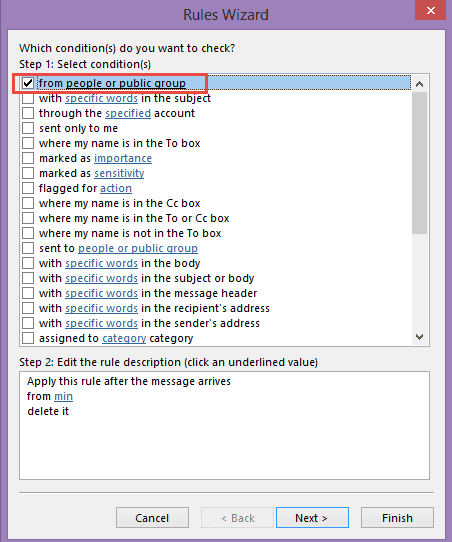
While a partial word filter won't work in all circumstances, you can use it to filter the display name of senders. For example, this rule will filter messages from Forum Administrator

Tip: Cancel the Check names dialog when adding the name to the people or group field:
Run a Script rule
When a rule that looks for partial words isn't working, you can use a run a script rule. This example shows how to filter for the Sender's display name, but it can be used with any Outlook email field.
Sub CheckSpam(Item As Outlook.MailItem)
  If InStr(LCase(Item.SenderName), "pfizer") Then
    Item.Delete
  End If
End Sub
Using Wildcards in a Script
You can use wildcards in a script, either by using the method below or regex.
So on this topic... how about moving all messages that say
Invoice AI-SO-11786 from My Company
where the invoice number changes each time?
Assuming AI-SO- is in every invoice and only the numbers change, the next example shows one way to use wildcards in a script. It works with 5 or more digits (or characters) following ai-so-. If the letters are always upper case, you could get away with removing LCASE and using upper case letters in the macro.
The rule looks for the word invoice in the subject or body and if found, runs this macro to check the subject.
Sub MoveInvoices(Item As Outlook.MailItem)
Dim MoveFolder As Folder
Set MoveFolder = Session.GetDefaultFolder(olFolderInbox)
Set MoveFolder = MoveFolder.Folders("Move")
     If LCase(Item.Subject) Like LCase("*ai-so-?????*") = True Then
      Item.Move MoveFolder
  End If
End Sub
See Outlook's Rules and Alerts: Run a Script for more information on using a run a script rule.
More Information
Create rules that apply to an entire domain
Rules frequently asked questions
Creating a Rule to Filter Blank Senders (Outlook-tips.net)

How would this code be modified to look for any 8-digit number in the subject line?
Hi Diane,
I use outlook. I have about 8000 emails in my sent items folder and about the same in my Inbox. If I group them by "From" or "To" there are over 200 groups for each. That is over 400+ in total. For me to create rules and folders for each one will take months of non-stop work. Is there a way that I can automate this process? I am willing to buy 3rd party sofware if necessary in the event that Outlook does not have this capability. Please advise.
Thank you,
SK
Are you looking to file them in folders? You could use a macro to file by display name or email address - or get the email address and create a folder by display name.
These two show how to get the address - they need tweaked to file by it though.
Sort messages by Sender domain (slipstick.com)
Display the Recipient Email Address in the Sent Items Folder (slipstick.com)
Not a rule-based, but a way to file mail using a macro
Macro to file Outlook email by sender's display name (slipstick.com)
Or... turn on conversation view and leave the sent items in the sent folder - the inbox items can be left or moved to a folder called Archive. Then use Outlook's search features when you need to find mail from someone.
Hi Diane, my vba script reports a compile error: Expected Function or Variable. It fails when entering the sub shown on the line below. Any suggestions?
Sub test(Item As Outlook.MailItem)
Is the message you are testing with an email message? It will fail on meeting invites, bounce messages and other non-email mailed items.
Hi Diane,
Thank you very much for this solution. Managed to make my own script for messages containing numbers that increment.
But, it's not working with messages that have been archived via Enterprise Vault. Any way to overcome the issue ?
Thanks,
Kostas
No, I'm not aware of a way around it - its due to how the archiving works. (And can't test theories because i don't use enterprise vault)
Thanks for the fast response !
Have a nice day,
Kostas
Dianne,
It seems I managed somehow to destroy my script. Even a single search isn't working. How can I delete the script and start a new one ?
Diane -
apologies for dredging up this old post. Can you clarify whether the line:
Set MoveFolder = MoveFolder.Folders("Move")
Is specifying a folder named "Move" as a target or an action?
Here's what I'm trying to do: match inbound emails that have a subject including INC??????? or TASK??????? and move them to a folder called "Pearson" Folder is at the same level as Inbox. Code is as follows:
Public Sub MoveSDMail(Item As Outlook.MailItem)
Dim MoveFolder As Folder
Set Folder = Session.GetDefaultFolder(olFolderInbox).Parent.Folders("Pearson")
Set MoveFolder = MoveFolder.Folders("Move")
If LCase(Item.Subject) Like LCase("*INC???????*") = True Then
Item.Move MoveFolder
ElseIf LCase(Item.Subject) Like LCase("*TASK???????*") = True Then
Item.Move MoveFolder
End If
End Sub
>> Is specifying a folder named "Move" as a target or an action?
Move is the folder name. In that example, the Move is a subfolder of the Inbox. The macro was written like that to keep the number of "dots" down in the folder path (one less dot over your folder path code).
You would use this
Set Folder = Session.GetDefaultFolder(olFolderInbox)
Set MoveFolder = Folder.Parent.Folders("Pearson")
or this
Set MoveFolder = Session.GetDefaultFolder(olFolderInbox).Parent.Folders("Pearson")
or
Set Folder = Session.GetDefaultFolder(olFolderInbox).Parent.Folders("Pearson")
then
Item.Move Folder
Hello Diane,
I see you have helped many people with creating macros, and I have a similar request as Steve. I have 20-40 projects going at once, and I always add the work order number in the subject line. It always starts with a W or C and they are 7 digits long. I would like to move these from the inbox and sent box to the project folders that are nested. They are nested like the following example(Inbox/Projects/40-xx/(Wxxxxxxx) Install Sign.
Any help would be greatly appreciated. We are currently using Outlook 2013.
I have some macros that do pretty much what you need - see https://www.slipstick.com/developer/code-samples/vba-file-messages/
Hello Diane,
I get the an object could not be found error. I changed the name from Clients to Projects. If I change Projects to Inbox, it will run, but does nothing.
Public Sub FindFolder()
Dim Name$
Dim Folders As Outlook.Folders
Dim Folder As Outlook.MAPIFolder
Set m_Folder = Nothing
m_Find = ""
Name = "*" & strCode
If Len(Trim$(Name)) = 0 Then Exit Sub
m_Find = Name
m_Find = LCase$(m_Find)
Set Folder = Session.GetDefaultFolder(olFolderInbox).Parent.Folders("Projects")
LoopFolders Folder.Folders
Thank you,
Brandon Rossman
This: Set Folder = Session.GetDefaultFolder(olFolderInbox).Parent.Folders("Projects")
Tells outlook to look for a folder named Project at the same level as the Inbox and other default outlook folders. Is that were it is?
It's nested under the Inbox folder. When I change that to Inbox it doesn't do anything.
This will get the subfolder of the inbox:
Set Folder = Session.GetDefaultFolder(olFolderInbox).Folders("Projects")
This is the inbox:
Set Folder = Session.GetDefaultFolder(olFolderInbox)
Thank you Diane. Now that it runs, i am getting a different error. When I run the debug it stops at ExtractText = M.SubMatches(0). Below is the code I have pulled from your original post. Sorry I don't know anything about VB Script. I appreciate your help in this.
Function ExtractText(Str As String) ' As String
Dim regEx As New RegExp
Dim NumMatches As MatchCollection
Dim M As Match
'this pattern looks for 7 digits in the subject
With regEx
.Pattern = "W[0-9]{7}"
.IgnoreCase = True
.Global = False
End With
Set NumMatches = regEx.Execute(Str)
If NumMatches.Count = 0 Then
ExtractText = ""
Else
Set M = NumMatches(0)
ExtractText = M.SubMatches(0)
End If
Code = ExtractText
End Function
>> .Pattern = "W[0-9]{7}"
Try changing that to .Pattern = "(W[0-9]{7})"
I was able recreate the error. It says Run-time error '5': Invalid procedure call or argument.
Hello Diane,
I have made all the changes like you suggested and even moved the Projects folder to the be at the same level as the Inbox. I do not get any error messages, however nothing happens when I log in? Any suggestions? I am using Outlook 2013.
Diane,
I have a site setup to where people can fill out a form and it sends me an email to contact them back. I am receiving a large amount of email from a spammer and I have been able to find something similar in all emails but it is at the last part of the contacts name. I.E. MikeJonesCM, TomJonesCM, FrankJonesCM. The JonesCM is always there in both the Subject and Body of the email. I'm wanting to be able to send these emails to another folder out of my mail email box, so that I can go through them later, just in case a good lead got put in there by mistake. Can the example you used above help with that, or does something else need to be added? Thank you for your time in this.
It should work - put jonescm in the field where i used min.
Hello Diane,
I have seen your name a lot when looking for answers to outlook questions and now find myself asking for help. I get a lot of email and need to manage this information. Every job we do gets a job# such as 15662-1 or 18569-2. For each job I may get as many as 35 emails for manufacturing kick offs. The subject line always reads (15662-1 Checklist ****). In addition, I create a folder for each job to help organize my inbox. (Inbox/Jobs/15662-1). Would it be possible to sort the inbox and move each email to the appropriate job folder?
If you can run a VBA script, yes. I have macro that I helped another user write that checks the subject for a 6 digit code and moves the message to a folder of the same name. On his, we used itemadd macros - and watch the inbox and sent folder for new messages. (He wanted sent items in the client folders too.) It could be converted to a run a script rule, but itemadd is more efficient. The code sample is at https://www.slipstick.com/macros/file-messages-keyword.txt
When I try this code its doesn't recognise the withevents
I've managed to get past that however its getting a compile error on m.submatches.
Any advise? I'm using outlook 2019