November 30 2018: The latest monthly Office 365 updates include an option to lock the zoom level.
I get quite a few complaints from people who say their fonts are tiny (or huge) or the font used for the reply shrinks yet Microsoft Outlook shows they are using a normal size font (such as 10 or 12 pt). Outlook users with high resolutions screens may have a problem reading incoming emails.
This is caused by the Zoom setting.
Lock the Zoom level in Outlook 365
If you are an Office 365 subscriber, you can now set Outlook to remember your zoom level.
To lock the zoom level reading messages, open the Zoom While Reading dialog and tick the box to Remember my preference.
You can open the Zoom while reading dialog by clicking on the zoom % in the status bar or look for the Zoom button on the Message menu in an opened message.

Then tick the box to remember your preference.
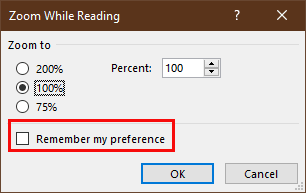
Zoom Is On When Reading Mail
When your incoming email is zoomed, the easiest fix is to hold Ctrl as you roll the mouse wheel (this is the likely cause for many people).
Keyboarders can use the Ctrl and plus (+) or minus (-) keys to change the zoom level in increments or Ctrl and the zero (0) key to go to 100%. Note: these keyboard shortcuts do not work in Outlook 2013/2016.
You can also click the Zoom button in the ribbon and set it back to 100%.
Click the button in the ribbon to open the zoom dialog and select the desired zoom level.

Outlook 2010, 2013, and 2016, 2019, 2021, 365 have a zoom slider in the main Outlook window status bar (on the right side). Use this slider to adjust the zoom in the reading pane.
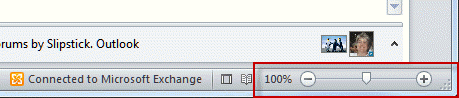
If you prefer, you can click on the zoom % (100% in the screenshot) to open the zoom dialog.
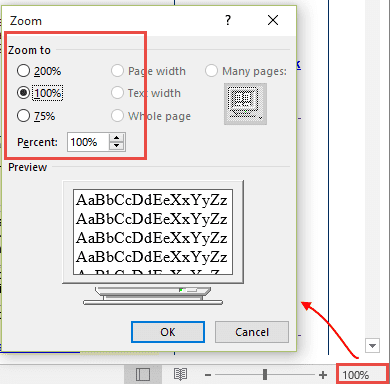
Note that changing the zoom setting is not persistent for reading messages unless you are using a current version of Outlook that has the Remember my preference checkbox. To make the zoom level persistent, you need to use an add-in or a macro. A list of zoom tools is in the Tools Section and a macro is at the end.
When Composing Message, Zoom Is Always On
Many times, when you make the change to a message you are composing and send it, the next message you compose reverts to the goofy zoom setting. This is because making changes to a message then sending the message applies the changes to that message only. If you make the changes then close the message, it should apply the changes to all future messages.
When zoom is stuck on a value (usually a tiny font), you can reset it by changing the zoom level then closing, but not sending, the message. If you change the zoom level then send, the change applies only to the message you changed, not to future messages.
In Outlook 2016, the Zoom button is on the Format Text ribbon.
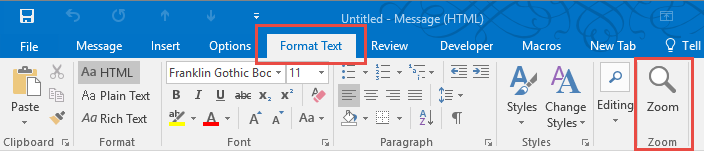
In Outlook 2010 and 2013, the Zoom button is on the Message tab when composing (or reading) a message.
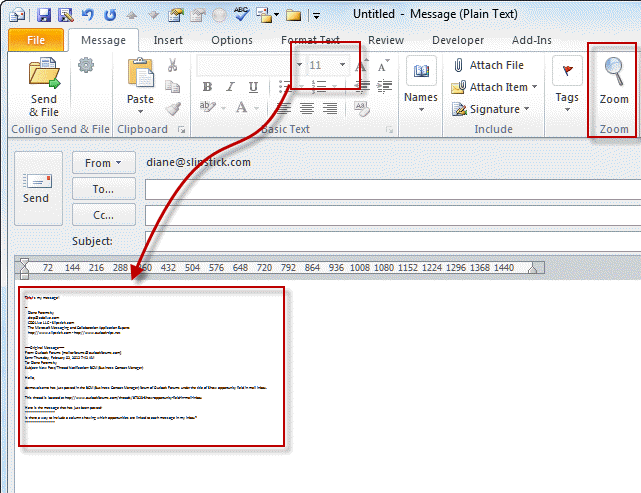
- Open a new message
- Click the Zoom button on the ribbon
- Change the zoom to the desired level
- Close the message.
- Click new message (or reply) and the zoom should be the desired level.
Tools
The Zoom Email Windows tool for Outlook automatically zooms all Outlook reading pane windows. It zooms every Outlook window to your specified zoom factor. It's perfect for being able to instantly and clearly see the email and other Outlook windows. |
Zoom in either Open Messages or Reading Pane
While the zoom level is persistent when you change it in the compose mail window, it's not persistent when you change it for incoming messages.
This macro requires the use of Redemption (Developer Edition).
You need to set a reference to the Microsoft Word Object Library in the VBA's Editor. It's under Tools, References. If it's not set, you'll get a Compile Error: User-defined type is not defined.
To use with the reading pane, you need to disable conversation view.
See "How to use Outlook's VBA Editor" for instructions and screenshots.
Option Explicit
 Dim WithEvents objInspectors As Outlook.Inspectors
 Dim WithEvents objOpenInspector As Outlook.Inspector
 Dim WithEvents objMailItem As Outlook.MailItem
 Dim WithEvents myOlExp As Outlook.Explorer
 Dim sExplorer As Object
 Dim Document As Object
 Dim Msg

'Sets the zoom to the same value
' To use different values, replace msgzoom with the number
' in openinspector and selectchange macros
 Const MsgZoom = 200

Private Sub Application_Startup()
 Set objInspectors = Application.Inspectors
 Set myOlExp = Application.ActiveExplorer
 Set sExplorer = CreateObject("Redemption.SafeExplorer")
 End Sub


Private Sub Application_Quit()
 Set objOpenInspector = Nothing
 Set objInspectors = Nothing
 Set objMailItem = Nothing
 End Sub

Private Sub objInspectors_NewInspector(ByVal Inspector As Inspector)
 If Inspector.CurrentItem.Class = olMail Then
 Set objMailItem = Inspector.CurrentItem
 Set objOpenInspector = Inspector

End If
 End Sub
 Private Sub objOpenInspector_Close()
Set objMailItem = Nothing
 End Sub

Private Sub objOpenInspector_Activate()
Dim wdDoc As Word.Document
 Set wdDoc = objOpenInspector.WordEditor
 wdDoc.Windows(1).Panes(1).View.Zoom.Percentage = MsgZoom

End Sub

Private Sub myOlExp_SelectionChange()
On Error GoTo ErrHandler:
 Set Msg = Application.ActiveExplorer.Selection(1)
 Application.ActiveExplorer.RemoveFromSelection (Msg)
 Application.ActiveExplorer.AddToSelection (Msg)
 sExplorer.Item = Application.ActiveExplorer
 Set Document = sExplorer.ReadingPane.WordEditor
 Document.Windows.Item(1).View.Zoom.Percentage = MsgZoom
Exit Sub

ErrHandler:
    Exit Sub

End Sub
Zoom in Reading Pane or Open Message Video Tutorial
Not shown in the video: You need to set a reference to the Microsoft Word Object Library in the VBA's Editor. It's under Tools, References. If it's not set, you'll get a Compile Error: User-defined type is not defined..
Set the Zoom Level in Open Messages
You can use VBA to force the zoom level when you read incoming email in Outlook 2007 or newer, or when using Outlook 2003 with Word set as the email editor. Don't forget to set the desired zoom level in this line:
wdDoc.Windows(1).Panes(1).View.Zoom.Percentage = 150
This macro goes in ThisOutlookSession.
You need to set a reference to the Microsoft Word Object Library in the VBA's Editor. It's under Tools, References. If it's not set, you'll get a Compile Error: User-defined type is not defined.
Option Explicit
 Dim WithEvents objInspectors As Outlook.Inspectors
 Dim WithEvents objOpenInspector As Outlook.Inspector
 Dim WithEvents objMailItem As Outlook.MailItem


Private Sub Application_Startup()
 Set objInspectors = Application.Inspectors
 End Sub


Private Sub Application_Quit()
 Set objOpenInspector = Nothing
 Set objInspectors = Nothing
 Set objMailItem = Nothing
 End Sub


Private Sub objInspectors_NewInspector(ByVal Inspector As Inspector)
 If Inspector.CurrentItem.Class = olMail Then
 Set objMailItem = Inspector.CurrentItem
 Set objOpenInspector = Inspector

 End If
 End Sub


Private Sub objOpenInspector_Close()

Set objMailItem = Nothing
 End Sub


Private Sub objOpenInspector_Activate()

Dim wdDoc As Word.Document
 Set wdDoc = objOpenInspector.WordEditor
 wdDoc.Windows(1).Panes(1).View.Zoom.Percentage = 150

End Sub
Zoom Macro Video Tutorial
How to use the macro
First: You will need macro security set to low during testing.
To check your macro security in Outlook 2010 and up, go to File, Options, Trust Center and open Trust Center Settings, and change the Macro Settings. In Outlook 2007 and older, it’s at Tools, Macro Security. If Outlook tells you it needs to be restarted, close and reopen Outlook. Note: after you test the macro and see that it works, you can either leave macro security set to low or sign the macro.
Now open the VBA Editor by pressing Alt+F11 on your keyboard.
To use the macro code in ThisOutlookSession:
- Set your macro security to Low in File, Options, Trust Center, Trust Center Settings, Macro Settings.
- Open the VB editor using Alt+F11
- Expand Project1 and double click on ThisOutlookSession.

- Copy then paste the macro into ThisOutlookSession. (Click within the code, Select All using Ctrl+A, Ctrl+C to copy, Ctrl+V to paste.)
- Set a reference to Microsoft Word in Tools, References
- Click in the Application_Startup macro and press the Run button to kick start it without restarting Outlook.
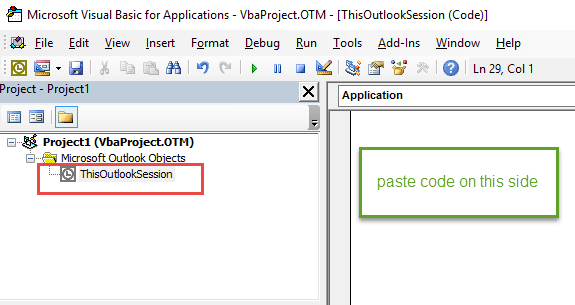
Application_Startup macros run when Outlook starts. If you are using an Application_Startup macro you can test the macro without restarting Outlook by clicking in the first line of the Application_Startup macro then clicking the Run button on the toolbar or pressing F8.
More information as well as screenshots are at How to use the VBA Editor.

Ade E says
Thanks for this Zoom reset guidance for the Outlook desktop app (O365), I appreciate you for providing this info.
It may be a little problem but you are a big help - thank you! 👍
Damir Grubisa says
In the latest ver of M365 Cloud, this zoom function is moved over under "Format text."
Regards
Damir
g4ns.com
Diane Poremsky says
It depends on which window you are in - if composing it is in Fornmat Text, if reading, it is in Messages tab.
Satish says
Hi Diane, GM.
How to change the size of attachment icons in the Outlook 2019
Whenever someone sends the email or I send with attachment, then that respective attachment icon appears too big in the email
It would be nice if the width of the attachment box could be reduced.
Att: Attached image for your reference.
Thankyou,
KSk.
Diane Poremsky says
Unfortunately, it can't be changed. Sorry. We can't even hide the attachment line, like we could in older versions.
Satish says
Hi Diane, Really Nice code snippet Working charm with keyboard selection changes (up & down). Whether this can be modified with Single click option (mouse click). if so, pl help. Thank you.
Diane Poremsky says
No, not to my knowledge. Sorry. 9But I'll take a look at it again, just to be sure.)
Vic Manohar says
Outlook 2003 with Word set as default editor.Conversation view disabled. References set as indicated. Redemption in use. Still get a Compile error: User-defined type is not defined. The VBA does not show up in the Macro list either. Any ideas?
Diane Poremsky says
What version of Outlook are you using? Which line is it dying on?
CraigC says
I have been using Diane Poremsky's VBA code to change the zoom level in Outlook messages for a long time. I love it and it worked flawlessly. I recently upgraded to Office 2019 and every time I start Outlook, the Redemption user agreement appears and needs to be completed to open Outlook. Any thoughts on how to suppress this?
Thank you.
Craig
Diane Poremsky says
I get that dialog often - not every restart though. I'll ask Dmitry why its happening.
CraigC says
Hi Diane - did Dmitry have any ideas?
Craig
Diane Poremsky says
I'll shoot him another email - I asked him about it in a thread about another issue and he might have missed it.
Stacy Brown says
I've been using this code for years and love it but it has suddenly stopped working. We are using Outlook 2016 (16.0.5182.1000) 64 bit. I've got my Word reference set and Macros set to allow them to run. I can manually run it but it will only works for one email and then the zoom reverts back to 100%. Anyone else seeing this?
Diane Poremsky says
No error messages? Comment out all error handler lines and set VBA to "Break on All Errors" = this is in Tools > options. This should give us an idea where its failing. (fingers crossed)
Stacy Brown says
Set to break on all errors and no error handling in the code. Still no error messages. It's like the Private Sub Application_Startup macro isn't running at all. If I go in and manually run it then the zoom does work for that session of Outlook. If I close Outlook and reopen, then the Zoom is back to 100.
Kolos says
OMG! The first option of "remember my preference" when setting the zoom worked! Is this a new addition? I remember a few years ago the only way to achieve this was through the VBA code option (which is what I googled and how I ended up on this page). Thank you so much, saved me a lot of hassle.
Diane Poremsky says
It is new to Outlook - first added to Outlook 365 in late 2018.
Monica Angelova says
Thank you so much,, it worked !
Sarah says
Help. My zoom is deactivated and my screen is tiny. How do I reactive the zoom so I can set my screen a bit bigger?
Diane Poremsky says
You lost the zoom control? Is all of outlook tiny or just the message text?
Arthur says
Hi,
Something recently got broken in Outlook 365, and the long lines no longer wrap around neither in the Reading Pane nor when in a separate window, regardless of the zoom level (perhaps with the exception that you can make the zoom level unreadably small that the lines per se fit in the window without having to wrap, which doesn't change the statement in that they don't wrap).
I did a search, and I'm not able to find any relevant entries to this in recent versions of Outlook. There are some older ones that play with the default browser, or Reading Pane settings (don't affect the broken window), etc. but they don't work.
Any idea what might be going on here?
Thanks in advance.
Diane Poremsky says
What do you use for antivirus? If it is scanning email it can "rewrite" the message, breaking the lines.
Arthur says
Thanks for your response, Diane. I'm not using any third-party antivirus (it's just Windows Defender). And it's not just lines of text, but also images are getting centered according to something other than the reading pane. I have an image at https://imgur.com/skEBdSK. Thank you.
Diane Poremsky says
That is usually CSS in the message itself.
Taylor says
Thanks SO MUCH!
Been dealing with GIANT fonts on emails as I compose them, for at least a week. I am so glad things are back to normal!
Anita Brown says
My Zoom speak is on but when I pull up an email it won't read it. How do I fix?
Diane Poremsky says
I'm not sure what you mean by Zoom speak. Is that Zoom the meeting app or Outlook's Zoom setting for messages?
Utham says
I composed a mailer and sent to users. By default viewer opens the mail @ zooms 100%.
When we view the mail @ 100% i am getting a black thin line on the left (have attached reference image)
@ 90% i don't see any issue. i usually face these kind when the mailer with heavy content.
I used tables to build the content.
Please help if anyone find a solution.
Regards
Utham
Taylor says
Could it be the border on your table?
Peter Woodward says
It used to work last year for me but now it is not. I suspect some MS update may have broken it. I have tried both macros above and neither work now.
Joby says
hi
if you have used licenced 365 app then
open 365 > view>view settings>other settings>column fond change to 12 --
change row fond to 12 >
okk
close then look the right corner % right click you can see the tab "Remember my preference "
Diane Poremsky says
Row Settings changes the message list font (which you can also change using Automatic formatting). It does not affect the text size in messages in the reading pane (or opened).
Remember my preferences applies to the reading pane/open message zoom level.
Laurie P says
But how does it work on a Mac and why can't Microsoft make things the SAME for PC and Mac?
Diane Poremsky says
The macro does not work on mac - word and excel support VBA but outlook does not.
It's hard to make the programs identical when the OS is so different. :(
Luis F says
Excellent and simple. Thank you.
Dave says
Has anyone found a solution - that works - to the annoying Zoom feature of Outlook 2013 ?
I want to set a default but cannot. Tried downloading a couple of third party fixes that didn't work. Not really willing (or able) to resurrect my VBA skills from the 1990s
Any help would be appreciated.
Diane Poremsky says
in 2013, you are limited to the addins or vba - you don't really need to know VBA as the macro here should work right out of the box. Sorry. :(
Dave says
Hello Diane,
Thanks for your response.
I followed your steps and did copy/paste the macro code into the directory specified..
Have I missed something ?
Dave
Diane Poremsky says
Sorry I missed his earlier - that should be all you need to do.
luo.la says
Ye ! This Is A Good Blog!
Jennifer Scullion says
Thank you!!!!!!
Sonya Kinder says
Hello Diane - Thank you for this great resource! The Zoom Macro works when I open an email message, close it and then open another one, but if I open a message and then click the Previous Item or Next Item arrows, then the zoom goes back to the default 100%. What code can I add to allow the zoom to stay constant even when I use the next/previous arrows? I look forward to your reply! ~Sonya
Diane Poremsky says
I will need to look into this scenario. (Or hope Microsoft adds the feature so we don't need a macro. :))
Dee says
My menu & folders screen are zoomed out & I can't correct. My email messages are normal. Can you help with this? Thank you so much!
Diane Poremsky says
When the text in the interface is tiny, its a bug that should correct itself with a couple of restarts.
Callan says
This awesome! Is work !! Very thanks!
Edward says
Diane thank you for the great discussion. The Zoom Macro is a lifesaver. There is one thing that's unfortunate. I need to click twice on the same message (with delay between click because double clicking without delay would cause it to open in a new windows) for the macro to work on the reading pane. I use Outlook 365 with Windows 10. Do you have this problem ?
Diane Poremsky says
I hadn't noticed it, but will try to repro.
Phil Reinemann says
I had a user call about this today and as so often happens I found the solution right here. Thank you!
One thing I've found that is unfortunate is that you said "Keyboarders can use the Ctrl and plus (+) or minus (-) keys to change the zoom level in increments or Ctrl and the zero (0) key to go to 100%. Note: these keyboard shortcuts do not work in Outlook 2013/2016. " We're using 2016.
Why would MS Office have turned that off?
Many of our users have touchpads (Dell E5450 laptops) and that's all they use when on the road and gestures like scroll are off so accidental scrolling doesn't happen - leaving mouse movement, so without the keyboard shortcuts and gestures is there anything that can zoom more simply than the Zoom option in Format Text? I tried various Shift, Ctrl & Alt keys with + and - but to no avail.
Is there a way to add the zoom slider to the bottom right of a compose email window?
Diane Poremsky says
In an open message, Alt+HQ12, Enter works. Not sure that qualifies as a 'shortcut' though. :) The zoom slider cant be added to the form. You can add the Zoom command to the Quick access bar so its easier to access if using collapsed ribbon.
Josh says
Ctrl-MWHEELUP, Ctrl-MWHEELDN
Without an external mouse, you can use the scrolling feature/function of the touchpad. Usually this is either swiping up/down along the right edge of the touchpad, or 2-finger swiping up/down. It would be CTRL-SCROLLUP and CTRL-SCROLLDN however you achieve that behaviour.
Gabriela Lopez says
This awesome! Thank you!
Stephen Adams says
Thank you for the help!
EmailIssue Melbourne says
Thanks for assisting as the auto zoom function was causing a lot of grief.
Mike Brown says
I have tried to use the zoom macro in ThisOutlookSession but I have a problem with the following code:
Private Sub objOpenInspector_Activate()
Dim wdDoc As Word.Document
Set wdDoc = objOpenInspector.WordEditor
wdDoc.Windows(1).Panes(1).View.Zoom.Percentage = 150
End Sub
The error message is "Run-time error 91: Object variable or With block variable not set".
I use Outlook 2016 in Office 365.
I have set Microsoft Word 16.0 Object Library in Tools/References.
I can see WordEditor as an object in the Inspector class in the Object Browser.
Please tell me what I could be doing wrong.
Mike
Chase says
Diane this recently started happening to me too. Outlook crashes and disables the add-on the next time it is run. Just had a windows update yesterday. Office version is 1701 Build 7766.2092. Would appreciate any help you can offer. Pasted below is part 1/2 of my script:
Option Explicit
Dim WithEvents objInspectors As Outlook.Inspectors
Dim WithEvents objOpenInspector As Outlook.Inspector
Dim WithEvents objMailItem As Outlook.MailItem
Dim WithEvents myOlExp As Outlook.Explorer
Dim sExplorer As Object
Dim Document As Object
Dim Msg
'Sets the zoom to the same value
' To use different values, replace msgzoom with the number
' in openinspector and selectchange macros
Const MsgZoom = 150
Private Sub Application_Startup()
Set objInspectors = Application.Inspectors
Set myOlExp = Application.ActiveExplorer
Set sExplorer = CreateObject("Redemption.SafeExplorer")
End Sub
Private Sub Application_Quit()
Set objOpenInspector = Nothing
Set objInspectors = Nothing
Set objMailItem = Nothing
End Sub
Private Sub objInspectors_NewInspector(ByVal Inspector As Inspector)
If Inspector.CurrentItem.Class = olMail Then
Set objMailItem = Inspector.CurrentItem
Set objOpenInspector = Inspector
End If
End Sub
Private Sub objOpenInspector_Close()
Set objMailItem = Nothing
End Sub
Private Sub objOpenInspector_Activate()
Dim wdDoc As Word.Document
On Error Resume Next
Set wdDoc = objOpenInspector.WordEditor
wdDoc.Windows(1).Panes(1).View.Zoom.Percentage = MsgZoom
End Sub
Private Sub myOlExp_SelectionChange()
On Error GoTo ErrHandler:
Set Msg = Application.ActiveExplorer.Selection(1)
Application.ActiveExplorer.RemoveFromSelection (Msg)
Application.ActiveExplorer.AddToSelection (Msg)
sExplorer.Item = Application.ActiveExplorer
Set Document = sExplorer.ReadingPane.WordEditor
Document.Windows.Item(1).View.Zoom.Percentage = MsgZoom
Exit Sub
ErrHandler:
Exit Sub
End Sub
Diane Poremsky says
Does it give you any error messages? I'm guessing it's the security update... but any error messages could help narrow it down. Also, check in the event viewer - the entry for outlook's crash might hold a clue.
Chase says
No error message, just Outlook just crashes, then when I reopen it, it has a yellow bar at the top saying it disabled add-ons. I click on it, reenable VB, then do ALT-F11 and click on the application startup section, hit F5, and it starts working.
Here's the first event viewer log from the crash itself:
GENERAL: Add-in execution error. Outlook crashed during the 'SelectionChange' callback of the 'ExplorerEvents_10' interface while calling into the 'Microsoft VBA for Outlook Addin' add-in.
DETAILS: -
-
1000
2
0
0x80000000000000
76674
Application
CSTERN.issisystems.com
-
SelectionChange
ExplorerEvents_10
Microsoft VBA for Outlook Addin
And here's the very next log that happens in the event viewer, not sure when this gets created or why:
GENERAL: Faulting application name: OUTLOOK.EXE, version: 16.0.7766.2092, time stamp: 0x59346a45
Faulting module name: VBE7.DLL, version: 0.0.0.0, time stamp: 0x57e4bc6a
Exception code: 0xc0000005
Fault offset: 0x0007816c
Faulting process id: 0x12d8
Faulting application start time: 0x01d2f720939e26b4
Faulting application path: C:Program Files (x86)Microsoft OfficerootOffice16OUTLOOK.EXE
Faulting module path: C:Program Files (x86)Common FilesMicrosoft SharedVBAVBA7.1VBE7.DLL
Report Id: e7c9dd71-6313-11e7-9be3-f8b156a1822e
Faulting package full name:
Faulting package-relative application ID:
DETAIL:
-
-
1000
2
100
0x80000000000000
76675
Application
CSTERN.issisystems.com
-
OUTLOOK.EXE
16.0.7766.2092
59346a45
VBE7.DLL
0.0.0.0
57e4bc6a
c0000005
Chase says
Obviously the problem is with VBE7.DLL. Strange thing (and this might be the problem), is this path doesn't exist for me:
C:Program Files (x86)Common FilesMicrosoft SharedVBAVBA7.1VBE7.DLL
In the 'Microsoft Shared' folder, there is no 'VBA' folder at all.
Diane Poremsky says
Which office suite (subscription or volume licensed MSI) & bitness do you have?
I don't have that folder either - the macro works for me in open messages
but not in the reading pane(silly me, forgot to read the fine print - doesn't support conversation view) in 2016/subscription/insider build (and vba doesn't crash). I'll see what I can find out from support.Chase says
OK good to know about the moderation piece. I thought 'moderation' meant it was being reviewed for curse words, etc. Now I realize you really do do it all! Ok... I am running 64 bit Office but unfortunately I don't know how to answer whether it is 'subscription or volume licensed MSI'. This is all on my office computer and everything is setup and controlled by my IT department, if that helps any. And I did have a few versions of Visual Studio on my PC (2010 & 2016) and I removed everything I saw except for 2016. Still didn't help... If there's a way to give you more about my Office installation than what I have already, let me know. As a reminder, this is what I see in Outlook: 1701 Build 7766.2092
Diane Poremsky says
I do moderate for curse words - my article about the whiteness of outlook 2013 had a lot of f-bombs directed at Microsoft - but i delete the word or replace with characters. Gotta keep it pg. :) But generally, only spam is not approved.
>> I don't know how to answer whether it is 'subscription or volume licensed MSI'.
In the file, account page, in with the version # etc, it will say if subscription. I'm guessing its probably volume license, which is (currently) MSI.
>> a few versions of Visual Studio on my PC (2010 & 2016)
Removing the older one was probably good regardless - i was recently told that you shouldn't have two VS. No idea how accurate that is... (I only have one installed and i don't think i've ever had more than one version installed - the 'current' version gets installed on new computers and stays till it's replaced.)
Chase says
Update since my most recent comment... I opened Outlook today and it didn't crash! But the macro wasn't running. I had to ALT+F11 and use F5 to kick it off. Now it works. So that is an improvement at least. Also, I am running Office 365 ProPlus same version and build as previously listed, so, I have no clue why it didn't crash for me today. Very strange. It also says 'deferred channel' right above the version number. Finally, when I click 'about outlook', I get more information which contradicts what I told you just recently. It says Microsoft Outlook 2016 MSO (16.0.7726.1042) 32-bit (not 64 bit). Even though my Windows installation absolutely is 64 bit (Windows 10 Pro 64-bit).
Diane Poremsky says
>> But the macro wasn't running. I had to ALT+F11 and use F5 to kick it off.
interesting. it's an auto-start macro, so it should have started.
Does the macro work ok (when outlook doesn't crash)? The only semi-intelligent article i found on it was on the Excel blog - they say to add a comment to the code then step into it to recompile. I don't if that would help here too.
Chase says
Just want to summarize everything since I had a few posts last time. My Outlook is Microsoft Outlook 2016 MSO (16.0.7726.1042) 32-bit and the one time I started Outlook without it crashing, it was after I had logged into Windows and waited about five minutes or more. It didn't crash, but, as I said, I had to manually start it. This was the only time it happened where it didn't crash, so, it is possible, I guess, that I am wrong and I had previously run Outlook, had it crash, and it disabled the VBA add-on so that the next time Outlook started without crashing. Bottom line is: It must be something in the 'application startup' area that is doing it. If there is a way for me to eliminate attempting to run this at application startup and force me to manually run the macro to kick it off - I would love that info, because right now Outlook crashed, I restart it, and then manually kick it off. If I can at least eliminate the part where Outlook crashes and I have to restart - that would help me out. I don't mind manually starting the macro every morning.
Diane Poremsky says
Try renaming Private Sub Application_Startup() to Public Sub Zoom(). You can add a button to the ribbon for it. (I didn't test it to verify - I'm on vacation and it's difficult to test macros on my tablet.)
Chase says
OK that worked. Outlook no longer crashes, and I have by button on the ribbon that I hit once in the morning, and I'm good to go. The script still has Private Sub Application_Quit () which I am thinking isn't necessary but it doesn't seem to be causing any problems. Thanks so much for your help.
Chase says
I'm not too happy with this site. I pasted a whole reply here a few days ago and it was 'waiting for moderation' and now it's gone. Ugh. Bottom line: yes I checked the event viewer and the problem is with a dll file that doesn't appear in my Explorer file structure. THAT problem is also noted on the web via Google search but I can't tell how to resolve it. The file is here: C:Program Files (x86)Common FilesMicrosoft SharedVBAVBA7.dll or something like that (I forgot the name of the .dll exacty). The 'VBA' folder does not appear in the 'common files' in my Explorer window. The one thread I found on Google about this directory not appearing mentioned looking for this in Program Files (instead of Program Files (x86)) but it also doesn't appear there for me. How can I restore/repair this file?
Diane Poremsky says
it's not gone - i just haven't had time to answer (everything stays in moderation until I reply, its easier to find the comments that need replies this way). I have a lot of catching up due to the US Independence day holiday and don't usually work too much on weekends if the weather is nice.
Melody says
Hi!
This was a great article. Thank you!
I'm getting an error message and it asks me to debug the VBA code:
"Run-time error '-2147024770 (8007007e)' the operation failed"
The line is: "Set sExplorer = CreateObject("Redemption.SafeExplorer")"
Any help would be appreciated!
Diane Poremsky says
Did you install Redemption? That is required (and free if you aren't redistributing it in an application)
Rachel says
Thank you for your article, Diane. I had used VBA only one time before this, and it's been several years. I was able to get the zoom just the way I like it using your video tutorial. Thank you so much for posting.
Jill Nicholson says
Thanks for your post - my text was super big and other sites only told me to change the zoom which on the main screen was showing 100%. however, following your instructions, i went into the zoom on the individual email and set it at 100% and then closed the email. it has worked.. I am very grateful to you. thanks Jill
DeeAnn Visk says
Thank God you posted this. It works! Thanks so much.
Arif says
This add on was working fine with Outlook 2016 until recently when a Microsoft auto update has happened. Since then every time I am opening outlook, it is crashing complaining about this add on. Any help to fix it would be high appreciated.
Diane Poremsky says
What is your version # of outlook?
Chase says
Same problem happened to me. My office version is 1701 (Build 7766.2092). Outlook crashes, then disables the VBA, restarts, but I am able to re-enable the VBA and run both of my scripts (reply all with attachments & this one for zoom). So must be something with the zoom script at startup.
Thomas says
it only works if i select a message wait then select the message again. (double clicking would cause it to open in a new window which works fine but not how i read emails) changing to a new message causes the zoom to reset. clicking a message opens at 100% then switching to a new message can sometimes cause a flash of the original message to zoom to 200% before loading the new message at 100%. selecting the original message afterward causes the new message to flash at 200% before displaying the original at 100%. only if you click on a message then select the same message again does it zoom to 200%. i have win 7 and outlook 2010 with a 3840x2160 res on a 17" laptop monitor. Windows DPI scale zoom is already set to 188%, the max Win 7 can use without breaking something, the XP style box is unchecked.
Diane Poremsky says
it may be related to the overall display zoom - using higher than 125% for the monitor can cause issues. i know it is triggered for the reading pane when you click on a new item (Private Sub myOlExp_SelectionChange) - it sounds like that is not being picked up. I think i have a test machine with 2010 and win7 - i'll see if i can repro.
does it work if you open the message in a new window? The Inspector macros handle that.
Thomas McGrath says
new window works fine. also it is 32 bit Office on win 7 x64.
Diane Poremsky says
so its just the reading pane... will look into it.
Rajesh I H says
Great articles. Thank you very much.
Uriel Gracia says
You're great! thank you
Raghvendra says
Dont need to do any thing just press Ctrl and scroll. Then you will able to adjust
compose message text as u wish
Lisa B says
Hi, thank you for the very useful article. However, I recently moved to Outlook 16. I am using the keypad and the zoom changes settings on it's own. I am not pressing control or using the zoom ribbon. I will be in the middle of crafting a message or readying a message and the zoom resets. Any ideas? Thank you.
Diane Poremsky says
Are you using a laptop with a touch pad? Brushing against it could trigger zoom. Otherwise, I'm not sure what would cause it.
Gayle Ann says
It did not work for me. I wanted it set at 80.
Diane Poremsky says
Does it work at settings greater than 100? (So we know if it's the macro or something unique to your computer.)
Sarah says
Hmmm - the keyboard shortcut (Ctrl plus + or Ctrl plus -) does not work in 2013
Diane Poremsky says
Yeah, it's not working in 2016 either. (The keyboard shortcuts will work in Chrome and IE - handy if you need to zoom a page.)
Nole says
it says that there is a compile error for Private Sub objOpenInspector_Activate()
it is highlighted in yellow and the zoom wont work. please help
Diane Poremsky says
That means there is an error in that code or line. Does it give you an error number? Try copying & pasting the code again - click the arrow button in the bar at the top of the code then copy the code from there and paste into ThisOutlookSession.
Chris King says
I get an error here too and I think they mean when opening a new message or existing message.
It is the dim line (second in snip):
Private Sub objOpenInspector_Activate()
Dim wdDoc As Word.Document
The error is Compile Error: User-defined type is not defined.
It is driving me CRAZY...I have not used VBA for some time but feel I should get this figured out.
This is using Outlook 2016.
Diane Poremsky says
This:
The error is Compile Error: User-defined type is not defined.
means you did not set a reference to the word object model in Tools, References. (Step 5 in how to use).
Chris King says
Ok, I think I got it. In regards to User-defined type is not defined. error...
I don't see why you need to dim as word doc...this works without error now. (I commented out 'as word.document')
Private Sub objOpenInspector_Activate()
Dim wdDoc 'As Word.Document
Set wdDoc = objOpenInspector.WordEditor
Diane Poremsky says
Dimming as a type is considered good practice (and may speed it up a tiny bit - not enough to see it here tho) but in most cases, it will work without declaring a type.
Marcin says
Hi. Can you please explain how to zoom in the Outlook 2016 main board. I do not mean separate email but all toolbars, a list of emails etc.?Regards. Marcin
Diane Poremsky says
Unfortunately there is no zoon for the main window. You are pretty limited in increasing the buttons and text - you can change the menu text size in Windows display settings. This will help a bit but you can't go too high as it's used in all of Windows.
Change the windows menu font size: https://www.outlook-tips.net/tips/tip-1068-change-size-font-outlooks-folder-list/
Stef says
To make this work when deleting a message or clicking on a folder in the folder pane also. simply add the following:
Private Sub Application_ItemLoad(ByVal Item As Object)
Call myOlExp_SelectionChange
End Sub
Regards
Stef
Stef says
Be careful with Sperry Software. After 2 years they ask you to repurchase and do not allow you to reactivate their software after reinstalling after a PC crash.
Carol says
thank you, thank you, thank you!!!!
Chase says
Thanks so much for this article. Genuinely appreciate the level of detail here and also the responses provided to the comments. Hopefully that will continue with this comment!
I realized, and perhaps this will help others with the same curiosity, that one simply needs to copy and paste the FIRST VBA code chunk above into the VBA editor in order to achieve the sustained zoom capability in BOTH the preview window and a separate email reading window. I was confused and kept trying to paste both sets of VBA code and running into problems.
That being said - I just noticed that when using a QUICK STEPS action to move a message into a specific folder will cause a runtime error in the macro - either macro. And this is very unfortunate because I heavily rely on the QUICK STEPS features of Outlook. I primarily use these from within an email which is open in a separate window to move the message to an appropriate folder so as to eliminate items in my Inbox. Sometimes I will perform the QUICK STEPS move from the reading pane itself without opening the email in its own separate window... and THIS DOES STILL WORK!! The problem only happens when attempting a QUICK STEPS action which moves a read email into a folder from within an individual and separately opened email window.
What can be done to resolve this problem? When I perform the move and get the runtime error, after clicking debug, I am brought into the VBA editor and it is highlighting the line shown below with my ### comments next to it (I'll paste the error message as well). ANY help at all (even a "hey you are out of luck") would be most greatly appreciated.
--Chase
ERROR: Run-time error '-1491058683 (a7204005)'
Private Sub objOpenInspector_Activate()
Dim wdDoc As Word.Document
Set wdDoc = objOpenInspector.WordEditor ####this is the highlighted line!!!####
wdDoc.Windows(1).Panes(1).View.Zoom.Percentage = MsgZoom
End Sub
Diane Poremsky says
It probably just needs better error handling. Try either of these two changes - they will exit the sub when you hit an error.
Private Sub objOpenInspector_Activate()
On Error Resume Next
Dim wdDoc As Word.Document
-- snip --
or
Private Sub objOpenInspector_Activate()
On Error GoTo exitsub
Dim wdDoc As Word.Document
Set wdDoc = objOpenInspector.WordEditor
wdDoc.Windows(1).Panes(1).View.Zoom.Percentage = MsgZoom
exitsub:
End Sub
Chase says
Thank you!! The first option appears to have worked... and for what it is worth it had nothing to really do with my quick steps. Even if I clicked the 'X' to delete a message while I was reading an individually opened email window - the macro would crap out on me.
Here is the full code with your fix:
Option Explicit
Dim WithEvents objInspectors As Outlook.Inspectors
Dim WithEvents objOpenInspector As Outlook.Inspector
Dim WithEvents objMailItem As Outlook.MailItem
Dim WithEvents myOlExp As Outlook.Explorer
Dim sExplorer As Object
Dim Document As Object
Dim Msg
'Sets the zoom to the same value
' To use different values, replace msgzoom with the number
' in openinspector and selectchange macros
Const MsgZoom = 150
Private Sub Application_Startup()
Set objInspectors = Application.Inspectors
Set myOlExp = Application.ActiveExplorer
Set sExplorer = CreateObject("Redemption.SafeExplorer")
End Sub
Private Sub Application_Quit()
Set objOpenInspector = Nothing
Set objInspectors = Nothing
Set objMailItem = Nothing
End Sub
Private Sub objInspectors_NewInspector(ByVal Inspector As Inspector)
If Inspector.CurrentItem.Class = olMail Then
Set objMailItem = Inspector.CurrentItem
Set objOpenInspector = Inspector
End If
End Sub
Private Sub objOpenInspector_Close()
Set objMailItem = Nothing
End Sub
Private Sub objOpenInspector_Activate()
Dim wdDoc As Word.Document
On Error Resume Next
Set wdDoc = objOpenInspector.WordEditor
wdDoc.Windows(1).Panes(1).View.Zoom.Percentage = MsgZoom
End Sub
Private Sub myOlExp_SelectionChange()
On Error GoTo ErrHandler:
Set Msg = Application.ActiveExplorer.Selection(1)
Application.ActiveExplorer.RemoveFromSelection (Msg)
Application.ActiveExplorer.AddToSelection (Msg)
sExplorer.Item = Application.ActiveExplorer
Set Document = sExplorer.ReadingPane.WordEditor
Document.Windows.Item(1).View.Zoom.Percentage = MsgZoom
Exit Sub
ErrHandler:
Exit Sub
End Sub
Steve Sivulka says
Thanks for this article. One issue with the vba macro that I've noticed is after I delete an email the next email that automatically shows up in the preview pane isn't zoomed in. If I click off of it and back onto it then it will auto-adjust the zoom. Any tweaks for this? (I know...super nit-picking...setting up my Win10 machine.)
Diane Poremsky says
I don't believe there is any way to avoid this - when you move to the next item like that, the selection doesn't register until you click off and back on. The same issue occurs when you use the forward and next buttons to read messages in the open window.
Steve Sivulka says
I fixed this issue by updating the code. The problem was a timing issue with those events. I'm assuming they take longer to process or don't trigger quite the same callback event. I added in an extra module with a timer function to ensure that the zoom level gets set. Can you send me your email address so I can send it to you?
Stef says
Hi Steve. Does this work like you wanted it to now? Also having the annoyance of the next message not being zoomed when deleting messages. Can you send me your updated code please?
Tom Timlin says
I figured out how to adjust every time zoom readjusts my type size in Microsoft Outlook. But it drives me f-ing crazy.i never had to bother with this before and I was just fine. I am just an guy with a laptop who wants to send e-mail without all this crap going on. I am not a very good typist, and the update from a few weeks ago with the new zoom slider is driving me out of my mind, slowing me down even worse than my lousy typing. I wish it would just get turned off or go away. It shrinks way down with one accidental swipe or enlarges. I am constantly going back to readjust it. New improvements from someone in the "creative dept." are NOT for everyone who uses a computer out there. Why can't companies get that through their thick skulls? By the way, while typing this it did not happen. what? Are you special and don't have t use it here while I have to put up with it? Hahahahah. what a crock.
Diane Poremsky says
No I'm not special. I know it takes some getting used to - if you tap on the screen, does it go back to the original size?
Nicolas Aumond says
It works for the first email i open but the if i use the short cut key to move to the next email, the font size is back to native outlook view. I have to close and open manually next email.
pasting the vba indicates the following 3 to be in red, i had to removed them for the vba to work:
Dim WithEvents objInspectors As Outlook.Inspectors
Dim WithEvents objOpenInspector As Outlook.Inspector
Dim WithEvents objMailItem As Outlook.MailItem
Any help would be GREAT!!
Diane Poremsky says
Sorry I missed this earlier.
You need those lines to set the objects. Did you paste it into ThisOutlookSession? (The macro needs to be there.) If yes, did you are there leading spaces?
Do you have the new macro i added? it works with open messages or in the reading pane.
Charles says
Your instructions saved my sanity. Hotmail was stuck on zoomed-in mode with my laptop and I could not figure out how I managed to trigger the effect and it was driving me crazy. Thanks!
Keleva Faleatua says
Thanks very much for your thorough answer. Very helpful and it solved my problem. Your help is much appreciated!
Jason says
When I Click in the Application_Startup macro and press the Run button, I get an error "Compile Error; Invalid outside procedure"
Any ideas??
Diane Poremsky says
Are you using the first macro that only works with open messages or the one that works in the reading pane too?
The error means the statement needs to be within a Sub or Function. is anything highlighted in yellow?
Jason says
Thanks for the reply..
I did not realize I added the top part Duh!!
I also got the first macro that works for reading pane working.. which is what we wanted..
Thanks for sharing this information!
Diane Poremsky says
oh... i bet you copied this line too :
wdDoc.Windows(1).Panes(1).View.Zoom.Percentage = 150
delete it from the top of the macro.
Logan Pederson says
I followed all of the instructions listed and get a Compile Error: "Only valid in object module. " What does this mean?
Diane Poremsky says
You put it in a module, it needs to be in thisoutlooksession.
Patrick says
My Outlook 2010 has no "Zoom" on the ribbon or elsewhere except the slider at the bottom right corner of the frame. Some weeks ago my receive and send type size dropped to about 5 pt. and the slider has only temporary effect and often no effect with the drafting new message. I can change the size to 24 and read it easily but the default should keep a reasonable size, I thimk.
Diane Poremsky says
Are all messages affected or just some? Incoming HTML messages generally use the font size the sender uses and most senders will use 10 - 14 pt. Plain text messages use your settings for composing plain text mail.
You can change the font size on some incoming messages - it's a setting in Microsoft Word. See https://www.slipstick.com/outlook/email/to-change-the-font-on-incoming-messages/#html for details. The font size should be 10 - 12. If this is set to 5, then the problem is on your end but if its set in the normal range, something else is causing the small fonts.
Robert says
Works great!! Thanks
Confused Outlooker says
Diane - Thanks a lot for this VBA. But, I keep getting the following runtime error after I send the first or second e-mail. Interestingly, it doesn't happen every single time, but many times... "Run-time error '-1837088766 (92804002': The operation failed." (Note: the numbers within the run time error seem to change.)
When I go to debug, VBA takes me to the following item in the code:
Set wdDoc = objOpenInspector.WordEditor
When I exit out, Outlook crashes. Do you have any suggestions for possible fixes?
Also, as an aside, are you hearing any complaints about Office 2013 making the font blurry? I recently upgraded from 2010 and I can't seem to get the font to look the same no matter what. (But, this zoom option has definitely helped!)
Diane Poremsky says
There were some issues with blurry font but i thought it was fixed in an update. Are you using a high res monitor (common on surface & some tablets)? If so, what is your display %? Default is 125% but many users increate it to 150% or more.
on the error, try discarding the wdDoc object at the end (before end sub) -
Set wdDoc = nothing
End Sub
If this is the problem, everyone should be affected, but you might have an addin or something that affects it. If it doesn't help, what addins do you have installed?
Confused Outlooker says
You're right, it's an add-in. I tracked down the one. It's an add-in for company software that I must use. Do you have any thoughts on an option to get around the issue? Would one of the two third party tools you suggested work? This may be something where I need to reach out to you off list...
As for the font, there was an update, but unfortunately I am still running into problems. My monitor will go to 1920x1080 (the recommended size), but I have it set at 1366x768 because everything is so tiny. My display % is 100%. (BTW, I am on Win7.)
Diane Poremsky says
Instead of using a lower res, use the recommended resolution and try 125% for the display.
It's possible the addins will fix it - do either have a trial so you can test them?
MMM says
In many cases, using the full resolution is not a good option. System texts and even some program text won't be shown if 150% for the display is used (125% is often not enough. At least not for my eyes). I have a 2560x1440 monitor, but I need to set it to 1824x1026 (added the custom resolution in a VGA-driver utility or windows-registry), which is best for my eyes and also for my old mouse which has a low DPI (on 2560x1440 the mouse just goes too slow). I've not be able to found a modern mouse which is as ergonomical as my mouse. Which is a must, because of my RSI complaints.
Diane Poremsky says
Yeah, they really need to work on issues using high % - it's a necessity for many users with their own hi-res surface tablets.
OK3 says
Diane Poremsky says
I thought I tested it in conversation view (it's my default view) but if i said somewhere in the article or comments that it won't work in conversation view, then it won't. The original macro needed tweaked to work in the reading pane. I'm wondering if something else is triggering it...
Zone says
Thank a lot
Don says
Is it possible to lock the zoom level so that it doesn't change and can't be changed? I am consistently having my emails change to smaller font as I type an email in Outlook. I can adjust it back to 100% but it's a pain when it happens a lot. I'd just like to lock my font size so it can't change. I think what is happening on my laptop is that my hands are somehow touching the mouse pad and making it zoom. I'm not sure how else it could suddenly shrink so often.
Diane Poremsky says
It should be locked at 100% - but try this: open a message, change the zoom. close the message (do not send). Open a new message. Is the zoom fixed?
Amy says
This is exactly the information I needed! I accidentally zoomed when I was in an email and had no idea that is what had caused the shrinking of the font. Quick fix to an annoying problem!
Justin says
Hi Diane, I have managed to get this to work in Outlook 2013 when I open an email to read it, but it still defaults to 100% in the reading pane. Am I missing something?
Thanks, Justin
Diane Poremsky says
The macro doesn't work on the reading pane, only in open messages. You need to use Redemption to change the reading pane zoom.
Keithmregan says
Hi. I am running outlook 2011 for mac and recently just upgraded my main display which is ultrahidef. the display is great but without the ability to zoom, the outlook text is tiny when composing or responding to an email. Is the zoom fader present on later version of outlook for mac, and If I upgrade to 2013 or 2016 is there a macro that I can use to keep the zoom settings persistent throughout when on a mac?
Jeanelle says
I didn't end up using these options. I finally gave up and had to lower the resolution of my screen (which was very high with the factor settings). Thanks!
Charmaine says
I tried this in outlook 2016 and it does not work.
Diane Poremsky says
Did you use the macro or the other options? (All work.) If the macro, did you get any error messages? Is macro security set to low?
Charmaine says
Diane, it's working now... thanks !
Charmaine says
Hi Diane, I realize that it does not persist. This is what I have. How can I make sure that it stays at 200% even after a reboot. https://imgur.com/T3hXJVt. I found this : "Remember that ThisOutlookSession is a class module.You need to add at least one regular code module to the project and declare your global variables in it, not in ThisOutlookSession, by using the Public keyword instead of plain old Dim." Could you do a video on how to set this up permanently? Thanks
BC says
my problem is only with the tool bar. easy to change font's and sizing....but how do you change just the tool bar size?
Diane Poremsky says
The options to change the ribbon are limited and any changes you make will affect all applications. Go into Control panel, display and change the text size for different elements. Menu covers the folder list names - i think it i the one that affects the ribbon too. Screenshots are here - https://www.outlook-tips.net/tips/tip-1068-change-size-font-outlooks-folder-list/
Arthur B. says
I'm a little confused by this page. The problem you're referring to at the top is about "reading incoming emails," but the VBA macro you suggest is for the zoom level when composing emails (from the referral to MS Word at the end where it actually sets the zoom level). Am I missing something? Thanks.
Diane Poremsky says
The page covers both problems - the macro is for reading incoming emails. Word is the Outlook editor (since 2007) and Word is used for both reading and composing, so it will work on incoming messages. It will work with Outlook 2003 (possibly earlier) only if you are using Word as the editor.
You can set the zoom level on composing messages and it'll stick.
Brent says
Thanks a lot. This worked perfectly.
Tao says
Could you please share the code?
Sharon says
excellent . great job, it works
j says
Hello! I pasted the original code but when i run it I get an error: Run-time error '91':
Object variable or With block variable not set. Any ideas?
Thanks so much!
Diane Poremsky says
Did you copy the entire code and put it in THisOutlookSession? Did you set a reference to Microsoft Word Object in Tools References? (That should give a different error though.)
mados123 says
Thank you so much for this solution! This seems like it would be a necessity for Outlook now that the resolutions are going beyond 1080p. It took me some time but by following all of your suggestions, I was able to make it work in public release of Outlook 2016.
GaryM says
Thanks very much for this macro, Diane. I was actually doing fine with the default Outlook 100% zoom level, but only because I had the global Windows desktop scaling set to 125%, which is not recommended because not all programs display properly. This macro solves one of my few remaining (and most difficult) problems after recently going with the standard global Windows setting of 100%. Thanks for sharing your excellent work.
GaryM says
P.S. I just now tested the preview version of Outlook 2016. The bad news is that it still displays Microsoft's same deafness to user requests for a persistent Zoom setting for reading emails, but the good news is that the macro solution given here seems to work just as well as it does on Office 2010 (and presumably 2013), once the correct "References" and "Macro Security" settings are adjusted. Thanks again.
Mohammed Azharuddin says
Hi Diane
I'm a layman. Can you please help me in understanding how to do the following steps. I'm using Outlook 2013 64 bit.
1. Set your macro security to Low.
5. Set a reference to Microsoft Word in Tools, References
Click in the Application_Startup macro and press the Run button to kick start it without restarting Outlook.
Thanks
Mohammed
Diane Poremsky says
See https://www.slipstick.com/developer/how-to-use-outlooks-vba-editor/
1. File, Options, Trust Center, Macro Settings. Set it on the lowest option, to run all macros. Then restart Outlook.
2. In the VBA editor, select tools, references and add a check next to the Word object library entry.
3. In the VBA editor, place the cursor in the line Private Sub Application_Startup() (or in the line under it) and click the Run button on the Toolbar or press F8.
Auden L. Grumet, Esq. says
I'm having the exact same problem as Mohammed. Much appreciate the code, but you lost me at #s 5 and really 6 ["Microsoft Word" by itself isn't an option in my 2016 VBA], and I don't understand the difference between "This Session" and enabling it persistently. Surely no one wants to just create/enable this for one session only - the whole point is to set it persistently, right? Thx
Diane Poremsky says
ThisSessionOnly is just the name of the module it needs to be placed in - this is where all startup macros need to be to run each time outlook starts. You need to enable the microsoft word object model in references in order to use this macro.
Trip Mitchell says
I am pretty sure I have all setup correctly, have the word reference selected and all, but still get the runtime error 91 and it is referencing the Set wdDoc = objOpenInspector.WordEditor
Diane Poremsky says
I created a video with all of the steps - https://youtu.be/r9Zc71SWB3k
It definitely should be working but that error indicates there is a problem with the object. Oh, did you restart outlook? (or run Application_Startup) - that sets the inspector with wdDoc needs.
Trip Mitchell says
Ok, after watching your video I realized I was trying to get the preview windows to stay zoomed and you were just working on the item once it was opened in another window. This will work for now and it is workign great, thank you! Let me know if you know how to get the preview window to stay zoomed as well.
Thanks again!
Diane Poremsky says
I think most people who say it doesn't work are trying to use the preview. :) The zoom function is not exposed in the inline preview - you need to use redemption. I have a code sample that i'm trying to get working - will need to work on it some more. :)
Diane Poremsky says
I finally got it working in preview - the secret was to turn off conversation view.
All Write Resources says
Thanks so much. Using the ctrl key worked. For some reason, my zoom slider bar won't budge.
Eddie Fard says
Hi Diane
If the macro will works on outlook 2013 windows 7, could you please send the steps as how to do it. The above procedures is for outlook 2010.
Diane Poremsky says
The steps are the same for Outlook 2010 and up.
Adi says
Thank you!!! It really works!!!
It's a shame it can't be used for the reading pane :(
Alex Lavar says
Good morning! I do not have Microsoft Word in my Available References. Macros are enabled for both Outlook and Word. How do I get it to show up in this list?
Diane Poremsky says
If should be in the references list, but if not, browse to your office installation folder and add MSWORD.OLB
Auden L. Grumet, Esq. says
It's actually called "Microsoft Word 16.0 Object Library", not "Microsoft Word" - I think that's what's confusing a lot of folks (including me).
Huong Tran says
Diane, I am using Windows 8.1 office 2013. The recipients get my email with error font and they can’t read. Please show me the way to correct it. (we use Vietnamese unicode font to communicate).
Diane Poremsky says
That means they don't have the font installed on their computer or their email client doesn't support Unicode. Make sure you use one of the basic fonts included with windows, ut generally the problem is on the recipients side.
Godwin says
Thanks Diane...this tip just saved e a lot of hassles.
jmp says
Using Office 2013 including Outlook & Lync, the Macro works well for new windows, but not for the preview pane apparently - as was already said above.
So I have 2 questions:
1. is there a link we can use to submit this problem to MS? or to submit an improvment proposal? (like just having a small checkbox near the zoom slide to lock the zoom level in the preview pane)
2. instead of using the Macro I tried using "windows DPI setting/set custom text size" but then it is making the Lync presence bullets in the distribution list desapear, any idea where that comes from?
Thanks
Diane Poremsky says
1. No, not really. Some people recommend this - https://microsoft.uservoice.com/ - but i'm not sure how much they track the posts there.
2. no. It sounds like a bug. I'll see if i can repro. What text size did you set it to?
Cliff says
This worked fantastically, thank you! I'm trying hard not to go back to 125% Windows scaling on my work laptop, and this was one of the worst persistent problems.
I'm not much of a VBA guy (don't know many software devs who are), so I really appreciate not having to learn it just to fix a problem that shouldn't exist in the first place! Also, credit to a MakeUseOf commenter for recommending this post. Gotta love the Internets!
StoneMan says
Hi, great post easy to follow, thank you. However, I had different expectations. This seemed to work only if I open (double click) an email in a new window. The window now defaults at a higher zoom Although this is nice, I was hoping for something that would change the zoom on the email preview pane. So when I click on an email, the preview pane would default to higher zoom. Is this possible? Thanks for your help.
Diane Poremsky says
No, sorry, that is not possible. The zoom slide in the lower right can adjust the reading pane zoom, but it's not persistent.
user5309 says
I'm lost at step 4. Paste the macro where? Is that code below the instructions the actual macro? I have it loaded in a "module" right now. I do step 5 ok then lost again at step 6. I did see where I could change the drop downs in the module headers and I found and selected "Application_Startup". I then click on "run" up top and get a compile error:
"Only valid in object module"
Diane Poremsky says
Yes, the code below the steps is the actual macro, in working order. You need it in ThisOutlookSession, not a module because it runs at startup and quit and when messages are opened.
Auden L. Grumet, Esq. says
Exactly! Same confusion here.
Diane Poremsky says
You need to paste it in ThisOutlookSession module in the VBA editor (which you opened in Step 2). To run it, you need to restart Outlook as it runs when the application starts... but you can cheat by placing the cursor in the Application_Startup macro (anywhere between Sub and End Sub) and click the Run button.
https://www.slipstick.com/developer/how-to-use-outlooks-vba-editor/
Dan Christensen says
Dan Christensen 9/20/14 Using the control button and the scroll on the mouse worked great Thanks
Kallia says
Hi Diane,
I'm using Microsoft Office 2011 for Mac. When I compose an email or reply on Outlook - the text is so small I have to strain my eyes even though it's on a 12 pt.
I can't find any zoom function or anything.
Please help me - in layman's terms :)
Thanks
Diane Poremsky says
I haven't found a zoom setting either. :( Try the Mac forums at Answers - someone there might know.
Ayman says
thanks a lot. this is very useful
Mark Nelson says
How does one remove the macro? The Remove option seems to be greyed out. Thanks. Mark
Diane Poremsky says
You select and delete the code from the VB Editor - press Alt+F11 to open the VB Editor, locate the macro then select all and delete.
Paul Poissenot says
Diane, I am using Windows 8 office 2013. The macro works but I had to remove the module that is created in VB and add a class module then paste code and save. Is there a way to get the macro to work on emails that open automatically after you delete or hit next on the first email. It is only working when I select the email from the inbox. It does not work on emails that open automatically.
Diane Poremsky says
As far as I know, no, you can't make it work on messages that open like that, because the macro doesn't detect the change. This line is looking for a new window to open: objInspectors_NewInspector but when the next message loads automatically, a new window doesn't open.
Keith says
Played around with the macro a little. I'm not much of a VB guru. Even though a new window does not open, the objInspectors_NewInspector is acted on. The problem seems to be how Windows itself is recognizing focus. As currently written when you use the next or previous item buttons the message is displayed with the default zoom until the focus is switched like a left mouse click then a right mouse click. I'm not sure its the best work around but I added a line to the macro: AppActivate ("Inbox - Keith@xyz.com - Outlook") just before the End If of the objInspectors_NewInspector section. This switches the Windows focus back to my inbox before the next message opens. With the focus moving back and forth the macro sets the zoom level as desired.
Note: in the line I added what is between the quotes is the exact title of my inbox window. This will be different for everyone. Just use the title from your inbox window exact as it appears.
ray says
Keith - I'm presuming this still doesn't work for the email preview window. Right?
Diane Poremsky says
That is my assumption, but we'll see what Keith has to say. :)
Keith says
Correct, it does not work for the preview pane. That's the key there. It is a preview pane not a window. Again, I'm no Microsoft or VB expert. This macro hinges on new windows opening. There have to be commands or data fields that recognize when the preview pane changes (Microsoft does it. They change icons in the command ribbons when the preview pane changes) but I have not spent the time researching what they may be.
Diane Poremsky says
At this time, it is not possible to affect the preview pane using VBA. Just because Microsoft can do it doesn't mean its possible for everyone to do it using VBA - Microsoft doesn't expose the features in the object model. You'd need to use Redemption, which is an application that exposes a lot of low level Extended MAPI objects and properties previously unavailable in VBA, but as of this writing, it does not expose any reading pane objects AFAIK.
ray says
Is it possible to do something similar for the reading pane?
Diane Poremsky says
The reading pane is not programmable, so you need to change the zoom manually. Sorry.
wichteh says
here is updated Outlook VBA code that resizes both opened messages and the reading pane. Microsoft blocked access to the Zoom parameter so you will have to first install Redemption drivers (http://www.dimastr.com/redemption/home.htm) and then under VBA Tools/References activate "Microsoft Word 15.0 Object Library" and "Redemption Outlook and MAPI COM Library". paste and run the code below, zoom is set in MsgZoom constant.
Option Explicit
Dim WithEvents objInspectors As Outlook.Inspectors
Dim WithEvents objOpenInspector As Outlook.Inspector Dim WithEvents objMailItem As Outlook.MailItem
Dim WithEvents myOlExp As Outlook.Explorer
Dim sExplorer As Object
Dim Document As Object
Dim Msg
Const MsgZoom = 130
Private Sub Application_Startup()
Set objInspectors = Application.Inspectors
Set myOlExp = Application.ActiveExplorer
Set sExplorer = CreateObject("Redemption.SafeExplorer")
End Sub
Private Sub Application_Quit()
Set objOpenInspector = Nothing
Set objInspectors = Nothing
Set objMailItem = Nothing
End Sub
Private Sub objInspectors_NewInspector(ByVal Inspector As Inspector)
If Inspector.CurrentItem.Class = olMail Then
Set objMailItem = Inspector.CurrentItem
Set objOpenInspector = Inspector
End If
End Sub
Private Sub objOpenInspector_Close()
Set objMailItem = Nothing
End Sub
Private Sub objOpenInspector_Activate()
Dim wdDoc As Word.Document
Set wdDoc = objOpenInspector.WordEditor
wdDoc.Windows(1).Panes(1).View.Zoom.Percentage = MsgZoom
End Sub
Private Sub myOlExp_SelectionChange()
On Error GoTo ErrHandler:
Set Msg = Application.ActiveExplorer.Selection(1)
Application.ActiveExplorer.RemoveFromSelection (Msg)
Application.ActiveExplorer.AddToSelection (Msg)
sExplorer.Item = Application.ActiveExplorer
Set Document = sExplorer.ReadingPane.WordEditor
Document.Windows.Item(1).View.Zoom.Percentage = MsgZoom
Exit Sub
ErrHandler:
Exit Sub
End Sub
Anthony Paganini says
Thank you so much for this!
Jeewan Dabideen says
Works great, thank you! It sucks that no one can get the preview pane zoom to be permanent. The closest I have used was this add-on called Zoom Email. it works okay but you see it zoom in every time you click an inbox message.
sam j says
I love the macro, thanks so much! Much better than having to install an add in which costs money.
Parinibbana says
I too would like to find a way to fix the zoom in the dreaded reading pane. Ctrl+mouse works, but is burdensome if you just want to have a brief look at the contents of an email.
Usually I would just use the arrow-down-key to go from one email to the next. Having to grab the mouse for every email doesn't sound like a desirable solution to me.
Any further ideas of how to tackle this issue, Diane?
Diane Poremsky says
You can set the font larger for plain text messages but your options are limited to the zoom control for html. Sorry.
Jimbo says
This script is only for reading email in their own windows correct? I did it and it works for that, but not for the dreaded reading pane. Was is also supposed to do the zoom automatic on the reading pane?
Diane Poremsky says
The macro is for messages opened in their own windows. Ctrl+mouse wheel will adjust the reading pane, but it's not persistent. :(
zoomer says
yeah! Thanks. I used Message / Zoom. That did the trick.
Rixter says
Thanks Diane. After applying the cert properly, it all came together. Much appreciate the macro and the online assistance.
Rixter says
Thanks Diane. I'm getting all the bits and pieces done, but its not coming together. I have cert attached to my macro, but I would like that macro (which is the OutlookDefaultZoom) to run whenever Outlook is launched, automatically. Without having to add it to my toolbar. Is there any handy documentation on that?. Thanks
Rixter says
Once this is applied, if I turn up the macro security again, the script stops running. Is there anyway to trust this particular script?
Diane Poremsky says
You need to sign it with selfcert then trust your selfcert certificate.
https://www.slipstick.com/developer/how-to-use-outlooks-vba-editor/#selfcert
Jess says
Thanks for the code. Is it possible to make it work only for some specific mails? I have some mails sent from MacBook, they always appear in tiny fonts (like 7.5 pt). I am looking for some tips to automatically change their fonts to a fixed size (Say 14 pts)...
This is a known problems for a long time and no one ever succeeded in fixing it. This script looks promising
N P Postlethwaite says
You are a superstar Diane thank you - great advice changed my screen back to normal again with your advice
Murtaza says
excellent work i have just pasted that changed the email address and it worked for me can you plese let me know how can i auto enable it and how can i make it auto run on any other person computer.
Diane Poremsky says
The zoom macro should run automatically. If you are talking about a different macro, I'll need to know which one.
Kevin Meyer says
Thanks Diane, you helped solve a problem that has bugged me for a VERY long time!
Warm regards, Kevin
MAC C says
Thanks. Worked for me, Windows 8 & Outlook 2013. Do you know a way to adjust the zoom setting for the Reading Pane(email preview)?
Diane Poremsky says
No, sorry. AFAIK, the reading pane is not programmable, other than turning it on and off.
Ivo says
Its not working for me. What does mean:
Set a reference to Microsoft Word in Tools, References?
After press F5 I get the line : Private Sub objOpenInspector_Activate() yellow and wdDoc As Word.Document is highlithed.
Diane Poremsky says
In the VBA Editor, go to Tools menu, select References. Find Microsoft Word in the list and add a checkmark.
Diane Poremsky says
As an FYI, i was able to repro - if the reading pane is turned off, the zoom slider will be grayed out and show the last used zoom setting.
kit says
I have the same problem, this script doesn't work with Outlook 2013 on a Win7 Pro 64-bit.
Diane Poremsky says
Do you get any error messages? (It's working here in Outlook 2013 on Windows 7.)
steve says
I just downloaded office 2013 and in outlook 2013 my zoom bar is stuck on 10%.....no matter what I try it is frozen on 10%. I tried to use the control button, I tried to turn the zoom function off and on again to no avail. Any suggestios would be much apprecaited.
Steve
Diane Poremsky says
Did you try restarting Outlook or even rebooting? Does clicking on the button next to the slider (where i presume it says 10%) open the Zoom dialog?
Jeffrey Harris says
I had to make a few adjustments. First, I needed to change "Private Sub Application_Startup()" to "Public Sub Application_Startup()" for macro to appear in the macro entries. Second, I had to add a reference to the Word library to resolve the reference to word.document.
It now works, but only when I open and close messages from a folder. If I navigate from message to message, it reverts back to 100% after the first message.
Is there a way to make this work when navigating from message to message?
Diane Poremsky says
You really don't need startup macros to be listed in the macro list - it should start when Outlook starts. Thanks for mentioning that I forgot to mention the reference to word.
I'll look into making it change when browsing - I'm not sure its possible (at least using simple code) because of the way the window is identified.
Matz Höög says
I get a Compile error: User-defined type not defined on the row "Dim wdDoc as Word.Document" when I double-click a message to read it in a new window.
It works when I create a new message.
I have Outlook 2013 (and Word 2013) on a Win7 Pro 64-bit.
Randy Dugger says
In order for this to work, you need to change the following line:
Original:
Private Sub Application_Quite()
Changed:
Private Sub Application_Quit()
The original author had a typo. Be sure to enable Macros in Outlook in order for this to work, then close/open Outlook. You can adjust your default zoom level by changing the 140 (zoom %) to a lesser number.
Diane Poremsky says
Thanks for catching that typo. Tip: to avoid closing outlook, click in the Application Startup macro and press the Run button.
Bill says
Thanks for the effort, but this does not work for me (running Outlook 2010 32 bit on a win 7/64 bit system). After adding the macro and restarting Outlook, the macro doesn't operate.
Diane Poremsky says
What is your macro security setting? File, options, trust center - macro security.