Use this code sample and function to display the Internet header of selected message in a new message form.
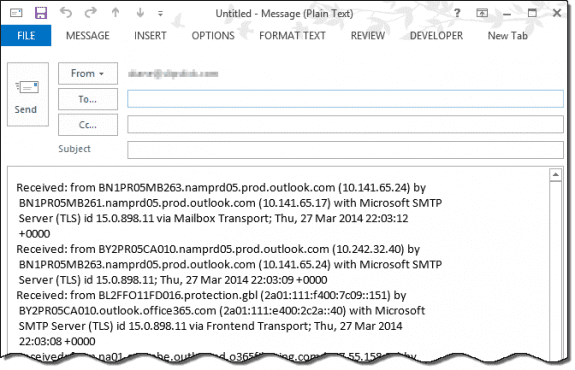
Tested in Outlook 2013, 2019, 2021, and Outlook 365, also works in Outlook 2010 and 2007.
The PowerShell version does not require you to change Outlook security settings. to use, select one or more messages then run the script.
clear

$olApp = new-object -comobject outlook.application
$PropName = "http://schemas.microsoft.com/mapi/proptag/0x007D001E"

$olFolder = ($olApp.ActiveExplorer())
$Selection = $olFolder.Selection

foreach ($olMsg in $Selection) {
$oPA = $olMsg.PropertyAccessor
$value = $oPA.GetProperty($PropName)

$Mail = $olApp.CreateItem(0)
$ndatetime = Get-Date -Format g
$Mail.Subject = $olMsg.subject + ' ' +$ndatetime
$Mail.Body = $value
$Mail.display()
}
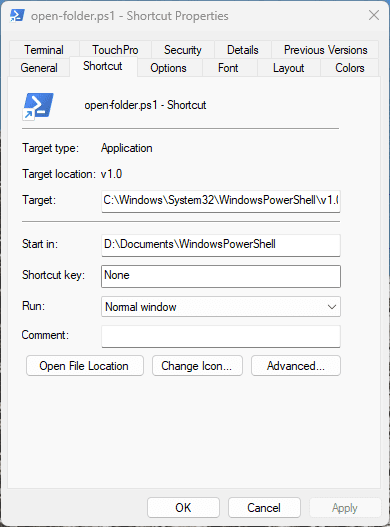
Save it as a *.ps1 then right-click and choose Run with PowerShell.
Or create a shortcut and pin it to the taskbar or Start menu. The target will be
powershell.exe -file "C:\path\to\filename.ps1"
Note: Windows will add the full path to powershell.exe to the shortcut.
VBA method to get message header
Sub ViewInternetHeader()
    Dim olItem As Outlook.MailItem, olMsg As Outlook.MailItem
    Dim strheader As String

    For Each olItem In Application.ActiveExplorer.Selection
        strheader = GetInetHeaders(olItem)

        Set olMsg = Application.CreateItem(olMailItem)
        With olMsg
            .BodyFormat = olFormatPlain
            .Body = strheader
            .Display
        End With
    Next
    Set olMsg = Nothing
End Sub


Function GetInetHeaders(olkMsg As Outlook.MailItem) As String
    ' Purpose: Returns the internet headers of a message.'
    ' Written: 4/28/2009'
    ' Author:  BlueDevilFan'
    ' //techniclee.wordpress.com/
    ' Outlook: 2007'
    Const PR_TRANSPORT_MESSAGE_HEADERS = "http://schemas.microsoft.com/mapi/proptag/0x007D001E"
    Dim olkPA As Outlook.PropertyAccessor
    Set olkPA = olkMsg.PropertyAccessor
    GetInetHeaders = olkPA.GetProperty(PR_TRANSPORT_MESSAGE_HEADERS)
    Set olkPA = Nothing
End Function
Write the header to a text file
This version of the above macro writes the header to a text file and opens it in Notepad. (You'll need the Function GetInetHeaders from above).
If you want to open it in another Text application, replace "notepad " with the file path and name, making sure to leave the space after the filename.
  Sub ViewInternetHeader()
    Dim olItem As Outlook.MailItem, olMsg As Outlook.MailItem
    Dim strheader As String

    For Each olItem In Application.ActiveExplorer.Selection
        strheader = GetInetHeaders(olItem)

' ### write to a text file
Dim FSO As Object
Dim strFile As String
Dim strFolderpath As String

Set FSO = CreateObject("Scripting.FileSystemObject")

' save to documents
strFolderpath = CreateObject("WScript.Shell").SpecialFolders(16)
    strFile = strFolderpath & "\header.txt"
Set objFile = FSO.CreateTextFile(strFile, True) ' True overwrites the file
Debug.Print strFile

    objFile.Write "" & strheader
    objFile.Close

 Call Shell("notepad.exe " & strFile, vbNormalFocus)

' ### end write to text file

    Next
    Set olMsg = Nothing
End Sub
Get Specific Values from the header
But combining RegEx and the macro above we can get specific values out of the header. In this example, we're getting the address in the Return-Path.
If you need two or more values, you'll use a Case statement to loop through the header. See Get two (or more) values from a message for an example.
Sub GetValuesFromInternetHeader()
    Dim olItem As Outlook.MailItem, olMsg As Outlook.MailItem
    Dim strHeader As String
    Dim strResult As String
    Dim strResults As String
    Dim Reg1 As Object
    Dim M1 As Object
    Dim M As Object

    For Each olItem In Application.ActiveExplorer.Selection
        strHeader = GetInetHeaders(olItem)

      Set Reg1 = CreateObject("VBScript.RegExp")
    With Reg1
        .Pattern = "(Return-Path:\s(.*))"
        .Global = True
    End With

    If Reg1.test(strHeader) Then

        Set M1 = Reg1.Execute(strHeader)
        For Each M In M1
' 0 = everything in the first set of ()
' 1 = everything in the second set of ()
        Debug.Print M.SubMatches(0)
        strResult = M.SubMatches(1)

' do something with the result
        strResults = strResult & vbCrLf & vbCrLf & strResults
        Next
    End If

    Next

        Set olMsg = Application.CreateItem(olMailItem)
        With olMsg
            .BodyFormat = olFormatPlain
            .Body = strResults
            .Display
        End With
    Set olMsg = Nothing
End Sub

Function GetInetHeaders(olkMsg As Outlook.MailItem) As String
    ' Purpose: Returns the internet headers of a message.'
    ' Written: 4/28/2009'
    ' Author:  BlueDevilFan'
    ' //techniclee.wordpress.com/
    ' Outlook: 2007'
    Const PR_TRANSPORT_MESSAGE_HEADERS = "http://schemas.microsoft.com/mapi/proptag/0x007D001E"
    Dim olkPA As Outlook.propertyAccessor
    Set olkPA = olkMsg.propertyAccessor
    GetInetHeaders = olkPA.GetProperty(PR_TRANSPORT_MESSAGE_HEADERS)
    Set olkPA = Nothing
End Function
Send a Spam Report
If you need to send a spam report to your ISP, you can use a macro to automate it. This macro will work on one message or a selection of messages.
If the macro is not creating a body that can be processed by the reporting service, try changing the 0x007D001E value to 0x007D001F. This returns PR_TRANSPORT_MESSAGE_HEADERS_W instead of PR_TRANSPORT_MESSAGE_HEADERS. See Geldner's thread and answer here: Problem submitting SPAM using Outlook VBA Form
Sub ForwardSpam()
    Dim olItem As Outlook.MailItem, olMsg As Outlook.MailItem
    Dim strHeader As String
    Dim strFWHeader As String
    Dim strNote As String

    For Each olItem In Application.ActiveExplorer.Selection
        strHeader = GetInetHeaders(olItem)

    strNote = "boilerplate note, if needed"

      Set olMsg = olItem.Forward
       With olMsg
        .To = "report@address.com"
        .BodyFormat = olFormatPlain
        .Body = strNote & vbCrLf & vbCrLf & strHeader & vbCrLf & vbCrLf & olItem.Body
        .Display ' change to .send when satisfied
       End With
    olItem.Delete
  Next
    Set olMsg = Nothing
End Sub

Function GetInetHeaders(olkMsg As Outlook.MailItem) As String
    ' Purpose: Returns the internet headers of a message.'
    ' Written: 4/28/2009'
    ' Author:  BlueDevilFan'
    ' //techniclee.wordpress.com/
    ' Outlook: 2007'
    Const PR_TRANSPORT_MESSAGE_HEADERS = "http://schemas.microsoft.com/mapi/proptag/0x007D001E"
    Dim olkPA As Outlook.propertyAccessor
    Set olkPA = olkMsg.propertyAccessor
    GetInetHeaders = olkPA.GetProperty(PR_TRANSPORT_MESSAGE_HEADERS)
    Set olkPA = Nothing
End Function
Using PowerShell Scripts
To use PowerShell scripts with Outlook, start typing PowerShell on the start menu and open Windows PowerShell when it comes up. Windows PowerShell ISE has a script pane at the top, which is useful if you want to edit the script.
Paste the entire script in the PowerShell window and press Enter or the Run button if using PowerShell ISE.
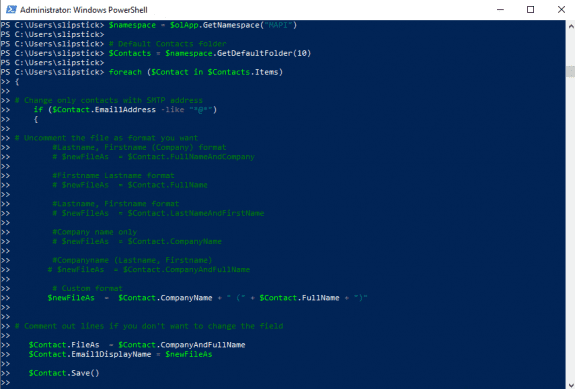

Note: PowerShell scripts will not work with new Outlook or Outlook on the web.
Saving PowerShell Scripts
If you want to save the script as a .ps1 file, paste it into Notepad and save it with the extension .ps1. To open it in the PowerShell IDE, type PowerShell on the start menu and click on Windows PowerShell IDE when the PowerShell app is found. Paste the script in the editing window.
To use it, you need to allow local scripts by running this command:
Set-ExecutionPolicy RemoteSigned
To run your saved .ps1 file, right-click on the script and choose Run with PowerShell.
How to use macros
First: You will need macro security set to low during testing.
To check your macro security in Outlook 2010 or 2013, go to File, Options, Trust Center and open Trust Center Settings, and change the Macro Settings. In Outlook 2007 and older, it’s at Tools, Macro Security.
After you test the macro and see that it works, you can either leave macro security set to low or sign the macro.
Open the VBA Editor by pressing Alt+F11 on your keyboard.
To put the code in a module:
- Right click on Project1 and choose Insert > Module
- Copy and paste the macro into the new module.
More information as well as screenshots are at How to use the VBA Editor
More Information
Retrieving Internet Headers Using VBA in Outlook 2007/2010 Includes a code sample to use with Run a Script rule.
For Outlook 2003 and older, see Get Internet header VBA code sample for Outlook 2003.

Frederic says
It would be nice to be able to get a specific part of the Internet Headers, for instance the Reply-To adress, and to display it in a new column (custom view). Very useful against spoofing ! I have tried to design a custom form for this purpose... but to no avail...
Diane Poremsky says
That is possible, using propertyaccessor or regex to find a value in the header.
https://www.slipstick.com/developer/read-mapi-properties-exposed-outlooks-object-model/
https://www.slipstick.com/developer/code-samples/outlooks-internet-headers/#values
use .Pattern = "(Reply-To:\s(.*))"
Tom Geldner says
Is there an easy way to mod the Spam Report macro so that it strips any blank lines from the header when creating the email report? Outlook, for some reason, often creates blank lines in headers and it causes SPAMCOP.NET to choke.
steve says
this is excellent.
How do I create a text file with the exact same information as the email that the 1st macro made?
Diane Poremsky says
Use this in place of the code that creates a message in the first macro
' ### write to a text file Dim FSO As Object Dim strFile As String Dim strFolderpath As String Set FSO = CreateObject("Scripting.FileSystemObject") ' save to documents strFolderpath = CreateObject("WScript.Shell").SpecialFolders(16) strFile = strFolderpath & "\header.txt" Set objFile = FSO.CreateTextFile(strFile, True) ' use False if you don't want to overwrite Debug.Print strFile objFile.Write "" & strheader objFile.Close Call Shell("notepad.exe " & strFile, vbNormalFocus) ' ### end write to text fileSteven says
wow, thanks.
very helpful.
Steven says
So much information! Wow.
Is there any way to filter the header and only write the date/time received to the text file? Is there a way to break out each piece of information, like recipient?, sender?
Are all of these 'Objects'?
Diane Poremsky says
You can get anything out of the header using regex, but the common fields are in vba - receivedtime, subject, sendername and senderemailaddress, recipient all are stored in fields accessible by VBA.
Get the fields, then write the strings to the text file.
With olItem
strName = .SenderName
strSender = .SenderEmailAddress
strTime = .ReceivedTime
End With
SteveB says
I just figured out that it'll work..... just not with a user form.
Would you be willing to modify it to work with a user form, or to put an output into a user form/label on a form?
Steve Buckley says
Hi.
In trying the code for the first one above, I get a run time error on the
.display under the With operation.
It tells me that it cannot perform that operation because a dialogue box is open, and needs to be closed. I have two dialogues open.
1- the program itself.
2- the user form I've created. I close the user form, and it still throws the error.
With olMsg.BodyFormat = olFormatPlain
.Body = strheader
.Display
End With
I'm using office 365.
Thank you.
Rainer says
Supercallifragilisticexpialidocious
Well done. Thank's a lot!
Rajan says
Dear Diane,
Thanks for your code . would you please me , i want to add some condition to code after extraction of few details. such as ; Reply To; From; To; and etc.
please help me to add some condition on it.
Thanks in advance.
Rajan says
Dear Diane,
Thanks for your code . it was really helpful to me . in the email headers i was trying to remove particular line from every header.
"h=sender:from:reply-to:to:subject:mime-version:content-type:list-unsubscribe:x-report-abuse:form-sub;"
please help me to find solution on this .
Diane Poremsky says
you'll change the pattern to find it...
.Pattern = "(h=(.*)-sub)"
Do you actually need to remove it from the header or need to copy it out of the header? VBA can't edit the internet header - you may be able to use Redemption (outlookspy.com) to edit it but i don't have code samples. If the line nver changes, you can use the replace function to remove it.
Rajan says
Dear Diane,
Thanks for response,
From the header i am extracting few details , such as;
.Pattern = "(To:\s(.*))"
but in result i am getting this , as both Contains To: ,
can u help to get exact match of string what i am searching . as code is not understanding that i am looking only for "To" not
"Reply-to."
Reply-To: Jon Luchette
To: Ernie Bourassa
Rachana says
Hi Diane,
I am working on a VB script that converts Outlook mail message to word doc and then save the file as a PDF. The PDF which is being generated is missing the header (which shows the sender's Display Name) .
Could you suggest the way forward. I Have attached my code for reference.
Diane Poremsky says
I haven't run your code yet, but the macro at https://www.slipstick.com/developer/code-samples/save-outlook-email-pdf/ created a pdf with the header you see in printouts (or replies) - with the sender in this format:
From: OutlookForums
I'll test your code when i get a chance (I'm on 'the road' right now.)
Joe says
Hi, can you show me a code where I can copy the email items (Outlook) in to a specific cell in a worksheet. Email Subject, From, received time, email address of the sender etc. Thanks in advance
Diane Poremsky says
The first macro at https://www.slipstick.com/developer/vba-copy-outlook-email-excel-workbook/ is used in a run a script rule, the second one is run manually.
klllmmm says
Dear Diane,
I'm importing outlook data in a particular folder into MS access through Ms Access->External data->Under the import & link section "More"-> Import Outlook folder
This imports a particular outlook folder data (fields noted below) at time, So i get tabuler dataset.
Fields are;
Importance, Icon, Priority, From, Message To Me, Message CC to Me, Sender Name
,CC, To, Message Size, Created, Modified, Subject Prefix,Has Attachments,
Normalized Subject, Object Type, Content Unread, Contents,Received, Subject
I' have below concerns.
1. Mostly i'm getting for "To" & "CC" fields are contact names, not the exact email addresses.
I prefer to get exact email address rather than contact name. Because sometimes
same contact name has many email addresses. Is there a way get this done?
2. Is their any way to import internet header informations of all the emails in a particular outlook folder
into MS access?
Thank you very much for your time & effort.
Diane Poremsky says
You are limited to the included fields when you use the automated method but you can use VBA to get any field you need.
klllmmm says
Thanks, i'll try to work with VBA scrpts to solve this.
Harish says
This works fine when I run it on mails I have received.
But, I wanted to parse mails that my friend has downloaded as .msg files from outlook on his PC.
Is it possible for me to parse them on my PC?
Diane Poremsky says
So they aren't in outlook? It should still work, assuming the header is present - sometimes saving files to the hard drive (or emailing them as attachments) removed the internet header.
This line tells you to use the current selection: For Each olItem In Application.ActiveExplorer.Selection
change it to use the opened message:
Set olItem In Application.ActiveInspector.CurrentItem
Jeminar says
Thanks Diane, this is excellent.
It doesn't capture the headers of sent mail (even if replying). Is there a way to get that?
Diane Poremsky says
Sent mail doesn't have headers in Outlook - that is added by the SMTP server.
Marc says
Dear Diane. In the codes above there is a small typo (or a change in behavior between different Office versions): "//schemas.microsoft.com/mapi/proptag/0x007D001E is missing the http (at least this was necessary in Outlook 2016 to get it to work)
Seth says
I'm trying to access the headers of messages that have been forwarded, which works. But it only shows the header information of the person who forwarded the message and not the original sender (which I would like). Is there a way to access those original headers?
Brad Kozell says
Unfortunately, this isn't possible. Once a message has been forwarded, the original header information is replaced with that of the "new" sender - the secondary person forwarding the message. This is by design. The only way to access the original header information is to work with the original (non-forwarded) message.
Brad Kozell says
Thanks! This is definitely a step in the right direction for me. I'm new to VBA (very, very green!). However, instead of simply displaying the header of the current message, is there any way to modify the code to allow it to dump the headers of ALL messages of the current folder, or an Outlook folder of our choosing? I'm a computer tech, and have a need to export the header information of all emails in a folder (not just the Inbox). Any assistance would be greatly appreciated.
Diane Poremsky says
Tweaking the macro to do that isn't difficult - i have base code to get the items in a selected folder and you just need to put working bots of the macros together. What do you want to do with the headers once you get them - write to one email message (or file) or to separate messages?
Brad Kozell says
I was looking to dump all of the headers into a single text file (or e-mail, really doesn't matter) so I could put that information into an application that can look at IP addresses in the header & display the country of origin. This third party application allows you to paste information into it - which is why it doesn't matter if the information is written to an email or text file.
Diane Poremsky says
Try rearranging the lines - if there are a lot of messages it would be better to write each one separately rather than adding them to a string.
Set olMsg = Application.CreateItem(olMailItem)
For Each olItem In Application.ActiveExplorer.Selection
strheader = GetInetHeaders(olItem) & vbcrlf & strheader
Next
With olMsg

.BodyFormat = olFormatPlain

.Body = strheader

.Display

End With
the second sample at https://www.slipstick.com/developer/code-samples/save-email-message-text-file/ shows how to write a lot of messages to a text file; it could easily be adapted to get the header.
Brad Kozell says
Thanks, I'll give it a try.
mvcampos says
first at all, thanks for posting this, really useful!!!
Suggestion:
If you, like me, are interested in the headers of the currently open email instead of selected email (sometimes we ask users to forward the email using Attach Item or CTRL+ALT+F, so we can check the headers), then
Remove the "For Each" and "Next" line in "Sub ViewInternetHeader()" and add:
Set olItem = Application.ActiveInspector.CurrentItem
that way you can see the headers of mails that are attached in other mails.
CTrimmer says
Hello, is there a way, with vba, to insert the formatted "message header" (From, Sent, To, CC, Subject) that outlook automatically displays below the line " -----original message----- " when a message is forwarded or replied to?
Diane Poremsky says
You need to build it using code or use the Forward or Reply command so they are added by default.
Rico says
I was trying with no luck to get the header opened in notepad instead of a new outlook message. Any luck ? or suggestion ? I manager to get a notepad open but not to copy the message in it. I'm not a macro expert :) just playing around
Diane Poremsky says
It not opened, but you can write to a text file by replacing the new message code with this:
Open "C:\Users\username\Documents\New folder\header.txt" For Output As 1
Print #1, strheader
Close #1
Shell "notepad.exe c:\Users\username\Documents\New folder\header.txt", vbNormalFocus
Simon Lukes says
Hi Diane,
I am trying to clarify the workings of the GetInetHeaders function. Is it using an xml schema from a microsoft website to pull out the header information? I did pop over to the website referred to in the code but it doesn't appear to be searcheable and I couldn't (didn't know how to) search for that particular example of BlueDevilFan's code to see if it was explained.
Diane Poremsky says
The code is fairly simple - it grabs the mapi property called PR_TRANSPORT_MESSAGE_HEADERS using propertyaccessor object. The schema is .
MSDN has some information about the PropertyAccessor object https://msdn.microsoft.com/en-us/library/office/ff863046.aspx
Jane Smith says
how do i use the information this is giving me? olMsg.body was not working
Diane Poremsky says
What are you trying to do? How is it not working? This macro just grabs the internet header and puts it in a message body so it's easy to read.
kixtart says
I'm 100% ignorant of how to even start this process. Do I begin by opening Notepad, and pasting the above code into a new txt file? Then what? I'm a sysadmin and have only done batch file scripting up to this point, somehow. Please don't blast me for that. :-)
Diane Poremsky says
See https://www.slipstick.com/developer/how-to-use-outlooks-vba-editor/ - that should get you pointed in the right direction.