Connecting Gmail calendar to Outlook is a popular request and unfortunately, it's not possible unless you use an add-in. However, if you only need a read-only calendar, you can add a Gmail calendar as an Internet Calendar and view your appointments (but not edit or add new appointments).
You need to use the Private ics link in Gmail and add it as an Internet Calendar in File, Account Settings, Internet Calendar.
Another option, if you use Outlook.com, is to subscribe the calendar in Outlook.com. The shared calendar syncs with the Outlook.com account. It's still going to be read-only, but avoids the occasional send and receive errors a subscribed calendar generates.
The Google Calendar Sync Utility utility will work with Outlook (all versions).
- Go to your Gmail calendar
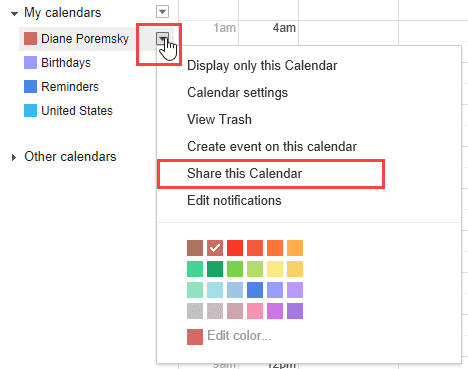
- Move the mouse over your calendar name then click on the caret to the right of the calendar name to expand the menu. Choose Share this calendar

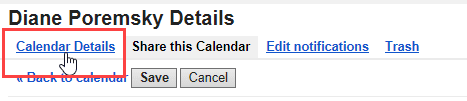
- Click the Calendar Details tab.
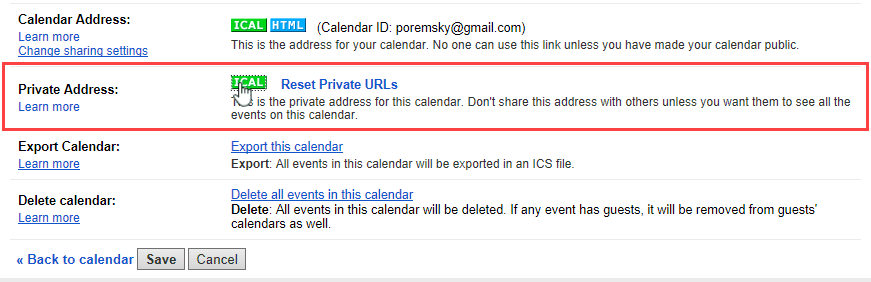
- Click the ICAL icon for the Private Address. If you choose the Public Address, you need to enable public access on the Share this calendar tab.
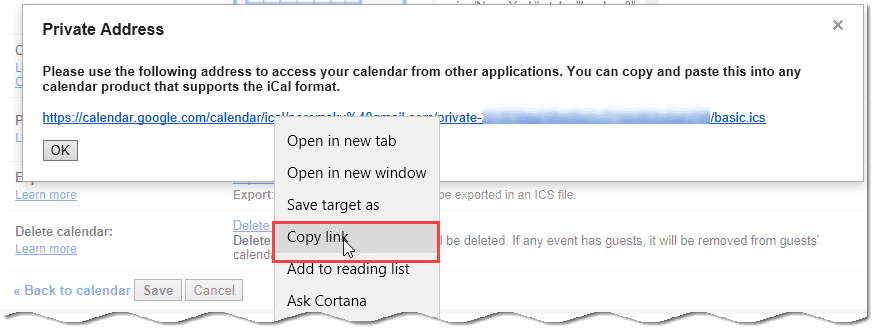
- Right-click on the URL and choose Copy.
- In Outlook, go to File, Account Settings, Internet Calendar tab.
- Click New.
- Paste the URL in the address field. It's no longer necessary to remove the S from the HTTPS URL, but if Outlook won't download or gives you an error, remove it.
- Click Add. Enter a friendly name for the calendar and return to Outlook.
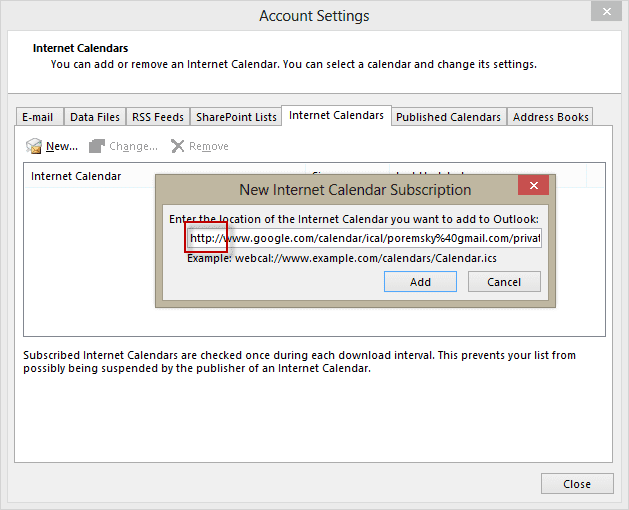
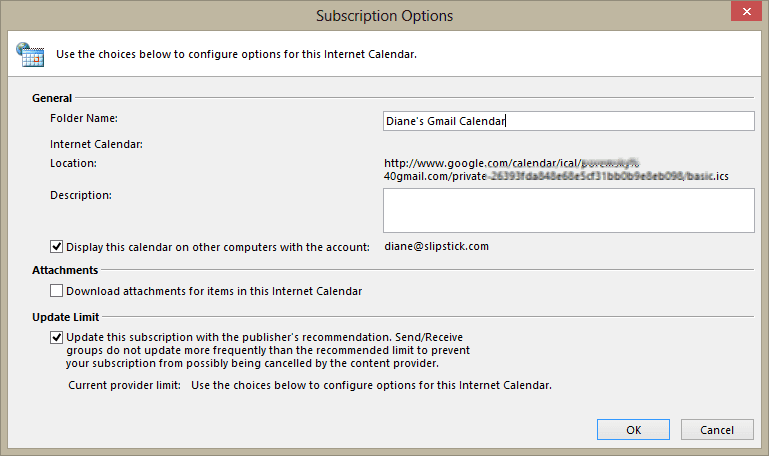
The calendar will sync to Outlook but it is read-only. You can't add appointments in Outlook and have them sync up to the server. Updates made to the calendar online should sync down to Outlook hourly.
Subscribe to a Google Calendar Video Tutorial
This video shows the steps to get the iCalendar ICS URL from Google Calendar as well as add it to Outlook.
More Information
Additional articles on using Gmail with Outlook

Ryan says
Diane,
this worked for me for years. in the last week, it stopped working and I couldn't see any appts. so I deleted the calendar and tried re-subscribing again. It won't allow me and I get the error "Couldn't Import Calendar. Try again later." any thoughts on potential workarounds or something else I could try?
David says
Just FYI it is now referred to as the "Secret Address" under individual calendar settings/ Integrate calendar
Siim says
Caldavsynchronizer – Sync Outlook Everywhere
this free software solved my sync issues with google and outlook
JackSpat says
Hi Diane
I recently came across your solution for syncing gmail with outlook. For me, it worked a treat. I'm wondering if there is any update on a two way sync, to allow events to be added to the gmail calendar from outlook? Paid or otherwise?
Diane Poremsky says
At this time, the only option is using a 3rd party utility to do the 2-way sync - companionlink or gsyncit work well.
Jennifer says
If I do this, can others see this calendar in Outlook? Will it be public in that it shows I'm busy but not what the actual event is?
I use Google calendar but my company uses Outlook. I am trying to embed my Google calendar into the Outlook calendar without others being able to see the actual events on my Google calendar.
Diane Poremsky says
subscribed calendars are private to you - only people looking at your desktop would have the opportunity to see it. You couldn't share the calendar from outlook even if you wanted to - you'd need to give out the url.
scott says
I've been dealing with this for years, where Outlook stops getting updates from my Google calendar. In the past it seems like it would stop updating about every 3 months, so I would delete the calendar in Outlook and re-add it. it would then immediately go get the "new" information in my Google calendar.
But, lately it's stopped updating about every other week...which is extremely painful.
I follow the steps above, no differently than I have for quite some time. Any ideas on what the problem might be?
Diane Poremsky says
No idea, but it's always been a bit buggy. However... they are working on a solution that Syncs Gmail calendar and contacts to Outlook via the "Microsoft Cloud". It's in limited testing right now (a small # of Windows Insiders had the option enabled in an update to Windows 10) - not sure when it will be available to the general public. I wasn't offered this with my account so i have no idea how well it works yet.
Chris says
Any updates out Outlook integration with calendar/contacts for mac? It works beautifully on iOS, so I know many people would enjoy this feature.
Diane Poremsky says
At this time, no, it's not supported in the desktop version, but they are working on a solution for Outlook desktop which should work in both windows and mac versions. I don't have an ETA though.
Ermanno says
Microsoft announced today this feature for Outlook 2016 for Mac (it's limited to a small number of Office Insiders). Hopefully the Windows version is not too far behind.
Sarah says
Thank you very much for this information. I have successfully subscribed to my Google calendar in Outlook 2016 but any changes that I make in the Google calendar (new and deleted events) are not showing in Outlook. Any ideas?
Diane Poremsky says
Do the changes ever sync? When it's added as a subscribed calendar, you should get updates about once an hour.
Kara says
Hi Diane, I don't know if Sarah's problem has been resolved, but I completed the steps above and am now having the same problem--entries that I edit or delete in my Google calendar (using my iPhone--not sure if that matters) are not syncing to my desktop Outlook. Any suggestions?
Diane Poremsky says
Does it sync if you select the calendar and click the Update folder button? Subscribing to google calendars has been buggy and it would probably be better if you used a utility to do a 2 way sync.
Eiler says
Linking my Gmail calendar, which is the one I use on phone/online etc, to my Outlook 365 has only left me with problems and grief - I certainly wish this would be an option Microsoft would embrace - Google calendar is widely used on mobile platforms, and should be hasslefree, fully 2-way functional in Outlook. Instead, the difficulty of setting up and syncing is painfull, and obviously designed to throw off any users from using this "option".
Diane Poremsky says
They are working on a solution - i don't know the status of it yet but might find out next week when I'm in Seattle for meetings.
Canoe says
Did you ever get any feedback on this?It's amazing that Windows 10's built in calendar app works both ways with Google, but Office 2016/365 doesn't..
Diane Poremsky says
they are working on a solution - not sure when they expect it have it available though. I'm assuming by next summer, but time will tell.
The reason it's not built into outlook is that it's harder to add new features to outlook - they built the new mail client from the ground up, soi it was easier to build support into it.
Naisy says
I tried it and I get this message: "Cannot verify or add the Internet Calendar in Outlook. Verify the link is a valid calendar link." Please help.
Diane Poremsky says
Are you using the public or private link? use the private link - if you use the public link, you need to enable problem access on the share this calendar tab.
Josh Brecheisen says
Diane, I actually just downloaded Google Apps Sync for Outlook and it synced right up without having to do all this and it allows you to manage and make changes.
Diane Poremsky says
Yeah, addins are often easier and most should be two way, so you can add to the calendar too. But if this is the Google apps sync that google has out, it only works with paid accounts, not free gmail.
Josh Brecheisen says
Diane, everything from my google calendar is showing with details in my outlook but it is in read only mode. Is there a way to make changes and manage the calendar from Outlook?
Diane Poremsky says
No, not using published calendars, it's one-way sync, down. You need to use a utility to get 2-way sync. I have a list at https://www.slipstick.com/outlook/sync-outlook/using-google-calendar-sync-utility-outlook/
Paul Lohman says
Does this solution still work? It says that it would cease in 2014
Diane Poremsky says
No, not for free gmail accounts. If you have a Google Apps (business) account, it is still supported.
Josh Brecheisen says
Thanks Diane. Your post was the only one that I could find that specified that I needed to use the "Private Address" ICAL. Now I can see all the details of my Gmail calendar in Outlook without making it public to the world.
Jon says
This hasnt seemed to work. I use Gmail and my wife uses Outlook. I had her paste the link in her outlook. Nothing from my calendar is there.
Diane Poremsky says
Was the calendar folder created? Are there any error messages?
I added a video tutorial to the article so you can see what to do.
Yana says
Hi
Is there a solution similar to the above but where you're trying to get Gmail account, calendar and contacts (including delegation rules) to sync with Outlook 2016 for MAC. Not Windows machine, but MAC Outlook. Two way syncing.
Diane Poremsky says
I'm not aware of any utilities that work with Mac Outlook and unfortunately, Mac Outlook doesn't support CalDav and CardDAV. Sorry.
Meg says
I'm trying to work your procedure; however, in Google, when I'm in the Calendar Details tab - I do not have the Private Address selection...any idea what I'm doing wrong?
Chad says
Yes - I don't see it either but here is what worked for me:
Click on the specific calendar drop down arrow
"Calendar Address" click on the ICAL button
Copy the address from here (and remember to delete the "s" in https)
Then follow Outlook direction she has in her post the rest of the way.
Hope it helps you.
C. Stanley Morton says
Hi,
Your procedure works like a charm. The problem now is if I want to print a weekly sheet that shows all the calendars combined, I have no idea how to get there. It appears that they all appear separately but not together as they do in Google. Any ideas? Thank you.
Diane Poremsky says
Outlook doesn't support this as a native feature, you'd need to use the Calendar Printing Assistant for outlook or a macro.
https://www.microsoft.com/en-us/download/details.aspx?id=16645
macro: https://www.slipstick.com/outlook/combine-outlook-calendars-print-one/
Neal says
I really appreciate your efforts to help! I've been trying what I thought to be the equivalent to windows .pst file... exporting contacts as an .olm file. After trying every possible variable via that route, I gave up. I also tried the text file option you suggested....and that did actually export files. I was excited! However, when I imported it, I discovered that Groups were not imported and all formatting on the notes was lost (just one long text). Having reliable access to Groups is one of the reasons I really wanted to continue using Outlook. And losing formatting on the notes was a pain I shouldn't have to deal with. Any other suggestions. Right now I'm leaning toward just switching to Mac Mail app for everyday use: it syncs nicely with my gmail contacts.... I'll use Outlook only when I need to utilize group emails. I'll keep an old Windows 7 laptop around...and keep it's Outlook contacts synced with gmail contacts (there is an app that does that nicely in the Windows world). Then export that .pst file to a flash drive and import it to Mac Outlook. Convoluted... but what choice do I have? At least I know this works.... Open to any other suggestions?
Diane Poremsky says
i'll have to test a few things and see if there is a better way to do what you want.
Neal says
Thanks for your response... I did some more research and came to the same conclusion... was able to remove the sync without any problem. Appreciate your help. Now... if you had any suggestions as to how to get Outlook 2011 (Mac OSx Mavericks) to export my contacts.. I would be in heaven. https://answers.microsoft.com/en-us/mac/forum/macoffice2011-macoutlook/problem-exporting-and-importing-contacts-in/31cead6c-822e-4d8f-aa88-aec52adaf00f
Diane Poremsky says
What happens when you do it? It works here - I selected all, the file, export. Actually, it looks like I didn't need to select all, the export process exported all contacts in the folder.
This is how it works for me: https://www.screencast.com/t/9RxOBAhkz8
Neal says
NEED HELP REMOVING THIS SYNC. I've done this exact procedure and it worked great... thanks!. But I am selling my computer and need to remove this syncing. If I delete the gmail calendar in Outlook, it tells me it will delete my gmail calendar online as well. I simply want to have Outlook 2010 on this computer not download my gmail calendar any more. Help!!
Diane Poremsky says
How are you syncing it? If you uninstall the sync server, it can't remove it from gmail online.