See Let Outlook decide the best message format to use to learn how to configure Outlook Contacts to choose the best message format for Internet addresses. In most cases, you should "Let Outlook decide".
We have instructions for adding contact photos to a large number of Contacts at Batch Import Photos into Outlook Contacts
Do you want to add more than 3 email addresses to an Outlook contact? See Contacts with more than three email addresses for one solution.
To add more contacts folders to Outlook and enable the new folders as an address book, see Create a new Contact folder and enable it as an Outlook Address Book.
Printing & Merging
- Add Attachments and Set Email Fields During a Mail Merge
- Create a Letter to a Contact using VBA
- Create Envelopes and Letters using Word
- How to Print an Exchange Distribution List
- How to Print Outlook Address Books
- Inserting Addresses into Word Documents
- Printing Labels or Envelopes for Contacts
- Start a Word letter from an Outlook contact
Distribution Lists
- Add a Category to Contacts in a Contact Group
- Create a Contact Group from a List of Addresses
- Create a Contact Group to quickly send email to a multiple people
- Create Individual Contacts from a Distribution List
- Creating Distribution Lists from Address Lists
- Find the Distribution Lists a Contact Belongs to
- How to Forward a Contact Group
- Import a distribution list from the PAB
- Outlook and Exchange Distribution Lists
- Send Messages Using Additional Office 365 Exchange Addresses
- Use VBA to Create a List of Exchange GAL Members
- Using Categories for Dynamic Distribution Lists
- Using Large Distribution Lists
Address Book Display
- Contacts are missing when you click the To button
- Converting from a MAPI Address Book to Contacts
- Copy GAL Addresses to Outlook and Make the GAL Portable
- Display Public Folder and Other Contacts in the Address Book
- Enable BCM Contacts as Outlook Address Book
- Enabling the Contacts Folder as an Address Book
- Hiding Global Address Book Fields
- Imported Addresses are Missing from Address Book
- Make the Address Book show only e-mail addresses, not fax numbers
- Outlook Address Book Search Order
- Outlook Contacts, Address Book, and Autocomplete
- Outlook's Address Book is Empty
- Quick Steps Address Book Bug (Fixed)
- Understanding Outlook's Auto-Complete Cache (*.NK2)
- Use VBA to Create a List of Exchange GAL Members
Name Resolution
Outlook use both auto-complete and auto-resolution to aid you in addresses messages.
See:
- Can you control which addresses are listed in autocomplete?
- Contact Groups aren’t listed in autocomplete
- Could not complete the operation. One or more parameter values are not valid.
- How to delete Autocomplete’s Other Suggestions
- Moving Outlook's auto-complete address list to a new account
- Suggested Contacts and Auto-Complete Lists
- The (good) Autocomplete list is back
- Understanding Outlook's Auto-Complete Cache (*.NK2)
- Using Automatic name checking or Autocomplete
To remove a name from the auto-complete list in Outlook 2002 and up, press Delete when the name pops up as you type into the To box. To clean up the entire list, see: How to reset the nickname and the automatic completion caches in Outlook (MSKB)
Contact Form
More from Outlookcode.com:
Microsoft Outlook Contact Forms -- quirks and limitations
Creating a "New Fax to Contact" Action
Changing the Display Order for Outlook Contacts
Required Categories Contact Form
Import/Export
- Automatically Add Addresses to Outlook Contacts
- Converting Addresses to or from Outlook
- Converting from a MAPI Address Book to Contacts
- Import vCards into Outlook
- Transfer Outlook Contacts to Kindle Fire and Android tablets
Sharing
Other
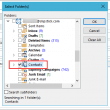
Searching for Contacts in Multiple Accounts
How to find which folder a contact is in when you have multiple accounts in Outlook or multiple contact folders.
Add to Outlook Contacts Bug
When you right click on a sender or recipient in an email header and choose Add to Outlook Contacts, a new contact is created and displayed in the Contact Card. In some builds, Outlook uses the email alias (the part before the @) as the full name.
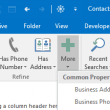
Searching Contacts Finds All Contacts
Use Search Refiners to limit the search results in Outlook's Instant Search.
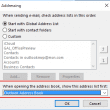
Outlook's Address Book is Empty
The default address book appears to be empty in Outlook when you click the Address book button or the To button when composing a message.
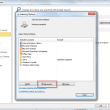
Contacts and Instant Search
When Outlook's Instant Search is not working as expected, you may need to rebuild the search index. I'll show you how.
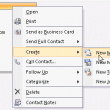
Create a new meeting with Outlook Contact
An Outlook user had this question: I upgraded to Outlook 2007 & I'm missing a feature that was in Outlook 2003: right-click a contact to create an appointment for them & have this stored in the contact's activities tab. How do I do this in Outlook 2007? In Outlook 2007, Outlook 2010, and Outlook 2013,
Send an Email to All Addresses on a Contact
How to send an email message to all addresses assigned to a Microsoft Outlook contact.
Using VBA to Change Business Card Image & Layout
While you can create a custom form that will apply to all new contacts, the business card image on existing contacts won't be updated. This is to preserve any business cards you may have already updated. If you really want to update the business card image on your contacts, you can use VBA to quickly make the change. We have code samples to change both the card image and the layout with BusinessCardLayoutXml.
Print Outlook Business Card Images
Use this macro to create and print a Microsoft Word document containing Outlook's business cards. The macro saves the card as a jpg image then inserts it into a Word document. Option Explicit Public Sub MergeContactPhoto() Dim currentExplorer As Explorer Dim Selection As Selection Dim oContact As ContactItem Dim obj As Object Dim filename As