The following code saves the attachments from selected messages but does not delete the attachments from the message(s). This VBA code is based on the code sample from my Outlook book: Save and Delete Attachments. Use it if you want to save the attachment, add a link to the saved file, and delete the attachment from the message.
Instructions to add the macro to a toolbar button or ribbon command are at the end of the page.
Save Attachments to the hard drive
Copy and paste the code from this page into your ThisOutlookSession project.
In Outlook, press Alt+F11 to open the VBA editor and expand Microsoft Outlook Objects then double click on ThisOutlookSession to open it in the editing pane and Ctrl+V to paste the code.
To use it you must first create a folder under your My Documents named OLAttachments (the code will not create it for you). Then select one or more messages and run the macro to save the attachments. You'll need to set macro security to warn before enabling macros or sign the macro. You can change the folder name or path where the attachments are saved by editing the code.
Public Sub SaveAttachments()
Dim objOL As Outlook.Application
Dim objMsg As Outlook.MailItem 'Object
Dim objAttachments As Outlook.Attachments
Dim objSelection As Outlook.Selection
Dim i As Long
Dim lngCount As Long
Dim strFile As String
Dim strFolderpath As String
Dim strDeletedFiles As String

    ' Get the path to your My Documents folder
    strFolderpath = CreateObject("WScript.Shell").SpecialFolders(16)
    On Error Resume Next

    ' Instantiate an Outlook Application object.
    Set objOL = Application

    ' Get the collection of selected objects.
    Set objSelection = objOL.ActiveExplorer.Selection

' The attachment folder needs to exist
' You can change this to another folder name of your choice

    ' Set the Attachment folder.
    strFolderpath = strFolderpath & "\OLAttachments\"

    ' Check each selected item for attachments.
    For Each objMsg In objSelection

    Set objAttachments = objMsg.Attachments
    lngCount = objAttachments.Count

    If lngCount > 0 Then

    ' Use a count down loop for removing items
    ' from a collection. Otherwise, the loop counter gets
    ' confused and only every other item is removed.

    For i = lngCount To 1 Step -1

    ' Get the file name.
    strFile = objAttachments.Item(i).FileName

    ' Combine with the path to the Temp folder.
    strFile = strFolderpath & strFile

    ' Save the attachment as a file.
    objAttachments.Item(i).SaveAsFile strFile

    Next i
    End If

    Next

ExitSub:

Set objAttachments = Nothing
Set objMsg = Nothing
Set objSelection = Nothing
Set objOL = Nothing
End Sub
Use an ItemAdd to Save Attachments on Arrival
This macro runs (automatically) on messages as they are added to the Inbox. Put it in ThisOutlookSession.
Option Explicit

Private WithEvents olInboxItems As Items

Private Sub Application_Startup()
  Dim objNS As NameSpace
  Set objNS = Application.Session
  ' instantiate objects declared WithEvents
  Set olInboxItems = objNS.GetDefaultFolder(olFolderInbox).Items
  Set objNS = Nothing
End Sub

Private Sub olInboxItems_ItemAdd(ByVal Item As Object)
  On Error Resume Next
If Item.Attachments.Count > 0 Then

Dim objAttachments As Outlook.Attachments
Dim lngCount As Long
Dim strFile As String
Dim sFileType As String
Dim i as long

Set objAttachments = Item.Attachments
    lngCount = objAttachments.Count
 For i = lngCount To 1 Step -1

' Get the file name.
 strFile = objAttachments.Item(i).FileName

 ' Get the path to your My Documents folder
    strFolderpath = CreateObject("WScript.Shell").SpecialFolders(16)
    strFolderpath = strFolderpath & "\OLAttachments\"

' Combine with the path to the folder.
 strFile = strFolderpath & strFile

' Save the attachment as a file.
 objAttachments.Item(i).SaveAsFile strFile

 Next i
End If

End Sub
Use Predefined Folders
This set of macros allows you to define a set of folders to save attachments to. Set the folder path in the small "stub" macros. The folder name is passed to the main macro. Add the macros to the ribbon or Quick Access Toolbar so they are easy to use.
To use: Select one or more messages that have attachments and run the macro.
To create more locations, copy a stub macro, then change the path and macro name. You need to end the file path with a \.
As written, the macro saves all attachments on the selected messages. If you need to filter it by file type, see the examples in other macros on this page.
These macros go in a Module.
Public strFolderpath As String
Public Sub SaveToDiane()
strFolderpath = "c:\diane\"
SaveAttachments
End Sub

Public Sub SaveToProject()
strFolderpath = "C:\project1\"
SaveAttachments
End Sub


Private Sub SaveAttachments()
Dim objOL As Outlook.Application
Dim objMsg As Object
Dim objAttachments As Outlook.Attachments
Dim objSelection As Outlook.Selection
Dim i As Long
Dim lngCount As Long
Dim strFile As String

    On Error Resume Next
    Set objOL = Application

    Set objSelection = objOL.ActiveExplorer.Selection

    ' Check each selected item for attachments.
    For Each objMsg In objSelection

    Set objAttachments = objMsg.Attachments
    lngCount = objAttachments.Count

    If lngCount > 0 Then

    ' Use a count down loop for removing items
    ' from a collection. Otherwise, the loop counter gets
    ' confused and only every other item is removed.

    For i = lngCount To 1 Step -1

    ' Get the file name.
    strFile = objAttachments.Item(i).FileName

    ' Combine with the path to the folder.
    strFile = strFolderpath & strFile

    ' Save the attachment as a file.
    objAttachments.Item(i).SaveAsFile strFile

    Next i
    End If

    Next

ExitSub:

Set objAttachments = Nothing
Set objMsg = Nothing
Set objSelection = Nothing
Set objOL = Nothing
End Sub
Run a Script Rule to Save Attachments
This version of the macro works with Rules, saving all attachments in messages that meet the condition of the rule to a folder under the user's documents folder.
To learn more about run a script rules, see Outlook's Rules and Alerts: Run a Script.
Public Sub SaveAttachments(Item As Outlook.MailItem)

If Item.Attachments.Count > 0 Then

Dim objAttachments As Outlook.Attachments
Dim lngCount As Long
Dim strFile As String
Dim sFileType As String
Dim i As Long

Set objAttachments = Item.Attachments
    lngCount = objAttachments.Count
 For i = lngCount To 1 Step -1

' Get the file name.
 strFile = objAttachments.Item(i).FileName

 ' Get the path to your My Documents folder
    strfolderpath = CreateObject("WScript.Shell").SpecialFolders(16)
    strfolderpath = strfolderpath & "\Attachments\"

' Combine with the path to the folder.
 strFile = strfolderpath & strFile

' Save the attachment as a file.
 objAttachments.Item(i).SaveAsFile strFile

 Next i
End If

End Sub
Add the message date to the filename
If you want to add the message date to the file, you'll need to get the date from the SentOn or ReceivedDate fields then format it as a string before adding it to the file name. It's a total of 4 new lines and one edited line.
First, Dim the two new variables at the top of the macro:
Dim dtDate As Date
Dim sName As String
To format the date and time and add it to the filename in 20130905045911-filename format, you'll add two lines of code after you count the attachments to get the date and format it, then edit the line that creates the filename.
If lngCount > 0 Then

       dtDate = objMsg.SentOn

         sName = Format(dtDate, "yyyymmdd", vbUseSystemDayOfWeek, vbUseSystem) & Format(dtDate, "hhnnss", vbUseSystemDayOfWeek, vbUseSystem) & "-"

   For i = lngCount To 1 Step -1

    ' Get the file name.
       strFile = sName & objAttachments.Item(i).FileName
Use the Subject and remove illegal characters
If you use the email subject in the file name, you will need to remove illegal characters that are not supported in Windows file system.
You can do that using the ReplaceCharsForFileName function (below). As written, the illegal characters are replaced with a dash (-) but you can change the word seperator.
Use this to get the subject and remove the illegal characters.
If lngCount > 0 Then

    sSubject = objMsg.Subject
' change the seperator if desired
    sSubject = ReplaceCharsForFileName sSubject, "-"

   For i = lngCount To 1 Step -1

    ' Get the file name.
       strFile = sSubject & objAttachments.Item(i).FileName
To trim long subjects, use the Left function to get the first characters. This snippet uses the first 25 characters of the subject.
sSubject = left(objMsg.Subject, 25)
To use the date and subject, use this code:
If lngCount > 0 Then

    sSubject = objMsg.Subject
    sSubject = ReplaceCharsForFileName sSubject, "-"

    dtDate = objMsg.SentOn
    sName = Format(dtDate, "yyyymmdd", vbUseSystemDayOfWeek, vbUseSystem) & Format(dtDate, "hhnnss", vbUseSystemDayOfWeek, vbUseSystem) & "-"

   For i = lngCount To 1 Step -1
 strFile = sSubject & sName & objAttachments.Item(i).FileName
Public Sub ReplaceCharsForFileName(sSubject As String, _ sChr As String _ ) sSubject = Replace(sSubject, "'", sChr) sSubject = Replace(sSubject, "*", sChr) sSubject = Replace(sSubject, "/", sChr) sSubject = Replace(sSubject, "\", sChr) sSubject = Replace(sSubject, ":", sChr) sSubject = Replace(sSubject, "?", sChr) sSubject = Replace(sSubject, Chr(34), sChr) sSubject = Replace(sSubject, "<", sChr) sSubject = Replace(sSubject, ">", sChr) sSubject = Replace(sSubject, "|", sChr) End Sub
Don't save images in signatures
This macro saves all attachments, including images embedded in signatures (they are attachments after all). To avoid saving signature images, you have two options: don't save image files, or don't save smaller files. You could even do both and save only larger images files.
Replace the code between For i = lngCount To 1 Step -1 / Next i lines with the following to filter out files smaller than 5KB. This should catch most signature images (and many text files).
If the attachments you need to save are always over 5 KB, you can increase the file size. (For reference, a blank Word document is over 10KB.)
    For i = lngCount To 1 Step -1
       If objAttachments.Item(i).Size > 5200 Then

    ' Get the file name.
    strFile = objAttachments.Item(i).filename

    ' Combine with the path to the Temp folder.
    strFile = strFolderpath & strFile

    ' Save the attachment as a file.
    objAttachments.Item(i).SaveAsFile strFile
     End If

    Next i
Save by File type
If you want to skip or save only a specific file type, use If LCase(Right(strFile, 4)) <> ".ext" format, where .ext is the extension. Add it after the first line strFile = line (and don't forget to add the End if before the Next i). You can use it to exclude a file type or use an equal (=) sign to save only a specific file type. (For 4-character extensions, use only the characters, don't include the dot.)
To work with a longer list of file types, use a Select Case statement. In this example, we're looking for image attachments, and if less than approx 5KB, we skip them. Larger image attachments will be saved.
 For i = lngCount To 1 Step -1

    ' Get the file name.
    strFile = objAttachments.Item(i).filename

' This code looks at the last 4 characters in a filename
      sFileType = LCase$(Right$(strFile, 4))

      Select Case sFileType
 ' Add additional file types below
       Case ".jpg", ".png", ".gif"
        If objAttachments.Item(i).Size < 5200 Then
     GoTo nexti
        End If
      End Select

    ' Combine with the path to the Temp folder.
    strFile = strFolderpath & strFile

    ' Save the attachment as a file.
    objAttachments.Item(i).SaveAsFile strFile

nexti:
    Next i
Increment duplicate file names
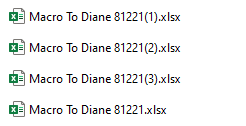
This version of the macro check to see if the file exists, it so, it adds a number to the file name.
Public Sub SaveAttachments()
Dim objOL As Outlook.Application
Dim objMsg As Outlook.MailItem 'Object
Dim objAttachments As Outlook.Attachments
Dim objSelection As Outlook.Selection
Dim i As Long
Dim lngCount As Long
Dim strFile As String
Dim strFolderpath As String
Dim strDeletedFiles As String

    ' Get the path to your My Documents folder
    strFolderpath = CreateObject("WScript.Shell").SpecialFolders(16)
    On Error Resume Next

    ' Instantiate an Outlook Application object.
    Set objOL = Application

    ' Get the collection of selected objects.
    Set objSelection = objOL.ActiveExplorer.Selection

' The attachment folder needs to exist
' You can change this to another folder name of your choice

    ' Set the Attachment folder.
    strFolderpath = strFolderpath & "\"

    ' Check each selected item for attachments.
    For Each objMsg In objSelection

    Set objAttachments = objMsg.Attachments
    lngCount = objAttachments.Count

    If lngCount > 0 Then

    ' Use a count down loop for removing items
    ' from a collection. Otherwise, the loop counter gets
    ' confused and only every other item is removed.

For i = lngCount To 1 Step -1

 ' Get the file name.
    strFile = objAttachments.Item(i).Filename

    lCount = InStrRev(strFile, ".") - 1
    pre = Left(strFile, lCount)
    ext = Right(strFile, Len(strFile) - lCount)

    ' Combine with the path to make the final path
    strFile = strFolderpath & pre & ext

    'check for existing
    Dim nnumber As String
    nnumber = 0

    Do
    FileExists = Dir(strFile)

    If FileExists = "" Then
    Exit Do
    Else

    nnumber = nnumber + 1
    strFile = strFolderpath & pre & "(" & nnumber & ")" & ext

    End If
    Loop

Debug.Print strFile

objAttachments.Item(i).SaveAsFile strFile

    Next i
    End If

    Next

ExitSub:

Set objAttachments = Nothing
Set objMsg = Nothing
Set objSelection = Nothing
Set objOL = Nothing
End Sub
Add a number to each attachment
This macro merges the first macro on this page with the macro at Write the last used value to the registry sample to add a number to each saved attachment, incrementing as attachments are saved. Because the last used value is in the registry, the count will persist because restarts.
Get the complete macro, ready to use: AttachmentIndex
 ' HKEY_CURRENT_USER\Software\VB and VBA Program Settings\Outlook\Index
    sAppName = "Outlook"
    sSection = "Index"
    sKey = "Last Index Number"
 ' The default starting number.
     iDefault = 101 ' adjust as needed

 ' Get stored registry value, if any.
     lRegValue = GetSetting(sAppName, sSection, sKey, iDefault)

 ' If the result is 0, set to default value.
     If lRegValue = 0 Then lRegValue = iDefault

' Put the save attachment code here
    strFolderpath = CreateObject("WScript.Shell").SpecialFolders(16)
    On Error Resume Next

    Set objOL = Application
    Set objSelection = objOL.ActiveExplorer.Selection
    strFolderpath = strFolderpath & "\OLAttachments\"

    For Each objMsg In objSelection
    Set objAttachments = objMsg.Attachments
    lngCount = objAttachments.Count

    If lngCount > 0 Then
    For i = lngCount To 1 Step -1

 ' Get the file name.
    strFile = objAttachments.Item(i).fileName

    lcount = InStrRev(strFile, ".") - 1
    pre = Left(strFile, lcount)
    ext = Right(strFile, Len(strFile) - lcount)

    ' Combine with the path to make the final path
    strFile = strFolderpath & pre & "_" & lRegValue & ext

    strFile = strFolderpath & strFile
    objAttachments.Item(i).SaveAsFile strFile

' add 1 to the index
    lRegValue = lRegValue + 1
        Err.Clear
    Next

   ' update the registry at the end
     SaveSetting sAppName, sSection, sKey, lRegValue
Save Attachments in Subfolders
To save the attachments in subfolders, you need to use the File Scripting Object to create the folder if it does not exist.
A complete, ready-to-use sample macro is here.
For Each objMsg In objSelection

  ' Set the Attachment folder.
    strFolder = strFolderpath & "\OLAttachments\"
    Set objAttachments = objMsg.Attachments
' put it together with the sender name
 strFolder = strFolder & objMsg.SenderName & "\"

 ' if the sender's folder doesn't exist, create it
 If Not FSO.FolderExists(strFolder) Then
 FSO.CreateFolder (strFolder)
 End If

    lngCount = objAttachments.Count
    If lngCount > 0 Then
      For i = lngCount To 1 Step -1
    strFile = objAttachments.Item(i).FileName
    strFile = strFolder & strFile
    objAttachments.Item(i).SaveAsFile strFile
Use Macro with Different Folders
This version of the macro save the attachments on the selected message to a subfolder. By using a "stub macro" to set the name of the subfolder, you can don't need ot repeat the long macro multiple times to use it with different pre-defined folders.
In this example, I'm either saving the attachment to From Bob or From Jim folder in my Documents folder.
C:\Users\username\Documents\From Bob\
C:\Users\username\Documents\From Jim\
Create buttons on the ribbon for the stub macros. Select the message then click the appropriate button.
Dim strFolder As String
Public Sub SaveToFolderBob()
    strFolder = "From Bob"
    SaveAttachments
End Sub

Public Sub SaveToFolderJim()
    strFolder = "From Jim"
    SaveAttachments
End Sub

Private Sub SaveAttachments()
Dim objOL As Outlook.Application
Dim objMsg As Outlook.MailItem 'Object
Dim objAttachments As Outlook.Attachments
Dim objSelection As Outlook.Selection
Dim i As Long
Dim lngCount As Long
Dim strFile As String
Dim strFolderpath As String
Dim strDeletedFiles As String

    ' Get the path to your My Documents folder
    strFolderpath = CreateObject("WScript.Shell").SpecialFolders(16)
    Debug.Print strFolderpath
    On Error Resume Next

' The attachment folder needs to exist
' You can change this to another folder name of your choice

    ' Set the Attachment folder.
    strFolderpath = strFolderpath & "\" & strFolder & "\"
    Debug.Print strFolderpath

    Set objOL = Outlook.Application
    Set objMsg = objOL.ActiveExplorer.Selection.Item(1)

    Set objAttachments = objMsg.Attachments
    lngCount = objAttachments.Count

    If lngCount > 0 Then

    ' Use a count down loop for removing items
    ' from a collection. Otherwise, the loop counter gets
    ' confused and only every other item is removed.

    For i = lngCount To 1 Step -1

    ' Get the file name.
    strFile = objAttachments.Item(i).FileName

    ' Combine with the path to the Temp folder.
    strFile = strFolderpath & strFile

    ' Save the attachment as a file.
    objAttachments.Item(i).SaveAsFile strFile

    Next i
    End If

ExitSub:

Set objAttachments = Nothing
Set objMsg = Nothing
Set objSelection = Nothing
Set objOL = Nothing
End Sub
Assign the macro to a button
In Outlook 2007 and older, you can create a toolbar button to run the macro. In Outlook 2010, you'll need to customize the ribbon.
More information is at Customize the Outlook Toolbar, Ribbon or QAT and at Customizing the Quick Access Toolbar (QAT).
Run the macro using a ribbon or QAT shortcut
Step 1: To create a button to run a macro in Outlook 2010, go to File, Options, and choose Customize Ribbon. (If you want a button on the QAT, choose Quick Access Toolbar instead.)
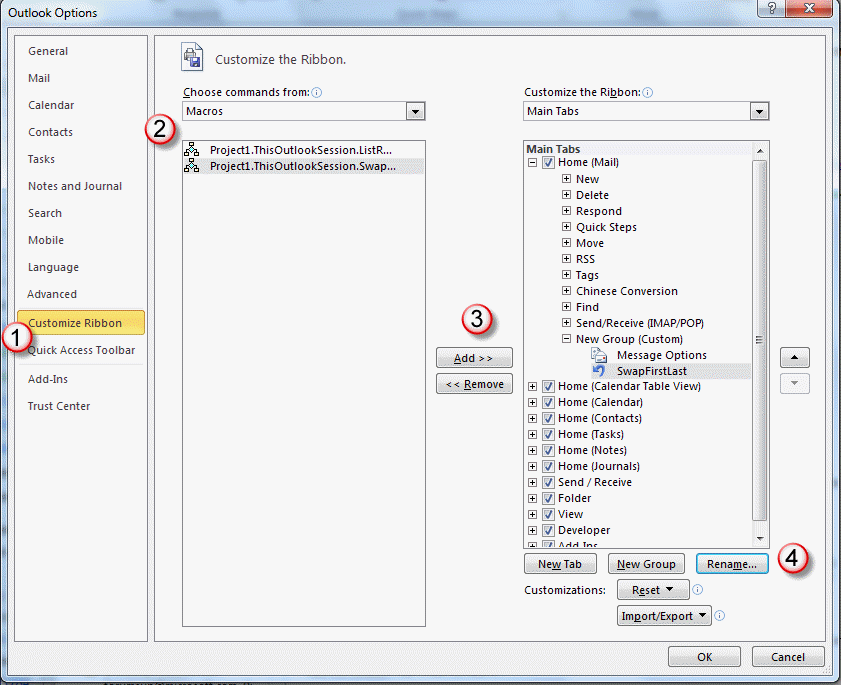
Step 2: Choose Macro from the Choose Commands From menu and select the macro you want to add to the ribbon or QAT.
Step 3: Select the Group you want to add the macro to. If it doesn't exist yet, use the New Group buttons to create the group.
Step 4: Use the Rename button to give the macro a friendly name and change the icon. You are limited to the icons in the dialog (unless you want to program a ribbon command).
Run the macro from a toolbar button
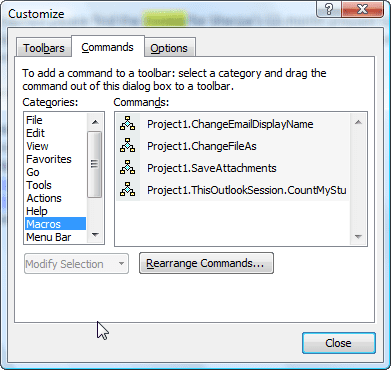
To create a toolbar button for it, go to View, Toolbar, Customize, Commands tab. In the Categories pane, type M to jump to Macros. On the Commands side, drag the macro you created to the toolbar. Right click on the button to rename it and assign a new icon.

Hunter Evans says
I am using the code below to try to save attachments in a group of emails to a specific folder based on the subject. It also includes a way to add a number to the front on the emails that have the exact same subject. The code instead saves all attachments to the first folder listed and doesn't move them based on subject. Is there a way to do this?
Public Sub SaveAttachments()
Dim objOL As Outlook.Application
Dim objMsg As Outlook.MailItem 'Object
Dim objAttachments As Outlook.Attachments
Dim objSelection As Outlook.Selection
Dim i As Long
Dim lngCount As Long
Dim strFile As String
Dim strFolderpath As String
Dim strDeletedFiles As String
Dim sSubject As String
On Error Resume Next
' Get the path to your My Documents folder
If InStr(1, objMsg.Subject, "Plant Production Schedule Report") Then
strFolderpath = "C:\downloads\shipment schedule\Morning\Test2\Prod Sch\"
Else: strFolderpath = "C:\downloads\shipment schedule\Morning\Test2"
End If
' Instantiate an Outlook Application object.
Set objOL = Application
' Get the collection of selected objects.
Set objSelection = objOL.ActiveExplorer.Selection
' Set the Attachment folder.
strFolderpath = strFolderpath
' Check each selected item for attachments.
For Each objMsg In objSelection
Set objAttachments = objMsg.Attachments
strFolder = strFolder
lngCount = objAttachments.Count
If lngCount > 0 Then
sSubject = objMsg.Subject
For i = lngCount To 1 Step -1
' Get the file name.
strFile = sSubject
lCount = InStrRev(strFile, ".") - 1
pre = Left(strFile, lCount)
ext = Right(strFile, Len(strFile) - lCount)
' Combine with the path to make the final path
strFile = strFolderpath & pre & ext
'check for existing
Dim nnumber As String
nnumber = 0
Do
FileExists = Dir(strFile)
If FileExists = "" Then
Exit Do
Else
nnumber = nnumber + 1
strFile = strFolderpath & pre & "(" & nnumber & ")" & ext
End If
Loop
Debug.Print strFile
objAttachments.Item(i).SaveAsFile strFile
Next i
End If
Next
ExitSub:
Set objAttachments = Nothing
Set objMsg = Nothing
Set objSelection = Nothing
Set objOL = Nothing
Diane Poremsky says
The folder path need to be set just prior to the save -
For Each objMsg In objSelection
' set path here if all attachments on the message go into the same folder.
Set objAttachments = objMsg.Attachments
This should work: (but I did not test it :))
For Each objMsg In objSelection
If InStr(1, objMsg.Subject, "Plant Production Schedule Report") Then
strFolderpath = "C:\downloads\shipment schedule\Morning\Test2\Prod Sch\"
Else: strFolderpath = "C:\downloads\shipment schedule\Morning\Test2"
End If
Set objAttachments = objMsg.Attachments
Hunter Evans says
Thanks. This worked perfectly!!!!
Hunter Evans says
Not sure my reply came through earlier. I am using the attached VBA that you previously assisted me with. It is working great except I need the new file names to include the attachments file extension. Right now, an email with the subject Production Schedule and an attachment that is 217080.txt saves as Production Schedule with no file type. I need it to save as Production Schedule.txt. The files in question are both .txt and .csv. Thanks.
Diane Poremsky says
I'll take a look at the code and see what needs to be changed.
Hunter Evans says
Sorry to be a pest, but wondered if you were able to look at my VBA to see how it could be adjusted to achieve what I am looking for. Thanks.
Diane Poremsky says
Not a problem - it looks like you are not getting the extension -
strFile = sSubject & sExtension
You need to get the extension from the attachment name like this -
' Get the file name.
strFile = objAttachments.Item(i).Filename
lCount = InStrRev(strFile, ".") - 1
sExtension= Right(strFile, Len(strFile) - lCount)
if the extensions will all be 4 characters (.docx, .xlsx), you can use this
sExtension= Right(objAttachments.Item(i).Filename, 5)
Ryan says
My VBA Script is not working. I've altered your script to download an .xlsx attachment and rename it as a standardized .xlsx filename. But it doesn't work. I'm wondering if it won't save and replace the current file. Attached is the script. Any help would be appreciated.
Diane Poremsky says
The first step is to uncomment this line so you can see if the path is correct. (Remove the ' from the beginning.)
' Debug.Print strFolderpath & strDestName
RAE says
WOW! Thanks Diane. Greetings from New Zealand. You saved me from having to click on 50 different email attachments. My fingers thank you.
Anders says
Hi Diane
Does "Increment duplicate file names" work with Outlook 365?
I wanted my own file path so I changed
' Get the path to your My Documents folder
    strFolderpath = CreateObject("WScript.Shell").SpecialFolders(16)
    On Error Resume Next
to
' Get the path to your My Documents folder
    strFolderpath = "C:\my path"
    On Error Resume Next
is this correct?
Thanks!
Edit: I noticed when I read my post that I've missed the last "\" in my path.
Diane Poremsky says
The desktop Outlook that is installed with Microsoft 365 Office subscription software, yes it works with it. Outlook on the web, no.
Paul Campbell says
Jesus God in Heaven, Thank you Diane Poremsky
You've coded your way into my heart.
A blessing on your head. Mazeltov.
Forever grateful,
Amen.
Bogue says
Thanks Diane! This has been extremely helpful. I am looking at saving excel files to a local drive; however, the excel files have their first 3 rows completely blank. Is there anyway to delete those rows upon download?
Thanks in advance!
Diane Poremsky says
You would need to use an Excel macro to do that. It could be converted to an Outlook macro that opens the file and deletes the empty rows. I don't have a macro that does it though.
Sophie says
Hi Diane! Thank you for your codes, they'll be saving me a lot of time. I'm using the "Use the Subject and remove illegal characters" one but the files are getting renamed to the subject + the original filename. Is there any way to make it so that it renames the files to the subject only? I'm new to VBA and I didn't manage to modify it myself.
Grace says
Thanks Diane!
Mia says
This is an incredible source. I attempted to combine two of your codes (Save Attachments in Subfolders and Increment duplicate file names), but did not succeed. Is it possible to do this?
Diane Poremsky says
It is possible. I'll take a look.
Diane Poremsky says
It is possible. I did not test, but this should work. { fingers crossed }
Public Sub SaveinSenderFolder()Dim objOL As Outlook.Application
Dim objMsg As Outlook.MailItem 'Object
Dim objAttachments As Outlook.Attachments
Dim objSelection As Outlook.Selection
Dim i As Long
Dim lngCount As Long
Dim strFile As String
Dim strFolderpath As String, strFolder As String
Dim strDeletedFiles As String
Dim FSO As Object
Set FSO = CreateObject("Scripting.FileSystemObject")
strFolderpath = CreateObject("WScript.Shell").SpecialFolders(16)
' On Error Resume Next
Set objOL = Application
Set objSelection = objOL.ActiveExplorer.Selection
' The attachment folder needs to exist
' You can change this to another folder name of your choice
' Check each selected item for attachments.
For Each objMsg In objSelection
' Set the Attachment folder.
strFolder = strFolderpath & "\OLAttachments\"
Set objAttachments = objMsg.Attachments
strFolder = strFolder & objMsg.SenderName & "\"
' if the sender's folder doesn't exist, create it
If Not FSO.FolderExists(strFolder) Then
FSO.CreateFolder (strFolder)
End If
lngCount = objAttachments.Count
If lngCount > 0 Then
' Use a count down loop for removing items
' from a collection. Otherwise, the loop counter gets
' confused and only every other item is removed.
For i = lngCount To 1 Step -1
' Get the file name.
strFile = objAttachments.Item(i).FileName
''## increment
lCount = InStrRev(strFile, ".") - 1
pre = Left(strFile, lCount)
ext = Right(strFile, Len(strFile) - lCount)
' Combine with the path to make the final path
strFile = strFolderpath & pre & ext
'check for existing
Dim nnumber As String
nnumber = 0
Do
FileExists = Dir(strFile)
If FileExists = "" Then
Exit Do
Else
nnumber = nnumber + 1
strFile = strFolderpath & pre & "(" & nnumber & ")" & ext
End If
Loop
' ## end increment
' Save the attachment as a file.
objAttachments.Item(i).SaveAsFile strFile
Err.Clear
Next
End If
Next
ExitSub:
Set objAttachments = Nothing
Set objMsg = Nothing
Set objSelection = Nothing
Set objOL = Nothing
End Sub
Ben says
hey diana, I'd your expertise on this:
why is it keeping telling me that a label is missing, using the following code?
your feedback would be really much appreciated.
I basically just wanted to extract only the .pdf attachments from an email.
Raychin says
Hello! I need my macro to download file attachments from specific email, with Subject containing the "906" number in it, from a subfolder of Outlook Inbox. But istill can't get it. Can you helpm e with that, please? My target sub folder's name "Meteologica SA Power Forecast"
and destination sdd folder's path : "C:\Users\BG-TRADE-005\OneDrive - xxxx.com\Desktop\Schedule\Mail_Temp\Download"
Raychin says
Hi Diane! It's amazing how much labor can be saved with your projects!
But i have i issue with Outlook macros for 2 weeks now... I can't get it work to download a specific named attachments from a Outlook Inbox sub folder to my SSD folder. Can you please help me with that task? For simplicity the Outlook sub folder will be Test, and the .csv attachments always have a "906" at the end of the Subject. I am trying to with this code :
Sub Download_Hrabrovo_Attachment() Dim rvApp As Outlook.Application Dim rvNS As Outlook.NameSpace Dim rvFolder As Outlook.MAPIFolder Dim rvItem As Object Dim mailitem As Outlook.mailitem Dim rvAtt As Outlook.Attachment Set rvApp = New Outlook.Application Set rvNS = rvApp.GetNamespace("MAPI") Set rvFolder = rvNS.GetDefaultFolder(rvFolderInbox) Set rvFolder = rvFolder.Folders("Inbox") Set rvFolder = rvFolder.Folders("Meteologica SA Power Forecast") For Each rvItem In rvFolder.Items If rvItem.Class = rvMail Then Set mailitem = rvItem If InStr(mailitem.Subject, "Wind Power Forecast" & "906") > 0 & _ InStr(rvAtt.FileName, "-wind-power-forecast-HrabrovoWind") Then For Each rvAtt In mailitem.Attachments rvAtt.SaveAsFile ("C:\Users\BG-TRADE-005\OneDrive - ****.com\Desktop\Schedule\Mail Temp\Download\") Next rvAtt End If End If Next rvItem Set rvFolder = Nothing Set rvNS = Nothing Set rvApp = Nothing End SubBobH says
I have a large collection of Calendar/Appointment items. All of them were created with the original email attached. I'm trying to access the sender email address from these attached emails. With type MailItems, I've been able to access the
MailItem.SenderEmailAddressproperty, but don't know how to do this with an AppointmentItem that contains an email attachment. I've tried using AppointmentItem.Attachmentments.item(1).SenderEmailAddress without success (there's only 1 attachment in these appointment items).Diane Poremsky says
You need to save the attachment, open it and then get the sender address. I have a macro around here, somewhere, that does it.
BobH says
Thanks. Used <item>.Attachments.SaveAsFile method to save the attachment, then Session.OpenSharedItem(<path to .msg file>) to open the attachment, then use SenderEmailAddress property to extract the email address. Some weird problems encountered - when I tried to reuse the same filename (e.g. 'untitled.msg'), I got random file system failures to open the .msg file that had just been saved (both using VBA and in File Explorer). Ended up using saving use <item>.Attachments.Filename property to save the file, then using 'Kill <path>\*.*' afterwards to cleanup the temp .msg files.
BobH says
This is my 2nd attempt to post this - first attempt on 12/31 showed @guest_219043 - awaiting approval, then disapppeared...
Unfortunately, what worked on one system (my test environment with a copy of the user's outlook.pst file - in my last past just below) failed on the target environment. Endless random occurrences of 'unable to save attachment' occurs even with valid path (I checked path in debugger). The attachment actually exists in the temp folder I set up, but it can't be opened, even in File Explorer. Have to exit Outlook completely to remove and retry.
Here's what I've tried so far:
1) The path to the temp attachments folder was fairly long, so I tried shortening it - no success, same random errors.
2) Thinking that it might be due to invalid characters in filename in .Filename property of attachment, I changed to using a sequential filename ("temp" & <index> & ".msg"), same random occurrences of the error.
It's baffling - some of the attachments are saved, others fail and once it fails, I can't even open the attachment in File Explorer
Here's the code block I'm using (can't use the code block <> feature, it inserts endless   markers) - it's a sub that's called from the main routine that loops through all the Calendar items (type AppointmentItem). Some of the attachments in the calendar items are email messages (type MailItem), some are meeting requests (type MeetingRequest). FolderPath is a module-level public variable. The comments indicate the endless randomness of the failures, with no apparent reason...
Sub SaveAttachmentsToTempFolderThenRetrieve(ByVal olItem As Object, SenderEmail As String)
Dim TempFolderPath, FinalPath As String, AttFileName As String
Dim objAtt, Msg As Object
Dim i As Integer
'Const Filename As String = "Untitled.msg"
TempFolderPath = FolderPath & "Attachments_temp\"
'On Error GoTo ErrHandler 'it is generating "unable to save attachment", different than what happened on server
If olItem.Attachments.Count > 0 Then
For Each objAtt In olItem.Attachments
i = i + 1
AttFileName = "temp" & CStr(i) & ".msg"
'FinalPath = TempFolderPath & objAtt.Filename
FinalPath = TempFolderPath & AttFileName
' no need to save by 'filename' property - no further need for the attachment once the email address is extracted
' FinalPath = TempFolderPath & Filename 'had to abandon this approach due to random open failures after saving
' Debug.Print FinalPath
objAtt.SaveAsFile FinalPath
Next
Set objAtt = Nothing
'On Error GoTo ErrHandler 'error handler needed due to random failures to open attachment after saving (even if opened in File Explorer)
Set Msg = Session.OpenSharedItem(FinalPath)
SenderEmail = Msg.SenderEmailAddress
Set Msg = Nothing
'If AttFileName = "Untitled.msg" Then Kill FinalPath
Else
SenderEmail = ""
End If
Exit Sub
BobH says
It turns out the problem was with an Outlook add-in. Once I disabled the add-on, the code worked properly. Should have checked this first.
Diane Poremsky says
Which addin was causing problems?
Albertan says
Hello Diane, thanks a lot for this code, it's very very helpful.
I tried to replace the strfolderpath = strfolderpath & "\Attachments\"
with a strfolderpath = "P:\MyCompany\Finance\ which is a network drive but it's taking a longer time.
Should I stick with the patch in C drive and then manually copy it from there? Not sure why would be be slower.....
Thank you
Diane Poremsky says
Yes, using a location will be faster. Outlook sometimes has trouble writing to network drives.
Ron Lister says
Hi Dianne,
I am attempting to use your VBA code, but it keeps erroring out on the following line of code
"sSubject = ReplaceCharsForFileName sSubject, "-""
I have added the "ReplaceCharsForFileName function" in as well and I still error out. I cannot see what is causing the issue. Would you have any suggestions on possible fixes?
Thank you
Ron
Using Outlook 365 in a Win 10 OS
Kurt says
I figured it out I think, the reason why the macro was only getting a few attachments. When the macro came across an email that was a meeting invite, it stopped. So I filtered those out, and then it works!
Calie says
What if we need it to save attachments from both emails and meeting invites?
Kurt says
I had same issue as Kris, the macro works but only grabs a few of the attachments, sometimes it grabs 20, sometimes 30, sometimes 1. Is this some kind of security issue? I am using office 365.
Thank you!
Diane Poremsky says
It wouldn't be security but either the macro is crashing and stops working or it is a memory issue (not releasing the objects that need released).
Mika Stolz says
Hello! Is there any way of saving attachments to a folder, picked through a user-friendly dialog window (like when saving attachments from a single message)?
Diane Poremsky says
Yes, you just need to replace the hard coded path with a folder piccker.
https://www.slipstick.com/developer/code-samples/windows-filepaths-macro/
Kris says
Thank you! This worked for the first few emails I selected, but then stopped after saving 40 attachments (incl the little images in signatures).
Is there any way to make it keep going - I am trying to back up a whole email folder.
Daniel Doyle says
Dianne, What a great resource you are. I am not able to get the script to work in OutlookO365 I get no information when running now but an unexpected error occurred when the email comes in and the rule is on
Any direction helpful
Pasting here:
Public Sub SaveAttachments()
Dim objOL As Outlook.Application
Dim objMsg As Outlook.MailItem 'Object
Dim objAttachments As Outlook.Attachments
Dim objSelection As Outlook.Selection
Dim i As Long
Dim lngCount As Long
Dim strFile As String
Dim strFolderpath As String
Dim strDeletedFiles As String
' Get the path to your My Documents folder
strFolderpath = "W:\FTPFolder\"
On Error Resume Next
' Instantiate an Outlook Application object.
Set objOL = Application
' Get the collection of selected objects.
Set objSelection = objOL.ActiveExplorer.Selection
' The attachment folder needs to exist
' You can change this to another folder name of your choice
' Check each selected item for attachments.
For Each objMsg In objSelection
Set objAttachments = objMsg.Attachments
lngCount = objAttachments.Count
If lngCount > 0 Then
' Use a count down loop for removing items
' from a collection. Otherwise, the loop counter gets
' confused and only every other item is removed.
For i = lngCount To 1 Step -1
' Get the file name.
strFile = objAttachments.Item(i).FileName
' Combine with the path to the Temp folder.
strFile = strFolderpath & strFile
' Save the attachment as a file.
objAttachments.Item(i).SaveAsFile strFile
Next i
End If
Next
ExitSub:
Set objAttachments = Nothing
Set objMsg = Nothing
Set objSelection = Nothing
Set objOL = Nothing
End Sub
Mika says
Hi. What if I need to save .xls files to .txt format automatically form Outlook to certain folder?
Diane Poremsky says
So, basically, you need to open them in Excel, save as text? You can do it using the excel object model - easiest way to get the code is to record a macro in excel then tweak it to work from outlook. Which is basically, change the activeworkbook reference to an excel object.
ActiveWorkbook.SaveAs Filename:= _
"path & filename.txt", _
FileFormat:=xlText, CreateBackup:=False
End Sub
I have several macros that show how to work with outlook and excel, such as https://www.slipstick.com/developer/vba-copy-outlook-email-excel-workbook/
Blaine says
Great stuff, Diane. I know Excel VBA pretty well but needed to save a bunch of CSVs from a number of emails and didn't know where to start with Outlook VBA. This worked out great.
A couple of observations:
I had to turn off Outlooks' reading pane. With the reading pane on, objOL.ActiveExplorer.Selection is only the displayed email, no matter how many you actually have selected.
My CSVs saved with a funky encoding. According to Notepad++ it's "UCS-2 LE BOM". It also saved the CSVs with an @ between each character, like "o@r@d@e@r@". I got rid of those in a linux shell with cat filename | tr -d '@' > newfilename.
Diane Poremsky says
Hmm. I have never seen that. Is notepad set to a format other than UTF-8?
Gnamat says
Hi Diane, thanks for creating this wonderful piece of code.
But how to append sender's email id before the attachment name and then save all the attachments?
Diane Poremsky says
Using the date snippet in the article, replace the date code with the sender's email.
Get the address:
sName = objMsg.senderemailaddress
You'd use this for the file name (as it is in the date snippet code)
strFile = sName & objAttachments.Item(i).FileName
Pratik says
Hi Diane,
How to save attachments from arrived mails of closed Outlook.means when the system is not ON or outlook is not yet opened.
Diane Poremsky says
Windows definitely needs to be running to use any client-side method. Outlook needs to be running to use a macro. A vbs or powershell could open outlook, but if the mail was not downloaded previously, you'd need to wait for outlook to download it. Powershell can connect to an exchange mailbox, but it would probably be easier to use Flow (or another 'this-then-that' service to save attachments to cloud storage. since Flow (and others) are web services, they'd work even if your workstation is off.
Rodolfo Solis says
Hello Diane,
I am trying touse the code that runs automatically from above but I'm getting no success.
I had tryed to set the file path to a custom destination but upted to just do the OLAttachments folder inside documents and still nada
Any advise?
Here's my code
Option Explicit
Private WithEvents olInboxItems As Items
Private Sub Application_Startup()
Dim objNS As NameSpace
Set objNS = Application.Session
' instantiate objects declared WithEvents
Set olInboxItems = objNS.GetDefaultFolder(olFolderInbox).Items
Set objNS = Nothing
End Sub
Private Sub olInboxItems_ItemAdd(ByVal Item As Object)
On Error Resume Next
If Item.Attachments.Count > 0 Then
Dim objAttachments As Outlook.Attachments
Dim lngCount As Long
Dim strFile As String
Dim sFileType As String
Dim i As Long
Dim strFolderpath As String
Set objAttachments = Item.Attachments
lngCount = objAttachments.Count
For i = lngCount To 1 Step -1
' Get the file name.
strFile = objAttachments.Item(i).FileName
On Error GoTo 1
' Get the path to your My Documents folder
strFolderpath = CreateObject("WScript.Shell").SpecialFolders(16)
strFolderpath = strFolderpath & "C:\Documents\OLAttachments\"
' Combine with the path to the folder.
1 strFile = strFolderpath & strFile
' Save the attachment as a file.
objAttachments.Item(i).SaveAsFile strFile
Next i
End If
End Sub
Diane Poremsky says
this is one problem: strFolderpath = strFolderpath & "C:\Documents\OLAttachments\"
use just strFolderpath = "C:\Documents\OLAttachments\" or the correct path to the folder (documents is under C:\users\username by default)
Create the attachments folder in Documents, open it and copy the path from the address bar. path it in for the path.
Shankha says
Hello Daine, amazing codes, thanks for sharing.
Have to requests
1) how to remove special characters from subject line. I have added objMsg.Subject to capture the subject in the code for Save Attachments in Subfolders2) unable to save the mail attached as an attachment, its giving error.
Much thanks
Diane Poremsky says
You need to use a function to strip illegal characters -
in the macro use
sName = objmsg.Subject
ReplaceCharsForFileName sName, "-"
then use sName in the link that sets the file name
Diane Poremsky says
I added a code sample to the article to remove the illegal characters.
https://www.slipstick.com/developer/save-attachments-to-the-hard-drive/#illegal
J Sawant says
I am using below coded save the file to purticular folder. I tried using this code however its not getting attachement saved to designated folder. I am using Outlook 2016, Windows 10. Once I run macro there no error. Kindly advise.
Sub Download_Attachments()
Dim ns As NameSpace
Dim olFolder_Inbox As Folder
Dim olMail As MailItem
Dim olAttachment As Attachment
Dim fso As Object
Dim Files_Saved_Folder_Path As String
Files_Saved_Folder_Path = "<Your folder path>"
Set ns = GetNamespace("MAPI")
Set fso = CreateObject("Scripting.FileSystemObject")
Set olFolder_Inbox = ns.GetDefaultFolder(olFolderInbox)
For Each olMail In olFolder_Inbox.Items
If TypeName(olMail) = "MailItem" And olMail.Attachments.Count > 0 Then
fso.CreateFolder (fso.BuildPath(File_Saved, Trim(olMail.Subject)))
For Each olAttachment In olMail.Attachments
olAttachment.SaveAsFile fso.BuildPath(File_Saved, Trim(olMail.Subject)) & "\" & olAttachment.FileName
Next olAttachment
End If
Next olMail
Set olFolder_Inbox = Nothing
Set fso = Nothing
Set ns = Nothing
End Sub
Diane Poremsky says
What are you using for the file path?
Files_Saved_Folder_Path = "<Your folder path>" ?
It needs to be c:\the\path\ <== ending \. If you don't have a slash between the file path and name, the file will be saved as 'pathfilename'
Are you setting the File_Saved variable?
fso.CreateFolder (fso.BuildPath(File_Saved, Trim(olMail.Subject)))
Kane says
Is there a Macro to copy attachments from recurring meetings to the hard drive
Diane Poremsky says
By using Dim objMsg As Object, the first macro should work with any outlook item. Are there different attachments on each occurrence? That is a little trickier. I'm not sure if i have any code for that.
Kane says
Thank you very much for quick response, Yes, different attachments in each occurrence.
Eric says
hello , i have noticed that all the rules script and macos are for the email arriving, that is okay since it can be operated by rules , the question is there is no rules for the email send out , i want to macro to save the attachment and also add the recipients in the filename , even manual operate is okay , however we i use the Recipients.Item.Addressin my macros , it fails , can you help me ?
Mishtan says
This is very useful Diane, thank you.
We have software that sends out emails in bulk. These emails with the attachments are saved individually into a folder on the server.
I would like to copy the attachments from these saved emails into another folder on the server.
Any ideas?
Diane Poremsky says
The messages are saved on the hard drive? Do you need to open the messages and save the attachments from the hard drive or is a macro saving the messages to the drive? If so, you can do it all in one step.
This shows how to open the msg file - then its just a matter of saving the attachment.
https://www.slipstick.com/developer/open-outlook-messages-stored-filesystem/
Mishtan says
Thanks for getting back to me.
Yes, the email message is saved in a designated folder on the server. There's no need to open the saved message. Just want to copy the attachment to another folder. e.g. there are 20 saved emails in a folder on the server. I would like to select 15 of the 20 emails and copy the attachments to another folder.
Peter says
Compile error here: objAttachments.Item(i).SaveAsFile strFile
or
objAttachments.Item(1).SaveAsFile strFile
or
objAttachments.SaveAsFile strFile
Error is
"Method or data member not found". And neither show up with Intellisense either.
Can someone help? Thank you.
Peter says
Hi,
Using Access with a reference to Outlook 16. I get a compile error on the attachment method SaveAsFile. "Method or Data member not found". This is using Ron DeBruin's code on https://www.rondebruin.nl/win/s1/outlook/saveatt.htm
I see some examples here using .item.SaveAsFile but .item does not come up either with Intelisense
Can anyone help?
Thanks.
Gitanshu Khurana says
Thanks you.. your codes helped me save a lot of time.
david thomas says
Hi I really like code you ahve devised but I cannot get it to store it in a different folder i was wondering if you could help, i Keep getting variable not defined error. I am using Outlook 2010 and windows 10 i would like it to store it at C:\Users\David Thomas\Desktop\Attachments\
your help would be greatly appreciated David Thomas
Option Explicit
Private WithEvents olInboxItems As Items
Private Sub Application_Startup()
Dim objNS As NameSpace
Set objNS = Application.Session
' instantiate objects declared WithEvents
Set olInboxItems = objNS.GetDefaultFolder(olFolderInbox).Items
Set objNS = Nothing
End Sub
Private Sub olInboxItems_ItemAdd(ByVal Item As Object)
On Error Resume Next
If Item.Attachments.Count > 0 Then
Dim objAttachments As Outlook.Attachments
Dim lngCount As Long
Dim strFile As String
Dim sFileType As String
Dim i As Long
Set objAttachments = Item.Attachments
lngCount = objAttachments.Count
For i = lngCount To 1 Step -1
' Get the file name.
strFile = objAttachments.Item(i).FileName
' Get the path to your My Documents folder
'strFolderpath = CreateObject("WScript.Shell").SpecialFolders(16)
'strFolderpath = strFolderpath & "\OLAttachments\"
'strFolderpath = "C:\Users\David Thomas\Desktop\Attachments\"
' Combine with the path to the folder.
strFile = C:\Users\David Thomas\Desktop & strFile
' Save the attachment as a file.
objAttachments.Item(i).SaveAsFile strFile
Next i
End If
End Sub
Max says
Hi Diane,
Great article you have written here. As I'm not very good when it comes to "coding" I would really appreciate if you could guide me how to do the following:
- Setup an automatic process that saves attachments to a specified folder on the computer with the following criteria (From specific person, Subject contains partial phrase "Payslip", Has an attachment) When Saving the file it gets the file name and saves it under the same name.
I would like to have this setup to save multiple different criteria from same person and other people also.
I appreciate your assistance.
Max
Max Parra says
Hi Diane.
thanks for this wonderful article, i use script to automatically save attachment in the same file, its working good, but every time when the script running i keep getting this alert message "Attachments are open. Don't forget to save the file if you have made any changes.", i receive a lot of emails in a day and that alert is stacking every time.
Do you have a solution for skip that alert?
If you don´t understand me. sorry about my orthography, i don't write english very good
Diane Poremsky says
You would need to close the attachments before running the macro.
Max Parra says
Dear Diane, sorry my ignorance, i don't have
too much experience in vba with MS Outlook. But how i can close the attachments with VBA?
this is my code
Public Sub DescargarAdj(Message As Outlook.MailItem)Dim Attachment As Outlook.Attachment
Dim Path As String
Path = "C:\Users\Mpap\Desktop"
For Each Attachment In Message.Attachments
Attachment.SaveAsFile Path & "\filename1.xls"
Next
End Sub
Max Parra says
sorry my ignorance, but how i can close the attachment using vba macro?
Barry says
Hi Diane,
Hope you are well.
I am trying to get the "Use an ItemAdd to Save Attachments on Arrival" to work in Outlook for multiple files.
I have updated the For I loop to include a select case to search for the appropriate file and then save it the designated location. Being a beginner I don't know what I am doing. You actually helped me to get this point a couple years ago and I am trying to implement now.
It just isn't working and I am not sure what I am missing. Probably something simple.
Can you advise?
I cut and pasted the code from above and then modified this part:
For i = lngCount To 1 Step -1
Set objPA = objAttachments.Item(i).PropertyAccessor
If objPA.GetProperty(PR_ATTACHMENT_HIDDEN) = False Then
strSourceFile = objAttachments.Item(i).FileName
Debug.Print strSourceFile
strDestFile = ""
If strSourceFile Like "*.xls*" Then
Select Case True
Case strSourceFile Like "Backlog*.xls"
strDestName = "Backlog Report.xls"
Case strSourceFile Like "Shipping Report*.xls"
strDestName = "Shipping report.xls"
Case strSourceFile Like "Booking*.xls"
strDestName = "Booking Report.xls"
Case strSourceFile Like "SLX Opportunity Review*.xls"
strDestName = "SLX Opportunity Review.xls"
Case strSourceFile Like "SLX Open Opportunities OSR*.xls"
strDestName = "SLX Open Opportunities OSR.xls"
End Select
Debug.Print strFolderpath & strDestName
If strDestName "" Then objAttachments.Item(i).SaveAsFile strFolderpath & strDestName
End If
End If
Next i
End If
End Sub
Any suggestions?
Also is there a way to make the destination on Onedrive?
Thanks,
Barry
Diane Poremsky says
>> Also is there a way to make the destination on Onedrive?
This is easy if you use the onedrive utility to sync. Get the file path on your computer and use that as the path.
Do you get any error messages?
Bob says
Hi Diane,
Do you know of a good article on how to Automatically save specific MS Outlook emails to a hard drive or network drive? I see a lot of articles about saving attachments, but little on automatically saving emails as .msg files. I'm fine with using VBA. Thank you
Bob says
I found some starting code at: http://www.vbaexpress.com/forum/showthread.php?64358-Saving-Multiple-Selected-Emails-As-MSG-Files-In-Bulk-In-Outlook that I modified to run with a rule. Thanks.
Diane Poremsky says
I have this macro - https://www.slipstick.com/developer/code-samples/save-messages-and-attachments-in-a-new-folder/
Trevor T says
How do I extract an outlook email, save it to an s drive folder and rename the file? Also is there a way I can automate sending the file i saved to someone ?
Craig says
Hey thanks for the article it got me going where I needed. FYI your Save by File type code block is incomplete. It will always save a file no matter the type if the file size is larger than 5kb. You need to add a "case else" to it.
Select Case sFileType' Add additional file types below
Case ".jpg", ".png", ".gif"
If objAttachments.Item(i).Size < 5200 Then
GoTo nexti
End If
Case Else
GoTo nexti
End Select
Deb Lee says
Hi Diane. I know nothing about VB but I am trying to automate as much as I can by googling code. I found this and I can get "Save Attachments to the hard drive" to work but I cannot get "Use an ItemAdd to Save Attachments on Arrival" or "Save by File type" to work. Are they 3 different macros or am I to copy and past the last 2 macros into the first one? For the file type macro, I only enter cvs but the images still download.
I want to do 2 things:
1. I want to save the .csv file in the current day email with a certain subject:
not saving any other file types
not saving all files with the same subject in my email history.
2. Save it over an existing file on my hard drive by removing the trailing date on the file name
(eg femmddyyyy.cvs to fe.csv)
How do I use the 2 macros to do that in one step?
Thanks
Deb
Diane Poremsky says
They are different macros - save by filetype is a snippet, not a full working macro.
Option ExplicitPrivate WithEvents olInboxItems As Items
Private Sub Application_Startup()
Dim objNS As NameSpace
Set objNS = Application.Session
' instantiate objects declared WithEvents
Set olInboxItems = objNS.GetDefaultFolder(olFolderInbox).Items
Set objNS = Nothing
End Sub
Private Sub olInboxItems_ItemAdd(ByVal Item As Object)
On Error Resume Next
If Item.Attachments.Count > 0 Then
Dim objAttachments As Outlook.Attachments
Dim lngCount As Long
Dim strFile As String
Dim sFileType As String
Dim i as long
Set objAttachments = Item.Attachments
lngCount = objAttachments.Count
For i = lngCount To 1 Step -1
' Get the file name.
strFile = objAttachments.Item(i).filename
' This code looks at the last 4 characters in a filename
sFileType = LCase$(Right$(strFile, 4))
Select Case sFileType
' Add additional file types below
Case ".csv"
If objAttachments.Item(i).Size < 5200 Then GoTo nexti End If End Select ' Combine with the path to the Temp folder. strFile = strFolderpath & "\fe.csv" ' Save the attachment as a file. objAttachments.Item(i).SaveAsFile strFile nexti: Next i End IfEnd Sub
Dan says
Hi there,
Thanks for the code it has been really helpful. Is it possible to save attachments to subfolders based on the subfolders created in Outlook?
Diane Poremsky says
Sure. When you set the folder path, you get the folder name from outlook. If the folder doesn't exist, the code needs to create it. (not hard.)
Russ Schadd says
Diane,
What a wonderful article! I am currently using this to save automated notifications from a monitoring system so I can then process the attachments with a script.
My question is how to have multiple instances of the Rules & script to process other emails and save to different locations.
Thanks
Diane Poremsky says
You can use "stub macros" to send values to the main macro - each location will use a different SaveAttachments macro (with new macro name) and call the main macro, passing the variable to it.
Dim strfolderpath as string
Public Sub SaveAttachments(Item As Outlook.MailItem)
strfolderpath = strfolderpath & "\Attachments\"
RunSaveAttach
end sub
private sub RunSaveAttach()
If Item.Attachments.Count > 0 Then
Dim objAttachments As Outlook.Attachments
Dim lngCount As Long
Dim strFile As String
Dim sFileType As String
Dim i As Long
Set objAttachments = Item.Attachments
lngCount = objAttachments.Count
For i = lngCount To 1 Step -1
' Get the file name.
strFile = objAttachments.Item(i).FileName
' Combine with the path to the folder.
strFile = strfolderpath & strFile
' Save the attachment as a file.
objAttachments.Item(i).SaveAsFile strFile
Next i
End If
End Sub
Bill says
Hello, sorry for my ignorance as I am just starting to learn Outlook Scripting. In your code to: Use an ItemAdd to Save Attachments on Arrival, can you highlight or include quotes where the code needs to be customized? (Where I need to input my folder loation on Hard Drive or update with file name, etc.)
Diane Poremsky says
This sets the folder path:
' Get the path to your My Documents folder
strFolderpath = CreateObject("WScript.Shell").SpecialFolders(16)
strFolderpath = strFolderpath & "\OLAttachments\"
if you aren't using may documents path, you can just use the path, like this
strFolderpath = "C:\foldername\foldername\attachments\"
Unfortunately, I can't highlight the code in anyway but try to add comments where the code needs updated for user specifics.
Bill says
Thank you but I am seeing 2 lines of strFolderpath in your code, which one needs to be updated with my folder path?
strFolderpath = CreateObject("WScript.Shell").SpecialFolders(16)
or
strFolderpath = strFolderpath & "\OLAttachments\"
Also is it possible to have this code look at a sub folder? Instead of the default Inbox? Or maybe the name of the attachement?
Bill says
Also I am wondering how your code knows which attachment to save? For example, I receive an EMail daily with 2 attachments, will both attachments be saved as the file name defined below?:
' Get the file name.
strFile = objAttachments.Item(i).
Is it possible to just specify 1 attachment to be saved?
Diane Poremsky says
Yes; Yes. The Save by File type section shows how.
Diane Poremsky says
Either one can be changed. If you aren't using the 'special folders' change the second path
strFolderpath = "D:\folder\path\OLAttachments\"
The macro that watches the folder can watch any folder.
Set olInboxItems = objNS.GetDefaultFolder(olFolderInbox).folders("folder name").Items
Said says
That was so helpful.
Is it possible to run this macro from either a selected or opened email by adding a select case depending on ActiveWindow ( Explorer or Inspector)?
Thanks
Diane Poremsky says
You can. Use the getcurrentitem function here:
https://www.slipstick.com/developer/outlook-vba-work-with-open-item-or-select-item/#getcurrentitem
Remove this line:
Set objSelection = objOL.ActiveExplorer.Selection
replace with
Set objMsg = GetCurrentItem()
Said says
It works :)
Thanks again.
Ned says
Hi everyone
I'm not familiar with VB and need help with my problem.
I'm looking for code so:
- save file in this format "subject line" + "_" + "date,time"
- hard code path to save folder "C:\Users\Ned\Desktop\test"
- RULE can invoke the code ( check picture )
I try do it myself but didn't get nowhere....
Appreciate any help
Diane Poremsky says
Subject line - change this
strFile = objAttachments.Item(i).FileName
to
strFile = objmsg.subject & ""_" & format(objmsg.receivedtime, "yyyymmddhhnn" ) & objAttachments.Item(i).FileName
You need to format the date time - the characters in it are not valid for file names.
use this for the folder path (may need the trailing \ )
strFolderpath = "C:\Users\Ned\Desktop\test"
Federico says
Hi,
I followed your guide but I'm unable to get it work.
I'm using office 2016 and I had to add registry key as you said.
I'm now able to see the "run script" in the rule menu and I' able to select created VBA.
Once finished the procedure I closed and reopen outlook, I sent a mail with an attachment to myself but nothing is saved inside the folder i choose.
Are you able to suggest me how to proceed?
Thanks ad regards,
Federico
Virat says
I have a subject body like: "Hello ABC" now when I want to save the attachment to a folder ABC and whenever there any reply like "FW: Hello ABC" or "RE: Hello ABC" then the attachments in those replies will be saved under the folder ABC. Currently when I am trying to save FW message to ABC then it removes the old folder and data and creating new one.I Want to save all the data pertains to subject line ABC irrespective of how many times I run the code.Please HELP!!!
Jignesh Acharya says
Hi,
Thanks for this wonderful code. I have made modifications in the above macro to save each attachment to its separate folder based on the sender's mail id. My problem is that it works grate on the current received emails but when i select last whole month emails to save its attachments , then macro stops after saving attachments 1-3 days of email although i selected the whole month emails.Looking further i found that if stops after particular number of selected email in old mails
Can you help?
Swapnil Mahajan says
Hi jignesh, i was also looking for the code with modification of sender email id , but mine is not working as it should be. can u please share u code... thanks.
Joshua Lutzow says
My VBA Macros all stopped working today for no reason. I have tried every security fix that I have found on the internet and nothing works. What is weird is it acts like it is running but just doesn't do anything. Does anyone have a very simple macro that i can test to see if its my macros or if its outlook being weird?
Diane Poremsky says
As the first line, add msgbox "It's working!" - if you see the message box, then the problem is with the code.
Check for updates and install any then reboot - I've seen outlook act weird when updates are waiting to be installed.
Ross says
Hi,
I am trying to combine a number of your scripts together but with no luck.
I'm using the Save in sender folder but trying to add, in only down load, word, excel & PDF files, with the addition on a file number being remembered in the registry.
Can you help with this please?
JarJar says
Is that possible to add the clause so it can avoid saving the Statement Files?
Diane Poremsky says
Sure. You can add an if statement - it would be something like this:
' Get the file name.
strFile = objAttachments.Item(i).FileName
if strfile <> "statement" then
' do the save'
end if
Rohan says
Thank you so much! This is very helpful!
Is it possible to add message date to the end of the filename instead of at the beginning? I am trying to create a macro that populates a folder with all attachments in such a way that I can organize all of the files by the name of the document followed by the date received.
Diane Poremsky says
you can, but you need to get the file extension so you can change the order. I have code one the site (somewhere) that does this.
strFile = strfilename & sName & strext
heh... its on this page
strFile = objAttachments.Item(i).fileName
lcount = InStrRev(strFile, ".") - 1
pre = Left(strFile, lcount)
ext = Right(strFile, Len(strFile) - lcount)
' Combine with the path to make the final path
strFile = pre & strname & ext
Hassan says
I am trying to use the script save attachments to hard drive, but i keep getting an error of "Activex component can't create object" . I am using MS outlook 2016, not sure if that has anything to do with it.
This can be really handy for my line of work i get over 300 attachments a month and its a pain to drag and drop, any help would be nice.
Diane Poremsky says
It works in Outlook 2016, although it might need tweaking if you use 64-bit office. Does it get to any line before stopping with that error? There isn't anything in the code that should trigger that error.
Hassan says
When I debug, it highlights this line in yellow "strFolderpath = CreateObject("WScript.Shell").SpecialFolders(16)"
I know that's to grab the my documents section, I am on windows 10 and using Microsoft outlook 2016. My documents is linked to the network through my work, not sure if that's the problem.
Diane Poremsky says
specialfolders(16) is the documents folder. it probably is because the documents are on the network. Outlook doesn't handle network paths well.
Try using a location that stays local
strFolderpath = CreateObject("WScript.Shell").SpecialFolders("Desktop")
Hassan says
Also when i add the direct location of my documents folder and i run the script it will go to the next line of
"' Instantiate an Outlook Application object.
Set objOL = CreateObject("Outlook.Application")" and stop there.
Diane Poremsky says
It's probably security issues - i've had issues with create object recently.
Try changing that line to this:
Set objOL = Outlook.Application
as long as outlook is running (and it will be, since its an outlook macro), you don't need create.object.
Hassan says
So what I did was instead of this line "strFolderpath = CreateObject("WScript.Shell").SpecialFolders(16)" , I ended up using the direct file path to my documents folder and I changed with your suggestion "Set objOL = CreateObject("Outlook.Application")" , to Set "objOL = Outlook.Application"
and it runs perfectly.
thank you for your help!
Jim says
Thank you, this code works perfectly for me and is really useful!
I'm using the first version of this code.
I'm fairly new to VBA and am trying to automate naming based on the e-mail subject (e.g.: If e-mail subject is A, strFile = X; Else if e-mail subject is B, strFile = Y etc...). Do you have any methods/functions to suggest? (any ideas would be helpful and appreciated).
Thanks again!
Jim
Diane Poremsky says
If the list is short, you can use if statements but if its longer, arrays are faster. Info on using arrays is here: https://www.slipstick.com/developer/using-arrays-outlook-macros/
if objmsg.subject = "something" then
strfile = "this"
elseif objmsg.subject = "this" then
strfile = "something"
end if
Jim says
Thanks a lot Diane! I'll look into macros, managed to get the If statement working though so I'm covered no matter what - thanks again!
Nick says
I am trying to combine the "Run a Script Rule to Save Attachments" and "Add the message date to the filename", but they do not had well together. Could you advise how to combine these? Also, how would I go about deleting the message after it has been saved to the folder with the proper name. For reference, I have the "Run a Script Rule to Save Attachments" working.
Diane Poremsky says
the snippet to add the date replaces these lines:
For i = lngCount To 1 Step -1
' Get the file name.
strFile = objAttachments.Item(i).FileName
use item.delete to delete the message
Randy Rees says
Hello,
I am using the ItemAdd version above but have it saving attachments to a Network folder. I have that working, I think. I would like to save only certain attachments and rename them so that the attachments are overwritten everyday. I tried to use an If statement with .Contains to identify the contents of the variable strFile and then change it to what I want but get an error. Any idea if I am even close to the right path? Any help would be appreciated. Thanks.
'If strFile.Contains("fiber") Then
'strFile = "test1.xls"
'End If
Diane Poremsky says
Do you need to search the attachment's contents or can you go by the attachment filename? For the filename, you'd use
if instr(1,strfile, "keyword") => 1 then
searching in the document for a word is more difficult and i don't have any code samples that do it handy.
Alfred Groning says
Hello,
how do I only save attachments from objects with subject "Example"?
If InStr(1, obj.Mail, "Example") >= 1 Then
I would have to create an extra object for the mailitem I guess?
BR
Diane Poremsky says
No need to create a new object, just use that line after it checks for attachments (so you don't need to check every message for the subject and them for attachments).
Diane Poremsky says
BTW, if you are using one of the scripts that uses Item for a mailitem name (such as Private Sub olInboxItems_ItemAdd(ByVal Item As Object))
use If InStr(1, item, "Example") >= 1 Then
oh, and i just noticed a typo in your code - no dot in objmail:
If InStr(1, objMail, "Example") >= 1 Then
Mark McDermott says
Hi. This looks good advice, but I cannot get the code to work for saving attachments as part of a rule/script. I had some fairly simple code that works, but only when all attachments in one email have different filenames; if the filenames are the same with different file formats (e.g. .xls and .pdf), it only saves the first attachment. If I can get your code working, would that save each of these files with the same filename? Alternatively, can you advise how my code can be adapted to save all of these files?
Dim objAtt As Outlook.Attachment
For Each objAtt In itm.Attachments
objAtt.SaveAsFile Folder & objAtt.DisplayName
Set objAtt = Nothing
Next
Many thanks,
Mark
Diane Poremsky says
>> if the filenames are the same with different file formats (e.g. .xls and .pdf), it only saves the first attachment.
Does it save the file with the proper extension?
oh, i see - you are killing the attachment object before it loops. Set nothing should be after the next.
Set objAtt = Nothing
Next
Fernando says
Hello Diane
I have the script working but when I receive an email with shared files (From OneDrive for example) the files are like a link how can I skip this files?
Thanks
Diane Poremsky says
you'll need to use an if statement - probably check the extension to skip it. I'll test it in the morning.
Mike says
Hello Diane,
I am using the following script. I get a file once per day, and save it. It was working for 3 days, but stopped working and I haven't figured out why yet. Outlook is running the rule to move the file to a folder and run the script--the file move is working, but doesn't save the attachment. No errors come up. Any idea?
Public Sub SaveAttachmentsToDisk(MItem As Outlook.MailItem)
Dim oAttachment As Outlook.Attachment
Dim sSaveFolder As String
Dim dateFormat
dateFormat = Format(MItem.SentOn, "yyyy-mm-dd")
sSaveFolder = "C:\Users\Admin\Dropbox\TowelTrackerTrumpRoyale"
For Each oAttachment In MItem.Attachments
oAttachment.SaveAsFile sSaveFolder & "\" & dateFormat & " TrumpAudit.rtf"
Next
End Sub
Diane Poremsky says
so the rule is moving the message and saving the attachment? That could be why - you shouldn't mix actions in a rule and the script - put all of the actions in the script. save the attachment, them move the message.
alternately, you can use the rule to move the message and use a script to watch that folder for new items.
Use VBA to move messages
Issac says
Hi, I saw the subject on "Run a Script Rule to Save Attachments".
Can it be adjusted to auto download attachments from multiple senders with inconsistent filenames into different folders on the hard drive? Thanks in advance!
Diane Poremsky says
it depends... as long as there is some consistency (words in subject or body, sender name, etc) to identify the folder to use, you can use a double array or case statements to link the keyword to the folder name.
Jack says
For the post below - the script we're using so far!
Option ExplicitPrivate WithEvents olInboxItems As Items
Private Sub Application_Startup()
Dim NS As Outlook.NameSpace
Dim objOwner As Outlook.Recipient
Set NS = Application.GetNamespace("MAPI")
Set objOwner = NS.CreateRecipient("test@test.com")
objOwner.Resolve
If objOwner.Resolved Then
'MsgBox objOwner.Name
Set olInboxItems = NS.GetSharedDefaultFolder(objOwner, olFolderInbox).Items
End If
End Sub
Private Sub olInboxItems_ItemAdd(ByVal Item As Object)
On Error Resume Next
If Item.Attachments.Count > 0 Then
Dim objAttachments As Outlook.Attachments
Dim lngCount As Long
Dim strFile As String
Dim sFileType As String
Dim i As Long
Dim sSender As String
Dim objMsg As Outlook.MailItem 'Object
Set objAttachments = Item.Attachments
Set objMsg = olInboxItems.SenderName
lngCount = objAttachments.Count
For i = lngCount To 1 Step -1
'Get Sender Name - DOESN'T WORK
Dim sSender As String
Dim objMsg As Outlook.MailItem 'Object
Set objMsg = olInboxItems.SenderName
sSender = "-" & objMsg
' Get the file name and add sender.
strFile = sSender & objAttachments.Item(i).FileName
' This code looks at the last 4 characters in a filename
sFileType = LCase$(Right$(strFile, 4))
If sFileType = ".csv" Then
strFile = "C:\outlook-attachments\" & strFile
' Save the attachment as a file.
objAttachments.Item(i).SaveAsFile strFile
Item.UnRead = False
Item.Save
End If
Next i
End If
End Sub
Diane Poremsky says
This: Private Sub olInboxItems_ItemAdd(ByVal Item As Object) means its an auto macro and item by object in the name means item is the named used for the object.
This is not used (plus its in twice) - you need to use item as the object name, not objmsg.
Dim objMsg As Outlook.MailItem 'Object
Set objMsg = olInboxItems.SenderName
use sSender = item.sendername to get the sender name.
Jack says
Awesome, thanks!
Jack says
Hi there, this is a great post I've been able to utilize a couple of times!
I had two questions I was hoping you could help with:
1) I'd like to include the senders name to the file but I'm using the option to automatically save incoming files. I've tried all sorts of iterations to the one listed here and I can't seem to figure out the correct code for that.
2) Is there a way to get it to process unread emails when it first opens? I love that it's processing as they come in, but if I receive emails over the weekend then it's not processing those automatically. I have it set to mark items as unread after the file is saved, so we can tell the difference.
I'm copying the code here in case it'll help anyone else. I'm having it dig into a shared mailbox on startup to process incoming emails with a CSV attachment and save them to a location on my C: - if it doesn't have a CSV attachment it remains as unread so we can follow up. Please note the sSender portion doesn't work - I had the variables next to the rest, but wanted to group it together so you could easily remove if needed. Adding to a comment on this post since it's too long for one!
Thanks for the help!
Diane Poremsky says
you'll use item.sendername or objMsg.sendername to get the name (the rule uses item as the mailitem objectname, the first macro uses objMsg as the mailitem object).
current filename is strFile = objAttachments.Item(i).FileName - to add the name, use
strFile = objMsg.sendername & "-" & objAttachments.Item(i).FileName
for "sender name-attachment name" format.
Andrew says
Hi, when I try using the itemadd code i get an error saying strFolderpath is not a defined variable. See code below:
`Private Sub olInboxItems_ItemAdd(ByVal Item As Object)
On Error Resume Next
If Item.Attachments.Count > 0 Then
Dim objAttachments As Outlook.Attachments
Dim lngCount As Long
Dim strFile As String
Dim sFileType As String
Dim i As Long
Set objAttachments = Item.Attachments
lngCount = objAttachments.Count
For i = lngCount To 1 Step -1
' Get the file name.
strFile = objAttachments.Item(i).FileName
' Get the path to your My Documents folder
strFolderpath = CreateObject("WScript.Shell").SpecialFolders(16)
strFolderpath = strFolderpath & "C:\Users\adadoun\Documents\Outlook Test\"
' Combine with the path to the folder.
strFile = strFolderpath & strFile
' Save the attachment as a file.
objAttachments.Item(i).SaveAsFile strFile
Next i
End If
End Sub
Diane Poremsky says
This is the problem: strFolderpath = strFolderpath & "C:\Users\adadoun\Documents\Outlook Test\"
CreateObject("WScript.Shell").SpecialFolders(16) is the user's documents folder, so use just strFolderpath = strFolderpath & "\Outlook Test\" or strFolderpath = "C:\Users\adadoun\Documents\Outlook Test\"
(outlook test folder needs to exist in Documents)
Andrew says
Thanks, that got it working! One more question, what would the code be to only attachments with a .xlsx extension? I tried using the code above, but keep getting a "Label not defined" error.
Diane Poremsky says
You'd add the snippet at https://www.slipstick.com/developer/save-attachments-to-the-hard-drive/#filetype - changing the case statement to
Case "xlsx"
With only one extension, you could use an if statement.
if LCase$(Right$(strFile, 4)) = "xlsx" then
'''' save
end if
Randy Rees says
I had the same error - strFolderpath is not a defined variable. I defined the strFolderpath as a String and everything seems to work great. I am new to programming though and was just wondering if there is a bigger issue I am not seeing. Thanks
Diane Poremsky says
option explicit at the top requires all variables be defined, which is why the error...
Nick says
I have added the save attachment script to outlook and selected multiple emails with multiple attachments. I am running office 2016 - When I do this the macro does indeed save the attachments but then over writes each one with the attachments in the last email selected. So each email has 3 attachments and it saves the first 3 then overwrites them with the 3 attachments from the second email. Any ideas what I can do so it does not save over the others? They files all have different names too.
Thanks
Diane Poremsky says
Add a number to each attachment name - https://www.slipstick.com/developer/save-attachments-to-the-hard-drive/#addnumber (if the messages come in at different times, you can add the recieved time or current time to the attachment names).
Andy says
Super simple worked a treat thanks
sumit says
this doesn't work for outlook 2016. because run a script rule is removed in 2016 version.
if there is any other way. please let me know.
Diane Poremsky says
You need to re-enable the run a script rule. I have a ready to use registry file at https://www.slipstick.com/outlook/rules/outlook-2016-run-a-script-rules/
Lily says
Hi,
I am also very beginner to VBA- I only recently found out you can use it outside of Excel. I tried the macro to save attachments as they arrive but it's not working for me. I put the code in ThisOutlookSession as directed. I'd like to use it with a rule so but when I went to add the script to the rule, there were no options for me to select.
I also played with the regular save attachment macro and that one worked. I notice that the format of the code between the two is different- at the end of the regular macro everything defined at the beginning of the macro is has a line at the end that says to Set [XYZ] = Nothing. The macro version to save as attachments arrive doesn't have the same. Could that be why I'm having problems with it?
Diane Poremsky says
A recent update for Outlook 2013 and 2016 removed run a script rule option - you can set a registry key to restore it.
https://www.slipstick.com/outlook/rules/outlook-2016-run-a-script-rules/
>> at the end of the regular macro everything defined at the beginning of the macro is has a line at the end that says to Set [XYZ] = Nothing. The macro version to save as attachments arrive doesn't
Setting the objects to nothing is good practice (as it in in Excel VBA) but not required. The only problems it causes is not releasing memory and eventually causing outlook to crash due to resource issues.
Stephen Brincat says
Thanks for the useful macro and explanation, my query is as follows if it can be done.
I receive a daily automated email with an excel attachment called "NXR sales" showing daily sales,
I would like to have a macro that;
automatically saves the attachment "NXR Sles" in my C:Mail_NXR_sales
since the file I'm receiving is updated daily the macro has to overwrite the previous excel file.
Diane Poremsky says
Yes, you can do that. The run a script version will use a rule to only process messages meeting conditions in the automated message. I believe the macros as written will overwrite the existing file automatically.
The other macros on the page would also work, but you'd need an if statement to check the message or attachment and it would need to check each message that had an attachment (which would include many with images in the signature).
To change the path, you'd update this line - make sure you use the ending backslash.
ravi sharma says
How do I use BOB & JIM macro as script in outlook 2007?
Diane Poremsky says
it should work in 2007 as is - change macro security, paste it into the vb editor, run either of the stub macros. see https://www.slipstick.com/developer/how-to-use-outlooks-vba-editor/ for the steps.
If you mean as a vbscript, you will need to convert it to a script - i think (but did not test it) that all objects in it are supported in script.
Onjai says
I use this code. It is very helpful. However there are two additional functions I need it to perform. First to allow the user to select or create a a Shell application object to pop-up BrowseForFolder dialog box. This will allow the user to save the attachments to a specific folder. The other function is to remove the attachment and write a hyperlink of pathname into the body of the email. Here are links to the two code pieces:
Saves attachments to a specific folder location:
https://gallery.technet.microsoft.com/Save-attachments-from-5b6bf54b
VBA code here saves attachments to a hardcoded folder location, writes hyperlink to file into email message, then deletes attachment from email (perfect solution only need to write to specified folder!):
https://www.extendoffice.com/documents/outlook/1379-outlook-remove-all-attachments.html
Any thoughts on how to combine these?
Thank you.
Diane Poremsky says
The one link looks like my macro - https://www.outlook-tips.net/code-samples/save-and-delete-attachments/ - and i have a macro at https://www.slipstick.com/developer/saving-messages-to-the-hard-drive-using-vba/ that uses the browse for folder function.
Basically, you replace the line that sets the hard coded folder path with
BrowseForFolder strFolderpath
Doby says
Hi. This is very helpful. Thank you very much.
I wonder if there is a for the code to go to a specific folder (I think I have this part worked out), but all to select all emails in that folder and then perform the extract. It would be awesome if you could help me add that feature.
Diane Poremsky says
so you want to run the macro on all messages in a specific outlook folder? That can be done. An example macro showing how its done is at https://www.slipstick.com/developer/code-samples/working-items-folder-selected-items/
Diane Poremsky says
Comment out 'on error resume next' lines (or delete) so you can see where the errors are.
Reji Rajan says
Reji says
Hi, firstly thank you for the wonderful code. I have been using this code for the past 3 years & it has worked like a charm. I have recently changed my laptop & have added the same code to the new laptop but for some reasons, the code doesn't work. There is no error message hence cannot figure out the issue. I will be grateful if you could help me rectify this issue. Thank you once again.
Diane Poremsky says
Did you change macro security to low? That is the most common reason why macros don't work. If there are an on error resume next or other error handling, comment it out - this will allow you to see where its failing.
Reji says
Hi Diane, thank you for your reply, i did try to comment out On Error Resume Next, it now gives me a runtime error. it says cannot save the attachment.Path does not exist.Verify the path is correct. My knownledge with vba is very minimalistic, could you explain the error. thanks
Diane Poremsky says
that means the path you are trying to use is not valid. After each of the lines that set the path add a debug.print line to get the path (or msgbox) - view > immediate window to see the results of debug.print. Verify it is what you expect.
strFolderpath = strFolderpath & "\OLAttachments\"
debug.print strFolderpath
strFile = objAttachments.Item(i).FileName
debug.print strFolderpath
debug.print strFile
nathan says
Hi Diane,
I have found your VBA samples very helpful, but I'm having trouble with one little bit of code.
I've got your save attachments to "my Documents" working and have changed this to look at a File Directory like this
' Set the Attachment folder.enviro = CStr(Environ("FILEDIRECTORY"))
strFolderpath = BrowseForFolder(enviro & "\NEWBENSONProjects")
What I'm trying to do is save at a location with the date prefixing the attachment but it doesn't seem to be working.
Any assistance would be greatly appreciated.
Diane Poremsky says
Do you want the folder name to include the date or the attachment name? The attachment name is easy - it's slightly more difficult to create the folder, especially if you are browsing for the parent folder, but is still doable.
this will add the date to the filename after browsing for the folder:
sName = Format(dtDate, "yyyymmdd", vbUseSystemDayOfWeek, vbUseSystem) & Format(dtDate, "hhnnss", vbUseSystemDayOfWeek, vbUseSystem) & "-"
strFile = sName & objAttachments.Item(i).FileName
strFile = strFolderpath & "\" & strFile
Micha says
Great post! But I am stuck with one problem, and would much appreciate if you could help!
I get daily email containing two files with variable parts in their name. Let's say they are 'A_YYYYMMDD.xls' and 'B_YYYYMMDD.xls'. I want to save these files as 'A', and 'B' respectively in a certain folder, constantly overwriting the preexisting files. Is there a way to detect the name of the attachment and save it with a determined name?
Diane Poremsky says
Sure, you can check the attachment name and change it -
strFile = objAttachments.Item(i).filename
if instr(1,strfile, "A_) > 0 then
strFile = strFolderpath & "existingfilename.xls"
objAttachments.Item(i).SaveAsFile strFile
Venkatesh says
I have 0 idea about this.. Thanks for your script. I tried and it works but I want only specific email attachments to have that rule. Where should I paste my code in module or the one which you told and how to apply the rule for specific mails with specific subject.. thanks in advance
Diane Poremsky says
You need the script for the rules that saves attachments (put it in a module) then replace the block beginning with For i = lngCount To 1 Step -1 through Next i with the code to get specific attachments. Then replace the comma-separated list of 4-digit file extensions with the extensions you need.
Venkatesh says
Thanks for your reply.. I need this as in my company I get handover mails daily and I want the attachment to be saved automatically when it comes with handover subject.sorry I didnt understand this statement:
" Then replace the comma-separated list of 4-digit file extensions with the extensions you need."
I am using your script: save attachments in hard drive(the one which you have mentioned above). so basically it works fine in this outlook session.. all attachments get saved. but if I put it in module and then create a new rule with run script then it shows blank.. please assist on this.
Diane Poremsky says
>> " Then replace the comma-separated list of 4-digit file extensions with the extensions you need."
If you need to save .gif, pptx, .cad files, you'll replace the extensions in the sample code with the extensions you need to save.
if you need to save all attachments, you wouldn't need that - the first macro should work fine.
Thomas says
Hi,
Thanks for this website. I love all of the practical applications I've found on Slipstick. I am working with the ItemAdd script and having trouble. I have two exchange accounts and only want the script to run when emails are sent to the second account (not the default).
How can this section be modified correctly. Below it is my attempt.
Private Sub Application_Startup()
Dim objNS As NameSpace
Set objNS = Application.Session
' instantiate objects declared WithEvents
Set olInboxItems = objNS.GetDefaultFolder(olFolderInbox).Items
Set objNS = Nothing
End Sub
My Attempt:
Private Sub Application_Startup()
Dim oaccount As Outlook.account
Dim store As Outlook.store
For Each oaccount In Application.Session.Accounts
If oaccount = "me@domain.com" Then
Set store = oaccount.DeliveryStore
Set olInboxItems = store.GetDefaultFolder(olFolderInbox).Items
End If
Next
End Sub
Diane Poremsky says
This: Set olInboxItems = objNS.GetDefaultFolder(olFolderInbox).Items tells Outlook to watch the default inbox. If you want it to watch a folder in another account you need to use the getfolderpath function and enter the path. Get the function from https://www.slipstick.com/developer/working-vba-nondefault-outlook-folders/#GetFolderPath
Then use Set olInboxItems = GetFolderPath("displayname@ddatafile.com\Inbox").items
Venkatesh says
Hi I need a small help. First of all thanks a lot for your help. I am able to save the attachments automatically. But I usually get lot of attachments which I dont want to save. So in short, I only want attachments with a specific subject to be saved. Like if the subject contains Handover then the attachment should get saved to a particular share drive. Thanks in advance.. Awaiting for your response.
Diane Poremsky says
This would be easiest in a run a script run - use the condition 'subject contains' to filter the mail it should run on. It's also possible to use If statements to filter, but this is easier if there are limited keywords to filter on.
If instr(1, lcase(item.subject), "handover") > 0 then
' code to save attachment
end if
Venkatesh says
Thanks for your reply. I put this code in Outlook Session but no luck.. Is there anything which I should change.. sorry I dont have any clue in this.
Public Sub SaveAttachments()
Dim objOL As Outlook.Application
Dim objMsg As Outlook.MailItem 'Object
Dim objAttachments As Outlook.Attachments
Dim objSelection As Outlook.Selection
Dim i As Long
Dim lngCount As Long
Dim strFile As String
Dim strFolderpath As String
Dim strDeletedFiles As String
' Get the path to your My Documents folder
strFolderpath = CreateObject("WScript.Shell").SpecialFolders(16)
On Error Resume Next
' Instantiate an Outlook Application object.
Set objOL = CreateObject("Outlook.Application")
' Get the collection of selected objects.
Set objSelection = objOL.ActiveExplorer.Selection
' The attachment folder needs to exist
' You can change this to another folder name of your choice
' Set the Attachment folder.
strFolderpath = strFolderpath & "OLAttachments"
' Check each selected item for attachments.
For Each objMsg In objSelection
Set objAttachments = objMsg.Attachments
lngCount = objAttachments.Count
If InStr(1, LCase(Item.Subject), "handover") > 0 Then
' Use a count down loop for removing items
' from a collection. Otherwise, the loop counter gets
' confused and only every other item is removed.
For i = lngCount To 1 Step -1
' Get the file name.
strFile = objAttachments.Item(i).FileName
' Combine with the path to the Temp folder.
strFile = strFolderpath & strFile
' Save the attachment as a file.
objAttachments.Item(i).SaveAsFile strFile
Next i
End If
Next
ExitSub:
Set objAttachments = Nothing
Set objMsg = Nothing
Set objSelection = Nothing
Set objOL = Nothing
End Sub
Diane Poremsky says
the object nanes need to match:
Dim objMsg As Outlook.MailItem
If InStr(1, LCase(Item.Subject), "handover") > 0 Then
Also, if you comment out the on error resume next line, it will error on the lines where there is an error.
Venkatesh says
Thank you for your timely reply as always. Here is the brief summary about the issue which I am facing. It would be great if you can assist me:
1) Pasted this code after change the object names, now both the object names are same. Please refer the below code:
Public Sub SaveAttachments(itm As Outlook.MailItem)
Dim objOL As Outlook.Application
Dim objMsg As Outlook.MailItem 'Object
Dim objAttachments As Outlook.Attachments
Dim objSelection As Outlook.Selection
Dim i As Long
Dim lngCount As Long
Dim strFile As String
Dim strFolderpath As String
Dim strDeletedFiles As String
' Get the path to your My Documents folder
strFolderpath = CreateObject("WScript.Shell").SpecialFolders(16)
On Error Resume Next
strFolderpath = strFolderpath & "OLAttachments"
Set objAttachments = Item.Attachments
lngCount = objAttachments.Count
If InStr(1, LCase(Item.subject), "handover") > 0 Then
' Use a count down loop for removing items
' from a collection. Otherwise, the loop counter gets
' confused and only every other item is removed.
For i = lngCount To 1 Step -1
' Get the file name.
strFile = objAttachments.Item(i).FileName
' Combine with the path to the Temp folder.
strFile = strFolderpath & strFile
' Save the attachment as a file.
objAttachments.Item(i).SaveAsFile strFile
Next i
End If
ExitSub:
Set objAttachments = Nothing
Set objMsg = Nothing
Set objSelection = Nothing
Set objOL = Nothing
End Sub
2) Pasted in Module(created new rule: run as script and called that) restarted outlook didnt work. Pasted in this outlook session restarted outlook and still didnt work.. looks like some changes needs to be done in the code.. Sorry I dont have much idea about VBA. Can you please reply me with thte proper code and any other steps which I should follow.
Diane Poremsky says
Message is identified as itm object here: Public Sub SaveAttachments(itm As Outlook.MailItem)
and Item object here: Set objAttachments = Item.Attachments
and as objmsg here, but its not actually used at all: Dim objMsg As Outlook.MailItem 'Object)
Venkatesh says
Run a script shows blank.. I think if i change the SaveAttachments() with someother it should work.. please advise
Diane Poremsky says
you have a mix of object names - you need to use the same object in between the () as you use to identify mail in the code.
Venkatesh says
Check this please I copied this in Module1.. then went into create new rule and gave run script .. restarted outlook .. but still no luck :(
Public Sub SaveAttachments(itm As Outlook.MailItems)
Dim objOL As Outlook.Application
Dim objMsg As Outlook.MailItem 'Object
Dim objAttachments As Outlook.Attachments
Dim objSelection As Outlook.Selection
Dim i As Long
Dim lngCount As Long
Dim strFile As String
Dim strFolderpath As String
Dim strDeletedFiles As String
' Get the path to your My Documents folder
strFolderpath = CreateObject("WScript.Shell").SpecialFolders(16)
On Error Resume Next
' Instantiate an Outlook Application object.
Set objOL = CreateObject("Outlook.Application")
' Get the collection of selected objects.
Set objSelection = objOL.ActiveExplorer.Selection
' The attachment folder needs to exist
' You can change this to another folder name of your choice
' Set the Attachment folder.
strFolderpath = strFolderpath & "OLAttachments"
' Check each selected item for attachments.
For Each objMsg In objSelection
Set objAttachments = objMsg.Attachments
lngCount = objAttachments.Count
If InStr(1, LCase(Item.Subject), "handover") > 0 Then
' Use a count down loop for removing items
' from a collection. Otherwise, the loop counter gets
' confused and only every other item is removed.
For i = lngCount To 1 Step -1
' Get the file name.
strFile = objAttachments.Item(i).FileName
' Combine with the path to the Temp folder.
strFile = strFolderpath & strFile
' Save the attachment as a file.
objAttachments.Item(i).SaveAsFile strFile
Next i
End If
Next
ExitSub:
Set objAttachments = Nothing
Set objMsg = Nothing
Set objSelection = Nothing
Set objOL = Nothing
End Sub
Diane Poremsky says
you have itm As Outlook.MailItems in the name, but use ojbmsg and Item.Subject. it should be 'Item As Outlook.MailItem' - you also don't need to walk the selection as rules run as the messages arrive. The block between on error and handover line is:
On Error Resume Next
strFolderpath = strFolderpath & "OLAttachments"
Set objAttachments = Item.Attachments
lngCount = objAttachments.Count
If InStr(1, LCase(Item.Subject), "handover") > 0 Then
Jon Youngblood says
Hi Diane,
I've been trying to use your code above "Add a number to each attachment" as a Rules Script, but I can't get it to work. I've noticed that it's missing the (Item As Outlook.MailItem), so I'm wondering if it is even possible to run that code in a Rules Script.
Our use case is this: we have a old ERP system that we generate reports from. It can create the report as a PDF and email it to us, however the reports always have the same filename (BOMB16PR.pdf). When I run the standard script on several emails that arrive in my inbox I only end up with 1 file being saved, which I believe is because the previous files are just being over-written since the filename is identical. I've tried adding the Timestamp code, but the messages are processed so quickly that files are still over-written.
Is there a way to make this work? I would really appreciate your assistance.
Diane Poremsky says
The code sample is intended to be run manually on selected messages. It can be converted to a script - you need to change the title to include item as outlook.mailitem and remove the selection loop. Remove dim objmsg line and For Each objMsg In objSelection (and matching next) - you'll either need to change all objmsg words to item or use objmsg as outlook.mailitem. (There might be some other lines that need removed to convert it to a rule script.)
The sample on the page is just a snippet of the code - just the part needs to add the index # and save the last used index to the registry. The full sample is in the text file linked right above it - https://www.slipstick.com/macros/add-a-number-to-each-attachment.txt
Jordan says
Hi Diane,
thank you for all this great work! I have taken some of the code and it works really well. What I am trying to accomplish is to have attachments that come into a specific subfolder automatically saved if it is from a certain email address.
IE
drivemedical@drivemed.com
s/accounting/scanned invoices/drive medical invoices/
I would like it to do that automatically on each vendor (10 total vendors) and drop the attachment into the folder that corresponds to the vendor email.
Diane Poremsky says
Are you watching one just one outlook folder or do you need to watch several? Assuming one outlook folder, you can use an array to check for addresses. If all messages going into the folder can be saved, you only need to watch the folder. Info on arrays: https://www.slipstick.com/developer/using-arrays-outlook-macros/ If you need to watch multiple folders, that is possible - then pass the message to a shared macro that handles the save.
Frank says
Hi,
working in Outlook 2010, the code works strange if more than one email is selected. Though it will save all attachments, it only deletes the ones of the message displayed.
I.e., four messages with attachments are selected via ctrl+shift, the second is displayed. All attachments are discovered and saved, but only the ones of the second email get deleted.
Code reduced to deletion:
Public Sub DeleteAttachments()
Dim objOL As Outlook.Application
Dim objMsg As Outlook.MailItem 'Object
Dim objAttachments As Outlook.Attachments
Dim objSelection As Outlook.Selection
Dim i As Long
Dim lngCount As Long
Dim strFile As String
' Instantiate an Outlook Application object.
Set objOL = CreateObject("Outlook.Application")
' Get the collection of selected objects.
Set objSelection = objOL.ActiveExplorer.Selection
For Each objMsg In objSelection
Set objAttachments = objMsg.Attachments
lngCount = objAttachments.Count
If lngCount > 0 Then
For i = lngCount To 1 Step -1
' Get the file name.
strFile = objAttachments.Item(i).FileName
objAttachments.Item(i).Delete
MsgBox ("Deleted: " & strFile)
Next i
End If
Next
ExitSub:
Set objAttachments = Nothing
Set objMsg = Nothing
Set objSelection = Nothing
Set objOL = Nothing
End Sub
Diane Poremsky says
The code looks good. Try replacing For Each objMsg In objSelection wth these lines (the dim can be put up with the other dim's) -
Dim objSel As Outlook.MailItem 'Object
For Each objSel In objSelection
set objMsg = objSel
Marc says
Hi Diane,
I'm new to VBA. I'm not even sure if i can just run a script, action or rule for this but I'm looking to save attachments (forwarded emails) from a specific sender with a specific subject name to a sub folder on my outlook. So that as soon as I receive the email from this sender with the forwarded email attachments, they transfer to a sub folder in my inbox. I know the subject is to transfer to a hard drive but i cant seem to find anything about my issue. Any help is appreciated.
Diane Poremsky says
so i understand this correctly: you receive messages that are forwarded as attachments and you want to save these attached messages in a folder in outlook?
Leslie says
Thank you so much for this code! It solved one of my problems.
Do you have something similar for saving the body of an email to a folder? Preferably to a csv or Excel file? If you could point me towards something that would help me figure it out I would appreciate it.
Diane Poremsky says
This page links to away to save the full message - https://www.slipstick.com/outlook/email/how-to-save-email-in-windows-file-system/ - the txt page has a way to add everything to one text file. This page - https://www.slipstick.com/developer/vba-copy-outlook-email-excel-workbook/ - has the basics of copying to excel. You wouldn't need the regex stuff, but can write the fields you need to excel.
Talha Ruçhan says
Hi, i am trying to save the attachment with a specific subject,but without any change to the attachments original name,can you help me ? The code i am using is this
Public Sub SaveAttachmentsToDisk(MItem As Outlook.MailItem)
Dim oAttachment As Outlook.Attachment
Dim s As String
sSaveFolder = "C:TestNew folder"
For Each oAttachment In MItem.Attachments
oAttachment.SaveAsFile s & oAttachment.DisplayName
Next
End Sub
Diane Poremsky says
Sorry I missed this earlier. This will save he attachment using the attachment name (assuming it's a typo that you have '.saveas s &' instead of '.saveas sSaveFolder &').
strFile = objAttachments.Item(i).fileName
strFile = sSaveFolder & mitem.subject & "_" & strfile 'subject_attacmentname format
if you want subject.ext then you need to get the extension and put it together.
strFile = objAttachments.Item(i).fileName
sFileType = LCase$(Right$(strFile, 4))
objAttachments.Item(i).SaveAsFile strFolderpath & mitem.subject & strfiletype
Brian says
Why should one need to jump thorough all the scripting hoops? I'm running Outlook for Mac 2011, and the Rules tab lists a "Save Attachments" option. On e simply specifies the destination folder (on one's local drive) for the attachment.
Seems simple enough, but it doesn't work. Have any of y'all had similar experiences?
Why would the Outlook developers include this option in the pull-down Rules menu if it doesn't function?
Saurabh says
Hi Diane
I would like to print all the attachments. Can we print all those attachments using VBA codes?
Thank you
Saurabh
Diane Poremsky says
Sure. See https://www.slipstick.com/developer/print-attachments-as-they-arrive/ for code.
Lee Roberts says
If you set up automaticly downloading attachments, is this not a good way for spyware to be downloaded onto your computer, as I always get spyware being emailed to me asking to open a file or download a file.
Diane Poremsky says
Saving it won't run the spyware and writing it to the hard drive will cause it to be scanned by your security software. Whether the scanner will pick it up is another matter...
Rebecca says
HI I used the code for "Save Attachments to the hard drive"
however when i try to save the attachment from another mail the similar emails are being overridden. i want all the mails attachments i chose to be saved and not only one. can someone help me
Diane Poremsky says
you can use a counter to add a number to all attachments or add the received time (inc. seconds) when you save -
DateFormat = Format(oldName.DateLastModified, "yyyymmddhhnnss ")
strFile = DateFormat & objAttachments.Item(i).FileName
Eli says
Thank you, this worked beautifully.
Avery Toledo says
New to VBA. Windows 10 doesn't use "My Documents", how do I change the file Location? I am not sure where to put the new location and how to it should be typed.
Thank you.
Diane Poremsky says
This:
strFolderpath = CreateObject("WScript.Shell").SpecialFolders(16)
gets the user's documents folder. It should work fine with Windows 10.
Elio says
Trying to this get this to work. Everything works except the adding the date to the file name.
Added the additional script here...
Public Sub SaveAttachments(Item As Outlook.MailItem)
If Item.Attachments.Count > 0 Then
Dim dtDate As Date
Dim sName As String
Dim objAttachments....
Looking forward to this.
Diane Poremsky says
you'd use this to get the date & time and format it:
sName = Format(dtDate, "yyyymmdd", vbUseSystemDayOfWeek, vbUseSystem) & Format(dtDate, "hhnnss", vbUseSystemDayOfWeek, vbUseSystem) & "-"
it goes before the line that sets strFile - you'll add it to the file name like this:
strFile = sName & objAttachments.Item(i).FileName
That gives you a format like 20160826113522-filename.ext. You can tweak the date format (for example: yyyy-mm-dd or yyyy_mm_dd), drop the time etc.
Brad Strasser says
Good Morning. I have a issue I am trying to solve. I receive about 30 emails with attachments each day that the attachments have to be saved to separate folders and I have not figured out a way to do this. Do you have any code that would work to do this. I have one VBA script set up to do the first one and it works great but I can not figure out how to add the rest of them so when the rule runs it does them all or how to create separate rules and VBA Scripts for each.
Diane Poremsky says
Each of the 30 goes into a different folder? You have two options. 30 rules with 30 macro stubs that send the folder name to the main macro (sample below) or 1 rule (maybe no rules - use an itemadd macro instead, depends how much mail you get each day) and an array that sets the folder name based on something in the message (to, words in subject, etc). Info on arrays is here: https://www.slipstick.com/developer/using-arrays-outlook-macros/
Dim strFolderPath as string
Public Sub Rule1(Item As Outlook.MailItem)
strFolderPath = "C:\folderpath\"
SaveAttachments item
End sub
Public Sub SaveAttachments(Item As Outlook.MailItem)
-- snip --
'delete the lines that set strfolderpath from this macro
If strFolderpath is the same for all except the last folder, you can put the folder name in the stub:
strfolderpath = "foldername\"
and have it in the main macro as
strfolderpath = "c:\folderpath\" & foldername
Morten Lauridsen says
Hey Diane. Thank you the all the good input.
I am using the "Run a Script Rule to Save Attachments" VBA, which is working fine.
The file I receive is in xlsx format, which I then need to open and save as txt format, before I can use it as I need.
Is there a way to convert the format from xlsx to txt using VBA?
Have a nice day,
Best regards,
Morten
Diane Poremsky says
Yes, you can - I'd record a macro in Excel to get the code to use then add it to outlook's macro (you'll need to set references to outlook to use excel vba in an outlook macro).
Morten says
Thank you for the reply. However I have many xlsx files coming in every day. When I run the macro in xls (simply recording the save as) it saves as a specific file name. With the many files I am receiving daily, I would like a vba code that saves the file with the original file name, but with txt instead of xlsx.
Is there a way to do this?
Have a nice day,
Best regards
Morten
Diane Poremsky says
You get the basic code from recording the macro then need to change it to use the strings in this macro -
strFile = objAttachments.Item(i).filename
strFile = left(strFile, len(strFile) - 5)
xlWB.SaveAs Filename:= strFolderpath & strFile & ".txt" , _
FileFormat:=xlText, CreateBackup:=False
(https://www.slipstick.com/developer/vba-copy-outlook-email-excel-workbook/ shows how to reference Excel from Outlook.)
Morten says
I am afraid I am little new to VBA. My code (at the end of yours) currently looks like this:
' Save the attachment as a file.
objAttachments.Item(i).SaveAsFile strFile
'Open the attachment file
Set xlApp = CreateObject("Excel.Application")
xlApp.Workbooks.Open (strFile)
xlApp.Visible = True
strFile = Left(strFile, Len(strFile) - 5)
xlWB.SaveAs FileName:=strFolderpath & strFile & ".txt", _
FileFormat:=xlText, CreateBackup:=False
Next i
End If
End Sub
Which will open my attachment in excel, but I cannot get it to save as text. How do I incorporate the above?
Best regards,
Morten
Diane Poremsky says
You didn't set xlWB -
Set xlWB = xlApp.Workbooks.Open(strFile)
The complete itemsadd macro is:
Private Sub olInboxItems_ItemAdd(ByVal Item As Object)
' On Error Resume Next
If Item.Attachments.Count > 0 Then
Dim objAttachments As Outlook.Attachments
Dim lngCount As Long
Dim strFile As String
Dim sFileType As String
Dim i As Long
Dim strFolderpath As String
Dim xlApp As Excel.Application
Dim xlWB As Excel.Workbook
Set objAttachments = Item.Attachments
lngCount = objAttachments.Count
For i = lngCount To 1 Step -1
' Get the file name.
strFile = objAttachments.Item(i).filename
' Get the path to your My Documents folder
strFolderpath = CreateObject("WScript.Shell").SpecialFolders(16)
strFolderpath = strFolderpath & "\Attachments\"
' Combine with the path to the folder.
strFile = strFolderpath & strFile
' Save the attachment as a file.
objAttachments.Item(i).SaveAsFile strFile
'Open the attachment file
Set xlApp = CreateObject("Excel.Application")
Set xlWB = xlApp.Workbooks.Open(strFile)
xlApp.Visible = True
strFile = Left(strFile, Len(strFile) - 5)
strFile = strFile & ".txt"
xlWB.SaveAs filename:=strFile, FileFormat:=xlText, CreateBackup:=False
xlWB.Close 1
xlApp.Quit
Next i
End If
End Sub
Morten says
Thank you so much, Diane. It works like a charm:)
Glenn A Garvey says
I have used a similar script to download files as received in outlook. I have been looking to see if someone has developed a script that would add tags to the file, such as sender, and subject from the email. I think it would make sorting through thousands of files easier.
Diane Poremsky says
I believe it's a bit more difficult to add to file properties as you need to do it using Windows methods. I don't have any any code samples that does it.
Claudia Kolind says
Dear Diane:
I'd never actually learned VBA coding, but I have made retriving E-mail attachement to local hard drive succesfully. I tried to use your code to get the attachements saved on a local drive/path, but nothing happends when I run the code and I do not have any knowledge to know what I am missing. could you please be so kind to tell me what I am missing, thanks so much for your time.
Public Sub SaveAttachments()
Dim olFolder As Outlook.MAPIFolder
Dim objMsg As Outlook.MailItem 'Object
Dim objAttachments As Outlook.Attachments
Dim objSelection As Outlook.Selection
Dim i As Long
Dim lngCount As Long
Dim fsSaveFolder As String
Dim strFile As String
Dim strFolderpath As String
Dim strDeletedFiles As String
' Get the path to your My Documents folder
fsSaveFolder = "\\deltedata\projekter\NPA_1_NPA_ENHEDER\OPE\Collateral\Daily Call - Praktisk Info\Afstemning\"
varMoveTofolder = "TEST"
On Error Resume Next
Set olFolder = Outlook.GetNamespace("MAPI").Folders("npa.collateral") 'Name of the main mail box
Set olFolder = olFolder.Folders("Statements") ' Name of subfolder in mailbox. Duplicate this line for every subfolder
' Get the collection of selected objects.
' The attachment folder needs to exist
' You can change this to another folder name of your choice
' Set the Attachment folder.
strFolderpath = fsSaveFolder & "Danske Bank AS - Hedgeforeningen Nykredit Alpha Afdeling Kobra CSA" & ".csv"
' Check each selected item for attachments.
For Each objMsg In objSelection
Set objAttachments = objMsg.Attachments
lngCount = objAttachments.Count
If lngCount > 0 Then
' Use a count down loop for removing items
' from a collection. Otherwise, the loop counter gets
' confused and only every other item is removed.
For i = lngCount To 1 Step -1
' Get the file name.
strFile = objAttachments.Item(i).Filename
' Combine with the path to the Temp folder.
strFile = strFolderpath & strFile
' Save the attachment as a file.
objAttachments.Item(i).SaveAsFile strFile
Next i
End If
Next
ExitSub:
Set objAttachments = Nothing
Set objMsg = Nothing
End Sub
Diane Poremsky says
does the macro work as written if you use the local documents folders? if so, comment out all of the On Error Resume Next lines and see where it stops.
do you need to log into the network path? do you have write permissions in that path?
Claudia Kolind says
Dear Diane, this VBA Works for the E-mails that has a Constance Title, but not those with xxx+new dates every day. and yes, I have the permissions in the path and do not need to log into any Network path for this to Work, thanks for your time.
Diane Poremsky says
it sounds like the date might be a problem - either characters in it are invalid in filenames or the format is wrong. What code are you using for the date?
Des says
Hi Diane,
Thanks for the very useful information. I am experiencing an issue with rules. I have a rule that moves an e-mail on arrival from a specific sender, from my Inbox to a subfolder. Then the rule calls a script (vba) that takes any attachments that are in the e-mail in this subfolder and puts them in a network directory. The problem is that the script runs before the e-mail arrives in the subfolder.
Basically the rule is, move e-mail to subfolder and then run script but instead it is running the script and then moving the e-mail.
Any thoughts?
Thanks,
Des
Diane Poremsky says
It's better to only have conditions in the rule and the script handles all of the actions.
You have two options:
use the rule to move the mail then use an itemadd macro to watch the folder and process it.
remove move from the rule and move the message using the script.
Gabor says
Hi Diane,
I put the "Add the message date to the filename" code in the "Run a Script Rule to Save Attachments" code, but it does not work. If Iput this additional code for date it does not save the attachments.at all.
Diane Poremsky says
Then the date code is wrong. Comment out all on error resume next lines and see if the macro errors.
what is the date code that you are using?
Mika says
Hi Diane,
I have difficulties to handle attachments in shared mailbox in Exchange. Outlook rule moves emails from different senders to a named folders and I need to save their attachmets for reproducing.
Would it be possible for you to help me with a script to save attachment for example from mailbox Balance's folder ABC to a mapped network drive X:\Balance\ (Lets say senders emailaddress in this case is abc@abc.com, shared Mailbox name is Balance and folder name is ABC)
I can't handle it with non default Outlook folder. Thank you in advance!
Diane Poremsky says
"Watching" a shared mailbox (as long as the folders are open in Outlook) is simple - but you need to "watch" each folder, which is unwieldy if you have a lot of folders to watch. It would be better to watch the inbox (using an itemadd macro), save the attachment and then move the message (using the same macro).
This line sets the folder -
Set olInboxItems = objNS.GetDefaultFolder(olFolderInbox).Items
This shows how to watch a shared folder: https://www.slipstick.com/developer/working-vba-nondefault-outlook-folders/#shared
Move to a new folder using code similar to this:
Set objDestFolder = objNamespace.Folders("Balance").Folders("ABC")
objItem.Move objDestFolder
to make it work with multiple folders in the balance mailbox, you need to get the name, alias, or domain from the message (how it's done depends on what you are using for the folder name) and use it as a variable in the path - Set objDestFolder = objNamespace.Folders("Balance").Folders(strSender)
Jeanette says
I am new to VBA, and I'm trying to do exactly this. Save my pdf attachments to my hard drive (not my documents). I've been using this script, but Outlook will randomly turn off the rule, indicating there is an error. Sometimes it works flawlessly for days, and other times I can't even keep it turned on for a day.
Sub saveAttachtoDisk(itm As Outlook.MailItem)
Dim objAtt As Outlook.Attachment
Dim saveFolder As String
saveFolder = "C:\Users\username\1 Inbox"
On Error Resume Next
For Each objAtt In itm.Attachments
If InStr(objAtt.DisplayName, ".pdf") Then
objAtt.SaveAsFile saveFolder & "\" & dateFormat & " " & objAtt.DisplayName
End If
Set objAtt = Nothing
Next
End Sub
Diane Poremsky says
Do you get a lot of mail at once or several with pdf attachments? If so, that could be the cause - the solution would be an itemadd macro instead - it can handle higher volume mail.
Jeanette says
Yes, I thought about running the item add macro. When going through it, I wasn't quite sure how to change it to do what I need it to (save to the c drive rather than My Docs, save only pdf). I'll see if I can get through it, and let you know if I have more questions. :-)
Diane Poremsky says
The path is stored in this line - make changes as needed.
strfolderpath = strfolderpath & "\Attachments\"
to save by file type, replace the code between For i... and next i with the code that checks the file type.
Jeanette says
Diane,
I really appreciate your help! I've been struggling with this for some time, and so I think using an itemadd macro is just the ticket. So, I've gone through your examples, and I must have something in the wrong order, or entered incorrectly. My goal: save PDF attachments to my "1 Inbox" folder with the date received (not time), file name = attachment name (with date appended to the end of the file name).
Option Explicit
Private WithEvents olInboxItems As Items
Private Sub Application_Startup()
Dim objNS As NameSpace
Set objNS = Application.Session
' instantiate objects declared WithEvents
Set olInboxItems = objNS.GetDefaultFolder(olFolderInbox).Items
Set objNS = Nothing
End Sub
Private Sub olInboxItems_ItemAdd(ByVal Item As Object)
On Error Resume Next
If Item.Attachments.Count > 0 Then
Dim objAttachments As Outlook.Attachments
Dim lngCount As Long
Dim strFile As String
Dim sFileType As String
Dim i As Long
Dim dtDate As Date
Dim sName As String
Set objAttachments = Item.Attachments
lngCount = objAttachments.Count
For i = lngCount To 1 Step -1
If lngCount > 0 Then
dtDate = objMsg.SentOn
sName = Format(dtDate, "yyyymmdd", vbUseSystemDayOfWeek, vbUseSystem) & "-"
For i = lngCount To 1 Step -1
' Get the file name.
strFile = sName & objAttachments.Item(i).FileName
If LCase(Right(strFile, 4)) = ".pdf" Then
GoTo nexti
End If
End Select
' Get the path to your My Documents folder
strFolderpath = CreateObject("WScript.Shell").ExpandEnvironmentStrings("%USERPROFILE%")
strFolderpath = strFolderpath & "\1 Inbox\"
' Combine with the path to the folder.
strFile = strFolderpath & strFile
' Save the attachment as a file.
objAttachments.Item(i).SaveAsFile strFile
Next i
End If
End Sub
Private Sub olInboxItems_ItemChange(ByVal Item As Object)
End Sub
Diane Poremsky says
This should work (but I didn't test it)
Option Explicit
Private WithEvents olInboxItems As Items
Private Sub Application_Startup()
Dim objNS As NameSpace
Set objNS = Application.Session
' instantiate objects declared WithEvents
Set olInboxItems = objNS.GetDefaultFolder(olFolderInbox).Items
Set objNS = Nothing
End Sub
Private Sub olInboxItems_ItemAdd(ByVal Item As Object)
On Error Resume Next
If Item.Attachments.Count > 0 Then
Dim objAttachments As Outlook.Attachments
Dim lngCount As Long
Dim strFile As String
Dim sFileType As String
Dim i As Long
Dim dtDate As Date
Dim sName As String
Set objAttachments = Item.Attachments
lngCount = objAttachments.Count
For i = lngCount To 1 Step -1
If lngCount > 0 Then
dtDate = objMsg.SentOn
sName = Format(dtDate, "yyyymmdd", vbUseSystemDayOfWeek, vbUseSystem)
For i = lngCount To 1 Step -1
' Get the file name.
strFile = sName & objAttachments.Item(i).FileName
If LCase(Right(strFile, 4)) = ".pdf" Then
lcount = InStrRev(strFile, ".") - 1
pre = Left(strFile, lcount)
ext = Right(strFile, Len(strFile) - lcount)
' Combine with the path to make the final path
strFile = strFolderpath & pre & "_" & sName & ext
' Get the path to your My Documents folder
strFolderpath = CreateObject("WScript.Shell").ExpandEnvironmentStrings("%USERPROFILE%")
strFolderpath = strFolderpath & "\1 Inbox\"
' Combine with the path to the folder.
strFile = strFolderpath & strFile
' Save the attachment as a file.
objAttachments.Item(i).SaveAsFile strFile
END IF
Next i
End If
End Sub
Jeanette says
Thank you for all of your help on this. In order to get it through debugging, so far I've had to define
Dim objMsg As Outlook.MailItem
Dim lcount As Integer
Dim pre As String
Dim ext As String
Dim strFolderpath As String
I now have the error "Compile error: next without for"
This is regarding the Next i at the end.
Option Explicit
Private WithEvents olInboxItems As Items
Private Sub Application_Startup()
Dim objNS As NameSpace
Set objNS = Application.Session
' instantiate objects declared WithEvents
Set olInboxItems = objNS.GetDefaultFolder(olFolderInbox).Items
Set objNS = Nothing
End Sub
Private Sub olInboxItems_ItemAdd(ByVal Item As Object)
On Error Resume Next
If Item.Attachments.Count > 0 Then
Dim objAttachments As Outlook.Attachments
Dim lngCount As Long
Dim strFile As String
Dim sFileType As String
Dim i As Long
Dim dtDate As Date
Dim sName As String
Dim objMsg As Outlook.MailItem
Dim lcount As Integer
Dim pre As String
Dim ext As String
Dim strFolderpath As String
Set objAttachments = Item.Attachments
lngCount = objAttachments.Count
For i = lngCount To 1 Step -1
If lngCount > 0 Then
dtDate = objMsg.SentOn
sName = Format(dtDate, "yyyymmdd", vbUseSystemDayOfWeek, vbUseSystem)
' Get the file name.
strFile = sName & objAttachments.Item(i).FileName
If LCase(Right(strFile, 4)) = ".pdf" Then
lcount = InStrRev(strFile, ".") - 1
pre = Left(strFile, lcount)
ext = Right(strFile, Len(strFile) - lcount)
' Combine with the path to make the final path
strFile = strFolderpath & pre & "_" & sName & ext
' Get the path to your My Documents folder
strFolderpath = CreateObject("WScript.Shell").ExpandEnvironmentStrings("%USERPROFILE%")
strFolderpath = strFolderpath & "\1 Inbox\"
' Combine with the path to the folder.
strFile = strFolderpath & strFile
' Save the attachment as a file.
objAttachments.Item(i).SaveAsFile strFile
End If
Next i
End If
End Sub
Diane Poremsky says
These are in the wrong order -
End If
Next i
End If
Next i goes before both if's.
Jeanette says
I changed it to
Next i
End If
End if
I am still getting the same Compile error: Next without for
Diane Poremsky says
how many next's do you have in the code?
Leonardo Villegas says
Hi Diane!
Thank you very much, you made my day!
I'm trying to add some filter to analyse the content of the XLM (.txt) files and save them in different locations according to it's content. I'm working on it and I'll publish it here if I succeed.
Thanks again!
Leo from Chile
johny says
Hello, I would like to save all the attachments from a specific outlook folder to hard drive...can you please help me on this....thanks for your help in advance.
Diane Poremsky says
This line uses the selected messages: Set objSelection = objOL.ActiveExplorer.Selection - so you could select all (control + a) in that folder and run it. Switch it to work on all items in the selected folder or in s specific folder isn't hard - you need to change a few lines. Basic code sample that works with all items in the selected folder is here - https://www.slipstick.com/developer/code-samples/working-items-folder-selected-items/ - you basically neeed to change these two lines to use the current folder or a specific folder:
Set objSelection = objOL.ActiveExplorer.Selection
For Each objMsg In objSelection
Chris says
Hi Diane,
I've hit a wall trying to append a date stamp to the end of the filename. I'm using the "Run a Script Rule to Save Attachments." All assistance is appreciated.
When I comment out the following it works fine. With it in I get no errors, but nothing happens.
' get the date
dtDate = objMsg.SentOn
' format the date
sName = "-" & Format(dtDate, "yyyymmdd", vbUseSystemDayOfWeek, vbUseSystem)
The full script is:
ublic Sub SaveAttachments(Item As Outlook.MailItem)
If Item.Attachments.Count > 0 Then
Dim objAttachments As Outlook.Attachments
Dim objMsg As Outlook.MailItem
Dim lngCount As Long
Dim strFile As String
Dim strfolderpath As String
Dim sFileType As String
Dim i As Long
Dim dtDate As Date
Dim sName As String
Set objAttachments = Item.Attachments
lngCount = objAttachments.Count
' get the date
dtDate = objMsg.SentOn
' format the date
sName = "-" & Format(dtDate, "yyyymmdd", vbUseSystemDayOfWeek, vbUseSystem)
For i = lngCount To 1 Step -1
If objAttachments.Item(i).Size > 7200 Then
' Get the file name.
strFile = objAttachments.Item(i).FileName & "-"
' Get the path to your My Documents folder
strfolderpath = "\\dfsshare\Temp\"
' Combine with the path to the folder.
strFile = strfolderpath & strFile
' Save the attachment as a file.
objAttachments.Item(i).SaveAsFile strFile
End If
Next i
End If
End Sub
Diane Poremsky says
if you add debug.print dtDate after dtDate = objMsg.SentOn, what shows in the immediate window? (Ctrl+G to show it)
Rajesh Kumar says
Dear All,
I saved all outlook message with file attachment on local dirve.
But i want to all file copy on server network share folder.
I am unable to copy on server ip address.
Error: The network path is not found.
how to map network drive in VBA code.
Please help me and any code share.
Diane Poremsky says
AFAIK, you can't map a drive using VBA. Can you map the drive in Windows Explorer?
Ali says
Is there a vba that can save multiple attachments with different names with the date the files arrived? For example
display_YYYYMMDD.csv
mobile_YYYYMMDD.csv
tablet_YYYYMMDD.csv
Diane Poremsky says
it's just a matter of setting the format. This sets the attachment name and file path
strFile = strFolderpath & strFile
this adds the date before the filename. To add it after takes a few more lines of code as you need to split the filename to separate the name from the extension - the code under the Add a number to each attachment section shows how to do that.
strDate = Format(objMsg.receivedtime, "YYYYMMDD_")
strFile = strFolderpath & "\" & strDate & & strFile
Tim says
Hello, I would like to run a script within a rule into the directory - C:\Users\Tim\OneDrive\Receipts. Can you help me replace the correct section?
Diane Poremsky says
you could just use the full path
strFolderpath = "C:\Users\Tim\OneDrive\Receipts\"
or replace the two strFolderpath lines with this
strFolderpath = CreateObject("WScript.Shell").ExpandEnvironmentStrings("%USERPROFILE%")
and
strFolderpath = strFolderpath & "\OneDrive\Receipts\"
Mark says
Hello - I'm trying to save attachments from a specific user to a mapped network drive under a dated folder. ie email from user1@mail.com with a file.xls attachment is received, file.xls should be saved to Z:\Reports\yyyymmdd\ Any advice would be appreciated. Thanks!
Diane Poremsky says
you'd use the code to create subfolders and change this line:
strFolder = strFolder & objMsg.SenderName & "\"
to
strDate = format(date, "yyyymmdd")
strFolder = "Z:\Reports\" & strDate & "\"
Vijay says
Hello Diane,
I need outlook vba code that can save attachment file to specific folder location on hard drive but it will include the specific files only For example, mails subject line("Hello Diane").It will save that mail attachment to folder.
Diane Poremsky says
You'd use the run a script rule - the rule does the filtering and the script does the saving - you'll need to merge the code to save only certain file types into the run a script macro.
Venkatesh says
I am able to save all the attachments automatically thanks to your code. But when i click run a script in create new rule, its just blank..
Diane Poremsky says
Scripts for run a script rules use code that is titled in this format: Public Sub SaveAttachments(Item As Outlook.MailItem) the part in bold is the magic that makes it visible in the run a script action in Rules.
BDW says
I cannot get this to run automatically. I am trying to get attachments auto-saved, with the date appended to the file, and only files larger thank 16KB.
Could someone please advise on where I went wrong...
Option Explicit
Private WithEvents olInboxItems As Items
Private Sub Application_Startup()
Dim objNS As NameSpace
Set objNS = Application.Session
' instantiate objects declared WithEvents
Set olInboxItems = objNS.GetDefaultFolder(olFolderInbox).Items
Set objNS = Nothing
End Sub
Private Sub olInboxItems_ItemAdd(ByVal Item As Object)
On Error Resume Next
If Item.Attachments.Count > 0 Then
Dim objAttachments As Outlook.Attachments
Dim objSelection As Outlook.Selection
Dim i As Long
Dim lngCount As Long
Dim strFile As String
Dim strFolderpath As String
Dim strDeletedFiles As String
Dim dtDate As Date
Dim sName As String
Dim objOL As Outlook.Application
Dim objMsg As Outlook.MailItem 'Object
' Get the path to your My Documents folder
strFolderpath = CreateObject("WScript.Shell").SpecialFolders(16)
' Instantiate an Outlook Application object.
Set objOL = CreateObject("Outlook.Application")
' Get the collection of selected objects.
Set objSelection = objOL.ActiveExplorer.Selection
' The attachment folder needs to exist
' You can change this to another folder name of your choice
' Set the Attachment folder.
strFolderpath = strFolderpath & "\AttachmentsFromOutlook\"
' Check each selected item for attachments.
For Each objMsg In objSelection
Set objAttachments = objMsg.Attachments
lngCount = objAttachments.Count
If lngCount > 0 Then
dtDate = objMsg.SentOn
sName = Format(dtDate, "yyyymmdd", vbUseSystemDayOfWeek, vbUseSystem) & "_"
For i = lngCount To 1 Step -1
' Get the file name.
If objAttachments.Item(i).Size > 16385 Then
' Get the file name.
strFile = sName & objAttachments.Item(i).FileName
' Combine with the path to the Temp folder.
strFile = strFolderpath & strFile
' Save the attachment as a file.
objAttachments.Item(i).SaveAsFile strFile
End If
Next i
End If
Next
End If
'ExitSub:
Set objAttachments = Nothing
Set objMsg = Nothing
Set objSelection = Nothing
Set objOL = Nothing
End Sub
Diane Poremsky says
you need to remove the For Each objMsg In objSelection / next lines and change all objmsg to item.
BDW says
Thanks for the prompt response! I removed those lines but it is still not working.
Option Explicit
Private WithEvents olInboxItems As Items
Private Sub Application_Startup()
Dim objNS As NameSpace
Set objNS = Application.Session
' instantiate objects declared WithEvents
Set olInboxItems = objNS.GetDefaultFolder(olFolderInbox).Items
Set objNS = Nothing
End Sub
Private Sub olInboxItems_ItemAdd(ByVal Item As Object)
On Error Resume Next
If Item.Attachments.Count > 0 Then
Dim objAttachments As Outlook.Attachments
Dim objSelection As Outlook.Selection
Dim i As Long
Dim lngCount As Long
Dim strFile As String
Dim strFolderpath As String
Dim strDeletedFiles As String
Dim dtDate As Date
Dim sName As String
Dim objOL As Outlook.Application
Dim objMsg As Item
' Get the path to your My Documents folder
strFolderpath = CreateObject("WScript.Shell").SpecialFolders(16)
' Instantiate an Outlook Application object.
Set objOL = CreateObject("Outlook.Application")
' Get the collection of selected objects.
Set objSelection = objOL.ActiveExplorer.Selection
' The attachment folder needs to exist
' You can change this to another folder name of your choice
' Set the Attachment folder.
strFolderpath = strFolderpath & "\AttachmentsFromOutlook\"
' Check each selected item for attachments.
Set objAttachments = objMsg.Attachments
lngCount = objAttachments.Count
If lngCount > 0 Then
dtDate = objMsg.SentOn
sName = Format(dtDate, "yyyymmdd", vbUseSystemDayOfWeek, vbUseSystem) & "_"
For i = lngCount To 1 Step -1
' Get the file name.
If objAttachments.Item(i).Size > 16385 Then
' Get the file name.
strFile = sName & objAttachments.Item(i).FileName
' Combine with the path to the Temp folder.
strFile = strFolderpath & strFile
' Save the attachment as a file.
objAttachments.Item(i).SaveAsFile strFile
End If
Next i
End If
Next
End If
'ExitSub:
Set objAttachments = Nothing
Set objMsg = Nothing
Set objSelection = Nothing
Set objOL = Nothing
End Sub
Diane Poremsky says
Any error messages?
Does this path exist? strFolderpath = strFolderpath & "\AttachmentsFromOutlook\"
Step through it (F8 or the Step button on the Edit toolbar) and see where it skips... and comment out the on error resume next lines.
Vasan says
Super excited to have found this Diane. Thanks for the code, instructions and it works flawlessly.
James says
Hi Diane,
Thanks for the code. I would like to save attachments from unread messages that have been routed to a specific subfolder of the Inbox. I've tried to modify and have not quite figured it out.
Thanks for your help with this.
Diane Poremsky says
you need to use the itemadd macro that watches the subfolder.
This will do it:
Set olInboxItems = objNS.GetDefaultFolder(olFolderInbox).Folders("foldername").Items
It's better to reduce the number of "dots" though - like this - if you need to go deeper, set more variables or if it's just one more level, add .folders("subfolder name") to the subfolder line.
Set inboxfolder = objNS.GetDefaultFolder(olFolderInbox)
Set subfolder = inboxfolder.Folders("foldername")
Set olInboxItems = subfolder.Items
Dayle says
Good morning Diane,
I would like to save a specific .xlsb attachment from a recurring email I receive that contains multiple .xlsb attachments. How do I specify the one I want to save?
Diane Poremsky says
do something like
strFile = objAttachments.Item(i).FileName
if strfile = "myattachment.xlsb" then
' Combine with the path to the Temp folder.
strFile = strFolderpath & strFile
' Save the attachment as a file.
objAttachments.Item(i).SaveAsFile strFile
end if
Next i
Reda says
Hello, please help me, this is exactly the macro that I need, I just want my files renamed attachments with the email sender, what's the code added
Diane Poremsky says
This sets the name: strFile = objAttachments.Item(i).FileName
to change it to the sender's name, use strFile = objMsg.SenderName
Reda says
thank you,diane, it worked with the code
strFile = objAttachments.Item(i).FileName & objMsg.SenderName
Frederick Howlin says
Hello Diane, I am working on my script but having trouble to select just the doc attachment (there are couple attachments) and then forward it to a recipient. The action bit seems to be having prob. Thank you for looking into it. Here is my script:
Sub SendNew_Attach(Item As Outlook.MailItem)
Dim objMsg As MailItem
Set objMsg = Application.CreateItem(olMailItem)
If Item.Attachments.Count > 0 Then
Dim attCount As Long
Dim strFile As String
Dim sFileType As String
attCount = Item.Attachments.Count
For i = attCount To 1 Step -1
strFile = Item.Attachments.Item(i).FileName
sFileType = LCase$(Right$(strFile, 4))
Select Case sFileType
Case ".doc"
Item.Forward
GoTo endsub
End Select
Next i
End If
endsub:
Set Item = Nothing
objMsg.Subject = ""
objMsg.Recipients.Add ""
objMsg.HTMLBody = objMsg.HTMLBody & "Dear Compliance, xyz ..."
objMsg.HTMLBody = objMsg.HTMLBody & ""
objMsg.Send
End Sub
Diane Poremsky says
You need to save the attachment then add it to the new message.
Select Case sFileType
Case ".doc"
' this is not needed if you are creating a new message
Item.Forward
strFolderpath = CreateObject("WScript.Shell").SpecialFolders(16)
strFolderpath = strFolderpath & "\OLAttachments\"
' Combine with the path to the folder.
strFile = strFolderpath & strFile
' Save the attachment as a file.
objAttachments.Item(i).SaveAsFile strFile
GoTo endsub
End Select
then in the new message, objMsg.Attachments.Add strFile
or... if you just want to forward the original message, you can delete the other attachments from the forward.
Frederick Howlin says
Excellent Diane. This is a life saver! It works seamlessly. Many Thanks.
Pamela Hamilton says
Thank you so much. The code to "add a number to each attachment" works perfectly, however I get attachments that are forwarded multiple times that have documents saved within them. Attachments to attachments basically. Is there any way to have it save ONLY the attachments to the forwarded emails to a folder? I would even help if it extracted everything, email messages and attachments at the root of a particular folder. We could simply delete what we don't need without opening each email to get to the attachment we need. Thank you so much for your help.
Diane Poremsky says
I'm assuming they are attached emails containing the file attachments... it should be possible but i don't have code samples that do it, although there is code on this site to open messages - then you need to identify the active email and save the file off.
Rob says
Before sending out an excel attachment I want to check for some columns. My problem is that when I do the SaveFileAs and the excel has links to other spreadsheets a message pops up behind the email asking if the user wants to update the links. I would like this message not to appear or be answered as no.
Do you have any ideas? I know that if I open it as an excel object I can turn the DisplayAlerts off but I do not think that I can do that on the SaveFileAs method.
Diane Poremsky says
If you can't turn it off in Excel using a macro, then Outlook won't be able to turn if off either. Sorry.
sujith says
code is working but giving an error when i save it in subject name
vikash kumar says
hi diane
Plese help me in saving file by type as I want to save only .pdf file.i have gone through your code but its saving all file please help.
below is the code I m using
' This code only strips attachments from mail items.
' If objMsg.class=olMail Then
' Get the Attachments collection of the item.
Set objAttachments = objMsg.Attachments
lngCount = objAttachments.Count
If lngCount > 0 Then
' We need to use a count down loop for removing items
' from a collection. Otherwise, the loop counter gets
' confused and only every other item is removed.
For i = lngCount To 1 Step -1
' Save attachment before deleting from item.
' Get the file name.
' Get the file name.
strFile = ".pdf"
' This code looks at the last 4 characters in a filename
sFileType = LCase$(Right$(strFile, 3))
' Combine with the path to the Temp folder.
strFile = strFolderpath & strFile
' Save the attachment as a file.
objAttachments.item(i).SaveAsFile strFile
Next i
'End If
' Adds the filename string to the message body and save it
' Check for HTML body
If objMsg.BodyFormat olFormatHTML Then
objMsg.Body = objMsg.Body & vbCrLf & _
"The file(s) were saved to " & strDeletedFiles
Else
objMsg.HTMLBody = objMsg.HTMLBody & "" & _
"The file(s) were saved to " & strDeletedFiles & ""
End If
objMsg.Save
'sets the attachment path to nothing before it moves on to the next message.
strDeletedFiles = ""
End If
Next
ExitSub:
Set objAttachments = Nothing
Set objMsg = Nothing
Set objSelection = Nothing
Set objOL = Nothing
End Sub
Tyrone says
Hi Diane,
Thanks for the help on vba. I want to ask. I'm using a rule script to save attachments when a new mail comes in. Its working perfectly for my personal inbox , but I dosen't seem to work for my groupinbox. Currently I can access it with below code, but need to be able to add it to my saveAttachtoDisk module. Code for group inbox access is Set olApp = Outlook.Application
Set objNS = olApp.GetNamespace("MAPI")
Set myRecipient = objNS.CreateRecipient("F0902918")
myRecipient.Resolve
Set Items = objNS.GetSharedDefaultFolder(myRecipient, olFolderInbox).Items
Diane Poremsky says
THe itemadd macro should work as long the code is "seeing" the shared/group inbox. The rules version will not work - you need to use the itemadd macro.
Private Sub Application_Startup()
Dim objNS As NameSpace
Set objNS = Application.Session
' instantiate objects declared WithEvents
Set myRecipient = objNS.CreateRecipient("F0902918")
myRecipient.Resolve
Set olInboxItems = objNS.GetSharedDefaultFolder(myRecipient, olFolderInbox).Items
Set objNS = Nothing
End Sub
gerard suico says
Hello Diane,
Thank you for sharing your knowledge to help the people like me who are struggling to make their work load easy. Can you please help me with my problem? I've been reading all those codes you wrote on every question. The closest to my question is the save in sender folder. On my desktop I have 2 folders, 1st is for special clients and the 2nd one is for regular customers. Inside those two folders are sub folders where I put all the invoices that I will send to each client. Invoices are being emailed to me by batch. Is there a way that you can show me a code that will automatically extract attachment and goes directly to my customers designated folder?
Thank you much in advance,
Gerard
Diane Poremsky says
How many client folders do you have? Do the folder names match the recipient display names? It is possible to do but you'll either need to use an array to store folder names or grab the display name. We could do a contact lookup if the contact company name is used for the folder name.
gerard suico says
Hi Diane,
Thank for your response. I have 125 clients and I have folder for each one them with their name on each folder. All the invoices that I receive thru email have their name on the subject line as well so that I can tell which invoice will go to a certain client.
Diane Poremsky says
Checking the name in the subject should work. I'm on the road this week, but will try to take a look at the code tonight.
Diane Poremsky says
The macro to save attachments to subfolders shows how to use or create subfolders if they don't exit - you just need to change the folder name from sender to the name:
strFolder = strFolder & objMsg.SenderName & "\"
strFolder = strFolder & strSubject & "\" - but you need to get the name from the subject or body. How the is subject formatted? If it's something like "Bob Smith: invoice " where the first : splits the name from the subject or contains a specific word after the name (like invoice), we can easily filter on it. If not, does the name in the message always fit a pattern - like first line or is it identified as the name, ie "Name: Bob Smith"?
Rampradeep says
hai thank you for sharing your knowledge.If want to create custom tab in outlook 2007 in VBE application with vba code how to do this.please tell me a brief explanation.Thank you in advance.
Diane Poremsky says
AFAIK, you can't create a custom tab in the ribbon using VBA. You need to use XML.
Alfredo says
This is great Diana! just what I was looking for, I wanted to save including the subject line, and I found the solution on the post thread. Just perfect! thank you!!
Vikash says
I received attachment in zip file how to unzip file?with the help of Marco
What command line I should add in the macro given by you?
Diane Poremsky says
You need to use a zip program that uses a command line then put that command line into the macro. The exact command line to use will depend on the zip program. AFAIK, you will need to use a 3rd party programs, not the built in compressed folders.
Tyrone says
Try 7zip. Create .bat file and add something like below:
for %%x in (*.zip) do (
echo %%~xf
7z e %%~nx.zip
)
Alex says
Hi Diane,
How do I extract an incoming zip attachment and save to a specific folder on hardisk?
Do you have a code example that does this?
and how to I call an excel macro from outlook code.
Diane Poremsky says
As in unzip it? You'll need to use a zip program that supports command lines then add the command lines to the macro.
To use excel (or other office app) from outlook, you need to use early- or late-binding (also set a reference in tools, references if needed) and call the application:
Set xlApp = GetObject(, "Excel.Application")
If Err 0 Then
Application.StatusBar = "Please wait while Excel source is opened ... "
Set xlApp = CreateObject("Excel.Application")
vikash says
hi diane,
where to add command line, for unziping,in macro.I am using 7zip programme.
Diane Poremsky says
try adding the command after objAttachments.Item(i).SaveAsFile strFile and use strfile as the filename in the command line.
Steve says
Sorry seems my question did not attach. The above code does not even show as a macro. I just need to copy attachments to a directory in outlook, any help as to why this does not work would be appreciated.
Diane Poremsky says
does the directory exist? Are you using a rule to run the macro?
Steve says
Sub saveAttachtoDisk(itm As Outlook.MailItem)
Dim objAtt As Outlook.Attachment
Dim saveFolder As String
Dim dateFormat
dateFormat = Format(Now, "mmdd H-mm")
saveFolder = "c:\cfkfax"
For Each objAtt In itm.Attachments
objAtt.SaveAsFile saveFolder & "\" & dateFormat
Set objAtt = Nothing
Next
End Sub
Diane Poremsky says
This macro is a run a script macro - it only runs from a rule, you can't trigger it by pushing the run button.
Vikash Kumar says
how to highlight multiple email with attachment for running macro?
Diane Poremsky says
Select the first message, hold Shift then select the last message.
Vikash says
Thanks diane.
Vikash says
Hi Diane
When I run the macro on the right a dialog box open showing number 1 2 referring to the attachment in the email.is there a way to remove this dialog box ?
Diane Poremsky says
I'm not sure what that dialog is - Is there a line that begins with msgbox in your code? if so, delete it.
Joel says
Hi,
I get a lot of pictures from a photographer, he writes the details in the email body.
Is there a way to save each email in a separate folder, the name should be the subject line?
and the email body should be saved as a text file?
Diane Poremsky says
You could do this with a macro. I just happen to have one i use to save pictures.... I'll have to publish it. When I finish it later this evening, it will be at https://www.slipstick.com/developer/code-samples/save-messages-and-attachments-in-a-new-folder/
JoJo says
Hi Diane,
Many thanks! May I know is it possible to add the number before the file type".pdf"? As now I need to open the file by select Adobe every time before I could print it. If it could save as pdf file will be much more time saving for me. Thanks again for your great help!
Diane Poremsky says
It's easiest if you put it before or after the filename, but there are a few ways to split it - assuming the only dot in the filename is before the extension, you can use this:
' Get the file name.
strFile = objAttachments.Item(i).fileName
Dim strExt() As String
strExt() = Split(strFile, ".")
For s = LBound(strExt) To UBound(strExt)
pre = strExt(0)
ext = strExt(1)
Next
' Combine with the path to make the final path
strFile = strFolderpath & pre & "_" & lRegValue & "." & ext
If the filename might have a dot in it, you'd need to split it using left and right functions. The advantage of the first method is that it works with 3 and 4 digit extensions. With this, you would need to get the position of the last dot and use it in the len calculation.
' Get the file name.
strFile = objAttachments.Item(i).fileName
pre = Left(strFile, Len(strFile) - 4)
ext = Right(strFile, 4)
' Combine with the path to make the final path
strFile = strFolderpath & pre & "_" & lRegValue & ext
JoJo says
Hi Diane,
Thank you so much for your tutorial. But i have a problem, the attachments I want to save are all ion same name, and actually it is generated from my system so with almost the same time, so I cannot use the date/time to distinguish them, can it add a number 1,2,3....to the file name end? could you help me on it? Thank you!
my attachment all in this name: M3_PROD@manfrotto.com.pdf
Diane Poremsky says
You can add a number and increase it with each message. Yo9u can reset the number each time you restart outlook or use a reg key or text file to hold the last used value and update it each time.
I have a sample of the registry method here - https://www.slipstick.com/developer/code-samples/create-custom-numbering-field/ shows how to do it - it's for indexing messages in the inbox - you need to use the parts that write the reg key and put it in the macro to save attachments.
If lRegValue = 0 Then lRegValue = iDefault
' save the attachment
lRegValue = lRegValue + 1
Diane Poremsky says
I added an update here - https://www.slipstick.com/developer/save-attachments-to-the-hard-drive/#index
Stig says
Hi Diane
Thank you so much for your efforts here - VBA is completely new to me, but your examples have helped me immensely in my daily work.
I was wondering if it is possible to add the created/modified date from the attachment itself instead of the SentOn date of the message?
I ask because I often receive delayed forwards of e.g. daily reports and similar, and I would prefer to be able to save it by the creation date of the report rather than the date the forward was sent (here I assume that you cannot extract date of original message instead of forwarded message).
Thanks,
Stig
Diane Poremsky says
You can get the properties of the attachment but depending on the attachment type, it might be the received or saved time. Office docs may have the original modified date but for other attachments, the created/modified date is the date you handled it, not the date from the sender's computer.
Diane Poremsky says
Try adding this right after the saveasfile line - turn on the Immediate window and see if the dates are the ones you expect.
Dim FSO As Object: Set FSO = CreateObject("Scripting.FileSystemObject")
Dim objFile As Object: Set objFile = FSO.Getfile(strFile)
Debug.Print "Date created: " & objFile.DateCreated
Debug.Print "Date last modified: " & objFile.DateLastModified
Stig says
Thank you so much for getting back to me on this one. I've added your code snippet and it seems to collect the right date (tested on pdf, doc, xls, and dwg files). As far as I can see, your code "reads" the file created by the previous code - do you have a suggestion on how I should go about adding the DateLastModified to the name instead of the SentOn date?
Diane Poremsky says
You'll save it, get the date then rename it. This shows how to save and rename - you just need to grab the mod date and change the name. LOL - it looks like that exactly what you want - it gets the modified date. I had totally forgotten until i looked at it just now.
Helps if i add the url - https://www.slipstick.com/developer/code-samples/save-rename-outlook-email-attachments/
Stig says
That's perfect, Diane. Just what I was after!
Once again, many, many thanks for your efforts here - you are saving me loads of time in my daily work with these snippets!
Daryl Berman says
Hi Diane,
I wonder if you can assist me, I am new to coding and came across you code for saving the attachments. I receive hundreds of reports (xls attachments) every month from a client of mine. The reports all have the same name, "BC Region Recon" followed by the date. What I need to have happen is for your code to save each report into a folder relating to text (customer name) from the body of the email (eg "Joe Blow") located in the 3rd line of the body of the email. Each email will have a different customer name as they relate to different customers of mine. If the folder does not exist I need the program to create it and save that attachment there and then move forward to the next email message.
In other words I need the code to save the attachments in different folders under say your OLAttachments folder.
Is this doable and could you possibly assist me?
Diane Poremsky says
You need to create subfolders for each person -
set strfolderpath variable then create the folder -
Dim FSO As Object
Set FSO = CreateObject("Scripting.FileSystemObject")
If Not FSO.FolderExists(StrFolderPath) Then
FSO.CreateFolder (StrFolderPath)
End If
Diane Poremsky says
A code sample is here save-in-sender-folder.txt
James says
Diane,
Thank you for the quick response. I read the article you mentioned regarding the itemadd code, but I am brand new to vba coding in Outlook and cannot figure out how to make this command work with my existing code.
Could you please provide me with an example or suggest where to add the itemadd line?
This is all very new to me and I'm having a hard time figuring it out.
James
Diane Poremsky says
I goofed - that wasn't the right sample. This one has the item add - https://www.slipstick.com/developer/code-samples/use-vba-move-messages-based-values-fields/ - I'll put together some code that works.
Diane Poremsky says
I added an itemadd macro to this page - it's the second macro.
James says
Hello Diane,
I found your original script to be incredibly helpful. I would like to take your code and have it automatically save only attachments from new emails when added to a specific mail folder or simply save attachments for new, unread messages within a specific folder instead of making me select individual messages. This extra automation would make this task perfect for me.
I have changed the code around a bit and got it to work, but now the script reads all items in the folder and the process takes over 10 minutes to complete and will only continue to grow as I receive more emails.
Here is my code:
Public Sub SaveAttachmentsTake2(Item As Outlook.MailItem)
Dim objOL As Outlook.Application
Dim objMsg As Outlook.MailItem 'Object
Dim objAttachments As Outlook.Attachments
Dim objSelection As Outlook.Selection
Dim i As Long
Dim lngCount As Long
Dim strFile As String
Dim strFolderpath As String
Dim strDeletedFiles As String
Dim dtDate As Date
Dim sName As String
Dim Ns As Outlook.NameSpace
' Get the path to your My Documents folder
strFolderpath = CreateObject("WScript.Shell").SpecialFolders(16)
On Error Resume Next
' Instantiate an Outlook Application object.
Set objOL = CreateObject("Outlook.Application")
' Get the collection of selected objects.
Set Ns = Application.GetNamespace("MAPI")
Set Items = Session.GetDefaultFolder(olFolderInbox).Folders("New Data").Items
' The attachment folder needs to exist
' You can change this to another folder name of your choice
' Set the Attachment folder.
strFolderpath = strFolderpath & "\OLAttachments\"
' Check each selected item for attachments
For Each Item In Items.Items.Restrict(UnRead = True)
For Each objMsg In Items
Set objAttachments = objMsg.Attachments
lngCount = objAttachments.Count
If lngCount > 0 Then
' Use a count down loop for removing items
' from a collection. Otherwise, the loop counter gets
' confused and only every other item is removed.
dtDate = objMsg.SentOn
sName = Format(dtDate, "yyymmdd", vbUseSystemDayOfWeek, vbUseSystem) & Format(dDate, "hhnnss", vbUseSystemDayOfWeek, vbUseSystem) & "-"
For i = lngCount To 1 Step -1
' Get the file name.
strFile = objAttachments.Item(i).FileName
' Combine with the path to the Temp folder.
strFile = strFolderpath & strFile
' Save the attachment as a file.
objAttachments.Item(i).SaveAsFile strFile
Next i
End If
Next
ExitSub:
Set objAttachments = Nothing
Set objMsg = Nothing
Set Items = Nothing
Set objOL = Nothing
End Sub
Any help will be greatly appreciated.
Diane Poremsky says
if you only need to process new mail, you can use an itemadd macro, the macro watches the folder... and it doesn't need this:
For Each Item In Items.Items.Restrict(UnRead = True)
For Each objMsg In Items
which is what causes the slow loop. i have a simple itemadd here - https://www.slipstick.com/developer/code-samples/save-rename-outlook-email-attachments/ -
Narasimharao Nandula says
Hi Diane,
Thank you for prompt response. Yes your understanding is correct. I want to move items with in that specified folder regardless of my selection.
However I am getting an error that “Object already in use”, could you please confirm where exactly I should add this line?
Thank you in advance for your response once again. Look forward for your valuable suggestions.
Best Regards,
Narasimharao
Diane Poremsky says
Code sample at https://www.slipstick.com/developer/code-samples/working-items-folder-selected-items/ shows how to work with all items in a folder. Short version is replace
Set objSelection = objOL.ActiveExplorer.Selection
For Each objMsg In objSelection
with (the link has the object you need to declare)
Set objFolder = objNS.Folders("Resource Planner").Folders("Inbox")
Set objItems = objFolder.Items
For Each objMsg In objItems
Diane Poremsky says
Does it tell you which object is in use? I'm not reproing it - I'm not really sure what is causing it.
Narasimharao Nandula says
Hi Diane,
I am little numb in understanding the VBA code properly. What ever i could understand from your various posts, i am using following code.
But my problem is that this code moves every new item from my inbox of outlook default session instead of the specified group mail inbox. Kindly note i have pasted this code into "Thisoutlooksession" as follows:
Private Sub Application_NewMail()
SaveAttachmentstoHarddrive
End Sub
Kindly help me.. Thanking you in advance for your passion of replying so many people and helping others in improving their knowledge.
Look forward for your advise.
Best Regards,
Narasimharao
Sub SaveAttachmentstoHarddrive()
Dim objOL As Outlook.Application
Dim objMsg As Outlook.MailItem 'Object
Dim objAttachments As Outlook.Attachments
Dim objSelection As Outlook.Selection
Dim I As Long
Dim lngCount As Long
Dim strFile As String
Dim strFolderPath As String
Dim strDeletedFiles As String
' Get the path to your My Documents folder
strFolderPath = "D:Tables"
'On Error Resume Next
' Instantiate an Outlook Application object.
Dim objNS As Outlook.NameSpace
Set objNS = Application.GetNamespace("MAPI")
' Get the collection of selected objects.
Set Items = objNS.Folders("Resource Planner").Folders("Inbox").Items
Set objOL = CreateObject("Outlook.Application")
Set objSelection = objOL.ActiveExplorer.Selection
' Set the Attachment folder.
strFolderPath = strFolderPath & ""
' Check each selected item for attachments. If attachments exist,
' save them to the strFolderPath folder and strip them from the item.
For Each objMsg In objSelection
' This code only strips attachments from mail items.
' If objMsg.class=olMail Then
' Get the Attachments collection of the item.
Set objAttachments = objMsg.Attachments
lngCount = objAttachments.Count
strDeletedFiles = ""
If lngCount > 0 Then
' We need to use a count down loop for removing items
' from a collection. Otherwise, the loop counter gets
' confused and only every other item is removed.
For I = lngCount To 1 Step -1
' Save attachment before deleting from item.
' Get the file name.
strFile = objAttachments.Item(I).FileName
' This code looks at the last 4 characters in a filename
sFileType = LCase$(Right$(strFile, 4))
Select Case sFileType
' Add additional file types below
Case ".xls", ".xlsx", ".doc", ".docx"
End Select
' Combine with the path to the Temp folder.
strFile = strFolderPath & strFile
' Save the attachment as a file.
objAttachments.Item(I).SaveAsFile strFile
' Delete the attachment.
objAttachments.Item(I).Delete
'write the save as path to a string to add to the message
'check for html and use html tags in link
If objMsg.BodyFormat olFormatHTML Then
strDeletedFiles = strDeletedFiles & vbCrLf & ""
Else
strDeletedFiles = strDeletedFiles & "" & "" & strFile & ""
End If
'Use the MsgBox command to troubleshoot. Remove it from the final code.
'MsgBox strDeletedFiles
Next I
' Adds the filename string to the message body and save it
' Check for HTML body
If objMsg.BodyFormat olFormatHTML Then
objMsg.Body = vbCrLf & "The file(s) were saved to " & strDeletedFiles & vbCrLf & objMsg.Body
Else
objMsg.HTMLBody = "" & "The file(s) were saved to " & strDeletedFiles & "" & objMsg.HTMLBody
End If
objMsg.Save
End If
Next
ExitSub:
Set objAttachments = Nothing
Set objMsg = Nothing
Set objSelection = Nothing
Set objOL = Nothing
End Sub
Diane Poremsky says
These lines tell it to apply to the selected messages
Set objSelection = objOL.ActiveExplorer.Selection
For Each objMsg In objSelection
I assume you want it to work on the items in this folder -
Set Items = objNS.Folders("Resource Planner").Folders("Inbox").Items - automatically, regardless of what you have selected?
Diane Poremsky says
Ok - you need to check the items in the folder -
For Each objMsg In items
I didn't test this but i think it will work:
Sub SaveAttachmentstoHarddrive()
Dim objOL As Outlook.Application
Dim objMsg As Outlook.MailItem 'Object
Dim objAttachments As Outlook.Attachments
Dim objSelection As Outlook.Selection
Dim I As Long
Dim lngCount As Long
Dim strFile As String
Dim strFolderPath As String
Dim strDeletedFiles As String
' Get the path to your My Documents folder
strFolderPath = "D:\Tables"
'On Error Resume Next
' Instantiate an Outlook Application object.
Dim objNS As Outlook.NameSpace
Set objNS = Application.GetNamespace("MAPI")
' Get the collection of selected objects.
Set Items = objNS.Folders("Resource Planner").Folders("Inbox").Items
' Set the Attachment folder.
strFolderPath = strFolderPath & "\"
' Check each selected item for attachments. If attachments exist,
' save them to the strFolderPath folder and strip them from the item.
For Each objMsg In items
Set objAttachments = objMsg.Attachments
lngCount = objAttachments.Count
strDeletedFiles = ""
If lngCount > 0 Then
' We need to use a count down loop for removing items
' from a collection. Otherwise, the loop counter gets
' confused and only every other item is removed.
For I = lngCount To 1 Step -1
' Save attachment before deleting from item.
' Get the file name.
strFile = objAttachments.Item(I).FileName
' This code looks at the last 4 characters in a filename
sFileType = LCase$(Right$(strFile, 4))
Select Case sFileType
' Add additional file types below
Case ".xls", ".xlsx", ".doc", ".docx"
End Select
' Combine with the path to the Temp folder.
strFile = strFolderPath & strFile
' Save the attachment as a file.
objAttachments.Item(I).SaveAsFile strFile
' Delete the attachment.
objAttachments.Item(I).Delete
'write the save as path to a string to add to the message
'check for html and use html tags in link
If objMsg.BodyFormat olFormatHTML Then
strDeletedFiles = strDeletedFiles & vbCrLf & ""
Else
strDeletedFiles = strDeletedFiles & "" & "" & strFile & ""
End If
'Use the MsgBox command to troubleshoot. Remove it from the final code.
'MsgBox strDeletedFiles
Next
' Adds the filename string to the message body and save it
' Check for HTML body
If objMsg.BodyFormat olFormatHTML Then
objMsg.Body = vbCrLf & "The file(s) were saved to " & strDeletedFiles & vbCrLf & objMsg.Body
Else
objMsg.HTMLBody = "" & "The file(s) were saved to " & strDeletedFiles & "" & objMsg.HTMLBody
End If
objMsg.Save
End If
Next
ExitSub:
Set objAttachments = Nothing
Set objMsg = Nothing
Set objSelection = Nothing
Set objOL = Nothing
End Sub
Sean Jines says
I receive 4 reports with similar names with the middle text as the variable (Company Name) I would like it to save the latest from each and overwrite the old file. Currently I have rule to put these report emails into a specified folder. I would like to have one macro to this across multiple PST files. I have another set that comes a zip file can I make it extract the files as XLSX?
Diane's Post were similar, but I know all mine are excel files.
Diane Poremsky says
To delete files (if the macro code doesn't already overwrite them) use
kill strFile 'where strFile is the full path & filename
I don't have any code samples that walk all folders in multiple pst files. If you want to do that as the messages arrive, you can use a run a rule script or an itemadd macro - but these work best if you aren't moving the messages to a bunch of folders.
Diane Poremsky says
To extract zip files, you need to use a zip program that supports command lines.
jhobbes says
Hi Diane
Thank you so much for you assistance. The macro runs like a charm, I would just like to save the attachment with the subject name in the OLAttachments folder.
So I have tried setting an object objString and instead of using :
Set objAttachments = objMsg.Attachments
lngCount = objAttachments.Count
I am using
Dim objSubject As Outlook.Selection
.
.
.
Set objSubject = objMsg.Subject
lngCount = objSubject.Count
If lngCount > 0 Then
' Use a count down loop for removing items
' from a collection. Otherwise, the loop counter gets
' confused and only every other item is removed.
For i = lngCount To 1 Step -1
' Get the file name.
strFile = objSubject.Item(i).Subject
' Combine with the path to the Temp folder.
strFile = strFolderpath & strFile
' Save the attachment as a file.
objSubject.Item(i).SaveAsFile strFile
Next i
End If
Next
But this does not work. Your kind assistance will be appreciated.
Diane Poremsky says
This strFile = objSubject.Item(i).Subject
should be
strFile = objMsg.Subject
keep in mind that if the subject contains illegal file name characters, they'll need to be stripped. I have several functions that can do that, such as the StripIllegalChar function here : https://www.slipstick.com/developer/saving-messages-to-the-hard-drive-using-vba/
John says
Hi Diane,
I am using a macro to download attachments to a folder. My problem is when I have two identically named files, only the first one recieved is saved. I believe this is because the macro reads the mail folder from newest to oldest message.
Can you tell me how I can edit the macro to read the folder from oldest to newest? Alternately, can I tell the macro to skip the save when there is already an identically named file in the save folder? I do not want to add the time/date string to the file name as I do not want duplicate files saved to my folder.
Thanks!
Diane Poremsky says
AFAIK, there isn't an easy way to change the read order but you can try changing the sort order.
You can wrap the save line with an if statement:
If Not Dir(strFile) <> "" Then
objAttachments.Item(i).SaveAsFile strFile
end if
Richard says
Hello Diana, I know it is possible to add an attachment to an item which you will send. But is it possible to save an attachment to a mailitem I received? I understand there is not an option to include an attachment to a current received mailitem in Outlook. But I thought there might be a VBA solution? Reason: I receive an email, read the pdf-attachment, change the subject based on some combined info in the pdf-attachment, save the attachment to my disk with the same new subject name. The last thing I wanted to do is attach the newly saved attachment in which I have made some automatic adjustments to the mailitem I received. I am very curious if this is somehow possible.
Regards,
Richard
Diane Poremsky says
You can. The manual method is to put the message into Edit mode and add the attachment.
You can do it with a macro - use an inputbox to ask for the file name then save it, remove the original attachment and add the replacement. This macro sample has the updated code in it - it asks for the new name, saves the file, removes the old file, adds the new one.
' Get the file name.
strFile = objAttachments.Item(i).FileName
strFile = InputBox("Enter Filename and extension", "Save Attachment", strFile)
' Combine with the path to the Temp folder.
strFile = strFolderpath & strFile
' Save the attachment as a file.
objAttachments.Item(i).SaveAsFile strFile
' delete the original
objAttachments.Item(i).Delete
'replace with the new one
objMsg.Attachments.Add strFile
Next i
objMsg.Save
End If
Next
Richard says
Hi Diana,
I am fairly suprised, but the code works great, Thank you very much!!
Regards,
Richard
Leuzzo says
Hi Diane,
Please help me to do update in the code below so as to create a folder in established location (path D:\MailSave\FirstWordSubject), the folder name is with the first word from the subject mail. If it already exists (path D:\MailSave\) must just to copy the message.
Sub SaveMsg(MyMail As MailItem)
On Error GoTo err
Dim strID As String
Dim olNS As Outlook.NameSpace
Dim olMail As Outlook.MailItem
strID = MyMail.EntryID
Set olNS = Application.GetNamespace("MAPI")
Set olMail = olNS.GetItemFromID(strID)
olMail.SaveAs "D:\MailSave\" & olMail.Subject & ".msg", olMSG
Set olMail = Nothing
Set olNS = Nothing
Exit Sub
err:
MsgBox err.Description, vbOKOnly + vbInformation, "Eroare"
End Sub
Diane Poremsky says
You need to use the file scripting object to check for the folder and create it if it doesn't exist.
Dim strfolderpath as string
Dim FSO As Object
strfolderpath = "d:\mailsave\ & firstword
Set FSO = CreateObject("Scripting.FileSystemObject")
If Not FSO.FolderExists(StrFolderPath) Then
FSO.CreateFolder (StrFolderPath)
End If
vicky says
Hi Diane Poremsky,
Thank you sharing this wonderful and useful coding.
It is really helping me..
However, if you could tell me the coding to change the desired location other than my documents.
It will be very helpful.
Hoping to hear from you soon
Diane Poremsky says
These two lines set the location on your hard drive:
This gets the user's documents folder:
strFolderpath = CreateObject("WScript.Shell").SpecialFolders(16)
' Set the Attachment folder.
strFolderpath = strFolderpath & "\OLAttachments\"
You can change those paths as needed or hard-code the path instead of using a variable.
strFolderpath = "\\fileserver\path\Attachments\"
I have some other windows environments paths here - https://www.slipstick.com/developer/windows-environment-variables-outlook-macros/
Stu Shapiro says
Can anyone help fix this code, red line on the strSaveFilename and nothing hapepens when i run it
.
Is saves .JPEG and JPG with the date.
Converts suffix to lower case
Saves only jpg files to the emails folder
Public Sub saveAttachtoDisk(itm As Outlook.MailItem)
Dim objAtt As Outlook.Attachment
Dim saveFolder As String
Dim dateFormat As String
Dim strFileExtension As String
Dim strSaveFileName as string
saveFolder = "C:\emails\"
dateFormat = Format(itm.ReceivedTime, "yyyy-mm-dd Hmm ")
strFileExtension = ".jpg"
For Each objAtt In itm.Attachments
if lcase(right(objAtt.FileName, 4)) = "jpeg" or lcase(right(obtAtt.FileName, 3) = "jpg") then
strSaveFileName = mid(objAtt.FileName, instr(1, objAtt.FileName, ".", length(objAtt.FileName) - instr(1, obtAtt.FileName)) & strFileExtension
objAtt.SaveAsFile saveFolder & "\" & dateFormat & strSaveFileName
Set objAtt = Nothing
End if
Next
End Sub
Diane Poremsky says
typos/spelling errors seems to be the main problem -
Public Sub saveAttachtoDisk(itm As Outlook.MailItem)
Dim objAtt As Outlook.Attachment
Dim saveFolder As String
Dim dateFormat As String
Dim strFileExtension As String
Dim strSaveFileName As String
saveFolder = "C:\Users\Diane\Documents\"
dateFormat = Format(itm.ReceivedTime, "yyyy-mm-dd Hmm ")
strFileExtension = ".jpg"
For Each objAtt In itm.Attachments
If LCase(Right(objAtt.FileName, 4)) = "jpeg" Or LCase(Right(objAtt.FileName, 3) = "jpg") Then
strSaveFileName = Mid(objAtt.FileName, InStr(1, objAtt.FileName, ".", Len(objAtt.FileName) - InStr(1, objAtt.FileName))) & strFileExtension
objAtt.SaveAsFile saveFolder & "\" & dateFormat & strSaveFileName
Set objAtt = Nothing
End If
Next
End Sub
Diane Poremsky says
BTW, it doesn't look like strSaveFilename is doing anything except adding the file extension twice.
Stu Shapiro says
Thank you so much Diane, its working :) saving only .jpg files to the folder! awesome!
Stu Shapiro says
Just another THANK YOU!
stushapiro says
Thank you so much for this. Its a bit over my head but im piecing things together as i dont do programming.
Can you help modify this simple script i have working.
The script currently saves out all the files as ".jpg" as .jpeg wont work for my needs.
*I simply want to add that it only saves ".jpeg" and ".jpg" and ignores all other attachments
__________________________________________
Public Sub saveAttachtoDisk(itm As Outlook.MailItem)
Dim objAtt As Outlook.Attachment
Dim saveFolder As String
Dim dateFormat As String
Dim strFileExtension As String
saveFolder = "C:\emails\"
dateFormat = Format(itm.ReceivedTime, "yyyy-mm-dd Hmm ")
strFileExtension = ".jpg"
For Each objAtt In itm.Attachments
objAtt.SaveAsFile saveFolder & "\" & dateFormat & objAtt.DisplayName & strFileExtension
Set objAtt = Nothing
Next
End Sub
__________________________________________
Diane Poremsky says
See the last macro snippet in the article for an example of a way to check for different extensions. You need to count the attachments and check each one for the file extension.
stushapiro says
Hi Dave,
thasnk for the reply. I did see that, its just over my head as im not a programmer. i dont know where or how to add that to my current code. I'm learning by taking things i understand and breaking down examples. This one is just a bit over my head.!
Diane Poremsky says
If you only need to look for jpg or jpeg, you can wrap the line that saves the file in an If/End if statement - the end of your code would look like this:
For Each objAtt In itm.Attachments
If LCase(Right(objAtt.filename, 3)) = "jpg" or LCase(Right(objAtt.filename, 4)) = "jpeg"
objAtt.SaveAsFile saveFolder & "\" & dateFormat & objAtt.DisplayName & strFileExtension
end if
Set objAtt = Nothing
Next
End Sub
i didn't test your code - does it work ok? I think the set objatt = nothing should be after the next, not before it.
stushapiro says
this has a syntax error so cant test it
Diane Poremsky says
Oh, I forgot the Then at the end of the If line.
AyoolaAlam says
Hi Diane,
Thank you for taking the time to write these tips and answer people's questions.
Pls have been trying to create a folder path i.e when the customized ribbon is clicked, it ask the user to browse to the folder path to save the selected mail. Here is my sample code but its not working. Pls can U pls help
Option Explicit
Public Sub SaveMessageAsMsg()
Dim oMail As Outlook.MailItem
Dim objItem As Object
Dim sPath As String
Dim dtDate As String
Dim sName As String
Dim enviro As String
Dim strFile As String
Dim olMSG As String
For Each objItem In ActiveExplorer.Selection
Set oMail = objItem
sName = oMail.Subject
dtDate = oMail.SenderName
sName = Format(dtDate, "yyyymmdd", vbUseSystemDayOfWeek, _
vbUseSystem) & Format(dtDate, "-hhnnss", _
vbUseSystemDayOfWeek, vbUseSystem) & "-" & sName & ".msg"
sPath = BrowseForFolder("T:TempCorrespondence")
strFile = sPath & "Correspondence" & strFile
Debug.Print sPath & sName
oMail.SaveAs sPath & sName, olMSG
MsgBox ("Message is Successfully Copied")
Next
End Sub
Function BrowseForFolder(Optional OpenAt As Variant) As Variant
Dim ShellApp As Object
Set ShellApp = CreateObject("Shell.Application"). _
BrowseForFolder(0, "Please choose a folder", 0, OpenAt)
On Error Resume Next
BrowseForFolder = ShellApp.self.Path
End Function
Diane Poremsky says
What happens when you try it? Does T:\Temp\Correspondence exist?
AyoolaAlam says
Thanks alot for you response,
Yes the path exist it was returning an error at "oMail.SaveAs sPath & sName, olMSG" which says "Tye MissMatch". Pls what do you think might be wrong. Thanks alot
Diane Poremsky says
Does the path exist? use debug.print or a msgbox to display the folder path and file name so you can verify it exists.
RD says
Never mind I figured it out. It runs as a macro but not as a rule. - thank you
RD says
Diane,
I setup this script in Outlook 2013 and modified the folder location but when the rule runs nothing is being placed in the folder. It doesn't error out and the progress bar runs across as if the script is successful but no go. Can you tell me what I modified wrong please?
Public Sub saveAttachtoDisk(itm As Outlook.MailItem)
Dim objAtt As Outlook.Attachment
Dim objMsg As Outlook.MailItem 'Object
Dim objAttachments As Outlook.Attachments
Dim objSelection As Outlook.Selection
Dim i As Long
Dim lngCount As Long
Dim strFile As String
Dim strFolderpath As String
Dim strDeletedFiles As String
' Get the path to your My Documents folder
' strFolderpath = CreateObject("WScript.Shell").SpecialFolders(16)
' On Error Resume Next
' Instantiate an Outlook Application object.
Set objAtt = CreateObject("Outlook.Application")
' Get the collection of selected objects.
Set objSelection = objAtt.ActiveExplorer.Selection
' The attachment folder needs to exist
' You can change this to another folder name of your choice
' Set the Attachment folder.
strFolderpath = "C:\AutoAttach"
' Check each selected item for attachments.
For Each objMsg In objSelection
Set objAttachments = objMsg.Attachments
lngCount = objAttachments.Count
If lngCount > 0 Then
' Use a count down loop for removing items
' from a collection. Otherwise, the loop counter gets
' confused and only every other item is removed.
For i = lngCount To 1 Step -1
' Get the file name.
strFile = objAttachments.Item(i).FileName
' Combine with the path to the Temp folder.
strFile = strFolderpath & strFile
' Save the attachment as a file.
objAttachments.Item(i).SaveAsFile strFile
Next i
End If
Next
End Sub
Diane Poremsky says
This one, with (itm as outlook.mailitem) in the macro name, should run in a rule. Itemadd in the macro name would run as items are added to the folder.
Diane Poremsky says
if it's running as a rule, you don't need to set the outlook.application or use the selection and the message object is 'itm'.
Try this:
Public Sub saveAttachtoDisk(itm As Outlook.MailItem)
Dim objAttachments As Outlook.Attachments
Dim i As Long
Dim lngCount As Long
Dim strFile As String
Dim strFolderpath As String
' Set the Attachment folder.
strFolderpath = "C:\AutoAttach\"
Set objAttachments = itm.Attachments
lngCount = objAttachments.Count
If lngCount > 0 Then
For i = lngCount To 1 Step -1
strFile = objAttachments.Item(i).filename
strFile = strFolderpath & strFile
objAttachments.Item(i).SaveAsFile strFile
Next i
End If
End Sub
Diane Poremsky says
Oh, and the file path needs to end with \ - otherwise the attachmnents are saved to C:\ and named autoattachfilename
John says
Hello Diane
Looking for a VBA by which I could extract / save all the PDF attachments from a particular mail. However these mails have further email attachments in them inside which lies these PDF files.
So basically it has to fetch all the attachments from the sub-msg files when the parent email is selected.
Is there a way to do this?
Diane Poremsky says
i think its doable - you need to save the attached message, pass it to the code as the new message object then open the attachment. you might need to use the code here - https://www.slipstick.com/developer/open-outlook-messages-stored-filesystem/ - on the msg attachment to get to the file attachment.
thomas d says
Hello Dian,
Is there anyway to have it so that each attachment is name after the subject line of the email it came from? And if there is more than one attachment, it will just be saved as "example" and "example (1)".
Thanks!
Diane Poremsky says
you can add the name but it won't add (1) to the names - you'll need to use code that adds a number. I'd probably recommend using subject-attachmentname format to avoid problems.
Santi says
Hi Diane,
Do you know how to create script in outlook that will automatically unzip an attachment when an email arrives and save it to local folder ?
I have to extract the attachment & save the file from distributor every day. But because I have to do it manually, sometime I forgot or missed to do it.
Can you please help me ?
warmth regard,
Santi
Diane Poremsky says
it would depend on the application you use to unzip - if it can be controlled by command line, you could probably do it from a macro.
Kevin B says
First off, thanks for all the vba help! I have referenced your material quite often.
How would you modify the above code to save the email attachments to a created folder using the subject as the folder name?
Thanks in advance!
Diane Poremsky says
so you want to save a message with the subject "Howdy Kevin" to a folder at \My Documents\Howdy Kevin\document.docx - try something like this:
strFile = strFolderpath & "\" & objMsg.subject & & "\" strFile
You'll probably need the file scripting object to create the folder
Shankha says
' Set the Attachment folder.
strFolder = strFolderpath & "\Mail_Attach\"
Set objAttachments = objMsg.Attachments
strFolder = strFolder & objMsg.SenderName & "-" & objMsg.Subject & "\"
Change to objMsg.Subject. however special characters in subject are issue.
henri says
I should elaborate. I get the browseforfolder dialog, but the ability to browse is there. No crosses next to folders, no tree structure down the left. What do I need to do to get it working correctly. I've seen mention of IE4 and 5, I've got 11. But I don't see why the later version would matter. The pics I've seen seem to indicate later versions should be O.K.
Diane Poremsky says
I don't think the browser version is the problem. If you click on folders do they expand?
henri says
BrowseForFolder is close to what I want, but I can't navigate anywhere with it is the another shell application I could use instead?
Andy McCarthy says
Hello again - please disregard. I figured out the issue. The error was in my code. I wasn't putting together the strings correctly and had also left out .DisplayName which means there was no filename to save. Duh. Thanks!
Diane Poremsky says
Thanks for the update. I'm sure you aren't the only one who makes silly mistakes like that. :)
Andy McCarthy says
Hi Diane - I'm sorry: I didn't realize you had later posted the code. Thanks very much. I'm going to try it. Andy
Andy McCarthy says
Hello Diane!
My script creates a new folder on a mapped network drive in which to save the attachments, but I encounter an error when I actually try to have the script save the attachments (I receive an error message that I don't have permission). It seems odd that I can create a folder via VBA but the same macro can't then save to that newly created folder. I don't have this error if I create then save to a folder on my local hard drive, only when trying to save to a mapped drive. As always, I'd be very grateful if you could point me in the right direction! Thanks, Andy
ZimN27 says
Very grateful! I had never worked with VBA before. I'm a layman.
You've no idea how it helped me!
Diane is the best!
Obrigado (Portugal)
ZimN27 says
Hi Diana! Thank you so much for providing these code and some of your knowledge.
This macro works flawlessly with the exception of not keeping the files with the same name.
I have over 1000 email to work with an attachment in excel and all have the same name.
Can you help me?
Thank you very much.
Diane Poremsky says
Add the received date to the the file name- there is a code sample there that does it.
Neilv says
Perfect, Many thanks Diane, I wonder where the correct piece of code i was using a few months ago went lol. Thank you again
neilv says
I used to use this code a while back but running it with the msg box just now I can see there is an issue with the path for
' Get the path to your My Documents folder
strFolderpath = CreateObject("WScript.Shell").SpecialFolders(16)
On Error Resume Next
and..
' Set the Attachment folder.
strFolderpath = strFolderpath & "J:\Mail Backups\OLAttachments"
It appears to be referencing a backup sync folder on our network rather then my documents locally.
thus the attachement folder ends up
servername/home/profilenameJ:\Mail Backups\OLAttachments
is there anything i can do about this?
Diane Poremsky says
This is wrong - strFolderpath = strFolderpath & "J:\Mail Backups\OLAttachments"
if you want it in the backups folder, use
use strFolderpath = "J:\Mail Backups\OLAttachments\"
or strFolderpath = strFolderpath & "\OLAttachments\" if you want it a subfolder in the temp folder.
englishgent says
Hi Diane,
Thank you for taking the time to write these tips and answer people's questions.
What I'd find really useful is for the macro to insert the filepath and filename of the saved attachments into the top of the email body. That way, I could quickly determine whether an email had any attachments, and go and find it/them in the folder in which they are saved.
I think what I'm asking for is to add the 'strFile' value to the start of the email body. If this could be done as a hyperlink, it would be fantastic, although just plain text would be much better than nothing. Do you know of a way to do this?
Many thanks for your help.
Diane Poremsky says
The original code from outlook-tips added it at the end - to add it to the top, switch the order in the objMsg.Body = lines."
If objMsg.BodyFormat <> olFormatHTML Then
strDeletedFiles = strDeletedFiles & vbCrLf & "
Else
strDeletedFiles = strDeletedFiles & "
" & "" & strFile & ""
End If
Next i
'End If
' Adds the filename string to the message body and save it
' Check for HTML body
If objMsg.BodyFormat <> olFormatHTML Then
objMsg.Body = objMsg.Body & vbCrLf & _
"The file(s) were saved to " & strDeletedFiles
Else
objMsg.HTMLBody = objMsg.HTMLBody & "
" & _
"The file(s) were saved to " & strDeletedFiles & "
"
End If
objMsg.Save
Jack says
Is there a way to use a service account to save to a network location that the user does not have access to?
Diane Poremsky says
I don't know if there is a way to pass the logon if you don't map the drive, but this should work
persistent = false
set objNetwork = WScript.CreateObject("WScript.Network")
objNetwork.MapNetworkDrive "driveletter:", "\\server\folder", persistent, "username", "password"
Lydia says
I'm looking for a way to save the attachment as the email address of the sender (that way I can easily identify in the folder who sent which attachment). How would I define that in the code?
Diane Poremsky says
use something like strFile = objMsg.senderemailaddress & "-" & objAttachments.Item(i).FileName
jzelnock says
Diane,
One more question. Occasionally I'm finding that certain senders used embedded images in their signatures. The macro reads these images as attachments. Is there any way to prevent that from happening?
Janice Zelnock
Diane Poremsky says
That is the one big limitation... you can't prevent it completely, but if you don't need to save images you can add an if statement. Or you can save only files larger than a certain size, say 5 kb. That size will still catch a few signature images, but if file you want to save are well over that, you can go higher.
Try adding something like this after you count the attachments.
For Each objAttachments In objMsg.Attachments
If objAttachments.Item(i).Size > 5200 Then
' do the save stuff
End If
Next objAttachments
I'll test it and update the page with the code.
Diane Poremsky says
That was a little overkill - you only need the if statement for the file size (and the end if)
For i = lngCount To 1 Step -1
If objAttachments.Item(i).Size > 5200 Then
' create filename, save it
End If
Next i
jzelnock says
Diane,
Worked like a charm. Thank you so much.
Janice Zelnock
jzelnock says
Diane,
Is there a way to add the Outlook 'SentOn' date to the saved filename so I can easily match it to the email it was attached to?
J Zelnock
Diane Poremsky says
Yes, you just need to format the value in the field and add it to the file name.
At the top:
Dim dtDate As Date
Dim sName As String
Replace the for i =... and first strFile lines with this:
dtDate = objMsg.SentOn
' format date/time as 20130905045911-
sName = Format(dtDate, "yyyymmdd", vbUseSystemDayOfWeek, _
vbUseSystem) & Format(dtDate, "hhnnss", _
vbUseSystemDayOfWeek, vbUseSystem) & "-"
For i = lngCount To 1 Step -1
' Get the file name.
strFile = sName & objAttachments.Item(i).FileName
Kevin Thomas says
Hi, Diane,
Thank you so much for this. I tried changing strFolderpath and the script fails without any sign of an error - the file just doesn't get where I set it. Any guidelines about how to refer to file locations? I'm a complete noob to VBA. Thanks in advance for any help you can give.
-Kevin
Diane Poremsky says
Step into each line using Debug > Step into or F8. Is it skipping any lines?
While you are stepping into the code, you can hover the mouse over the strFolderpath line (after you move to the next line) and see the path the macro wants to use - but basically, it uses your My Documents and you need to use \ to identify the folders, strFolderpath does not include it. If you leave a slash off, it's added to the previous folder name or prefix to the filename. The subfolder also needs to exist.
If you use strFolderpath = strFolderpath & "\OLAttachments", the attachment is saved as C:\Users\Diane\Documents\OLAttachmentsfilename.extension
and strFolderpath = strFolderpath & "OLAttachments\" looks for C:\Users\Diane\DocumentsOLAttachments\filename.doc
Osbaldo Martinez Garcia says
Hi Diana, thank you very much for the macro, which is the only way to download xml files? is it possible?
Thanks and Regards
Diane Poremsky says
It doesn't work with xml attachments? It *should* work with all attachments. I know XML may be handled differently in OWA but it should work in Outlook.
Suzanne says
(from the original posted code). Any ideas?
Suzanne says
For some reason, this only exports the attachment from the first email and ignores the rest.
Diane Poremsky says
So it skips button multiple attachments on one message and attachments on multiple messages?
I'd add either debug.print objMsg.subject & objAttachments.Count or msgbox objMsg.subject & objAttachments.Count after
lngCount = objAttachments.Count line to see if it's rolling through the other messages or just ending.
If you use msgbox, only select a few messages - otherwise it is annoying. Debug.print will show in the Immediate window - you can show it from the View menu in the VBE.
Diane Poremsky says
Use this as the folder path -
strFolderpath = BrowseForFolder("\\")
this as the path and file name
strFile = strFolderpath & "\" & strFile
and this function:
Function BrowseForFolder(Optional OpenAt As Variant) As Variant
'Function To Browse for a user selected folder.
'If the "OpenAt" path is provided, open the browser at that directory
'NOTE: If invalid, it will open at the Desktop level
Dim ShellApp As Object
'Create a file browser window at the default folder
Set ShellApp = CreateObject("Shell.Application"). _
BrowseForFolder(0, "Please choose a folder", 0, OpenAt)
'Set the folder to that selected. (On error in case cancelled)
On Error Resume Next
BrowseForFolder = ShellApp.self.Path
On Error GoTo 0
'Destroy the Shell Application
Set ShellApp = Nothing
'Check for invalid or non-entries and send to the Invalid error
'handler if found
'Valid selections can begin L: (where L is a letter) or
'\\ (as in \\servername\sharename. All others are invalid
Select Case Mid(BrowseForFolder, 2, 1)
Case Is = ":"
If Left(BrowseForFolder, 1) = ":" Then GoTo Invalid
Case Is = "\"
If Not Left(BrowseForFolder, 1) = "\" Then GoTo Invalid
Case Else
GoTo Invalid
End Select
Exit Function
Invalid:
'If it was determined that the selection was invalid, set to False
BrowseForFolder = False
End Function
Andy McCarthy says
Hello Diane,
Is it possible to modify the code so that the "save attachment" window launches during each loop? Certainly not as fast but it would give me the ability to process multiple emails and save files to various locations.
Thanks!
Andy
Diane Poremsky says
yes, it is. I have code here somewhere for a folder picker. I'll see if i can find it.
nik says
no, just execute the macro for all unread RSS (or selected).
> If the enclosures are downloaded
OK. There would be no macro option (at least a manual method in Outlook settings), which automatically downloads the attachments of all RSS items?
Diane Poremsky says
To the best of my knowledge, no, that is not exposed in the object model. You could use send keys to get it, but that is really messy.
tech says
Hi Diane!
Is it possible to access all of the RSS attachments?
Thanks ;)
nik
Diane Poremsky says
Automatically? If the enclosures are downloaded, yes. For automatic use, you'd need to watch the folder (easiest with 1 folder or if all are delivered to 1 folder).
Mike Kennedy says
is there a macro to access all of the attachments in a calendar?
donna russo says
Hi Diane,
Do you know if there is a script to:
1. open email (jotform)
2. click on link in body of email--field on the jotform (which has the attachment)
3.Save the attachment that opened when link is clicked to a folder?
Thanks,
Donna
Diane Poremsky says
I'm not aware of any script that can do that. Sorry.
Bertie says
Some attachments are themselves messages with further attachments - n levels deep! Can these also be saved?
Diane Poremsky says
Each nested message as separate messages rather than one attachment? No, not easily. You can drag the message attachment to a folder then run the macro.
Shaju says
Sorry, is there a script to only save the selected attachments to harddisk ? Say the mail has 5 attachments, but i want to save only 3 selected. Please help me with the code. Thanks !!
Diane Poremsky says
I don't have a code sample that does that and i'm not 100% sure it can be done - you'd need to identify the selection first.
outlooktips says
It can't distinguish between jpg in the message and jpg in the signature - if you never wanted to save jpg (or any file type) you'd need to add a couple of lines that said 'if jpg type, skip'. I'll see if i can find some code sample that will do this.
Jose Feliciano says
This worked like a charm! Thank you! Which part of the code do I edit to prevent it from extracting the jpegs from the signature block?