Using the "Rules and Alerts" option to "run a script", the list of scripts to run is empty. What makes a script appear in the list?
The argument must by type MailItem or MeetingItem for the subroutine to be available in the Rules Wizard in Outlook 2007. In Outlook 2010 and 2013 (and up), PostItem also works.
You need to avoid processing messages using more than one rule when you are using a run a script rule. Run a script rules should be placed at the top of the rules list and include the "stop processing" action.
All actions should be in the script - don't combine actions in the rule with the run a script rule. Include all of the actions you want to take on the items that meet the rule's conditions in the VBA procedure.
Something like this:
Public Sub ShowMessage(Item As Outlook.MailItem)

'code

End Sub
Using VBA Editor
Open Outlook's VBA editor by pressing Alt+F11 and expand Microsoft Office Outlook Objects then double click on ThisOutlookSession.
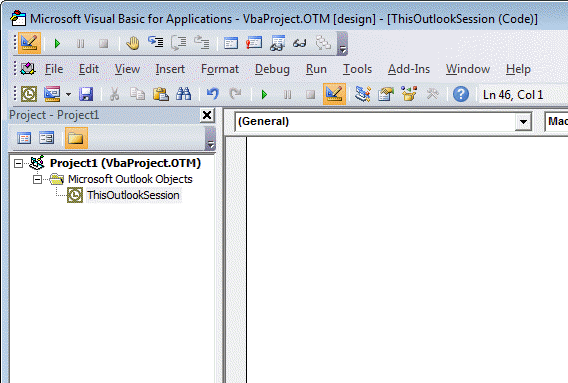
You'll type or paste the code into the module, then create the rule with the 'run script' Action and select this script
Create a Run a Script Rule
After the script is written, you need to add it to a rule.
If you have Outlook 2016 and run a script action is missing, see "Run-a-Script Rules Missing in Outlook" for the fix.
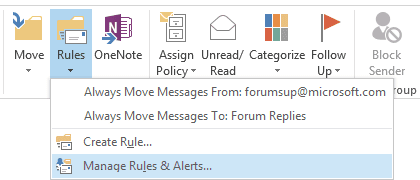
- Open Rules Wizard. In Outlook 2010 and 2013, it's on Outlook's Home ribbon,
Rules > Manage Rules & Alerts. Look on the Tools menu in older versions.

- Click New Rule.
- Select Apply Rule on messages I receive and click Next.
- Select your conditions and click Next.
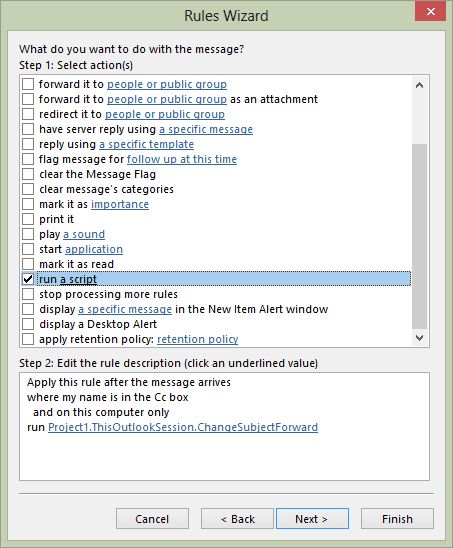
- Select Run a script action (near the bottom).
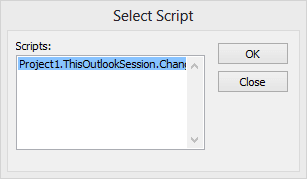
- Click on a script.
- Select your script, click OK.
- Click Next then finish the rule.
For best results, all actions should be in the script.
More Information
- Filter mail when you are not the only recipient
- Process Mail that was Auto Forwarded by a Rule
- Run a Script: Send Autoreply with Date
- Filter messages containing spam or other words
- Creating an AND rule in Outlook Rules
- Search PDF Attachments and Forward
- Run-a-Script Rules Missing in Outlook
- Blocking Mail From New Top-Level Domains
- How to Process Mail After Business Hours
- Create Appointment From Email Automatically
- Open Hyperlinks in an Outlook Email Message
- Talking Reminders
- Receive a Reminder When a Message Doesn't Arrive?
- Delegates, Meeting Requests, and Rules
- Run Rules Now using a Macro
- Automatically Add a Category to Accepted Meetings
- Save and Rename Outlook Email Attachments
- Use a Rule to delete older messages as new ones arrive
- Convert RTF Messages to Plain Text Format
- Outlook AutoReplies: One Script, Many Responses
- Use VBA to move messages with attachments
- Save all incoming messages to the hard drive
- Run a script rule: Reply to a message
- Sort messages by Sender domain
- Use a Macro to Copy Data in an Email to Excel

Mario says
Hello Diane, greetings from Brazil!
We have a doubt in outlook and needs your help:
In my company , we need automate some tasks in Outlook. For example, when we apply some tag in email, we want these email tagged be moved to folder automatically.
I know that outlook web and outlook desktop have rules that i can automate many tasks, like move email to folder from tag, sender, subject, etc, that rules works when emails are sended and received.
I found these manual task in Outlook desktop that move email to folder after i tagged that email manually. In these task, we need click on button "Run Rules Now" manually:
https://filestore.community.support.microsoft.com/api/images/d58b5400-c18c-426d-84fa-0a934716c28e?upload=true
https://filestore.community.support.microsoft.com/api/images/b7a0c5d8-e7e9-41f6-a131-b074cd359483?upload=true
however, in my company we need automate tasks after email arrive in inbox.
This is my doubt: is possible create automatic task for when i apply tag in email received, these email be move to folder automatically? there are script or macro related?
Thanks a lot!!
Mario
mishu36 says
hi, i am trying to use "run a script" but in my "Outlook 2019", but that option is missing.
i tried to use the registry hack of "EnableUnsafeClientMailRules" but it also not working. i want to use a way around but for that i need to execute VBA Macro before outlook rules can be run. Can you please guide me on this.
here is my action plan sequence:
Diane Poremsky says
Did you restart Outlook after setting the key?
If you ended the registry yourself, try using the exported key from this website.
Rakesh Kumar says
Hello Brother,
My script is not showing in Run a Script.
Diane Poremsky says
Did you put it in ThisOutlookSession? Try putting the script in a new module instead.
The macro 'name' needs to be in this format:
Public Sub ShowMessage(Item As Outlook.MailItem)
josue aguirre says
Hello, can you please help me with a problem?
I have a rule in Outlook that runs a script, but it suddenly doesn't work anymore. And when I want to change this rule or create a new one I get a message:
"This rule will only be executed when you check your email ..."
swinn says
Discovered the hard way that if the Sub you are trying to invoke with an Outlook Rule has an Optional parameter, the Rule Editor won't display it for you to select.
egenc says
I have added script but can't see it in rule page.
Diane Poremsky says
The script needs to be named in this format, preferably in a module (not thisoutlooksession) - you don't need to call the mail object Item, but you do need it in the ().
Public Sub ShowMessage(Item As Outlook.MailItem)
Isaac says
It's exactly the opposite. It MUST be in the thisoutlooksession, and CAN'T be in a regular module.
Diane Poremsky says
No, it will work in either, but it is recommended to put it in a module. I've had instances where it was not 'seen' if in thisoutlooksession, but none where it was not seen in a module.
ardi says
how to use in outlook 2016
Michael says
I'm trying to use the "Send a message to someone when a reminder fires" macro from this page: https://www.slipstick.com/developer/send-email-outlook-reminders-fires/, but it seems like the parameters of that code aren't compatible with what's required for the Rules Wizard to recognize it as a script.
Angelo says
Hi,
Thank you for the article.
Yuvaraj says
Hi,
I have tried with the options as suggested, but while i tried to set the rules in the action pane the rule "Run a Script", I cant able to find my macro name while i clicked on the script underlined one. Could you pls suggest me why can't able to find the macro name. Please?
Thanks,
Yuvaraj
Diane Poremsky says
What is the macro name? It needs to be formatted like this
Public Sub ShowMessage(Item As Outlook.MailItem)
Is the macro in thisoutlooksession or a module? It should be visible in either, but sometimes won't work in thisoutlooksession.
genc says
how to give a name like this? From where
Bob says
I have set up a forward script on a co-workers computer, it worked for about 4 days and then it quit working. when I investigated the script was gone. the next week it did the same thing. I have the exact same script and rule set up on my computer and have never had this issue.
Rohit says
Hello,
The article was really impressive.
I followed the steps for running a batch file. However, when I was testing that by sending a mail from myself to me to check if the batch file gets triggered, I see that the batch file is not triggered.
I am not sure why it is not triggering the batch file.
Could you please help.
Thanks.
Diane Poremsky says
What batch file are you running? (There isn't one on this page.)
Diane Poremsky says
BTW, if the rule isn't running, you may need to use an ItemAdd macro that watches the folder for new items.
Erfan says
I'm new in VBA, I have some folder in my outlook and I need move the incoming message to the related folder, the related folder can search by a key in the subject of the new email and I don't have any idea to how I can search by a key and retrieve related folder.
I develop a script for outlook as below for getting the key in subject of new message
Sub CustomMailMessageRule(Item As Outlook.MailItem)
Dim strTicket, strSubject As String
Dim strFolder As String
strTicket = "None"
strSubject = Item.Subject
If InStr(1, strSubject, "#-") > 0 Then
strSubject = Mid(strSubject, InStr(strSubject, "#-") + 2)
If InStr(strSubject, " ") > 0 Then
strTicket = Left(strSubject, InStr(strSubject, " ") - 1)
End If
End If
and the unknown part is below part which I need to search whole my folders by related key and retrieve the related folder
strFolder = "???"
and finally, move the incoming message to the related folder by below code
If InStr(strFolder) > 0 Then
Item.Move Session.GetDefaultFolder(olFolderInbox).folders(strFolder)
MsgBox "Your New Message has been moved to related folder "
End Sub
I'm really appreciated if someone can help me and let me know how can I do that and please correct me if there is any mistake in my code.
Diane Poremsky says
you need to use an array - see https://www.slipstick.com/developer/using-arrays-outlook-macros/ for an example
Steven Vincent says
Hi Diane,
I do not have the option to run a script when I go to create new rule. Is there a way to activate this?
Diane Poremsky says
Yes, you need to set a registry key - it was removed from outlook 2013 and 2016 in in the June security update.
See https://www.slipstick.com/outlook/rules/outlook-2016-run-a-script-rules/ for the key and a ready to use reg file.
Loren Pearson says
Good morning Diane,
Great tutorials and code examples for exploring Outlook VBA possibilities.
My issue stems from the removal of Run a Script, in that my organization has vetoed my request (and that of others) to have the Registry change implemented as an exception. They have left the Macros run through Run a Script as too dangerous, and referred me to NewMailItems as an alternative.
However, I have found that it is not as effective.
My issue is that I am unable to pull in those that populate my inbox when I am logged off of my machine (overnights, weekends, etc.). There are often hundreds of reports in my inbox for post processing (appending to spreadsheets, saving into shared folders, etc.) after a weekend. They run fine when I am logged in, and when I was not, the Run a Script function used to capture all of as soon as I logged in, but now they are all unprocessed.
I can forward them to myself, and they get captured that way, but there must be automated method to do this. What would be your recommendation to process these files already in the inbox, as a rule would have? Is there an ApplicationStartup tool to pull in these files. Thank you.
Diane Poremsky says
I use itemadd - that will pick up new items as they are added to the folder. See https://www.slipstick.com/developer/itemadd-macro/ for more information.
Brian Vogel says
Hello Diane,
I'm here to bother you on this page because it's the "next step" and I'm having a bit of trouble.
When I have finished with a test script, and go through the steps above to create a rule to run it, no scripts show up in the list.
What must I do "up front" after the script is tested so that it will show up in that list?
Thanks again for your assistance.
Diane Poremsky says
What did you name the script? The name line should be in this format:
Public Sub YourScriptName(Item As Outlook.MailItem)
if you don't have the Item As Outlook.MailItem in the (), it won't be seen by the rule.
if you mean, you can't see the rule action for run a script, see https://www.slipstick.com/outlook/rules/outlook-2016-run-a-script-rules/ - both 2013 and 2016 had run a script disabled by a recent security patch.
Brian Vogel says
Diane,
Thanks again. I had failed to declare the parameter and, without it, that script will not appear in the list of scripts since *something* has to be passed to a script invoked by a rule. Or at least it looks that way because it showed up without issue once I'd corrected that oversight.
I have Outlook 2010, but the person I'm assisting has Outlook 2016, and I had already noticed your warning at the top of this page and on at least one other page at slipstick.
Brian
Deepak says
How i can get E-mail fields as input for external command.
Example :
I would like to pass subject and msg to below parameters.
Object =
Message =
Diane Poremsky says
you'd use the object name and field name - in this example, I'll assume item is representing the outlook.mailitem:
item.subject
I'm not sure what you mean by msg - is that is the mailitem, how you reference it depends on how you are accessing it. In a run a script macro, you'd put it in the () in trhe macro name - sub macroname(item as outlook.mailitem)
deepak says
Thanks for reply , I have one more query ,
A. Do we need to keep open outlook client on system always to run the script ?
Diane Poremsky says
Yes, you do.
Mike petrozelli says
Hi Diane, I was tasked with a gentleman's request to extract an attachment from a specific email user and subject line and move it to a network folder so that others can view it without him having to constantly move it. I receive the email but don't see the file moved to the location:
Private Sub Application_Startup()
Dim olApp As Outlook.Application
Dim objNS As Outlook.NameSpace
Set olApp = Outlook.Application
Set objNS = olApp.GetNamespace("MAPI")
Set Items = objNS.GetDefaultFolder(olFolderInbox).Items
End Sub
Private Sub Items_ItemAdd(ByVal item As Object)
On Error GoTo ErrorHandler
'Only act if it's a MailItem
Dim Msg As Outlook.MailItem
If TypeName(item) = "MailItem" Then
Set Msg = item
'Change variables to match need. Comment or delete any part unnecessary.
If (Msg.SenderName = "Mike Petrozelli") And _
(Msg.Subject = "Test") And _
(Msg.Attachments.Count >= 1) Then
'Set folder to save in.
Dim olDestFldr As Outlook.MAPIFolder
Dim myAttachments As Outlook.Attachments
Dim Att As String
'location to save in. Can be root drive or mapped network drive.
Const attPath As String = "\servernametest"
' save attachment
Set myAttachments = item.Attachments
Att = myAttachments.item(1).DisplayName
myAttachments.item(1).SaveAsFile attPath & Att
' mark as read
Msg.UnRead = False
End If
End If
ProgramExit:
Exit Sub
ErrorHandler:
MsgBox Err.Number & " - " & Err.Description
Resume ProgramExit
Sub myRuleMacro(item As Outlook.MailItem)
End Sub
End Sub
Sub Test1()
End Sub
Anything I could be missing code-wise??
Diane Poremsky says
Did you change macro security and restart outlook?
add msgbox "Working" after the if.. thens - this will tell you where it is failing. Stepping though the code and watching which lies it skips could be helpful too.
I'm assuming that the server path is correct and complete and the slashes were removed by my website software.
Eitan Orgil says
Hi Diane,
I use Office 2007, and I have a script running in outlook that will extract only
numbers from a mail, then it will update an Excel with that data and then
send an email with a picture of a chart.
I configured a Rule that runs when mail from A sender arrive, set it up to
run the script.
The problem is, when Rules and Alerts starts, the mail is not in the Inbox yet,
so the script cannot find the mail, and I get the MsgBox "There is no mail".
Once the Script exits and the Rule ends, the mail is in the Inbox, so now
when I run the rule manually it runs with no problem.
I added the "Stop Processing more rules" but it did not change the status,
In the rules and Alerts it looks like it first run the script then stop processing
more rules.
What am I doing wrong?
appreciate your help
attaching the code.
Diane Poremsky says
you are getting that message with a run a script rule? I'm guessing its something in the script. can you post it?
Eitan Orgil says
Hi Diane,
ProcessMail.txt is the script.
and the Pic is my Rules and Alerts screen shot.
When the mail I want to process arrives, Rules and Alerts pics it up,
at that moment I cannot see the mail in the Inbox,
This is why I added the If Then Else section, When I get the message
"There is no mail" the mail I want to process is no in the Inbox,
only after I press the OK on the message box, I can see the mail,
Unread, in the Inbox, then I run the Rule manually (Run Rules Now)
and the Script does what I expect it to do.
My script looks for the mail in the Inbox.
Diane Poremsky says
with run a script rules (or itemadd macros), you don't need to search for the message - the rule picks up the message - the script moves it and does whatever.
Eitan Orgil says
Hi Diane,
OK, thanks for the clarification.
Now, how do I handle the message? The Rules and Alerts Identified it
as "Mail From", how do I move it? send it's content to the Function
that extracts the Numbers from it? basically, what is it's "Name"?
Diane Poremsky says
when the rule picks it up, it sends to it to the script as Item or whatever word you use for mailitem in the macro -
Public Sub ShowMessage(Item As Outlook.MailItem)
that is the same as using this for the selected item - but the rule has already selected it.
Set Item = objApp.ActiveExplorer.Selection.Item(1)
Eitan Orgil says
Hi Diane,
Grate, this solved it and even simplified my code
Thank you for your time
Brenda Gorham says
Diane, Let me first state, I am a true beginner at VBA. My administration has requested a better means to identify reports coming through their Outlook daily. Currently, we use a product called Interbit as our report distribution software. Love the product, but unfortunately it does not allow me to identify the name of the attachment in the subject line. User's only see the subject line, unless they open each attachment.
Could you direct me to the best option or help documentation on this subject; one for beginners, such as myself?
I have goggled a lot regarding the creation of a VB macro and then applying a Run script rule. This sounds more like I would need to apply this to each recipient. Is there a method to apply a rule to the sender?
Diane Poremsky says
do you need to run it on your computer only or on everyone's computer? Will it need to run when your computer is not turned on? While you can set macros up on a lot of computers, it's requires some effort to install them; and they only run when Outlook is running.
That said, getting the names of the attachments and adding them to the subject isn't a big deal - it's actually pretty easy (this code sample is from the macro at Reply with the Attachment name):
For Each oAtt In Item.Attachments
strAtt = strAtt & "; " & oAtt.FileName
Next oAtt
item.subject = item.subject & " " & stratt
Mayank Manchanda says
Hi Diane,
I need to do something similar but with a different criteria. Are you able to help me with that?
I receive inquiries through a realestate portal and I want to capture the contact details from the body of the email and export it to excel to avoid manual handling. Format of the email is same all the times.
Can this be done through a macro and exported to excel?
Diane Poremsky says
it can be done using a macro - i have an example here - https://www.slipstick.com/developer/regex-parse-message-text/
Benoit Rompre says
Hi,
We have some script that are working with run script rule in outlook 2013 and older. Since upgrading and updated Outlook 2016 we do not have any "Run a script rule". All are rules are now in error. We are still able to open and run the macros selecting an email.
Diane Poremsky says
it's a new security feature (makes no sense to me as VBA in general would be equally secure or insecure) - you need to set a registry key to enable run a script.
https://www.slipstick.com/outlook/rules/outlook-2016-run-a-script-rules/
Paul says
Hi Diane--
My VBA Macro works manually however if does not run as a Macro. I feel I have followed you excellent instructions but I must be missing something. I am trying to have a rule that once X email arrive on this client only run macro to copy email to a flat file. Thanks in advance.
Diane Poremsky says
Run a script macros can only run from rules (or if called from other macros) - they can't be run manually. It needs to be named
Public Sub macroname(Item As Outlook.MailItem)
Herbert says
Hi Diane,
you say, that under OL 2013 I should be able to process PostItem as well. I attempt to do that for incoming RSS posts. However, the rules wizard does not list procedures with this argument type, hence I can not select them. What am I doing wrong?
Thanks in advance,
Herbert
Diane Poremsky says
You would use the condition 'from any rss feed' (along with any other conditions) and then choose run a script rule on the actions screen.
Kruti says
I need to run a selenium script of which I have a .bat file
I have no knowledge of VBA
How do I write code to run my .bat file through outlook.
Diane Poremsky says
This article tells how to call programs from a macro - for a bat file, you need to use Shell (strURL), vbNormalFocus in the code.
Edward McArdle says
Hi Diane
Wondering if you had a chance to review my query?
Regards
Ed
Diane Poremsky says
No. :)
Ed McArdle says
Hi,
For the run a script rule, how do you get this to work in a shared mailbox and also, how do you alter this code so that if the ID already exists on the subject line it will not add a new one. I like to use this unique id to determine number of touch points to an email thread so therefore don't want it to create a new one each time.
Many Thanks,
Ed
Diane Poremsky says
A run a script rule won't run on a shared mailbox - it needs to be opened in outlook as an account. You could use an itemadd macro and watch the folder for new items. Which macro are you using? You need to look for the code - the easiest way is using regex unless it's wrapped in [] or something to identify where it begins or ends. Then you can use instr, left or right functions.
Narendra says
Hi Diane Poremsky,
Hope your fine.
I need a small help from your side, as I found an Excel Macro in Google but it's not serving my exact need.
Coming to the issue, I need a macro, wich will copy the mail body (data in tabular format) into excel. Attached macro doing a good job but copying all data into single CELL.
https://answers.microsoft.com/en-us/office/forum/office_2010-customize/need-to-copy-the-full-data-body-from-outlook-mail/848dfd0d-2d27-4db2-9980-086ccaeabd65?auth=1
Diane Poremsky says
Do you need to get email address, send date etc? I have this macro: https://www.slipstick.com/developer/code-samples/macro-export-outlook-fields-excel/ If you need the body, you can get that, but probably should run it thru the replace function, to replace double quotes with single quotes.
If you need to get data out of the body, use regex: https://www.slipstick.com/developer/vba-copy-outlook-email-excel-workbook/
get multiple data: https://www.slipstick.com/developer/regex-parse-message-text/
Dom says
Hi Diane,
I put a request for your help in last week. Have you had a chance to look at it yet please. It's about digital signatures. Not sure if it's not worked or if it's still under moderation.
Diane Poremsky says
I was on vacation last week - tried to keep up with some comments, but only ones that were really easy to answer. :)
Dom says
Hi,
I am hoping some one will have a suggestion for me here. I want to digitally sign all outgoing email messages from my account HOWEVER I often send emails FROM other accounts (ie on behalf of) and these don't or can't have digital signatures. If I turn on the setting in Outlook 2013 to "add digital signature to outgoing email messages", I'm forever having to edit the options for individual messages to turn off "sign" for that message, or if I have it permanently off I forget to sign the emails from my personal account.
What I'm looking for is suggestions as to how I could set up some sort of rule/ script so that all emails from my personal account are signed but those on behalf of others aren't.
Any thoughts please? Thanks
Diane Poremsky says
I don't think you can sign mail using a macro (but will check) - you might be able to use a macro to check mail as you send it and if mail from that account is not signed, it will tell you. If not, it can check for mail sent from that account and ask you if you signed it. Samples here: https://www.slipstick.com/how-to-outlook/prevent-sending-messages-to-wrong-email-address/
Diane Poremsky says
I haven't been able to use Redemption to check outgoing mail for a digital signature (you can use it for incoming mail). Best I have right now is just a warning when you click Send.
Dom says
Thank you for your efforts. I will certainly check out what you've suggested.
steve haley says
Good Morning,
i am hoping someone one can help me,
i install CCTV , i have a customer that has a cctv system thats sends email on activation,
i am unable to set up a schedule on the CCTV as the software designers left this out. so the cctv email is either on or off.
what i would like to do is forward the emails to my outlook 2016 programme that will forward the emails between 23.00 and 6 in the morning.
thank you in advanced
steve
Diane Poremsky says
So you want to send the mail to outlook then have outlook forward it if it arrives between during a certain time period? You can either use a run a script rule (makes it easier to filter out the messages) or an item.add macro. To get the time, use code line this in the script or macro:
If Now() > DateSerial(Year(Now), Month(Now), Day(Now)) + #5:59:00 PM# _
Or Now() < DateSerial(Year(Now), Month(Now), Day(Now)) + #6:59:00 AM# Then'send the autoreply Set oRespond = Item.Forward With oRespond .Recipients.Add "alias@domain.com" .send end with end if
Ashley says
Dear Diane,
how to set a recurring auto response rule every day between 6PM to 1AM with a custom message?
Diane Poremsky says
You can either use a reminder to turn rules on and off or use an itemadd macro to watch for new messages and check the time. I don't currently have any samples that check the hour (but have several that send replies) but putting one together shouldn't be too difficult - check the time using an if statement -
If Now() > DateSerial(Year(Now), Month(Now), Day(Now)) + #5:59:00 PM# _
Or Now() < DateSerial(Year(Now), Month(Now), Day(Now)) + #12:59:00 AM# Then'send the autoreply Set oRespond = Item.Reply Set oRespond = Application.CreateItemFromTemplate("C:\path\to\correct.oft") With oRespond .Recipients.Add Item.SenderEmailAddress .Subject = "Office is closed Re:" & Item.Subject .send end with end if
Phil says
Post 3 of 3: Steps to run scripts.
This information is unfortunately lacking in this forum, I had to try several different sources to get my new VBA scripts to work.
Options: Outlook > File > Options > Trust Centre … Trust Centre Settings > Macro settings > Notification on digitally signed macros
Start > All Apps > Digital Certificates for VBA (SelfCert) > Create a certificate…
after cert created, see certificate properties > Install on Local Machine, in Named cert store,
browse to Trusted Root Certificate Authorities > Import (will see message cert imported ok)
In VBA window (Alt-F11), Tools > Digital Signature > choose newly created cert, OK
Close & Return to Outlook; Exit Outlook > Save VbaProject.OTM
On opening Outlook, after first rule that runs a script starts, must choose Enable Macros.
Each time exit Outlook, choose to save VbaProject.OTM (even if not changed)
Diane Poremsky says
Do not sign macros until after they are well tested and working. Each time you edit any macro you need to remove the signature then re-sign it.
Why are you doing this? "after cert created, see certificate properties > Install on Local Machine, in Named cert store,
browse to Trusted Root Certificate Authorities > Import (will see message cert imported ok)" Selfcert installs the cert - it should immediately be listed in tools, digital signature.
You should also only need to save VBA once (well twice the first time you exit outlook after signing the code).
how to self sign video: https://youtu.be/CRbLKo_sPGA
Susan R says
Why would I want to get 100s of annoying "notifications" even if the VBA was written by me... stored on my local drive... NOT coming in via email... and I have a self-cert created and installed? Seems like I would need a setting of "just run it, but disable all others".
Diane Poremsky says
I'm not sure I understand where you are getting hundreds of notifications from. If you are talking about a self-signed macro, you can trust only that certificate and set security to not trust any others.
Phil says
Post 2 of 3: TailLog
Public Sub TailLog()
' report last 20 emails received, asterisk those received today
Const logFname = "C:\A\Out_Log.txt"
Const flagBigFile = 3000, msgBoxLine = 60
Dim logFile As Integer
Dim startRec As Integer, thisRec As Integer, maxRec As Integer
Dim lines() As String, toDate As String, a As String
toDate = Format(Now(), "yymmdd")
' load file into memory
logFile = FreeFile
Open logFname For Input As #logFile
lines = Split(Input$(LOF(logFile), #logFile), vbNewLine)
Close #logFile
' first line is lines(0) despite Option Base 1
' report last 20 emails
maxRec = UBound(lines)
startRec = maxRec - 20
If (startRec flagBigFile) Then
a = a & "WARNING: File " & logFname & " is now over " & _
flagBigFile & " records." & vbCrLf
End If
MsgBox a & "* : received today.", vbOKOnly, "Last 20 emails in " & logFname
End Sub
Post concludes with steps required to run scripts in Outlook 2012.
Phil says
Hi Diane, I want to contribute a script to your forum, to log which rules have executed. I started in this forum a couple of weeks ago.
Due to character maximum constraints on posts, I have split this into three posts.
1 of 3: LogRule
I have 31 rules. Since each rule script is limited to one argument (outlook.mailitem), I needed to write 31 mini-macros, such as Public Sub Lr29(mail as outlook.mailitem): call LogRule(29, mail): End Sub. Then I have one main script Public Sub LogRule(ruleNumber as integer, mail as mailitem) in which I can do the main work. I have since added a separate script Public Sub TailLog() which I can run using Alt-F8, to display the last 20 items added to the log of rules that have executed, with asterisk showing which rules executed today.
Option Base 1
Option Explicit
Public Sub LogRule(ruleNum As Integer, mail As Outlook.MailItem)
Const logFname = "C:\A\Out_Log.txt", maxRule = 31, errorRule = 32
Dim logFile As Integer, ruleName As Variant
ruleName = Array("Bills Enbridge", "Bills Cogeco", "Bills Bell", _
"Bills epost", "Kijiji", "Southgate Church", _
"(ISC)2|ISACA", "HBC", "Michaels", _
"MSN", "NAC", "Netflix", _
"Shoppers Drug Mart", "Sears", "Notificn Accepted", _
"Notificn BNS", "This Week", "Peters by sender", _
"Peters by subject", "ISSA", "Cn_Books", _
"epm", "FaithGateway", "Samaritan", _
"YouVersion", "LinkedIn", "Canadian Tire", _
"RockAuto", "ebay", "pinterest", _
"CAA neo", "[not coded]")
logFile = FreeFile
Open logFname For Append As #logFile
If (ruleNum > maxRule) Then ruleNum = errorRule
Print #logFile, Format(Now(), "yymmdd HH:mm"), _
"Rule: " & Format(ruleNum, "00") & " " & ruleName(ruleNum), _
"From: " & mail.SenderName, _
"Subj: " & mail.Subject
Close #logFile
End Sub
Post continues with code for TailLog...
Diane Poremsky says
It's really better to post long questions and code in our forum - https://forums.slipstick.com/forums/61-outlook-vba-and-custom-forms/
Ram says
Hi Diane, I am trying to set up a rule wherein I need the script to run first and then start the application. But the priority of actions is the other way around. Is there any way we can change the order of actions selected?
Diane Poremsky says
Are you trying to use run a script and start an application actions together? When you use run a script, all actions should be in the script.
This line in the script should work -
Shell ("application-name.exe " & "filepath if used"), vbNormalFocus
office apps would use
Set oApp = CreateObject("Excel.Application")
oApp.Workbooks.Open FileName:=strURL
oApp.Visible = True
coolguy says
Hi Diane, i am creating a new outlook rule to trigger a batch file once i get an email having specific text.
the batch file after running should start my selenium tests but its not doing this.
i can see batch execution started but the tests are not getting fired.
can you help me with this?
any more setting i need to do.?
Diane Poremsky says
Does the batch run correctly if you double click on it?
coolguy says
yes Dianae the scripts are running perfectly well when i double click on it.
but when i do it through outlook it only flashes the console screen and nothing happens after that...
thanks in advance.
Diane Poremsky says
As long as you don't need to pass any values to the bat or run it as admin, it should work. It might be better to call the bat from a macro (using a run a script rule) instead of directly from the rule (using the run program rule) - that hands it off from outlook. If you are using run a script, try calling the bat using start an app method.
This will open a bat file from a macro:
Shell ("C:\path\to\file.bat"), vbNormalFocus
Bonnie says
Diane: we recently moved from Outlook 2007 to 2013. I am looking for vba code or a macro that will open an Outlook email message with the header turned off, view the email message in browser (IE) and then save as a PDF document. Our IE Browser has Nuance PowerPDF integrated and would like to use it to create the PDF as it opens a window for naming the file and saving it to a specific location.
Alex says
Is there a way that the script that I am going to invoke first save the attachments that come with the email to some location on file system.Then I want to open the files (these are .csv files)on the disk.Perform certain set of operations between the files and finally I want to send a file that I create after performing the set of operations as a attachment in response to the mail that I had received.Are there any refrences that I can use.
Brad says
Does anyone have a script that:
On the receive of an email with subject "target this email" it would
- look in body for text "Email Address:" , take the next 50 chars to use as the email address to send another canned email out.
So if this is in the body:
Email Address: testme@email.com
It would send a canned email to trstme@email.com.
Thanks in advance.
Diane Poremsky says
The rule will take care of the subject part... you need to use regex or instr (or mid) function to find the address. This macro at the end of the article at https://www.slipstick.com/outlook/rules/run-script-rule-change-subject-message/ shows how to do it.
You'd use myForward.Recipients.Add submatches(1) to add it as the recipient.
Michelle Marie says
Hi Diane, I am new to macros and trying to figure out what needs to be added and where in the following code so that only emails being sent to a specific email in Outlook 2010 can run the script. I tried creating a condition for it in Outlook rules but the code didn't work at all when Indid that. I have two emails going to one folder and only need the script run on one email address. I hope that makes sense and you're help is GREATLY appreciated!
Public Sub saveAttachtoDisk(itm As Outlook.MailItem)
Dim objAtt As Outlook.Attachment
Dim saveFolder As String
Dim dateFormat
dateFormat = Format(Now, "mm-dd-yy H-mm ")
saveFolder = "S:\Documents"
For Each objAtt In itm.Attachments
If InStr(objAtt.DisplayName, ".pdf") Then
objAtt.SaveAsFile saveFolder & "\" & dateFormat & objAtt.DisplayName
End If
Set objAtt = Nothing
Next
End Sub
Diane Poremsky says
The condition for "through the specified account" should work. Otherwise, you need an If statement - you can use either address in the if but if using the other address, use Exit Sub
Dim Recipients As Outlook.Recipients
Dim recip As Outlook.Recipient
Dim i
Set Recipients = Item.Recipients
For i = Recipients.Count To 1 Step -1
Set recip = recip & "," & Recipients.Item(i)
next i
If InStr(LCase(recip), "your@address") Then
' Exit Sub ' if using other address
' or
'code goes here if using the 'right' address
End if
Anthony says
Hi Diane,
I have been looking for a way to have Outlook (2013) capture which emails I have active/open before I shut it down (and typically reboot). I have seen some code out there that indicates that in some capacity with the right programming it can be done, such as: https://stackoverflow.com/questions/7471772/when-outlook-loads-to-open-all-emails-that-were-open-when-outlook-last-closed
But I have not seen it done. It would be very useful for me! Thoughts? thanks!
Diane Poremsky says
I haven't tried it, but if you capture the entry id of each message, it should work. I don't have any samples. Did you test that code?
stolen says
Hi Diane.
I need to have meeting invites that arrive in my Inbox for 2 people to show in color and wondered if a script would accomplish this. I get many meeting invites and do not want to overlook the specific invites sent to either of my two bosses (using Outlook 2007), so if they can arrive in the same color for both people or a different color for each, I wanted to ask. Thank you for your help.
Diane Poremsky says
Use a Conditional formatting rule in the view.
jz says
im using outlook 2007 and wanna allow sending email to only my distribution list contacts and no one else. Need a script for this. Help
Diane Poremsky says
You'd use an ItemSend macro that checks messages as they are sent - I have a code sample at https://www.slipstick.com/how-to-outlook/prevent-sending-messages-to-wrong-email-address/ - it doesn't check the contacts folder or DL's - just warns if messages aren't sent to specific domains.
JB says
Need some help, I am looking to create a rule in Outlook 2013 that can be applied to any messages that are moved into a specific folder ("ABC123"). I don't see this option anywhere in the Rules Wizard. I want for the action of this rule to be to "Run a Script", but first need to know how to set the rule to be triggered. Select messages will be moved/copied into the ABC123 folder by the user manually. Thanks
Diane Poremsky says
A rule only watches the inbox (you can run rules on any folder but only automatic rules work on the inbox). You can use an itemadd macro that watches the ABC123 folder and does something.
Diane Poremsky says
I have quite a few itemadd samples on this site - one is the second macro at https://www.slipstick.com/developer/save-attachments-to-the-hard-drive/ - replace the code in the olInboxItems_ItemAdd macro with your code.
Private Sub olInboxItems_ItemAdd(ByVal Item As Object)
' your code here
End Sub
oh, and you need to change the application start macro to watch the right folder a subfolder of the inbox would be like this:
Set olInboxItems = objNS.GetDefaultFolder(olFolderInbox).folders("ABC123").Items
pjop says
Hi guys,
Do you have an Outlook script on this process?
I have 3 sub folders under inbox, A_Type Email folder, B_Type Email folder and Forwarded Emails folder
Whenever I drag emails to either A_Type Email folder or B_Type Email folder, the email will automatically forwarded to a specific emails address and after that it will move to Forwarded Emails folder automatically?
Thank you for your assistance! I really appreciate it.
Agent-311 says
I know nothing about VBA other than "Alt + F11" and pasting the code into "Module1"
Current Script that works: Triggered by a Rule & Saves an attachment to a folder
I Need to catch totally different emails using a different Rule and trigger a 2nd script that does the same as the 1st script, but gives the attachment a different file name.
It sounds like I can't setup a 2nd Rule to trigger a 2nd script(?). So, how do I do this?
My Script
Public Sub saveAttachtoDisk(itm As Outlook.MailItem)
Dim objAtt As Outlook.Attachment
Dim saveFolder As String
saveFolder = "https://website.com/folder/"
For Each objAtt In itm.Attachments
objAtt.SaveAsFile saveFolder & "\File Name.txt"
Set objAtt = Nothing
Next
End Sub
Diane Poremsky says
You can create as many as you need, provided the macro name is different for each.
Bryan says
Hello I am trying to get outlook to send an email to us if the customer does not recieve a report email that gets sent out daily. The code I have currently only causes a pop up box saying that the email was not found. I need it to email us so that we will know that the customer did not recieve the report. Any ideas? Here is the code I am currently using, thank you.
Private Sub Application_Reminder(ByVal Item As Object)
If Item.Class = olTask Then
If InStr(Item.Subject, "subject") > 0 Then
ReminderUnreceivedMail
End If
End If
End Sub
Sub ReminderUnreceivedMail()
Dim Itms As Items
Dim srchSender As String
Dim srchSubject As String
Set Itms = GetNamespace("MAPI").GetDefaultFolder(olFolderInbox).Items
srchSender = "sender"
srchSubject = "xyz"
Set Itms = Itms.Restrict("[SenderName] = 'sender' And [Subject] = 'subject' And [SentOn] > '" & Format(Date, "yyyy-mm-dd") & "'")
If Itms.Count = 0 Then
MsgBox "No " & srchSubject & " email on " & Format(Date, "yyyy-mm-dd")
End If
Set Itms = Nothing
End Sub
Diane Poremsky says
In this code block you need to add the code to create a new message or call another macro that creates the message.
If Itms.Count = 0 Then
MsgBox "No " & srchSubject & " email on " & Format(Date, "yyyy-mm-dd")
End If
Dim objMsg As MailItem
Set objMsg = Application.CreateItem(olMailItem)
With objMsg
.To = "Alias@domain.com"
.Body = "Whatever"
.Subject = "This is the subject"
.Display
End With
Set objMsg = Nothing
Ken says
Hi Diane, It isOutlook 2010 and there is no Run a script in the rules wizard. Not sure what to do.
Diane Poremsky says
Run a script should be in all copies of Outlook 2010. What type of email account? Are you using a terminal server?
ken says
Diane, it sounds like the same issue as Meg from August 2014 & the other below it. What are you referring to in your comment " macro script *should* work in thisoutlooksession, but it's best to put it in a new module. And it needs to have the script name line in this format - with Item As Outlook.MailItem:
Sub MacroName(Item As Outlook.MailItem)" I don't see another reference to macro script
Diane Poremsky says
In order for Outlook to use a macro in a run a script rule, the name of the macro needs to be in this format:
Sub MacroName(Item As Outlook.MailItem)
Macros with names in this format won't be listed when you click on run a script.
Sub MacroName()
I have a ton of macros - but only two can be used in rules:

Ken says
Diane, I am attempting to set up this rule but in the rules wizard under select condition(s) there is not an option to "run a script"
Diane Poremsky says
What version of Outlook? It should be near the bottom of the list of actions on the Actions page. (like 4th from the bottom)
Jaap says
Thank you very much, Diane! Really appreciated.
Jaap says
Hi Diane, did you find the time to look at my code I sent earlier? I appreciate your help very much. Otherwise do you know the code for this part: Set newCalFolder = NS.GetSharedDefaultFolder(objOwner, olFolderCalendar) but then for a mailbox. SInce this example code (part of GetFolderPath macro regards the calender and my issue regards mailboxes.
Thank in advance,
Jaap
Diane Poremsky says
No, I hadn't had a chance yet (I took a lot of time off in Dec.) The getfolderpath macro works with any folder type - it just needs to be told the path. It'll work with all mailboxes open in the profile.
Jaap says
Diane, many thanks. I use Exchange 2010 and have -within my own profile jaap@company.com- access to the mailbox of target@company.com. So the emailbox of target@company.com is visible in my left panel in Outlook. The name of that emailbox is 'Target | Company". I know have the following code:
Private WithEvents Items As Outlook.Items
Private Sub Application_Startup()
Set Items = Session.GetDefaultFolder(olFolderSentMail).Items
End Sub
Private Sub Items_ItemAdd(ByVal Item As Object)
If Item.SendUsingAccount = "target@company.com" Then
' Get the GetFolderPath function from http://slipstick.me/getfolderpath
Set Items = GetFolderPath("Target | Company\Sent items").Items
' After adding the function to ThisOutlookSession:
Function GetFolderPath(ByVal FolderPath As String) As Outlook.Folder
Dim oFolder As Outlook.Folder
Dim FoldersArray As Variant
Dim i As Integer
On Error GoTo GetFolderPath_Error
If Left(FolderPath, 2) = "\\" Then
FolderPath = Right(FolderPath, Len(FolderPath) - 2)
End If
'Convert folderpath to array
FoldersArray = Split(FolderPath, "\")
Set oFolder = Application.Session.Folders.Item(FoldersArray(0))
If Not oFolder Is Nothing Then
For i = 1 To UBound(FoldersArray, 1)
Dim SubFolders As Outlook.Folders
Set SubFolders = oFolder.Folders
Set oFolder = SubFolders.Item(FoldersArray(i))
If oFolder Is Nothing Then
Set GetFolderPath = Nothing
End If
Next
End If
'Return the oFolder
Set GetFolderPath = oFolder
Exit Function
GetFolderPath_Error:
Set GetFolderPath = Nothing
Exit Function
End Function
Set MovePst = GetFolderPath("Target | Company\Sent items")
Item.UnRead = False
Item.Move MovePst
End If
End Sub
I tested it, but is does not work yet. What am I doing wrong? Many thanks for your help!
Diane Poremsky says
This is telling the macro to watch the default sent folder:
Private Sub Application_Startup()
Set Items = Session.GetDefaultFolder(olFolderSentMail).Items
End Sub
And this tells it to watch the Target Company sent folder:
Set Items = GetFolderPath("Target | Company\Sent items").Items
The function goes at the end of the macro, as a separate macro.
You need this + the function:
Private WithEvents Items As Outlook.Items
Private Sub Application_Startup()
Set Items = Session.GetDefaultFolder(olFolderSentMail).Items
End Sub
Private Sub Items_ItemAdd(ByVal Item As Object)
If Item.SendUsingAccount = "target@company.com" Then
' Get the GetFolderPath function from http://slipstick.me/getfolderpath
Set MovePst = GetFolderPath("Target | Company\Sent items")
Item.UnRead = False
Item.Move MovePst
End If
end sub
Narendra says
Hi Diane,
I am actually looking for How to auto forward an email with some added explanation. Can you plz help on this
Diane Poremsky says
like adding a note to it? See https://www.slipstick.com/outlook/rules/run-script-rule-reply-message/
Jaap says
Thanks Diane. We have third-party software that uses via Outlook a certain mailbox (not my own, but I have full access to it) to send emails. I want a copy of the sent item put in the Sent folder of that mailbox using a rule. It does so, but no time of sending mail is shown (where the date and time should be shown it says 'none'). The email in my own Sent folder has all the information so now I still need to manually move that email to the correct Sent folder (of that other mailbox). So somehow I think the rule is carried out before the actual sending of the email. Thanks for your reply.
Diane Poremsky says
It sounds like its moving a draft message. I have a macro here - https://www.slipstick.com/developer/code-samples/use-a-macro-to-move-imap-account-sent-items/ - that moves sent items after they are dropped in the sent folder. Is the mailbox opened in your profile as a shared mailbox or as a separate account? The macro might need tweaked if it's open as a shared mailbox.
Jaap Fox says
Hi Diane, I am using Outlook 2007 and I would like to use a script rule to move a message that has been sent with a certain subject to another folder 30 seconds or 1 minute after it has been sent. Can you help me out?
Thanks,
Jaap
Diane Poremsky says
Outlook doesn't include a timer, so it's difficult to do a delayed move. Is there a reason why it needs to be delayed?
Z Tan says
I would like to have a script that when I replied the email, the user defined field " Replied" automatically captured the date of the action. Can anyone advise? I need a step by step guide.
Diane Poremsky says
You don't need a custom field - you need a custom form (cfg)- get the replied to time one from here - https://www.slipstick.com/exchange/adding-extended-mapi-fields-to-outlook/ - and install it.
Hari Prasad says
1. We would like to check and append an Identifier to header (and) Or body of incoming mails in a folder something like . How can we do it in scripts?
2. This Number should increment automatically.
Is there a solution?
Any help is appreciated
Diane Poremsky says
Adding to the internet header is difficult, but you can add a value to the subject or body field or create a custom field for the number. See https://www.slipstick.com/developer/code-samples/create-custom-numbering-field/ for a sample. It needs converted to a run a script rule.
Meg says
Hi, there is no "run script" option for me to choose from. How do I enable it?
Diane Poremsky says
The run a script action is missing from the actions list in the rules wizard? What version of Outlook do you use? What type of email account?
Erica says
Hello,
I have the same problem as Meg. The "Run script" option isn't available. I have Outlook 2010, and I'm trying to set the rule for a MAPI account, but I also have an IMAP/SMTP on the same application. If is not possible to use the run script option, is there any other way? Thank you Diane!
Diane Poremsky says
The macro script *should* work in thisoutlooksession, but it's best to put it in a new module. And it needs to have the script name line in this format - with Item As Outlook.MailItem:
Sub MacroName(Item As Outlook.MailItem)
Vaibhav SIngh says
I am trying to open URL upon arrival of E-mail of a particular subject.
Please help me (Also, I cant see that script when I click on add " SCRIPT")
Diane Poremsky says
The same url all the time, not one in the message? This page shows how to open a url: https://www.slipstick.com/outlook/tasks/open-webpage-task-reminder-fires/ - put that together with the run a script rule. You could probably forget the script and use the option to run a program, loading the url with a batch file if entering the url as the program name didn't work.
Create the rule looking for the subject,
Public Sub OpenURL(Item As Outlook.MailItem)
Dim strURL As String
Dim oApp As Object
Set oApp = CreateObject("InternetExplorer.Application")
strURL = "http;//www.slipstick.com"
oApp.navigate (strURL)
oApp.Visible = True
'wait for page to load before passing the web URL
Do While oApp.Busy
DoEvents
Loop
End Sub
Egharevba Osarugue says
Hello,
I am trying to find a way to accurate delete duplicate mails on outlook, or move them to a folder where i could review it before deleting it. Please could you help with a code that could do that or steps to follow to achieve that?
Diane Poremsky says
I don't have any samples that do that, but basically you need to compare the sender, recipients, sent date, subject and maybe the body. And you need to test each message against every other message in the folder. I'd check the subject first and if it matches, check the sender and sent date. That should be good enough, since you can't send two messages at the exact same time. But to be sure, you could check the recipients and the message body.
Dallas M says
I am trying to change the save destination of the PDF. Where would I replace the folder information?
P.S. I read and use your codes all the time! I have been able to create a few simple ones of my own because of you. Thanks!
Diane Poremsky says
Depending on which macro you are using - it maybe be in this line or one similar:
strToSaveAs = MyDocs & "\" & sName & ".pdf"
you can change the path to a fully hardcoded path - like:
strToSaveAs = "C:\Email\" & sName & ".pdf"
Chris D says
Ahh, good to know. Thank you.
francesca says
I need to create more projects to manage different rules.
How can i do?
Please help me !
Diane Poremsky says
You can use multiple macros.
Andrew Jones says
I just stumbled across this when looking for a solution to our needing to save attachments received from 2 different emails to the same folder. I receive these 2 specific emails from the same source at the same time every morning, but need to run two different versions of a script that saves the attachments. One that renames the attachment from one of the emails, and another that leaves the names alone. I know the code needed for each, but can't seem to figure out how to create a new project to get a 2nd script to appear in the list.
Diane Poremsky says
Outlook only supports one project. Did you try adding both changes to one script? How are you identifying the messages?
Are you using Rules to identify the messages, save the attachment, and file the message or using an itemadd macro to save the attachment?
One option is an if statement -
if itm.subject = "subject1" then
'do the save
else
'save and rename
end if
Chris D says
Say I want to run my "script", which does subject line checking, on every message that comes in, but also allow additional rules to run on those messages that "fall through" my 'IF' statement in my code?
For example, say I have a mail with the subject "Attachements included" that has attachments I want to save, and another that has the subject "Just Move Me" that I have a rule set for that moves it to a folder. I want the "script" to run on both, but if the subject is "Attachements included", save them (I already have working code for this) and move the message, otherwise, do nothing.
I put my rule to "run a script" as follows:
Apply this rule after the message arrives
on this computer only
run Project1.ThisOutlookSession.stripAttachmentsFromMailItem
and another rule after it that says:
Apply this rule after the message arrives
with "Just Move Me" in the subject
and on this computer only
move it to the "Moved" folder
My question is if I put "Stop processing more rules" in my "run a script" rule, the additional ones never fire, and I lose my move message functionality, unless I want to code in moves for all of my rules (which I really don't... lol).
In small testing, it seems to work fine without it, but the warning above specifically states to not process additional rules on messages that have a "script" run on them. I guess I'm just wondering if my set up will work in the long run. Any advice? :)
Diane Poremsky says
The stop processing will stop looking for rules that match the current message, if it matched the current rule. You don;'t want to use that if you want all rules to check a message.
As an FYI, the run a script rule should probably be last.
Al says
Apply this rule after the message arrives
from xxxxxx
and with xxxxx in the subject
and on this computer only run xxxxxxxxxxxxx
Diane Poremsky says
It should work. I'd try removing subject from the rule and adding it to the code - or remove the from line and add it to the code.
If instr(lcase(item.subject,"keyword") then
'do whatever
End if
Al says
My rule doesn't trigger my VBA script when an email enters the Inbox. I know my script works because I can run the rule manually.
Diane Poremsky says
How does the rule read?
Mark W says
That seems to have fixed it. Thanks!
Mark W says
I got this to work the first time. It stopped working after I exited Outlook 2013 and went back in. Any ideas?
Diane Poremsky says
Check the macro security settings - when this happens it usually means they are not on low.
Andy says
Hi,
I am currently trying to create a script that can be ran as part of rule within Outlook 2013. This will look for a certain subject within the message, then run a script to copy a folder from a server down to my local machine. I believe I have the correct code for this however the script does not appear for selection when creating the rule.
The code reads -
Dim fso As FileSystemObject
Set fso = New FileSystemObject
fso.MoveFolder "Source", "DeStination"
Set fso = Nothing
I have opened VB editor, opened ThisOutlookSession, pasted in the code (with the correct source and destination), then saved the VB project, but this still does not appear for selection. Any help would be greatly appreciated!
Thanks,
Diane Poremsky says
So you are basically using a message to trigger an action on your computer?
The VBA should look something like this - assuming your code is valid. It can go in either ThisOutlookSession or a module. The key to using a run a script rule is this part of the procedure name: (Item As Outlook.MailItem)
Public Sub MoveFolder(Item As Outlook.MailItem)
Dim fso As FileSystemObject
Set fso = New FileSystemObject
fso.MoveFolder "Source", "DeStination"
Set fso = Nothing
End Sub
Richard says
Using VBA to save an attachment with the rule wizard
Diane Poremsky says
use the macro at Save attachments to drive with a run a script rule that calls the macro:
Sub SaveAttachmentsRule(Item As Outlook.MailItem)
SaveAttachments
End Sub
Antonio says
What about runing scripts for OUTGOING messages? Any solution? Thanks
Diane Poremsky says
Rules scripts are not an option, you need to use the Send event. See Add attachments and set email fields during a mail merge for a code sample.