Comcast users who are having problems need to change the outgoing server to use port 587 or 465 and set Use this following type of encrypted connection to None . Screenshots of the dialog are here
We're seeing a rash of Outlook users complaining about the Enter Network Password dialog box constantly popping up and a send/receive error.
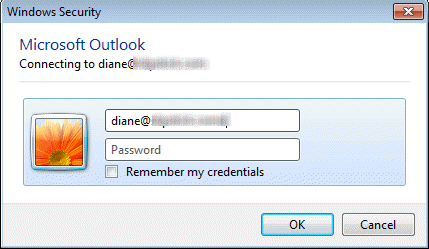
Task 'AT&T - Receiving' reported error (0x800CCC92) : 'Your e-mail server rejected your login. Verify your user name and password in your account properties. Under Tools, click E-mail accounts. The server responded: -ERR [AUTH] invalid user/password'
There are several causes for this problem:
- Outlook is locked out because another device is checking mail
- The server names or port numbers are wrong
- Outlook needs an App Password, not your real password
- Your profile is corrupt
- The stored password could be corrupt
If you are using an AT&T / Yahoo account, try the solution at Log into the account online.
iCloud users: remove p##. from the server name. See iCloud configuration for more information.
While many complaints are coming from AT&T/Yahoo users, the network password dialog problem is not limited to AT&T or Yahoo email accounts.
Using Outlook and a Smartphone | Corrupt Profile | Corrupt Password storage
Yahoo / AT&T Users | More Information
Outlook is locked out because another device is checking mail
This is most common when you use a POP3 account and a smartphone or multiple computers to check your email. This should never be a problem when you use EAS, Outlook Hotmail Connector or Exchange mailboxes, but a few IMAP users said they were locked out due to too many devices accessing the server.
After trying everything in the KB article, uninstalling and reinstalling Outlook and a host of other (useless) solutions, one user realized the dialog stopped coming up when his iPhone was turned off.
Turn off all devices and close all but one email client and see if the problem goes away.
If this is the cause, you can reduce the frequency of the network password dialog by setting Outlook and the smartphone or tablet to check mail less often or switch to IMAP if possible. If using an AT&T/Yahoo account, you can also switch to the yahoo servers to end the password dialog.
Corrupt profile
Your Outlook profile may be corrupt. If this is the cause, a new profile will fix it. See How to create a new profile if you don't know how to create a profile.
Corrupt password cache
In some cases the problem is a corrupt password cache. This is more common with Windows XP, less common with Windows 7/8 (the password cache is handled differently in Windows 7/8 and less likely to become corrupted.)
Remove passwords from Windows 7 and 8 using the Credential manager in the control panel. Note: this is rarely the cause of password problems when you use Windows 7 or 8.
Instructions to remove the corrupt password cache from Windows XP are here. Note that this will wipe out all saved passwords for your user account.
Yahoo / AT&T Users
If you use an Yahoo-affiliated account, it's less likely the password cache is corrupt. AT&T is known to have an issue with passwords (yet their support staff blames Outlook). Many comments, such as this one by Kev report that the problem is fixed by logging into the account online. I've seen reports that you need to do this at least once every 30 days.
This is from Joseph, confirming Kev's experience:
I had a terrible problem with Outlook not remembering my password. The prompt just kept coming back- enter password and again and again. I spent hours on this. I read tons of your postings and tons of others and I just wanted to tell you how I fixed it because I only saw one person who figured it out. You might know it but if not, I hope to save some people the hell I went through.
I asked to change my password. I just couldn't remember how to do it because AT & T and Yahoo have this weird email relationship; it is complicated. I asked a tech to help me. Unbeknown to me, he changed the password not only on the AT & T webmail but somehow he did something to the Yahoo mail also (they are separate logons).
So now whenever that comes up, all I do is log into the AT & T account online and then the Yahoo one. They don't seem to be in synch. Some person put this information out because I had reloaded Outlook, created the user profile a million times, got a new virus program, tried to edit the registry. It all came down to AT & T and this messed up logon thing.
If you have AT&T/Yahoo, follow Kev and Joseph's advice and log in online.
Log into the account online
Wayne shared this:
I went online to the ATT Technical Support Chat Line and she had me log onto my ATT Web Mail account. This told me two things: By being able to login to my webmail account I knew that my password was valid, (just in case I changed it and forgot or something similar.) By merely logging on to my webmail account I had actually reset or cleared any errors that my email had. Ever since then I have had no problems with my Outlook accounts. Problem solved!
Logging in to verify the password is correct is always a good idea and I recommend doing this before (or instead of) changing the password because you assume the password is wrong. I have no idea why it also seemed to clear any errors. Logically it shouldn't matter, but logic is often missing with webmail accounts.
Justin N (and others) verified this works.
- Go to //www.yahoo.com
- Log in using your email identity.
- Check mail.
- Log out.
To add more to this, it looks like you may need to log into the web account every 30 days. Resetting the password (or resetting to the same password as you are currently using) may not be necessary if you log in online once every 30 days.
Thanks to ejp for sharing this information from the ATT forum. Since I don't have an AT&T account, I can't test it, but I believe either the yahoo web interface (as suggested by Wayne) or the AT&T interface as suggested by others would meet the suspected 30 day log in requirement. Let me know if it works for you.
AT&T has broken the ability to reliably use Outlook to send/receive mail via AT&T accounts (such as my own, at sbcglobal.net. Outlook consistently reports it can’t connect and demands a password. But, the password isn’t the problem. AT&T IS THE PROBLEM.
Carol Anne prepared the following instructions for the AT&T website, including screenshots. If you want a printed copy, a PDF is available.
| Go to https://www.att.com, and login on the right side of the screen | 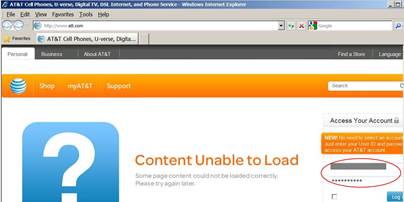 |
| Click on myAT&T, and find the Internet link, and click on it. | 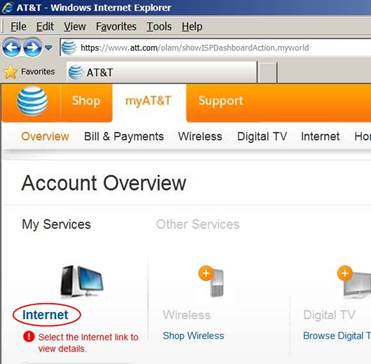 |
| Now, using the menu bar, click on Profile | 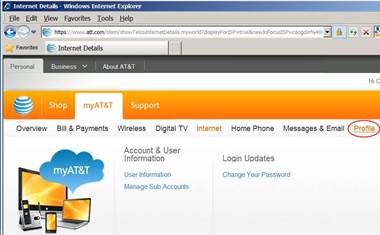 |
| Scroll down in User Information to the bottom, where you’ll see Status. As shown here, it should read Active. However, if it reads Disabled, that’s the source of the problem. I know of no way to get AT&T to change that from Disabled to Active, but apparently my two hours of phone calling got somebody to change it, because with this now set to “Active,” Outlook works again! | 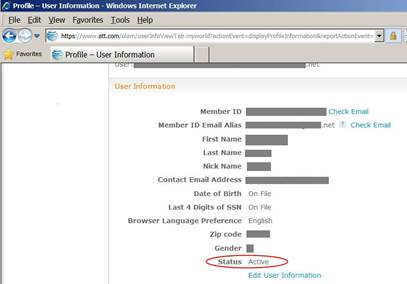 |
Fixing a Disabled Account
Log into ATT.COM with your current password. Reset your password under PROFILE
Go to ATT.NET, and in the top right hand corner of the screen, you will see the option for MEMBER CENTER.
Log in using the new password.
Reset your password in Mozilla or Outlook to match
Alert: Intermittent Password Issues
AT&T has identified several intermittent password-related issues that may impact customers, including the following:
Customer email passwords suddenly stop working
After password resets, customers are unable to access email
Customers are getting caught in password reset loops
The "Remember Me" password option for email isn't always working
Customers are unable to send/receive email with new mail settings
Please be aware that AT&T is working to resolve these issues. If you are experiencing any of the symptoms above and have been unsuccessful accessing your email or resetting your password, please Contact AT&T for more assistance.
Yahoo Server Configuration
LTyler recommends changing the POP and SMTP servers to the following names to an end to the dialog.
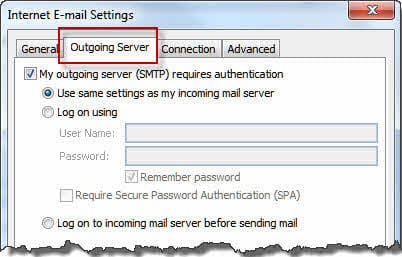
Incoming Mail Server: pop.mail.yahoo.com
Use Port 995 and SSL
Outgoing Mail Server: smtp.mail.yahoo.com
Use Port 465, SSL and authenticate with the outgoing server.
AT&T Account Configuration
The new server names apply to all AT&T email domains: ameritech.net, att.net, bellsouth.net, flash.net, nvbell.net, pacbell.net, prodigy.net, sbcglobal.net, snet.net, swbell.net, wans.net addresses. (You can also use the yahoo servers, listed below.)
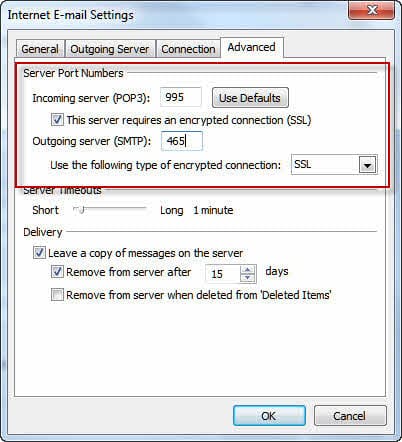
Username: full email address
Incoming server: inbound.att.net
Use Port 995, SSL enabled.
Outgoing server: outbound.att.net
Use Port 465, SSL enabled. On the Outgoing Server tab, enable authentication.
To change the server names, go to Account Settings and double click on the account. Change the server names on this screen then click on the More Settings button to configure the Ports (on Advanced tab) and Outgoing server authentication.
More Information
Outlook 2007: "Enter Network Password" Pop-ups (OutlookForums)
Enter Network Password (AT&T Forum)
Email server settings (POP and SMTP) AT&T Support

Demilovato says
There's a deeper issue here. Outlook looks at the error from the POP server and for *some* errors, ignores them. If it doesn't recognize the error, of course it doesn't ignore it. If this were configurable (so other errors could be added), users could control this in a reasonable manner.There's a deeper issue here. Outlook looks at the error from the POP server and for *some* errors, ignores them. If it doesn't recognize the error, of course it doesn't ignore it. If this were configurable (so other errors could be added), users could control this in a reasonable manner.
John Pallaoro says
If you have an AT&T sbcglobal.net email account Outlook will need a "Secure Mail Key", this sixteen character key is generated on their webpage under 'Account Profile", don't look to their foreign support team to know that, I spent hours figuring it out myself.
Good luck.
Diane Poremsky says
Yeah, as of a few weeks ago, you need to use an app password with yahoo accounts.
Lawrence B. says
Just got off the phone with AT&T and got what I hope is the right explanation. The tech said it's a "425 issue". 425 refers to AT&T's spam prevention filter. The tech took it off my account, I hope for good. He said if it ever recurs simply reboot my modem and it will reset. We'll see!
Ed Lee says
I have tried all of the above and i still get the pop up
any other suggestions
Diane Poremsky says
See if the suggestion here works for you - https://www.slipstick.com/problems/the-never-ending-network-password-dialog/#comment-203320
Girish Shikenis says
Login to your web email (Yahoo) and go to SETTINGS option, In Setting option Navigate to "Account Security" & re enter the web email password.
--> enable "Allow apps that use less secure sign in"
--> Close the page
--> Try outlook access now
Scott says
Every time I clicked to send an E-mail I was hit with the Network password request ,,, My quick fix for Outlook 2007 was in Tools - Options - Mail Setup - E-mail Accounts - Email ... Make sure the default email account is highlighted and click "repair" option. If you're sure of your settings, change nothing and click on "next" to continue
I also checked "Always use an existing dial up connection" just in case ... Not sure if that was part of the fix.
Regedit attempts to repair made it worse if anything so advise not to do so.
Cheers - Scott
Ellen Nash says
I too keep getting the box popping up and it won't accept my password.....and can't receive e-mails. I had an IT professional reset everything, worked for a while but started all over again. The funny part is, my husbands account is also part of our outlook and he's receiving e-mails? What the heck? We're out of state for a while and I don't want to bother my IT person again so I'm going into my xfinity account directly to get mine.l
Peter says
This is all on Yahoo. Has nothing to do with whether your phone is running a yahoo mail program or something. It has happened on and off for many years with Outlook. Happening again right now, and happened for several days a couple of weeks ago. Same thing happening on two different computers, no changes on anything. After a day (or two or three) suddenly the pop server just starts working again. I wish they would just fix it.
Lisa says
Completely agree. I use att.net (Yahoo) and Outlook. Every time that Yahoo does something to their servers, I am plagued with this issue on a constant basis. Then magically Yahoo does something else to the server and it stops until the next time. There is nothing that I can do here which will stop the box from appearing and then magically disappearing.
Greybeard says
There's a deeper issue here. Outlook looks at the error from the POP server and for *some* errors, ignores them. If it doesn't recognize the error, of course it doesn't ignore it. If this were configurable (so other errors could be added), users could control this in a reasonable manner.
For example, Cox in our area has been having problems with slow RADIUS (or DIAMETER, or whatever they're using) servers, so some logins get "Mail store not available, try again in a few minutes". This became intolerable; I finally called and they basically said "Yeah, we know, we can move your account to another server", which fixed it *for me*. A far better solution would be to be able to tell Outlook to ignore this error.
I know about this because I configured a POP server on an oddball platform to change its response when the account was locked to something Outlook recognized, so it wouldn't put up the dialog. Alas, this was a good 8 years ago and I've forgotten what the error was and how I learned what it needed to be, but I'm pretty sure I didn't imagine it.
Laura says
My AT&T-Yahoo email account unexpectedly stopped working. Emails send and receive OK to/from my Yahoo mail webpage. But both Thunderbird (on my laptop) and my smartphone could not connect.
"Sending of password for user xxx@snet.net did not succeed. Mail server inbound.att.net responded: (#MBR1213) Please verify your account by going to https://login.yahoo.com"
(snet.net is one of the AT&T domains. To make matters worse, AT&T sold its Connecticut subsidiary to Frontier so it's really a complicated relationship and I have no idea who to call for help)
I finally had success with a tip from an earlier suggestion above from Joseph. He said to login to both Yahoo and AT&T to get them in sync. However I couldn't figure out how to do that.
On my AT&T Yahoo mail page, I went to Settings > Account Information > Choose how Yahoo contacts you. This forced a login prompt, and I logged in. Then I went back to my usual inbox homepage, logged out and then logged in again. Voila! My smartphone and Thunderbird both started to download from Yahoo. There's probably an easier way to get to both logins separately, but I don't know it and at this point, I'm not messing with success.
Inman Lanier says
I hate to reopen what appeared to be an old topic, but I, too have been plagued by this issue many times in the past decade - only AT&T server fixes would ultimately resolve. I am getting the nagging network password dialogue box. I rarely have email locked out for any length of time, however the nagging box pops up WAAAYYYY too frequently, and screws up text entry in various apps depending on timing of the popup.
Are others experiencing this again? Am I alone?
Rick (@rpodric) says
When all else fails you, there's always Clickoff. I use it for this problem (among other annoyances), and it works great.
308Tom says
After swapping the yahoo port numbers, worked just fine - thank you
.
I only changed the Incoming since that was the one that consistently gave me issues
Pavan says
SOLVED. https://www.google.com/settings/security/lesssecureapps
this will get things going.
Diane Poremsky says
Yes, as of July 2014, Gmail users will need to use 2 factor authentication and an app password in Outlook or change gmail to use a less secure setting. This should only affect5 new gmail accounts or ones not used often.
Simon says
If using only a POP3 email account this box can be easilly removed as follows:
1. When it appears delete all content within the Login/Password Box ie leave blank.
2. Close Box.
3. Close Outlook
4. Restart PC
5. Open Outlook
6. Go to Account Settings and re-enter POP3 Email Account Login Name and Password details and Save/Exit
7. Close Outlook
8. Restart PC
9. Open Outlook.
10. Internet Login/Password Box should no longer appear
Jane says
I use a bellsouth.net address as a former bellsouth customer and MS Outlook 2010. The change to inbound and outbound is what finally fixed my problem. I have been seeing errors for months now but it was still sending and receiving, despite the error messages. Today, it stopped working. I scrolled through these answers and the change to using inbound and outbound WORKED. Thank you!!!
Bob says
Simon's fix on Oct. 2, 2014 worked for me. The second time I restarted Outlook (Simon's Step #9), the error did pop up onced, but then I clicked send/receive and it then DID receive all messages (that it had not been receiving for a few days). I'll update this reply if it "fails" again...
Michael Kagan says
I have this problem on my MAC using gmail accounts. A couple of times a day at least I get and error message and request to reenter my password. When I look in Outlook Preferences/Account I find that the line that should have my password listed (as ****) is empty! How is that possible? Is there a way to lock that information? Even if I tick the "would you like to have the password remembered" doesn't help. Is this problem due to a clash with my iPhone downloading emails?
Diane Poremsky says
Are you using POP3 or IMAP in Outlook and on the iphone? As long as you are using IMAP, the iPhone shouldn't affect it, but if you use POP3, a lock is put on the mailbox and it can trigger this dialog. The password box shouldn't clear though.
Rick says
Would you be able to ask them in the beta to excise this dialog once and for all (any circumstances up to and including sunspots)? I have no expectations that it'll ever happen, since this thing might even predate the 21st century, but it's worth a try. Thanks.
Diane Poremsky says
I will ask, but I'm not holding my breath.
MM says
I had this problem all day yesterday and finally did a tech support chat with ATT in the afternoon. They would not admit it was a problem with their email client server not authenticating correctly, even though the error I was getting was ERROR:[AUTH]. The tech spent over an hour checking and changing and then changing back all my email settings, making me change my ATT email account password, re-creating my email profile in Outlook, and telling me to uninstall and reinstall Outlook because it must be corrupt. Well I proved him wrong by trying to set up my ATT email account on my son's laptop and having the exact same issue with a brand new profile on a separate device. Clearly it was not my Outlook that was the issue. Well I did NOT take his advice to uninstall Outlook and just left everything alone overnight, and magically this morning the popups have disappeared and Outlook is working perfectly. Why can't ATT just admit it when they are having an equipment problem instead of blaming Outlook? If you find that you can log in to your account on their server att.net without incident and send/receive emails from there but not from your Outlook after verifying all your settings and the popups still appear it most likely means they are having server authentication issues on their end. Log a ticket with ATT tech support.
Amrutha says
i have two log in account for my desktop one is the administrator and the other is standard user account, both are password protected. The problem is:
when i logging into the standard user account , i am able to access the broadband connection.
But if i log in through administrator account i am not able to access the broadband connection
Diane Poremsky says
if only outlook is affected, check the firewall settings and make sure outlook.exe is allowed through.
Shorty says
Thank you so much. I have had this issue for about two months and it has been very annoying. I have had to just close outlook to keep the dialog box from popping up repeatedly. I logged in online through Yahoo and then problem stopped. I have an at&t email account and Outlook 2010.
Mel says
I just want to let you all know that I have never used Outlook and I have the same problems you are experiencing. I use Mac Mail as client. Also, I finally fired AT&T as my service provider and still have the issue, so it has nothing to do with the ISP either. I have other non-Att/yahoo pop accounts that are able to run on multiple clients with NO problem. You may want to google "yahoo mail down" for the latest. In any case, the problem seems to be the mail servers for ATT-yahoo accounts (as well as non ATT yahoo accounts).
Diane Poremsky says
Yeah, Yahoo was down for about 40 hours or so this week. I thought they were back up now though. On the Mac side, if you use Outlook 2011, disable AppNap. I'm not sure if other clients are affected by it, so it might be worth a try even if you don't use Outlook 2011.
Ellen Jackson says
This worked for me after I switched the port numbers from the indication above. The one that worked was putting 995 in the Incoming server box and 465 in the outgoing server box AND using the yahoo servers.
B. Dubya says
I suffered with the aggravating Enter Network Password issue for years, until I found your message. Changing the check mail times on my PC and my wife's laptop seems to have fixed the problem. Thanks Diane!
rseiler (@rseiler2) says
Diane, I accidentally didn't log in the same way here as I've done in the past (see my Oct 11 message above). Rick=rseiler.
Diane Poremsky says
Ah. I missed the similarities in the aliases. What firewall do you use? Does it come up for all accounts or for just one? Servers will ask for re-authentication under certain circumstances such as if you change IPs, and outlook doesn't pass authentication automatically in cases like this.
If your outgoing authentication setting is not correct for your server, it will ask each time Outlook tries to connect to the server. In this case, it can help to set outlook to check mail between every 5 - 8 minutes as most servers keep you authenticated for 10 min. since the last contact.
rseiler (@rseiler2) says
I've never used a 3rd-party firewall. Well, at least in the 21st century (remember Zonealarm?). Just the Windows one.
I've only been checking one POP account in recent years, but in the past it has come up with others.
I'm on cable and am nerdy enough to keep informal track of my external IP. It goes months without changing.
I use my ISP's SMTP for outgoing mail, and it doesn't require any configuration for outgoing authentication (just SSL and a particular port, which is a different tab). So I'm not sure what you're saying applies in the case that I'm not using live.com for sending, but either way, I've reduced polling to 8 mins from 10.
I should emphasize that the popup is not one that I see every day. It probably only happens when there's a legitimate glitch on the server side, but with a timeout of 10 mins now, it's hard to believe that the glitch is that lengthy. What's impossible to believe is that MS actually thinks this is the right way to alert you to a problem.
Diane Poremsky says
Yeah, i remember when zone alarm was the only firewall. Many, many years ago. If the problem is related to server glitches, changing the time out or setting outlook to check mail automatically less than every 10 min might not help.
Rick says
The dialog box is part of Outlook, so it's an Outlook issue fundamentally. I've never had AT&T as an ISP in my life and I've been getting this pop-up for a decade. Per earlier posts, AT&T can exacerbate the situation, but simply changing to another ISP does not automatically put you free and clear of this.
Diane Poremsky says
What type of email account do you use? Do you access your email from a smartphone or second computer? This error is very common with POP3 accounts - the first mail client puts a lot of the mailbox and the second one is locked out.
Rick says
Timeout on 10 mins is not a fix for the issue. I can't even tell if it makes the pop-ups less frequent.
Columbus says
Agreed. It is NOT an Outlook issue - it is an AT&T issue. It has happened to me at various times over the last 10+ years and always involves AT&T making some change to its servers. I have tried all of the fixes shown in this thread and nothing works. Is it just a coincidence that AT&T/Yahoo has just rolled out new updates to its iOS and Android apps? I don't think so. I have never been able to do anything to get it to stop; in the past, it just resolves itself on its own. I am on the verge of dumping AT&T entirely - cell phone and landline included - and finding a new provider since I am at my wits end.
Connie says
It is not a AT&T issue its is a Outlook issue. Outlook is not a product of AT&T. If you can access AT&T webmail then that is the product they provide. Every time Microsoft has a update it creates these problems.
Diane Poremsky says
If you use AT&T, there are issues that result from issues with the way AT&T handles the email - this is most certainly a problem with AT&T, not Outlook. There are other causes, depending on your type of of email account.
rseiler (@rseiler2) says
I'm over here from the Network popup thread, since I somehow didn't know of this one covering the specific problem. My version of this is random-seeming and occasional, never constant. Weeks can go by without seeing it, maybe several weeks to the point where I've forgotten about it, but then it can happen once or twice a day for most days out of a week.
No ATT/Yahoo. In recent years, it's been MS's POP3 for Hotmail (now Outlook.com). I realize that MS rarely has server problems and that this issue is expected at those times, though I'd argue that Outlook could handle things in a much more elegant way than a rude dialog.
Interval: always 10 mins. Solid broadband connection (once Comcast, but no longer).
No multiple devices competing for POP3 here, just one Outlook 2013 (and before that 2010, etc., going back to 2003--yes, I actually recall this problem back to then).
Windows 8.1 now, before that 8.0, then 7, then Vista, then XP. It's not related to any OS or version of Outlook. Maybe if Outlook had a timeout or retry setting, in which Outlook could be given a much longer leash before displaying this dialog, the problem could be largely avoided.
Diane Poremsky says
Open Account settings, double click on the affected account then click More Settings - look on the Advanced tab. You can increase the timeout there. i think the max is 10 min. - see if that helps.
rseiler (@rseiler2) says
That's pretty funny, as I've seen that, but since it was "grayed out" I never pursued it. Of course, that's only a decoy, since if you actually click it, it moves. I've now put it on 10 mins and will report back. I've been in a "cycle" where I see these popups a couple times a day, so if they go away suddenly, this is likely the reason.
Columbus says
I just stumbled across this thread because my Outlook/AT&T/Yahoo issue has resurfaced. I have had this issue for years and it usually gets resolved after Yahoo/AT&T does something with their servers. I just tried the fix described above and the box keeps coming back.
Cookie says
We use Comcast and have the "Enter your user name and password for the following server" prompt pop up constantly. I, now, can not receive emails.
Diane Poremsky says
Did you check the port #? Comcast is changing the ports - use port 587 or 465 and set Use this following type of encrypted connection to None then click OK.
G Elson says
As it turned out for me, Cox e-mail was down for more than 48 hours! As soon as it came back up, everything was fine. Whew!
bruce braithwaite says
Using Virgin mobile USB stick for connection. Enter network password is my problem. Don't know how to correct. Dont remember having a user name/password. Server showing as:smtp. gmail.com. Any suggestions?
David E. Casteel says
A thought just occurred to me: my Yahoo! password includes an "at" sign--could it be that passing that might be a problem?
Diane Poremsky says
I'd certainly try using alphanumeric characters, but I don't think the at sign is the problem.
David E. Casteel says
This problem is not limited to AT&T; I am having the same problem with Yahoo. It has occurred several times in the past, but did not disable my Outlook--this time I cannot either send or receive messages on Outlook, but my Yahoo! Mail is working fine. This time it started when i had to change my Yahoo! password due to having been hacked. My errors are "Internet E-mail" and it's asking for the password to the POP3 and SMTP servers. Those are from Yahoo! and one would think the passwords required would be the one for Yahoo! However, when I try using it, I get continual failures (so many that Yahoo! thinks I'm being hacked and recommends a password change--the very process that started my current problems!)
I am at my wit's end. I have thousands of messages archived on Outlook and going to another mail process is not an option.
Davie
Diane Poremsky says
So you are getting this password dialog with a yahoo account not associated with AT&T?
G Valle says
Yesterday, out of the clear blue, my sbcglobal email began working through Outook again. I did nothing to prompt this, but was elated because I couldn't get it to work for over a month. This morning....Argh! Again, back to the same mess. I wish ATT would get their act together. And don't tell me to change email address, ie. to gmail or something... Aside from the fact that I tried that, I've had it! For many years I avoided doing business with ATT. But because I wanted all services-cable, internet and home phone- through one provider I switched. Never again. Right now I'm researching companies to change not only my email address, but my service provider as well. Like ATT cares anyway!
Randy says
I hate this issue, I need to have my email on phone and would like to have it on ipad as well and while in the middle of typing on laptop the stupid prompt keeps me from working.!!!! Damn you I am very disappointed. I have paid money and countless hours trying to fix this problem, I have all but given up!
patrick1125 says
Well, that "fix" did not work. After rebooting, I logged on to my web mail via ATT and also via Yahoo. Both allowed me access to my incoming mail. Just to be sure, I restarted my computer and cranked up Outlook. The first thing that I saw was the infamous pop-up asking me to enter my password.
patrick1125 says
Thank you, again. Yes, it would be a terrible way to verify that I am still an ATT customer.
I have just logged in to my e-mail account via AT&T and Yahoo, so we'll see if that helps. I will report back either way for those unfortunates that share this problem.
patrick1125 says
Diane,
Since you last replied to me on June 12 I have been too busy to try to solve the never-ending-pop-up problem, so I just re-entered the password and tried to continue working. However, over the past 2 weeks the pop-up has appeared with increased frequency and I now need to spend some time to try to fix it. I have read all of the above stream and it does not really seem as if anyone has a solution, or did I miss it?. New information since I last posted is that I do not have to use the ATT DSL connection for the problem to occur - it happened while I was logged on via a highly secure private connection. Also, the hang up only appears to happen in the receive mode, which results in an error message. When that happens, if I close the error message box, close Outlook and re-open it, I usually get my incoming mail.
Does any of that suggest a solution to you?
I really appreciate all of the time and effort that you have spent trying to solve this mess that seems to have been created by AT&T. No big surprise that they don't want to admit it and try to solve the problem.
Diane Poremsky says
Hmm. June 12 - fixed. July 7 ish, broken, One thing several people have mentioned is authentication works for 30 days then you need to log back into the email interface to re-authenticate. I would try that first. The only thing that varies is that some say you need to log into the ATT account then email, other say you can use the yahoo interface.
Because the problem seems to be between ATT and Yahoo authentication, how you check mail doesn't matter. It's like Yahoo needs to verify you are still an ATT customer every 30 days. That would make sense since they are giving you the premium accounts but if so, its a really bad way to do it.
ejp says
Diane, thanks for the AVG add-in info. I now have it disabled.
Also, thanks again for all you do here with your sage advice and free too! I'm promoting this site to family, friends and neighbors.
Diane Poremsky says
Thanks for your support!
ejp says
Thanks for the insight. I do love MSE's clean/lean/intuitive user interface. One thing still, why do you object to the Outlook AVG add-in?
Back on the original thread of ATT/Yahoo grief: Sat Internet went down but came back after 3-4 hrs, Sun both machines ok on Outlook, Monday AM both dead with Outlook but could access email via Yahoo and Gmail. Monday PM, my tower's Outlook came back (i.e., server would authenticate userID/pw) but laptop's Outlook still no email. Tue (today) my PC still ok, but now laptop can't even login to Yahoo...pw rejected. Called ATT tier 1 TS for pw reset and on logging in with new pw, suddenly laptop's Outlook started working with no changes to Outlook's settings. Sigh.....
Did another Google of pw authentication/rejection problem using new/different phrasing of problem and encounter forum posts dating from 2008 with identical symptoms as described by many above. I have no hope this will ever be fixed.
The tier 1 ATT TS person (India?) reiterated the official ATT position: ATT does not support Outlook, Tbird, etc. they only provide the POP server settings, then we are on our own. Beyond that, it's $49 the first hr, or $15/mo for hand holding from a 3rd party ATT partner. We know it's not a POP mail client problem, otherwise why would it stop working then suddenly start working with no changes to the client program.
I am close to subscribing to the $15 mo solution just so I can call them every other day when it's down and see what they say when the standard "verify your settings" fix does not work. Wonder if you can cancel the service after 2 or 3 mo.
If anyone reading this has subscribed to the $$$ service, it would be nice to hear the outcome.
Diane Poremsky says
The AVG add-in is known to cause problems - messing up formatting when it scans, dropping mail, preventing mail from sending. Only a really, really clueless person who clicks on every attachment they receive, needs the extra security it offers. The rest of us are smart enough to say 'hmm.. this looks suspicious' and don't need to waste the processing power checking all email. Outlook writes all attachments to the drive before opening them, so the virus will be stopped if you slip up.
I love how ISPs blame everything but themselves. It's even worse when you are a woman - they treat you like you are a dumb blonde. I went through this with Sprint/Embarq about 8 years ago and finally had to say the 'look jerk, I might be a woman, but I know technology' and mentioned the book titles i wrote and asked if they ever heard of slipstick. I got much better service after that. :) And this was before they outsourced call centers - I was talking to a guy in the US. CenturyTel was no better after we moved here. I kept telling them the DSL died on rainy days. After 6 calls, they finally had a guy come out on a rainy day. The box in my front yard was soaked inside. Gosh, I was right. Fancy that. :)
ejp says
Diane, in an earlier reply to me above, you said:
"Interesting. Let us know how the experiment turns out. As for invasive AV, I prefer Security essentials because it does not install a SMTP scanner. Norton and AVG install an Outlook add-in and also a SMTP filter for non-outlook mail. We do not recommend using the outlook add-in – I personally would not use the smtp filter either, but I’ve been told that the SMTP filter causes no problems…"
Would you please elaborate on your AV philosphy, specifically why you like the new MS Security Essentials in spite of relatively poor reviews (I'm now using it on our laptop anyway after removing Norton), and the SMTP filter issue. Don't understand that. I have free AVG on my tower.
I follow reports from these guys: https://www.av-comparatives.org/en/comparativesreviews who seem pretty thorough and impartial (former university IT dept people I think). They rank MSE low in virus catching but rate high in few false positives. Here's a thought on demanding the highest AV ratings vs cost and complexity and conflicts. Maybe someone who's relatively savvy and risk averse (follows best practices) does not need a 2012 Rolls Royce AV solution (i.e., Norton 360, Kaspersky, et al) and can manage fine with a slightly rusty and dented 1960 VW beetle solution.
Your thoughts please?
I've decided to run with a minimalist and free solution and see if I ever get infected. If no infections a year from now, I'm done messing with the rebate forms for Norton 360, Kaspersky, etc.
Thanks!
Diane Poremsky says
I would argue that no one needs the rolls-royce :) Especially Norton, it's bloatware. I wasted an hour trying to help a guy fix his computer after running the cleanup tool that came with it when it cleaned too much from the registry. I suspect that he needs the best AV though - he clears his browser history and asked if what he deleted could be recovered. :)
I prefer MSE because it's free, does not install smtp scanner, and we're relatively low risk. I have not seen any reviews where it was rated poor - it was middle of the pack. We've been using it since the days of OneCare. I have AVG free on a couple of VMs, mostly so i can test things with the addin. If AVG did not install the outlook addin, I might use it more. I haven't had problems with false positives with MSE. Mail is filtered before it hits the Inbox so we really only have browser exploits to worry about but stay. We mostly stick with "safe" sites and the only infection was on a new computer, after I removed mcafee and before I got around to installing MSE. That freakin' 'your computer is infected' thing. After i got the browser closed, I used system restore and immediately installed MSE. SR probably wasn't necessary, but since i didn't have AV installed, i thought it was prudent.
Kev Daug says
I was having the same password problem in June 2012 as report in Nov 2010. I got the same answer from ATT support - it must be Outlook or my iPhone. Some days everything works, some days nothing. I tried the log into the web mail server and log out, and now my Outlook is working and so is my iPhone. Thanks for the help on this site.
Rick says
A worldwide problem. The Brits think they fixed it:
DavidM
Moderator
Posts: 1,322
Registered: 27-01-2010
3
Re: E-mail password rejection
Options
on 27-04-2012 11h23
Hi Guys,
We wanted to update you on the email password pop ups issue some of you have been experiencing. Last month Yahoo completed a piece of work which involved migrating the affected mail server farms. Since this migration work was done we have completed extensive testing and no further issues with POP or IMAP have been found. As a precautionary measure the remaining mail server farms have also now been upgraded.
There may still be cases where individual customers continue to have problems, and this could be connected with the mail clients used, if you do continue to experience any issues please get in touch so we can help you. We do not believe the problems now reported are linked to any wider issues as our testing has not replicated this.
We have decided to lock this thread as the original issue has been resolved and there may be confusion with new individual issues linking to this when the issue is something different.
Big thanks to all who posted on this thread or emailed in with info to help us investigate this and progress the server migration work.
If anyone is still experiencing issues with Yahoo mail please feel free to start an individual thread with your problem and you can get help from the community, or contact the mods via link in their profile so we can investigate and resolve any outstanding individual cases.
Cheers
David
BTCare Community Mod
If you like a post, or want to say thanks for a helpful answer, please click on the Ratings star on the left-hand side of the post.
If someone answers your question correctly please let other members know by clicking on ’Mark as Accepted Solution’.
Message 671 of 671 (875 Views)
--------
Here is a BT thread describing the same issue. The message above is the final ( optimistic) post.
https://community.bt.com/t5/Other-BB-Queries/E-mail-password-rejection/td-p/234061/page/35
---------
Rick says
Hi Diane, communicate with you on this topic on microsoft site. Email was working as of my last post, having tried all of the fixes here and more. Email worked for about 30 days, but problem has re-occurred. Do you know how to get this issue to management in Microsoft to assign a software engineering invetigation and possible fix?
Diane Poremsky says
Is this an AT&T or Yahoo account? According to several sources, you need to log in online at least once every 30 days to avoid problems. There are differing reports if logging into yahoo online directly is enough or if you need to login through AT&T website.
If its not an AT&T / Yahoo account, who is your email provider? Unless Microsoft can repro the problem and identify Outlook as the problem, they can't fix it. (The AT&T / Yahoo is a on the AT&T side and the problem affects all email clients.)
Eric Palmer says
I was confused about Gmail and ATT/Yahoo, getting hung up on the incoming/outgoing server settings you need for Gmail to forward email TO yahoo, not FROM. I only want FROM, and seem to have it working by just going into the Yahoo setting to forward (and retain) all ATT.net email to another email addr (i.e., myname@gmail.com). this seems to work and the email splits and goes to Gmail and Outlook. Forget if I played with reply.
This is all well and good, but at the moment, my email on the tower is working and my wife's laptop is not (down 1 week and counting) and she insists that since we send ATT $$$ every month for DSL/email service, we should not have to pay the additional monthly $15 tech support fee they want to make it actually work 100% of the time. Imagine if the car dealer tried to charge us a monthly fee for our car to start 100% of the time. How long before there would be a congressional investigation of that. I think someone should get some state attorney general's involved since this is fraud plain and simple. It's actually interstate, so is a federal thing. if you Google enough, you see this going back to 2006. It's been plaguing me for almost 3 yrs.
I'm gong to change her p/w one more time then call tech support and insist on a tier 2 tech without paying a fee.
Eric Palmer says
I don't thoroughly understand all interaction between ATT email and Gmail/Hot Mail, Tbird, etc, but I did create a Gmail acct (and Mozilla Tbird) that receives my ATT emial from my existing/old addr and for that to work, I needed to specify the ATT POP server info (pop.att.yahoo.com and other variations), email addr and password in a near identical manner that Outlook requires. Thus, when Outlook does not work, Gmail does not work either since ATT does not authenticate my password for anyone.
is there another way to get Gmail to "talk" to ATT/Yahoo servers without specifying the same info that Outlook wants? maybe I'm missing something.
Diane Poremsky says
Unfortunately not. It's too bad that AT&T has messed things up so bad that it doesn't work. It should work to forward from Yahoo to Gmail, but it makes it harder to reply using the AT&T address.
Are the IMAP servers as messed up? Instructions at Online Services (I don't think any of the Yahoo utilities on that page will work any better than Gmail.)
ejp says
Well, that hoped-for fix 2-3 replies back did not work after all. The laptop is now down email wise and my wife is back to Yahoo email, and or Katie's fix above, I've been faked out by that one countless times. Seems to "fix" it for a while, then it's back. It's not fixed unless you can go a month or more without failure.
I changed my wife's p/w, had to recreate the verification image all over again, logged in via Member Center and the pop-ups continue. My email on the tower is still ok.....for now.
Diane, on the aero "peak" thing, thanks....I'll play with that. Trivial issue vs the email problem that's driving me nuts.
I think this should be reported to a State Attorney General's office as fraud on AT&T's part. We subscribe to DSL service for $X per month and are promised POP email service. But if we actually want POP to work consistently, that's another $15/mo + countless calls to tech support. That's bait and switch and it's illegal!
Between the ATT tech forum (see link above) and several others I've visited there's huge evidence that this is a massive universal problem across the country that been going on for well over a year, maybe longer.
Diane Poremsky says
I know it's been a serious problem for about 6 months - and of course, AT&T denies it's a problem and blames Outlook.
I wonder if there is something else going on - as this does seem to work for some people. Password authentication issues makes sense in some ways, since they are interfacing with Yahoo (and trying to push everyone off AT&T servers.) Can you configure the AT&T account to push everything to gmail or hotmail? Both will let you set up a different address to use for replies, so you could reply using the AT&T address. Or just say screw it and work on moving all mail over to gmail or hotmail.
Katie says
I have A T & T DSL. POP email dialog box kept coming up last night. I also do check my pop email on my phone. I logged into yahoo mail with my A T & T information, logged out and it is now fixed. Thanks so much.
ejp says
It's still working on both PC's, so fingers crossed, but it has worked for days in the past.
Can I slip in a new topic on IE. Don't know if it's outside this forum. I don't use IE but my wife claims that if she has 2 or more pages/tabs open and switches back to IE from Outlook by hovering over the iE icon on bottom tool bar, that the pop-up box listing the open pages/tabs is new and takes up space, is annoying and covers other content. I use Firefox and it does the same thing which I like.
Is there a way to turn this off with IE? that is, eliminate the pop-up. To move between pages then she'd have to use the left/right arrows at top left of screen.
thanks.
Diane Poremsky says
it sounds like the aero "peek" feature. It's not new - she should either see a list or the images, depending on how many pages are open. You can turn it off for all apps, but not just for IE. On the little rectangle at the end of the taskbar (by the clock) that can be clicked to show the desktop - right click it and toggle peek off an on. Although... that is not affecting the little preview windows. Hmmm. Try the Visual Effects settings in Control panel, System, performance and uncheck the Enable Aero Peek box.
She can click on the preview to open the page she wants and it should only cover content for a few seconds.
ejp says
I don't think it's add-ins and I have all the standard ones. I may be jumping the gun here as it's only been working for 4 hrs and I've been fooled many times before, but this is promising and may be the fix we all seek.
The following is posted at this link, page 5, post dated 5/19/12:
https://forums.att.com/t5/Email-Internet-Security/Outlook-2007-keeps-asking-for-user-name-and-password/td-p/2740777/page/5
The post starts just below "++++++". scroll up for many posts describing everything on this board. Please post a reply here if this does NOT work for you and I will do same.
+++++++++++++++++++++++++++++++++++++++++++++++++
Re: Outlook 2007 keeps asking for user name and password
Options
05-26-2012 12:14:24 AM
I have followed the directions of several of the posters here and the following does seem to work. If you try to log into the Member Center (att.net) right now, with your current password, it will tell you the password is incorrect, even if you can log into att.com. (They should be synced, but.....)
Directions:
Log into ATT.COM with your current password. Reset your password under PROFILE
Go to ATT.NET, and in the top right hand corner of the screen, you will see the option for MEMBER CENTER.
Log in using the new password.
Reset your password in Mozilla or Outlook to match
You should now be able to use IMAP or POP settings described by AT&T.
Diane Poremsky says
For the record, I do not think it is add-ins or anything client side. Well, anything hardware/software client side. It certainly could be passwords out of sync, which would fit with the belief that something changed on the server side.
ejp says
ok, I don't exactly check it manually that often. only if I have "incoming" which can happen in spurts. depending on what else I'm doing, when an email comes in, I check it.
The thing that's weird - nothing new - is that the tower, my main machine I'm using now, will produce that pop-up every 2-3 min but email continues to work. I just turned the auto email send/receive off (uncheck) but the pop-ups continue at same rate.
Diane Poremsky says
what addi-ns do you have installed? It should only be coming up that often if you or an addin is connecting to the server frequently.
ejp says
Ahaaa!! while sitting here composing above reply, the laptop suddenly toggled over from "not working" to "working" and 2 days worth of email came flowing down into Outlook from the Yahoo server. That's the way it works. time will tell how long this lasts. It's not really fixed, just another "head fake" in order to stay out of the pond.
ejp says
ok, still not working. Here's a summary of what, for me anyway, does NOT fix the problem. Repeat.....this DOES NOT fix my problem with the pop-ups:
1. login to Yahoo and read email. Fixes problem on tower half the time, never on laptop. Laptop still down, tower reads email but getting pop-up every 2-3 min.
2. Set Outlook's auto check-email-inteval to 15 min or so.
3. disable MS software firewall.
4. uninstall Norton. Seemed to fix it but it was back the next day after installing MS Essentials.
5. Remove MS Essentials and run with zero A/V protection.
6. Remove Actiontec modem/router and revert back to old Siemens Speadstream modem that worked 2-3 yrs ago. Still works for internet access but no fix for pop-up.
7. Operate with laptop or tower plugged DIRECTLY INTO DSL MODEM. i.e. no router firewall. DANGEROUS!
8. Now back with Netgear router and Speadstream modem and original problem persists.
Next step, I'm considering building a catapult and flinging all this gear into the pond behind my house and going back to the way things were 40 yrs ago when I was not spending 20-30% of my time trying to get tech gear to work.
Seriously, I need to explore Gmail more, but there's still the password authentication problem there too since I don't want an email addr like wilburcrankybutt@gmail.com. Instead need something like lancearmstrong@pacbell.net . That's the conundrum.
just saw your reply. Am on the PC 2-3-4 hrs/day and check it manually every 2-3-4 min and automatically every 15 min. Using POP3.
Really like your site, BTW. Thanks for the service !!!
Diane Poremsky says
I would avoid this: "check it manually every 2-3-4 min."
Set it to send mail immediately and let the automatic checks download all mail. I think you could safely reduce the check every time to 10 minutes. As long as you do not do manual checks, it *should* (that's a big should :)) work ok.
If you like to hold mail for a few minutes before sending, you can set up a rule to hold mail for a minute or two before it gets sent immediately.
ejp says
It's back. To recap, uninstalling Norton "fixed" it momentairly on the laptop then I installed MS Essentials and a day later email is down again. Can log into Yahoo and read email but not with Outlook. 2 days ago, could not even login to Yahoo on the tower till I called them and changed password. No idea why the old one went bad.
Just removed MSE on laptop but still no dice. Running w/o a net at present. Spent 2 hrs on the phone with ATT over past few days changing various passwords to no avail. Internet went totally dead yesterday when my network p/w apparently went bad. Internet now up, laptop has no email and the tower email works BUT get the dreaded pop-up every 3-4 min.
I'm using an Actiontec combo modem/router with a new Netgear dual band router (Actiontec acting as modem only). this had been working for past 6 mo (except for the error pop-up) but next will switch back to old ATT blessed Speedstream modem to see if that does anything. Since on every call to ATT over past 2-3 yrs, there is NEVER a problem with my settings, it seem does point to something funky with my set-up, but no idea what that could be now that the Norton removal was apparently a "head fake".
As much as I hate it, I'm getting closer and closer to the ATT $$$ subscription tech service. I build and service my own and friend's computers, so hate to admit defeat on this. FYI, the service is $49 one call or $15/mo annual service.
Perhaps JDecC can expand on what he/she did. I have same problem with Gmail and Mozilla Tbird!!! BUT, I did not cancel my ATT account, I just created a Gmail account. Both fail with their own version of the ATT pop-up error box since they can not authenticate my userID/password with the ATT/Yahoo email server.
I don't see how you can cancel ATT without losing email entirely since they are my DSL provider. When you create a Gmail acct, to talk to an existing POP acct. you have to provide your att email address, right? when I try this, it can't authenticate same as Outlook can't. what am I missing here?
The question is, how do I create a Gmail acct that receives email from my current ATT email address? WE CAN'T CHANGE EMAIL ADDRESSES.
Diane Poremsky says
Dang. I was hoping that gmail would bypass the lock, collect email and outlook could get it from gmail.
How often are you checking email? Are you using POP3 or IMAP?
ejp says
This 2-3 yr recurring problem surfaced again on our laptop and after 2 days down and 45min on the phone with AT&T and zero success I had an epiphany and decided to disable (totally remove) Norton. Problem fixed !!! for now anyway. The tech did not say "try removing your A/V app" but instead offered the $49 solution. Before removing Norton, I seemed to be able to invoke the problem by turning the router off and on, this time off for 2 days. it would typically clear spontaneously after minutes to hours to days but this time, after 2+ days, none of the usual fixes worked (i.e., login and out of my Yahoo email, change Yahoo password).
Had same problem on my tower for a few min after same router shut-down, but it recovered within minutes. I'm using free AVG and now wonder if that does not contribute also, so plan to do some experimentation. I just installed MS Security Essentials on the laptop, so we will see if that creates any interference.
Any recommendations for a "minimally invasive" A/V app?
I understood EST NOD32 had a minimal footprint and did use it once, but am exploring free options for now.
Diane Poremsky says
Interesting. Let us know how the experiment turns out. As for invasive AV, I prefer Security essentials because it does not install a SMTP scanner. Norton and AVG install an Outlook add-in and also a SMTP filter for non-outlook mail. We do not recommend using the outlook add-in - I personally would not use the smtp filter either, but I've been told that the SMTP filter causes no problems...
SarafS01 says
So, I read through all of the threads in this forum because I'm having the same problem for about 3 weeks now. It was mentioned that one reason this could be happening is because of the Iphone. I have mine through AT&T wireless, but it reads emails from my home emails which come through my cable modem.
What should I do to resolve this? It's really driving me out of my tree because I've never had this much difficulty with this and have had the phone for more than a year.
Diane Poremsky says
Is the problem account a POP3 account? The problem isn't with AT&T wireless, but AT&T broadband's supplied email accounts.
To see if the phone is a factor, turn it off - if the problem goes away when its off and comes back when its turned on, we know it's related.
J DeC says
I finally solved this Enter Password problem by cancelling att.net account and opening a gmail account.
Att.net has millions of users & Outlook has millions of users. If these two entities cannot get along then cancel one. The loser will soon get the hint and fix this issue once and for all.
Diane Poremsky says
That's one way to solve it.
ejp says
yes, 2 PC's fetch email from saye ATT account (2 seperate emails) but each set to check mail different times (10 min and 12min, was every 2-3 min) plus problem still occurs when one is powered off. Problem can alternate from one PC to other. One week tower is dead, 2 wks later it's the laptop's turn, then both are fine for 1 or 2 wks, then neither and so on...... Seems totally independent of the PC and again the tower is main account and laptop is the secondary or alternate ATT/Yahoo email addr, but that never seems to mater much.
One clue is that 80% of the time, the problem is cleared after logging into the Yahoo email acct. on MyYahoo, or "HerYahoo" as case may be. Only have to login and view inbox. Don't have to log out or really do anything.
Things are working today but subject to change at any moment.
ejp says
ok, now it's working again. "working" means my email downloaded from the ATT/Yahoo server to Outlook. BTW, the whole time I was down, email continued to work on a laptop that uses a secondary email address on the same ATT account.
I may have to stand corrected on Gmail not working when Outlook was dead. I was able to receive NEW email from a laptop on same account (secondary email addr) which continued to work find during this outtage. But again, only NEW email. The email in the Yahoo queue from last night would not load down, then suddenly the dam burst and everything came down to Outlook as I knew it would sooner or later (4 hours down this time). Maybe when Gmail seemed to be working was during a transiton stage when ATT/Yahoo was "thinking" about working.
Maybe I'm not clear on how to use Gmail with ATT/Yahoo. All I'm doing is going into the settings for my Yahoo account and checking the box that says forward to another acct.
from my "My Yahoo! " acct: options->mail options->pop&forwarding->forward to another acct. select "store & forward".
Is there more to it than this?
thanks for any help.
Diane Poremsky says
@ejp - It's possible there is a problem with the yahoo servers.
You mention two computers - are both configured to get mail from the same account? If both try to download at once, one computer will get the password dialog. Try setting each to check for new mail every 2 hours or more, use send immediately so mail is sent as you create it. Then if you want to check mail between the automatic passes, press F9 or the Send/Receive button. Try to avoid pressing the button more often than every 10 min though.
ejp says
Here's a cut/past from a reply I just left on this ATT forum on the same topic -> https://forums.att.com/t5/Email-Internet-Security/Outlook-2007-keeps-asking-for-user-name-and-password/td-p/2740777
Check out above site if you want to see how pervasive and hopeless this problem is. I'm thinking another DSL provider may be the only sure fix.
My post on ATT forum:
Me again. It's a day later and I've been dead in the water for 2-3 hrs with no emal, unless I use the on-line Yahoo acct. None of the "solutions" on this forum nor others have worked. When they seem to work short term, it's because the problem - for me at least - clears itself automatically then reappears an hour or day or a week later.
Is there any light at the end of the tunnel on this? I'm staring at another prompt for UserName/Password as I type. For a while, I thought Gmail might be a solution and had my mail forwarded there, but that's dead too and for obvious reasons if you think about. How can the ATT server forward the mail if it won't authenticate my UserName/Password?
How about some real help from AT&T and not the usual advice about changing server settings to inbound.att.net/outbound.att.net, etc., etc..... that does not help at all. It's a deeper problem that has nothing to do with our local settings.
ejp says
Justin N, yes, that has worked for me but found it not a permanent solution. That is perhaps 80% of the time on a given "bad day" when my email is dead and nothing but the password pop-up prompts over and over, doing what you suggest has fixed it for hours to days, but it always comes back....for 3 yrs and counting it comes back. My last "try" was to tell outlook to stop the auto email check entirely and I manually check for new mail. So far ok (2 days), but not enough time has passed to be sure. Actually, I did get one pop-up when I checked email manually, but the mail did come down from the ATT/Yahoo server.
You are not supposed to try/change >1 thing at once in debugging, but I also told Yahoo to send spam thru but flag it as spam. Odd thing though, I now get zero spam in Outlook (only used to get 1 or 2/day anyway down to Outlook) and the Yahoo spam folder is also empty after 24 hrs (typically has 10-20 items per 24 hrs). It's like it's blocking it at the Yahoo spam filter and deleting it there. Maybe I misunderstood the switch I was setting in yahoo setup to deal with spam. These suggestions came from someone else on this or another forum.
On Gmail, yes, have tried it and my mail is forwarded there currently (still goes to Outlook too), but I like Outlook and have not conditioned myself yet to embrace Gmail. May go there if I get annoyed enough.
Thanks for the suggestions !
Justin N says
Something that worked just now for me:
- Go to http://www.yahoo.com
- Log in using your sbcglobal.net or other AT&T-associated email identity.
- Check mail.
- Log out.
We just did this, and after three days of no email, my boss suddenly received a flood of them.
ejp says
The problem persists after changing "check email interval" to 10 min and 12 min on 2 systems. ALSO, with the tower system shut down, the laptop still gets pop-up every 10 to 30 min to 1 hr. or so.
I suspect this problem is like a migraine with multiple potential causes which explains why some of the "fixes" above work for some people but not others. And, remember, I've been seeing this for at least 2 years, perhaps 3.
At approx 3-4-5 week interval one PC or the other refuses to download email at all while the pop-up box is appearing while the other PC works fine. This condition can last an hour or all day. Suddenly it will clear on its own. Sometimes it's cleared by logging into the Yahoo! account to view email but not consistently.
I'm now experimenting with Gmail on tower system (with email forwarding from the ATT/Yahoo acct.) and so far no pop-ups on tower (2 days and counting) but they continue unabated on laptop. May switch to Gmail. Oddly you can forward AND still receive email in Outlook even though the boxes you check in your ATT/Yahoo account set-up to enable forwarding state you can only do one or the other but not both.
Any new ideas welcomed short of dropping ATT for high speed access.
Diane Poremsky says
Rather than dropping ATT - drop their email. :)
Gmail should work fine the way you are using it - I don't ever recall seeing any complaints about gmail locks. As an FYI - If you plan to use both the gmail and ATT addresses in Outlook, unlike the gmail web interface, Outlook won't detect which account the message was sent to - it will send everything using whichever address you have configured as the sending address in Outlook. My recommendation is to always reply from gmail... and work on switching over to gmail. Then you can change Internet providers anytime you want without the hassle of changing your email address.
An even better option, IMO, is to get your own domain name. Some domain registrars include one or more free mailboxes with registration and AFAIK, all support forwarding email addresses to a specific address, so you can forward the mail to gmail and reply using your domain address. If you get mad at gmail/google, you can easily forward your address to some other account (like your ATT acct! :)).
Don Fite says
If you use outlook for both ATT and Gmail, then you CAN create a new inbox and a rule to be checked when mail is retrieved based on the address the e-mail is sent to.
ejp says
Ohoooo... didn't think of that. Yes we do, my desktop and wife's laptop. Could explain the seeming randomness. Her email is the secondary account with mine the primary.
will check it out and advise.
Thanks!
ejp says
I continue to have problems with the recurring password prompt (2-3 yrs and counting) in spite of all suggestions above and 3 or 4 1 hrs sessions with India IT techs. I have the problem with Win XP and Win 7. Outlook 2003 and 2010 AND Thunderbird across two PC's. i.e., it's not unique to Outlook. I have reinstalled Outlook several times, from scratch, created new accts. etc. all to no avail.
The problem occurs with non fatal p/w prompts on both PCs the same day, on one but not the other on same day, on neither PC for several days to a week. One PC's email can be dead in the water for minutes to days while the other works fine and vice versa. Then suddenly it starts working. It may start working during an IT call or 2 hrs later or while I'm placing the call.
No iPhones nor any smart phone in the house (old school).
The password prompt box problem occurs equally with:
pop.mail.yahoo.com (I think the old server from years ago)
pop.att.yahoo.com (been using for 2-3 yrs)
inbound.att.net/ outbound.att.net (started using yesterday after reading above w no improvement)
Any more suggestions?
Diane Poremsky says
Do you have more than one email client logged into the account? When one client tries to check mail at the same time another client is accessing it, you'll get the prompt because the first client has a lock on the mailbox. If you have both computers checking mail, set the email clients to check at odd times so they are less likely to overlap, ie, the main computer checks every 7 minutes and the other one every 11 minutes.
Also, if you have the email clients set to check mail every minute or so, this can happen if its downloading a lot of messages or a large message. (We recommend 8 - 10 min between checks).
Rusty J says
Switched off the problem account on the iphone and the outlook issue went away, at least for now. What I don't get is I have two other ATT email accounts on the same outlook profile and on the iphone and have never had an issue with them.
Diane Poremsky says
Are the incoming servers the same for all accounts? It's possible one account is using a different server as LTyler suggests.
Doug says
A client of mine began having these issues just this week with Outlook 2010; they had been on U-Verse about six months.
Switching them from pop.att.yahoo.com to pop.mail.yahoo.com solved the issue (thanks, LTyler!). It sounds like AT&T has some work to do getting their mail servers in order.
Jean says
Thank you. I was having intermittent problems between Outlook and att.net. Unplugged by Iphone as you suggested - - - and viola, fixed.
geoff says
I have had this problem intermittently for many years. It started with Bellsouth and then AT&T aquired that company. It has been driving me absolutely bonkers and never have I seen a solution that works. Years ago I paid Microsoft to try to help me and their techie told me to run msconfig and uncheck one of the startup processed. It worked for at least a couple of years.
Does anybody know what process that might have been? I can't remember.
John Neale says
Hi Diane
After our conversation on the other Microsoft forum I spoke with British Telecom's Yahoo support in their Indian call centre and they apparently working on the Yahoo servers to correct the fault, he was supposed to call me back tonight at 6pm GMT but didn't call? So far this evening there have been no messages so do I deduce from this that they might have resolved the server issues? Time will tell but I do take a lot of what BT/Yahoo say with a pinch of salt.
Diane Poremsky says
Thanks for the update.
Dave Bolt says
I found this artical on Apple's support site: https://support.apple.com/kb/TS2621
In case you can't read the artical, it points out that POP3 is not designed to support simultaneous connections.
This supports the earlier comment that turning off the iPhone may solve the problem with Outlook.
I would suspect a bug in Outlook where it pops up the password dialog but keeps trying to log into the mail server while displaying the password dialog. When I have seen the problem, cancelling the password dialog does not cancel checking for mail, and it eventually succeedes.
What Outlook should do is probably keep retrying longer before giving up and then display the correct error message. (This may not be as simple as it seems, I took a quick look at the specifications for POP mail and don't see a provision to tell the caller that the user is already logged in).
Hope this helps clarify the situation a little.
Diane Poremsky says
Correct, POP3 does not support simultaneous connections. A lock is put on the mailbox during the download process and this lock prevents other clients from checking mail at the same time. Outlook is (and always has been) a bit slower at releasing the lock than other clients plus servers can control how long a lock stays once the client releases it. One of the people who first brought the problem to my attention believes that AT&T updated their servers to hold the lock longer in an attempt to encourage people to switch over to yahoo servers. That theory makes sense to me. Theory 2 is they lengthened the lock to reduce server load - it's cheaper than adding more server capacity and most users won't notice, because they check mail less frequently.
I'm not sure I would call the dialog a bug in outlook but cancelling the dialog only cancels the current check - the next one will succeed or fail on schedule. Reducing the frequencies of mail checks on all devices will reduce the frequencies of the dialog. However, Outlook could handle it better and stop trying sooner or waitng longer before trying again.
I like to use odd times for autochecks, not every 5 or 10 min. If two devices overlap once, they will always overlap. If one is set for 7 min and one for 9, they'll be on different schedules and as long as the server doesn't keep a lock open after the device closes the connection, all is well. Higher numbers also help - 11 and 15 min checks will reduce the chances of overlap.
Fred Cohn says
So far, no pop up windows. Fingers crossed.
Dennis says
I get the same problem at my works PC, what I think most people are missing is that the password being asked for is the NETWORK PASSWORD, not one for emails. We dont have any Network Passwords on our Computer
Fred Cohn says
What I did was:
1. Closed Outlook
2. Saved the Protect Storage file to my desktop
3. Remove the subkey under the Protect Storage file in the registry
4. Rebooted the computer
5. Went into the control panel, opened the Mail folder and reentered my password in the Outlook setup. However, the password was already there indicated by ******. Which makes me think that after I went through all the procedures above, shouldn't the space for the password be blank?
Fred Cohn says
My computer went all evening without the pop up window appearing. When I sat down at my computer this morning....there it was!!
I'll try to remove the subkey in the Protected Storage folder and report back.
Diane Poremsky says
Did you reboot? It's weird that it worked yesterday and now doesn't.
Fred Cohn says
I reapplied the corrections and rebooted again. I'll report back when I have something.
Diane Poremsky says
Did any of the settings change? It's sometimes my experience that windows update forces outlook closed (aka crashes it) and when this happens, outlook settings can be lost. This latest round of windows updates (for win7) did not reload outlook on boot, which leads me to think outlook did not close cleanly.
Fred Cohn says
Windows XP
Diane Poremsky says
Since you have Windows XP, try the protected storage fix.
Fred Cohn says
Just thinking of the top of my head.....when I made the changes to my POP3 and SMTP settings, should I have also deleted the registry password key in the Protected Storage System Provider folder and then reenter my password in the setup?
Diane Poremsky says
I don't think you need to edit the pss unless it's corrupt - but when you changed the server names, it should have asked you to re-enter the password.
what version of windows?
Fred Cohn says
She has her own email address and password. We have both setting to check for new email every 5 minutes.
BTW, we've been using Outlook 2003 since approx. 2004 and have had the settings set to check emails every 1 minute. I just recently changed it to 5 minutes thinking that might have solved the problem, but it obviously didn't.
Diane Poremsky says
We recommend using 8 - 10 min, or higher. However, all that will do is reduce the frequency of the dialog.
Do you sync with smartphones? if not, i'd try deleting the protected storage key.
Fred Cohn says
Well, I just had the pop up window appear again after I made the change, but the pop up didn't appear on my wife's computer. We share the same service with a router. Any ideas on what to do now??
Diane Poremsky says
Do you both share the same mailbox? If so, how often is outlook set to check for new mail?
Fred Cohn says
If it's just a tweak to the Outlook setup then why isn't AT&T advising clients what changes need to be made? I would assume that the answer is that they look at it as an Outlook issue and not theirs.
I was told by their rep that they have a division within AT&T, I forget their name, that could assist on solving this issue, but they would charge a fee for this service. He stated that there was a solution but I would have to pay for that since the problem was not on AT&T's end, but Outlook's. I got so ticked off by this recommendation that I just hung up the phone.
I'm not sure if they would have suggested the change advised above. I can only assume it would have been something as simple, which irritated me even more. Why can they not just advise a simple solution to the problem and assist customers who are experiencing issues? I guess it involves $$$$$$$$$$$.
Diane Poremsky says
It's not a tweak made to outlook - AT&T tweaked their server (according to my sources) which caused the problem to surface in Outlook. (both sides get some of the blame) Thats why it started hitting everyone about 3 - 4 weeks ago. It should only be a problem for people who also check mail using a smartphone or second computer, which may be a small % of Outlook/AT&T users. As to why they aren't telling users how to fix it - it's typical tech support. :) The low level guys you talk to first often aren't told about the problem and are paid to follow the script. If the solution is not in the book, they are limited by liability policies in what they can do or say.
Fred Cohn says
I've had this same issue for the past three weeks, trying every method mentioned on different websites to cure this issue. I was just given this link to this discussion and tried the solution mentioned above. I'm keeping my fingers crossed that this will fix this issue.
I have to wonder why AT&T hasn't solved this issue themselves or informed clients of this problem or resolution. I know we are not the only users of AT&T who are experiencing this problem.
Diane Poremsky says
The information I have (which should be taken with a grain of salt at this point) is that AT&T did this to force everyone over to yahoo. That's why i asked what server names (or domain) had the problem. However, AFAIK, of all mail clients, Outlook may be the only one that handles the change so poorly - so it could just be a simple tweak they made and not a conspiracy to push users over to yahoo.
Mohammed Majeed Khan says
its simple
Just go to your gmail account from google
go to sign in & security settings
then on the allow less secure button
then inshallah the network error problem is solved
majeed khan
LTyler says
I, too, have had numerous popups in Outlook 2007 from POP email through AT&T DSL service, many times each day.
It is finally resolved. After trying several Inbound and Outbound settings, this works great:
Incoming Mail Server: pop.mail.yahoo.com
Outgoing Mail Server: smtp.mail.yahoo.com
I changed this four days ago, and have not been asked for Username/Pswd since.
Diane Poremsky says
Thanks! What server name did you use before - was it on yahoo or att?
margaret says
THANK YOU. I've been fighting this for a few weeks. THIS change finally worked (fingers crossed.)
I was using pop/smtp.att.yahoo.com; I tried the inbound/outbound.att.net. Both of those caused the same problems. I had messed with the registry; recreated all accounts, etc. But this change seems to work.
Harry Worthing says
I have Outlook 2013 and a relatively new Dell computer with Windows 7. This "pop-up problem" started about a month ago, and we have been getting about 15 to 20 pop-ups per day. Two days ago, one of my computer-savvy sons helped me enter the Incoming (pop.mail.yahoo.com) and outgoing (smtp.mail.yahoo.com) server addresses in the appropriate places, and we have not had a pop-up since!
It is bazaar to me that either Microsoft or AT&T doesn't post this information and stop fighting as to who is to blame!
Harry Worthing says
I ran into this problem back in April and solved it as mentioned above. Now it has started again and occurs as many as 30 or 40 times per day ... right in the middle of whatever we are doing on the computer. What is going on????
mfcjax1 says
Check your provider - your account may have been deactivated for any number of reasons. have them re-activate the problem email address. Make sure current password is in your email folder. End of problem.