This article applies to the ANSI pst format used by Outlook 2002 and older. While it is possible to create an ANSI pst in Outlook 2003 to 2021, the default pst format in the newer versions of Outlook is Unicode, which supports up to 1TB pst files (50GB is the recommended max.) Most of the utilities below will repair PST files in either ANSI or Unicode pst format.
Microsoft Outlook limits the size of the older format Personal Folders (*.pst) files and offline folders (*.ost) files to 2GB. If a new or changed item increases the size over than limit, you will not be able to use the .pst or .ost file. Even if you delete items from the server mailbox, the .ost file will not synchronize.
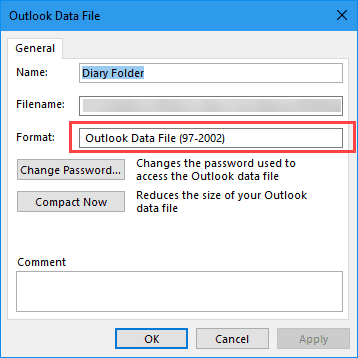
If you need to use an older .pst file in Outlook 2013, 2016, or newer and plan to leave it in the profile, it is recommended you import the pst to a new pst file. If you aren't sure if the .pst is the older ANSI-format, check the .pst properties. In Outlook 2003 and newer, an ANSI pst is identified as Outlook Data File (97-2002).
Beginning with Outlook 2003, larger PST files are supported. However, if you upgrade from an older version you need to create a new PST, the older PST format is not automatically converted or upgraded. See Convert an old PST to a Unicode PST. If the old PST won't open in Outlook you will need to repair it before you can convert it.
Shrinking a file that's over the limit | Preventing files from growing too large
Other Tools | More information
How to check the data file (pst) format
- Right click on the top level folder and choose Properties (Data File Properties in Outlook 2010 and newer)
- Click Advanced to open the data file dialog.
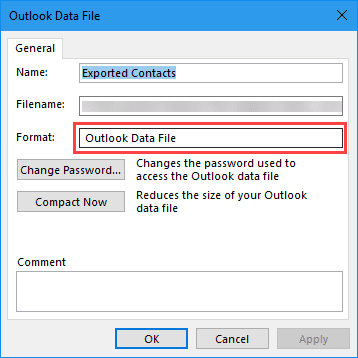
- If the data file is listed as Outlook Data File and you are using Outlook 2003 and up, its a Unicode data file.

- If the data file is labeled Outlook Data File (97-2002) its an older ANSI format and is limited to no more than 1.9 GB in size and no more than 65,000 items per folder (often less).
Shrinking a file that's over the limit
Outlook has no built-in way to reduce a PST or OST file that has gone over the limit. However, Microsoft provides a tool, PST2GB, which you can download to restore the file to operability. Note, however, that the utility truncates the data from between 25 and 50mb and the truncated data is not recoverable. The remaining data under 2GB should be restored.
If you want to attempt repairs yourself, use a tool called a hex editor to edit the data in the file directly. Every Windows shareware site has a selection of hex editors. Eugene McCarthy of FAO Headquarters in Rome recommends the free iHex editor, which loads only 64kb of the file at a time, making it ideal for tinkering with extremely large PST files.
Make a backup of your PST or OST, then open the original file with the hex editor (available for download from any Windows shareware site). You'll want to remove a few characters from the middle of the file, then save it and try to run the Inbox Repair Tool (Scanpst.exe) to repair the damage you did with the hex editor. If Scanpst can repair the file, you should be able to open it Outlook again. If not, try removing some additional characters from the file.
If this process works, with any luck, you'll lose only one or two items. You may be able to recover 100% of the data by repeating the process with a new copy of the file, but removing the data from a different area.
Preventing PST files from growing too large
Beginning with Microsoft Office XP Service Pack 1, Outlook provides better protection against Personal Folders .pst and offline folders .ost file growing past the 2GB size limit. Once an PST or OST file reaches 1.82GB, users will not be able to add new items. This MSKB article contains more information: Mail Delivery to Inbox Stops When the Personal Folder or Offline Folder Is Full
Tools in the Spotlight
DataNumen Outlook Repair
 | DataNumen Outlook Repair is a powerful tool to repair and recover corrupted Outlook PST files. Main features: recover mail messages, folders, posts, appointments, meeting requests, contacts, distribution lists, tasks, task requests, journals and notes in PST files; support to recover attachments; support to recover deleted Outlook items; support to recover oversized 2GB PST files; support to split the output PST file into several small ones; support to recover password protected PST files; support to convert PST file from Outlook 97-2002 format into the new Outlook Unicode format. |
Stellar Outlook PST Repair
 | Outlook PST Repair software repairs the corrupted PST file and for recovering its entire mailbox items. This software even repairs file which are larger than 2 GB and also recovers deleted emails. Stellar Outlook PST Repair software has several powerful features like repair password protected and encrypted files and also recovery of selected folders. This software works with almost all latest Outlook versions and has good compatibility with Windows 8, 7, vista, 2003, 2002 and 2000. |
Tools
| CopyPST | CopyPST repairs Outlook data files by exporting it to a new file, ignoring any error. It requires that the data file can still be opened in Outlook. Exporting a file breaks links, which can be repairs using OLfix program. Free |
| DataNumen Outlook Drive Recovery | Outlook Drive Recovery can recover all Outlook data from drives or disks, including messages, folders, posts, appointments, meetings, contacts, distribution lists, tasks, journals and notes. All properties, such as subject, to, from, cc, bcc, date, etc., are recovered. Recover Outlook data with password protection, both compressible encryption and high encryption. All drives and file systems supported, including hard disks, flash drives, Zip disks, CDROMs, etc., and any file systems, such as FAT, FAT32, NTFS, Linux Ext2, Linux Ext3, etc. |
| EasyRecovery EmailRepair | Repair corrupted .pst and .ost files and those exceeding the 2gb limit. Retrieve deleted items from Outlook folders. Can access password-protected .pst files. Can also repair and restore Outlook Express data. |
| Kernel for Outlook PST Repair Tool | Kernel for Outlook PST Repair Tool recovers and restores emails and other items from damaged, corrupted or broken PST files. The demo version shows you exactly that how many emails and other items will be recovered using the full Kernel Repair PST Software. Kernel for Outlook PST Repair supported versions are Outlook 97, 2000, XP, 2003. It successfully recovers all items from the PST file including emails, drafts, calendars, journal, notes, tasks, contacts etc. OST repair tool available. |
| Outlook Recovery | Outlook Recovery locates Outlook files and databases automatically. If you experienced a hard drive failure or deleted an Outlook database by an accident, Outlook Recovery will perform a full scan of that disk in order to locate and undelete/recover the database. If a database is corrupted, Outlook Recovery will repair it so that it can be used with Microsoft Outlook again. Outlook Recovery can recover Outlook databases in PST and OST formats, saving them for using with Outlook or any email application that supports the EML format. |
| OutlookFix | OutlookFix is an Outlook repair software tool for damaged, erased or large Outlook PST files. Restores Outlook files, will undelete emails and files, and lets you reduce the size of Outlook (Outlook 2gb limit fix) solving the common 2Gb size problem. |
| PST Walker | Outlook .NET pst/ost native parser. Pass the .pst or .ost file by header or extension, strip attachments, get all items (Appointments, Calendar, Folders, Email, Tasks, etc.), recover deleted or orphaned items. Allows you to continue processing if file is corrupt. Works with 97 - 2007 format, all encryption methods, and password protected files. Outlook is not required. Does not use MAPI or CDO. Version 4.20 |
| PSTViewer Pro | Use PstViewer Pro to view, search, print, reply to, and export email stored in your Outlook .PST files. Just start PstViewer Pro and select the folder with your .pst files. Click on the .PST file to reveal folders, emails, and file attachments. Renders Outlook emails in their original html, rich text or text formatting. Export your emails to different formats, including PDF, HTML, MHT, CSV, JPG and more. Can also open .eml and .msg files, Outlook not required. |
| Recovery for Outlook | Recovery for Outlook repairs corrupted Outlook mailboxes (.pst). The program also supports Exchange Offline Storage Files (.ost). Supported Outlook versions: 2007, 2003, 2002, 2000, 98 and 97 |
| Recovery Toolbox for Outlook | Recover data from Outlook pst files. Recover Exchange ost files and/or convert them into Microsoft Outlook pst files. Export data from pst files into eml and vcf files. |
| Remo OST to PST converter | Remo OST to PST Converter is one of the most used tool to convert Outlook OST files to PST files. It helps in managing Outlook data among both IMAP and POP3 account users. Best thing about this tool by Remo is that you an convert a damaged or corrupt OST files into a healthy PST file. This indeed saves you from losing your precious data and then allows you to store it in a more flexible PST file. Remo OST to PST Converter is available to all versions of Microsoft Office and Outlook users, from Outlook 2003 to 2019. |
| Stellar Outlook Manager | With Stellar Outlook Manager you can back-up your important emails, compact large PST file, identify and remove duplicate emails, get back lost password, repair corrupt PST files and even split large PST files. All these functions can be managed conveniently in just a few clicks through a central console. |
| Stellar PST File Splitter | PST File Splitter reduces the size of a large PST file by splitting it into small parts and helps in avoiding the PST corruption situations. Stellar Phoenix PST File Splitter splits large PST file on the basis of email Id, date and folder size and keep the original PST file intact. It allows to create batch files for automating splitting process and also provides the log report of every operation. PST file splitter is available with both single user and corporate versions and efficiently works with Outlook 2010, 2007, 2003, 2002 and 2000. |
| Stellar Toolkit for Outlook | Stellar Toolkit for Outlook is a comprehensive software package to manage and optimize Microsoft Outlook profile. Get tools to repair damaged or corrupt PSTs, convert OST to PST, merge Outlook PST files, split or compact large PST files, and more. |

Hello Diane. I am a "regular Joe" (no programming knowledge) using Outlook 13 for my email. I keep getting a message that I can't delete any files because my pst file is full. I found several .pst files in my file explorer, but in particular 2 copies (I assume identical because they are the exact same size - 1.81GB) of Outlook.pst. I am afraid to tamper with them because I don't want to lose all my saved emails. How do I get rid of what I don't want to make room in the pst? I have to delete files from my Deleted Files folder about once a month but It's being required more and more often. What do I do? Shall I just buy a new (not Outlook) email program? Thanks.
you have outlook 2013, so no need to get a new version - but it sounds like you might be using an old ANSI pst that is limited to 1.9GB file size, not the new unicode pst format (which supports 50GB).
Open control panel, mail and edit the profile. On the data files tab, to confirm you are using one of those pst, select the pst choose open file location. This will open windows explorer with the data file selected - is it one of the 1.81GB files?
If so, add a new pst - do not choose Outlook 97-2002 format. Set it as default. Make sure the email account is delivering to its inbox (email tab, change folder button). This will get you back in business with a pst that will grow larger. Next, double click the pst that is generating the error and click Compact Now. Does that make it small enough to export to the new pst?
Hello Diane,
I have a pst file that is just over 4GB.
Outlook will not open it as it claims the file was not properly closed last time.
SCANPST will scan but not repair.
Gives the error message the file location is full.
But the PST file it is the only thing on a 16GB thumb drive.
Any suggestions as how I might proceed?
Thank you.
it could be an symptom of a corrupt pst, but i'm guessing the thumb drive disk format supports a max of 4gb file size. Does a trial of one of the commercial pst repair programs open it? If its corrupt and can't be fixed by scanpst, you will need to use a commercial product to repair or export it.
Hello Diane,
I need your help in how to split large PST by size, is there's any free tool for that?
No, there is not a free tool. Can you open the pst? If so, you can use archive to move some contents to a new pst, or you can drag folders to a new pst.
Hi Diane,
Is it possible to recover 14GB pst file deleted by mistake?
Thanks
if it is in the recycle bin folder, yes, no problem. If you emptied the trash or had to bypass it due to size, possibly. Close Outlook and all other programs - you want to stop writing to the hard disk as much as possible. Download a file recovery program (most of the pst repair companies also have windows file recovery programs) and run it. If you are lucky, you'll recover it completely. You might get part of it back... or nothing if too much time passed since it was deleted.
Hi Diane
I have been reading a lot of your posts and trying everything.
I have a 1.96GB pst file and I'm running outlook 2007 in Windows 8. I tried the scanpst.exe but that doesn't work. I've repeatedly tried it and cannot get beyond stage 6.
So I tried the truncating option. I went as low as 655MB and then the program completed. Great! I thought. But then when I tried scanpst.exe, I got an error message again and it didn't complete. (The truncated file won't open directly in outlook.) So now I'm stuck and don't know what to try next. Do you have any suggestions?
Thanks Yu
If scanpst fails, you need to use a commercial tool - several have trial versions so you can see if it will recover the data before buying it.
Hi Diane,
I have a pst with almost 5gb and it will not let me open outlook because 'it wasn't closed properly last time' I can't use scanpst.exe because it's a big file. Also, I am unable to find any third party commercial software to recover. Please advise as this is emergency lol thank you
Scanpst that is included with outlook 2003 and above can repair Unicode pst files - it's definitely a Unicode pst if it's over 2Gb.
Hi Diane,I have a laptop that started crashing on me. When it was up one time i was able to backup my outlook personal folders to a flash drive. Bad thing was that my main two folders were merged together and is now 4.1 GB. When I went to import into new laptop (I'm using office 2007) i get this error message, "The drive that contains your data file is out of disk space. Empty the Deleted Items folder or create space on the drive by removing some of your files. Access is denied. Verify the disk is not full or write-protected and that the file is not being used". And of course i cannot get the old laptop to operate again to export the pst. files again. Is there anything i can do in this situation.
Thanks,
Is the laptop drive full? Copy the pst file to the hard drive. If the error message is in error - you have mega amount of free space, it's possible the pst file is corrupt.
Hi Diane, I am a new Slapstick and I just found this section, hope you do look at past sections, well.... I was an BCM Outlook user since 2000 however my PST file grew way over the limit and then my BCM OL crashed - when I could not recover and found out it was because BCM OL did not support file larger than 2gb, I just had to dumped OL, but I really loved BCM OL and enjoyed using it. I have not used BCM OL since 2002 so my question is. Has MS corrected the large file problem? and if not, what would you do to divide up the retained files (because of my type of work "Live Music Booking Agent" I save everything sent and received and I had many folders within OL because of how I file stuff ie.. Buyer, Agent, Artist, Venue, Recommend-er, Request Bids, Toss, East, West, Media TV, Media Print, Media Radio, etc... and I save the emails with the attachments) so that when the file reach the limits what does one do to continue within that year or years? Please let me know? anyone's opinion is appreciated. PS: I use Gmail now,… Read more »
As of Outlook 2003, there is a new pst format that supports large file sizes, up to 1 TB. The default in 2003 is 20 GB, but they've raised it to 50 GB in outlook 2013. A simple registry change will allow it to grow above 50 GB.
That said, if you receive a lot of larger attachments, I'd archive by year. If the 50 GB can handle a year's worth, every march I'd archive the previous year's messages to a new pst file. If the pst grows faster than that, I'd archive more often or use a utility (or macro) to save attachments to the harddrive.
This is really a very helpful post. with the help of the given guidelines i have become able to repair my large pst files easily.