If you use Skype for Business and receive an error that the set of folders cannot be opened, see "Skype for Business is locking Outlook's .OST File"
I'm not sure what is causing the problem, but we're seeing a rash of complaints with the following error:
Cannot start Microsoft Office Outlook. Unable to open the Outlook window. Invalid XML, the view cannot be loaded.
The users run Office Diagnostics in an attempt to fix it on their own but it finds no errors.
To fix this you need to close Outlook and reopen it using the /resetnavpane switch or find and delete <profile_name>.xml and restart Outlook. Outlook will recreate a new file with the default navigation pane folders. You will lose any customizations on the navigation pane, such as folders on the Favorites folder list
How to use the /resetnavpane switch
- Close Outlook.
- Press Windows key + R to open the Run command.
- Type or paste this into the Open field: outlook.exe /resetnavpane

- Press Enter (or OK button) to restart Outlook.
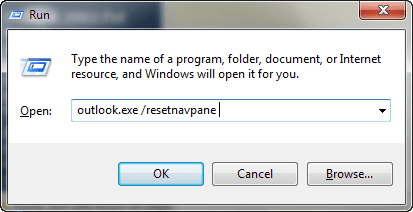
Note: Make sure there is a space between outlook.exe and the switch.
Video Tutorial
Delete the Navigation pane configuration file
If you are having problems using the switch, you can find and delete the XML file that holds the navigation pane settings. In the Start search or Run fields or in Windows Explorer's address bar, paste the following and press Enter:
%appdata%\Microsoft\Outlook
This will open Windows Explorer to the folder where many of Outlook configuration files are kept. Find and delete the file named for your profile with the extension XML. Note that we highly recommend using the switch instead of deleting the file directly.
More Information
From Outlook-tips.net:
See Error with the To-Do Bar's Task list if the error is "The operation failed. An object could not be found."

To resolve issues with Outlook, not opening, some users have suggested turning off Compatibility mode. Here are the steps you can follow to do this:
The command: "outlook.exe /resetnavpane" does nothing.
It should reset the navigation page to the default. If you don't use Favorites in Mail module, you may not notice a change.
Which version and build of Outlook are you using? See File, Office Account for the information.
When I launch Outlook, it starts up but when it gets as far as processing it disappears. I have tried launching it while holding the CTRL key, that doesn't work either. I have office 365. Any suggestions would be great. Thanks for your time.
I can't even open Outlook. I get this error message;
Cannot start Microsoft Outlook. Cannot open the Outlook window. The set of folders cannot be opened. File access is denied. You do not have permission required to access the file C:\users\username\Documents\OutlookFiles\emailaddress.pst
I can't get outlook to open, it say processing, help what I'm I to do
Close it and restart in Safe mode - see if it opens. To open Outlook in Safe mode: Close Outlook then hold Ctrl as you click on the Outlook icon. You'll get a message asking if you want to start in Safe mode. Click Ok.
What type of email account is configured in Outlook?
I ended up going to the Microsoft store. They went in and did a repair twice and finally we had to re-install using my product key. They had no explanation as to what the problem was. This is the 2nd time I have had to do this. I think there is some kind of gliche in the Microsoft 2016 software.
when trying to open outlook get message microsoft outlook has stopped working problem caused program to stop working correctly
Running Windows 8.1 and Outlook 2013
Clicking on the Outlook icon does nothing.
when trying "outlook /safe" error message returned is
c:\program files\ microsoft office 15\ root\office15\outlook.exe
The volume for a file has been externally altered so that the opened file is no longer vaild.
How do get it started again ?
You'll need to repair the office installation.