• Outlook User
  • New Outlook app
  • Outlook.com
  • Outlook Mac
  • Outlook & iCloud
  • Developer
  • Microsoft 365 Admin
    • Common Problems
    • Microsoft 365
    • Outlook BCM
    • Utilities & Addins

Error with the To-Do Bar's Task list

Slipstick Systems

› Problems › Error with the To-Do Bar’s Task list

Last reviewed on April 7, 2016     15 Comments

We're seeing a rash of errors with the To-Do Bar lately. This following message appears at the bottom, where the Task List is:

"The operation failed. An object could not be found."

Also, in the To-Do List in the Tasks module, the error message is

"Cannot display the folder."

Depending on the cause, it may be easily fixed by closing Outlook and reopening it using the /resettodobar switch then restart Outlook.

When it's caused by a corrupted profile (often due to using Easy Transfer or copying and pasting a *.pst file over the current *.pst file), check for duplicate *.pst files in your profile and delete the extras. If this doesn't help, you'll need to make a new profile.

How to use the /resettodobar switch

Close Outlook. At the Start search field on Vista or Windows7 Start menu or in the Start menu, Run command (Windows key + R), type

outlook.exe /resettodobar

Then press Enter (or OK) to restart Outlook.

Note: Make sure there is a space between the words.

How to reset the To-Do Bar

Delete duplicate *.pst files

Close Outlook

Go to Control Panel, Mail, Data Files. This will open the Account settings dialog to the Data Files tab. (Search for Mail after opening the Control panel, if its not visible).
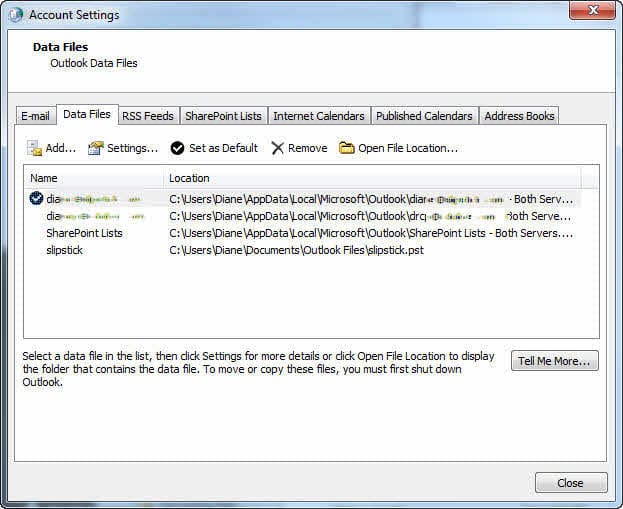
Remove duplicate pst files

Do you have 2 identical *.pst files listed? If so, select one of them and click Remove then re-open Outlook.

Tip: While this procedure will not delete your *.pst file from the hard drive, if you don't have a backup of your *.pst, now is a good time to make one. Before removing the duplicated listing, select the *.pst file and click the Open Folder Location button. This opens Windows Explorer to the location where the *.pst file is. Make a copy of the *.pst.

More Information

How to start Outlook in safe mode
Outlook's Command Line Switches
Where Are My Files?

See Error Message: Cannot start Microsoft Office Outlook. if the error is "Cannot start Microsoft Office Outlook. Unable to open the Outlook window"

Error with the To-Do Bar's Task list was last modified: April 7th, 2016 by Diane Poremsky
Post Views: 52

Related Posts:

  • Cannot start Microsoft Office Outlook Error Message
  • Outlook creates a folder named "gliding"
  • We're seeing users complain about an error message popping up on the c
    Outlook Sync Client Error
  • The Folder is Full Error

About Diane Poremsky

A Microsoft Outlook Most Valuable Professional (MVP) since 1999, Diane is the author of several books, including Outlook 2013 Absolute Beginners Book. She also created video training CDs and online training classes for Microsoft Outlook. You can find her helping people online in Outlook Forums as well as in the Microsoft Answers and TechNet forums.

Comments

  1. Krishna says

    July 11, 2017 at 9:49 am

    Thanks a lot ..the command actually solved my problem.

    Reply
  2. Lynn says

    July 3, 2017 at 8:26 pm

    Thanks very much. Using the resettodobar action seems to have solved this for me.

    Reply
  3. Jesus says

    August 13, 2015 at 1:17 pm

    Thanks! Still works this solution!!

    Reply
  4. jay says

    November 13, 2013 at 12:32 pm

    tried cleanviews but northing happened. i have an equal problem as Jon.

    Reply
    • Diane Poremsky says

      November 13, 2013 at 7:32 pm

      Do you have more than one data file in your profile? If so, try setting a different pst file as default and see if it works, then set the original one back as default.

      Reply
  5. David says

    November 8, 2013 at 12:51 am

    Wow, the cleanviews switch fixed my task pane issue. Before I only had the message "Operation Failed" where the task pane should have been. (Outlook2010)

    Reply
  6. Kalala says

    May 8, 2013 at 4:52 am

    thank you! thank you! thank you!
    battled for months with this on an old laptop and was very frustrated to have it happen again.

    Reply
  7. Jon says

    February 24, 2013 at 9:15 am

    I have the problem of being unable to display To Do list or tasks in my main Outlook view, and when I bring Tasks to the screen by clicking on the lower left hand Tasks tab, the To Do list cannot be displayed. I tried running outlook.exe /resettodobar but this had no effect. I had multiple .pst files but deleted the extras, still with no effect. This problem began after I copied one of my Outlook mail folders as a .pst file to an external drive. Please suggest what to try next. thank you.

    Reply
    • Diane Poremsky says

      February 24, 2013 at 7:07 pm

      Close Outlook and restart it using the /cleanviews switch.

      Reply
  8. Stefan says

    November 20, 2012 at 3:34 am

    My problem was two .pst fiels. After removal of one and restarting outlook the error disapeared.

    Thank you!

    Reply
  9. David P says

    July 25, 2012 at 8:43 pm

    I did the usual Google to find a solution.
    I even did the Help-Office Diagnosics routine (why didn't that check pick up the error?)
    My problem was, as you suggested, "2 identical *.pst files listed".
    I followed your instructions and now
    1. my Tasks appear in my To-Do Bar (again), and
    2. my Reminders are displaying as expected (without giving me an error indication).
    Many, many thanks!
    Dave

    Reply
  10. darla griffin says

    April 23, 2012 at 5:26 pm

    unable to log in under this account

    Reply
  11. TimR says

    January 12, 2012 at 11:52 am

    We've had this problem in our environment since migrating from Exchange 2003 to Exchange 2010. The problem though, is that even after running Outlook with resettodobar, after the user closes outlook, the next time they open oulook, the problem comes back. So far the only thing that we can find that fixes the issue is to create a PST backup of their mailbox, delete the mailbox, then create a new mailbox and import the PST. However, this can cause other problems with other users due to Exchange caching email addresses. Also, an upgrade to Outlook 2010 fixes the problem.

    There has to be a more permanent fix for this than the resettodobar fix. Hard deleting the ToDo and Reminders using MFCMAPI also often results in a short term fix with the problem coming back next run of Outlook.

    Reply
  12. Ryan Over says

    December 27, 2011 at 9:40 pm

    Thanks for the fix!

    Reply
  13. Greg.D says

    October 15, 2011 at 6:05 am

    Awesome!! Works like a charm. I had too many .pst files. Thanks again!

    Reply

Leave a Reply Cancel reply

Your email address will not be published. Required fields are marked *

Visit Slipstick Forums.
What's New at Slipstick.com

Latest EMO: Vol. 31 Issue 7

Subscribe to Exchange Messaging Outlook


Support Services

Do you need help setting up Outlook, moving your email to a new computer, migrating or configuring Office 365, or just need some one-on-one assistance?

Our Sponsors

CompanionLink
ReliefJet
  • Popular
  • Latest
  • Week Month All
  • Use Classic Outlook, not New Outlook
  • How to Remove the Primary Account from Outlook
  • Reset the New Outlook Profile
  • Disable "Always ask before opening" Dialog
  • This operation has been cancelled due to restrictions
  • How to Hide or Delete Outlook's Default Folders
  • Change Outlook's Programmatic Access Options
  • Use Public Folders In new Outlook
  • Removing Suggested Accounts in New Outlook
  • How to Delete Stuck Read Receipts
  • Sync Issues and Errors with Gmail and Yahoo accounts
  • Error Opening iCloud Appointments in Classic Outlook
  • Opt out of Microsoft 365 Companion Apps
  • Mail Templates in Outlook for Windows (and Web)
  • Urban legend: Microsoft Deletes Old Outlook.com Messages
  • Buttons in the New Message Notifications
  • Move Deleted Items to Another Folder Automatically
  • Open Outlook Templates using PowerShell
  • Count and List Folders in Classic Outlook
  • Google Workspace and Outlook with POP Mail
Ajax spinner

Recent Bugs List

Microsoft keeps a running list of issues affecting recently released updates at Fixes or workarounds for recent issues in classic Outlook (Windows).

For new Outlook for Windows: Fixes or workarounds for recent issues in new Outlook for Windows .

Outlook for Mac Recent issues: Fixes or workarounds for recent issues in Outlook for Mac

Outlook.com Recent issues: Fixes or workarounds for recent issues on Outlook.com

Office Update History

Update history for supported Office versions is at Update history for Office

Outlook Suggestions and Feedback

Outlook Feedback covers Outlook as an email client, including Outlook Android, iOS, Mac, and Windows clients, as well as the browser extension (PWA) and Outlook on the web.

Outlook (new) Feedback. Use this for feedback and suggestions for Outlook (new).

Use Outlook.com Feedback for suggestions or feedback about Outlook.com accounts.

Other Microsoft 365 applications and services


New Outlook Articles

Sync Issues and Errors with Gmail and Yahoo accounts

Error Opening iCloud Appointments in Classic Outlook

Opt out of Microsoft 365 Companion Apps

Mail Templates in Outlook for Windows (and Web)

Urban legend: Microsoft Deletes Old Outlook.com Messages

Buttons in the New Message Notifications

Move Deleted Items to Another Folder Automatically

Open Outlook Templates using PowerShell

Count and List Folders in Classic Outlook

Google Workspace and Outlook with POP Mail

Newest Code Samples

Open Outlook Templates using PowerShell

Count and List Folders in Classic Outlook

Insert Word Document into Email using VBA

Warn Before Deleting a Contact

Use PowerShell to Delete Attachments

Remove RE:, FWD:, and Other Prefixes from Subject Line

Change the Mailing Address Using PowerShell

Categorize @Mentioned Messages

Send an Email When You Open Outlook

Delete Old Calendar Events using VBA

Repair PST

Convert an OST to PST

Repair damaged PST file

Repair large PST File

Remove password from PST

Merge Two Data Files

Sync & Share Outlook Data

  • Share Calendar & Contacts
  • Synchronize two computers
  • Sync Calendar and Contacts Using Outlook.com
  • Sync Outlook & Android Devices
  • Sync Google Calendar with Outlook
  • Access Folders in Other Users Mailboxes

Diane Poremsky [Outlook MVP]

Make a donation

Mail Tools

Sending and Retrieval Tools

Mass Mail Tools

Compose Tools

Duplicate Remover Tools

Mail Tools for Outlook

Online Services

Calendar Tools

Schedule Management

Calendar Printing Tools

Calendar Reminder Tools

Calendar Dates & Data

Time and Billing Tools

Meeting Productivity Tools

Duplicate Remover Tools

Productivity

Productivity Tools

Automatic Message Processing Tools

Special Function Automatic Processing Tools

Housekeeping and Message Management

Task Tools

Project and Business Management Tools

Choosing the Folder to Save a Sent Message In

Run Rules on messages after reading

Help & Suggestions

Submit Outlook Feature Requests

Slipstick Support Services

Buy Microsoft 365 Office Software and Services

Visit Slipstick Forums.

What's New at Slipstick.com

Home | Outlook User | Exchange Administrator | Office 365 | Outlook.com | Outlook Developer
Outlook for Mac | Common Problems | Utilities & Addins | Tutorials
Outlook & iCloud Issues | Outlook Apps
EMO Archives | About Slipstick | Slipstick Forums
Submit New or Updated Outlook and Exchange Server Utilities

Send comments using our Feedback page
Copyright © 2026 Slipstick Systems. All rights reserved.
Slipstick Systems is not affiliated with Microsoft Corporation.