With the introduction of two-factor authorization since the original date of this article, there is a second (and becoming more common) cause of this error: Outlook needs the app password, as it will not currently bring up the second authorization screen.
The message that comes up when Outlook can't set up an encrypted connection automatically caught a couple of users off guard this week. After calling their mail provider to verify the account supports encryption, they asked me what was wrong with Outlook.
An encrypted connection to your mail server is not available. Click next to attempt using an unencrypted connection.
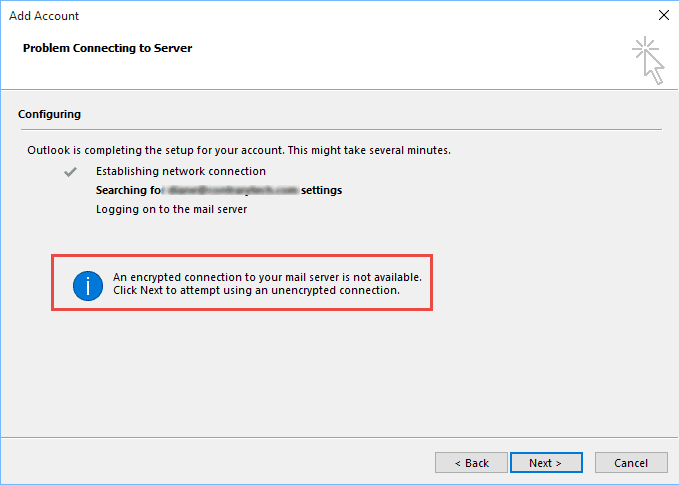
This message doesn't mean that the mail server doesn't support encryption, it just means Outlook's Auto Account Setup can't determine the correct settings to use. This is caused by incomplete or missing autodiscover records in DNS. As a result, you'll need the account up manually if you want to use encryption.
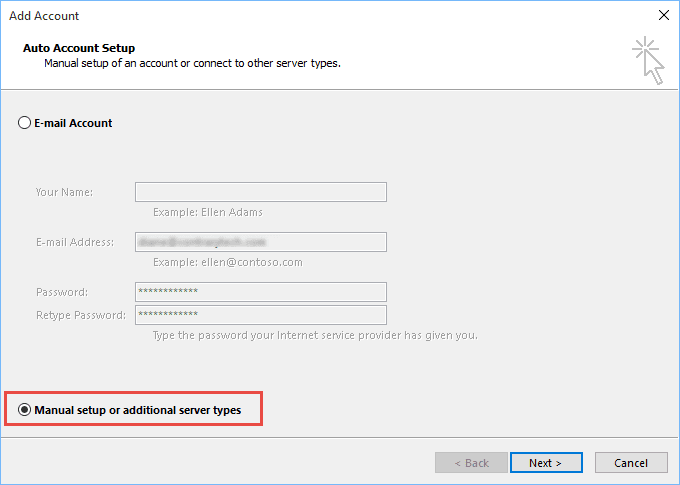
When this message comes up, click Back, select Manually configure server settings then click Next.
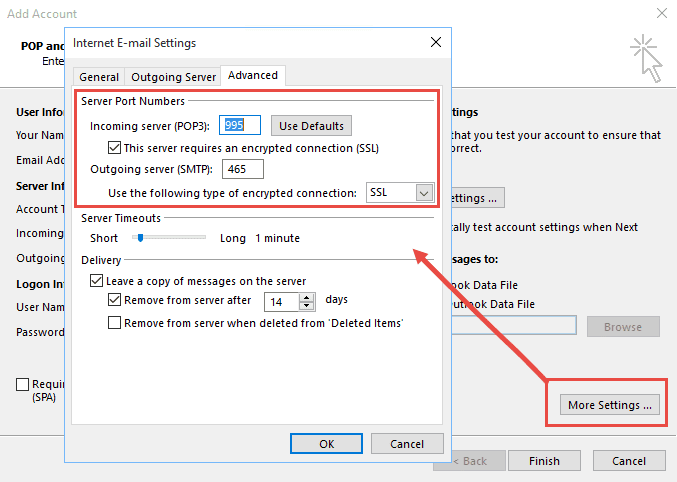
You'll need to enter your account information and server names then click More Settings and configure your SSL or TLS settings on the Advanced tab.

is there a need to mention incoming and ougoing server information in this blog?
and the screenshot that you attached is not the window that opens when you select manual configuration for setting up Outlook.
I am having this problem too. I've manually entered the settings. I'm using MS Outlook 2007, attached to an AOL mail account. I receive and send email using that account from all my other devices, which suggests the problem is in my Outlook app or my PC. I can use the online AOL account. I've run "Repair email account," tried turning off the Windows firewall, and other things. Any suggestions?
I don't know if this will help, but I finally found that the problem was not on the desktop side, but on the server/hosting side. I use exchange server, hosted by Microsoft, and had to turn off "Security Defaults" in my Office portal. Once I had done that, Outlook stopped asking repeatedly for the password. I guess the problem might be the same with other email hosts as well, just try to find out if there is a setting somewhere on gmail/yahoo/outlook or whatever you are using. Gmail have a "support for less secure apps" setting that caused some trouble if it was enabled.
To fix my Exhange security settings, I just did the "Turn Security defaults on or off" part of https://docs.microsoft.com/en-us/microsoft-365/admin/security-and-compliance/set-up-multi-factor-authentication?view=o365-worldwide
Hi there,
My security defaults are turned off in AAD but still the issue persists. Also, the user in getting is prompted by " Help us protect your account "every time trying to login to Azure portal. Have troubleshooted with re configuring MFA to Microsoft authenticator app and SMS but seems to have not fixed the issue.
It is not working. i am trying to connect my gmail account. the incoming server IMAP number is what? & the outgoing SMTP number is what?
Typically, IMAP is 993 and 465 or 587 for SMTP but you need to check with your email provider to verify. Most have this information on their Support pages.
Edit, sorry I missed the gmail part earlier. It is 993 and 465.
BTW, gmail has had issues this week, especially with sending.
how can this "issue" be addressed as the earlier support remarks don't work for me
I am trying to setup my email using Outlook 2016.
no matter what I do, it keeps giving me an error message.
I've tried to use the auto setup then I tried to set up manually.
it keeps asking me to enter my password - which I've done.
HELP!!
Who is your email host?
Doesn't work, waste of time !
What type of email account are you trying to set up in Outlook?
Two days ago, our "alifrant@yahoo.com" login credentials suddenly started getting "rejected by the server." None of the suggested fixes makes any difference. Tried various things for two days, with no luck. We're going to install Thunderbird and see if that will work for us in place of Outlook.
You need to use app passwords with Yahoo accounts now.
https://www.slipstick.com/outlook/yahoo-aol-accounts-outlook/
how can you get this to work on windows 7 outlook 2016 for army enterprise email