When you create email accounts in Microsoft Outlook 2010 and newer, the default setting is to create a separate data files for each POP3 account. Note that the delivery folders for IMAP and MSN accounts can't be changed; changing the location for Exchange server mailboxes will remove the mail from the server and can break Exchange features.
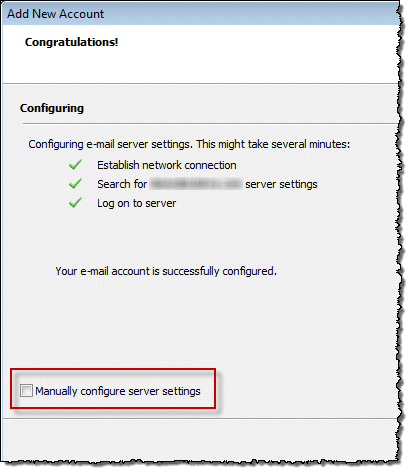
While you can select the folder when you're creating the accounts, you need to select the Manually configure server settings after the account is setup. Most people who use auto account setup choose Finish (or add another account) instead of manually changing settings and missing this option.
These instructions are for POP3 accounts only. For other account types, see Multiple IMAP and Hotmail Accounts and their Data Files (*.pst)
If you don't like this and want to use one Inbox for each account, change it.
To change the email delivery location:
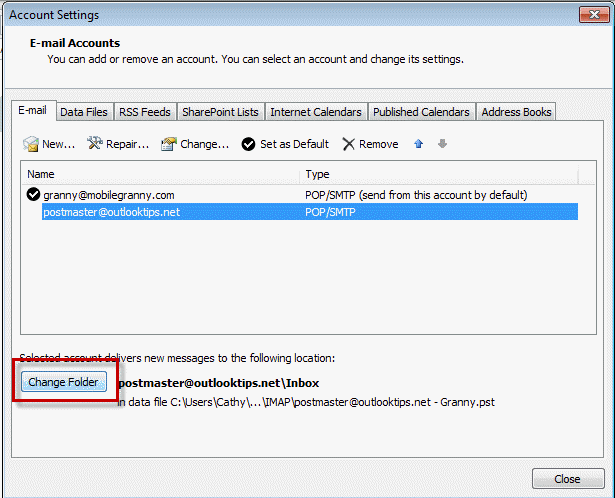
- Open File, Account Settings and select the account
- Click Change folder button
- Select the folder you want the messages delivered to.
Note: you'll use this same method to change the delivery location in Outlook 2007, but from Tools, Account Settings dialog.

Rob says
Hi Diane
Can i change an account from IMAP to POP3 in OL2007 without problems so it can deliver to my main inbox?
TThanks!
Diane Poremsky says
You can (assuming it supports PO)- you need to delete the account and add it back as POP3, its not possible to convert an account that is in the profile.
Clive Jackson says
Thanks for this, it made it so easy to move all my mail accounts to one inbox
Changa says
Hello Diane,
I hope all is well with you.
I have an end user that has multiple accounts set up to their work Outlook account. We use O365 32-bit Win7 64-bit OS. The end user deletes emails from one of their work accounts and the deleted email appears in their personal email trash folder. Behavior is specific to end user's pc while others in their area are not experiencing the same issue. Please let me know what other information you may need.
Diane Poremsky says
Are they all POP3 accounts or do you use Exchange server? This is expected behavior for shared Exchange mailboxes unless the user has create permission in the Deleted items folder of the shared mailbox.
PL Loya says
i have outlook 2016 and i have 3 e-mail account, and my problem is the when i sent and email from the second or third account, The e-mail that i sent appear on the first account on sent items.. How can i resolve that issue
Diane Poremsky says
Are the messages being sent from the proper account? We've seen an issue with outlook 2016 and an outlook.com account in the profile where all mail is sent from the outlook.com account.
PL Loya says
yes they are,,,When i sent an e-mail to someone they do get it from the proper account is just that i don't see the e-mail on the proper sent folder and all e-mails from the other two account goes to the first account...
Diane Poremsky says
Sorry I missed this earlier (too many comments came in and i took off over the holidays) - is it still failing?
PL Loya says
I also try on outlook options and mail-save massages and check on " When replying to a massage that is not in the inbox, save the reply in the same folder ". But that did not work either...
Bill Upton says
When I send emails from my IMAP account some but not all emails go in the pop3 account sent folder
Diane Poremsky says
Are you using any rules to move sent messages? did you confirm the from field showed the imap account?
What version of Outlook are you using?
Shekar says
Hi Madam ,
I have a problem , we just upgrade our exchange server 2003 to exchange Server 2010 , I got some issue , for several user , their sent items to going to the wrong folder , their sent message is going to the Archive folder
Could you please help me , to find a solution
thanks
Best Regards
shekar
Diane Poremsky says
Sorry I missed this earlier - did you solve it?
Are all messages getting moved? if only some, do they have the option to save sent messages with the original and are replying to messages in the archive folder?
Are the messages being moved there immediately upon sending the message? If there is a delay in moving them, are the users syncing with an android smartphone?
K Jenkinson says
Please - Any clues on why one of my accounts has a (1) after it. There's only one of it! Worried there may be a confounding duplicate lurking. The 2 accounts link to the same data file and are (for example):
"john@jsmith.co.uk(1)"
and "info@mybussiness.co.uk"
It's that pesky (1) I am worried about! Does it matter.#
POP3/ Windows 10/ new laptop/ Office 2010/ + pain!
Diane Poremsky says
it doesn't matter... depending on where you see it, it either indicates you added the account a second time or you have two data files created by the same email address. See https://www.slipstick.com/outlook/config/rename-email-accounts-data-files-folder-list/ for instructions to remove it - it's really easy to remove.
John Wilson says
Thanks for the info. I searched my Outlook 2010 help and as usual, I got 99% of stuff I was NOT looking for. A Google search brought my to your site where I found the answer in seconds.
Cindy says
I seem to have 2 e-mails in my mail folder. When I go into the account settings there is only 1 e-mail account. I have IMAP. How do I get just 1 mail account?
Diane Poremsky says
2 emails or two datafiles? Look on the Data Files tab in Account Settings. If one is a pst file, you can rename it by selecting the pst then click Change.
Al Frazier says
How do I keep from having multiple contact folders using multiple email accounts?
Diane Poremsky says
Unfortunately you might not be able to. If they are pop3 accounts delivering to different pst files and each account's folders has a calendar & contacts folder, that file was set as the default for delivery at some point. You can use mfcmapi to delete the extras.
https://www.slipstick.com/outlook/delete-outlooks-default-folders/
If they are in exchange or outlook.com accounts, you can try hiding the folders, but they will likely come back eventually. (instructions in article links above)
Tim says
Hi, I am dual booting to Win7 and Win10. In Win7 I use MS Outlook 2013 and in Win10 I use MS Outlook 2016. Both versions use the same pst data file in 'My Documents Outlook Files'. However I am getting duplicates when I log on to either version. Hope there might be a fix for this?
Diane Poremsky says
The mailbox manager file that controls this is stored in the data file and it's different for each profile. Are the profiles named the same? That can help, but it's no guarantee that outlook will use it. Better is to not save mail on the server, unfortunately. If it's your outlook.com account, set it to archive pop3 mail - its left on the server but moved out of the inbox when you download it.
Gavin says
Hi, can you assist me with an Outlook issue I have please? I started a new position and am expected to have 3 different outlook accounts open in tab all the time. I log in to each account separately and they open, shortly afterwards the three accounts seem to refresh automatically and then I see one and the same inbox across all 3 different accounts and the tabs still show separate account email addresses open? Does anyone know how I can resolve this issue, maybe a setting I am unfamiliar with please?
Eucaeuca says
the "Change Folder" button is not present on my outlook 2013. Is there a new method?
Diane Poremsky says
Is the account configured as pop3 or imap? Change account is used only with pop3 accounts.
Rob says
I have the same issue -- is there a way for me to set up my imap account to funnel into the inbox of my other account on Outlook 2007?
Thank you!
Diane Poremsky says
Setting it up as POP3 would be the easiest way to do this, provided your mail server supports pop3. Otherwise you need to use rules to move the mail.
Deany Meinke says
OH wow!! ... Sure gonna try this!! ... I was about to go look for Outlook 2007 to install!!! ... I just REALLY don't like all these separate accounts ... and Rules is o.k. ... but still a pain!
Does this also mean things will set up with one Sent box and ONE Deleted box too ... and gets rid of each email in it' own folder in the Folders column!!
Diane Poremsky says
Yes, you can configure it just like you have it in Outlook 2007, one inbox, one sent, one deleted, one drafts - point each account to the default pst. The account names in the folder list are from the pst files each account uses, so you need to close them after you point each account to the default pst.
Marci says
I'm not sure this is the right place but here is my issue and hoping for some light on how to fix. We migrated from web outlook 2010 to Office 365 Outlook - same emails but different passwords. I get some emails in my new Office 365 Outlook and I get some emails in my web Outlook 2010. The emails I receive in each are different - never a duplication. Any ideas on how to get all my emails to be sent to Office 365 Outlook? Thanks in advance for any suggestions!
Diane Poremsky says
If the DNS records were all properly updated to point to office 365, you should get all mail there, although it can take up to 72 hours for the records to be updated worldwide. (As a rule, most mail will be going to the new server within a few hours, and mostly junk mail will end up in the old account after that.)
You're using the browser to read mail in both the old and new server? If you add both accounts to the same Outlook desktop profile, you can drag mail from the old account to the new one until all mail is directed to the new server.
Marci says
Thank you Diane. Initially, after 365 installation, I was using the web outlook for both 2010 and 365. A day or so ago, I was able to setup the desktop Outlook 365 and have been using that since plus looking at the web 2010 Outlook. Will check the DNS records. Thanks again!
Terry says
Perhaps you also need to know that I have Windows 10 with Microsoft Office 2016.
Diane Poremsky says
That won't matter - as long as the accounts are pop3, you can deliver the to one pst in any version of outlook.
Terry says
I have 3 POP3 accounts.....different domain names and service providers. Can I combine all 3?
Diane Poremsky says
Yes, you can deliver all to one pst.
Regina says
I have done this and am getting duplicate downloads. I think primarily on the gmail accounts.
Diane Poremsky says
It sounds like the mailbox manager file is not getting updated after it downloads mail. (That is assuming you aren't forwarding mail to one of the other accounts you're checking.)
If only gmail accounts are affected, you can change gmail settings to archive the mail as you download it. POP3 only downloads mail in the inbox and archiving will remove it from the inbox.
Dave K says
Thanks for the reply, got on line and figured It out
Dave Kagey says
Hi Diane....following all of the above and still having a setup issue. All seemed to go good on setup, except I now have two accounts on the left. Ourlook and Outlook 2. Tried making the one go away, but looks like Outlook 1 is the data file and I can't figure out how to change and it won't let me. Are you one of those tech folks where we can pay you by cc to talk to us one on one over the phone to solve an issue.
Thanks
Diane Poremsky says
Well, I do do remote access but I'm out of town - more information and my schedule is at https://shop.slipstick.com/services.asp.
Do you have all pop3 accounts and all are going into one data file? if so, go to file, account settings (2010 and up) and remove the other data file from the data file tab.
VJ says
Why is the email that I send being saved in the inbox instead of the sent items folder. The correct boxes are set in options yet all my sent mail still gets put in the inbox on Outlook 2007.
Diane Poremsky says
All sent mail or just some? There is an option to save replies in the folder with the original. Its not supposed to do this when the replies to a message in the inbox, but it can happen in some circumstances.
Juan says
Thanks a lot sister for sharing.
intexx says
Perfect! It's on the way :-)
intexx says
Hi Diane
Looks like I owe you a donut. Glazed or jelly-filled? Or maybe chocolate, my own personal favorite.
I finally got a chance to escape from work for a bit and sign into my home profile (no Exchange accounts there). I'd moved the .PST, so upon startup Outlook dutifully prompted me for the new location.
As expected, the 'New E-mail Delivery Location' feature didn't work (as previously noted). I only have POP3 accounts configured there. Nevertheless, I still had to select a .PST that was different from the account's original and then switch back.
This is in 2013.
So you may safely eliminate the Exchange part of the equation in your 2016 testing if you wish.
Thanks,
Jeff Bowman
Fairbanks, Alaska
Diane Poremsky says
Thanks for the update - I'll take chocolate too. :)
intexx says
Hi Diane
That's a good plan :-)
Thanks,
Jeff Bowman
Fairbanks, Alaska
intexx says
Hi Diane
It's definitely a bug.
The first time I encountered it I was working through the CP applet. This time around I figured it was a CP-related issue and so I tried it directly through Outlook. Same cheese.
Turns out, when you have a mix of POP3 and Exchange accounts as I do, you have to temporarily select one of the Exchange accounts as the target (without clicking Close on the main Account Settings dialog). Then when you switch back to your .PST the path will display after clicking OK on the New E-mail Delivery Location dialog.
I haven't tested to see whether this behavior extends to Exchange-less profiles, but I'll betcha a donut that it doesn't.
What's your best way to report an Outlook bug?
Thanks,
Jeff Bowman
Fairbanks, Alaska
Diane Poremsky says
I'll try to repro it in outlook 2016 and if so, report it. (I'm assuming the behavior is the same.) But don't expect them to fix it (unless it's something simple) because it's likely that very few users hit the problem.
intexx says
Hi Diane
What should one do when moving the .PST for an existing account renders the Change Folder button unusable? Clicking it, selecting the Inbox of the target .PST, and then clicking OK has no effect.
Normally the path of the .PST file appears to the right of the button, but after moving the .PST and confirming the new location after restarting Outlook there's nothing there.
Is this a bug?
Thanks,
Jeff Bowman
Fairbanks, Alaska
Diane Poremsky says
Assuming the account is a pop3 account (the only one with the change folder button), it sounds like either a bug or a corrupt profile.
Which version of Outlook and did you try changing it from the Control panel, mail dialog rather in Outlook?
Tony Santana says
Diane: You were a lifesafer!!! I am migrating to Office365 and it is a nightmare of confusing setup protocols. Even the Microsoft Tech guy couldn't walk me through this problem but your advice was spot on! Thank you very much.
Cheers.
Al Berger says
Diane, Once we have done this, to get all incoming files into one inbox, how do we move the existing new files (already received prior to reading your suggestions) from each individual inbox to the main one?
Diane Poremsky says
Drag and drop or copy and paste. Or use the move command. If there are a lot, use Import.
Debi says
I just want my msn.com email to come into my Outlook inbox - it only does if I am actively online with Outlook - what's up with that? Every time I reconfigure it, it sets up a new "POP" email under my Outlook mail box.
Diane Poremsky says
Where is it adding the new pop email?
Is the account configured as POP3, IMAP, or using the Outlook connector/EAS to sync to your desktop? Go to File, Account Settings to check - the account type is to the right of the account name. If POP, you need to select the account then the Change Folder button under the account list and select the desired Inbox.
Jen says
I have two email addresses. When someone sends an email to either address, I receive the email in both addresses' in box. How can I fix this? Thank you.
Diane Poremsky says
Did you configure your web mail account to forward mail to the other account? Are you using rules to copy mail to the other folder?
Tim Hadley says
Hi Diane, Cant thank you enough. I have been transferring my business docs from old computer to the new one. I have had everything figured out except this. It was driving me nuts. I finally put the right words into Google to find your answer. It worked straight away. I now have all 4 emails addressing coming into one inbox. Saves me scrolling down to find emails.
Once again thanks you.
Tim H.
Gold Coast, QLD Australia.
Chris says
Hi Diane
I would like to use only 1 data file and have all my accounts appear there. I followed your instructions but I am having a spot of Trouble. I have an Outlook.com account configured which is Auto saved as an .ost file. I then configured my other mail account as POP3 and tried to Change the delivery address as you listed above. It will however not allow me to select an .ost file as a destination and gives the message that it is an invalid file type.
What am i doing wrong?
Thanks
Chris
Diane Poremsky says
You can't deliver mail to an Outlook.com account configured using Active Sync. You'll need to set it up as imap to upload mail to the server, but AFAIK, Outlook 2013 won't let you set an imap account as the delivery location for a pop3. (It doesn't here.)
Andrew says
I don't have a "Change Folder" button. Any suggestions?
Diane Poremsky says
Is the account a POP3 account? The other email account types can't be changed and wont have the change folder button.