If you migrate to Office 365, Outlook.com, or Exchange server, or import contacts, appointments, or mail that is categorized but the category is not on the master list Outlook has a feature that will look for categories assigned to your Contacts, Appointments, and Mail and add them to your master categories list. The colors will be randomly assigned (not totally random: Outlook chooses the next color on the list).
Do this by right clicking on the top level folder (where Outlook Today is, or for secondary accounts in your profile, on the top level of the data file) and choose Data File Properties from the menu.
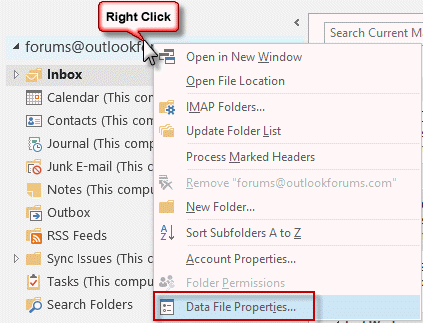
It should be the last command, as seen in the screenshot, but may not be the very last item if you have add-ins installed that add commands to this menu.
In the Properties dialog, click the button to Upgrade to Color Categories. This will convert the categories and add any not already on your master color category list, to it.
If you have more than one account in your profile that uses an existing data file, you need repeat these steps for each account.

To share color categories with other users, see the Tools below.
Tools in the Spotlight
Category Manager allows sharing of color categories; it adds a sidebar to the folder view as well as opened items, in which you can group your categories and assign them lightning fast; and it adds a reminder, which optionally prompts you if you forget to assign a category. Version 3 | |
ReliefJet Essentials is a set of 162 utilities for Outlook, Office 365 and Exchange Server. It can backup, import, export and convert data into different formats. Perform personalized mass mailings. Save, remove and optimize attachments. Find and remove duplicate messages, contacts, appointments, meetings, and other items. Retrieve statistics on email usage and get reports on Outlook data and settings. You can run the utilities directly from Outlook, automatically in rules, via standalone app, or from the command line. |


Tools
CodeTwo CatMan allows sharing of Outlook categories with other users on the local network. Centralized management using a shared configuration file. Version 3.0.1 | |
Exchange Category Manager is a plug-in for Exchange Server and Office 365. It enables you to manage the Outlook categories and colors that are available in Outlook. Define an unlimited number of groups with different users. Each group can have it's own set of categories and colors to choose from. You can add categories to the existing category list that a user has in Outlook or replace everything with the predefined list. As it integrates with Exchange server directly, the users do not have to do anything, their category list is automatically managed. No software has to be installed on the client pc's. |

jsmith says
This is super helpful--thank you! When I restored my categories, it also populated the categories of another calendar that I have access to. If I delete categories that aren't mine but belong to the other calendar, will they delete on both calendars or just mine?
Diane Poremsky says
It depends... if it is a shared calendar, you can delete the categories from your own master category list. Make sure you have a folder in your account selected.
If it is another mailbox in your profile, you need to confirm there are separate master category lists for each account. Select a folder in the other account and look at the master category list. Is it identical to your master category list?
mukhesh says
Clear all categories is getting grayed out and I dont see the new color category until I restart my outlook.
Diane Poremsky says
What type of email account do you have configured in Outlook? POP, IMAP, Outlook.com, or Microsoft Exchange?
Gary Packard says
I have the "Categories" icon on the Quick Access Bar, but it is not highlighted and does not work.
Diane Poremsky says
Do you have an IMAP account? Categories don't work with IMAP accounts and the button is grayed out.
https://www.slipstick.com/outlook/outlook-categories-flags-and-imap-accounts/
Howard Bryant says
I have installed Office 2019 but hate the colours is there any way I can change them to be the same as 2007 other than un installing and reverting to 2007 as out look literaly gives me a headake
Regards
Howard
Diane Poremsky says
You are talking about the overall color scheme? You are limited to the office color scheme in File, Options, General. Sorry.
Shahid says
Hi Diane,
There is a user mailbox in exchange 2013, whenever we re-create his outlook profile, in his calendars entries double categories appears itself.
So suppose if he has entry in calendar "traveling some where" and a category is assign to it as
"Travel", after recreating his outlook profile , the same entry will have
now two categories "Business" and "Travel".Do you know what can cause this.
Diane Poremsky says
Is he syncing with something? Using BCM? Either could be a potential cause, depending on his configuration.
AleX says
Outlook 2016. In the column Categories in the emails list I see only names of categories without color (single line, reading pane off). Is it possible to replace text here with a color box as it was in Outlook 2010?
Diane Poremsky says
You should have the color box and the name unless you changed the field format to text only (View settings, Format)
Shari says
It only offers the 'Text' option, no other options to choose from on the DropDown
Diane Poremsky says
Did you move the category field to the left side of the From field?
Category Colors Don't Display in Inbox (slipstick.com)
Al Padeletti says
In Novell GroupWise assigning a category changed the color of the entire subject line (in a list view) which made them stand out easily. The way Outlook handles categories is very much more subdued. Is there a way, either in Outlook or a 3rd party software, to make items flagged with a category stand out more?
Diane Poremsky says
You can create conditional formatting rules for a view. I would make a new custom view and add the rules so they don't accidently get reset.
https://www.slipstick.com/tutorial/use-automatic-formatting-to-highlight-messages/
Al Padeletti says
Awesome! This is great! Thank you Diane!!
C.J. says
1. Is there a 'master category list' that can be managed independently of the Categorize button that appears for Contacts and Email? A place where I could create names/colors and then expect to see them available when I next create a Contact/appointment, or read an emai, and want to categorize it?
That is, I do not see the Categorize button ever 'active' unless some outlook item is selected.
2. If you follow these procedures and click on the Upgrade to Color Categories button, what do you see that is evidence of the conversion/upgrade having been completed successfully? I never see the button greyed out.
Ah, I see that Anniversary and Birthday and Groups and Important and Must Attend have appeared along with my other categories. Is this "the sign" that I was looking for?
Diane Poremsky says
Yes, that is te sign you were looking for. :)
1. No. The only list is on the button - All categories command. there are 3rd party utilities that make managing the categories easier.
2. the only evidence is that the categories that were on items but not on the master list as now on the aster list. it is not disabled after it runs.
Len Raphael says
OL 2016 client for Office 365 E3.
1. I have a bunch of ancient categories from ten years ago Exchange that I want to delete for one mailbox and then create new ones. Don't see any way other delete one by one in OL and the 3rd party tools not obviously compat with OL 2016?
2. In an Office 365 situation, would the categories deleted or added for a specific user on one local profile, get synched to that same Office 365 users profile on another pc?
Diane Poremsky says
I have a macro that can do it - but the utilities should work with 2016. The delete code is near the end of this article - https://www.slipstick.com/developer/get-color-categories-and-restore-them-using-vba/
Yes, if the categories are in an exchange mailbox, including office 365 or (the new) outlook.com, categories will be in the profile on any computer using outlook. Some smartphone apps will have the categories too.
Jeremiah Landi (@jeremiahlandi) says
Diane,
This is awesome! I just recently upgraded and all my categories went missing.
This helped me bring them back and get running again. Thank you for the great information! Cheers.
AJ says
is it possible to do color category for Meetings and Appts so all user sharing calendar folders can identify quicly Meetings by color on Outlook 2011 Mac ? We use Exchange 2007 server with the Provider. we don't use pst with Macs.
Penny Rutishauser says
How do you get the COLOR of an email's assigned category to display under the Category field/column instead of the name/text of the category?
Diane Poremsky says
Are you using the single line message list view, with the reading pane off or on the bottom? The category color should be in the category block, but the wide list view will include the category names. "Text" is the only field format available when you aren't using the compact message list.
John says
Hi,
I'm using outlook 2013 with three email accounts (all with pop3 protocol - all in different folders). Today I noticed that my colour categories have gone back to the default names (yellow category etc). When I scroll down my inbox I can still (sometimes) see the colour categories that I have previously assigned but when I click on an email the category box under the reading view window appears with the assigned name but with no colour. When I open the colour categories window my assigned categories appear as "not in Master Category list" and yet they appear only after i have clicked on an email with the corresponding category.
What I eventually noticed is that apparently my colour categories are still working for two of my inboxes. They just reset to default in one of them (the one where I use them most by the way).
I did not upgrade, or transfer, or anything else... It looks like outlook just decided to mess with my categories.
Any suggestions?
Diane Poremsky says
Run the upgrade to color categories function (right click on the root of the mailbox and choose properties, then click the upgrade button.) I don't know why they would have been erased - they are stored in the data file. Oh, if you changed the default data file, it could affect the master list.
vanitylicenseplate says
Microsoft should go belly up for leaving crap like this to third party developers. Its not like outlook is a free program. More and more they just leave stuff out that use to work great, then replace it with half-a$$ garbage that have never been tested.
Elaine says
I use coloured categories for my boss' emails. When an email requires action, I choose the category (i.e., meeting) and choose the category "action" which is red. As of yesterday, if I choose the category "meeting" it automatically adds the category "action". Help!!!!
Diane Poremsky says
I can honestly say I've never seen (heard that happen before). did you make sure the category name wasn't changed to include both names? Are you applying the category directly or using a Quick Step?
coelacanth97 says
When I deployed Office 2013 around the office, some simply did an install-over-top of 2010, but others first required me to uninstall Office 2010 Standard before installing 2013, due to 32/64-bit discrepancy. I can't remember if I had to uninstall 2010 first for this user. He's the only one that uses category colors anyway.
Anyway, I can confirm that clicking any folder within his archive folder (PST file), the color boxes appear. They don't appear anymore anywhere within the main mailbox, and I can confirm on a computer still running Office 2010 that the color boxes DO appear within the main mailbox.
As I mentioned, I already tried right-clicking the main mailbox > Data file properties > Upgrade to color categories, this did not replace the color boxes within the main mailbox.
If I categorize a message anywhere within the main mailbox, the color block doesn't appear as it does within the personal folder.
Diane Poremsky says
Color categories are per mailbox. Assign all of the categories in the archive pst to 1 item, move or copy it to the other data file and run upgrade to color categories.
Marc says
One of our users also lost all his category colors when upgrading from Office 2010 to 2013. I tried the first suggestion to "Upgrade to Color Categories" on his main data file as shown at the top of this page, but nothing has changed. The colors are still missing. Anything else I can try?
Diane Poremsky says
How did you upgrade? I haven't seen problems with categories with simple in-place upgrades. Are the items with the categories in this data file? Categories are per data file, not per profile.
T says
Hi There,
I currently have full delegate access to my managers calendar.We are using Microsoft Outlook, I use 2007 he has 2010. I have full access to his calendar, read write etc and I use the categories which I have edited to my liking with colur etc. I colour categorize any meetings in his calendar for travel etc except he cannot see the colour, he can see the meeting etc but not the colur category associated to it - How do I get him to also be able to view the colour in his calendar?
Diane Poremsky says
You need to set the colors categories up on his mailbox - color categories are per user so he can't see the colors you added while viewing his mailbox. They need to be added from his account. Some of the Tools on this page can make it easier to share color categories too.
T says
Hi Diane,
The color categories are standard in Outlook, all Ive done is rename some of them, when I add the category to the meeting invite, the colour reflects in my calendar but not his - How do I get the colour cateogry to also show on his? Do I have to change his categories to be the same as mine?
Diane Poremsky says
You both need to have the same categories and colors - color categories are per mailbox and user, not shared.
Shala says
I am having similar issues. We share a calendar with 65 people. And we use the color categories, but only the main person and my self can see the colors added to the calendar. The rest of the staff can not. How can we fix that so that all employees see the same colors?
Diane Poremsky says
Everyone needs the same category list - the easiest way to do this is with one of the utilities listed in the tools section.
Cynthia Page says
I can't get categories to be available in the folders that aren't under the main heading. When I set up Outlook it automatically set a separate group of folders for my email address that is not the same as the "Outlook Data File" set of folders. Now I can only use the categories if I transfer an email into the Outlook files then transfer it back to my email address files.
Is there any way to get categories to show up in my other data files?
Diane Poremsky says
You are using an imap account and categories are not supported in imap. See https://www.slipstick.com/outlook/outlook-categories-flags-and-imap-accounts/ for more information and a macro that will let you set categories.
Jans P says
Before I received this response, I changed the categories to match my old ones in XP and added my old ones and all of the contacts automatically updated. I am pleased I don't have to go in one by one.
Jan Churchill says
I am not sure what we had orgiginally but I could change the names to the categoes then they match my appointments.
No I just have the 4 colours and I can't change them
Jan Churchill says
I have just had outllok 2010 downloaded on to my computer,
I am trying to relabel the categories to match what we are used to for Available Appointments for differant services offered by Southern Health.
I can't do this.
I have looked and read from the web but do not still understand what I have to do.
Could some one explain in simpke terms please.
Forever Greatful
Jan
Diane Poremsky says
You can change the names of the categories in Outlook 2010 too., Expand the Category button on an open message or in the Outlook window. Click all Categories from the bottom of the menu. Select a category and click the Rename button.
Camil says
when i open my outlook contacts and try to open the contact category that i had modified, sometimes i only see th default categories that came with the software, and not the ones that I added on
this started when I tried synchronizing outlook to gmail, so I can synch it with my android
please advise
Diane Poremsky says
What version of Outlook and are all updates installed? This sounds similar to a problem introduced into Outlook 2007 by an update and fixed bu a later one. It's possible another update broke it.