It's simple to open a received message to edit it or change the format of messages.
You can use this method to add notes to a message or add attachments to a message. You don't need to go into edit mode to edit the subject field: simply type in the subject field of an open message to make changes.
To change the message format (HTML to plain text), look on the Options tab.
- Open the message.
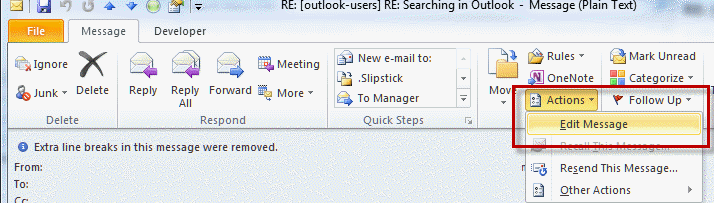
- On the opened message's ribbon or menus: In Outlook 2010 and newer: Go to Actions, Edit Message (Actions is in the Move section of the ribbon)

In Outlook 2007: Click on Other Actions, Edit message - Edit the message and then click Save to save the changes. Close and cancel to discard the changes.
How to Convert a Message to Plain Text Format
More Information
Changes are not saved until you Save the message. You can reply or forward the edited message without saving it. (Change the format before hitting Reply to use quote prefix for that format.)

Can i also edit the To and CC field. If Yes, how?
No, those are read-only fields. Sorry.
Thank you so much Diane! This was exactly the ID I was looking for; worked like a charm :)
Hi Diane, sorry I know this is an old post, but I'm looking at going into edit message mode and I can't find a way. I even tried finding a command bar option using the script in this page but couldn't find one for Edit Message: https://support.microsoft.com/kb/201095
This way I could've done something like:
myInspector.CommandBars.FindControl(,ID).Execute
Do you have any solution?
you can disable it using group policy - see https://www.slipstick.com/how-to-outlook/group-policy-disable-commands/ - edit message is 5604
Would you happen to have any VBA examples that show how to execute the "Edit Message" and how to change the text to html format?
I should have some, somewhere. Text to HTML is item.htmlbody = item.body. Do you need to go into Edit message mode or just change things, like from plain to html?