Update: Beginning with Outlook 2010 SP1, Mailto's will use the default account for messages.
When you use Microsoft Outlook 2010 or Outlook 2013 and have multiple accounts delivered to different *.pst files, Outlook doesn't use the default account set in Account settings for new messages. Instead, it uses the account associated with the mailbox or *.pst file you have in focus. This change in behavior takes some getting used to, but its my experience that once they understand how it works, most users with multiple POP3 or Exchange accounts like it.
This feature not as well liked by users with an IMAP account as their primary account and POP3 accounts delivered to the default *.pst file. Instead of using the default IMAP account as it did in previous versions, Outlook now sends new mail using a POP3 account that is delivered to the *.pst. When the IMAP user sends a new message to a contact or starts a new message after viewing the calendar, Outlook chooses a POP3 account as the sending account.
The obvious solution is to use a different *.pst file for the POP3 accounts but if that is not acceptable, you can set a registry value to always use the default account, regardless of the data store, or to always ask which account to use. Both of these options are controlled by a registry key.
Alternately, you can use a macro to always open a new message with the default account selected or open a new message with a specific account selected.
Registry key in Outlook 2010 SP1 and up
When you have multiple accounts and an IMAP account in Outlook 2010/2013 and you change the default sending account to the IMAP account, you may experience the following issues:
- When you click a mailto link from a browser or from Outlook, the default sending account is the Exchange Server account instead of the IMAP account.
- When you create a new email message, the Exchange Server account is selected instead of the IMAP account.
Out of the box, Outlook 2010 SP1 and Outlook 2013 use the default account for Send to commands but not for new messages created while viewing a pst file (when a POP account is assigned to the pst file), unless you set a registry value to always force the use of the default account.
To force all new messages to use the default email account, regardless of which pst file you are viewing, browse to the following registry subkey and add a DWORD named NewItemsUseDefaultSendingAccount:
In Outlook 2016, the option was added to the UI (in File, Options, Mail) or you can set the key in the registry:
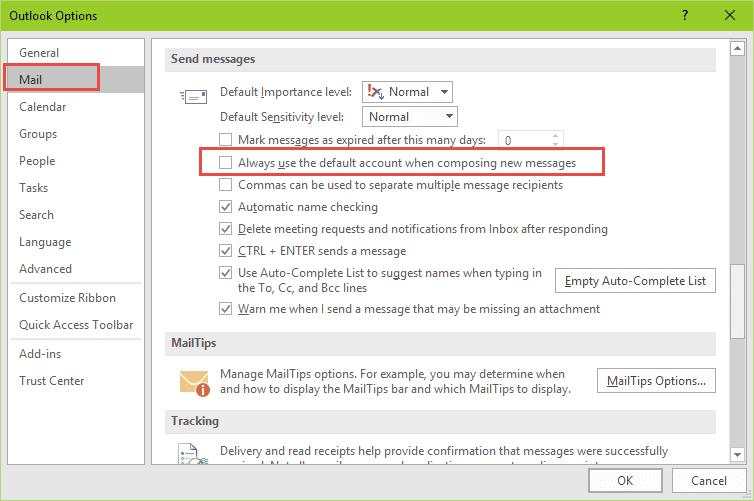
HKEY_CURRENT_USER\Software\Microsoft\Office\16.0\Outlook\Options\Mail
DWORD value: NewItemsUseDefaultSendingAccount
Value: 1
In Outlook 2013, the key is:
HKEY_CURRENT_USER\Software\Microsoft\Office\15.0\Outlook\Options\Mail
DWORD value: NewItemsUseDefaultSendingAccount
Value: 1
In Outlook 2010, edit this key:
HKEY_CURRENT_USER\Software\Microsoft\Office\14.0\Outlook\Options\Mail
DWORD value: NewItemsUseDefaultSendingAccount
Value: 1
If you prefer not to edit the registry yourself, you can run this registry file to set the NewItemsUseDefaultSendingAccount key:
Outlook 2016 Outlook 2013 Outlook 2010
Registry key to force account selection every time
This fix is simple, but can get annoying, fast, since it forces the user to select an account every time they send a new message. (Replies and Forwards always use the account the message arrived on.)
This might be good for people who use multiple accounts and frequently (accidentally) send using the wrong account, especially if they are sending sensitive documents, as it will almost eliminate accidentally sending email from the wrong account.
In Outlook 2016, the registry key is:
HKEY_CURRENT_USER\Software\Policies\Microsoft\Office\16.0\outlook\options
Value Name: ForceAccountSelection
Value type: REG_DWORD: 1 for force, 0 to disable.
In Outlook 2013, the registry key is:
HKEY_CURRENT_USER\Software\Policies\Microsoft\Office\15.0\outlook\options
Value Name: ForceAccountSelection
Value type: REG_DWORD: 1 for force, 0 to disable.
In Outlook 2010, the registry key is:
HKEY_CURRENT_USER\Software\Policies\Microsoft\Office\14.0\outlook\options
Value Name: ForceAccountSelection
Value type: REG_DWORD: 1 for force, 0 to disable.
Notes: You need to create the path if it does not exist. You can also set this using the Office group policy templates. The value type is the same for both 32-bit and 64-bit Outlook.
If you don't want to edit the registry yourself, you can run this registry file to set the ForceAccountSelection key:
Outlook 2016 Outlook 2013 Outlook 2010
Warning: A user reported this tweak may prevent the New item buttons in Contacts and other folders from working.
Solution for default IMAP accounts: Create a fake POP3 account
Tools
SelectSender is a tool for Office 365 users who need to send mail from different addresses. This utility allows an Office 365 OWA user the ability to easily select the From address of the new, replied or forwarded message. SelectSender can be used only in cooperation with ChooseFrom 365 cloud service. | |
This add-in will automatically substitute the From: address when you reply to or forward a message sent to the distribution list. In other words, when a person who is a member of the distribution list replies to a message sent to the distribution list, the default sender address will be the distribution list address. | |
SetAccount add-in allows you to specify the email account to use for all outgoing email. If you have more than one email account collecting email and always want to send replies using the default account, Outlook always uses the receiving account when you reply. You can select the correct sending account when you reply, but it's easy to forget to do this. This utility also fixes the Outlook.com bug where the Outlook.com account is used for all replies. |

Anup says
Thank you. file helped to me to Force Account Selection..
Robert says
Works great for new messages without content. Thank you for this very useful post.
In addition, it would be great if the same procedure could be done for directly sending files: right click --> send to --> email recepient (the same if you send from an open file). In this case the standard account is still default.
Is this also possible to fix?
Greets Robert from Germany
Holger Laufenberg says
Microsoft - listen up! you can fix this easily. The issue is NOT the default account or which account one is currently viewing! The issue is that anyone using multiple email accounts in Outlook will eventually compose and send one using the wrong account - period. It's embarrassing, can cause huge legal problems and its unnecessary as it can easily be fixed intelligently! There is only one accurate solution to permanently avoid this issue: Allow association of email accounts with a specific contact entry. Meaning, anytime you create a contact in Outlook you have the option to identify/tag it with the email account that should be used when adding this contact to a new email - Done! In case someone sends an email to multiple contacts who have been associated with different Outlook email accounts, simply do a pop up that states that recipients have been tagged with different accounts and which one to use.
Brent McDonald says
Hi, May I trouble you for a spot of help? I wish to FORCE account selection with new emails. I recently set up a new computer running Windows 10 running with Office 365 32-bit...which in my understanding is VERY similar to Office 2016.
Office 2016 isn't in the "Policies" folder as suggested above so I added the 2016 Key (REG_DWORD: 1 for force, 0 to disable.) in this location and it is not working:
Computer\HKEY_CURRENT_USER\Software\Microsoft\Office\16.0\Outlook\Options\ForceAccountSelection
I've attached a screen snip to illustrate.
Can you tell me where I went wrong?
Gratefully yours, Brent McDonald
Paddy says
I have stumbled on an oddity which may be related to this. Email template created by somebody outside the organisation but supplied to us as part of a software product. If I use the template to send an email the although it uses my correct sending account it displays in my sent folder (I have the "email account" field visible in the sent items folder) as having been sent using an account from outside our organisation?? Seems really odd. How can I be sure the outside email account is not somehow also receiving a copy?
Diane Poremsky says
I'm surprised the From field shows another address - it definitely shouldn't. Do you see the From field when you create a message using the template? If not, look on the Options menu and show the From field. Make sure you account is listed there. Also, i would test using it to send to a personal account. If you use exchange it definitely should use the correct From account but some SMTP servers will accept mail with a different From address.
Paddy says
Thanks for your reply. The problem is not with the To or From field - they are both correct. The problem is with Email Account field. As I have a number of addresses I select Email Account as a visible account on the current view settings so I can see which account emails are sent through - I use POP3 as I don't want mail staying on our hosters servers.
The problem seems to be that when an email .msg file is saved to use as a template it is populated with the default email account field from the computer on which it is created. When the .msg file is then used on an entirely different organisations computer to create an actual mail this initial Email Account property is not overwritten (and shows up if the Current View is set up to show it). It is disconcerting to see it as it looks like the wrong account has been used - although the actual account used is whatever account is selected when sending the email.
Interestingly if a non-default email account is used for the send the Email Account field is overwritten and the problem goes away - it is only when using the default account that there is a problem.
I cannot find a way to remove the initial Email Account field/property on the original.msg file - using remove personal properties on a windows explorer right-click doesn't do so. I am using Outlook 2016 supplied as part of Office 365.
Diane Poremsky says
>> template it is populated with the default email account field from the computer on which it is created.
That is correct (it can use any account address in the creator's profile but most people use the default) ... but, at least in the past, if an account by that name doesn't exist, Outlook uses the default in the current profile. I have never seen it keep the original name in the sent folder - i will see if i can repro. My concern would be that a SMTP server accepts it as 'from you on behalf of template address'
Paddy says
>> . My concern would be that a SMTP server accepts it as 'from you on behalf of template address' <<
Hadn't thought about that possibility - I'll have to test that by sending to a personal account and see how it shows up on a home device.
Issue though with wrong EmailAccount showing in the Sent folder happened again today when I used a .msg template I thought I had re-created (but hadn't ) .
Easiest way I have found to determine what account is "baked into" a saved .msg file is through the design this form option on the Developers tab in Outlook 2016 . Unfortunately the field is not editable.
Gerhard says
I have several e-mail accounts. When I reply, Outlook (2016) many times but I think not always chooses the default account as From instead of the one the e-mail was sent to. This is annoying and I am ready to give Outlook the boot. So far I could not find a simple solution for this. Is there one?
Diane Poremsky says
Are the messages all delivered to the same mailbox on the server but downloaded using different accounts set up in Outlook? That is the usual reason for this behavior.
Marek says
is there a way outlook shows 2 accounts on the startup?
Diane Poremsky says
You can open two outlook windows, one to each account - that would be the only way. Right click on the second folder, choose open in new window. When you close outlook, use File, Exit. When you start outlook, both windows will open.
Tim says
Hi, Useful tips thanks.
I do have a specific requirement which is close to the above, but not quite answered by your useful guidance: I have different data files which I would like to assign a specific email account to. The email accounts are all working fine, and I have a default email account set up BUT I'd prefer not to have to select each time on the other. So is it somehow possible to assign a different default email to each outlook data file ? Thanks.
Diane Poremsky says
You can assign a folder in a pst asa the delivery location for each account = file, account settings, select the account and click the Change folder button at the bottom then select the inbox in the other pst. Screenshot of the dialog is here - https://www.slipstick.com/outlook/email/deliver-pop3-accounts-one-outlook-inbox/
Shahid says
Thanks
This discussion is very helpful , Is there any setting in outlook for
MAC to achieve the same as we don't have registry in MAC?
Diane Poremsky says
No, not to my knowledge. (I don't know if they are working on something like this.)
Brian Howells says
Thanks for reply, failed on auto, have
switched to manual setup, window asks choose service
four options, 1 microsoft exchange server etc,
2 Outlook .com etc, 3 PoP or IMAP. 4 Other.
Which Option to check?
Diane Poremsky says
pop or imap for all accounts except Outlook.com, office 365, or Exchange server.
Brian Howells says
I am using outlook 13, I think I have deleted a file accidentaly, my gmail still works in outlook
but my Yahoo mail does not work and all of the saved mail folders have gone.
My Yahoo is PoP and my Gmail is Imap. the Yahoo e mail is the default.
When I open outlook gmail arrives but yahoo gets error message
(0x8004010F) on send and receive. What have I Done?
Diane Poremsky says
sounds like the profile is corrupt. you'll need to make a new profile to fix it.
https://www.slipstick.com/outlook/how-to-create-a-new-profile/
Carolyn Sokol says
Can you do this same thing in Office 365 on the web? I need to be able to reply from multiple receiving account. Thanks
Diane Poremsky says
As in Outlook on the web? Your options are limited on the web - you can open other mailboxes your account has permission to open (open shared mailbox is under your account name) or you can use 'in private' browsers to open additional mailboxes (Chrome's profiles work well for this too).
Simon says
Hello - the above seems a perfect tweak.
I am using Outlook 2007. Would the Registry edit be the below? I changed the 14.0 to 13.0.
HKEY_CURRENT_USERSoftwareMicrosoftOffice13.0OutlookOptionsMail
DWORD value: NewItemsUseDefaultSendingAccount
Value: 1
Many thanks.
Diane Poremsky says
What is happening? This key was introduced in Outlook 2010 (SP1, I believe), to return the behavior to that of Outlook 2007 and earlier, so it shouldn't make a difference with Outlook 2007. It won't hurt to try it though - but it's 12.0, not 13 (they skipped #13).
Irwin says
I'm am trying to check the ForceAccountSelection setting - HKCU etc for an Outlook 2016 installation but there is no ...office16.0... key just 15.0!
Diane Poremsky says
Are you sure Office 2016 is installed and not 2013? Both are available as "Office 365" and look pretty similar.
Sharon Bailey says
Could you please direct me to help for the following problem, even though it may only be tangential to the current discussion?
I have Outlook 2010 on my laptop, and recently added Office 365 to my desktop. I have been using an IMAP connection to my personal Gmail account for years and years and years, and have set it up on multiple computers.
This week, my boss supplied me with a work Gmail account, which I set up with a new password. I read up a little on adding a second Gmail account to Outlook 2010 and did my best to follow the instructions. When I hit Finish, Outlook proceeded to crash/hang.
Now when I turn on Outlook, it asks for the account password. Regardless of which account's PW I enter, the pop up screen disappears for a nano second, then pops back up unless I x-close it. Then, the message at the top says Inbox-Outlook Data File-Microsoft Outlook (Not Responding). At the bottom of the screen it says Downloading Folder Order, but it doesn't look like anything is happening.
I confess to not having archived in a l-o-n-g time, and to having a boatload of folders in my original Gmail account.
I really, really like using Outlook. Any steps I can follow to use it again? Since it totally won't load, I am stuck.
Thanks for your consideration!
Diane Poremsky says
Having two gmail accounts shouldn't be causing issues. Not archiving shouldn't affect it either. Are you using the google sync utility for the work account?
Try this: close Outlook, go to Control panel and find Mail. Open your profile and remove the new gmail account. If you want, you can test outlook now by opening it - if asked for a password, you'll know its asking for your personal. close outlook after testing then back in the mail applet, add the business account back and make sure you click to Save the password. Restart Outlook again.
Rajeev Dave says
my default account in Outlook 2010 is not needed anymore and my secondary gmail account is the main one I use. How do I backup and delete exisiting primary/default account and then make the gmail the default account?
Diane Poremsky says
Is it a POP account? If so, you just need to remove it - the pst file is safe. If it's IMAP, Outlook.com, or Exchange, you can export to a pst file (File, Open, Export to a file - follow the wizard)then remove the account.
You can set the Gmail ad the default email account but outlook 2010 requires a pst or exchange data file set as the default data file - you can't set an imap data file as default in outlook 2010.
Jim Kaye says
Let me add my frustration. Your help in setting calendar and contacts to work with outlook.com while mail is my POP3 were great. However, after migration the default from account is , as others say, locked to outlook.com and must be manually changed. I tried the "setAccount" tool you suggested but it won't load as an active add-in. Says Inactive. Any clue why? Any further word from Microsoft on a solution?
Diane Poremsky says
Assuming it's this issue and not something else: https://www.slipstick.com/outlook/outlookcom/outlook-com-reply-account/ - their solution is to set a pst as default... it's a non-solution IMO.
If you don't change the address, does it send from the correct account? It's my experience that it is sent from the correct account.
If you enable it as an addin in file, options, addins, Go button, does it keep disabling itsself?
Victor Ivanidze says
Hello Jim,
contact me directly if you wish to use SetAccount tool and I'll try to help.
Dmitriy says
ForceAccountSelection works fine, but only for a new e-mail created, how to make same for reply e-mail?
I have outlook.com account and several mail accounts are forwarding mail to it. For sending from those several accounts I set up them in Outlook only to send and not not receive.
So, all mail I replying to are in outlook.com inbox account, and outlook expectantly set it as reply-from account. How to patch reply-from account in same way as for new send-from account.
Diane Poremsky says
Replies should always go from the recieving account - but there is a bug - https://www.slipstick.com/outlook/outlookcom/outlook-com-reply-account/ - they are working on a fix but it looks like (at least for most people) that the mail is sent from the correct account, even though outlook has the wrong account in the from field.
Bruno P says
Hello Diane, I'm running Outlook 2016 and need the option to be prompted to choose the sender account for each new e-mail or reply. I have tried and tried the forceaccountselection trick, but I noticed no change in my Outlook behaviour: it keeps selecting a default account or the account of the current folder. I have my own outlook account, two others shared accounts and one IMAP account. For the shared account I have added them in the "From" list (I have got the cross to delete them if I want). What can be wrong ? The forceaccountselection reg key seems tp work for others, why not for me ?
Diane Poremsky says
I assume you restarted outlook... which suite are you using? The policies key don't work with Outlook 2016 Home or Personal suites that are targeted to consumers. If you are using either (or even if not), try putting it in this location instead: HKEY_CURRENT_USER\Software\Microsoft\Office\16.0\outlook\options - many keys will work in either path.
Diane Poremsky says
Just tested it on a Home installation - the policy key works, the one in the normal user path does not. (You definitely need to restart outlook after adding the policy key. )
jackmeat says
Problem is if i hit reply, I want to reply from the account the message was sent to. And that is what is not happening. If i could get the prompt to select account everytime i click send, new or reply/forward, than that would be fine since Microsux can't seem to fix this issue
Diane Poremsky says
This sounds like the outlook.com bug in Outlook 2016 for windows which occurs when a non-microsoft address is used as an alias in a Microsoft account. They are aware of the problem but i don't have any additional information at the moment.
https://www.slipstick.com/outlook/outlookcom/outlook-com-reply-account/
Andrew says
Thanks for this. My default keeps changing in my outlook 2016 when sending out.
Diane Poremsky says
it's probably this - https://www.slipstick.com/outlook/outlookcom/outlook-com-reply-account/
Volkan says
I have too many accounts with Outlok.
When replying to an email, the sending account is always the same account selected.
However, the incoming mail account must be selected.
How can I fix it.
Thank you
Diane Poremsky says
Outlook is supposed to use the account that downloaded the message but there is a bug in outlook 2016 with outlook.com accounts.
https://www.slipstick.com/outlook/outlookcom/outlook-com-reply-account/
Kim says
I'm using Windows 10 Pro, Outlook Mail (Exchange), and an IMAP gmail account (that I want to always send from). The "always use the default account" setting has absolutely no effect whatsoever. I'm confused because I followed the instructions here, but had no luck, but then found your article https://www.slipstick.com/outlook/outlookcom/outlook-com-reply-account . Should Outlook 2016 be removed from this article because it doesn't apply due to the bug? Or can you explain the situation when it does have an affect? I use SetAccount to set the default account; it's a lifesaver!
Diane Poremsky says
The information on this page applies to outlook 2016, except in a limited situation, due to the bug. If you don't have an outlook.com account that triggers the bug, the 'always use' setting will work for the default account in your profile.
Kiki Paul says
Hello
I decided to complete clean Office 2016 off my machine and start again.
While i have some extra options in my registry, I still do not have the option listed above. Should I add in the keys manually? Many thanks!
Diane Poremsky says
Yes, if a key you need does not exist in the registry you'll need to add it.
Kiki Paul says
I have 3 accounts set up in Outlook 2016: 1 Outlook.com (Office 365) and 2 Gmails account. No matter from which mailbox i reply, Outlook always present the default account.
Tried so far:
Checked in Options>Mail>Send>Always use default account = unticked
Ran the OffCAT tool
Uninstalled & reinstalled Office
Then I am looked for the registry key:
HKEY_CURRENT_USER\Software\Policies\Microsoft\Office\16.0\outlook\options
Value Name: ForceAccountSelection
Value type: REG_DWORD: 1 for force, 0 to disable.
But I only have Policies>System Certificates or Windows,
I added in the key anyway, but no luck. Any response in Outlook still comes from the default account. This is really unhandy, I process a lot of email every day and need to rely on sending from the correct account.
Any assistance will be most welcome!
Diane Poremsky says
That problem is a bug that hits when an address not in the outlook.com (Hotmail, msn, live) domains is an outlook.com alias. This includes 3rd party addresses like Gmail & Comcast and outlook.com custom domains.
I didn't try force account selection, but the always use default account key and macros don't work. Options are to remove the alias and use outlook.com address or change it every time until it gets fixed. https://www.slipstick.com/outlook/outlookcom/outlook-com-reply-account/
Rochelley says
I have just re-synced my Outlook.com account with Outlook 2016 using the new Exchange server settings rather than EAS. But now I have this funky address that my Outlook.com exchange account wants to send from which I cannot override no matter what in OL2016. So I set up a POP account using the correct send from email address which is also an alias on my Outlook.com account (still using Outlook.com's new server POP settings) and set it to deliver to the Exchange OST file rather than it's own PST file. I then chose the POP account in Outlook 2016 as the default account for sending from. But it doesn't work. The OL2016 UI is also set that way, and I've checked the registry DWORD key as you suggested and it is also set to always use the default account when composing new messages. So am I missing something, or is it something I simply cannot do when I am in the message store for the OST file? This is going to be a huge problem for me if I have to change the Send from address on every single email I send. Please tell me there is a solution for this!
Diane Poremsky says
That is due to a bug. See the write up at https://www.slipstick.com/outlook/outlookcom/outlook-com-reply-account/
Set the outlook.com alias as default and add the non-Microsoft account as a connected account.
Waggie says
I have 2 emails set up as multiple accounts in Outlook 2013 - now I would like to separate each account. Is there any way to do this so that all my past emails, contacts, etc do not disappear? In Outlook 2007 I could delete, move, etc all my files in both accounts. I cannot do this in Outlook 2013 so would like to treat each account separately.
Thank you.
Diane Poremsky says
It should work the same in 2013. What type of accounts do you have configured? The easiest might be to create a new profile and add the PST to it -copying the profile the deleting accounts from the profile works too, as long as you don't have 'this computer only' folders in the folder list.
Waggie says
I have two IMAP accounts set up in Outlook 2013. One is the main account and that is the account where I cannot delete (this operation cannot be performed because the object has been deleted) move folders, etc. The second account I can delete, move items with no problem. I do not mind logging in to separate accounts - much easier than being unable to delete emails, etc. I would really like to separate the two accounts but am afraid I will lose all my information.
Thank you.
Diane Poremsky says
if they are imap and you either do not have 'this computer only' folders for calendars and contacts or they are empty, you can delete the imap data file and outlook will resync it with the server.
Tim says
This unfortunately did not fix my problem, but I'm hoping you can. I have two email accounts at work, my personal work account, and a group work account. In the old Outlook, I could take messages from the group box, put it in mine, and when I would forward them they would, by default, forward from my account. Now they always default to the group box email no matter what the default account is and it's very frustrating. Thanks.
Diane Poremsky says
Outlook will always use the account that received the message. Did you try setting the NewItemsUseDefaultSendingAccount key? Not sure it will work since a forward technically isn't a new item.
Sabz says
Hello,
I am facing a problem in outlook. I have two user accounts on my outlook. There is a particular sender that sends an email to me, for example my email is xyz@outlook.com. Instead of me receiving this email in my mailbox, it ends up being showed only in the second users mailbox for example abc@outlook.com. Any ideas on how I can resolve this problem?
Thank you.
Diane Poremsky says
First guess is there is a rule moving the message. Second is that for whatever reason, he really is using the second address.
How are the accounts configured in Outlook - as pop3, imap, exchange? if pop3, there should be a copy of the message in the mailbox online (unless you don't leave messages on the server for a few days) - you can use web access to see if it was delivered to that mailbox. If you use imap or exchange, you'll need to look at the message header to see where it was delivered. OPEN the message and either go to the Tags section of the ribbon or go to File, Properties. Select all and copy the header (ctrl+a,c) then paste into a new message for so you can read it. Is the expected address in the header?
Sabz says
Hi,
Thank you so much! I have been able to fix the problem, the issue was that there was a rule set up by someone so, I just deleted it.
Thanks again!
Lisa says
I have an outlook account and both mine and hubby's email addresses are added to the mailbox. Somehow though, it has named his as my name, so when he is sending emails, it comes from his email address, but it says my name. Does anyone know how to fix this please?
Diane Poremsky says
These are two separate mailboxes with separate passwords? Are they added as Exchange, POP3, or IMAP?
Lisa says
Hi Diane, it says they are both exchange active sync. And yes individual email addresses, I just added his to the outlook on the desktop, and I seem to have taken him over :)
Diane Poremsky says
i would start with removing the accounts from the profile or make a new profile if these are the only accounts in the profile. Do this from Control panel, mail. Use auto account setup to add the first account then start outlook. close it and add the second account to the profile.
Lisa says
Thank you Diane! Much appreciated :)
Martin says
Hi Diane,
My set up is a bit different:
in-house Exchange 2016, Outlook 2013 clients,
all users have their own email accounts, but as main account use an email account to a separate/shared user email account.
Autodiscover picks up the users log on email account, I add the extra account manually, and set it as default.
It works ok, all email default to shared email account.
However client is using 2 3rd party tools that use VBA code command DoCmd.SendObject to send emails from Outlook, Email is sent from the default account, however once sent it goes to sent items of the logged on user.
Bizarre
Diane Poremsky says
is the second account opened as a shared mailbox or an actual email account?
Are you using the method here to add it - https://www.slipstick.com/exchange/shared-mailboxes-and-the-default-send-from-account/
Adrienne Nagyvari says
my computer using windows mail account when sending photos etc. it stopped doing it and there is just no option to make outlook as the default account,i tried everything
Diane Poremsky says
sorry i missed this earlier. :( (Trying to get caught up after taking a vacation.)
This is with a hotmail account? It probably moved to the new server- you need to remove the account from the mail client that you are using and add it back. If you want to make Outlook the default email client, go to control panel, find Default Programs and click the top link.
Debbie says
Hi Diane, I use Outlook for my email on my home computer. I have an outlook email address and 3 gmail addresses. When I create new messages it sends from the "active" email account that I am in. That is great, it is what i want. However, when I choose to "reply to" an email I have received it sends from my Outlook email address ALWAYS. I do not like this, I want it to reply from the address it was received at. I know I can use the FROM drop down to change the "reply from" but I usually forget to do that. Anyway I can make it reply from the address that it was sent to, automatically other than making a manual change?
Webmaster says
Are the accounts in separate data files? Replies use the account that downloaded the message, so if the Gmail accounts are set up as connected accounts in outlook.com, it downloads them and is the default reply. I have a macro that might work on this situation if you use outlook 2016.
Jann says
Hi Diane,
I have 2 Exchange active sync email accounts and 2 IMAP accounts in my outlook 2013.
IMAP A account has been set as the default account for Email and Data File in account settings.
I was able to set IMAP A account as the default email address when composing new emails via the "Älways use the default account when composing new messages" in the Mail-outlook options.
However, this setting did not carry over to new meetings created. Instead, IMAP B account always gets chosen as the primary email account when new meetings are created.
How do I fix this?
Looking forward to your response,
Jann
Diane Poremsky says
Which account is the calendar folder in? That account is the default account for meetings. If it's a pst with no accounts assigned to it, then it would use the default email account.
Roland says
Outlook 2016 reply/forward sets wrong from account!
I have just upgraded to Outlook 2016 (from 2007) and also connected a Outlook.com account. In addition to the Outlook.com Exchange account I use several IMAP accounts. Outlook.com is the default data file, but the default email is one of the IMAP accounts. On reply's and forward's Outlook 2016 sets the from email to outlook_xxxxxxxxxxxxxxx@outlook.com for all the accounts, regardless of which account i reply/forward from. From on new emails are correctly set to the account in focus. Further, Outlook 2016 use outlook_xxxxxxxxxxxxxxx@outlook.com also for new emails from that account, not the primary email address configured in Outlook.com, nor any configured aliases. I can manually change the From email, but it is annoying and having outlook_xxxxxxxxxxxxxxx@outlook.com is really ugly. The xxxxxxxxxxxxxxx seem to be my old live id. I have to auto configure Outlook 2016 to access outlook.com as I am using categories to manage my contacts. Configuring the access with Exchange Active Sync give the correct behavior for reply's, forward's and new emails, but I lose category sync between computers which is a show stopper for me.
Diane Poremsky says
Was your outlook.com account moved to the new server yet? Once it's moved (and you add the account as an exchange account) the problem with aliases should be fixed. I need to look into the reply account problem.
Roland says
I believe I have been moved to the new server (how do I check that?), and the account has been added as an exchange account (i.e. automatically configured). If I add it manually as EAS, then reply and forwards works as they should, but I cannot use this as I need the categories support. If I by mistake send an email from outlook_xxxxxxxxxxxxxxx@outlook.com, the recipients recieve the email, but if they reply they get the following error message:
From: postmaster@mail.hotmail.com
Sent: Saturday, July 23, 2016 8:59 AM
Subject: Undeliverable: outlook reply problems
...
Delivery to the following recipients failed.
outlook_xxxxxxxxxxxxxxx@outlook.com
Diane Poremsky says
Log into outlook.com and check the url - outlook.live.com is the new server. if it was moved, you can set a valid alias as default - then accidental usage will work and you'll get the messages.
Justin says
This either does not work in Outlook 2016 or it doesn't work with Exchange controlled mailboxes. I have employees that I assign multiple mailboxes to. For example, Jane Doe has her own mailbox and she controls the Sales mailbox. I give her Full Access Permissions as well as Send As permissions for the Sales mailbox. In OL 2010 when she went to the inbox for Sales and replied to an email the Sales email address would show in the FROM box. Now, in OL2016, it shows her own email. She has to change it every time. Also, new emails always use her default account as well. Using the GUI in OL 2016 I can verify the registry setting changes. But it always uses her default mail account.
Diane Poremsky says
it should work for replies from a shared mailbox (it does here) - but the user definitely needs send as permission on the shared mailbox. New mails will use the user's account for sure.
Does she have the full shared mailbox in her profile (either using automapping or adding it as a secondary mailbox) or did she just open the shared folder? (Mine is opened as the full mailbox.)
Nick Urfe says
Thank you for your thorough and useful explanation. Your is the only technical support voice that provides a complete and workable solution. Even if messing with the Registry is not for regular non-techies, this is still doable for most folks who can get their hands a little dirty with Windows innards. My only concern is that you assume everyone knows how to add a few lines to the Registry without--possibly--turning the computer into a paperweight. More detailed steps would be appreciated.
Diane Poremsky says
That's why I have the ready-to-use reg files. :) I have a 'how to' published on one of my sites, will find it and link to the pages with reg edits.
Haakon says
I have similar problem on the iPhone, however, it is difficult to ascertain which account is in focus. When starting the e-mail, the correct sender is shown, however, on sending it changes to the other profile "on random". It seems to disregard the default account settings. Unfortunately, there is no registry to edit?
Diane Poremsky says
Sorry, I don't know what could be wrong on the phone side. Is the other profile the default account? Are you using the Outlook for iOS app or the native apple app?
Barry Graham says
By the way, I like the one to make it always ask which account to use. Too bad that one doesn't work for replies and forwards either!
Diane Poremsky says
do you always want to use one account or will you be choosing the account? If you always want to use one account and use imap or pop3, you can configure a different smtp server while keeping the original pop3 - the instructions are here - https://www.slipstick.com/outlook/config/create-receive-pop3-account/
Barry Graham says
Diane you pointed me to this page from another post and I tried your fix. It does make it use the default account as desired, this is helpful thanks.
Note that it does not present all the day/date flags, I only get the option to flag the message for tomorrow.
Also is there a way to force the default account if replying or forwarding? The fix doesn't make the default account be used.
I still can't figure out how MS can give you an option to only use the default account, yet you still have to do all this to actually make that happen.
Diane Poremsky says
>> Note that it does not present all the day/date flags, I only get the option to flag the message for tomorrow.
That is normal for IMAP or EAS accounts. They only support flag on/ flag off.
Replies & forwards always use the account they came in on. If all replies will use the default account, you can change the smtp server settings. Instructions- https://www.slipstick.com/outlook/config/create-receive-pop3-account/#mixed
Barry Graham says
Actually now that I have it all set up to pop up a box asking me how many days ahead I want to flag messages, as they hit the folder in which the message is saved when sent, this is no longer an issue. Since you helped me to create that box, thank you!
Lthsinc says
Have a different issue. Have been working with multiple imap accounts in Outlook 2013 with no issues. Then I had to add an MS exchange account, and that seems to have changed everything. If forced the exchange account to become the default account, instead of the primary imap account. This also seems to have caused my default calendar, (for this computer only), to disappear, and now places my appointments on the exchange calendar. I do not want this as the exchange account is not my primary account, nor do I want others seeing my appointments, etc.
When I try to make my primary imap account the default account again by selecting it in the data tab of Account Settings, I get an error message saying that the data file cannot be used, that it must be the same format as offline data files, (.ost). However, the account I am selecting is an .ost file, and it was the default account before adding the exchange account. Guessing I cannot get my calendar back, I followed the instructions for creating a new .pst data account to get a default calendar in Outlook, but is there any way to return my Outlook to what it was, with the correct primary imap account as the default account, and a calendar back into that profile? Thanks so much for your assitance.
Diane Poremsky says
Yeah, exchange always likes to be the default account. You can set other data files as default - see https://www.slipstick.com/outlook/change-the-default-data-file-from-exchange-to-another-account/ for the steps to get past the error.
I don't recommend using the 'this computer only folders' (they don't get backed up), use a pst if you don't want to use the exchange folders. But, FWIW, no one will see your appointments if you don't share the exchange calendar - if you need to share it, you can mark appointments private.
Brent McDonald says
Good afternoon Diane,
I'm so grateful for your expertise.
I have two exchange accounts. I've used the "forceaccountselection" registry key for several years with office 365 (2013). I recently upgraded to the version 365 (2016) and this function seems to have broken.
I've gone into the registry and created the key: HKEY_CURRENT_USER>SOFTWARE>Microsoft>Office>16.0>Outlook>Options>Mail
Name: forceaccountselection
Type: Reg_DWORD
Data: 0x00000001
For some reason it does not successfully force me to select the account when I click new. I'd be very grateful for your help.
Thank you much!
Diane Poremsky says
it's working under the policies key - HKEY_CURRENT_USER\Software\Policies\Microsoft\Office\16.0\outlook\options
richard stewart says
I have a trial only version of office 2010 in my computer, and a newer version of OFFICE without outlook. Since every time some web site or other wants me to email them it calls up outlook trial version 2010, but of course it won't work because I never paid for a full version. I installed OUTLOOK 2013, but ONLY the trial version of OUTLOOK 2010 ever comes up automatically, how can I get rid of OUTLOOK 2010 without getting rid of the rest of OFFICE 2010?
Jennifer Lloyd says
I recently upgraded my computer which had 4 accounts on one .pst file. When I used it in outlook 2013 in automatically made four separate .pst files for each account. Love the idea and want it to work. I set each one up with the proper information for incoming and outgoing mail, passwords, email addy etc. all of which checked out in the self test. BUT when I send and receive all mail I ONLY get the MAIN account mail to send and receive. The other accounts are visible but show the send receive error "outlook data file cannot be accessed". Does that mean the files are corrupt and I need to create them from scratch? Or is there something else I can/need to do?
Jeff Bartlett says
Since I started using office 365, my isp has gone over to outlook.com as their servers, so officer 365 isnt really needed, but I have issues trying to use an ost away from my c drive (ssd so I would not want to fill it up with a big ost)
Diane Poremsky says
You can move the ost - see https://www.slipstick.com/outlook/config/how-to-move-the-imap-personal-folder-pst/ - for EAS account, you need to use ForcePSTPath (yeah, it's not a pst, but for whatever reason, EAS OST are treated like pst). You'll need to remove the outlook.com account and re-create it after setting the key.
After the outlook.com account moves to the new server and you add it to outlook as an exchange account, the methods to move an ost will work (which I'm assuming you are using now).
Jeff says
Diane I have posted this question on the forum site, if that answer falls into the "more complicated".
Jeff
Diane Poremsky says
It's more for the oodles of programming questions with long code - its easier to read in the forum and other people can help answer questions there.
jeff says
Perhaps I should explain my set up. I have a standard isp email account. I forward all emails from there to my office 365 exchange email account. This is the account that my outlook 2016 downloads from. As my isp email address is the default for so my net accounts etc, changing email addresses is not an option. However, I would still like to use this default email address as my original send email address and also reply email send address. I have set up outlook 2016 for the 2 accounts, the exchange account receive only and the isp account, send only. I still get the annoying "send on behalf of" on emails but my isp email account is the account used and the account the original addressee will reply back to. When sending reply's to emails, my default exchange account is selected but I do have the From drop down box, to select my isp email account (again with the "on behalf of"..... Is there not way, like when sending a new email, of forcing the user to select a send account. This is mainly for my wife, who's emails are set up the same, of not making a mistake in replying to an email with a wrong send address.
Diane Poremsky says
This: When sending reply's to emails, my default exchange account is selected is because the exchange account is the one that downloads it. One option is to have outlook download the mail from the isp and store it in the exchange mailbox - of course, it only works when outlook is open and if the isp is forwarding mail (rather than office 365 collecting it) you'll have duplicates.
I'll see if i can repro - exchange likes to be a mail hog, but changing accounts should change accounts.
Jeff says
I note you have added a registry edit now for 16.00, thanks. I worked it out, I had manually added that reg change into the wrong area. It is working now, using your file, but, it makes you select the email account for new emails, which is what I want however, when you reply to an email, the default account is chosen for the reply "From". Is there a reg edit to make you select the appropriate email account for replies, exactly as it does now for new emails???
Diane Poremsky says
No, replies will always be from the account that downloaded the message.
Jeff says
The registry entry doesn't seem to work with Outlook 2016, creating the same entry under Office 16.0 registry entry.
Diane Poremsky says
It's working here - with it set, the default account is always used for new messages. Did you restart Outlook? (I forget if it is necessary with the key.)
Susie Probert says
Hi Diane
This is really quite an amazing thread - and I am truly hopeful that you can help me with my situation.
We have recently moved to office 365 and we have some shared mailboxes along with our licensed user accounts.
We use MYOB accounting software and utilise the feature where we can email directly from MYOB. This uses the default account (as set up in Outlook). We want these emails to come from one of the shared mailboxes, so I have added that shared mailbox into Outlook as a profile and selected that as the default. However, when you create the email from MYOB the message goes into the Outbox (interestingly it is the outbox of the licenced user profile that is on that computer) and they sit there until someone manually clicks on them and sends them - they don't automatically send. This is not the behaviour when we make the licensed user profile the default - in that instance they automatically send. Seems to me that there is some issue with the officelink function (or equivalent) that the MYOB email function is using accessing the shared mailbox to allow the autosend - but I didn't know whether I could get around this via rules or something similar. The end work around will be that we have to pay a licence fee for this particular shared mailbox (and have it as a proper account) but if there is another approach that would work I would be interested in trying it...
I'd love your thoughts on this.
Regards
Susie
Diane Poremsky says
Is the mailbox also automapped to your profile or are you a delegate? Both can cause issues if you also open the mailbox as a mailbox. If so, remove your account as a delete or have the admin removing automapping.
One option: Make a new profile for the shared mailbox, with only the shared mailbox in the profile. In autoaccount setup, use the shared mailbox address - when the password dialog comes up, put in your login information. When you need to send invoices, use this profile.
Instructions: https://www.slipstick.com/exchange/create-rules-and-oof-shared-mailbox/
Cesar Castello says
Thank you for your quick answer Diane,
It does not exist. I will create it and try.
Regards
Cesar Castello says
Hello Diane,
I have 3 IMAP accounts in Outlook 2013, Windows 10. I was trying to change the Registry as per your instructions bellow, but it seems that this is different for Windows 10. Can you help me? Thank you.
Cesar
HKEY_CURRENT_USER\Software\Policies\Microsoft\Office\15.0\outlook\options
Value Name: ForceAccountSelection
Value type: REG_DWORD: 1 for force, 0 to disable.
Diane Poremsky says
It's the same in Windows 10. If the key doesn't exist, you'll need to create it. Or run the ready to use file to set it automatically.
ben says
Hi Diane,
I used the registry edit file linked and now I cannot open Outlook with that profile, only in safe mode.
any suggestions?
Thanks Ben
Diane Poremsky says
Can you open the profile if you delete the key from the registry? Which reg entry did you use?
ben says
I used the Outlook 2013 key and then deleted it after it wouldnt open and no luck.
I have an exchange account and a pop3 account, and it will open in safe the pop3 now but the exchange account profile will not open, nor can I switch profiles and get it to open in non-safe mode.
I'll admit this is the 3rd time ive ever edited the registry (been a Mac guy for most of the last 30 years), but not sure where I went wrong. Thanks!
Diane Poremsky says
Do you get any error messages? The key is not something that would affect outlook like this - I'm guessing something is causing it and it's a coincidence that it happened at the same time. Open Control panel, Mail and edit the Email accounts - select the Exchange account and click or remove it and add it back.
peapodsnappies says
Hi Diane, thanks for that!
I updated to the latest Outlook for Mac (blue icon) and it does fix the signature issue.
Now to work out why emails sent from the Mac have a completely different font size when read on a PC... it looks terrible. Surely this should be an easier process :)
peapodsnappies says
Thanks Diane, really appreciate your reply. Not to worry, might need to use something other than outlook as it appears changing the signature is also very difficult on mac.
Diane Poremsky says
Are you using the newest Outlook for Mac? It has the blue icon like the windows version; the original outlook 2011 has a yellow icon. The signature is easy to changing in the newest versions.
Alex says
Hi Diane,
I really like the functions referred to in your article (ie reply from the same address the email was sent to). This has worked for me until now (outlook 2010), but I'm in the process of switching to mac and it doesn't seem to be working on Outlook for Mac (2011).
I use rules to move pop emails into my exchange account, but now when I hit reply the exchange account is always used as the reply from address (or whatever I set as a default account). It's not ideal, I really liked that it used to choose the correct address and signature... any ideas how to fix this?
Diane Poremsky says
As far as I know, there is no way to do it outlook for mac using a macro - you'll need to select the address before sending. Sorry.
wkadams says
When I try to follow your steps to modify the registry I get down to the options where it says to select mail. However, I don't have an option for mail. what can I do. I simply want to just send email from my default account which is 1 out of 5.
Diane Poremsky says
If the key doesn't exist, you need to create it. Or download the ready-to-run reg file and run it.
Alex says
The macro page link you provided doesn't show macro for creating default account appointment but your 2nd suggestion - start request from email section - works fine! Thanks Diane -
Diane Poremsky says
The code under the 'Send a meeting request using a specific account' section should work - it's a macro you need to click to use. When i get a chance, I'll look at making it work when a new appointment form opens.
Alex says
Thanks for response: yes but would like to avoid having to change each time?
Diane Poremsky says
If the reg key isn't working you can use a macro - https://www.slipstick.com/developer/send-using-default-or-specific-account/ - or start the meeting request from the imap data file, not from the calendar.
Alex says
Hi Diane,
In Outlook 2013 I use gmail for mail and outlook.com for everything else. When I create an appointment and invite someone, the invitation always sends from the outlook.com address. How can I default to always send from gmail? The registry trick NewItemsUseDefaultSendingAccount does not help.
many thanks
Diane Poremsky says
Changing the From account doesn't send it through Gmail?
Steve Rauscher says
Oh, I just checked. The business accont was the default email account, but not the default data file. When I changed it and tested it, mail merge now goes out via the right account. Many thanks for your help.
Steve Rauscher says
Hi Diane,
Periodically, I've been sending out mail merge emails using Word & Outlook, with emails stored in an Excel file. These go out under my default business email account, which is an IMAP account.
I recently purchased a new computer and am now trying to do the same thing with Office 2013. However, these emails are now going out under my personal gmail account (also IMAP) instead of my default business email account.
I tried to find the folder in the Regedit registry. I can find HKEY_CURRENT_USER\Software\Policies\Microsoft\Office\14.0\outlook\.
However the \options folder isn't there and I can's seem to create it.
Can you provide some step by step instructions on how to make sure that emails using email mail merge with Word/Excel/Outlook go out under the correct default business email account?
Many thanks,
Steve
Diane Poremsky says
If the folder doesn't exist, you need to create it. Is the business account set as both the default email account and default data file? With 2 imap accounts, it definitely should use the default account.
Brian says
Thanks for your very prompt reply.There are 5 separate accounts (each with a different user name) all down loading into the same inbox in Outlook 2013. Each account downloads separately - sequentially one after the other. The accounts are separate in the Outlook 2013 - there are 5 lines - one for each account - in the File-Info-Account Information-Account Settings-E-Mail accounts-E-mail tab.Any further comment appreciated - if the macro is still relevant, what do I do with it ?Brian
Diane Poremsky says
Well, it should work if the accounts are downloading the mail - that is the default Outlook behavior. I have no idea why its not working but the macro at https://www.slipstick.com/outlook/using-gmail-master-account-reply-using-correct-account/ should use the account the message was sent to.
If you add the email account field to the view, does it list the account that downloaded the message? Did you set any registry keys to always use the default account?
Brian says
One part of my posting is not clear after up-loading - that part I repeat below with better punctuation :HELP Let me explain : I have several POP3 email accounts – let us call them : abc@domain1.com (set as default account in Outlook), abc1@domain1.com, abc2@domain2.com, abc3@domain3.com, I receive an email addressed to my default email address (abc@domain1.com) and when I reply Outlook attempts to send the reply from one of my other email addresses (for example abc2@domain2.com – but it could be any of the non-default addresses).
Diane Poremsky says
Do the accounts have separate mailboxes with different user names and passwords or do they share a mailbox (and share a username/password)? The description of your problem sounds like they share a mailbox and any of the accounts will download all of the messages. If so, try the macro here - https://www.slipstick.com/outlook/using-gmail-master-account-reply-using-correct-account/ - (it'll work with any catchall mailbox)
Brian says
I have a similar problem to those listed above, but I don't think it has been addressed. Many references on the internet say “Replies and Forwards” always use the account the message arrived on” – this is NOT what I’m finding !! HELPLet me explain :I have several POP3 email accounts – let us call them :abc@domain1.com (set as default account in Outlook)abc1@domain1.comabc2@domain2.comabc3@domain3.comI receive an email addressed to my default email address (abc@domain1.com) and when I reply Outlook attempts to send the reply from one of my other email addresses (for example abc2@domain2.com – but it could be any of the non-default addresses). I then need to manually change the “from” email address before sending – being human I sometimes forget to change it.How can I make it actually default to the “default” email address always or come up with a “select the from e-mail address” – I’ve seen that this can be done for a NEW email by making a registry change but the various references imply that it does not work for replies or forwarding of emails.HELP !!I’m using Outlook 2013 32 bit with Windows 7 64 bit.This same problem existed when I had Office Professional 2007 installed, I then installed Office 365 (in the hope the problem would go away – but it has not!) and subsequently uninstalled Office 2007. All settings for Outlook 2013 were automatically taken from 2007 when 365 was installed.Thanks for any help.
Debbie Anne says
Hi, I have OL2010 and cannot change the default email account, I have 6 separate mail boxes set up. I have changed the registry to force an account, which seems to be selecting the account from which mail box is currently open, very good. However, when I try to mail merge documents from Word 2010, the emails are all going out with the first account, my personal account, and I have to manually change the send account on every email. Very painful. Is there any way to fix this?
Diane Poremsky says
Mail merge always uses the default account - some mail merge utilities will let you use a different account. This macro should work with any account too.
https://www.slipstick.com/outlook/contacts/mail-merge-outlook-using-macro/
john says
Thanks for the automated registry change but I think I figured out my mistake causing emails to go out from the wrong email account. So, how can I change the registry back -- is it as simple as deleting the piece that was added?
Diane Poremsky says
Yes, you just need to delete the key that was added.
Andrew says
Forcing the account works great for new messages. I have a ton of messages that are in shared mailboxes. I read through most of the above replies but I don't believe there is a way to default to a certain account every time no matter who the original sender was? I most certainly don't want to have to select the "from account" each time.
Any ideas?
Diane Poremsky says
Will you always and forever send all messages from those accounts using the default account? If so, set the From address and outgoing server to the default account. See https://www.slipstick.com/outlook/config/how-to-create-a-fake-pop3-account/ - the field marked with 1 is used on replies (and new messages from that account) - put the default account's address there and use it's outgoing server.
Janice Landon says
Hi, I have two email accounts in outlook 2010. I also have two company files in my MYOB software.One email account is for one company and the other is for the other one. The original company emails through the original email account but I want to be able to email from the new company through the new email account. Is it possible to make a choice, please help.
Diane Poremsky says
If I understand the problem correctly, you want to send email from MYOB using account #2. The best way to do this is by creating a second profile with only this account in it. Close Outlook, open Control Panel and find Mail. Select the profile and click copy. Open the copy and set the second acct as default and remove the first account (to avoid confusion). Set it so outlook asks which profile when you start it. Open the profile you want to use then go into myob.
Warren says
Thanks Diane for the quick reply. The problem has happened twice but on two separate POP accounts. Unfortunately this has nothing to do with our server as the POP account isn't on our server and we don't have access to those servers.
Warren says
Hi. I have a user using office 2013. In outlook he has his exchange account (default) and multiple Pop3 accounts all with different email addresses. His exchange account works no problem but one of his Pop3 accounts user@iammutant.com keeps wanting to get repaired. I have already run the repair process once and then the second time I reinstalled office and added all the profiles again, but now the same email address wants to be repaired again. The user is running windows 8.1 now. Everything worked on Windows 7 with outlook 2010
Diane Poremsky says
It could be something specific to the server. How often does it go bad? You can turn on logging, but should do so only after it goes bad and keep it on only for one or two send and receives.
https://support.microsoft.com/kb/831053
Martin says
So would you be able to give some advice on the registry folders for Win 8.1 which are different to Win7? I would like to force the account seletion.
Diane Poremsky says
the windows version doesn't matter, the office version does. You need to go to either HKEY_CURRENT_USER\Software\Policies\Microsoft\Office\15.0 (outlook 2013) or HKEY_CURRENT_USER\Software\Policies\Microsoft\Office\14.0 (outlook 2010).
Terry says
In a Active Directory Exchange 2013 environment, Outlook 2010 will go to default email address. Added registry to force choice but still goes to default, even disable use default in registry.So I can change the"From:" address from the From dropdown list but it goes into the default email Sent Items. Is there some group policy that may be in place on the Server?
Diane Poremsky says
is the other address assigned to a shared mailbox? If so, there is a reg key that will use the shared mailbox sent folder and deleted items folders. See https://www.slipstick.com/exchange/sending-email-from-a-secondary-exchange-mailbox/ for the necessary registry setting.
If you mean, you have additional smtp addresses assigned to your mailbox, those addresses are incoming only, you can't reply using them.
Martin says
OK the game moves on I am using Win 8.1 Outlook 10 SP2 but have the default account selection issue to overcome. The Regedit paths are different to those described above and so I would appreciate an update if possible.
Diane Poremsky says
Outlook 2010 is version 14. SP level does not matter.
Olabimpe says
Hello. I have three accounts set up on my outlook 2010. I want outlook to automatically determine which account to send from based on a specific word in recipient addresses. I discover that Manage Rules and alert does not have this option. please is there a way I can achieve this?
Diane Poremsky says
Outlook doesn't have that feature but you can use a macro to do it. This is one way: https://www.slipstick.com/developer/assign-email-account-contact/
If you wanted to do it by domain, you could use a macro that checked the domain and changed the account. I don't have any samples that do that though.
Sieg says
Hi Diane,
Thank you for your reply.
"Office 365 supports connected accounts and they reply should use the correct address if the account is set up as a connected accounted. "
I know of this function, however if I use this function instead of direct e-mail forwarding from the ISP server, the incoming email will often have a 10-20 mins lag between the email reaching the ISP email inbox and the Office 365 inbox.
Is there other ways other than macro? Say change the time interval in which Office 365 receives email from the ISP server?
Thanks.
Diane Poremsky says
You can't change how frequently Office 365 checks for mail - I think it's on a 15 min schedule, which is generally the ISP recommended time.
John P says
Thank you. I should have mentioned that both accounts are set up as POP accounts, and both are Gmail accounts. I can log into them from a browser and they send outgoing mail from the separate accounts as expected, but from Outlook, outgoing mail is all sent from my work account.
Diane Poremsky says
I'll see if i can repro on my mac.
John P says
Thank you Diane for sharing your deep knowledge of this. I am using Outlook for Mac 2011 and I have nearly the identical problem as Joe Fucito (needing to separate my business and personal emails), but in my case I had both accounts dump into the same .pst file. I just discovered that when I compose a new message, although it gives me the option to choose which account to send the message from in a little drop-down box in the "From" field, that option is *ignored* and the email is always sent from my business account. Do you know if I would have to set up a new profile and new .pst file in order to avoid that? Outlook's behavior is totally counter-intuitive (and has the potential to do real damage to people's lives), since it makes you think that you are successfully selecting the account that you want to send your mail from, but you aren't.
Diane Poremsky says
Outlook shouldn't do that - I'll check it on my mac and see if i can figure it out.
Joe Fucito says
All POP3 and one calendar and one contacts is preferred. Have separate now in two profiles and pain to keep syncing them each with a google calendar (only way I found to get each Outlook calendar in sync with each other and my cell phone calendar. Looks like new setup will make this easier. Thanks for your help. (and promptness)
Joe Fucito says
Thank you. Understand. Will this give me one Calendar and one Contacts?
Diane Poremsky says
It depends on your account types. With POP3 or IMAP, yes, you can have one calendar and contacts. If you want to try and keep these separate for each account, you can do that too.
Adriana Bennett says
Hello, I am in Outlook 2013 and I have multiple e-mail accounts. I also need to have separate calendars for each e-mail account. Although I opened new calendars linked to these e-mail accounts I do not seem to be able to use these calendars for meetings - sending meeting invites and accepting meetings. When sending a meeting invite from one of the calendars I get a message saying "The meeting is not in the Calendar folder for this account. Responses to this meeting will not be tallied". Would you be able to help. Many thanks in advance.
Diane Poremsky says
What type of email accounts do you use? Is the correct account listed in the from field when you create a meeting request?
Joe Fucito says
Current - Running two Outlook 2007 profiles (on window XP laptop). One is for my main business that pops several email accounts (multiple "xx@myowndomain.com"). Also have contacts and calendar related to business. Other profile is personal (my own main domain, a hobby-business domain, and an ISP email). Also have contacts and calendar set up in this profile.
Primarily did this so i didn't have to think about the Sending Account being right for the main business emails and also be right for the main personal emails (obviously, each profile has its own pst file). Doing it this way allowed me to set the correct Default Sending Account to make that part of sending emails automatic.
By the way, I sync the calendars through Google Calendar which also syncs to the calendar on my Bionic mobile. Kind of a pain now; open one profile, enter appointments, hit google sync, close profile, open other profile, hit google sync, etc., etc., you get the point.
Now have new laptop running Windows 7. Want to set up email with the same concern about not having to think about whether or not the sending email is the right one. Can this be accomplished with only one Outlook profile in Outlook 2013 (and thereby maintaining one Contact and one Calendar). Or do I still need to maintain two Outlook profiles?
Diane Poremsky says
Yes, with Outlook 2013 you only need one profile - if the accounts are delivered to separate data files, outlook will "default" to the account that is delivered to the data file you are currently viewing.
Colin Farrant says
Diane. Apologies if you have covered this above but I have not seen it. I have downloaded the run this registry file to set the ForceAccountSelection key: and it works in that it asks me what account I want to use. Great. When I try press send from mail merge, it says I need to choose the account...how do I do that from the word/mail merge doc?
Diane Poremsky says
You can set the account in a macro but I'm not sure how well it will work in the mail merge. See https://www.slipstick.com/developer/send-using-default-or-specific-account/ for the basics.
Jonathan Dimsdale says
Yes I do need to send my emails from my normal account so I think that I do need to alter the registry according to the comments above. I would be grateful if you can tell me how to do this as I can't find the registry and when I go to the link under Outlook 2013 and right click, I don't get the option of 'save link as' (I'm using Firefox).
Diane Poremsky says
Here is a little video that shows how to use the reg files in Firefox. https://www.screencast.com/t/8Tcy4XfGHV
Jonathan Dimsdale says
I exported the calendar because Outlook.com said that I had to if I wanted to import a calendar to Outlook.com, which I was led to believe was necessary in order to enable the synchronisation of my calendar with my phone. I have Office 365 Home Premium. I am not sure whether I have an Exchange Server mailbox but I was able to set up a new email account as an Exchange ActiveSync as per your tutorial. That was when I got stuck on the requirement to change the registry.
Diane Poremsky says
If you have Outlook.com, it's not an exchange mailbox.
Jonathan Dimsdale says
On the Outlook,com website, it said that I had to import my calendar as an ics file. My Office 365 is Home Premium but how do I find out if it includes an Exchange Server mailbox? It does have a facility for including an email account as ExchangeActivSync which I have done. It was after doing that, as per your tutorial, that you said that I had to alter the registry, which was when i got lost:)
Diane Poremsky says
If you are using Outlook.com, and have the Home Premium subscription, you don't have the Exchange services. Exchange Active Sync is just the type of protocol that is used to connect to Outlook.com.
As for the calendar, you do need to move the appointments into the Outlook.com calendar, and importing an ics is one option. The other way is to copy the appointments to the outlook.com calendar folder in outlook. Some of the appointments may not sync up to the server when you copy the appointments, but the ics method should work 100% of the time.
I'll have to review the tutorial - the options on this page need to registry setting only if you need to send mail from a specific account all the time. It wouldn't affect ics files.
Jonathan Dimsdale says
I recently purchased a Windows phone so that my calendar and contacts would be automatically synchronised between the phone and my Outlook 2003. I had a nightmare trying to get this to work including spending 2 1/2 hours on the Microsoft chat line and getting absolutely nowhere. In despair, I updated to Office 365 including Outlook 2013 as I was told that I couldn't export my calendar from Outlook 2003 as an ics file. My daughter then directed me to this website and I have followed the tutorial and your instructions but I am completely lost when you talk about editing the registry file. I don't know where to find a registry file or registry editor and when I went to the link above referring to Outlook 2013 and rightclicked on the contents, there was no option to 'save link as' (I am using Firefox and Windows 7).
I also have a problem in that when my calendar is transferred to my phone, it doesn't record the appointment, only that I am busy between the relevant hours.
I would be most grateful if you could help a geriatric novice!!
Diane Poremsky says
I'm not sure why you need to export the calendar as an ics and I'm not sure what on this page would help with the calendar. :)
In Outlook 2013, select a calendar folder then File, Save Calendar... click More options buttons to change the level of details.
When you say Office 365, do you mean Home Premium or a business suite that includes Exchange Server mailbox?
Sieg says
Hi,
I have set up e-mail forwarding from my ISP email (POP3) to an office 365 email, however I would still like all outgoing email to be my ISP email (i.e. contacts will only see my ISP email, not the office 365 email).
I have set up both emails in outlook, hence your regedit solution, solved the part for creating new email (auto selection of my ISP email as outgoing email).
My question is when replying to an email, is there a similar solution such that whenever I click reply in the office 365 email inbox, it will automatically select my ISP email as the out-going address (current default is the office 365 email)? Instead of manually selecting through the drop down list?
I'm using outlook 2013 on windows 8.1
Your help is very much appreciated. Thanks in advance.
Diane Poremsky says
For replies, you'll need to use a macro to pick the name from the To field - but Office 365 supports connected accounts and they reply should use the correct address if the account is set up as a connected accounted.
https://www.slipstick.com/developer/reply-using-address-message-sent-to/ has the macro to select the account based on the address
https://www.slipstick.com/outlook/email/choose-the-account-to-send-a-reply-from/ has a macro that sets the account - use instead of the standard reply button.
Auke B says
Thanx! it worked for me
Jerry says
Well, not sure if this has been answered but i'll ask anyway. I'm working with the following 2 pop accounts on outlook 2010 each one pulls mail from the same server. tom@myserver.com & tomp@myserver.com the tom@myserver.com is the default. All I want to do is for every reply, replyall is to always use the tom@myserver.com as the outbound account. The Tomp@myserver.com received generic inquiry emails and bulk mail. is there an easy way to accomplish this. i do have the tomp@myserver.com using the reply to option and it's smtp is the tom@myserver.com.
thx
Diane Poremsky says
I assume this: "i do have the tomp@myserver.com using the reply to option and it's smtp is the tom@myserver.com." means you configured the outgoing smtp to use the desired server. That's all you need to do - oh, and change the address to use the correct account, if desired (the email address field at the top of the dialog). Screenshots and more information are here - https://www.slipstick.com/outlook/email/choose-the-account-to-send-a-reply-from/ - the section at the top of the page is all you need.
Rach says
Excellent! thanks very much for the automatic regedit - it took me a long while to pluck up the courage to allow a download/link to make the changes, but I'm glad I did it. I did make a back up of my registry first though as per https://support.microsoft.com/kb/2518195
This has solved my problem :)
Fabrice Ravel says
I have 2 PC, one with outlook 2013 and the other with outlook 2010.
These PC have 2 outlook accounts :
- One pop3 account (principal)
- One Exchange 2010 account which supports shared calendars.
Under outlook 2013, I selected the "Always to use the account by default during the composition of new messages " option, then :
- Any new created e-mail, whom we are in the file of data pop3 or Exchange, uses well the account by default which corresponds in pop3.
- Any new meeting added in the Exchange calendar use for the opportunity the Exchange account .
It corresponds completely to what I want.
On the other hand in outlook 2010, with the same marked option, the new meetings added in Exchange leave with the account pop3, what raises me problem.
Is it possible to obtain the same behavior with outlook 2010 as in outlook 2013 ?
Thank you for your help.
Diane Poremsky says
I'll have to check on it. Are you using cached exchange or online?
Sophia says
YAY! Thank you!
Ali Sagheb says
This is great! Thanks! Any chance you have the solution for Windows 8? There was not a 'Mail' key under 'Options' in the registry. I tried making one and adding the value but it didn't work.
Diane Poremsky says
The keys are the same in all versions of Windows, the outlook version is what matters (when the path includes the version #). If a key doesn't exist, you need to create it - or use the correct reg file for your version.
Dafne Dovllansky (@DafneDov) says
Hi I would appreciate if you can help me about how to configure from which account are e-mails sent even though they arrived through IMAP. The situation is as follows:
I am using Outlook 2010, and I have my gmail account configured as IMAP, besides other POP3 accounts. My gmail account is checking other account (POP3) and I have other accounts forwarded to my gmail, as well. The problem is that when I reply messages from outlook it is automatically determined that the outgoing mail is the gmail one, and since I have configured the SMTP for all these accounts to be able to send messages directly from outlook I would like that when pressing reply, the outgoing mail will be the one to which the email was sent to. I tried with the rules, but I can not set up any different rule than the predetermined… and this is not included there :( (Rules where much better in previous versions!)
Can you help me?
Steve Richards says
Brilliant! I clicked the link and the fix was taken care of for me. You are awesome, thank you.
coreen says
you know what I did try making the folder at the same level as the inbox and it worked!! thanks!
coreen says
Related to the IMAP POP3 discussion I am trying to set up folders within my inbox. and the message I keep getting is that it is "a limitation of my IMAP server. In order to create a folder that can contain sub folders append '/' to its name as you create it." I don't seem to understand how to do that cause the various ways I try are not working. If I want a sub folder named website in my inbox what is it asking me to name it? website/ ? website/inbox? Feeling pretty dense about the exact way to do this
thanks
Diane Poremsky says
We can be dense together. :) I haven't seen that message before. The Inbox already exists, so you'd create website/ - or so i think. The other option is to make a folder at the same level as the inbox, although it may error too.
Alain says
THis works great for mails on Outlook 2013 Thanks! I'm now looking for the same registry tip to do the exact same for calendar invitation. I would like that calendar invitations to be sent using the default email account. Any ideas? Thanks
Diane Poremsky says
There is not a reg hack for meetings - I thought this one worked for all mail - meetings included. I don't know if a macro would be able to change it - I'll check.
Steven Papier says
I use an Outlook Exchange account as my primary email address, and I've set up several POP3 accounts. One of those POP3 accounts is my default "from" account. In Office 2007 I could create a Word mail-merge document and all of the generated emails would use the default POP3 account. .In Office 2013, that's no longer the case. My Outlook Exchange account becomes the "from" account for those emails even though it isn't my default "from" account. In fact, there seems to be a small bug when I try to manually change the "from" account in mail-merge generated emails, but the real problem is it isn't practical to manually edit those messages. Using your registry key change instructions doesn't seem to help.
Steven Papier says
In the above section titled "Registry key in Outlook 2010 SP1 and Outlook 2013," the contents of https://www.slipstick.com/doit/NewItemsUseDefaultSendingAccount-2013.reg are different from the instructions you give to manually change the registry. Should "Policies" be part of the registry path?
Diane Poremsky says
No, its not necessary. The policies key is normally applied by Group policy but can be used by anyone. The only difference is the policy key disables the option in the interface, if one exists, which one doesn't for both of the options on the page.
Harry says
I need to share a Windows 7 Professional computer with Outlook 2013 with different users with unique pop3 email accounts, each of which must be private. I can set up multiple profiles ok, but am not sure how to set them up so a specific person can only log into and see their unique email account. Can you help?
Diane Poremsky says
You need windows user accounts if you want the accounts private - in Windows, type user account in the start search field. Create a user account for each person. Then switch users or log off/log on to change windows accounts.
Nigel Palmer says
Hi I have a peculiar difficulty where I have removed the multiple accounts. Each account had of course the same username which is the same as one of the accounts. If I have to have one account only I don't want the original one so have chosen another. This works fine but still sends 'From' the username not the email address I have chosen. Can you help me please?
Diane Poremsky says
What type of email account do you use? How are you choosing the email address? I know Outlook.com accounts will not use any other From address - other email providers may do the same.
Sree Kumar says
HI, I have a problem. I had created two profies in my outlook 2007. One for personal and one for my business. The default profile is my business one, but the frequency of mails are more in personal. Most of the times my outlook will be on in default mode, but personal mails are downloaded in this profile. I don't need that to happen. How can you help me in this?
Diane Poremsky says
So mail from a second account is downloaded when it's not int he open profile? Do the personal and business accounts share a catchall mailbox?
David Butt (@dbuttireland) says
Thanks for coming back so promptly Diane - I've been ill for the past few days hence my delay in replying.
Yes it is set as default, and yes is is at the top in the From address picker. Interesting to note however, the dialog box does not seem to be following the same rules as the address picker. Have you seen this happen before? Is there anything else I can do?
Thanks again Diane, appreciate your help
-David
Diane Poremsky says
Oops... wrong comment. sorry about that.
David Butt (@dbuttireland) says
Diane,
Hopefully you can help on this one....
I have several POP email accounts set up on Outlook 2010. I had reason to delete the default account and re-install it. The account is working well, but it is now listed at the bottom of the dialog box, so I have to scroll down to see its progress.
Can this be changed and moved back to the top as it was before?
Appreciate you help:-)
David.
Diane Poremsky says
Is it set as default? The default should be on top then the rest follow in Alphabetical order.
File, Account Settings to check - you can also arrange the order they are listed in the dialog - that controls the order in the From address picker.
John says
i need help with regards to my email account, this is how it goes, i do have an existing should i say default email account, i just want to ask if i will going to add one more account but i dont want to set up together with my default, all i want to is to get those incoming emails from the other email. is there any way i can received those incoming emails from the other email account? any other suggestions? please realyy need help.
Diane Poremsky says
You have two options in Outlook: a new profile for the second account or add the second account and either deliver it to a new pst file or to the same pst as the default account. If you want to receive on the second account but send any replies from the default account, use the method at send-only POP3 account- the incoming server will be correct for the account, the outgoing server will be for the second account. Set up outgoing authentication on More Settings > Outgoing server
mikkishull says
Diane...I am at my wits end. Would it be possible to engage your services to figure out what is going on with my new Outlook 2013?
Diane Poremsky says
Sure, I'm available for hire. Email me at diane @ slipstick .com with the details of your problem and we can set up a time to look at it. I have gotomeeting available so i can view your configuration.
Larry Cooper says
Since installing to Outlook 2010,, mail that I cc; or bcc; back to my own account gets sent to the intended recipient from the correct account however; the CC, or BCC copy that I send back to my account gets sent from my Hotmail account and a copy of the sent mail goes to my Hotmail sent folder instead of the original sending account sent folder
I use this method so that I can file sent mail into each recipients own folder.
I didn't have any problem with sending myself emails in 2007 Outlook.
Diane Poremsky says
What type of email account do you have configured in outlook? If the cc or bcc is sent from your Hotmail acct, the original should be sent from it as well. Outlook wouldn't send the same message from two accounts.
RM says
Diane, I have 2 separate IMAP accounts (Personal and Business) on my home computer using Outlook 2010. My business is set to my default account.
Everything works fine except for when I go to accept a meeting request from a 3rd party.
My acceptance email always comes from my personal account, even though the meeting request was sent to my business account. I tried the Edit this response to modify where the email comes from, but there are no options. It defaults to my personal account.
Do you know how I can change the accept from email to my business account?
Diane Poremsky says
Outlook should send the response from the account that received it - if not, from the default account. So, it should be using the business account.
I would do one of two things: set the personal account default then set the business account as default or remove the personal account, restart Outlook, and then add it back. If the personal account was added first, this might fix it.
Dave Englund says
I go into Accounts > Email, and select my personal account. Double-click it to Change it. Choose More Settings. In Microsoft Exchange dialog, go to Advanced tab. We added two shared Help Desk mailboxes under "Open these additional mailboxes" (e.g., Help Desk 1, Help Desk 2).
Diane Poremsky says
Ok. Replies should use the right account - new messages won't (you need to select the account). I have VBA that will open a new message addressed from a different address.
Dave Englund says
I work on a help desk. We each have a personal exchange mailbox, and also work in a shared exchange mailbox. When we do a reply out of either mailbox the "From" information is correct for the mailbox we are in. So far so good.
However, now that we are using Outlook 2010 there is a new wrinkle. If I do a Reply or Reply All from *within* our Remedy help desk application, even though the original email attached to the ticket was from the Help Desk mailbox (its a copy of the most recent Sent message), when the reply message comes up it defaults to my personal mailbox as the "From" sender, instead of the original help desk sender mailbox. Are there any registery tweaks that would fix this?
Diane Poremsky says
How did you add the mailbox to your profile in the older version? Replies should use the correct address, new mail may not. depending on how the account was added.
I'm not aware of a reg tweak offhand - you can use VBA. https://www.slipstick.com/outlook-developer/send-using-default-or-specific-account/#2
Randall Bryant says
Hi Diane
After reading through all the comments here and seeing your correspondence with other needy folks, I'm optimistic in my chances of resolving some Outlook issues I'm having. Any help you could offer would be greatly appreciated. Here's a few details...
I am trying to setup my grandmothers new gmail address in Outlook 2010 (SP1). She just moved home's and had to get a new ISP due to the new home being in a rural area. The previous ISP provided her with an email address when has been canceled, and we started her a new gmail address to use moving forward.
The old email address has been setup in Outlook for sometime now and has performed with no issues. It appears that the old email address uses the same .pst file as the Outlook User Account which leaves only one account (email address) as a option on the left-hand side pane. When I add the new gmail address in IMAP (imap is desirable so that she can log into gmail from other computers throught the web interface and see her email account exactly as it is on her home computer which utilizes Outlook), it creates a new .pst file. I noticed that the new .pst file is being created in a different location than the old one. The old file is at ...documents/Outlook Files... The new .pst file for the gmail account is being created at ...AppData/Local/Microsoft/Outlook/.. The 2 separate Outlook Data Files are showing up on the leftpane (1 is the old email address, the other the new gmail address). How can I consolidate these two data files? I selected all the mail in the inbox of the old email address and moved it to the inbox of the new gmail address. The address book data and the calendar data from the old account need to be part of the new gmail address. I've tried every angle that I can possibly see and haven't been able to accomplish getting the new gmail account setup with the old data and getting the old email account removed.
Again, any help would be greatly appreciated.
Randall
Diane Poremsky says
That is normal behavior for imap accounts. They need a local pst for calendar and contacts, so you'll have 2 in the profile. Imap data files don't need backed up and are in the app data file path. The pop3 pst files should be backed up and are in the My Documents folder so it's easier to back them up. See https://www.slipstick.com/outlook/config/configure-and-use-imap-accounts/ for more information on imap accounts. See https://www.slipstick.com/outlook/sync-outlook/synchronizing-outlook-google-accounts/ for tips setting up gmail accounts in outlook.
Frank says
I applied the Outlook 2013 registry key and now my IMAP account defaults for all new email.
But when i create a new appointment or meeting, outlook 2013 still defaults to the forst POP3 account and not my IMAP account.
Is there a way to force meetings and appointments to my IMAP account?
Diane Poremsky says
You can do it using VBA - I'll add the code at the bottom of https://www.slipstick.com/outlook-developer/send-using-default-or-specific-account/#2 - to use, rather than click the new meeting button, create a button for your macro and click it.
steve says
when i send emails out it says my name then{ssmith@email.com}
Is there any way to make it just say my name and not my email address to??
Diane Poremsky says
If you use a pop3/imap/hotmail account, you can control it, but not if you use exchange - it's controlled by the server.
Jo says
Hi Diane
Your help with all these queries is terrific. My question relates to a small business that is having trouble with duplicate emails. The situation is that Outlook 2010 has 2 accounts - a new one for the new office person has been added (jean@...), but the previous account (brenda@...) is retained as it has all the archived emails in it.
On the hosting server, a forwarder directs all the brenda@... emails to jean@... but, because emails are being retained on the server (as a backup), any emails to brenda@... go into both the jean@ and the brenda@ inboxes. What they would like is for the emails only to go into the jean@ account, while retaining the brenda@ account for archive purposes.
Is there any way of doing this? Thanks very much
Diane Poremsky says
What type of email account is it? Do you want the new mail to go into the brenda account as part of the archive? If not, you need either set the forwarding rule to not deliver to both mailboxes, but to forward only the the new one. Or you can add the brenda address to jean's mailbox and remove the forwarding rule - the brenda mailbox will have a new default email address (which doesn't matter since its not getting email). This would be easier if you use Exchange server (mostly because I know how to do it. :)) AFAIK, all mail servers support the first option - not sure how many besides Exchange support the second one.
Phillip Mobin says
You rock. This fixed a very annoying problem for me especially with signatures. Changing from the wrong account would not bring the new signature in and had to insert signature manually every time. Now it is all good. Many thanks.
Diane Poremsky says
Glad to have been a help. :) Do you have signatures assigned to every account? If you assign a blank signature to every account, signatures will switch automatically.
Johnathan Dodds says
I have 8 different .PST FILES for 8 different emails in Outlook 2010. I keep getting duplicate emails sent to over 8 different folders when an email is sent to the DEFAULT EMAIL. I'm constantly clicking on DIFFERENT FOLDERS under the DEFAULT INBOX and deleting the duplicate emails. Is there any solution? I don't have a virus.
Diane Poremsky says
Do the 8 accounts all use the same username and password to log into the server?
Are you leaving mail on the server?
do you use rules to move mail? If so, you need to use stop processing action in the rules that move mail.
Phil says
Hi Diane,
I am having the same problem but on Outlook 2011 for Mac.
I have 2 exchange accounts setup and am using the unified inbox. When I send a new email it automatically chooses the "From" line to whichever email inbox is highlighted at the time. This is very frustrating since we use a centralized support inbox and then have our own personal inboxes as well.
Is there any way to set Outlook to automatically send from the default address all the time? I know I can select to always reply and forward from my default account but why can't I choose to always send from the default account too?
Please help. It makes no sense that they would fix this on Windows and not on Mac. Wait yes it does since they also make windows...
Ron says
Hi. I am having the problem described above. I have 3 pop accounts configured in Outlook with one designated as the default account. I want all new emails to be from the default account unless I make that change manually. Alternatively a manual selection for all new emails would also be fine. If I am reading correctly it seems that Office 2010 sp1 was supposed to fix that. I have that update but it is still defaulting to the outgoing email being from whichever pst the cursor is in. Can you help?
Diane Poremsky says
The change in SP1 applies to a different scenario - such as if you use IMAP account as default and deliver a POP3 account to the default data file.
Use the macro on page 2 - https://www.slipstick.com/outlook/2010/multiple-accounts-and-the-default-account/2/#2 - either one will work. Create a toolbar button and always use it.
Rick Stambach says
A Simple Way to set the default sending account is to go to the account settings select the account you want to send from and move it up above the other accounts in the list.
Diane Poremsky says
Setting an account as default moves it up the list, but constantly changing the default gets old fast. Sp1 fixes the problems so you don't need to change the default.
George says
Thanks a bunch, Diane. My wife's computer is set up well now. "A happy wife is a happy life." :)
George says
PS: I've wondered if I can just change the destination file for each account on the account window to the default Outlook.pst file. If so, will that automatically execute the rules correctly, or might I need to re-create them?
Diane Poremsky says
In File, Account Settings, select each account and then click the change folders button. Select the folder where you want the account delivered to. Repeat for each. You'll need to repoint the rules to the correct folders.
George says
I've been using Outlook for several versions, recently installing 2010 on my wife's new computer and on my laptop. On my laptop, it was an upgrade and all went as expected, with my several email accounts all operating from the main set of folders (inbox, drafts, deleted items, etc) But, when I set up my wife's PC, each account I set up has its own full set of folders (inbox, deleted items, sent items, etc.) None operate within the default file set and it is very confusing to deal with. I don't know what I should have done differently. Now, I just want to combine her email accounts under the default folder and eliminate the other folder sets. Can this be done?
Jorge Matos says
Wow Diane I can't believe your register file link worked so flawlessly and automatically. This issue its been driving me crazy for months on end and with a couple of clicks I solved it thanks to you. Thanks again for this great information and resource. The web needs more people like you:)
Ralph says
I have 2 exchange accounts (exchange 2010 and exchange2003) on different domains. I set the 2010 account as send by default, go back and look later and the old account is set to default. I would use the registry tweak above but if the account changes then all the email will use the wrong account. Please advise
Diane Poremsky says
In outlook 2010 with 2 exchange accounts, each one is 'default' when you are looking at mail in their folders. I would get in the habit of changing mail folders rather than messing with tweaks.
Pete says
How do I set up 1 Calendar for 3 x pop 3 accounts & sync with my b/berry?
Diane Poremsky says
When you add the 2nd and 3rd accounts to the profile and use separate pst files, the accounts *should* use the calendar folder in the default pst file. This calendar will sync using the BB Desktop manager. You need to configure the BB desktop software to sync the calendar.
Sue Graves says
Thank you Diane, I will set up a new profile on my pc and let you know how I get on. Many thanks for your help.
Sue Graves says
My default account is also a POP3 account.
Our latest thought is to set up Outlook and a profile for just the merge email address on a spare pc - it will mean loading applications and moving all of the data across but maybe that is the answer if I can't get it to work on my machine. .
Diane Poremsky says
Unless you are doing the merge frequently, i would just make a second profile on your computer and switch profiles when you need to send the merge.
See create a new profile for instructions - in the screenshot there is a selector to ask which profile to use.
Sue Graves says
I need to send a monthly newsletter/email to a Group set up in Outlook 2010 using the mail merge facility in Word 2010 but it needs to be sent from a specific POP3 account, not the one I usually have set as my normal default.
I have changed the Account Settings in Outlook to the required 'other' POP3 address and set this to be the default, but the merge still shows as coming from my usual default address.
What else should I be doing for this to be possible. Any help would be much appreciated. Thanks
Diane Poremsky says
Is the default an Exchange account? Exchange tends to be an account hog. The only real solution is to use two profiles - one to use for the mail merge with only the pop account in it. If you need addresses from the other mailbox, create a mail merge list before changing profiles. If the list never changes, you can save the address list Word creates (.OMM file) and use it each time.
I don't think you can force it using VBA but will look into it. A little tweaking of one of the macros on page 2 might work.
Joe says
I have a user that has exchange with blackberry enterprise server, but uses gmail with pop/smtp for email and wants all emails (new and replies) to send using the gmail account.
Currently when we forward the emails from gmail to the exchange account and she replies to an email it uses the exchange account. Is there any way to force outlook to use the gmail account only for sending reply emails?
The only way I could get this to work was to make her leave her pc on and have it download gmail messages via pop into the exchange mailbox, but she wants to be able to shut down the pc when out of town.
Thanks!
Diane Poremsky says
When you use Exchange server mailbox / protocol, Outlook always replies using the default account. You could add the gmail address as the default SMTP address on the mailbox. Rather than leaving the computer on, you should use a POP3 connector to collect her mail and drop it in the exchange mailbox. POP3 Connectors
Loyd says
OK. That covers email messages. What about the calendar and the contacts list?
Diane Poremsky says
If you have multiple POP3 accounts (and/or multiple IMAP accounts) delivered to one pst, you will only have one calendar and one contact folder.
If you an Exchange server account and a pst file, the Exchange calendar is in the mailbox (so free/busy works).
Clark says
I use Outlook 2010 with one current Comcast POP3 account. I will be moving to a non-Comcast area in a month, and will be starting a new internet ISP (Brighthouse/TWC). I will be creating a new email address with this new ISP. Can I just add the new ISP as a new Outlook account, and conitnue to use the same (previous) .pst file and folders in Outlook?
Thanks, Clark
Diane Poremsky says
Yes, you can. When you add the new account, you can choose to use the old pst as the default for delivery too. If you use autodiscovery, click the Manual button in the lower left after Outlook configures the account - you can select the data file on the screen that comes up.
Barry says
I have a problem after combining my contacts. When I start to type in an email address in the "TO:" Outlook doesnt recognize the names on my list, and doesnt start to fill out the correct name. I have to go to the address book search the name, then create the email.
I have tried naming the contact list as default, and moved it to the top of the list, but to no avail.
Is there anyone that can help me?
Mark says
I do have sp1 installed. managed to get it replying with signatures now.
How do I use custom reply buttons
Diane Poremsky says
@mark - Do you have SP1 installed? If that doesn't help, you can use custom reply buttons that set the reply account.
Mark says
Is there anything I can do to get outlook to function the way I want/ the way it used to ?
Mark says
Moving the mail to the default PST file. This is separate from the imap pst file created by outlook.
POP3 is not an option unfortunately.
Thanks for your reply
Jos says
After using the above "Registry key to force account selection every time" it works very good. But when clicking on an emailadtres in a text or a "mailto" Outlooks opens with a senderadress. So in that case I"am not forced to chose.
Diane Poremsky says
Yeah, that is normal behavior as the new message is called using simple mapi, not extended mapi.
Mark says
I have 2 imap accounts using rules to deliver to 1 PST file. When I hit reply it always uses the default account. I would like to have outlook reply with the original address the mail was sent from e.g. respective imap account. Also the same to use the correct signature for each account.
This used to work in outlook 2007
Any suggestions would be appreciated
Diane Poremsky says
Are you moving the mail to the default pst file or the other imap pst file? I'll try to repro it in the morning.
Does your account support POP3? That might meet your needs better.
jJoynt says
Hello Diane - you are very knowledgable about this and I hope you can help a not so tech-literate Outlook 2010 user in windows 7... Everything worked fine until all old Outlook data/contacts/folders/emails migrated over to new computer set-up when upgrading from XP to 7. To keep things simple for my employees I want all incoming emails from three pop3 email accounts to go to one Inbox, and their Junk and Deleted Items accordingly to go to one place. Two of the email accounts are creating duplicates when I created a rule to point them to one Inbox - any suggestions? or a clear guideline as to how to do this? I have read and tried many slightly different fixes and versions online but still getting duplicates. The one email account that is AOK is an earthlink.net account. The other two are through my business website. Thank you!
Diane Poremsky says
The #2 and #3 accounts are suffering with duplicates? Are they POP3 accounts? Are you leaving mail on the server?
If you disable the rules, do you still get duplicates? (Multiple rules applying to the same message is a common cause of dups.)
Wes says
Hey,
I cannot seem to get this fix to work. Creating the registry key to force selection. And when I tr the install link, it downloads it but errors: "Error accessing the registry".
I went to the shown location, right click on options and create a new DWord. Named it ForceAccountSelection. Double click to open and set the value to 1.
Is this correct? When I open Outlook nothing has changed and still send from same account without asking.
Diane Poremsky says
What version of Windows do you use? Is this a personal computer or work computer? Do you use any security software that locks down the registry?
Yes, 1 is the correct value to force the default account.
The registry error makes m wonder if your registry is locked down against changes.
Carl says
That worked great! Thanks for the info, I would have never figured that out on my own. Now I can finally put that old XP PC to rest.
Carl says
I need to migrate my Outlook with all of it's account settings to a new computer. I have been using Outlook 2007 on XP to access my company exchange email in caching mode and also have two pop3 accounts that are stored in the same ost file. I have a new computer with Windows 7 and Outlook 2010 on it set up in caching mode for my work exchange mailbox but when I try to add my pop3 accounts Outlook does not allow me to choose the ost file for them. I need to be able to access my pop3 email accounts from multiple PCs so pst files won't work for me.
I have upgraded the Outlook 2007 PC to Outlook 2010 and the pop3 accounts are still using the ost file but I have to start Outlook in safe mode. I still need to get rid of the old XP PC and get these accounts set up on the new PC. If I delete my profile on the new PC and copy the ost file from the XP PC to the new PC will that bring over the pop3 account settings?
Diane Poremsky says
After adding the account, go to the Account Settings dialog, Email account tab - select the POP3 account and click on the Change folder at the bottom of the screen. Select the Exchange mailbox. Remove the pst files from the Data files tab.
You don't be able to move the ost to a new computer - it's tied to the account that created it. Create the email accounts in Outlook 2010 and everything online will sync down.
What error message do you get when you try to start Outlook?
Matt says
I think I have a related but slightly different issue.
I have a personnel account and am also part of a group. The group is required because I work in a team, but it is first come first served in terms of reply, but I am then left with both the initial email as well as the reply from one of my colleagues, is there anyway in which this can be deleted at the point that it is responded to?
I fear this is not possible, but any ideas would be appreciated.
Tks
Diane Poremsky says
What type of email account do you use? Are the group mails in their own mailbox?
Bob Sheir says
I use several pc's from work to home and have an iphone. I was trying to get my iphone to work with Microsoft Outlook and tried different apps on different computers with my iphone and now my iphone contact list is filled with duplicates many of which are empty other than the name or company name. On my Icloud account I have 7000 backed up contacts from either my phone or I guess my computers? I have multiple PST files from various computers and want to figure out the most efficient way to edit all this mess into one good contact list and put it back into Outlook, my gmail account, my phone and the Icloud account. I don't blame you if you pretend like this comment never came because I have been living with this mess for months> Yes I am a spaz. Thanks for any suggestions you can offer.
Diane Poremsky says
If they are duplicated because of all the syncing, see Remove Duplicate Contacts for duplicate remover tools. If some contacts might contain updated data, see Combine Duplicate Contacts.
I would probably move all contacts back into Outlook (in the icloud & other folders, select all, then use the move to command or drag to outlook's contacts), run a duplicate checker then copy what is left back to the icloud folder. We have a tutorial showing how to move/copy contacts here: iCloud and Outlook Problems.
Way Bay says
I encountered a problem when I was setting up my Microsoft Outlook 2010. I have multiple POP3 e-mail accounts and in all previous Outlook version I had no problem setting them up. This time round, I have already set up two POP3 accounts but when I started to set up the third one, Outlook would show me "The Requested Operations Failed" at the last stage. I thought my third e-mail account was faulty and I went on to set up my fourth e-mail account but to encounter the same error message. My question is--is there a limit to the number of e-mail accounts? What should I do to set up the rest of my e-mail accounts? I have four more to go.
Diane Poremsky says
There is not a limit to the number of accounts you can configure in outlook - well, there might be, but i have not heard of anyone who hit the limit. I know 15 accounts is possible, so you are ok with 4.
Are you using Outlook in Compatibility mode?
arr says
You have made a life long convert
I have been fighting the embarrassment of the wrong return address on mail for weeks.
Outlook 2010, Multiple Accounts and the Default Account | Slipstick ...
Fixed it all
thank you Thank You THANK YOU
Mike says
I have two accounts active for email with one appropriately set as the default. On the data tab it still has an old account that I want to delete but it is listed as the default so it won't allow me to delete it. I would like to change the default in the data tab but it won't let me. When I click on the two active accounts it won't let me make them the default. Is there some fix to this? Thanks,Mike
Rebekah says
@Diane I have no idea. I assume 3 accts to one pst file...although I don't really know what that is. =) I mean, I can "select" which account I'm sending from in the new mail message, but it will still send via the one and record that way... So what's the procedure? Is the above instructions and screen shots supposed to alleviate this? You can DM me - Any help is appreciated.
Diane Poremsky says
@Rebekah - do you have all 3 accounts delivering to one pst file? If you use separate pst files, Outlook 2010's behavior is to use the account assigned to the folders you are viewing as the default.
If you deliver all mail to one data file, the registry key to force you to choose the account is what you need. Yes, it's a PITA, but prevents you from using the wrong account for new messages. (Replies are sent from the account that downloaded the message.)
Rebekah says
I handle 3 Pop3 accounts in my Outlook 2010. I do NOT want a default account because I use an outlook plugin for Infusionsoft.com to record sent emails to our work database. I want the email being sent From each different account to appear or record as from that actual user and NOT the default account. I've tried everything I can think of playing around with my settings... can anyone help? In layman's terms?
Lynn says
I have a business email account I no longer use. I may still receive emails to that account for a few months. Can I forward all my incoming email to another account? If so, How. I tried using the "Rules" and that didn't work.
I don't want to delete it yet, and I'd rather not have to check it all the time.
Diane Poremsky says
What type of account / where is it hosted? While you could configure rules in outlook, they only run when outlook us running. If you have the old account and your other account in your profile, you may be able to deliver the old mail to the new account's folders and configure it to use your other account as the reply address.
The other option is to configure a forwarding rule on the mail server. This will forward all mail as it arrives to the old account and it will work until the administrator deletes the account. This is the preferred method as the mail is forwarded as it arrives and you can remove the old account from outlook.
Linda says
I have a question with regards to shared mailbox, i'm a member of this shared mailbox and would like to "reply, or forward" an incoming mail from that mailbox with the field "FROM" to be defaulted to my email address rather than the shared email address. Is this possible?
Ron says
Diane, everything is now exactly as I want it. Thank you.
Ron says
Diane, Thank you. I was pretty sure I had set up three profiles, but actually there is only one visible: all three mailboxes are visible in that profile.
I am going to re-set this, and have two profiles: one to give access to the personal email addreses that my wife and I use. The second profile would give access to my business account.
For some reason I cannot easily explain, I have found that with every new release of Outlook/Exhange (which I have been using since Exchange was invented) I have struggled to set up the Contacts/Address book relationship properly. I think I must be a slow learner!
I will take your advice about Contacts.
Regards
Ron says
That was useful, thank you.My wife and I have just arrived on Outlook 2010 after using many previous Outlooks. I like the sending policy you described above: we have three mailboxes (3 main pst files): one personal mailbox each (POP) and my business mailbox (Exchange). I set up some rules to separate the incoming emails into three folders, but now realise that is unnecessary for the reasons you describe above.
So I would now like to delete the rules that move our personal emails to those two now-redundant folders. But since Outlook always starts up as though I am the Exchange user, I can no longer see the rules I set up to move our personal emails. I would like to know how to persuade Outlook (when starting up) that I am one of the other two users. Can you help with that?
Also, we have a problem making Outlook use the right contacts folders. There seem to be two for each account - most of them empty; in one of our accounts we have to tell Outlook which contacts folder to look at every time we send an email.
I suspect this is all better than before, once one masters it. But we haven't yet.
Regards
Diane Poremsky says
Are you using 3 profiles or 1 profile with 3 accounts? If you use 3 profiles, open Control panel and type Mail in the search field - Click Show Profiles and set it to ask which profile when starting.
Each account will have 2 contacts - Contact and Suggested Contacts. Click the Address book link on the ribbon and then Tools, Options menu in the open Address book. You can set outlook to start with a specific address book or set it to choose the address book based on which folder set you are views.
Ben says
I have two POP3 email accounts (wife’s and mine) that we’re trying to set-up separately in Outlook 2010. Mine was already in there and worked (and still works just fine). I added her profile and even have it working to where Outlook prompts us to choose which profile we want when you start Outlook.
When we open the new 2nd profile, there is a main profile with Inbox/Drafts/Sent/Deleted/Junk, etc... underneath the main "Outlook Data File" section at the top left. However, no emails download into that Inbox at all. Instead, Outlook also created a second email profile that shows up just below all of those folders (as if it's a 2nd email account on the profile). In that section, there is ONLY an Inbox. Emails do download into it. If we send an email it goes into Sent at the top section. If we delete from the lower one, it just vanishes, since there's no Deleted box down there. How do I remove the "extra" email profile below and just get everything in the top one?
Lance Truelson says
I dont have i map only 6 pop 3 accounts I did the registry update and I had to add the keys and the last value was a dword and this worked great always asks me what accout to send from and replies work the same way they used to
To force all new messages to use the default account, browse to the following registry subkey:
HKEY_CURRENT_USERSoftwarePoliciesMicrosoftOffice14.0outlookoptions
You make the folder by right clicking and using New – Folder
the after you make the options folder right click on it and pick New (Dword32 Bit Qword 64 Bit) on the right hand side you will see a highlighted area fill as below (Value Name) then right click that value after its named and change value to 1 or 0 as below
Value Name: ForceAccountSelection
Value type: REG_DWORD: 1 for force, 0 to disable.
Notes: You need to create the path if it does not exist. You can also set this using the Office 2010 group policy templates.
The value type is the same for both 32-bit and 64-bit Outlook.
Thank you to whom ever figured out the way to do this !!!!!!!!!!!!!!!!!!!!!
Daniele says
I'm using some Distribution Group in Exchange 2010 to forward through a 3rd party pop3 connector some "shared" mailboxes.
Client-side I have multiple accounts, but in this case, making a reply or a forward I have the Exchange account as sender by default.
What I need is to have the address in TO (or in second step in BC or third step in BCC) as sender.
Any ideas?
THANKS!!
Daniele
Jim says
I'm sorry to ask this here since it's about Outlook 2011 for Mac but I have one of the same problems listed here and cannot find an answer anywhere. I have multiple accounts (an IMAP account and a POP3 account). The POP account is the default and I want all new mail to be sent from it. It is set as default but when I choose "New Mail" it chooses whichever account I have selected at the time. Since OSX has no registry, I can't try the solution in this article. Any thoughts? Thank you.
Diane Poremsky says
In this case, where you want to only send from one account, never from the other, change the From address and the SMTP to use the other accounts info. I need to boot my mac to check the specifics of how to change this in outlook 2011, but in the account settings there should be a field for the From address, separate from the account's login address. In the SMTP field enter the server name you want to send from and the authentication you need to log into it.
Oops... I might have mixed this up with a Jim on a mailing list that has a similar problem, but with 2 pop accounts. The above advice works if you never want to reply from the other account. If you reply to messages from the second account and want the replies to use the second account, this won't work. Must go boot my mac...
Henry says
Help. On boot-up of Outlook, I need the dialog box that allows me to select the User. Right now, Outlook boots-up with the administrator user and does not allow me to select any otther user. Where is the setting in Outlook that causes the program to pause on boot-up to allow one to choose the user name?
Allan says
If you put Outlook into offline mode first, then the transfer or export/import will work. If you do it with Outlook working online, it will corrupt your OST file.
LTPZ says
Actually, I have I question actually. If I already set up Outlook 2010 with gmail as imap and some pop3 emails coming in also and brought in my contacts from gmail using a csv file... and now BOOM! I realized that my default account isn't working and someone told me I should have reconfigured the gmail imaps as pops, so I did and of course that didn't help... so I changed them back.
And yes, I was backing up some place in between all this...
Now, I've gotten to the point that I have over 1000 email files in a handfull of pst files.
I just want to start all over.
Do I just back up? or do I just manually copy all the pst files?
Then how do I know I have them all?
I can't use the easy transfer because is corrupts the files in 2010, correct?
There is so much going on in the background of this program that as someone like me who loved to program raw in DOS and have control, I want to throw my Android phone out the window because it is not helping this situation at all because it needs the imap accounts!
Any constructive suggestions?
Davzell says
Hello everything,
Excuse my bad english im french.
Do you Know a trick (script, registres key, prf file,...) to modify the default account in Outlook ?
Example i have a pop3 account in Outlook: test1@test.fr
I want add a second pop3 account test2@test.fr by a prf file. But i want set the second pop3 account by default.
When i try, test1@test.fr stay the default account.
Thx