This was fixed in build 16.0.8067.1000 released May 2017.
Users with POP3 or IMAP accounts who created Outlook.com accounts using their own email address, to sync just their calendar and contacts have noticed a problem (bug!) after their account was migrated to the new server and opened in Outlook 2016: all replies use the Outlook.com account, not the account that downloaded the message.
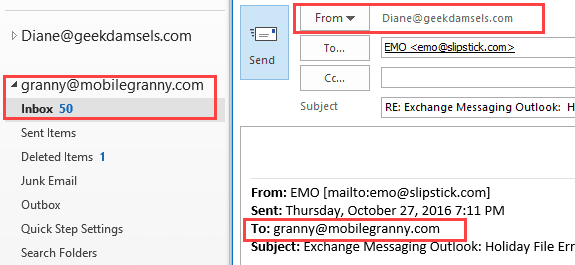
New messages use the correct email account but replies or forwards always show as From the Outlook.com account. At this time, the correct From account is actually used, even though it displays the wrong account. Test it, and if it sends from the wrong account, select the correct account using the From selector. Yes, it's an extra step that should not be necessary.
My best guess on the cause of this bug is that it is related to a new Outlook 2016 feature for Outlook.com accounts that lists all aliases for your Outlook.com account on the From selector, allowing you to use any of select any of the aliases to send from. (Exchange users have wanted the ability to send using the secondary addresses assigned to their mailboxes for years but it's only available in Outlook.com accounts at this time. Sorry.)
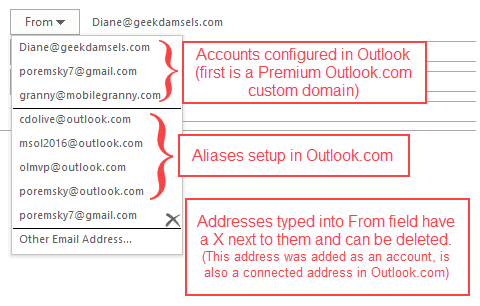
Note: those addresses are only used for testing. I will not respond to messages sent to those addresses (and probably won't even see them.)
In my tests, Outlook.com accounts with non-Microsoft addresses added as aliases and the new custom domains are affected. If you only have Outlook.com aliases (including Hotmail, Live, MSN), Outlook will use the correct From account.
Affected users have limited options until this is fixed. You can continue to change the From address manually or remove the non-Microsoft address from the Microsoft account. Macros to change the address automatically are not working.
Removing the address is not going to work for custom domains, but will work for anyone who is using a Pop3 or IMAP account and Outlook.com for calendar and contacts. The address can be added back as a connected account then set as the default for sending, which might work better.
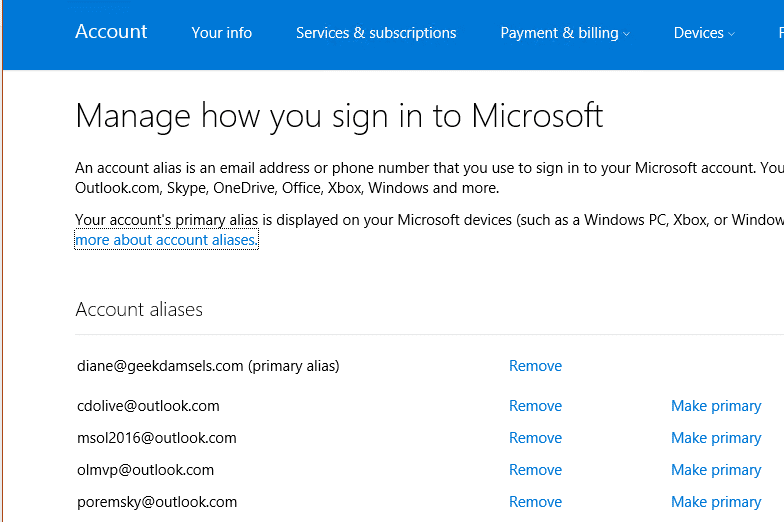
To remove an address alias from your Microsoft Account, log into your account at https://account.live.com/names/Manage then click Remove next to the addresses you want to remove.
The following addin works around this bug (also works if you just always want to send from one account.)
Tools
SelectSender is a tool for Office 365 users who need to send mail from different addresses. This utility allows an Office 365 OWA user the ability to easily select the From address of the new, replied or forwarded message. SelectSender can be used only in cooperation with ChooseFrom 365 cloud service. | |
This add-in will automatically substitute the From: address when you reply to or forward a message sent to the distribution list. In other words, when a person who is a member of the distribution list replies to a message sent to the distribution list, the default sender address will be the distribution list address. | |
SetAccount add-in allows you to specify the email account to use for all outgoing email. If you have more than one email account collecting email and always want to send replies using the default account, Outlook always uses the receiving account when you reply. You can select the correct sending account when you reply, but it's easy to forget to do this. This utility also fixes the Outlook.com bug where the Outlook.com account is used for all replies. |

Dafne Grimes says
Hello, i have a message in outlook said "we couldn't log on to the incoming (IMAP)server". How can I fixed
Diane Poremsky says
Who is your email provider? If AOL, Yahoo, or AT&T, see https://www.slipstick.com/outlook/yahoo-aol-accounts-outlook/:
Kim Spoorenberg says
Hello, I have multiple email addresses from two different companies and we can not seem to get the calendars to sync properly when people respond to the calendar invite the response comes from the main account set up in outlook instead of the email account I originally sent the invite from. what todo?
Sophie Johnson says
Dear Diane,
I used to be able to adjust the 'From' email manually in my Outlook 2016. Now, the From button will not budge. All my replies are sent in outlook.com. (All my accounts are IMAP. I can send from my gmail.com account and my domain-name account. But replies are always only in outlook.com, and no choice of Reply email is permitted. This is very irritating.)
Doron says
Hi, I need some advice, please. Suddenly, when I reply or forward an email from my Outlook 2016, the reply email goes out from a diferent mailbox. How to fix so all my replies and forwarded will go out from the receiver address not the default one. I have about 5 mailboxes on my Outlook 2016.
Diane Poremsky says
What type of email accounts do you have configured in Outlook? Are they all on different mail servers?
One common cause is using a catchall mailbox, where each account has the same username and password - outlook downloads all of the mail in the mailbox.
Doron says
Thank you, Diane. There are 2 Exchange accounts, 3 IMAP (non-Microsoft) accounts. The only email account that when I hit 'reply' it won't send from the same, is one of the Exchange accounts. This one is not the default account though.
Diane Poremsky says
It's definitely odd that the exchange account is affected. Does the rely/forward send from the default account?
Brian Titus says
I just set up Outlook 2016 on a new computer, and I can't get my non-outlook.com email address to stick in the "From" list. So, now I have to select "other email address" and type in my email address every time I'm sending. On my laptop with Outlook 2016, this non-outlook.com address is at least available in the list, with an "X" by it. I can't remember how it got there though!
Brian Titus says
Just happened to check back in on this... I'm not sure what has been fixed. I'm on Outlook version 1706 build 8229.2086. When I create a new email, I still see my non-outlook.com email address with an "X", and it still is not selected by default. New emails created at outlook.com work fine.
Diane Poremsky says
Is the non-outlook address an alias at outlook.com? That part isn't fixed. (They are working on it, no ETA though.)
What is fixed is a problem when 2 accounts were in a profile and replies to mail in the pop or imap account were sent using the outlook.com account.
Brian Titus says
Sigh... yep, that's what's still not fixed for me. I'll just keep waiting I guess. Thanks for the reply!
Brian Titus says
Sorry, should have said the "non-outlook address that's an alias at outlook.com" part is what is still not fixed for me.
Jim says
It is nice to see MS finally fixed the default send from when using an alias external account. I still have the issue of getting replays to meeting requests. They go out under ugly@outlook.com still. If I use the alias I get "meeting is not in the calendar folder for this account...". Any work around or am I missing something?
Diane Poremsky says
The external account is an alias in Outlook.com? They are working on making this work but I don't have an ETA.
WS Lee says
Hi Diane
Previously I was using Outlook.com for my email corresponding purpose. Recently I installed MS Office & Outlook 2016 in my PC. After setting up the same email account in MS Outlook, I found all the sent mail messages in "SENT" box (Outlook.com) could not appear in MS Outlook "SENT" box. I do not know how to solve this problem. Please help. Thank you.
Diane Poremsky says
Did you use auto account setup to add the account to Outlook desktop?
Is the folder called Sent items or just Sent? Some smartphones will put sent messages in a different folder and it causes confusion on the desktop because the messages are where you expect them to be.
WS Lee says
Hi Diane
Yes. I did use auto account setup to add the account to MS Outlook desktop. And you are right, the folder name in Outlook.com is "Sent Items" and is different from folder name "Sent" in MS Outlook. Is this the reason why all my older sent mails in Outlook.com not appearing in MS Outlook application? I did check the syn settings in Account under Outlook.com, the syn settings is "ON" status. However, the problem still persist. Are there some ways to move all the older sent mails (in Sent Items folder) from Outlook.com to "Sent" folder in MS Outlook? Please advise. Thank you.
Diane Poremsky says
It should be Sent Items in both outlook and outlook.com - that is the standard name for Outlook and Exchange. Press Ctrl+6 to switch to the folder list - you'll be able to see all folders in all data files. Which data file is the Sent folder in and what type of account is configured for that account in Outlook?
WS Lee says
Hi Diane,
Recently I installed MS Outlook 2016 in my PC. However, I could not retrive all the "SENT" email messages from Outlook.com to MS Outlook 2016. All the "SENT" email not appear in Sent box of MS Outlook 2016. What is the problem and how to solve it? Please help. Thanks.
Diane Poremsky says
Some appear, some don't? Is there any pattern to which appear and which don't - like all the older ones are missing? If so, check the sync slider in File, Account settings, double click on the outlook.com account and see what the sync slider is set to.
Try resetting the view on the folder. (View tab)
Brian Titus says
Anyone know of any updates on this? It's driving me crazy... I have my own email non-outlook.com address which I've used for years, and now since the migration I have to manually select it for every message sent from the desktop. Super annoying.
Diane Poremsky says
No updates as far as a fix yet (although I haven't tested it with the recent insider builds) - if you set a pst as default, it will work as expected, but this will also affect the default calendar.
Jen says
Hi Diane,
Thanks for your useful site! I access my yahoo email on both my Mac and PCs by syncing with Outlook via IMAP, and I use Outlook.com to sync my calendar and contacts across all my devices. I can send and receive emails just fine. Replies come from and go back to my yahoo account as expected when I send from my desktop version of Outlook or from Outlook.com. My issue is with calendar invites.
All my calendar invites are sent from the ugly outlook.com address instead of my yahoo alias. So, any calendar replies (accepts or declines) got to this ugly address instead of yahoo. The problem with this is that I never receive them. The sender gets a 550 error "550 Requested action not taken: mailbox unavailable" because the mailbox is not found.
I'm not sure if this is the same bug as documented on this thread, but if you know how to fix it, I'd be ever so grateful!
Thanks,
Jen
Diane Poremsky says
That is a different issue. If you create the event from the yahoo inbox, it should be sent from the yahoo account. If you create it by going into calendar and choosing a date, it will go from outlook.com because its on the outlook.com calendar.
There really isn't a good solution - you can't prevent the meeting requests from going out from the outlook account because the events are on its calendar.
Jen says
Thanks, Diane. I agree....It's not really a good solution as I need the appointment to be on my outlook account in order to sync with my other devices. What about the 550 error though? Obviously the mailbox exists since that is where my requests are being sent from. Why is the sender getting a "mailbox unavailable" error and can't I receive the reply? Is there any workaround or resolution on that end?
Diane Poremsky says
the address- outlook_ugly@ - is not a routable address. the only workaround is to add an outlook.com alias to the mailbox and set it as default.
Chris T says
This issue features in..
Fixes or workarounds for recent issues on Outlook.com
Workaround 2 given there is to create an empty Outlook data file and make that the default Outlook data file. I have tried it, and it works for me. No awkward knock-ons apparent so far.
Paul says
thank you for identifying this extremely ANNOYING problem. i'm getting a "on behalf of" in all my replies. Some ***** clearly designed this to anger people. Or was so incompetent as to not test it before release.
I tried the registry edit in another thread. no go. would appreciate any advice for simply allowing a reply to reply from the account it came to.
Diane Poremsky says
they are working on solving it and until that happens, you'll need to select the correct account before sending.
Paul says
thank you Diane
Geert says
When filling in the reply-to address in the IMAP account settings / more settings, at least a new reply will not be undeliverable in case you did forget to change the 'from' field
Danny Khen says
Diane,
I just found out that the bug happens even in a much simpler case. I have a Hotmail account as my MSA, and it had one alias, an outlook.com address. No non-MS aliases. My default Outlook account is an IMAP account. The reply/forward bug reproduced. To solve it, I had to do this:
1. On outlook.com, I removed the single alias.
2. In Outlook, I removed the Hotmail account, then re-added it.
Now, the From menu does not show the alias again, and reply/forward respect the default account for From.
In case you have contact with the Outlook team on this, you may want to give them this info.
Danny
Will says
Hi,
I use Outlook 2016 and Outlook.com using the address of an connected account, which is set as primary alias and default "From".
With EAS, everything worked fine, email and calendar events were created with correct from address.
After migration to Exchange, things do not really work anymore: Autodiscovery does not work using the non-Microsoft-address alias (which is a send-only SMTP account, reception is via automatic forward), and when using an outlook.com alias for autodiscover, default from email becomes the Outlook_A1B2C3D4... type of address, while any attempt to add the specific email from seems to end up in "on behalf of" email sender information.
From what I have read, the hex digit address does not appear if changing primary alias to an outlook.com address, but this did not seem to help with the "on behalf of" address field problem.
Is there a possibility to use Outlook 2016 to send transparently through Outlook.com emails using a "from" of a connected SMTP account?
Diane Poremsky says
At this time, no, connected accounts don't work in outlook desktop. I was told they are working on it but don't know what they will do (hopefully not make it worse!) or when.
Will says
Thanks for confirming.
So they are disconnected accounts for now. :-(
Hopefully they reintroduce the way it worked when using EAS.
For me, this now breaks quite a few things. Need to check what it means for the calendar and responses to invitations coming in via connect account's addresses.
Chris says
any updates on a bug fix?
Diane Poremsky says
Not at this time. There are some reports that if the outlook.com account is added after the pop/imap, that it works as expected. I haven't had a chance to test that (I removed the outside addresses from my accounts testing the bug)... also, you can manually configure an EAS account (eas.outlook.com is the server name) but EAS isn't as robust.
Kevin Bryant says
Hi Diane,
Thanks for the very useful website. I use Outlook 2016 with a Pop3 personal account setup as default and an Outlook.com(365) exchange account to sync calendars and contacts. all work correctly and I do not seem to have the bug identified in this article. However on changing from EAS to an auto setup exchange account the data file properties are named : outlook_EB62094CDD8CEE9B@outlook.com, can I rename somehow without any issues? When sending, forwarding or replying to emails my default appears to the correct personal email address with an option to change it to the correct outlook.com alias address so I am not sure why the outlook_EB62094CDD8CEE9B@outlook.com is not named the same as my Outlook.com alias.
As always any help appreciated.
Kind Regards,
Kev
Adrian says
I use my Outlook.com account only for syncing my calendar and contacts. In my case, the solution seems to be to make the POP3 data file (rather than the Outlook.com data file) the default data file - unless you tell me that this is a bad thing to do.
Diane Poremsky says
All that would do would be change the calendar that shows up in outlook today and in the to-do bar. also where new appointments or contacts go when you create a new item while in another folder. Overall, it's not bad - it won't blow outlook up - but might be inconvenient.
Lillian says
Hi Diane, I'm completely stuck! I had a custom domain set as an outlook.com profile to sync my contacts/calendar etc across all outlook tools. After the upgrade I re-added everything and lost my calendar/contacts and the snyc hasn't been working. So, I created a new outlook profile (with an outlook.com domain) and connected my custom domain account, set the "send from" as my custom domain. I left the primary alias as the outlook.com. I can select my custom domain as the send email address in outlook.com and outlook 16, but not the android app. I also have the issue that my calendar appointments are coming from the outlook.com address -not my custom domain. Also, I've tried to add the custom domain as an alias too but it won't let me because I have another account set up with that custom domain. I've deleted that profile, but the account won't physically delete until January! I'm losing my mind here - I am stuck as to what I should do. any help much appreciated (I was on live chat with microsoft today and they have not been able to help). Thanks in advance.
Christopher Hood says
This bug is a real pain. I hope that Microsoft gets it sorted soon.
George says
Diane hi.
I use Windows 10 Anniversary update with Office Pro 2010 and Outlook 2010.
Following your expert advice I had Outlook 2010 connected to the original Outlook.com via the Hotmail (Outlook) connector which worked superbly. Both my calendars, Contacts linked perfectly and I was able to view and edit on my Windows Phone (Lumia 950) also running Windows 10 Anniversary update.
I tried to re add account via the Auto Account Setup to automatically configure Outlook.com account as an Exchange account in Outlook. I then removed the 'old' Outlook account that was connected via the Outlook Hotmail Connector (MAPI) and uninstalled the Outlook Hotmail Connector from the PC. (PC also has POP3 emails connected to it).
Two things then happened: Both my calendars disappeared from the PC and I cant seem to get them back unless I reinstall Outlook Hotmail Connector, but now they don't sync with my Phone. I used to be able to send email from my Windows Live account, but I don't seem to be able to do so now with the exchange Outlook.com account.
Your help or guidance in the right direction will be greatly appreciated.
Diane Poremsky says
Was the account moved to the new server? if the connect syncs, the account either wasn't moved yet or it was just moved and the move is not complete - it can take 24 - 48 hours for DNS to properly update and point to the new server. Logging into outlook.com would work but clients will have problems connecting.