An Outlook had a question about the Calendar overlays:
I manage 7 calendars in Outlook and I would like to have at least 6 of them overlapped in the same view, but when I select the 5th, the view changes to something different. Is there any way to view more than 4 calendars overlapped keeping them as when I overlap 2 or 3.
That "something different" is the Schedule View. It's supposed to make it easier to view a large number of calendars. By default, when you select 5 or more calendars, Outlook switches to the Schedule view.
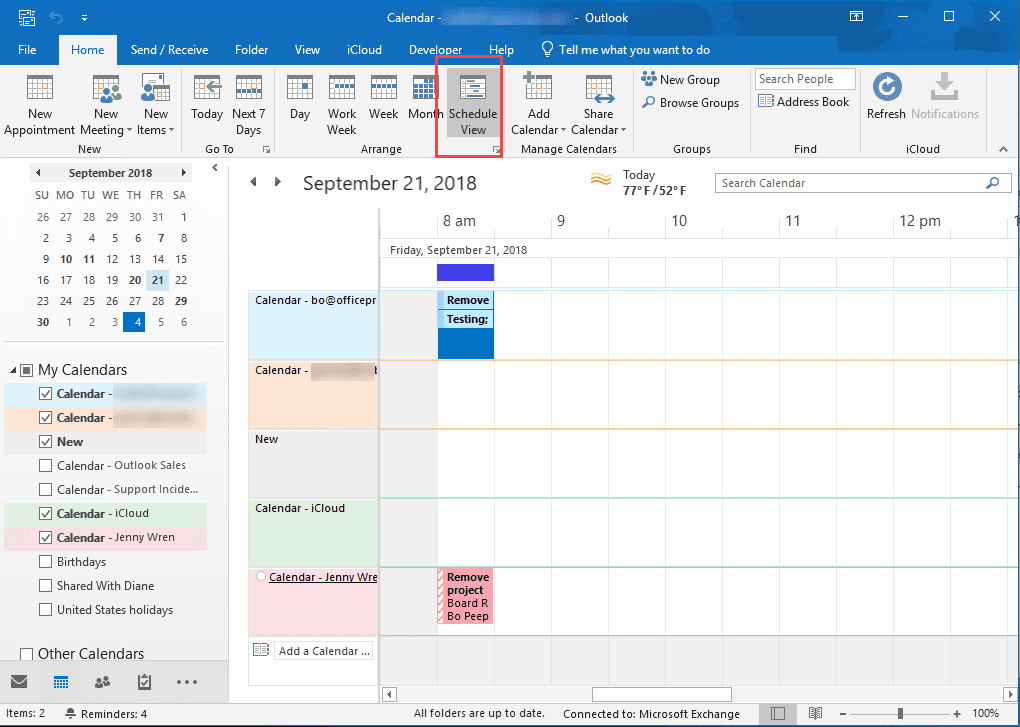
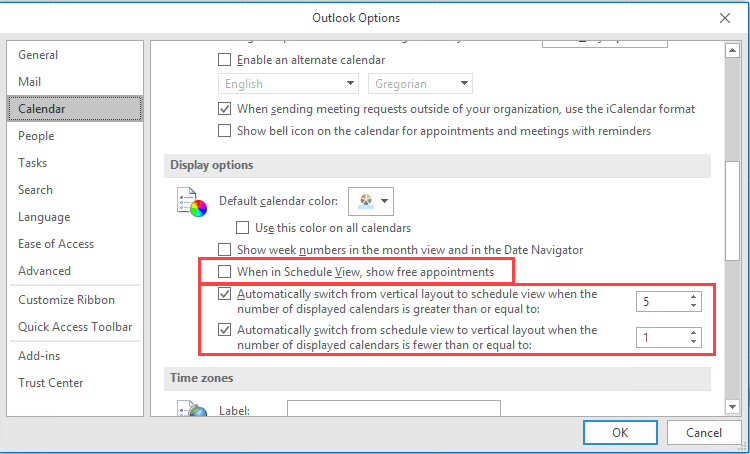
You can view more in the overlay mode. Either switch back to Month or a Day view on the View menu by choosing Month or disable Schedule view in File, Options, Calendar. If you like Schedule view, you can change how many calendars are selected before switching to or from Schedule view.
The settings in Calendar Options are:
Automatically switch from vertical layout to schedule view when the number of displayed calendars is greater than or equal to [number of calendars]
Automatically switch from schedule view to vertical layout when the number of displayed calendars is fewer than or equal to: [number of calendars]
Administrators can use group policy to allow or block switching between the standard calendar view and schedule view. In the Outlook Group Policy templates, the Schedule View options are under Outlook, Outlook, Options, Preferences, Calendar Options, Schedule View.
While we’re discussing Schedule View, a client preferred using Schedule view but thought it was “broken” because very few of his appointments were showing on it. A little investigation showed that most of his appointments were set to Free. By default, Schedule view only displays appointments that are marked Busy, Out of Office, Working elsewhere or Tentative.
If you use Schedule view and want to see Free appointments, you’ll need to enable the option for When in Schedule View, show free appointments. Or set your appointments to one of the Busy states.
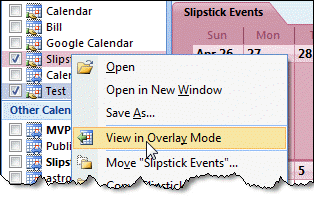
Switch between overlay and side-by-side mode:
Click on the arrow on the tab to switch between overlay or side-by-side mode.

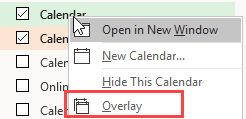
Or, right-click on the folder name and click on Overlay to toggle it on and off.

Hi Diane,
One of the users is having trouble with Calendar in Outlook.
He has 5 or 6 calendars setup in OVERLAY mode but every half-hour or so it changes back to side-by-side.
Have you got any ideas of why it would happen?
Diane:
I am wondering how to view a calendar overlay when I am in email and have the calendar pane open on the right of the screen. I use O365 E3.
Thank you,
In the to-do list? It's not possible. You'll need to open the calendars in a new window.
Hi Diane,
thank you for your tutorial. I use Schedule View in Outlook 2013, I have 8 parallels calendars and "gantt view" is very useful, I have a question about the display: I would like to see more of one day, the best would be a week display in schedule style with all the 8 calendars side by side (not overlayed), is it possible to change into this type of view?
Thank you in advance
Best wishes
Monica
Unfortunately, no. The calendar module is limited to 1 full day, even on large screens.
The scheduling assistant will show as many days as can fit on your screen (4 days on my large monitor) but it only works with mailboxes, not all calendars.
Hello Diane,
Thank you for your explanations on these Outlook calendars.
As I have two calendars in my OL 2010, one for biz and one for private appointments in overlay view when activated, I would like to start OL without having to also click the private one before being able to see all appointments.
Is there a way of starting OL with both calendars activated from the beginning?
Thank you!
Best regards,
Martin
Outlook 2010 should remember that both are selected (unless you start in the calendar), but if not, you can use VBA or an addin.
Open Outlook with multiple calendars selected and https://www.slipstick.com/developer/code-samples/select-multiple-calendars-outlook/