We get many questions about Office activation failing:
"After installing and activating Office, Outlook keeps asking to accept the End User License Agreement (EULA)."
This is caused by Windows security and permissions. Your Windows user account doesn't have the necessary permissions to write the activation to the registry.
How to Fix
Method 1: Right click on Outlook.exe and choose Run as Administrator. Accept the EULA. If this doesn't help, use Method 2.
If Run as Administrator does not appear when you right click on the shortcut, use the Start menu or Start screen's Search field to find outlook.exe. Holding Ctrl+Shift as you right-click on the Outlook shortcut you use to open it should also enable the Run as Administrator link.
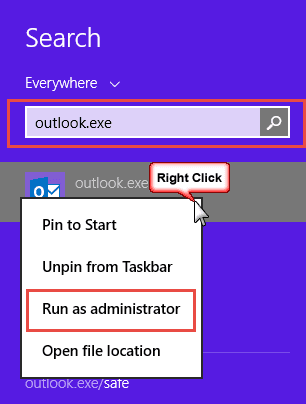

Method 2: Log on to the computer using a Windows account that has administration privileges. Once you do this, open Outlook using Run as administrator. Now when you accept the EULA, the acceptance is saved to the registry. When you log back into your Windows account, the EULA won't appear.

I just changed my password on an old Hotmail account, now I am being asked to agree to cync my other accounts and contacts to it. I don’t want to give this permission. Without agreeing to this I can’t sign into this account. What should I do?
can you post a screenshot? That doesn't sound like anything you should see in outlook.com
Tried the fixes above, no go.
Which version of Office and Windows do you use?
Every time I open Outlook 2013 (paid $149.00 for this) a box pops up asking to accept the agreement. I'm tired of it and two hours on the phone with a so-called Microsoft expert hasn't helped, she plain 'did not know why'!
Did either method on this page fix it?
What a ROYAL pain. Outlook is a pain - I don't know all the geek stuff about my internet connections that I would have to provide in order to enable me to use Outlook. Ridiculous - I'm gonna dump my Office and use Open Office. Microsoft shoots themselves in the foot once again. Listen to the masses!!!
The Internet connection stuff you need to know to configure outlook are needed to configure any email client... and outlook's automatic account setup will configure most accounts for you. But... you need to use the programs that meet YOUR NEEDS the best, and if that is Open Office, then by all means you should be using it.
Thanks. Right-clicking on Outlook in the start menu didn't give the run as administrator option. I had to find outlook.exe and right-click that
I can't understand why we have to accept Outlook if we don't like it. I would like to return to the original system.
This is Outlook.com replacing Hotmail? Unfortunately, Microsoft decided to replace the Hotmail interface with outlook.com. Sorry.