You can supplement Microsoft Outlook's built-in Categories field with your own Subcategory field, or use a category naming convention to allow you to better organize and group "subcategories" together.
Method #1 | Method #2 | Method #3 | More Information
Method 1 - Custom Keyword field
Add a new Subcategory field to a folder like this:
- Open a Contact.
- Click the All fields tab
- Select User-defined fields in folder.
- Click New.
- Define your new field as follows:
Name: Subcategory
Type: Keywords
Format: Text
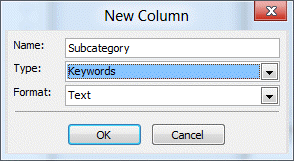
The Keywords type allows you to apply multiple subcategories to each item.
Limitations of this method:
You cannot group by more than one Keywords-type field in a view. This means that you cannot have a view that groups by Category then by Subcategory. You can create a filtered view for the Category then group by the subcategory.
Because you can't create a custom email form for incoming items, if you need to apply subcategories names to email items, you can either create a custom keyword field in the Inbox (use in-cell editing to add keywords) or use two category names and filter so you only see items assigned to the main category name, then group by category to group by "subcategory". Or use the naming convention method below.
Method 2 - Naming Convention
Another method is to name your categories so they include subcategory information -- for example, Business - Local, Business - Regional, Business - International, etc. When you use this method, you can sort by category name and group by category, so that the categories will be grouped alphabetically, with all of the Business categories together (from our example).
Method 3 - Colors
Use Outlook's Color Categories feature to "group" categories together. Each color is the "master category" and the category names are the subcategories. This method is less useful because you can't group or filter by colors.

More Information
- See Microsoft Outlook Categories for a list of addins for working with categories.

jass says
how to make subcategories under the color category?
Diane Poremsky says
You can't make actual subcategories, but can fake it using a naming convention such as Business - Local, Business - Regional, Business
jass says
I work on a shared email box and all the members have different colors as categories. It goes like red-Cynthia, blue-Brian etc. I want to make a subcategory to organize emails coming under my color-name. not sure if thats possible.
James says
Diane, using Method 1 above, any way to allow Instant Search of this Keywords-Type UDF when working in a folder or across a set of folders?
Diane Poremsky says
No, sorry.
Terry says
Thank you, Diane for this information. I've tried to research the category/subcategory issue for any further information, but "no joy." We have upgraded to Office 2016 and are finding nothing has really changed in this area since your post (above). We will probably end up utilizing your Method 2 - Naming Convention, but I have a question about your Method 1 - Custom Keyword field. I was able to create the new "Subcategory" field into the various views (that we easy enough), but I cannot determine how to actually assign a category label to the new Subcategory field. What am I missing here?
Diane Poremsky says
Definitely nothing has changed over the years in regards to subcategories (and i doubt it ever will).
You can't assign labels/colors/categories to the field - it's just a test field that supports grouping. So you can group by category then by the keyword.
michael says
Outlook 2010. Built in feature to FIND Related messages does not find messages I WANT RELATED. Do you know of a method by which I can identify messages as being Related? I do not know macros. I do not know VBA.
Diane Poremsky says
Find related find messages by sender or that are in the thread. If you need to find messages that are related in some other manner, you'll need to use instant search.
Raj says
How to add multiple subcategories for single category??
Diane Poremsky says
You'd need to use this format for the category name: cat - subcat1, cat - subcat2 etc.
Another option is use colors to identify a "family" of related categories and category names for the subcategory: create these categories, all using the red color: subcat1, subcat2, subcat3.
Scott Aldinger says
Diane, I love categories and use them a lot. Thank you for your writings. when I open contacts and sort by category, is there a way to quickly go to a category, for example, WYC is way at the bottom of the list and I have to scroll down, and or shrink each category to get there. Scott
Diane Poremsky says
Try pressing W - this will jump you to the first item (category in this example) in Outlook 2010's Category dialog. This trick works to jump around many Outlook views and dialogs, but not all.