We see many complaints that Outlook crashes when replying to messages or creating new messages. This happens because the delivery folder selection is corrupt and you are referencing a nonexistent folder.
You may receive error code 0x8004010F with a message that Outlook can't access your outlook.pst file instead of Outlook crashing. The solution is the same: set a delivery location. You'll often get this error if you move the *.pst file and select the new .pst location when Outlook is restarted.
This should only affect POP3 email account and may be more common when the profile contains a Microsoft Exchange Server account.
Select a delivery location
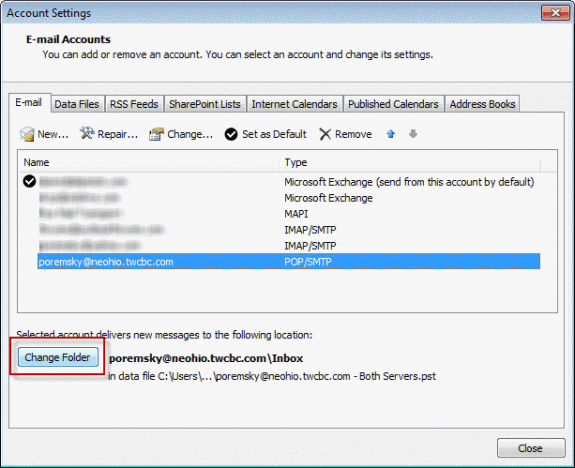
- Open the Account Settings dialog. In Outlook 2010 and up, look on the File tab, in Outlook 2007, it's on the Tools menu.
- Select the POP3 account
- Click Change Folder
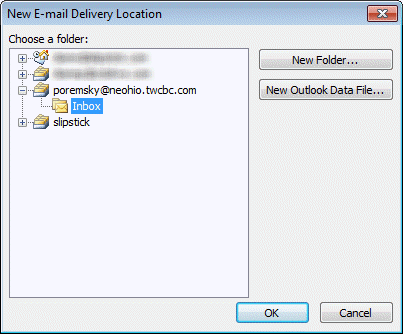
- Select a folder to deliver to.
- Work you way back out to Outlook and see if it still crashes.
Send and Receive Error: 0x8004010F
A missing or corrupt folder selection can also result in the following errors when attempting to send and receive. The fix is the same: click Change Folder and select a folder for delivery.
Task 'you@domain.com - Sending' reported error (0x8004010F) : 'Outlook data file cannot be accessed.'
Task 'you@domain.com - Receiving' reported error (0x8004010F) : 'Outlook data file cannot be accessed.'
Note: when the error message is 'object cannot be found' and you use an Exchange mailbox, the 800x4010F error is the result of problems with the address book. See The Dreaded 0x8004010f – Operation Failed Error

Linda says
Hey Diane! I am also facing an error code 0xc0000225 then outlook not responding.
rgm1714 says
A Windows 10, Office 365 user with many happy years of using Outlook UNTIL most recent round of system updates. Problems were intermittent at first but now occur 100% of the time. I can delete incoming emails BUT if I attempt to reply, when I hit SEND, the header immediately generates a spinning wheel and the message Not Responding appears. If I attempt to create a new email and I hit Address Book, the email immediately hangs with the message Not Responding. Based on an earlier post, I have emptied the AutoComplete file (that was a mistake) with no impact on the problem. I have run OffCAT.msi to identify any issues and found one add-in that I have now disabled. No impact on the problem. I have done both a Quick Repair and a Complete Repair (?) to no avail. I have started Outlook in Safe Mode and was able to send test messages to myself successfully in each of three email accounts - a Pop3 (Earthlink) amd two MAPI accounts (Gmail, Me) when I tested the accounts in Repair mode. However, while still in Safe Mode, any attempt to send a new email failed with the email immediately hanging with the message Not Responding. There are 14,000 emails in the Inbox. I have compacted the data files (which by the way are in the C drive). My memory is divided into the 'C' drive which is about 150 Mgb and is about 50% utilized and the 'D' drive for data which is 760 Mgb and is 98% available. I attempted to run scanpst.exe to see if there were data file corruption problems but this file does not seem to be included with the Outlook files in Office 365.I have shut down aother apps to minimize the use of system resources. I am beyond frustrated.
Leslie says
Hi,
My outlook crashes and I tried to do this solution but it's not a POP account, I believe it's an Exchange account, what would be the solution for this?
Diane Poremsky says
Try removing the exchange account from your profile and add it back (or create a new profile).
sharen frost says
while using thi emailing, i was getting sending message error issue mostly and that was seriously irritating. This is best post for Outlook Crashes When You Reply or Create a New Message. Well done Guys!
Salley says
Finally - the solution! Thank for your help
Vicki says
I guess I'm missing a portion of the fix. When I get to the point of the POP tab under email, it shows my email address and "inbox" under that and nothing else. Should I open the "new folder" selection and create a new name for the emails to go to? Will delivery be the same? Thank you. This never happened before until I moved into a new apartment, now it happens all the time.
Diane Poremsky says
I wonder if your problem is something with the internet connection... if the folder names next to the Change folder button says 'address@domain.com\Inbox' then its set correctly. You can try selecting another folder then reselecting the Inbox.
toby says
either typing in a preview pane reply or pop-out window reply, Outlook freezes. Tried safe mode and get same results...fully updated Win10 and Outlook 2016
Yves says
did you find a solution yet?
rainard says
Doesn't work for me. Outlook 2016, same issue. Creating or replying crashes Outlook 2016. File changed, new Profile, deinstall and install Office 2016, nothing works. The error appears after installing Windows 10 last Version (threshold). Is there any solution ? Trying since 2 days to solve ...
Yves says
did you find any solution to this
Brian Clark says
Thank you so much Diane. You fixed my POP3 issue with my Outlook 2016 crashing. I can't thank you enough. ? ( and no thanks to Mr. Gates I'm afraid. )
Brian Clark says
Finally I have found the right fix - thank you, thank you, thank you. Will this issue continue to occur with my POP3 account? I have Office 2016 and Windows 10. Should Microsoft have been responsible for fixing this issue - to date they have not been very helpful.
angelica says
where is the account setting for the newest outlook for windows 10. I'm trying to follow steps above but cant find email account settings to change folder. help
Diane Poremsky says
In Outlook 2013, 2016, or 2010, go to File, Account Settings. Select the POp3 account and the Change Folder button is on the bottom of the dialog. Only POP3 accounts have this option.
Brian Clark says
Perfect Diane, you are a genius. ?
angelica says
for some reason there isn't a "file" tab or area, in windows 10, outlook is an app and there isn't any "file" to click on.
Diane Poremsky says
You are using the Mail app, not Outlook desktop. That would have different causes and solutions from the Outlook desktop app.
Do you have any windows updates waiting to install? If so, install them.
What antivirus are you using?
Sarah Squibb says
I'm having the same problem. I can open a reply to an email but then if I type it freezes and Outlook crashes. The same happens in safe mode
Diane Poremsky says
What version of Outlook & Windows? What type of email account?
malcolm bund says
when replying to an email the screen that appears automatically freezes and I have to close the program through task manager.
Diane Poremsky says
Does it work ok in Safe mode?
To open Outlook in Safe mode: Close Outlook then hold Ctrl as you click on the Outlook icon. You'll get a message asking if you want to start in Safe mode. Click Ok.
Darren says
Same for me, either typing in a preview pane reply or pop-out window reply, Outlook freezes. Tried safe mode and get same results...fully updated Win10 and Outlook 2016
ChiChang Lee says
My E-mail account does not allow me to write any text. Please resolve the problem.
Diane Poremsky says
What happens when you try? What is the error message?