• Outlook User
  • New Outlook app
  • Outlook.com
  • Outlook Mac
  • Outlook & iCloud
  • Developer
  • Microsoft 365 Admin
    • Common Problems
    • Microsoft 365
    • Outlook BCM
    • Utilities & Addins

Outlook.com Connected Accounts: Gone

Slipstick Systems

› Outlook.com › Outlook.com Connected Accounts: Gone

Last reviewed on August 9, 2024     6 Comments

Applies to: Outlook.com

When Microsoft removed connected accounts from outlook.com accounts not using the feature back in May 2021, they said anyone using connected accounts at that time could continue to use it.

When users with connected accounts could not view the Sync email page at View tab > View settings > Mail for weeks around the end of 2023 and into early 2024, many users who still had connected accounts wondered how much longer we’d be able to keep them.

When the page loading problems were fixed in February 2024, users discovered editing an account to update a password removed all accounts and the feature from outlook.com.

Around April 1, 2024, Microsoft added a banner to the Sync Email page notifying users the feature was going to be removed on July 1 2024.
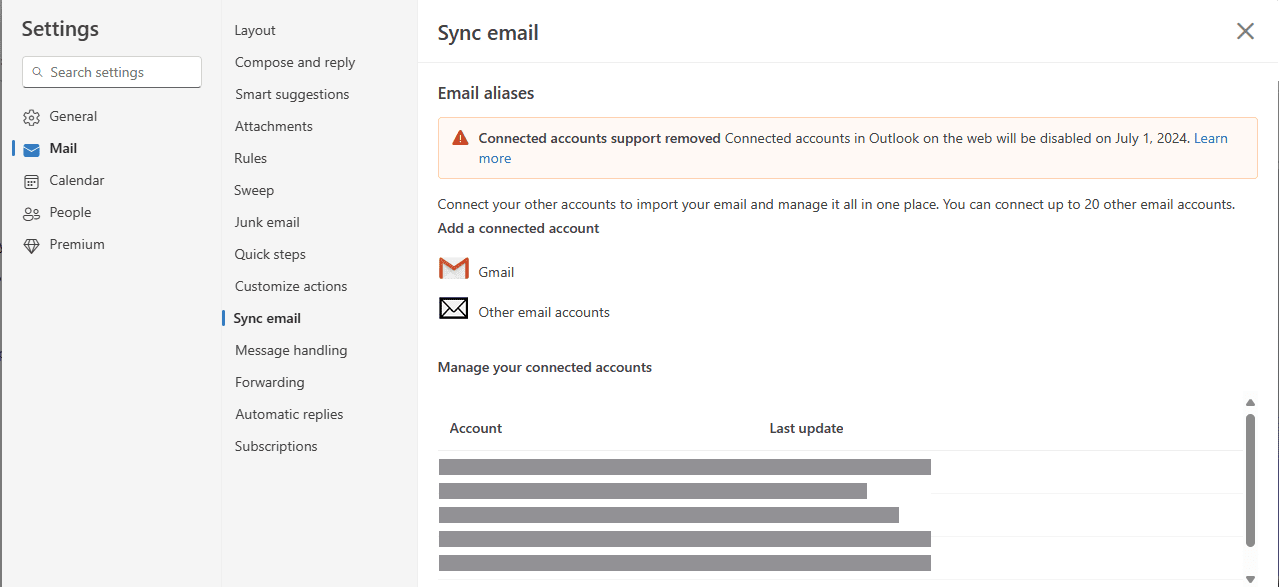
Connected account notification

Based on the number of threads I’m seeing in the Microsoft forums many users missed the banner notification.

What are your options now?

If you prefer using the outlook.com interface to read your mail, you can add the accounts to new Outlook. While its not quite the same as connected accounts (each mailbox will be separate), it has the same interface as Outlook on the web. (Currently, it works best with outlook.com and Microsoft 365 accounts, plus Gmail, Yahoo, and iCloud.)

Forwarding mail to Outlook.com is also an option, although it’s not one I recommend now that more domains are using SPF and DMARC to identify potentially spoofed emails and drop them.

In addition to losing connected accounts, Microsoft 365 subscribers lost the ability to add a Gmail account as an "Additional mailbox" and opening in the outlook.com interface.

More Information

My previous articles on the subject:
Volume 29 Issue 20
Volume 29 Issue 21
Volume 29 Issue 12

Microsoft article mentioning it:
Troubleshoot connected accounts in Outlook.com

Outlook.com Connected Accounts: Gone was last modified: August 9th, 2024 by Diane Poremsky
Post Views: 108

Related Posts:

  • Removing Suggested Accounts in New Outlook
  • Outlook.com is moving to Office 365!
  • "This account is not supported in Outlook" error message
  • Spellcheck and Microsoft Editor not working in new Outlook

About Diane Poremsky

A Microsoft Outlook Most Valuable Professional (MVP) since 1999, Diane is the author of several books, including Outlook 2013 Absolute Beginners Book. She also created video training CDs and online training classes for Microsoft Outlook. You can find her helping people online in Outlook Forums as well as in the Microsoft Answers and TechNet forums.

Comments

  1. Deborah Danniels-French says

    January 14, 2026 at 12:11 pm

    a second thought - if I delete my @design and my gmail from Outlook on the web - does it delete them from the outlook app?

    Reply
    • Diane Poremsky says

      March 6, 2026 at 12:17 pm

      Are you using the addresses as aliases? That only gives you another address to sign in with, it doesn't affect email.

      Mail in outlook.com mailbox will remain. It only removed the account (that no longer syncs to outlook.com, although Microsoft should have removed it from the page when they disabled connected accounts.)

      Reply
  2. Deborah Danniels-French says

    January 14, 2026 at 12:07 pm

    Finally just figured this out and found this page. VERY VERY annoying and unfair of a company like Microsoft! Ridiculous to force you to use @outlook on the web version (if I understand this properly) grrrr . . . .

    Reply
  3. N.O. Contact says

    July 21, 2024 at 7:47 am

    Just another way MS seeks domination, alienates users and displays disregard for loyalty and tradition. May I suggest adding all email accounts to Spark, which finally offers its handy email program on all platforms including Windows. Spark even let's you color-code your accounts, so you see at a glance whether the message originates in Gmail, Yahoo, Outlook, or any third-party provider. And you'll support a business based in Ukraine!

    Reply
  4. Lori Tanaka says

    July 17, 2024 at 9:13 pm

    Thank you for the article--Microsoft doesn't even mention this in any of their help guides. Even their IT help desk doesn't know about this. I spent 2 days trying to figure out what was wrong and then by chance I stumbled upon your article.

    Reply
  5. Franz says

    July 17, 2024 at 3:10 pm

    ouch, I guess this just hit me. I used outlook web and always SENT through my own SMTP server (as I didn't want to use @outlook.com as sender address) - suddenly this doesn't work anymore ... seem's I have to go to use gmail now or an own eMail webinterface ... (which usually suck :-( )

    Reply

Leave a Reply Cancel reply

Your email address will not be published. Required fields are marked *

Visit Slipstick Forums.
What's New at Slipstick.com

Latest EMO: Vol. 31 Issue 7

Subscribe to Exchange Messaging Outlook


Support Services

Do you need help setting up Outlook, moving your email to a new computer, migrating or configuring Office 365, or just need some one-on-one assistance?

Our Sponsors

CompanionLink
ReliefJet
  • Popular
  • Latest
  • Week Month All
  • Use Classic Outlook, not New Outlook
  • How to Remove the Primary Account from Outlook
  • Reset the New Outlook Profile
  • Disable "Always ask before opening" Dialog
  • This operation has been cancelled due to restrictions
  • How to Hide or Delete Outlook's Default Folders
  • Change Outlook's Programmatic Access Options
  • Use Public Folders In new Outlook
  • Removing Suggested Accounts in New Outlook
  • Remove a password from an Outlook *.pst File
  • Sync Issues and Errors with Gmail and Yahoo accounts
  • Error Opening iCloud Appointments in Classic Outlook
  • Opt out of Microsoft 365 Companion Apps
  • Mail Templates in Outlook for Windows (and Web)
  • Urban legend: Microsoft Deletes Old Outlook.com Messages
  • Buttons in the New Message Notifications
  • Move Deleted Items to Another Folder Automatically
  • Open Outlook Templates using PowerShell
  • Count and List Folders in Classic Outlook
  • Google Workspace and Outlook with POP Mail
Ajax spinner

Recent Bugs List

Microsoft keeps a running list of issues affecting recently released updates at Fixes or workarounds for recent issues in classic Outlook (Windows).

For new Outlook for Windows: Fixes or workarounds for recent issues in new Outlook for Windows .

Outlook for Mac Recent issues: Fixes or workarounds for recent issues in Outlook for Mac

Outlook.com Recent issues: Fixes or workarounds for recent issues on Outlook.com

Office Update History

Update history for supported Office versions is at Update history for Office

Outlook Suggestions and Feedback

Outlook Feedback covers Outlook as an email client, including Outlook Android, iOS, Mac, and Windows clients, as well as the browser extension (PWA) and Outlook on the web.

Outlook (new) Feedback. Use this for feedback and suggestions for Outlook (new).

Use Outlook.com Feedback for suggestions or feedback about Outlook.com accounts.

Other Microsoft 365 applications and services


New Outlook Articles

Sync Issues and Errors with Gmail and Yahoo accounts

Error Opening iCloud Appointments in Classic Outlook

Opt out of Microsoft 365 Companion Apps

Mail Templates in Outlook for Windows (and Web)

Urban legend: Microsoft Deletes Old Outlook.com Messages

Buttons in the New Message Notifications

Move Deleted Items to Another Folder Automatically

Open Outlook Templates using PowerShell

Count and List Folders in Classic Outlook

Google Workspace and Outlook with POP Mail

Newest Code Samples

Open Outlook Templates using PowerShell

Count and List Folders in Classic Outlook

Insert Word Document into Email using VBA

Warn Before Deleting a Contact

Use PowerShell to Delete Attachments

Remove RE:, FWD:, and Other Prefixes from Subject Line

Change the Mailing Address Using PowerShell

Categorize @Mentioned Messages

Send an Email When You Open Outlook

Delete Old Calendar Events using VBA

Repair PST

Convert an OST to PST

Repair damaged PST file

Repair large PST File

Remove password from PST

Merge Two Data Files

Sync & Share Outlook Data

  • Share Calendar & Contacts
  • Synchronize two computers
  • Sync Calendar and Contacts Using Outlook.com
  • Sync Outlook & Android Devices
  • Sync Google Calendar with Outlook
  • Access Folders in Other Users Mailboxes

Diane Poremsky [Outlook MVP]

Make a donation

Mail Tools

Sending and Retrieval Tools

Mass Mail Tools

Compose Tools

Duplicate Remover Tools

Mail Tools for Outlook

Online Services

Calendar Tools

Schedule Management

Calendar Printing Tools

Calendar Reminder Tools

Calendar Dates & Data

Time and Billing Tools

Meeting Productivity Tools

Duplicate Remover Tools

Productivity

Productivity Tools

Automatic Message Processing Tools

Special Function Automatic Processing Tools

Housekeeping and Message Management

Task Tools

Project and Business Management Tools

Choosing the Folder to Save a Sent Message In

Run Rules on messages after reading

Help & Suggestions

Submit Outlook Feature Requests

Slipstick Support Services

Buy Microsoft 365 Office Software and Services

Visit Slipstick Forums.

What's New at Slipstick.com

Home | Outlook User | Exchange Administrator | Office 365 | Outlook.com | Outlook Developer
Outlook for Mac | Common Problems | Utilities & Addins | Tutorials
Outlook & iCloud Issues | Outlook Apps
EMO Archives | About Slipstick | Slipstick Forums
Submit New or Updated Outlook and Exchange Server Utilities

Send comments using our Feedback page
Copyright © 2026 Slipstick Systems. All rights reserved.
Slipstick Systems is not affiliated with Microsoft Corporation.