Many users would like to set the iCloud data file as their default data file, if only because they want to see their appointments on the To-do Bar. It doesn't work with all Outlook versions, all account types, or all iCloud versions. It is not recommended, but generally speaking, if it works on your system and does not crash Outlook, you can try it.
When iCloud is set as default and you use an IMAP account, you can't send email in older versions of Outlook. This is because IMAP accounts need a default data file for sent items, even if you have Outlook configured to move sent items to the IMAP folder. The iCloud does not support a Sent Items or other mail folders. (Outlook 2013 and up do not have this problem.)
When the iCloud folder is set as default data file, you can only create Notes (or Journal entries) when you are viewing a (non-IMAP) pst file. If you use RSS feeds, you need to select a delivery folder in local pst file when you add the feed to the profile.
There are no workarounds for IMAP accounts in older versions of Outlook. You'll need to use a POP3 account to send email. There may be other errors and issues I'm not aware of.
General Outlook and iCloud issues are at Outlook and iCloud Sync Issues. iCloud & Outlook Calendar issues are at iCloud and Outlook Calendar Sync Issues and Contact issues are at iCloud and Outlook Contact Sync Issues
"Cannot Start Outlook..." Error
If you receive this (or a similar) error message
Cannot start Microsoft Outlook. Cannot open the Outlook window. The set of folders cannot be opened. Unsupported folder class (IPF.Contact)
You don't have the default delivery location set to a pst.
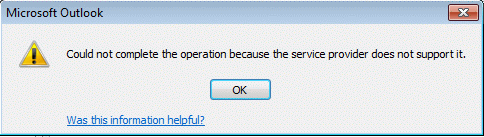
To change the default data file to a local pst file, open Control panel and find Mail, open the profile, Account Settings, then select Change Folder at the bottom of the dialog or set the PST file to default on the Data Files tab.
"Do not have permission to create entry..." error
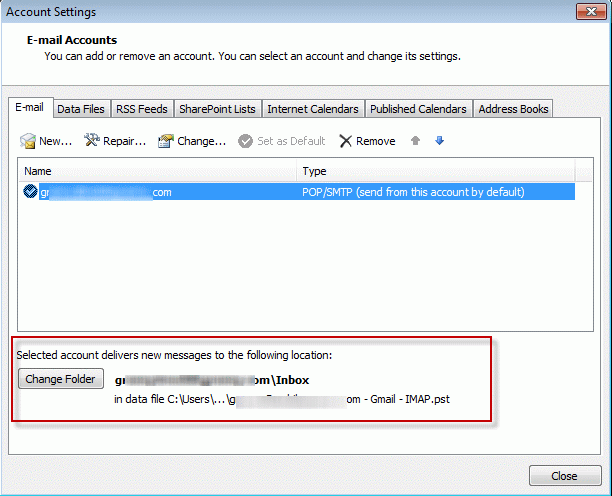
When an IMAP account is set as the default email account and iCloud is set as the default data file, you'll receive this error message when you attempt to create a new message:
You don't have permission to create and entry in this folder. Right-click the folder, and then click Properties to check your permissions for the folder. See the folder owner or your administrator to change your permissions.

You'll receive a similar message when you try to create a new Note (or Journal item).
Before creating the note, you need to select a folder in a non-IMAP pst file before trying to create the item.
"Service provider does not support operation..." error
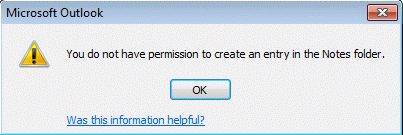
When you try to compose a message while viewing the IMAP folders or send reply to a message received on an IMAP account, you'll receive the following error. The default service provider (the icloud data file) does not support mail items.
Could not complete the operation because the service provider does not support it.
More Information
- iCloud error: Outlook isn't configured to have a default profile
- iCloud Add-in is not listed in Outlook Add-ins
- iCloud is hijacking Meeting Invitations
- How to fix the iCloud APLZOD.dll error in Outlook
- iCloud Doesn't Sync
- iCloud, Outlook 2016, and Windows 10
- iCloud for Outlook 2016
- Save New Contacts to iCloud Contacts
- Transfer POP3 Mail on an iPhone to Outlook
- Outlook crashes when syncing iCloud calendars
- Syncing iPhone Sent Messages with Outlook
- After Installing iCloud, Mail Won't Send?
- Create a Task and copy to another Tasks folder
- iCloud and Outlook Repair Now error
- Outlook and iCloud: What you need to know
- Save appointments to a non-default Outlook calendar folder
- iCloud and Outlook Problems: Syncing Calendar
- Issues Syncing Outlook and iCloud Contacts
- Outlook and iCloud Sync Issues






























Hi Diane,
I'm having an impossible time with iCloud in Outlook 2016. It worked fine and then I lost the iCloud sync button and now I can't seem to create a data file - i.e. after trying to configure the iCloud configuration I can't get it a data file sent to Outlook. One thing I've noticed is that the iCloud configuration screen often an unchecked display Contacts, Calendars and Tasks (with Outlook) even though I've selected and applied.
Any suggestions? I have done all the obvious - new iCloud downloads, Account on/off etc.
is the addin listed in outlook's file, options, addins? Did you try signing out of icloud then back in?
Hi Diane,
I did some updates to apple software on my pc on friday, and it caused my Outlook to stop functioning totally. I use Outlook through Exchange (OST). It added my apple ID to my Outlook profile, and that caused email not to flow anymore. Now when I open my Outlook, I had a new "data file" attached to it. I have my email, my coworkers email, and iCloud "data fle" and now the Apple ID data file. Outlook was spitting out errors that because my Apple ID email wasnt configured properly, Outlook couldnt send or receive. So I deleted it. As soon as I deleted it, mail functioned normally again. Unfortunatly, it not only deleted the Apple ID email, but also the iCloud "data file" as well. I havent backed up my contacts to iCould or my iPhone in a very long time. I believe that those files are still on my PC somewhere. Do you think that you cna help me out?
Yeah, for some reason, the icloud addin is causing send & receive issues for some users. Make sure you have the newest icloud installed - 5.2,
If you use Exchange, the only reason to use icloud is to have personal contacts or appt on your phone also in outlook (the phone can sync directly with exchange unless your admin turned it off). If you are using icloud to add the email account to outlook, you can set the Apple email account up in your profile as an imap account - use autoaccount setup to add it.
To get the icloud contact file back in outlook, sign back into icloud. if you need to add contacts or appt to the icloud, copy them over then sign out of icloud.
Hi Diane:
I had a PC crash but have a backup file called "Icloud Archive.pst" I believe the PC was running Outlook 2013 that this was created with. It is a large file. When I try to open it using a new PC with a current Windows 10 PC with Office 365 in outlook when I try to open this file it does not display an error but just says "no data found" I really need to get into this file, thanks in advance for your help.
-Gordon
that file should be an archive created by icloud and will only have calendar, contacts, and tasks. It won't have email in it. You only need this if you are no longer going to use icloud to sync.
What type of email account did you use on the old computer? If it was an imap account you won't need the data file, everything is on the server. If you upgraded the old computer from an older version, the pst could be in %localappdata%\Microsoft\outlook. (Paste that in the address bar of windows explorer and press enter.)
I've read and re-read this, but can't seem to make sense of it. I'm running Outlook 2007, using iCloud calendar, and I want my iCloud calendar to display on my Outlook Today. I've attempted what you outlined in the article above, but no love. Please advise.
To see the calendar on Outlook Today, you need to set the icloud data file as default, but it won't work if you are using an IMAP account (and may cause outlook to crash). Go to tools, account settings and on the Data Files tab, select the icloud data file and set it as Default.
So i had to reinstall icloud because there was a sync issue with outlook...when I did that...it eliminated all of my folders and all the emails that were in them...very bad...how do I get them back?
It should not have affected the email - unless it was an icloud email account, which would be added back to outlook when you signed into icloud.
Hi Diane, love your site. Great info. Here is my question: I use Yahoo mail with an IMAP setup in Outlook 2010. I use iCloud to manage my calendar and contacts, and have it synced to Outlook 2010 using the iCloud addin. My problem is with calendar invites. When I receive them via my Yahoo email inside Outlook and I accept them, they show up onto the default calendar in Outlook, not in iCloud. I then have to copy them to iCloud to see them on my phone,and if the invite gets changed the iCloud copy is disconnected from the original and isn't update.
Is there a way to have the calendar invites go directly onto the iCloud calendar in Outlook directly?
This is a known issue - the only way around it is to copy the meetings or use a macro to move or copy them. When your outlook.com account moves to office 365, you'll add it to Outlook as an Exchange account and the problems should be solved. That will be sometime later this year.
Hi, and thanks,
But I need more specifics than that. I am assuming I am to open Outlook and do Ctrl 6 to access the Folder list. Correct?
Please then tell me what is scanpst. and where do I find that and how do I use it and what will it do?
Will this address the inability to delete, add or manipulate things in Local Folder and Local Contacts?
Yes, open outlook and do a Ctrl+6 to switch to the folder list. This will allow you to see where the folders are in relation to the data files and other folders. Are the folders mentioned in the error message in the pst with other Outlook folders or in the iCloud?
Instructions to use scanpst are here https://www.outlook-tips.net/beginner-user/use-scanpst-to-repair-outlook-files/ -
Hi-
I have a Toshiba PC laptop running Windows 7. I use Google Chrome. You seem to know how to do stuff with outlook 2007 and icloud. I have a really weird problem that I can not see here (or anywhere). In a recent sync yesterday I got the message that some of the data would not sync and could be kept or deleted. I chose to keep it and it ended up in "Local Contacts" and "Local Calendar" folders under icloud. When I open either of those folders and try to delete any items that are unneeded I get this error message:
"You don't have appropriate permission to perform this operation."
I have already tried "delegates" (no button and no way to install it AND its NOT an email account) and "open outllook.exe as administrator" . I'm really good at looking up fixes for problems but can't find this one anywhere. Can you help me be able to delete or manipulate those items in the local folders that I no longer need in outlook or icloud?
Thanks,
Peg
The folders were added to a pst file? Or are they in the iCloud data file? Go to Folder list to check (Ctrl+6). If in a pst file, try using scanpst.
Hi Peg, Did you manage to resolve this? I have exactly the same problem. "Local Contacts" is under iCloud not the pst file. Scanpst did not help.
Go to the Folder list (Ctrl+6) and you'll see where all of the contacts folders fall within the different data files in your profile. Are they in the icloud data file, your default data file or did icloud create a new data file to back them up to?