If you are looking for information about the old "contact linking" feature, see Show Contact Linking fields in Outlook.
Outlook 2013 introduced a neat feature where all contacts for a person are linked together and the aggregate data from all of the linked contacts is displayed on a contact card, with the source of the data listed on the contact card. You can click a link to open any one of the contacts associated with the person.
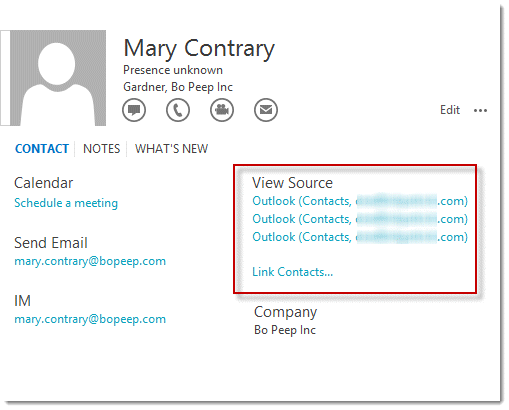
Outlook does a pretty good job at matching the contacts but occasionally gets it wrong. When contacts are incorrectly linked, or not linked, you can correct the links from the contact card. (You can't bulk unlink all contacts.)
Under list of associated contacts (View Source) is a link for Link Contacts. Click this link to open the Linked Contacts dialog shown here.
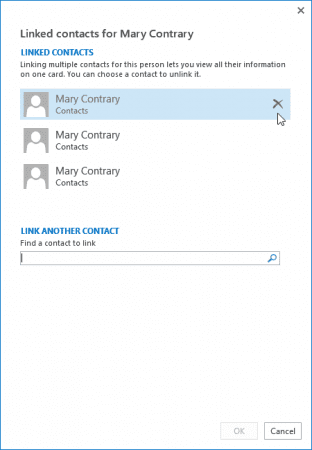
To unlink contacts, hover a name then click the X beside the name to unlink it from the contact.
To link contacts, type a name into the Search field to search for Contacts to link to the contact. Select the names you want to link to the contact.
Disable this feature
If you hate this feature, you can't (yet) disable it. Make sure you vote for the ability to disable it in this thread at Outlook UserVoice (and leave a comment telling Microsoft why it's important.)
Adding an option to disable the Contact Linking feature (Outlook Uservoice)

David says
Hey - I cannot see this feature at all. Running MS 365 Outlook on Win 11 the three dots does not offer an option related to linking.
My issue is that if I created 2 contacts by duplicating one and then modifying the info (eg. family members) it seems to have got linked in the background (refer https://answers.microsoft.com/en-us/msoffice/forum/all/problem-solved-question-was-outlook-contacts-which/3ed9188d-c854-4cf0-bc0a-f08806ecac0c which is my exact scenario, only with the latest O365). Selecting one of the contacts arbitrarily displays contact 1 or contact 2, but with a mash-up of the contact information.
Any ideas? The Old Outlook seems to manage this fine, however the New Outlook is stuffed
Diane Poremsky says
New outlook doesnt have an option to unlink. Sorry. The merging is a "feature" to eliminate duplicates.
Bill Nelson says
Supposing I select the contact(s) I want to link and click OK but they don't link; is there something I need to turn on?
Steve Smith says
Running MS 365 Outlook on Win 11 the three dots does not offer an option related to linking. (Another machine running Office 2016 does) How can I get this functionality in MS 365 Office? Thanks
John Riddle says
I love this feature. Can I create more than one linked contact items? Such as "Linked Managers" and "Linked References"? I would have a need to have several fields that each contain linked contacts from different folders. Is that possible?
Diane Poremsky says
You can link more than one together but I'm not sure this is the best way to link coworkers and you can't identify them as managers etc, only link them.
If you use a business Exchange account, the contact cards will show organizational information from the global address list.
Fuck says
Worst feature ever. Now i cant update any contacts. This shit should have never been active bu default.
Diane Poremsky says
I can't argue about it being the worst feature ever... but it won't prevent editing contacts. Switch to one of the card views, or list or phone view. You can open and edit contacts easily using any of these views. And won't see how they were linked.
Kristen says
How can I like emails, tasks ect. to contacts?
I would like to click a contact and it to have the regarding emails and notes attached. Is this possible with 2013?
Diane Poremsky says
Short version: you can't; the closest we had to something like this outside of BCM was Activities, which was removed from 2013/up. You can still link contacts to items -see https://www.slipstick.com/outlook/contacts/show-contact-linking-fields/ to enable the contacts field, or go into file, properties to link.
Outlook 2013 and 2016 have the People Pane from the social connector, which, if enabled, will show recent messages from a contact in a small pane. Screenshot: https://www.slipstick.com/images/2011/08/people-pane.png
Another option is a macro to create an instant search for all items associated with the contact. https://www.slipstick.com/developer/instant-search-messages-selected-contact/
mike shick says
Is there a way to unlink all contacts at one time. I hate this feature.
Diane Poremsky says
No, unfortunately. Very few people love it - i have mixed feelings. It's nice if i have true duplicates and they aren't identical but not when it links family members or employees of the same company.
Tony says
This linked contacts feature has been more of a problem than neat for us. Is there still no way to turn it Off?
Diane Poremsky says
No, unfortunately. (It really is a PITA.) They are taking votes at uservoice and i recommend voting (and leaving comments) thre - https://outlook.uservoice.com/forums/322590-outlook-2016-for-windows/suggestions/17378602-adding-an-option-to-disable-the-contact-linking-fe
mll says
A PITA indeed...
Diane, your linke doesn't work any more. Does this suggest that this badly implemented function is here forever?
Diane Poremsky says
I'm not sure why the link is not working (I'll ask the person who manages that uservoice for Microsoft) - I would never say never, but its not looking good for a rollback IMHO.
David Jansson says
Is there a way to turn off this bug, I mean feature? Its causing us nothing but trouble :( one of us has somewhere between 500 to 1000 contacts with all sorts of miss-links, is there a way to look for linked contacts without inspecting each individual contact?
Diane Poremsky says
No, not at this time. It helps reduce the annoyance with it if you don't use the People view (which is hated by just about everyone) - at least that is my experience.
David Jansson says
Thank you Diane.
Hal says
Unfortunately this is not harmless, it is ruining my life. There are spurious folders and contacts synced to other devices. Professional users need a way of turning off Social Contacts folders in Outlook (even though the feature is turned off in my outlook.com I am still getting these folders in my Outlook).
Diane Poremsky says
Which Social Contacts folders do you have? You shouldn't have LinkedIn & Facebook if you are not signed into that account - if you sign out, the folders should go away.
Laocoon says
I'm finding the linked contacts is a sync nightmare. I started out with a fully edited, detailed Outlook contacts file exported from Outlook 2007. Upon a recent conversion to O365 and an Outlook.com email address, I've been in contacts duplication hell.
I just can't unlink or make them go away. Even after deleting all contacts in all locations, just one contact from the old list brings up all contacts ever uploaded (including deleted dead people). I have no sixth sense for fixing this, and made no progress after 12 hours with MS tech support and Apple (since I also sync to an iPhone). Repeatedly, a cleaned-up contacts file will re-sync to the old info after about 24-48 hours. It behaves as if a scheduled sync is running somewhere in the background, as immediate sync is fine.
For now, I've done a complete workaround that functions, but it's a mess and far from what I expected from new and improved Office.
I hope this nightmare ends. If anyone has any ideas, I'd love to hear them.
Mike says
Hi Diane - are you aware of any issues with linked contacts and missing or incomplete history in the people pane of Outlook 2016? I am trying to find the reason for these inconsistencies - some contacts show a complete history others only partial list of emails and attachments, and some none at all.
I should mention, I have had to make a lot of changes to my contact and imported from csv files to try and clean things up.
Thanks!
Diane Poremsky says
I know they use the search index but I'm not aware of any problems with it. On the contacts that show nothing, are the email addresses on the imported contacts resolved?
FWIW, the people pane/social connector is deprecated - it won't be improved and might be removed from a future version.
The Bigger Boss says
Has Microsoft been able to provide a solution to mass unlink contacts?
you mentioned it will be fixed in April 2016.
Diane Poremsky says
No, there isn't a mass unlinking tool. I don't recall saying it would be fixed in April. If you mean this: " but if its related to the tiny text problem affecting custom forms, it will be fixed in April [2014]. SP1 is due out soon too" that was referencing a problem in custom forms, not linking.
David says
Thanks so much for this info - - somehow, my contacts got linked randomly and I want to mass-edit or mass-undo that...do you know if this is possible?
Diane Poremsky says
No, sorry, it's not currently possible.
Wayne Claybaugh says
Hi Diane:
I believe I have read (and tried) most of your tips on how to get your contacts to reappear when you move the contacts from an old computer to a new one. I am stuck on getting the contacts to "link". I dont have a "Link Contacts.." showing up on my contacts list. It does show various outlook contacts however. Any help would be greatly appreciated.
Wayne Claybaugh
Diane Poremsky says
What type of email account do you use?
If you just need to move them to a new computer, either export the contacts folder to a pst or if already using a pst, copy it to the new computer.
If you've already done that, is the contacts folder enabled as an address book?
https://www.slipstick.com/outlook/contacts/enabling-the-contacts-folder-as-an-address-book/
jamespward says
sorry , I meant link tasks and journal entries to contacts. like I used to do in prior Outlook, now I have to make a "category" for each contact to associate the task, etc. to the contact.
Diane Poremsky says
You can display the contacts field on the items (and it's in File, Properties) so you can link them. See https://www.slipstick.com/outlook/2013/show-contact-linking-fields-in-outlook-2013/ for instructions.
jamespward says
I have made many attempts to understand and use the linking feature. I have hired several experts and several tech support attempts all to no avail.
Diane Poremsky says
Honestly, I'm not sure why you'd want to use it. :) It's really only useful if you have duplicate contacts - and with the demise of Facebook and LinkedIn connectors, it's less likely you'll have duplicates you'd want to keep. Some people use it to link a husband and wife together, although I don't like using it for that.
Roman Lowkis says
It's been a while since this thread started and I wonder if Microsoft still thinks that implementing linking in that fashion was a good idea? I hope that Diane is a pretty good conduit for messages, but is the product team listening?
All I would wish for is that the feature give more control over the behavior to the user and that the bugs were fixed.
About control:
- allow for disabling the feature
- implement link filter/search to find contacts that have been linked
- allow for mass linking/unlinking
About bugs:
- I unlinked two contacts, and the addresses are now separate, but the phone numbers still appear linked. The phones of one contact appear as "read-only" on the other.
- In another case I have a record that appears to be linked to itself. The phone number appears twice, once editable, once "read-only".
Pretty sloppy for a feature that has been around for that long.
BTW: I am using O365 Pro Plus.
Choice Crosby says
Can this feature be implemented by GPO?
Diane Poremsky says
No, you can't link contacts or disable it using a GPO.
Sandy Kleinhenz says
i'm using outlook 2013 and in specific contact under sources, there is NO "Link Contacts" in blue. The Linkedin source is showing in blue but no way to remove that source?
Diane Poremsky says
If linkedin is the only source listed, no your can't remove it (unless you unfriend the person on linkedin).
Richard says
How can I 'heal' linking errors?
Some of my contacts are linked and I don't know why. So when I look at a conversation with Anna I suddenly see in the social section the contact photo of Ben. When I click on Ben's photo I see the mail address of Ben but the Phone number of Anne.
When I unlink them, all is back to normal. But I have dozens of these 'false' links.
I (Outlook 2013, Office 365 E3) have never used linking on purpose. But nevertheless some of my private contacts in my contact folder are linked with colleagues that I see only through GAL. But the contact objects have nothing in common. With one exception: I mailed in the past with both of them. But always separately. And each time with different subjects. And whey never where recipients of the same mail. And I never provides the social connector with any 'social' login credentials.
Diane Poremsky says
The linking is buggy - for most people it's just one or two that are poorly linked. I'm not aware of a quick fix to unlink and relink.
The contact photos come from your contacts, the GAL (if photos were added) and from SharePoint (if used), plus linkedin and facebook if signed in to either or both services.
Michael Rowe says
Good information, Diane. Always so helpful and on point. Thank you!!
Michael Rowe says
Is there a way to link contacts quickly en mass (that is my created contact for them with their automated LinkedIn or Facebook contact) or must I link them one by one? And how do I link them again? I seem to be able to pull up the feature screen only when I have an email and click on the person's email address. That can't be the only way to find contacts I might want to link together. And was their a final verdict on if information (ie in the notes field) is lost if you decide to unlink contacts later?
Diane Poremsky says
When you link contacts, it only associates two contacts together and displays the aggregated information on the people view - notes will still be in the copy in your contacts folder. Outlook should link a contact with his linkedin profile if the lnikedin address matches the one in contacts. But if not, yes, you'll need to do it one at a time - you can do it from the new People view in Contacts aka People.
jamespward says
2 things. this does not seem to apply to linking a "task" to a person. instead a person to another person. second when I try to link person to person my cursor just spins, never completes the link. thanks
Diane Poremsky says
It links the contact to a task, or appointment, contact - basically as a hyperlink to the contat. The only other option is assigning the task to a person.
jamespward says
I have spent many hours searching and trying to link a task to a contact/people. is this at all possible?
Diane Poremsky says
You can show the Contact field on the Outlook forms and link to the contact.
https://www.slipstick.com/outlook/2013/show-contact-linking-fields-in-outlook-2013/
Marc Bressman says
You have to love when Microsoft just decides to randomly implement new "features" that actually make it harder to work and then don't offer any way to revert to the way things were (or disable these features altogether).
Todd Parkhill says
Is there a way to safely unlink contacts? When I have unlinked contacts all my notes for the contact disappear and I cannot find them anywhere.
I posted a similar question two days ago, but I don't see it. Why is that?
Todd Parkhill says
And now that I've posted my follow-up question, I see my previous question... Must be a cache issue.
Please disregard and thank you for your reply. I'll take a look in "Deleted Items."
Diane Poremsky says
i approve messages as i reply so they dont get lost, so its here somewhere. :)
you can unlink contacts but cant disable the feature. switch the view to business cards and it wont be so annoying.
Todd Parkhill says
Is there any way to recover data once something has been unlinked? I noticed that Outlook, oh-so-helpfully, linked/merged a company's record (no person's name) with a person at that company. I unlinked the two and now the entire company record is gone and I'm left with just the person's record! I needed that co. info and now it seems Outlook has "helpfully" removed it.
Sigh...
Foolish me; I thought Office365/Exchange was going to help me and my business.
Todd Parkhill says
Correction: the company info is there, but the notes are gone. Aaaargh!
Diane Poremsky says
Check the deleted items folder - it's not supposed to delete data when it merges and moves the contact it doesn't keep to delete. Go to the deleted folder, turn off the reading pane and sort by the icon - it's usually easier to find non-mail that way.
Kendall Ymker says
Thanks but that doesn't help me. Probably a rhetorical question but why does Microsoft think that it needs to "help" me in this way? The fact that the software is doing things that I don't want or even ask it to do is very aggravating.
Diane Poremsky says
:) They thought it was a good idea... and it might work pretty good in theory, but in wide use the flaws come out.
Kendall Ymker says
I do not want to use this feature. How do I turn this automatic linking off? Outlook is linking some of my contacts together. I have manually removed the link. Outlook then, at random intervals, decides to re-link the contacts. I have even changed the names so they are more dissimilar but Outlook still links them.
Diane Poremsky says
Sorry, at this time it can't be disabled. :(
Elena says
Custom Task with "Contacts" link field was created in Outlook 2003.
I migrated the custom form into Outlook 2013. I updated the registry as described in this article to be able to continue using the "Contact" field. However the registry update did not change the behaivior of the custom form: when a contact is added to the "Contacts" field Outlook crashes and restarts.
This does not happen if I add the "Contact" field to a new custom form. It only happens with the form imported from the Outlook 2003.
Can anything be done besides recreating the custom form from scratch?
Diane Poremsky says
Probably not... but if its related to the tiny text problem affecting custom forms, it will be fixed in April (2014). SP1 is due out soon too, I have no way of knowing if it fixes this problem, but it might.
Does it have code behind it?
baron bruno says
Why don't they have implemented this new functionnality in remplacement of contact linking on all type of items ??? New functionnality but usage limited if not implemented on all types of items !!!
Diane Poremsky says
The new functionality is just for associating contacts from multiple sources together as one, in most cases it will be to link a persons outlook contact with their Facebook and LinkedIn contacts. Some people may use it to link households - separate contacts for spouses, linked using this method.
Eric Legault says
Not to be confused with Contact Linking or Lync Contacts LOL!
Diane Poremsky says
Linked Contacts linking to Lync contacts in Office365... would that be in Outlook.com or outlook.com? And would you like fries with that? :)