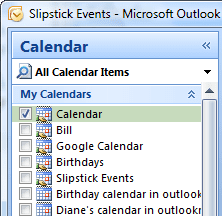
 The problem: when you have multiple calendars selected in Outlook and close (uncheck) the first calendar, the calendar's name remains in the title bar and taskbar. Any custom views for the original calendar will remain in the Current view picker.
This is a known issue. It's not so much a bug but a limitation of the ability of Outlook to refresh the window when you check and uncheck calendars.
When the Calendar folder loads, Outlook loads the views for the default calendar and puts that calendar's name in the title bar and on the taskbar button. When you select (or deselect) calendars, you aren't reloading the calendar module, you are just changing what is seen on screen.
Views
You need to refresh the view to see folder-specific views when you select a shared calendar. Deselect the other calendars, leaving only the shared calendar selected, then click on the Mail folder button then the Calendar button. This is necessary because the default or selected calendar’s views are loaded when you open the calendar folder, not when you select or deselect each calendar.
Workaround
To refresh the view you need to leave the calendar folder and come back to calendar. Do this by clicking the Mail button and then the Calendar button.
