I'm seeing a lot of complaints with "lost" appointments and meetings saved to the wrong calendar in Outlook 2013 when IMAP accounts are in the profile.
Another common complaint is that users are unable to Categorize appointments and contacts, and flag options are limit to flag or no flag.
Incoming meetings are placed into the "This computer only" calendar. I want all appointments added to the calendar in my default .pst file. This is so frustrating. I want to define a "default calendar" and have ALL appointments go there, regardless of the email account they arrived in, and that now seems impossible. What was Microsoft thinking?
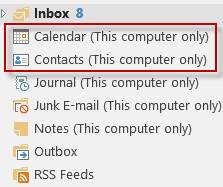 Microsoft was thinking about all of the people who complained about needing two .pst files in a profile that had only an IMAP account.
The problem with the way Outlook 2013 handles Calendar, Contacts, Tasks, and Notes goes beyond which calendar the meeting requests are added to. Categories and Flags will not work "as expected" on items in the IMAP folders.
Too many people are in the habit of deleting IMAP .pst files or accounts when they think something is wrong with Outlook. If they do this when they have a single IMAP data file in Outlook 2013, they will lose their calendar, contacts, notes and tasks unless they remember to export those folders first. Because the new IMAP data file is tied to the account that created it, it will require expensive recovery tools to recover the contents if System Restore can't restore the profile.
The solution? Make sure all calendar, contacts, tasks and notes are exported or moved from the IMAP .ost folders to a local .pst (which is set as the default data file).
Create a local pst file
To create a local pst file:
- Go to File, Account Settings, Data Files tab
- Click Add, type in a name for the pst file
- Set it as Default data file
- Close Outlook and reopen it
- Move the contacts from the Contacts (This Computer only) folder to the Contacts folder in the new pst file
- Switch to the Calendar (This Computer only) folder
- Switch to a List view
- Select all and move or drag the appointments to the new calendar folder
Repeat Step 5 for Tasks and Notes, if necessary.
To remove the (This Computer only) folders from the IMAP data file:
- Close Outlook.
- Open Windows Explorer, type %localappdata%\microsoft\outlook in the address bar
- Delete the IMAP ost file
- Restart Outlook
Create a local pst file video tutorial
More Information
Outlook Categories, Flags, and IMAP Accounts Includes workarounds for adding categories to items in IMAP folders.

Hi Dianne, great content here and easy to read, thanks, I appreciate your time and effort!
Like most people here, I guess, if I use the default calendar, the event is put on (this computer only) which does not then sync with other devices, e.g. mobile.
In your article 'To remove the (this Computer only)' I am not sure which IMAP ost file to delete to get rid of '(this computer only)'. I have four email accounts with an ost file associated with each of them as viewed in %localappdata%\microsoft\outlook. Three of them are IMAP accounts but my Outlook.com is Microsoft Exchange. My default email ost is an IMAP account. What do I delete?
Switch to the folder list = Ctrl+6 - and find the this computer only folder. You can right click on the root folder then choose open file location to open Explorer with that data file selected. I usually recommend renaming it first - this is just in case you forgot to move appointments or contacts or tasks out of the folders.
Hi Diane,
I created a new local 'default' .pst file, and now all appointments I'm invited to go to a single calendar. Thank you.
However, now, whenever I receive an email, the message goes straight to the Junk or Spam folder for the email account it is sent to. I have no spam filters set on any account, so I can't cancel any rules within Outlook, because none are set there. I've been in touch with the people who host my email addresses, and they've checked that the movement to spam folders has not been set-up their end? Could this be something to do with the local .pst file I created, because that's what's changed since yesterday, when all the emails were arriving and staying in their respective in-boxes :-)
Do you have any idea of a solution, please?
Thanks in anticipation
Diane,
I am having similar issues with Outlook 2013. We converted to IMAP when I installed my new computer. I think I am getting things fixed as I go through the weeks. My wife and I use the same calendar, contacts, etc. Should I just stay with the IMAP this computer only or is there any benefit to go back to pst files.
Thanks
I would use a pst file for calendar and contacts - its safer if anything happens to the imap ost. If you and your wife have separate profiles you can both use the pst file. If you go back to a pst, after copying everything in the this computer only folders into the pst, set the pst as default and delete the ost so outlook can rebuild it without those folders.
In my case (Outlook 2016 of Office 365 at Mac OS Sierra as default mail and calendar app where the default account is at MS hosted Exchange (Office 365) + bunch of IMAP accounts) all incoming invites arriving to any of IMAP folders are not accepted to the main (Exchange) calendar but to to "This computer only" calendar. + there is no easy way to move or copy the event to the default (Exchange) calendar.
Does each imap account have a 'this computer only' folder? If there is only one calendar, they would all go to the same calendar. (I'll check it on my mac in the morning).
Aloha Diane,
I am using Outlook 2016, Windows 7, multiple IMAP accounts, and gSyncit. I never had a calendar called "This Computer Only" until about two months ago. I read through your instructions and others. I was able to remove the calendar by deleting the.OST file. Unfortunately, two weeks later it came back. Can you tell me what triggers the creation of the “This Computer Only” file?
Thanks,
Mark
Those folders are created when an imap data file is set as the default data file.
Dear Diane, Firstly thank you for all info you put up, it has been very helpful so many times. I have a question with regards to the calendar issue this computer only. I have agmail account that i set up as imap, and it is showing as this computer only. How can I keep the gmail calendar as default in outlook but that it does not show this computer only? when i do the process you mention above, firstly it does not get rid off the this computer only, secondly I would like that my default appointments are saved in gmail account but if pop is the default, the new appointment will go to the pop calendar. If its not possible to make calendar on gmail imap with removed this computer only, what third party software would you recommend to sync pop calendar with gmail calendar on the server side not locally. Basically since I dont have the exchange, I am trying to mimic syncing outlook calendar on pop with gmail calendar on server so that I can then sync the calendar on my phone. In general I would be happy to set up a call with you as I… Read more »
you need to set a pst as default then outlook will use it's calendar. then you close outlook and delete the imap ost file from %localappdata%\microsoft\outlook and let outlook resync everything. This will remove the this computer only folders.
Right now, the only way to sync gmail calendar and contact is using a utility such as companionlink. Microsoft is working on a solution but i dont have an ETA for it's release.
Hello Diana,
I have a problem with synchronizing my local Outlook 2013 calendar with the Outlook.com calendar. The default data file is Outlook.com - personal-email-address.ost. My personal email address is coupled to Outlook.com. The personal email has an IMAP account in Outlook 2013. Incoming meeting requests end up in my personal email calendar (only this computer) so they don't synchronize with my Outlook.com calendar. And for outgoing meeting requests I have to choose the Outlook.com account to make them end up in the default (Outlook.com) calendar. How can I make meetings to be sent from and to my personal email address AND synchronise with Outlook.com?
Hi Diane,
I am facing issues with organizing meetings in calendar. I am using microsoft exchange account (office 2016). Meetings are getting created randomly between Mailbox calendar & PST calendar. This is happening for both the meetings, I am creating & also meeting request I am getting. I want all meetings to be organize in Mailbox calendar only, because for these meetings only I am getting the reminder.
How many accounts are in your profile? Meetings go on the calendar that associated with the account or that you are working in - so it sounds like you have an account using a pst file, I would move everything in the second calendar (use a list view, select all and drag to the mailbox calendar) to the exchange calendar then delete the calendar in the pst. This article explains how - https://www.slipstick.com/outlook/delete-outlooks-default-folders/
FWIW, you should get reminders for both calendars (but only the default one is on the to-do bar and outlook today) if you have an account delivered to the pst, otherwise, see https://www.slipstick.com/outlook/reminders-archives-pst-files/. (My preference would be one calendar - less likely to miss a meeting or appointment.)