 So you installed Office 2013 Preview and decided you didn't want to use it and thought you uninstalled it... but like many Office betas, uninstalling it leaves stuff lying around.
Microsoft has an uninstaller for the Click to Run version as well as instructions for anyone who prefers to uninstall Office 2013 themselves. Details can be found at Uninstall Microsoft Office 2013 or Office 365
After uninstalling Office, reboot then do a reinstall of your old version. Because Outlook 2013 moves the Profile keys (now in HKEY_CURRENT_USER\Software\Microsoft\Office\15.0\Outlook\Profiles), uses a more compact *.ost format, and keeps IMAP mail in an *.ost file, the Outlook 2013 profile won't work with older versions of Outlook.
Also note that if you used an IMAP account in Outlook 2013, it now stores calendar and contacts in an offline data store (*.ost). You'll need to export any calendar items or contacts added to the IMAP folders before uninstalling Office 2013 or removing the account from Outlook as the *.ost file can only be opened by the account that created it.
Removing orphaned Control Panel Mail icon
Uninstalling Office 2013 Preview left behind the Control Panel "Mail (Microsoft Outlook 15)" applet. It shows as a broken shortcut with a white paper icon. How do I remove it?
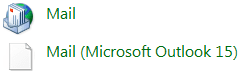 Check the following registry locations for an entry for Office 15, starting with the first keys. As always, you should export the keys before deleting them.
Deleting this key should remove the Control panel Mail applet.
HKEY_CLASSES_ROOT\Wow6432Node\CLSID\{A0D4CD32-5D5D-4f72-BAAA-767A7AD6BAC5}\DefaultIcon
Default value: "C:\\Program Files\\Microsoft Office 15\\root\\Office15\\MLCFG32.CPL,0"
Note: delete the entire key (folder icon, on the left), not just the default value! You can export the key first if you are worried it will mess up your system. Right click on the key and choose Export the right click again and choose Delete.
If not, check these keys and delete the values that point MLCFG32 to the Office 15 path.
Control panel key:
HKEY_LOCAL_MACHINE\SOFTWARE\Microsoft\Windows\CurrentVersion\Control Panel\Cpls
Name: mlcfg32.cpl
Control panel key:
HKEY_LOCAL_MACHINE\SOFTWARE\Microsoft\Windows\CurrentVersion\Control Panel\Extended Properties\{305CA226-D286-468E-B848-2B2E8E697B74}
Value: path to MLCFG32, such as C:\Program Files\Microsoft Office\Office15\MLCFG32.CPL
Control panel key:
HKEY_CURRENT_USER\Control Panel\MMCPL
Clients key:
HKEY_LOCAL_MACHINE\SOFTWARE\Clients\Mail\Microsoft Outlook\shell\Properties\command
(Default) value will be something like: rundll32.exe shell32.dll,Control_RunDLL "C:\PROGRA~1\MICROS~1\Office15\MLCFG32.CPL"

funmi lawal says
My outlook is completely not responding, I accidentally entered the wrong server details and now it wont allow me to access anything on outlook. error message cannot open f.lawal@miaconsulting.biz.pst.
Diane Poremsky says
Close Outlook - use Task Manager to force it closed if necessary. Go to Control panel, find Mail and open it. you can edit the account in the profile from this dialog and fix the mistake.
Susan says
My outlook is set up as exchange. My email will not work with exchange. How do I get rid of it? I have uninstalled and reinstalled three times to no avail.
Diane Poremsky says
You need to edit the profile to remove the account and add it back, using the correct account type. Do this in Control panel, Mail. See Remove and Add accounts in outlook if you need the complete steps.
Scott Mains says
Hi Diane et al,
Deleting this key removed the extra Mail Icon from my system:
[HKEY_LOCAL_MACHINE\SOFTWARE\Classes\CLSID\{A0D4CD32-5D5D-4f72-BAAA-767A7AD6BAC5}]
@="Mail"
"LocalizedString"="Mail (Microsoft Outlook 15)"
"InfoTip"="Microsoft Outlook Profiles"
"System.ControlPanel.Category"="9"
[HKEY_LOCAL_MACHINE\SOFTWARE\Classes\CLSID\{A0D4CD32-5D5D-4f72-BAAA-767A7AD6BAC5}\DefaultIcon]
@="C:\\Program Files\\Microsoft Office 15\\root\\Office15\\MLCFG32.CPL,0"
[HKEY_LOCAL_MACHINE\SOFTWARE\Classes\CLSID\{A0D4CD32-5D5D-4f72-BAAA-767A7AD6BAC5}\shell]
[HKEY_LOCAL_MACHINE\SOFTWARE\Classes\CLSID\{A0D4CD32-5D5D-4f72-BAAA-767A7AD6BAC5}\shell\open]
[HKEY_LOCAL_MACHINE\SOFTWARE\Classes\CLSID\{A0D4CD32-5D5D-4f72-BAAA-767A7AD6BAC5}\shell\open\command]
@="\"C:\\Program Files\\Microsoft Office 15\\root\\Client\\AppVLP.exe\" rundll32.exe shell32.dll,Control_RunDLL \"C:\\Program Files\\Microsoft Office 15\\root\\Office15\\MLCFG32.CPL\""
Teri Gary says
installed office 2013 on laptop and one day later it crashed!!! purchased new laptop, can i reload on new laptop???? how?
Diane Poremsky says
You can reload it on the new one. Did you get an online subscription or a boxed DVD? If online, log in, download and install. If you have a CD, reinstall it - you may need to call in to activate.
Ed Evans says
Nope, non-corporate
Diane Poremsky says
I'm out of ideas. Sorry.
Ed Evans says
Diane:
Did you find anything on this?
Diane Poremsky says
No, so far no one seems to know why it's still there (on a personal computer) if the folder is gone and the 5 registry keys are gone. If you are using a corporate computer, it could be the result of a group policy.
Claudine Corkins says
When I reply to a message in Outlook 2013 the message font reduces drastically?
Diane Poremsky says
It's probably the zoom setting. Do you see a zoom button on the right of the ribbon or the zoom slider in the status bar?
See https://www.slipstick.com/outlook/adjust-outlooks-zoom-setting/ for more information and screenshots.
Diane Poremsky says
I'll have to look into it - deleting the registry keys should have removed it.
Ed Evans says
Yes. I rebooted but path is gone
Ed Evans says
I tried the steps above. Still have white icon. Windows 7 64
Diane Poremsky says
I'm assuming there is nothing at C:\Program Files\Microsoft Office 15\root\Office15\MLCFG32.CPL...
Did you reboot?