Run a script rule
To use the code, you'll create a rule with the desired conditions and choose 'run a script' as the only action, selecting this script.
Sub KeepFriday(Item As Outlook.MailItem)
datefri = WeekdayName(Weekday(aItem.ReceivedTime))

If datefri = "Friday" Then

'moves to the Friday subfolder under Inbox.
   Item.Move Session.GetDefaultFolder(olFolderInbox).Folders("Friday")
Else
   Item.Delete
End If

End Sub
VBA to run anytime
To use this code sample select the folder then run the macro
Sub KeepFridayOnly()
Dim dest As Outlook.MAPIFolder
Dim aItem As Object
Dim datefri As String

Set mail = Application.ActiveExplorer.CurrentFolder

For Each aItem In mail.Items

datefri = WeekdayName(Weekday(aItem.ReceivedTime))

If datefri = "Friday" Then
   aItem.Move Session.GetDefaultFolder(olFolderInbox).Folders("Friday")
End If

Next aItem

 Set aItem = Nothing
 Set myolApp = Nothing

End Sub
ItemAdd Macro
This version of the macro is an ItemAdd macro. This means it run when a message is added to the folder the macro is watching. In this sample, we're using Select Case to check the day of the week and assign a different category based on the date.
This macro is added to ThisOutlookSession and runs when Outlook starts. To test it without restarting Outlook, click in the Application_Startup macro and click Run. Select one or two messages, then Ctrl+C, V to copy and paste them in place. The macro will run on the copies.
Option Explicit

Private WithEvents olInboxItems As Items

Private Sub Application_Startup()
  Dim objNS As NameSpace
  Set objNS = Application.Session
  ' instantiate objects declared WithEvents
  Set olInboxItems = objNS.GetDefaultFolder(olFolderInbox).Items
  Set objNS = Nothing
End Sub

Private Sub olInboxItems_ItemAdd(ByVal Item As Object)
Dim dayname As String
Dim strcat As String

dayname = WeekdayName(Weekday(Item.ReceivedTime))

Select Case dayname
Case "Monday", "Tuesday"
    strcat = "Due Friday"
Case "Wednesday", "Thursday"
    strcat = "Due Monday"
Case "Friday", "Saturday"
    strcat = "Due Tuesday"
Case "Sunday"
    strcat = "Due Wednesday"
End Select

   Item.Categories = strcat
   Item.Save

End Sub
Process mail by date and time
Outlook's Rules and Search functions can't search by times. While you can "do something" with messages (or any Outlook item) between two dates, you can't filter by time too. However, you can use VBA to "do something" messages that fall within a certain time period.
In this code sample, I'm adding a category to messages that arrived after 6 PM during the last 30 days. This macro runs on the messages in the selected folder.
Sub FlagByTime()
Dim aItem As Object
Dim strTime As String

Set mail = Application.ActiveExplorer.CurrentFolder
For Each aItem In mail.Items

'Check the message age
 If aItem.ReceivedTime > Date - 30 Then

strTime = TimeValue(aItem.ReceivedTime)

'Check the received time
  If strTime > #6:00:00 PM# Then
     aItem.Categories = "Nighttime"
     aItem.Save
 End If

 End If

Next aItem

 Set aItem = Nothing
End Sub
Add a Category to messages received at specific dates and times
This macro will add a category to messages received at specific times between specific dates. In this example, messages received between 8 AM and 10 AM from 10/20/2019 through 11/3/2019.
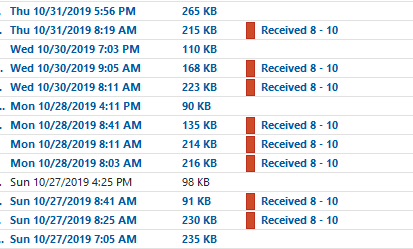
This macro runs on the selected folder.
Public Sub FindMailbyTime()
    Dim objOL As Outlook.Application
    Dim objItems As Outlook.Items
    Dim objFolder As Outlook.MAPIFolder
    Dim obj As Object

    Set objOL = Outlook.Application
    Set objFolder = objOL.ActiveExplorer.CurrentFolder
    Set objItems = objFolder.Items

    For Each obj In objItems
    If obj.MessageClass = "IPM.Note" Then
    If obj.ReceivedTime => DateValue("10/20/2019") And obj.ReceivedTime <= DateValue("11/3/2019") Then
' 24-hour format
    If Hour(obj.ReceivedTime) >= 8 And Hour(obj.ReceivedTime) < 10 Then

     With obj
    ' do whatever
       Debug.Print .ReceivedTime, .Subject
     .Categories = "Received 8 - 10"
     .Save
     End With

    End If
    End If
    End If

    Next

    Set obj = Nothing
    Set objItems = Nothing
    Set objFolder = Nothing
    Set objOL = Nothing
End Sub
How to use the macro
First: You will need macro security set to low during testing.
To check your macro security in Outlook 2010 or 2013, go to File, Options, Trust Center and open Trust Center Settings, and change the Macro Settings. In Outlook 2007 and older, it’s at Tools, Macro Security. If Outlook tells you it needs to be restarted, close and reopen Outlook. Note: after you test the macro and see that it works, you can either leave macro security set to low or sign the macro.
Now open the VBA Editor by pressing Alt+F11 on your keyboard.
To use the macro code in ThisOutlookSession:
- Expand Project1 and double click on ThisOutlookSession.
- Copy then paste the macro into ThisOutlookSession. (Click within the code, Select All using Ctrl+A, Ctrl+C to copy, Ctrl+V to paste.)
Application_Startup macros run when Outlook starts. If you are using an Application_Startup macro you can test the macro without restarting Outlook by clicking in the first line of the Application_Startup macro then clicking the Run button on the toolbar or pressing F8.
More information as well as screenshots are at How to use the VBA Editor.
VBA Date and Time Functions
| Function | Description |
|---|---|
| Now | Current date and time. Example: 7/27/19 11:32:18 AM returned by Now |
| Today() | Current date only |
| Date | Current date only. Example: 7/27/19 returned by Date |
| Time | Current time only. Example: 11:32:18 AM returned by Time |
| TimeValue() | Time part of argument. Example: 11:32:18 AM returned by TimeValue(Now) |
| DateValue() | Date part of argument (excellent for ordering by date) |
| DateSerial() | Date part of three arguments: year, month, day DateSerial(Year(Now), Month(Now)-1, Day(Now)) |
| DatePart() | Returns a portion of the date. Year example: 2019 returned by DatePart("yyyy", Date) Month example: 7 returned by DatePart("m", #7/27/2019#) Week of year example: 30 returned by DatePart("ww", #7/27/2019#) DatePart function |
| Year() | Returns the year portion of the date argument. |
| Month() | Returns the month portion of the date argument. |
| Day() | Returns the day portion of the date argument. |
| MonthName() | Used to format month names. July returned by MonthName(Month(Date)) |
| WeekdayName() | Used to format day names. Wednesday returned by WeekdayName(Weekday(Date)) |
| DateDiff() | Returns the difference in dates. Days example: -237 returned by DateDiff("d", #7/27/2019#, #12/2/2018#) Months example: 2 returned by DateDiff("m", #7/27/2019#, #9/14/2019#) 0 is returned if the two dates have same month and year |
| DateAdd() | Add and subtract dates. 7/28/2019 returned by DateAdd("yyyy", 1, #7/27/2019#)) Today"s date + 30 days returned by DateAdd("d", 30, Date) The date 45 days ago returned by DateAdd("d", -45, Date) To find Monday of a week: DateAdd("d",-WeekDay(Date)+2,Date) |
| Format() | Used for formatting dates. Examples: Wed, 27-July-2019 returned by Format(Date,"ddd, d-mmmm-yyyy") 27-Jul-2019 returned by Format(Date,"d-mmm-yy") |
More Information
More Run a Script Samples:
- Autoaccept a Meeting Request using Rules
- Automatically Add a Category to Accepted Meetings
- Blocking Mail From New Top-Level Domains
- Convert RTF Messages to Plain Text Format
- Create a rule to delete mail after a number of days
- Create a Task from an Email using a Rule
- Create an Outlook Appointment from a Message
- Create Appointment From Email Automatically
- Delegates, Meeting Requests, and Rules
- Delete attachments from messages
- Forward meeting details to another address
- How to Change the Font used for Outlook's RSS Feeds
- How to Process Mail After Business Hours
- Keep Canceled Meetings on Outlook's Calendar
- Macro to Print Outlook email attachments as they arrive
- Move messages CC'd to an address
- Open All Hyperlinks in an Outlook Email Message
- Outlook AutoReplies: One Script, Many Responses
- Outlook's Rules and Alerts: Run a Script
- Read Outlook Messages using Plain Text
- Receive a Reminder When a Message Doesn't Arrive?
- Run a script rule: Autoreply using a template
- Run a Script Rule: Change Subject then Forward Message
- Run a script rule: Reply to a message
- Run a Script Rule: Send a New Message when a Message Arrives
- Run Rules Now using a Macro
- Run-a-Script Rules Missing in Outlook
- Save all incoming messages to the hard drive
- Save and Rename Outlook Email Attachments
- Save Attachments to the Hard Drive
- Save Outlook Email as a PDF
- Sort messages by Sender domain
- Talking Reminders
- To create a rule with wildcards

Jordan says
Hi Diane,
I am trying to get the script to work within a rule but it is not working for me. I added the script function back to Outlook via a registry edit. I have Microsoft Outlook for Office 365 and latest 64-bit version of Outlook.
Nothing happens when I run my rule with the script. I am trying to get an email I receive on Tuesdays, instead of Fridays like your example, to move the email to my "Tuesday" labeled folder from my "OneCloud" labeled folder, both under my inbox, where I can then have another rule to forward the email to the Outlook contact group of my choosing. See attached screenshots. Can you please help me?
Thank you,
MPP says
When I try the code in the "Process mail by date and time" section I get the message:
"Run-time error '438':
Object doesn't support this property or method"
Please could someone tell me how to correct this?
Pietje says
Hi, I find it not usefull, cause the script can only run on a client and at the specific day i am not at work, thats why i neede the script.
Diane Poremsky says
These scripts require outlook to be open to run, even one triggered by reminders or an email rule. If outlook is open you can use a task reminder set for that specific day, or if you want to remotely trigger it, send an email with a specific (and unique) subject line.