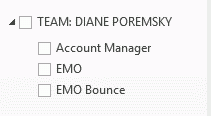
 A user wanted to know if it was possible to disable the Team calendars that are listed on Outlook’s calendar navigation pane. While it can be handy for users who manage one or a small number of calendars, the navigation pane is cluttered when the user manages several calendars.
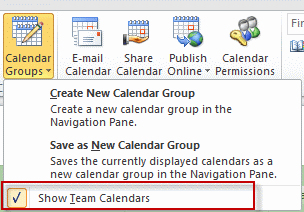
Sure. Individual users can expand the Calendar Groups button in the Manage Calendars chunk and deselect Show Team Calendars.
Use GPO
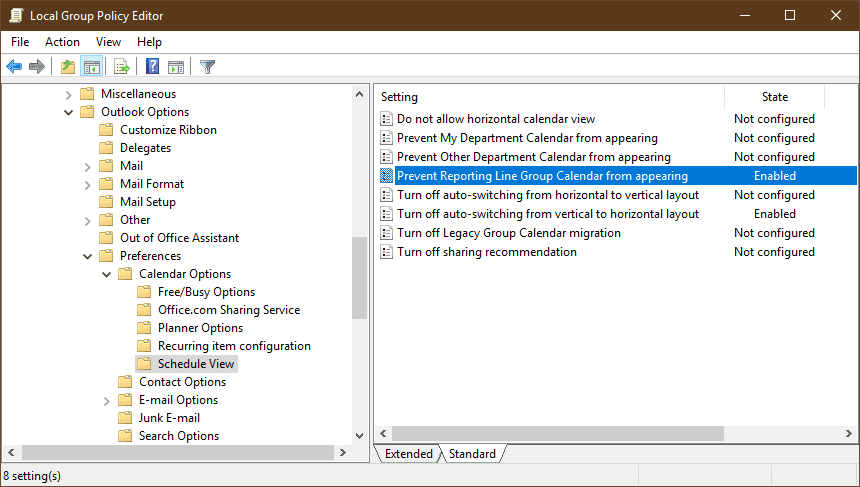
This can also be controlled through group policy. In the policy editor, browse to Outlook, Outlook Options, Preferences, Calendar Options, Schedule View. Team calendar are controlled by the Prevent Reporting Line Group Calendar from appearing. You can also use group policy to prevent My Department and Other department calendars from showing on the calendar navigation pane.
Disable Team Calendars by editing the registry
To disable the Team calendar by editing the registry, add a DWORD named Disablereportinglinegroupcalendar with a data value of 1 to
HKEY_CURRENT_USER\Software\Microsoft\Office\xx.0\Outlook\Options\WunderBar
Disable the Department calendar: Disabledepartmenttree
Disable the Other Department calendar:Disableotherdepartmentcalendar
Outlook 2016
HKEY_CURRENT_USER\Software\Microsoft\Office\16.0\Outlook\Options\WunderBar
DWORD: Disablereportinglinegroupcalendar
Data Value: 1 (disable)

DWORD: Disabledepartmenttree
Data Value: 1 (disable)

DWORD: Disableotherdepartmentcalendar
Data Value: 1 (disable)
Outlook 2013
HKEY_CURRENT_USER\Software\Microsoft\Office\15.0\Outlook\Options\WunderBar
DWORD: Disablereportinglinegroupcalendar
Data Value: 1 (disable)

DWORD: Disabledepartmenttree
Data Value: 1 (disable)

DWORD: Disableotherdepartmentcalendar
Data Value: 1 (disable)
Outlook 2010
HKEY_CURRENT_USER\Software\Microsoft\Office\14.0\Outlook\Options\WunderBar
DWORD: Disablereportinglinegroupcalendar
Data Value: 1 (disable)

DWORD: Disabledepartmenttree
Data Value: 1 (disable)

DWORD: Disableotherdepartmentcalendar
Data Value: 1 (disable)
Use a DWORD of Disabledepartmenttreefor the Department calendar and Disableotherdepartmentcalendar for Other Department calendar.
Do It For Me
Disable Team Calendars 2016 Disable Team Calendars 2013 Disable Team Calendars 2010
Group policy keys
Disabling the calendars using group policy will set the keys under the policy branch:
HKEY_CURRENT_USER\Software\Policies\Microsoft\office\xx.0\outlook\options\wunderbar
Outlook 2016
HKEY_CURRENT_USER\Software\Policies\Microsoft\Office\16.0\Outlook\Options\WunderBar
DWORD: Disablereportinglinegroupcalendar
Data Value: 1 (disable)

DWORD: Disabledepartmenttree
Data Value: 1 (disable)

DWORD: Disableotherdepartmentcalendar
Data Value: 1 (disable)
Outlook 2013
HKEY_CURRENT_USER\Software\Policies\Microsoft\Office\15.0\Outlook\Options\WunderBar
DWORD: Disablereportinglinegroupcalendar
Data Value: 1 (disable)

DWORD: Disabledepartmenttree
Data Value: 1 (disable)

DWORD: Disableotherdepartmentcalendar
Data Value: 1 (disable)
Outlook 2010
HKEY_CURRENT_USER\Software\Policies\Microsoft\Office\14.0\Outlook\Options\WunderBar
DWORD: Disablereportinglinegroupcalendar
Data Value: 1 (disable)

DWORD: Disabledepartmenttree
Data Value: 1 (disable)

DWORD: Disableotherdepartmentcalendar
Data Value: 1 (disable)
Do It For Me
Disable Calendars Policy 2016 Disable Calendars Policy 2013 Disable Calendars Policy 2010

You can also change these in Group Policy
Disabling Team Calendars for a large number of users
For global action, we can set this value via GPO.
These policy are configured for Outlook , so we have to use Group Policy Managment with Outlook 2010 and 2013 Administrative Templates.
So we have to create new policy linked to appropriate OU : click Create a GPO in this domain, and Linki it here… This Policy is created for user, not computer.
Expand : User Configuration – Policies – Administrative Templates – Microsoft Outlook 2010 or/and 2013 or 2016– Outlook Options – Preferences – Calendar Options – Schedule View
And Set policy Prevent Reporting Line Group Calendar from appearing .
http://exchangeblog.pl/wp-content/uploads/2013/02/kal2.jpg