While this article was originally when iCloud2 was introduced many, many years ago, some of the issues raised back then remain a problem today, such as messages getting stuck in the Outbox.
- Appointment and contact notes are plain text only
- Natural language not supported in date fields
- The contact linking field is missing
- Outgoing messages are stuck in the Outbox
- iCloud error: The set of folders cannot be opened.
In some versions of Outlook and iCloud, you may be able to set iCloud data files as the default data file in Outlook. However, it is not recommended at this time and is not supported. See iCloud default data files for details.
iCloud Contacts not listed first when clicking To
If you don't see your iCloud contacts first when you click the To button, the iCloud contact folder is not set as the default list in the Address Book Options.
- Open the Address Book using the Address Book button on the Home ribbon
- Click Tools, Options
- Select iCloud in When opening the address book, show this address list first
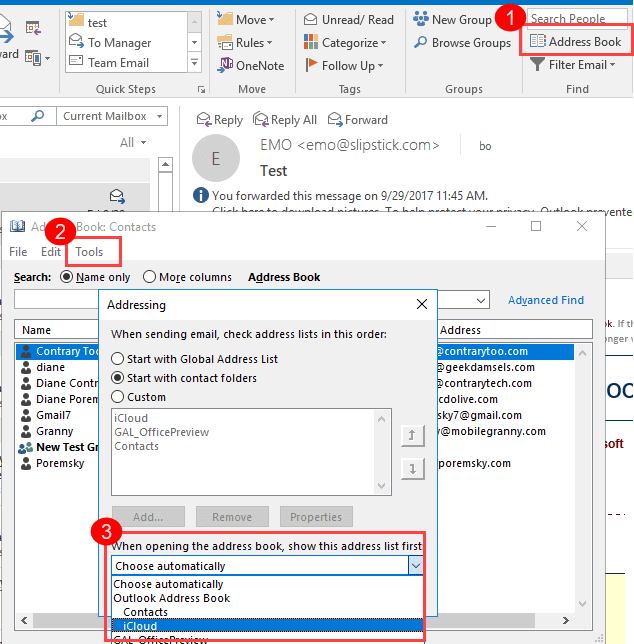
If iCloud is not listed in the Address book drop down, you need to right click on the iCloud Contacts folder, choose Properties and enable it as an Address book. See "Contacts are missing when you click the To button" for more information.
Change Views
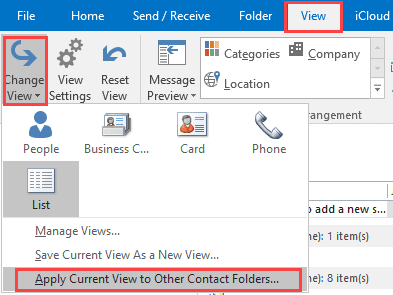
To apply a different view to all Contact folders switch to the View tab and apply a different view to the folder:
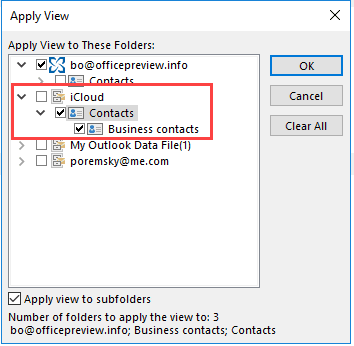
- Select a Contacts folder not in the iCloud
- Switch to the View tab
- Expand the Change views button and select Apply current view to other folders

- Expand the iCloud entry and select the iCloud contacts folder
- Click Apply
Additional Outlook-icloud articles are listed at the end of this article, with the newest articles at the top of the list.
Appointment and Contact notes are plain text only
The Notes field in Appointments and Contacts use plain text format in iCloud. This is "by design" due to frequent complaints about the formatting getting messed up during the sync process.
Additionally, the date fields in iCloud appointments do not support natural language. You need to type the date in full short date format (2 digit year ok).
1d does not convert to tomorrow's date
12/1 converts to 12/1/2000
12/1/12 converts to 12/1/2012
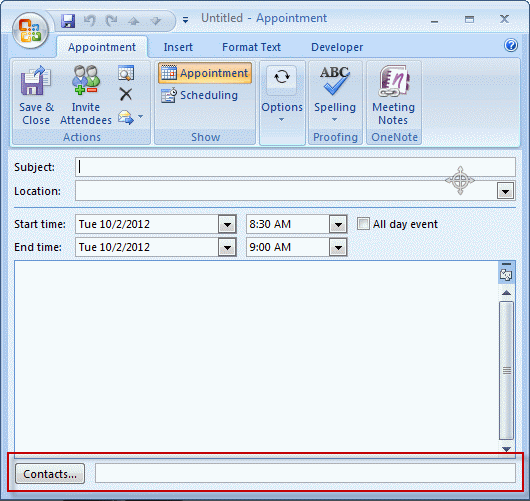
The Contact linking field is missing
The contact linking field is not supported in iCloud. This is the field at the bottom of an appointment or contact that displays linked contacts. (It's turned off by default in Outlook 2007 and up and can be enabled via the Options > Contact Options dialog.)
Outgoing messages are stuck in the Outbox
Users are reporting outgoing messages getting stuck in the Outbox after installing iCloud.
There are two causes:
iCloud is marking the messages read when you look in the Outbox. You'll know the message was marked as read by the icon - its no longer a closed envelope and is the draft's paper and pen icon instead.
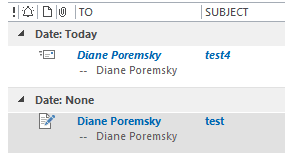
The solution: stop looking in the Outbox or stop using iCloud. To resend, open the message and switch to the Inbox then click Send on the message. Do not look in the Outbox.
The other cause is just a general problem with iCloud. This usually manifests after installing updates. If this is the case, there are two potential fixes:
- Disable iCloud, verify email sends correctly then re-enable it.
- Move the message from the Outbox to the drafts folder or delete it. Open it from Drafts or Deleted Items then Send again.
I tried to disable iCloud using the Outlook Trust Center but it won't let me. It keeps telling me only an Administrator can do this and I am one.
You need to close Outlook. Right click on the Outlook shortcut you use to open it and choose Run as administrator. If you don't see run as administrator, hold Shift as you right click. Now you should be able to disable it. Complete instructions (and screenshots) are available at Add-in can only be Disabled by an Administrator
iCloud error: The set of folders cannot be opened.
After upgrading Windows, you may receive the following error:
The set of folders cannot be opened. The information store could not be opened.
You need to re-sync the iCloud data file. close Outlook, open the Control panel and search for Mail. Select Data Files. Select iCloud from the list of accounts then click the Settings button. Close Outlook and reopen Outlook.
Tools in the Spotlight
CompanionLink synchronizes Outlook data with phones and other supported desktop applications and web-based services (like Google). Companionlink supports all versions of Outlook, including Outlook 2013 32-bit and 64-bit, and Windows 10. Version 9 |

Tools
CodeTwo FolderSync Addin is an Outlook add-in that enables synchronization of folders. The synchronization of data will always take place between selected folders and the user can choose several pairs of folders that need synchronizing. Freeware. | |
CodeTwo Sync for iCloud syncs Outlook folders with iCloud folders automatically synchronizes Outlook contacts, calendars and tasks with the iCloud data file in Outlook. CodeTwo Sync for iCloud will let you keep the iCloud and Outlook folders in sync, so you don't need to move or copy contacts and appointments between the default Outlook folders and iCloud folders. (Now Free) | |
gSyncit is an Outlook add-in that allows for two-way synchronization between Outlook calendars, contacts, notes, and tasks with your Google, iCloud, AOL, Fruxx, Yahoo, Memotoo and many other "DAV" enabled services. Also includes support for syncing attachments for calendar events. Works with Microsoft Outlook 2007, 2010, 2013, 2016, 2019, 2021 or Office 365 (Desktop Client) on Windows 7 and newer. | |
Backup and synchronize your personal data (contacts, calendar, files, bookmarks, etc.)with your phone, tablet and computer | |
Your sync-software can sync only default folders of Outlook, but you need also subfolders and public folders? OLMixedFolders can synchronize any Microsoft Outlook subfolder or public folders with your Outlook default folders. It uses categories to keep in touch with the origin folder. It is possible to create elements for the linked folders directly on your mobile phone. After synchronization, the element goes to the specified folder. | |
Outlook CalDav Synchronizer is a free Outlook Plugin, which synchronizes events, tasks and contacts between Outlook and Google, SOGo, Nextcloud or any other CalDAV or CardDAV server. Supported Outlook versions are Office 365, 2019, 2016, 2013, 2010 and 2007. | |
SimpleSYN Mobile is the synchronization solution for synchronizing Outlook data with your iPhone, iPad or Android device. Emails, appointments, contacts, notes and tasks are always up-to-date on all devices. Your Outlook data always remains local on your devices and is not stored in the cloud. On your smartphone you do not need an additional app and you can use the built-in apps. SimpleSYN Mobile syncs on the local network (WLAN) or on the way via the internet. Free 30 days trial available | |
Automatically synchronize your Outlook calendar and contacts with Google or iCloud. Access Outlook calendar and contacts on your Android phone or iPhone/iPad. |
More Information
iCloud: Unable to open iCloud folders in Outlook after upgrading to Windows 8
More Outlook and iCloud articles at slipstick.com:
- After Installing iCloud, Mail Won't Send?
- Create a Task and copy to another Tasks folder
- How to fix the iCloud APLZOD.dll error in Outlook
- iCloud Add-in is not listed in Outlook Add-ins
- iCloud and Outlook Problems: Syncing Calendar
- iCloud and Outlook Repair Now error
- iCloud Doesn't Sync
- iCloud error: Outlook isn't configured to have a default profile
- iCloud for Outlook 2016
- iCloud is hijacking Meeting Invitations
- iCloud, Outlook 2016, and Windows 10
- Issues Syncing Outlook and iCloud Contacts
- Outlook and iCloud Sync Issues
- Outlook and iCloud: default data files
- Outlook crashes when syncing iCloud calendars
- Save appointments to a non-default Outlook calendar folder
- Save New Contacts to iCloud Contacts
- Syncing iPhone Sent Messages with Outlook
- Transfer POP3 Mail on an iPhone to Outlook

Mary says
Hello Diane, My Iphone and Outlook calendar have recently stopped synching and I noticed that I not longer have a "'Move to iCloud" buttong on the Appointment task bar on my PC. I am using Outlook 2010 and the iCloud Add-in is not disabled. Would you be able to help me resolve the issue?
Thanks
Diane Poremsky says
First step is to sign out of icloud then sign back in.
Ted Blank says
A comment above says: "Reverting to iCloud 1 will fix these issues (but it cannot be set as default data file)."
What does does the "it" refer to in that sentence, as in "it cannot be set").
What are the benefits, if any, of being able to set "it" as the default data file? I don't know what a default data file is.
This related to Outlook 2010 with iCloud AddIn.
Thanks!
ted blank
Diane Poremsky says
For most people, the most noticeable thing is that the data file holds the appointments that display on the to-do bar. Because of the way Outlook 2010 handles accounts, the default data file is less important for mail handling and to to-do bar drives the default.
The iCloud data file can't be set as the default data file in some builds of iCloud. When the iCloud data file can be set as default, the to-do bar displays appointments that are in the iCloud and newly created appointments may be saved directly in the iCloud (under some circumstances). When the folders where your calendar and contacts are is set as default, the user "experience" is generally a little better.
alex b says
Having major problems with outlook 2010 and windows 8. Downloaded icloudsetup 2.1.2 and installed. However, outlook wont let me send email out from my mac account or any of my other email accounts (gmail, work). Uninstalled and reinstalled icloud. No joy. Uninstalled icloud and installed icloud 1.1. Outlook wont open.
When i try to open outlook without icloud installed, i get an error window saying that...cannot start outlook. Cannot open outlook window. The set of folders cannot be opened. An unexpected error occurred. MAPI was unable to load the information service C:\PROGRA~1\COMMON~1\Apple\INTERN~1\APLZOD64.dll. Be sure that the service is correctly installed and configured.'
When i reinstall icloud 2.1.2 - i can open up outlook, see emails but cannot reply or send emails from mac account or other email accounts.....so back to square 1.
Can you help???????
Diane Poremsky says
Your mac account is imap and you need a pst file set as default to use imap accounts with iCloud. You cannot set the iCloud as the default data file. File, Account Settings, Data File, Add... set a pst file as default. You can use an existing pst file, but not the imap data file.
The error relates to the iCloud - removing the iCloud service from your profile should fix it, if you don't want to use icloud. (Control panel, search for Mail and edit the profile - remove the iCloud from the data files tab).
Bruce Maples says
Hi there! Thank you for all you do and share. I thought I'd return the favor by sharing a problem and answer. I moved my contacts to iCloud, and a view I had created stopped working. Found the answer at this location. Apparently iCloud contact folders don't recognize categories for filters.
https://answers.microsoft.com/en-us/office/forum/office_2010-outlook/outlook-install-of-icloud-views-and-filters-stop/f914b243-7273-480e-acb4-161cfc89a05e?msgId=ee58a4a9-a554-4f3a-8750-72afb90fc730
Diane Poremsky says
They are working here - but you need to use a "contains" filter, not a "is" filter. category:("Category") finds all items with category in the category name. category:="Blue Category" finds items only in the blue category, as iCloud sees "blue category, green category" as one string, not two separate strings. This works in View filters too, but you need to use "contains" not equals.
That article is not accurate re: IMAP. The iCloud *email account* is IMAP and imap does not support categories, without a little trickery. The actual iCloud data file used for calendar and contacts is a SQLite database. Categories work pretty much the same in iCloud as they do it outlook, with just minor problems.
S. Dhruva says
Hi Diane:
I upgraded my Offie 2010 to Office 2013 x64. Now the iCloud will not synch. I have "repaired" the installation, un-installed iCloud (2.1.x), re-installed that, deleted the data file for iCloud (.ost). Noe of these fix the link between iCloud and Outlook 2013. Any help? Thanks
Diane Poremsky says
When you uninstalled/reinstalled, did it remove the icloud from the profile? If not, sign out of the icloud and sign back in.
Lee Garrett says
Thank you, Diane. That solved the problem! iCloud Control Panel was installed successfully after repairing Office 2013, and it allows me to sync iCloud with Outlook 2013 now.
Lee Garrett says
Dear Diane,
I had two versions of Outlook installed on a windows 8 PC. I'm unable to get iCloud Control Panel to recognize Outlook 2013 is installed after removing Outlook 2010.
The steps to recreate the problem:
1) Install microsoft office 2010 including Outlook on a Windows 8 PC.
2) Install microsoft Outlook 2013 as well.
3) Install iCloud control panel.
4) sign in to iCloud Control panel.
I receive a message saying there are two versions of Outlook installed, and to uninstall one of them.
5) Uninstall office 2010 from Control Panel add/remove programs.
6) sign in to iCloud Control panel, and there are no options to sync with Outlook presented as there would be expected--just a reference to go to icloud.com for contacts, etc.
Question, is there a registry item left after uninstalling microsoft office that tells iCloud there is no outlook on the system now, even though outlook 2013 is still installed? If so, can I edit the registry to fix this?
Diane Poremsky says
I would repair Office 2013 install then open it to make sure the profile is working. Then close it and try icloud again. Also, make sure you have at least icloud2.1 - that is the first version to support 2013.
PHILIP says
Dear Diane
I am trying to set up my @me account on outlook
i have followed the standard imap settings as supplied by Apple
i am using windows 8 x64 with out look 365 latest version..
however i am having no success
can you advise
Diane Poremsky says
Icloud set up mine when i set up icloud - I'm using p06-imap.mail.me.com and p06-smtp.mail.me.com; port 995/SSL for incoming and 587/TLS for outbound mail. I understand they go up to p99- for the server names.
Krista says
I have set up a "rule" in my outlook from my company's server to forward my emails to my icloud email account and they are being sent from outlook but coming into my icloud acct. Can you PLEASE help!
Diane Poremsky says
If you forward mail to the account does it arrive? If yes, the admin is probably blocking automatic forwards to internet addresses. You'll need to speak with the admin to get it changed.
Sandra Kegie says
I would like to be able to right-click paste text from anywhere into a calendar event but since initiating iCloud cannot, into either the Outlook or iCloud calendars. This is really annoying - is there a way around this?
Diane Poremsky says
Use Ctrl+V. The icloud calendar uses a plain text editor that doesn't use the right-click content menu and it can't be changed.
Marieke Jonkman says
sure enough, changing it according to this link, fixed the problem and I'm all good to go!
(just sharing the link for others to benefit too)
https://office.microsoft.com/en-us/excel-help/click-to-run-switch-to-using-an-msi-based-office-edition-HA101850538.aspx
Marieke Jonkman says
ah.... that may be the problem, I believe I have the downloaded version of office 2010? Could that be it?
No, I'm brand spankin' new to Mac and iCloud :)
Diane Poremsky says
Check the version in File, Help menu. If it says click to run, you'll need to convert to the installed version.
Marieke Jonkman says
I'm at my wits end here ;) and I can't seem to find an answer on the internet. I have windows 7, outlook 2010 and installed iCloud2, but iCloud2 does not recognize outlook. I get the message
'ICloud contacts, calendars and reminders are available on icloud.com'
Any links or insights on how to fix this? I would really like to sync outlook with my ipad and mac!
Thank you so much!
Diane Poremsky says
Do you know which office suite you use? If its a click to run version, icloud may not see outlook.
Did you use icloud 1 with outlook? if so, close outlook, sign out of icloud and sign back in.
Pedro says
Dear Diane, by mistake I closed the icloud folder on the emails part of outlook and now i lost mu icloud contacts in outlook and my icloud agenda in outlook. All the information is in icloud on my iphone and ipad but can't get it back to my outlook.. Could you help me? thank you Pedro Pimenta
Diane Poremsky says
Close outlook. Sign out of icloud control panel, then sign back in. When icloud is finished setting it up, reopen outlook. You should have everything back in outlook.
Junior says
If you sign out of iCloud and sign back in with Outlook closed, might just fix it.
Try it out to enable
Scott Power says
Scratch that....the forwarded copy of the meeting allows me to paste in the note section
Diane Poremsky says
Thanks. The screenshots you sent me look like appointments - I'll keep trying to repro it as here only meetings are affected. Are all appointments affected or just some (besides the copy)? Do you know where you created the affected appointments - on outlook or on the apple device?
Scott Power says
Fix doesn't work....It allows me to forward the appointment just fine and I still can't paste in the notes section.
Diane Poremsky says
You don't want to forward it - you are just doing that to make a copy of the appointment. Outlook will say it can't Forward it and needs to make a copy. Say Ok and the copy opens, with a "Move to iCloud" button. Click it to move an editable copy of the appointment to the icloud calendar (you'll have the original one plus the copy on the calendar).
Also, would you mind sending me a screenshot of what the uneditable appointment looks like when its open? You can send it to diane at slipstick. Thanks.
jeri says
Helpful - but doesn't address what to do when iCLoud doesn't recognize Outlook. This worked fine in version 1, sigh.
Diane Poremsky says
There shouldn't be a problem. Did you log out and back into icloud via the control panel applet?