The “Outlook could not create the work file. Check the temp environment variable.” error is more common after an upgrade of the operating system. It's the result of a corrupted temporary internet cache variable, possibly caused by the upgrading the OS or using Easy Transfer to move settings to a new computer.
Fixing it is easy - you can either edit the registry to change the location of the Temporary Internet Files or make the change within Internet Options (Control panel).
If you don't want to edit the registry, you can use the Mr. Fix it in You receive an "Error 1606" error message when you try to install or remove a Microsoft program. Mr FixIt will reset all User Shell Folders values, including Cache.
Edit the Registry method:
At Start menu, Run (or Windows key + R) type
regedit
Browse to HKEY_CURRENT_USER\Software\Microsoft\Windows\Current Version\Explorer\User Shell Folders
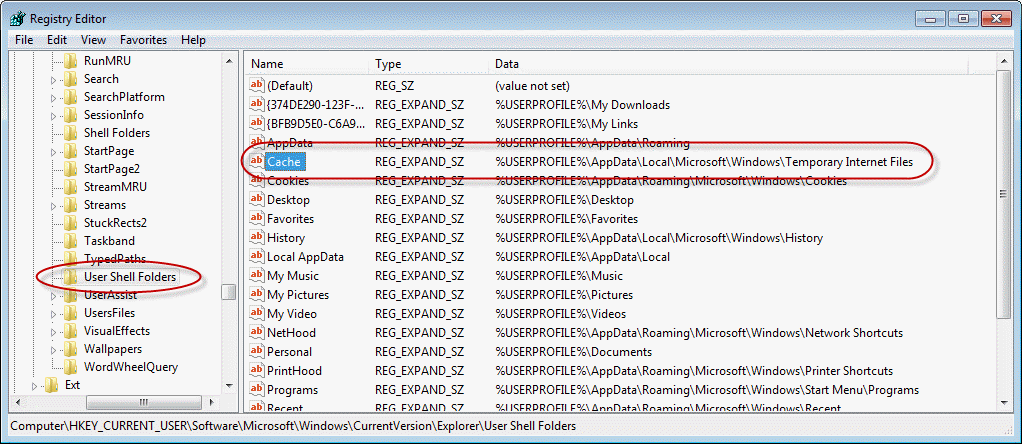
The Cache variable (in the right pane of the register editor window) should be as follows:
Windows 10:
%USERPROFILE%\AppData\Local\Microsoft\Windows\INetCache
Windows 7 or Vista:
%USERPROFILE%\AppData\Local\Microsoft\Windows\Temporary Internet Files
Double click on the Cache name to open it then edit it, entering the correct path (as listed above).
Internet Options method
Open Control Panel, Internet Options or go to Internet Explorer's Tools menu, Internet Options.
- In the Internet Options dialog, click the General tab. In the Browsing history section click Settings to open the Temporary Internet Files and History Settings dialog.

- In the Temporary Internet Files and History Settings dialog, click Move Folder to open the Browse for Folder dialog.
- In the Browse for Folder dialog, select the correct location for your Temp folder.
- Click OK to close the Browse for Folder dialog. Click OK to close the Temporary Internet Files and History Settings dialog. Click OK to close the Internet Options dialog.
- Wait for content to migrate to the new location.
- Reboot the computer when prompted.
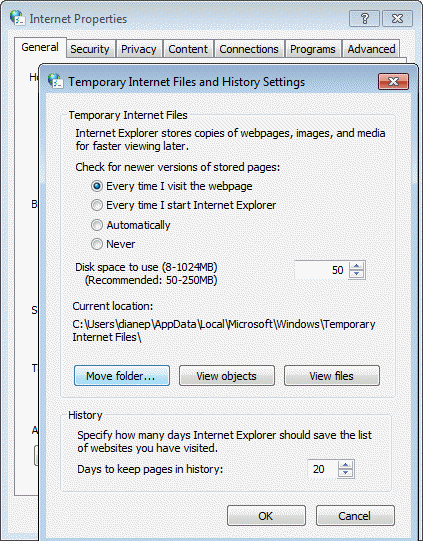
In Windows 10, the folder is at C:\Users\user name\AppData\Local\Microsoft\Windows\INetCache
In Windows 7 or Vista, and Windows 2008 Server, look for the folder here: C:\Users\user name\AppData\Local\Microsoft\Windows
For Windows XP and prior versions of Windows: C:\Documents and Settings\user name\Local Settings

Thanks Diane it worked!
Neither of these worked for me. My problem is Windows Mail for Windows10 giving me this error message whenever I try to open an email.
Diane,
Tried other fixes which didn't work; yours did, thanks.
thanx. registry fix worked
Deanne
Thanks for this info. I have the same problem with outlook from Office Professional Plus 2016 installed with Windows 10. Can you give me the information to adjust my registry for it? Thanks
The registry is the same for all versions of outlook - the win10 path is the same as for 7/8 - %USERPROFILE%\AppData\Local\Microsoft\Windows\Temporary Internet Files
I used the Control Panel method (some newbs might be afraid of manipulating the REGEDIT, which is a good idea) and it changed the registry keys to match the correct path. After the restart, the issues with Office 365/2016 in Win10 stopped and as of now, I haven't seen any other issues. Thanks for the easy fix. Too bad MS doesn't seem to know how to do it!
The same problem shows up with Outlook 2013 when upgrading to Windows 10.
The registry entry is
%USERPROFILE%\AppData\Local\Microsoft\Windows\NetCache
but the folder does not exist.
There are two options.
1. Change the registry to INetCache, since there is a corresponding folder in the Users\UserName\AppData\Local\Microsoft\Windows folder on the hard drive.
2. Create a new folder called "NetCache" without changing the registry.
I did the second option and it worked fine.
Tried this fix (created new folder NetCache) and problem remains with Windows 10
Diane, I have been getting an error message "there are no file" every time I try to save a document. I am running Outlook 2013 on Windows 7. I use this for business, and I am desperate. Thanks.
These are email attachments or linked files? Are all attachments affected or just certain file types?