If the time on the Day/Week calendar is off by one hour the week after DST changed, also see Daylight Saving Time Calendar Display Bugs, especially if you use two time zones. This is caused by a "display bug" and will go away "next week" or if you switch to the Work Week view.
When I send or receive meeting requests or view other people's calendars, the appointments are off by one hour.
This is caused by incorrect time or time zone settings on one of the computers.
- Verify all computers involved are set to the correct time, time zone and Daylight Saving Time settings in Windows' Date/Time settings. You can open Date and Time in Windows 10 by right-clicking on the time in the notification tray and choosing Adjust Date/Time.
- Verify the settings are also correct in Outlook. File, Options, Calendar, Time Zones (The settings should be identical and a change made in one location should reflect in the other.)

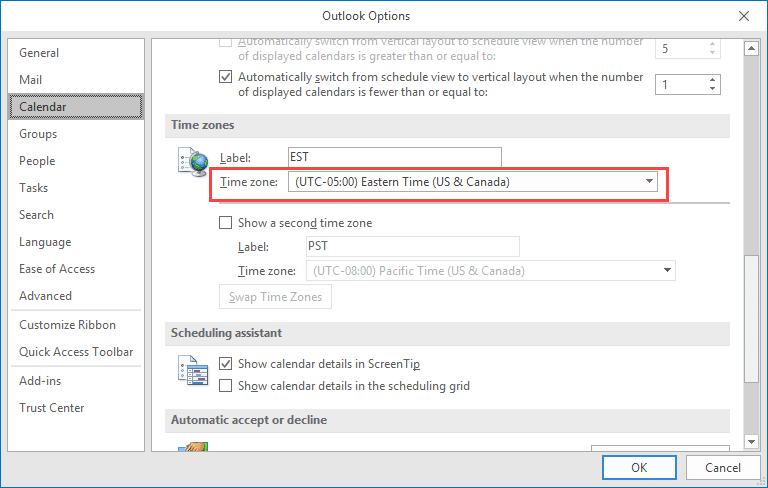
You need to use a time zone with the correct DST settings for your location. If your location does not observe DST, DO NOT choose a time zone that does then deselect the option to automatically update for daylight saving time. You need to use a time zone that does not observe DST.
If you receive an iCalendar that does not include time zone offsets in the ical, Outlook may place the appointment on your calendar using standard time, not current time. For example, if you subscribe to an Internet calendar that does not include DST information, Outlook will treat the events as referencing standard time and move them ahead an hour if they occur when DST is in effect. As a result, an appointment scheduled for noon will be on the calendar at 1 PM.

This did not work for me. I usually work on Central time but came to Mountain Time for a week and will be working remotely. Initially everything was fine since my laptop and business account did not automatically update their timezones but I was off by one hour. I updated both of them now. ALL my scheduled meetings are off by one hour even when both the timezones in the account and the laptop are now updated. How do I fix this? When I changed them both back to central the meetings change again to be off (one hour later).
If the time zone was not correct when the appointment was added to the calendar, changing the time zone will change the time for existing events.
The fix: either update events manually or export the calendar to CSV, change the time zone and import. If you go export/import route, to avoid changing old events, create a new calendar and move the items you need to export to it, then do the export, fix the zone and import. The original items will be in the new calendar if you need to compare them with the import.
https://www.slipstick.com/outlook/calendar/appointments-and-time-zones/#fix
With our company, it is only iCloud appointments that come through an hour different. Apparently this has been known about for many years and neither party is really doing anything about it (Apple/Microsoft) All MS calendar software products do the same thing - Exchange, Outlook, Windows Calendar, etc. Their web calendars, as most all other web calendar systems, are fine. All computers are set to the correct time and TZ and all are set to automatic DST. Outlook is set to use the correct calendar TZ and DST. iCloud is set to use Central Time / Winnipeg (where we are located). All settings in iCloud regarding TZ and DST seem correct, unless I am missing something. If I get an appointment in Outlook from someone in the office who sends it from iCloud/iPhone, the face of the appointment itself says it is for the correct day/time, but when I we open the attached ICS file so it will be added to Outlook, it shows an hour difference (later). I have also tested this in Windows Calendar and Exchange with the same issue. From what I have been reading online, it seems to be due to iCloud not including recognizable TZIDs… Read more »
There are 4 spots you need to change. 2 on your iPhone - time setting of the general phone to Beijing and then in the iPhone calendar to Beijing. Then 2 spots on your PC - change it on your PC computer clock to Beijing and then in Outlook calendar under options to Beijing. The times then all sync ups from all ends - yes! this was driving me insane!
thank-you - I think you have saved my sanity!
A great thank you from me as well!
All my clocks were properly set to Eastern Time, except (frustratingly) my Microsoft Teams meetings, which were all listed as one hour early -- until, at your suggestion, I checked my Thunderbird email program's calendar, which for some reason was set to Central Time.
Once I fixed that, all my Microsoft Teams Meetings invitations fixed themselves. Thanks!
Sending Recurring iCal mail from exchange to outlook / Google, The recurring text "Occurs every day effective 4/30/2016 until 4/30/2016 from 8:00 PM to 9:20 PM" is showing always in UTC time, Because commonly the meeting time stored as UTC, wil display the date and time based on user's timezone. but other single ical mail sit in right time based on outlook timezone, fog eg, If I change the timezone in outlook its displaying perfectly, its not expecting timezone id while creating the meeting. But the recurring iCal mail is not taking outlook timezone,
Please help me.
I had this exact same problem. Turns out it was the time zone setting in the company router. Thats right - the time zone in the router. Weird. Set it to the correct time zone and it was fixed.
I have the EXACT SAME problem as Richard and am interested in ANY suggestions.
Is Outlook generating the appointment? I've seen issues where the appointment was generated outside of Outlook but defaulted to using UTC/GMT for the appointment because Outlook didn't know what time zone it was supposed to be in because appointment used a different naming convention for the time zones.
Hi Diane
If I send an invite for an all-day event from my work Outlook calendar (company-hosted Exchange) to my home email address, that works fine.
But if I send an invite for an all-day event from my home Outlook calendar to my company email address, when it arrives in my work outlook calendar, it is -1 hours off in my work calendar - 23:00 - 23:00.
Both home and work laptops are set to London/Dublin timezone in both Outlook>options and in Control Panel>date & time. Both are running W7 and Outlook 2010.
Any ideas?
Thanks,
Richard
PS meant to add that it is of course presently BST here in the UK (i.e. daylight saving time, GMT +1) and that would appear to be being lost in one direction.
It sounds like the TZ is getting lost on the appt so the server uses GMT. I've seen it between Outlook and some ical servers but it shouldn't happen with Outlook to Outlook/Exchange. (I don't have a solution off hand. )
Hi! I am using Samsung Note 4 and I am based in the Philippines. since the DST was lifted last March 8th, all my meeting invites coming from US colleagues were either off by a day or a day+1 hour. For example, a meeting set on Tuesday at 5pm, PST would show as Tuesday at 9am (PH time) instead of Wednesday, 8am since Philippines is ahead by 15 hours. Tried setting up my calendar using iphone 5 and everything is showing up just fine. Is it something to do with google calendar?
More power!
It could be google - or it could be something else. Make sure your computer and your google account is set to the correct time zone, has auto dst update enabled, if your zone supports it, and your computer time is correct. If the sender's aren't using the right time zone settings it can mess the calendar up too - Outlook uses UTC 0 for all appointments and adjusts it the appointment time to the local computer's time zone.