My Outlook Calendar template is an excellent Word template that reads your Outlook calendar and creates a really nice calendar which you can doctor up with fancy fonts, colors or background images before printing. It can be sent to others as a Word document (or print it as a PDF before sending). You can even save it as HTML to upload to a web site. Several years ago (and possibly still) this calendar template was used on thousands of websites - it was easy to use and made a nicer looking HTML calendar than the old Outlook web calendar publisher (defunct as of Outlook 2003). I'm not sure this will ever be the idiot's guide Laurie wants but we're off to a good start.
Comments are temporarily disabled on this page due to high spambot activity. If you have a question about the topic of this page, you can ask it at OutlookForums . Thanks.
The calendar template in question is the My Outlook Calendar template but many of the changes here may apply to the other calendar templates as all are based off of the same template.
The best news yet: it works in all versions of Outlook & Word to date: Office 97 - Office 2013. It should work in future versions that continue to support VBA. Note that it may error in 64-bit Office.
Using the Template
Using the template is pretty straight-forward. Download the zip file, extract the template and double click it.
For best results (and because of tighter macro security), it should be in the default location for Personal templates. In Windows 7/8 this is usually C:\Users\username\AppData\Roaming\Microsoft\Templates\. If you run it from other folders, you may need to lower macro security settings. (Set the Personal templates location using Word's File, Options, Save dialog.)
When the template is in the Templates folder, you can open it from Word, using the File > New > Templates dialog. Otherwise, double click to start it. Once open, you'll see a dialog with many options to select from.

In the top section you select the Outlook calendar you want to print and the format: monthly or weekly.
The tabbed lower section has many options, with the most popular ones enabled by default. Click each tab to see the options available.
After choosing the options you want to use, click OK and Word will create the calendar. It may take a few seconds if you have a lot of appointments or are making a calendar that spans several months.
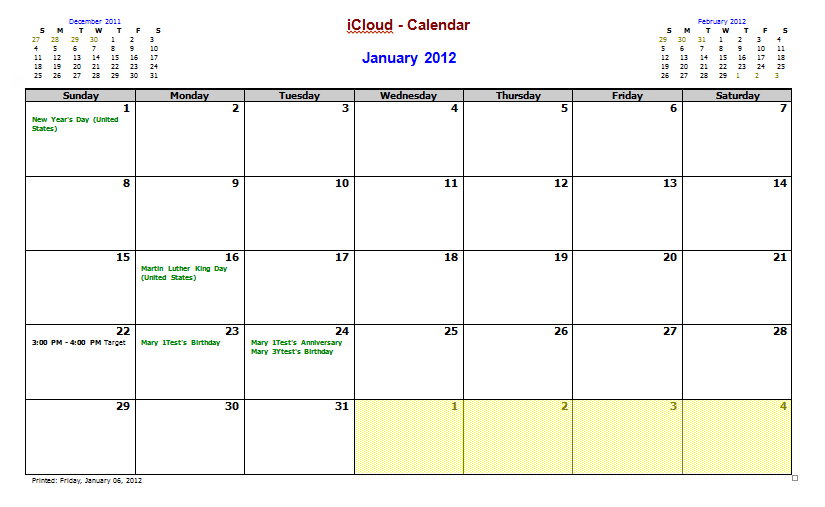
This is the finished result:
Customize the Calendar
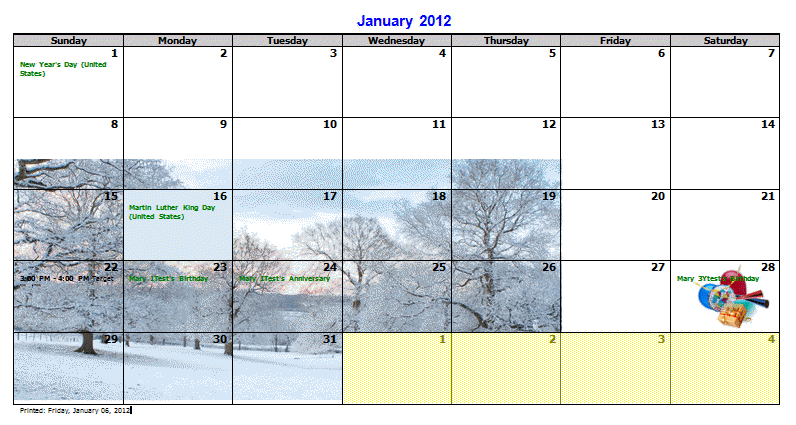
Before printing the calendar you can use Word's tools to highlight appointments or dates or to decorate the calendar.
Need color in one cell? Use Cell Shading.
Want to add a image to the calendar or a date? You can quickly insert an image then use the Wrap text command to send it behind text. However, for best results, insert the image and select it. On the Picture format ribbon you'll expand the Position command and choose More layout options from the bottom. On the Text wrapping tab, set the image to be In front of text (for now), then on the Position tab, deselect Layout in table cell. Close the dialog. Drag to position on the page and resize as desired, then send behind the text (Wrap text command).
Editing the Template
Since Laurie started this, we'll begin with the features she wants to change:
I've had a bash at editing it in VBA via Word, but the options to edit seem limited: I have managed to tell it NOT to print my name at the top, but not managed to remove the two mini calendars for last and next month at the top. Nor to change the font for the printed date. Nor change the grid size. Etc etc...
The options usually persistent once changed, but if you want to change the defaults or even hardcode certain settings, you can edit the code.
- First, open the template as a template. Don't double click on it, right click on the *.dot file and choose Open. It should open to a white page and the title bar should say 'my outlook calendar.dot'.
- Next, press Alt+F11 to open the VB editor
- On the left, expand Forms folder and right click on the little form icon labeled "MY" then choose View Code.
- Now you can make your changes to the code and save.
The default options are set in this section of code. (I searched for 'thumbnail' to find it quickly). I changed the default for the thumbnail calendars and the calendar name so both are off. This sets my preferred defaults while allowing me to use them if I want to.
chkPrintWeekends.Value = GetSetting(Application.Name, strKey, chkPrintWeekends.Caption, "True")
chkLeftToRight.Value = GetSetting(Application.Name, strKey, chkLeftToRight.Caption, "False")
chkShowMeetingAttendees.Value = GetSetting(Application.Name, strKey, chkShowMeetingAttendees.Caption, "False")
chkShowApptEnd.Value = GetSetting(Application.Name, strKey, chkShowApptEnd.Caption, "True")
chkThumbnails.Value = GetSetting(Application.Name, strKey, chkThumbnails.Caption, "False")
txtNumberMonths.Text = GetSetting(Application.Name, strKey, "Number Months", "1")
txtNumberWeeks.Text = GetSetting(Application.Name, strKey, "Number Weeks", "1")
txtOtherTitle.Text = GetSetting(Application.Name, strKey, lblOtherTitles.Caption, "")
chkUserName.Value = GetSetting(Application.Name, strKey, chkUserName.Caption, "0")
txtDateFormat.Text = GetSetting(Application.Name, cTemplate, "Date Format", "m/d")
txtHourFormat.Text = GetSetting(Application.Name, cTemplate, "Hour Format", "h:mm AMPM")
txtApptFontSize.Text = GetSetting(Application.Name, strKey, "Text Font Size", Application.Selection.Font.Size)
mpCalendarType.Value = GetSetting(Application.Name, strKey, "Visible Tab", "1")
More Information
Idiot's guide to amending My Outlook Calendar template (Outlook Forums)

Kristin says
I am getting the following error when I try to run it: "Runtime error 5491: The requested member of the collection does not exist."
It seems to fail right before printing a multi-date calendar item. I am trying to do the monthly view, and this happens whether or not I have the "show banners" checked. I'm wondering if my item name is too long for the banner?
Can anyone provide any pointers to try to fix this?
Edward says
Hi, Diane,
What's the license on this? Can i modify the VB code further and use it within my company? I would leave the copyright notice within the code but would like to hide the "About" tab. Is this possible?
Diane Poremsky says
You sure can use it and edit it. I haven't looked at the code in a long time, but if nothing else, you can change the About text - search the code for "about" to find where to change it. As I recall, it uses a tab'd dialog - should be able to hide the tab by setting to to visible = false in the userform control properties.
Laurie says
Hi there. Thanks for persevering with this.
Some problems.
1. The readme says "Olcalndr.exe contains a sample Microsoft Word 97 template for use with
Microsoft Outlook 97 and Outlook 98". I have Outlook 2003.
2. I don't have a C:UsersusernameAppDataRoamingMicrosoftTemplates folder.
On the other hand, I _have_ got C:Program FilesMicrosoft OfficeTemplates which contains fax templates etc.
3. "First, open the template as a template. Don't double click on it, right click on the *.dot file and choose Open. It should open to a white page and the title bar should say 'my outlook calendar.dot'."
Nope. The title bar says 'OlCalndr'. I have the file on the desktop and macro security set to low.
I think I'll give up now. Life is too short. Thanks for trying to help me though.
Diane Poremsky says
1. Doesn't matter. I'm using Outlook 2010. It works fine. (Also True for most templates.)
2. Are you using Windows 7 or XP? In Windows 7, paste %appdata%microsofttemplates into the start menu search field. In Windows xp, paste %USERPROFILE%Application DataMicrosofttemplates into the address bar of windows explorer.
3. I wrote this for the other calendar template (My Outlook Calendar), so the title bar will be different if you use a different template. The VBA code samples may be different too.