This is one of my favorite Outlook features and it works with all versions of Outlook and with all Outlook folders. It also works with any application that accepts paste, not just Excel.
Create a view that contains the fields you need, then copy the rows and paste into any application that accepts paste. Some applications, like Word, require Paste Special, As Text to remove OLE formatting. Otherwise, you'll paste Outlook items, not rows of text.
- Switch to a list view, if not already using a list view.
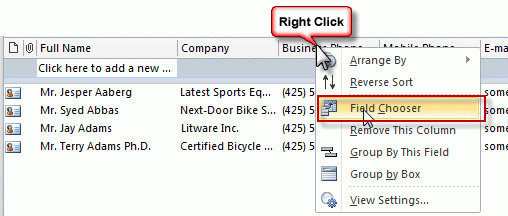
- Right click on the row of field names and choose Field Chooser.

- Drag the fields you need to copy to the row of field names.
- Drag the fields you don't need off of the row of field names.
- Begin by selecting the text. Hold Ctrl as you scroll down or use the PgDown or End key to select the items faster.
- Press Ctrl+C to copy the selection.
- Go to Excel and paste (Ctrl+V)
Use Format Columns to change the format of the date or number fields. To open the format columns dialog, right click on the row of field names and choose View Settings, Format Columns
You can paste into any application that accepts paste, however if you paste in Word, you need to use Paste Special, As Text.
Video Tutorial
Tips:
- Disable in-cell editing - its easier to select the rows.
- Right click on the row of field names and choose Customize, then reset to reset the view.
- Remember, you need to use Paste Special, As Text when pasting into some applications.

Hello Diane,
I am sorry because I do not write in the right discussion, but a colleague and I use a query to have a look of our Outlook calendars into Excel.
The problem is that this way of doing does not take in consideration the categories in which the calendar events can be classified (my colleague do class its calendar events in various categories).
Do you have an idea about the way of doing to synchronise also the categories please?
Thank you in advance for your help.
Yohann
Thank you so much! I've been looking for this for a long time!
Hi Diane, when I paste in Excel it is automatically pasting a separate row that is the header row that lists my field names. Then I have to delete that row. I am trying to add data to an existing table. How can I set it to paste without also pasting the field name row above the data?
I'm not aware of a way to avoid it with copy and paste. You could use a macro to send the data to excel - but depending on how frequently you do this and if you always use the same fields, deleting the row might be easier.
Does it work in Mac? I can't seem to copy the list in Mac but Windows does.
I don't think so, but will test it to be sure.
Thank you so much. I will wait for your reply.
Because Outlook mac does not support OLE (object linking), copy and pasting to Excel doesn't work.
I'm looking for a way to get the full body of the email into Excel. The exporting method outlook provided only does 250 emails, and the copy and paste method spaces out the different lines. Is there any way I can get all of the contents on one line?
You need to VBA to export the body. I have a code sample here https://www.slipstick.com/developer/vba-copy-outlook-email-excel-workbook/
I was able to export a folder consisting of several emails but I am unable to get the date and time and the entire body of the message into excel. We do not host our own emails and that may have something to do with it but I am at a loss as to how to get the entire email message, including date, time, and any attachments into an excel (CSV) file format...can anyone help?
I followed your presentation and understand how the contacts and calendar can be copied into an excel file but I need to copy the actual email messages along with the attendant data for import into another program. Is it possible to copy the email content into an excel or .CSV file format for later use?
The PROBLEM is that you don't get hour (on date data) if the date is not from curret week! I would like to have always date+hour... not only hours (if Today) or days' name (if Yesterday...)
Make sure you change the Column formatting. View menu, View settings - Format Columns. Default is Best Fit and gives you only the date for older items.
Choose a format that has the time included. These formats are based on your windows long and short date formats but the '12/1/17 8:49 AM' format should work then you can customize it more in Excel. (its not the selection in the screenshot - sorry)
Hi! I did exactly this, but I am still seeing it paste as time only for same day, Days for in week and DDMMYYYY format for anything older. Any ideas?