Outlook doesn't support wildcards in rules, so you can't use use a * or ? character for wildcards. Instead, just specify the string you want to match. For example, if you want to match anything with "foo" in the subject text, then any the following would cause the rule to fire:
Foobar
Fools
tofoo
Note that the Rules Wizard supports wildcarding for e-mail addresses. By using the "with specific words in the recipient's address" and "with specific words in the sender's address" conditions, you can set rules for everyone from a particular domain, for example. See Creating Rules that Apply to an Entire Domain for more information.
However, these address rules do not work for Exchange Server recipients since the Exchange server addresses do not show up in the message header. To apply a rule to addresses within your Exchange organization (or exclude them), use @ as the word in the address (or exclude messages with @ in the address). See Creating a Rule to Filter Blank Senders for more information.
Display names
While a partial word filter won't work in all circumstances, you can use it to filter the display name of senders. For example, this rule will filter messages from Forum Administrator

Tip: Cancel the Check names dialog when adding the name to the people or group field:
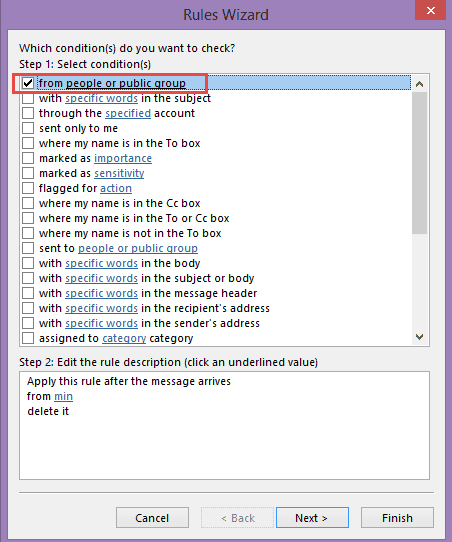
Run a Script rule
When a rule that looks for partial words isn't working, you can use a run a script rule. This example shows how to filter for the Sender's display name, but it can be used with any Outlook email field.
Sub CheckSpam(Item As Outlook.MailItem)
  If InStr(LCase(Item.SenderName), "pfizer") Then
    Item.Delete
  End If
End Sub
Using Wildcards in a Script
You can use wildcards in a script, either by using the method below or regex.
So on this topic... how about moving all messages that say
Invoice AI-SO-11786 from My Company
where the invoice number changes each time?
Assuming AI-SO- is in every invoice and only the numbers change, the next example shows one way to use wildcards in a script. It works with 5 or more digits (or characters) following ai-so-. If the letters are always upper case, you could get away with removing LCASE and using upper case letters in the macro.
The rule looks for the word invoice in the subject or body and if found, runs this macro to check the subject.
Sub MoveInvoices(Item As Outlook.MailItem)
Dim MoveFolder As Folder
Set MoveFolder = Session.GetDefaultFolder(olFolderInbox)
Set MoveFolder = MoveFolder.Folders("Move")
     If LCase(Item.Subject) Like LCase("*ai-so-?????*") = True Then
      Item.Move MoveFolder
  End If
End Sub
See Outlook's Rules and Alerts: Run a Script for more information on using a run a script rule.
More Information
Create rules that apply to an entire domain
Rules frequently asked questions
Creating a Rule to Filter Blank Senders (Outlook-tips.net)

Berkeley Goodloe says
How would this code be modified to look for any 8-digit number in the subject line?
guest_2233445 says
Hi Diane,
I use outlook. I have about 8000 emails in my sent items folder and about the same in my Inbox. If I group them by "From" or "To" there are over 200 groups for each. That is over 400+ in total. For me to create rules and folders for each one will take months of non-stop work. Is there a way that I can automate this process? I am willing to buy 3rd party sofware if necessary in the event that Outlook does not have this capability. Please advise.
Thank you,
SK
Diane Poremsky says
Are you looking to file them in folders? You could use a macro to file by display name or email address - or get the email address and create a folder by display name.
These two show how to get the address - they need tweaked to file by it though.
Sort messages by Sender domain (slipstick.com)
Display the Recipient Email Address in the Sent Items Folder (slipstick.com)
Not a rule-based, but a way to file mail using a macro
Macro to file Outlook email by sender's display name (slipstick.com)
Or... turn on conversation view and leave the sent items in the sent folder - the inbox items can be left or moved to a folder called Archive. Then use Outlook's search features when you need to find mail from someone.
Frank says
Hi Diane, my vba script reports a compile error: Expected Function or Variable. It fails when entering the sub shown on the line below. Any suggestions?
Sub test(Item As Outlook.MailItem)
Diane Poremsky says
Is the message you are testing with an email message? It will fail on meeting invites, bounce messages and other non-email mailed items.
Kostas says
Hi Diane,
Thank you very much for this solution. Managed to make my own script for messages containing numbers that increment.
But, it's not working with messages that have been archived via Enterprise Vault. Any way to overcome the issue ?
Thanks,
Kostas
Diane Poremsky says
No, I'm not aware of a way around it - its due to how the archiving works. (And can't test theories because i don't use enterprise vault)
Kostas says
Thanks for the fast response !
Have a nice day,
Kostas
Kostas says
Dianne,
It seems I managed somehow to destroy my script. Even a single search isn't working. How can I delete the script and start a new one ?
Michael McMahon says
Diane -
apologies for dredging up this old post. Can you clarify whether the line:
Set MoveFolder = MoveFolder.Folders("Move")
Is specifying a folder named "Move" as a target or an action?
Here's what I'm trying to do: match inbound emails that have a subject including INC??????? or TASK??????? and move them to a folder called "Pearson" Folder is at the same level as Inbox. Code is as follows:
Public Sub MoveSDMail(Item As Outlook.MailItem)
Dim MoveFolder As Folder
Set Folder = Session.GetDefaultFolder(olFolderInbox).Parent.Folders("Pearson")
Set MoveFolder = MoveFolder.Folders("Move")
If LCase(Item.Subject) Like LCase("*INC???????*") = True Then
Item.Move MoveFolder
ElseIf LCase(Item.Subject) Like LCase("*TASK???????*") = True Then
Item.Move MoveFolder
End If
End Sub
Diane Poremsky says
>> Is specifying a folder named "Move" as a target or an action?
Move is the folder name. In that example, the Move is a subfolder of the Inbox. The macro was written like that to keep the number of "dots" down in the folder path (one less dot over your folder path code).
You would use this
Set Folder = Session.GetDefaultFolder(olFolderInbox)
Set MoveFolder = Folder.Parent.Folders("Pearson")
or this
Set MoveFolder = Session.GetDefaultFolder(olFolderInbox).Parent.Folders("Pearson")
or
Set Folder = Session.GetDefaultFolder(olFolderInbox).Parent.Folders("Pearson")
then
Item.Move Folder
Brandon Rossman says
Hello Diane,
I see you have helped many people with creating macros, and I have a similar request as Steve. I have 20-40 projects going at once, and I always add the work order number in the subject line. It always starts with a W or C and they are 7 digits long. I would like to move these from the inbox and sent box to the project folders that are nested. They are nested like the following example(Inbox/Projects/40-xx/(Wxxxxxxx) Install Sign.
Any help would be greatly appreciated. We are currently using Outlook 2013.
Diane Poremsky says
I have some macros that do pretty much what you need - see https://www.slipstick.com/developer/code-samples/vba-file-messages/
Brandon Rossman says
Hello Diane,
I get the an object could not be found error. I changed the name from Clients to Projects. If I change Projects to Inbox, it will run, but does nothing.
Public Sub FindFolder()
Dim Name$
Dim Folders As Outlook.Folders
Dim Folder As Outlook.MAPIFolder
Set m_Folder = Nothing
m_Find = ""
Name = "*" & strCode
If Len(Trim$(Name)) = 0 Then Exit Sub
m_Find = Name
m_Find = LCase$(m_Find)
Set Folder = Session.GetDefaultFolder(olFolderInbox).Parent.Folders("Projects")
LoopFolders Folder.Folders
Thank you,
Brandon Rossman
Diane Poremsky says
This: Set Folder = Session.GetDefaultFolder(olFolderInbox).Parent.Folders("Projects")
Tells outlook to look for a folder named Project at the same level as the Inbox and other default outlook folders. Is that were it is?
Brandon Rossman says
It's nested under the Inbox folder. When I change that to Inbox it doesn't do anything.
Diane Poremsky says
This will get the subfolder of the inbox:
Set Folder = Session.GetDefaultFolder(olFolderInbox).Folders("Projects")
This is the inbox:
Set Folder = Session.GetDefaultFolder(olFolderInbox)
Brandon Rossman says
Thank you Diane. Now that it runs, i am getting a different error. When I run the debug it stops at ExtractText = M.SubMatches(0). Below is the code I have pulled from your original post. Sorry I don't know anything about VB Script. I appreciate your help in this.
Function ExtractText(Str As String) ' As String
Dim regEx As New RegExp
Dim NumMatches As MatchCollection
Dim M As Match
'this pattern looks for 7 digits in the subject
With regEx
.Pattern = "W[0-9]{7}"
.IgnoreCase = True
.Global = False
End With
Set NumMatches = regEx.Execute(Str)
If NumMatches.Count = 0 Then
ExtractText = ""
Else
Set M = NumMatches(0)
ExtractText = M.SubMatches(0)
End If
Code = ExtractText
End Function
Diane Poremsky says
>> .Pattern = "W[0-9]{7}"
Try changing that to .Pattern = "(W[0-9]{7})"
Brandon Rossman says
I was able recreate the error. It says Run-time error '5': Invalid procedure call or argument.
Brandon Rossman says
Hello Diane,
I have made all the changes like you suggested and even moved the Projects folder to the be at the same level as the Inbox. I do not get any error messages, however nothing happens when I log in? Any suggestions? I am using Outlook 2013.
Andy Williams says
Diane,
I have a site setup to where people can fill out a form and it sends me an email to contact them back. I am receiving a large amount of email from a spammer and I have been able to find something similar in all emails but it is at the last part of the contacts name. I.E. MikeJonesCM, TomJonesCM, FrankJonesCM. The JonesCM is always there in both the Subject and Body of the email. I'm wanting to be able to send these emails to another folder out of my mail email box, so that I can go through them later, just in case a good lead got put in there by mistake. Can the example you used above help with that, or does something else need to be added? Thank you for your time in this.
Diane Poremsky says
It should work - put jonescm in the field where i used min.
Ken says
Hello Diane,
I have seen your name a lot when looking for answers to outlook questions and now find myself asking for help. I get a lot of email and need to manage this information. Every job we do gets a job# such as 15662-1 or 18569-2. For each job I may get as many as 35 emails for manufacturing kick offs. The subject line always reads (15662-1 Checklist ****). In addition, I create a folder for each job to help organize my inbox. (Inbox/Jobs/15662-1). Would it be possible to sort the inbox and move each email to the appropriate job folder?
Diane Poremsky says
If you can run a VBA script, yes. I have macro that I helped another user write that checks the subject for a 6 digit code and moves the message to a folder of the same name. On his, we used itemadd macros - and watch the inbox and sent folder for new messages. (He wanted sent items in the client folders too.) It could be converted to a run a script rule, but itemadd is more efficient. The code sample is at https://www.slipstick.com/macros/file-messages-keyword.txt
shah says
When I try this code its doesn't recognise the withevents
shah says
I've managed to get past that however its getting a compile error on m.submatches.
Any advise? I'm using outlook 2019
Ruben Morillo says
Diane, thanks for your support!!
I need to do a script to move emails with specific text but with two variants, let's say:
1) subject: monitoring orders - USA
2) subject: monitoring orders - CANADA
each one I need to move to different folders in local database:
Local Database is called: 2017, with the following folders:
1) Folder: Monitoring USA
2) Folder: Monitoring CANADA
can you help me to get the proper script?
Diane Poremsky says
Sorry I missed this. Did you get a script? It's fairly easy to do using If statements
Sub MoveMail(Item As Outlook.MailItem)
' if CANADA and USA will always be capped, no need to use lcase
If InStr(Item.subject, "CANADA") Then
' move to subfolder of inbox
item.move Session.GetDefaultFolder(olFolderInbox).folders("Monitoring CANADA")
elseif InStr(Item.subject, "USA") Then
' move to subfolder of inbox
item.move Session.GetDefaultFolder(olFolderInbox).folders("Monitoring USA")
End If
End Sub
Steve Godreau says
Hi Diane...
First of all I have to say how many odd tech searches bring me to SlipStick and you.. very very handy page!!
So on this topic... how about moving all messages that say
Invoice AI-SO-11786 from My Company
where the invoice number changes each time?
Diane Poremsky says
You'll obviously need to use a script - if the format is the same and just the digits change, this macro will work in a run a script rule:
Sub MoveInvoices(Item As Outlook.MailItem)
If LCase(Item.Subject) Like LCase("*ai-so-?????*") = True Then
Item.Move (Session.GetDefaultFolder(olFolderInbox).Folders("Move"))
End If
End Sub
it assumed the folder is a subfolder of the inbox and the # is
at least 5 digits- actually, as long as there are at least 5 characters after the AI-SO- (which is covered by the 'from my company' text), it works with any number of digits.Garrett says
Hello! I am wanting to create a somewhat unique set of rules. For example look a the first letter of the subject line of an email and forward to a specific address. For example:
if the subject starts with "A" forward to user1@company.com
if the subject starts with "B" forward to user2@company.com
if the subject starts with "C" forward to user3@company.com
This would be for the whole alphabet and numeric codes.
Thanks!
Diane Poremsky says
You would need to use a run a script rule to do this - outlook rules will look for the first letter of any word in the subject. You'd use an if statement -
if left(item.subject, "A") = 1 then .... see https://www.slipstick.com/outlook/rules/outlooks-rules-and-alerts-run-a-script/ for run a script information.
Jack says
My problem is a bit similar. I'm getting email alerts from different addresses in the same domain like email1@domain.com, email2@domain.com, email101@domain.com, email220@domain.com. So the number before the @ sign is the only thing changing. I want every email sent to those addresses to be put in the same folder. Do I need a script for this?
Diane Poremsky says
no, create a rule for words in sender's address - see https://www.slipstick.com/outlook/rules/create-rules-that-apply-to-an-entire-domain/ for the steps. You'll use domain.com, as the word.
Ray says
Thank-you Diane... Have you ran into the "whole word" dilemma in Outlook rules? My team name abbreviation is EET so whether I filter messages to a specific category via rule anything with EET is also filtered (e.g. meet, feet, etc.). This is the case for "_EET_" where "_" is a space I am using in the rule. Is there any cheat to do this?
Diane Poremsky says
Can you use a macro? If so, use the rule to find 'eet' then use the run a script action to look for the whole word (assuming you are filtering on the body)
If InStr(Item.Body, " EET ") Then
If they don't always use all caps you'd need to use lower case letters for eet and lcase the field, as shown in the full example on the page.
Andrew says
Hi Diane,
Is there a way to set up a rule where -
The condition is based on a variable in the body - %email_address% and the action is to forward the email to the %email_address% which was found in the body.
So for example, if in the body there is: jack@mydomain.com
The email is forwarded to jack@mydomain.com
Thanks!
Webmaster says
Yes, using a run a script rule and reflex. I have some run a script samples on the site that are close to what you need - I'm not sure if I can find them right now ( I'm on my phone ) but will post a link later if you can't find them by searching for 'run a script'
Jack says
I have a problem with a trojan i can't track down. In the meantime my machine is a spam pump. What I notice is that the spam is sent with "someone@jmydomain" since all legit mail i send is 'myname@mydomaiin' can a rule be made to delete any outgoing mail that isn't from me based on the "from" info in the header?
Diane Poremsky says
Is it being sent through Outlook? If not, then no, you can't make a rule. Are the messages being sent from your computer? Or is the spammer spoofing your address and you're getting the NDRs back? I would definitely change the email password just incase they got into your account.
If the computer really is infected, you need to get rid of the virus. Several antivirus programs have a SMTP scanner and scan all outgoing mail - this would be a help if it's coming from your computer, but its really better to clean the computer.
Mili says
Hoping you can help.... Want to set up a rule... Assigned to a category, reply using specific template..
However the email comes from -
Sally Jones via SEEK
Therefore I need the reply to go to Sally Jones - rather than the noreply@. If I manual click reply the email is addressed to Sally Jones. Where as using the rule above only responds to noreply@.
Any idea's how I can achieve this?
Diane Poremsky says
Sorry it's taken me so long to get to this - I'm trying to catch on older messages after taking a vacation and coming back to 100 comments waiting. :(
You can do this, just not using the default rule. You'll need to use a run a script rule- the script you need and instructions are at
https://www.slipstick.com/developer/run-a-script-rule-autoreply-using-a-template/ - I think it's the second script on the page that replies to the reply to address.
naresh says
I want to create a rule to put all emails coming from similar email address, like name@lpr102.company.com, name@lpr103.company.com, name@lpr1423.company.com etc. Is there any simpler way to group them and create a rule.
Diane Poremsky says
No, you can't do that in a simple rule. You can use a run a script rule that looks for just the domain name. If i don't have a code sample, I'll add one. More information about run a script is here https://www.slipstick.com/outlook/rules/outlooks-rules-and-alerts-run-a-script/
Mike says
It does allow to filter out something in the Sender's Address. So you could filter "company.com" email addresses.
Stanley says
how does syntax's work in rules? Do they express unique meanings
Diane Poremsky says
I'm not sure what you mean - Outlook's rules are pretty basic, nothing unique or hidden features.
Kelly Napier says
I have a checklist form that employees fill out. The email generated by this form has "Checklist Comments :" in the header, followed by any comments they may have entered. The "Checklist Comments :" is persistent whether they entered comments or not. Is there a way to set up a rule to look for specific text followed by any character so that I can see only the emails with actual comments or is that the exact type of "wildcard" this thread is referring to?
Diane Poremsky says
That would require a wildcard. You could do it using a run a script rule. if you can count on a character or phrase being present, you could use an exception. 'if checklist then move, except if #' type rule.
MCP Trainer says
Is it possible to make a rule using AND clause in a subject line (subject with "xxx" AND "yyy", for example, rather than "xxx" OR "yyy")?
Diane Poremsky says
With rules, no.
Filters (views, search folders, advanced find), yes. In a filter you'd use subject field only xxx yyy - this will find words containing xxx or yyy - for example, filtering for us returns business, us, plus...
Per Lindgren says
Hi!
I'm a beginner with Outlook (and Windows), so this might be a simple question. I have an email address in my companys Exchange server, say "myname@company.com". I asked for an "alias" to that address "myname2@company.com" and my idea was to use that alias when subscirbing to mailing lists, requesting whitepapers etc etc.Then I could differentiate a little between more serious mail (to "myname") and possibly less seriouse mail (to "myname2"). Now I want to create a rule that puts all mail to "myname2@company.com" in a separate folder. I've tried to use the rule wizard to create a rule that triggers on "myname2" as a word in the recipient address (I'm not sure of the exact terminlogy since my Outlook is in Swedish!). My rule doesn't trigger. Regardless of the words in the rule. I've tried "myname2", "myname2@company.com". without luck. If I try to trigger on "myname" (without the "2") - i.e. my original address - the rule works. To me it looks like the rule doesn't see the alias address at all, just the adress that the alias is pointing to. If I look at the mail headers of a message to "myname2" to To-field looks correct with the "myname2@company.com" address.
Phew... Any suggestions?!?
Kind regards
Per
Diane Poremsky says
Use the words in the header rule instead. The recipient address one seems buggy. Hopefully, all of the things you subscribed to use the address in the to fled instead if BCC'ing it.
Per Lindgren says
Great! Worked like a charm. In swedish that option is (very badly translated) "med specifika ord i meddelanderubriken", in case other swedes finds this Q and A!
Thanks! :-)
Ed Lane says
Hi Diane. Thanks so much for your time and responses.
I tried the sender "Pfizer" option, but unless the sender name is exactly "Pfizer", it won't work (ie, "ExtremePrizer" is not deleted.
Sorry to say but, unless I'm doing something wrong, the script isn't working. I saved your text as PfizerScript.vbs and if I execute as an object in Explorer, or open command line and execute using CScript, it fails.
Error is in line 1, Character 20. Error is: Expected ')', Code 800A03EE
Sorry and thank you again for the help.
Diane Poremsky says
I tested a rule for a message from Forum Administrator and look for 'min' - it moved the messages to the Deleted folder.
Anyway, the script is used in a rule, in the VBA editor, not as a vbs. Instructions are here -
https://www.slipstick.com/outlook/rules/outlooks-rules-and-alerts-run-a-script/
Ed Lane says
My spam comes mostly from variations of the word "Pfizer" in the From field in Outlook. ActivePfizer, SafePfizer, etc., however they don't all come from the same email address nor domain.
How can I create a rule that filters out any wildcard variations of Pfizer in the From Field. Suggestions?
Diane Poremsky says
Rules don't support wildcards but if you can use VBA, a script in a run a script rule will. I'll put something together.
BTW, just entering 'pfizer' in a rule for messages from sender might also work, however checking senders names can be hit or miss.
Diane Poremsky says
Try this - it will look for pfizer in the sender's display name and match any case.
Sub CheckSpam(Item As Outlook.MailItem)
If InStr(LCase(Item.SenderName), "pfizer") Then
Item.Delete
End If
End Sub
Lewis says
If you are using an Exchange server, why not use Exchange SCL? Otherwise, you're better off buying an antispam software (which ideally sits at your email server level), in my opinion.
That way, you have less chance of vulnerabilities being exploited.
Diane Poremsky says
Only an admin can configure the SCL settings on exchange. For client side use, 3rd party antispam software is often more trouble than its worth. It's really better to enable filtering on the mailbox at the server level.
Rommel Sharma says
Thank you for the useful post.
Bryan says
Is it possible to create a rule using numbers (e.g.fax numbers) instead of names?
Diane Poremsky says
Yes; if you are using it as the From address, type the number in the name field in the format it's used in the header. See Rules for entire domain if you need to see screenshots.
Chris says
hi,
is it possible to create a rule to manage spam from info domain. For example; abc@helen.ocean.info.