In Outlook 2010 and up, the Junk Email Filter options (including Safe and Blocked lists) are per email account, but its not very obvious and many users discover it only by accident.
"I discovered that the Junk E-mail options are apparently per-mailbox. I originally disabled the junk mail settings from my Inbox. This morning, while reviewing messages that had been put in my Junk E-mail folder, I clicked on Junk Email options from within that message. Much to my surprise, it was set to Low. I closed the message and clicked on Junk Email options from my Inbox and it was set to No Automatic Filtering. In looking closer, I noticed that the Window Title bar indicates "Junk Email Options - (mailbox address)".
Correct, Outlook 2010's (and newer) Junk Email filter options are individual, not global settings. Rather than applying one setting to all accounts, you can set different options for each email account in your profile. While its easier to change the settings when you deliver each account to a different data file, the settings are per account, not per data file, so you can change the settings.
I looked under Account Settings and Junk Email Options and cannot find anything that lets me select which mailbox the Junk Email options apply to, but apparently they are per-mailbox as I see different settings depending on whether I'm in the Inbox, or in a message that was addressed to a particular mailbox.Where do find the settings for the Junk Email Options for each individual mailbox?"
You found the Junk Email Options for the accounts.
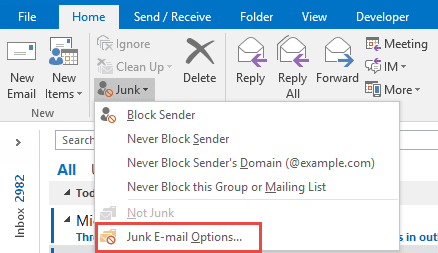
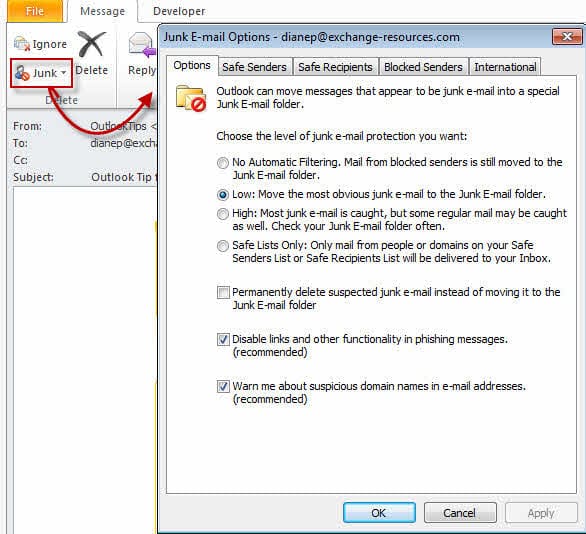
When you use multiple accounts delivered to separate data files, the Junk Email Options dialog shows the Junk Email settings for the account whose folders you are in.

When more than one account is delivered to a data file, you'll need to open a message received by the account and click the Junk button to see the Junk Email Options.
More Information
- Add EU to the International Blocked TLD List
- Automatically Cleanup Outlook's Deleted Item and Junk Email Folders
- Blocking Mail From New Top-Level Domains
- Bulk Add Addresses to Safe and Blocked Senders Lists
- Don't Get Caught In a Phishing Hack
- Empty Multiple Deleted Items Folders using a Macro
- How to Block Foreign Spam
- Icon is not correct on the Junk Mail Folder
- Junk Email Filtering isn't Working in Outlook
- Junk Mail Filtering in Outlook
- Office 365 Fraud Detection Checks
- Outlook's "Not Junk" option isn't available
- Rules and Tools to Filter Junk Mail
- Samsung smartphones move email to the Junk folder
- Sending Autoreplies to Spammers
- Should You Respond to Junk Mail?
- Understanding the Safe and Blocked Senders lists
- Using Outlook's Junk Mail filter
- What Moved a Message to the Junk E-mail Folder?

AndyH says
Hello Diane, Ive used quite a few articles to help improve the setup my outlook. One thing I've not been able to find online is how to setup a shared safesenderslist.txt, saferecipientslist.txt and blockedsenderslist.txt on my home network and have outlook on my PC and 2 laptops all reference and update the same files. I can do this locally on each computer but it's a real pain having to update all the files and keep them in sync.
Im using Outlook 365on all computers connecting to email via IMAP (laptops) and POP3 (main computer).
I've found articles on doing this with Group Policy, which I cant use at home, and even tried manually entering the Registry keys to see if they work. No success yet.
https://support.microsoft.com/en-us/help/2252421/how-to-deploy-junk-email-settings-such-as-the-safe-senders-list-by-usi
Wonder if this is something you've done. Many thanks in advance.
Andy
Ken Granzow says
I use outlook 2010 and have had trouble (through my ignorance) in configuring the junk mail filter. I use it for two email accounts that store emails in a single pst file and go to the same inbox. I have discovered that not only are the junk email settings separate for each email account, the junk mail filter list is separate for each account. (I use the junk list as the only filter. I have about 1200 email servers in the list. I regularly add to the list.) The only way I have found to edit each of the lists is to open account settings and set as default the account whose email settings I want to modify. Then when I go to junk email options, it opens the dialog for the account I've set as default. I keep adding to the junk list in the same default account (that I normally use). Then, I occasionally export the list to a file and import it to other junk list. I also take the list file to another computer and import there. I hope this may help others who are frustrated with the email filter.
Blessings,
Ken
Krish says
Hello Diane,
Can you please help me with the registry for setting up Low Junk filtering?
Thanks
Krish
Diane Poremsky says
because the settings are per account, not across all accounts, it's easier to set it in interface. You can't (easily) edit the registry using automated methods - you'd need to find the key in each account and change it.
Open a message received on an account, open junk mail options and verify its the correct account then change the setting to low.
Matthew Cummings says
I tried your directions outlook 2013 client connected to rackspace hosting 2013 backend. I have my main email box setup and then in out look using the add additional email box option I have another email box setup when I go to that email inbox and select and email and right click on it and go to the junk option it still shows my email box at the top for the mail box it is filtering. what am I doing wrong?
Diane Poremsky says
Sorry I missed this earlier. You can't add to junk mail for shared mailboxes. You would need to open it as an account in a profile to edit it's junk email settings. Instructions are here https://www.slipstick.com/exchange/shared-mailboxes-and-the-default-send-from-account/
Bill B. says
Some email senders use bulk mailing outfits which have domains that are like @mail46.us4.mcsv.net. The trouble is, the next mailing might have @mail32.us4.mcsv.net.
How can I add this domain to the safe senders list so I don't have to add every possible iteration of the 'from' email address?
Diane Poremsky says
At the moment, you can't. You'll need to add each one. do the messages all use the same display name in the from field? If so, try creating a contact and trusting contacts - if the junk filter uses the display name, it will work. Otherwise, if its a problem, you could use a macro that watches the junk folder for messages from the domain and moves the messages out.
Tom McCracken says
That explains that, but my problem is that when I go into Junk Mail Options and set the filter to high, then log out, when I log back in the setting is set to No Filtering. I don't understand why it keeps reverting, I am clicking on the Apply button after I set to High.
Diane Poremsky says
It usually only reverts with Outlook.com accounts. I'm pretty sure Outlook doesn't disable it for IMAP accounts - I know gmail says to set it to low, but other imap servers don't AFAIK, Will double check.
Tom McCracken says
The computer choose IMAP, and I thought it should be POP but was unable to change it. This really means nothing to me but i noticed that it was leaving the messages on the server.
Diane Poremsky says
Automatic Account Setup always goes with IMAP if the server supports it. You need to add the account manually if you want to use POP3.
Junk mail rules work with IMAP accounts but the entire message needs to be downloaded before the rules (junk or rules you create) will run. They can be a little goofy with IMAP accounts because headers are often downloaded first.
Tom McCracken says
Outlook 2010, my server does not filter anything.
Diane Poremsky says
Are you using POP3, IMAP, Exchange, or Outlook.com email accounts?
Tom McCracken says
My junk email filter settings keep reverting to the lowest setting each time I log off. They will not stay where I set them.
Diane Poremsky says
What type of email account? This is normal with Outlook.com accounts using the Outlook Connector or EAS - the server handles junk mail filtering so that mail doesn't need ot be downloaded then uploaded when its moved to the junk folder.
jb says
"When you use multiple accounts delivered to separate data files, the Junk Email options dialog shows the junk mail settings for the account whose folders you are in....When more than one account is delivered to a data file, you'll need to open a message received by the account and click the Junk button to see the Junk Email Options."
I have 6 accounts delivered to one data file. I didn't try your method, but what I did is one-by-one make each account the default account in "Account Settings" and turn Junk filtering off for each. This works as well.
Diane Poremsky says
Yeah, but its a lot more work. :)
Larry Stevens says
I have recently figured out how to globally add a web-site address to my junk mail filter. What I would also like to know (and cannot figure out) is how to globally add any email address beginning with the same word (or words). I.e.: info
Diane Poremsky says
I'm not sure I'd put info (or sales) on the list as a lot of legit sites use it as a generic reply address. That said, you can't use aliases on the junk filter, only domains or full addresses. You'd need to create a rule where the sender's address contains info.
Michael Bryant says
I despise Microsoft. If I did not earn my living using Excel I would never touch their software again. Once again they stick a spanner into something that used to be easy and make it hard for their users without giving them the option of opting out of the new feature. So now if I want to add someone to the safe senders list I have to do it three times for three different accounts. How the hell is that supposed to make life easier?
BTW Diane thanks for noticing the change - no one else appears to have done so.
MAB