How the blocked sender's filter works seems to a point of confusion for a number of Outlook users. It does not block the messages sent by those addresses from being downloaded; Outlook needs to download the messages to run the filters.
However, this doesn’t match the user’s expectation of how it should work.
Outlook’s Blocked Senders puts the sender’s address or domain on a list and messages will always be moved to the Junk Email folder. Users expect that Blocked Senders are blocked from the mailbox, not moved to Junk Email. One reason the messages are not blocked is in the event you accidentally add a "good" address or domain to the blocked list. If the mail is dropped, you won't be able to recover it. If it's moved to the Junk Email folder, you might find it.
Creating rules to delete the mail won't work either. The rules run on mail in the Inbox after the Junk email filter has removed all the spam. The messages the rules are supposed to delete are moved before the rule runs.
If the junk mail filter is moving the messages to the Junk Email folder, there is no need to block the sender. Most spammers use an address for a short period then move on to another address and you end up blocking an address that will never send you mail again.
In Outlook for Windows there is a limit to the number of addresses you can add to the Safe and Blocked list combined and you don’t want to fill it up with addresses that are never used again. You should be able to add approximately 2000 entries, more if you have more domains than full email addresses on the list.
Blocked senders are treated as Junk Email and the messages will be handled the same way as mail filtered by the Junk Mail filter. It's either placed in the Junk Mail folder or deleted, per your Junk mail options.
For this reason, and the reasons listed below, it is highly recommended that you add names to the Safe lists (to avoid false positives) and let the Junk Mail filter take care of the junk. Don't add addresses to the blocked list if the messages are filtered to the Junk Email folder. The blocked list should be short.
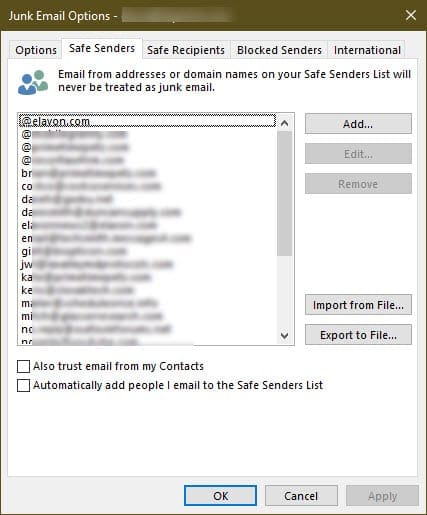
My own blocked list has 2 addresses on it. One is a person who forwards a lot of junk and the other is a newsletter I can't get unsubscribed from. I don't add people I send mail to, to my Safe Senders list because I reply to a lot of people just once or twice and my list would fill up fast, but it is recommended for most users.
If you choose to trust mail from addresses in your Contacts and you created a contact for yourself, all mail sent to you will be trusted.
How many addresses can the safe and blocked lists hold?
If the addresses are long, your list will hold fewer addresses; if they're short or you have a lot of domains on the lists, you'll have more total entries on your list.
For Microsoft Exchange accounts, including Outlook.com and Office 365, total size of all lists combined cannot exceed 510KB (as stored in the data file, not exported as a text file). Once the 510KB limit is reached, Outlook alerts you and additional addresses aren't saved until you remove some from the list.
Microsoft imposed the limit to improve performance, as the lists are stored as a hidden property in the Inbox and duplicated to the local registry. Each time the users synchronize with the Exchange mailbox store, the lists are downloaded. The lists are in the data values 001f041a, 001f041c, and 001f0418 within subkeys of the registry, in a different subkey for each account.
You can estimate the size of your lists as stored in Outlook by exporting the Safe Sender, Safe Recipients, and Blocked Senders as text files and adding the file sizes. The size in Outlook is two to three times larger than the size of the text files.
The safe and blocked lists for POP and IMAP accounts are stored only in the registry. Each account has its own Safe and blocked list, stored in a subkey under the profile key. The lists are in the data values 001f041a, 001f041c, and 001f0418.
The limit can be adjusted on Exchange Server 2007 or 2010, by adding a new registry key value to the following registry key. This option is not supported on Exchange server 2013 and newer, including Office 365.
HKEY_LOCAL_MACHINE\System\CurrentControlSet\Services\MSExchangeIS\ParametersSystem\
DWORD: Type Max Extended Rule Size
Value Data: maximum size (in bytes) that you want to allow
Importing a list of blocked addresses from an older version of Outlook is not recommended, in part because these lists often are larger than 512K and Outlook crashes when trying to import them, but also because spammers change addresses so often that lists are outdated within a few months.
If Outlook's Junk email filter doesn't offer enough options, misses too much spam, or you need better Safe and Blocked lists, try one of the many excellent third party anti-spam filters available.
For a list of third party tools, visit Rules and tools to filter junk mail in Microsoft Outlook
Outlook needs to use cached mode with Exchange server mailboxes to filter junk email on the client side. In classic online mode, any junk mail that is filtered is done so by the Exchange server's filter.
For Exchange server junk mail filtering tools, visit Content Control Tools for Exchange Server
Customize the filter?
Is there a way to add a group of selected junk e-mail from the inbox to the blocked senders list all at one time instead of one junk e-mail at a time?
The short answer is simply No. The long answer is that while it seems like a stupid move by Microsoft not to include this functionality, or the often-requested ability to train the filter, they have an excellent reason for not including these options.
Microsoft believes that users should not have to touch the filters period. Any antispam solution should be automatic and good enough to catch most spam, because as we've learned over the years with antivirus software and Windows updates, users aren't particularly good at keeping their programs updated. It also takes time to tinker with antispam settings and filters, time better spent doing anything but configuring the filters.
If the filter is designed right, only a few addresses will need to be added to any of the lists - such as addresses belonging to people you don't want to correspond with or whose messages are mistakenly classified as spam. In fact, adding every address that is used to send spam to the list will result in a long list of names, many of which will never send you another message. In addition, you are limited in the number of names you can add to the safe and blocked lists and would need to spend a lot of time culling the list.
Your goal should be to have a Safe senders list longer than your Blocked senders list. If you need to spend minutes each day (or following each mail pass) adding addresses to your Blocked list, then your Junk Email settings are too low, you don't have the latest filter update, or you need a better spam filter than the one provided with Outlook. Businesses should filter out the spam on the email server, removing spam long before the messages are downloaded to their users desktop.
Delete addresses from the Blocked list
If you receive an error that your list is full or want to clean up the list, open the Junk Email Options dialog and delete names from the lists. In Outlook 2010 and 2013, open it from the Home tab, Junk button, Junk Email Options.
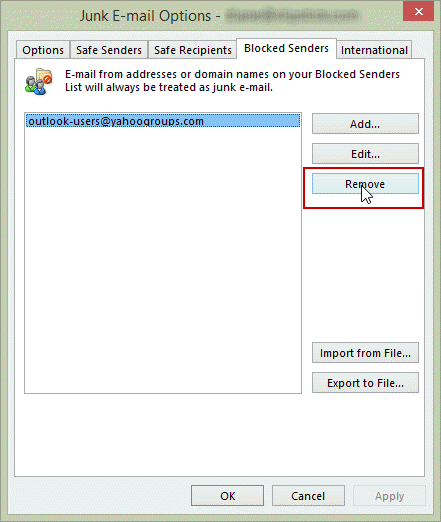
When you use an Outlook.com account, you need to log into the account online and remove the names from the blocked list (or verify they were removed when you removed them in Outlook.)
More Information
Error: “Cannot Add to the Server Junk E-mail Lists” in Microsoft Outlook
You are over Junk E-mail list limit - Outlook | Microsoft Docs
For more information on Junk email filtering, see
Rules and tools to filter junk mail in Microsoft Outlook
- Add EU to the International Blocked TLD List
- Automatically Cleanup Outlook's Deleted Item and Junk Email Folders
- Blocking Mail From New Top-Level Domains
- Bulk Add Addresses to Safe and Blocked Senders Lists
- Don't Get Caught In a Phishing Hack
- Empty Multiple Deleted Items Folders using a Macro
- How to Block Foreign Spam
- Icon is not correct on the Junk Mail Folder
- Junk Email Filtering isn't Working in Outlook
- Junk Mail Filtering in Outlook
- Office 365 Fraud Detection Checks
- Outlook's "Not Junk" option isn't available
- Samsung smartphones move email to the Junk folder
- Sending Autoreplies to Spammers
- Should You Respond to Junk Mail?
- Using Outlook's Junk Filter with Multiple Accounts
- Using Outlook's Junk Mail filter
- What Moved a Message to the Junk E-mail Folder?

Dave Cawdell says
Current limit for the Blocked list for Outlook 365 is now much higher. I have just under 2,000 addresses blocked (I have many, many, many recruiters sending new job openings to me under multiple addresses). I would guess 2,000, 5,000 or even 10,000. At some point, the size of the file is going to cause your email to grind to a halt.
Current limit for the Blocked list for Outlook 365 is now much higher. I have just under 2,000 addresses blocked (I have many, many, many recruiters sending new job openings to me under multiple addresses). I would guess 2,000, 5,000 or even 10,000. At some point, the size of the file is going to cause your email to grind to a halt.
UPDATE : I just found on a Microsoft site that the limit is the file size 510Kb which, based on my file right now means about 10,000 addresses.
Diane Poremsky says
Correct, the server storage space is 510KB for Office 365 and Outlook.com account - but the storage space is not the same as the size of the file exported from outlook - there will be fewer addresses stored on the server, approx 3 - 4x fewer. The exact count depends on how many entries are domains only (or short addresses).
MEM says
How can I restore blocked sender list that was backed up from outlook express 5
Thanks
Diane Poremsky says
What format is the list in?
Are you using Outlook desktop software or Outlook on the web or something else?
MEM says
Dear Diane,
Thank you for your reply
I was using outlook express which is included to windows XP, and the blocked sender list is backed up in registry file format (*.reg)
MEM says
Dear Diane
Thank you for your reply
The blocked sender list was backed up as registry file (*.reg)
I was using Outlook Express which is included in windows XP
Douglas Cote says
Is anyone aware of a bug in Outlook that displays the image download banner at the top, even though the following conditions are true:
- The sender's domain is in the safe sender list
- There are actually NO images in the message
Seeing this in both Office 2016 and 2013.
Thanks,
Doug
Diane Poremsky says
Did you check the message source? External css and web bugs can be blocked. I'm assuming external content is enabled for senders on the safe list... my best guess is that the external content that outlook thinks exists is not on the senders domain.
dattakafka odell says
why does outlook send emails that cannot be blocked? when you try to block it outlook says something to the effect that the address isn't valid. if it isn't valid why was it sent?
Diane Poremsky says
some smtp servers used by spammers allow invalid From email addresses. If you aren't using Exchange server, create a rule to delete all mail that does not have @ in the from address - you can do this one of two ways: next to last rule moves all mail with @ in the address to Inbox & stop processing. last rule deletes all mail. Another way is to use just one rule - delete all mail Except if has @ in From address.
Robert Holah says
Hi Diane, I am using outlook.com and implementing your very good recommendations but I have questions. I have noticed emails from the same companies but in a slightly different format. For example, mostly I receive emails from somebody@company.co.uk, I have noticed that more and more companies are using somebody@mail.company.co.uk or somebody@e.company.co.uk. Also, in outlook client, the safe senders address format is @company.co.uk but in outlook.com the @ sign is removed, so company.co.uk is the entry to use. My questions are will a company.co.uk entry in the safe senders list apply to addresses like mail.company.co.uk and similarly will @company.co.uk work for @mail.company.co.uk. I guess I am asking what is the minimum I can use to apply to all versions of the same email address? Is there an underlying rule I should know about.
Diane Poremsky says
>> will @company.co.uk work for @mail.company.co.uk
No. The @ tells it to look for the entire domain.
You'll need to test it with company.co.uk - it *might* work. (Using .trade works for messages in the .trade TLD)
Ken says
Thanks. This is exactly what I was looking for.
Ramkumar R S says
I have a peculiar problem. I have a list of email IDs in the blocked senders list. But when the same sender is sending emails to me, Outlook is still not moving it to Junk folder automatically. I have set "high" in the junk filter option, but not a single email goes to junk automatically,
Joe Bigler says
That's amazing! I tried searching for an answer and all I got was how to set up the spam filter in Exchange or Verizon's email. Thanks.
Joe Bigler says
>>If you choose to trust mail from addresses in your Contacts and you created a contact for yourself, all mail sent to you will be trusted. <<
That solved my problem immediately. I am using Outlook 2013 with pop accounts in Yahoo, Verizon, and Gmail. My Verizon account was getting pummeled with junk all the time. I switched to safe list only. Still didn't work. As soon as I cleaned my own contact from the contact list, all that junk was tossed into my junk folder, which I can either leave until it deletes or delete permanently with one click. I am surprised I didn't find this before. Did you figure this out or did it come from somewhere else? In any case, thanks very much.
Joe Bigler
Diane Poremsky says
I figured it out back when they first introduced the junk mail filter and safe lists - in like 2003.
John Davison says
I am a plastic Surgeon and use email to communicate with patients. Because of SPAM settings, and the words I use in my correspondence, many of my emails get lost in junk folders, and its a real problem.
If a patient sends an email to me first, will my subsequent reply emails get through as "safe"?
Any advice you have would be much appraciated.
Diane Poremsky says
Generally speaking, No, replying to email won't automatically solve the problem. It can help some, but many clients and filters do not automatically whitelist addresses you send messages to. Two things that might help - don't use hyperlinks and don't put phone numbers in your signature. For some reason, some junk filters see phone numbers and mark it junk or even reject the message. Using a format that does not look like a phone number to a machine - I can't remember all the formats I tested when i discovered a number was blocked, but the typical (202) 555-1212, 202-555-1212, and 202.555.1212 formats were blocked.
Javier Martinez says
I have 2 computers with Outlook 2010, in one, I can click Junk button, and the emails is instantly deleted in addition to being added to Junk list. The other computer, it adds it to Junk, but I have to take a second step of deleting the unwanted email. Is this a feature I can setup?
Diane Poremsky says
It's not an option to turn off and on but it should the message to the junk folder on both computers. Are you sure the name is being added to the list?
What type of email account are you using? Are both computers configured the same way?
Donna says
Does an addressee added to my blocked sender list receive any notification from my email address when messages are blocked?
Diane Poremsky says
No, they are not notified. That filters messages from the address into your junk mail folder.
Dennis says
Ok, thanks. LMK!
Dennis says
It is for a POP account. Yes, they are direct emails from someone (might be a generic email - like info@whatever.com) but still that is the "to" email address. There may be a name attached to - for example: Jane Doe I did just test with another email address and the safe recipient still did not work (no name, email address listed in "to" only). thanks for the help. Dennis
Diane Poremsky says
I'll have to test it and see if there is a bug, because it should work.
Dennis says
Hi Diane,
I have added people to Safe Recipients list and checked the box to download images from people on the list in Trust Center. But yet, they are still blocked. Any ideas? Thanks in advance for the help!
Dennis
Diane Poremsky says
What type of email account do you have? Are the messages from individuals? Are all messages affected or just some?
Keith says
Is there anyway to defeat the spammers who use variable domain names? I get a lot of junk from @mail* (where * is a number from 1 to ?) followed by .us*.mcsv.net or .atl*.rsgsv.net or .wd*.mcdlv.net. If limited to 999 I can see that there are 3 million possible addresses just from these examples. Spammers are one maybe 10 steps ahead of Microsoft Outlook on this one.
Diane Poremsky says
Try using just mcsv.net and rsgsv.net - i think Outlook still looks at the full address after @, so it probably won't work. The other option is to use just that part of the address in a rule - you can try a words in the address rule, but I prefer to use a words in the header rule.
lil hunsaker says
how do I get rid of senders on my block list. I keep getting the msg that my block list is full and I need to delete some items.
Diane Poremsky says
Open Junk mail options, select the Blocked tab and delete some (most) of the addresses. Because spammers change addresses often, you should olny put annoying people or businesses who won't unsubscribe you on the blocked list, not run of the mill spammers.
Emma says
I hope you can help - I have been receiving emails from a person I do not want to correspond with, who has effectively been cyber-stalking me for the last few months. He has recently found out my work email address and I have added him to my blocked senders list. All his emails are routed to junkmail automatically, and are then deleted. What I'm nervous about is understanding whether, when I turn on Out of Office Automatic Replies, will he receive these messages? Or are these not sent to Blocked Senders? Appreciate your guidance!!!
Tom Hall says
I've just been reading https://support.microsoft.com/kb/2252421 - although this article starts off saying it's for group policy, it does later on refer to non-policy reg settings (which I don't have), and seems to imply that these reg keys are needed for Safe Sender's list to work ?
Diane Poremsky says
The article refers to pushing out a safe/blocked senders list using group policy: "When you configure junk email list settings in the Group Policy Management Console, these policy settings are correctly deployed to client workstations (which are determined by examining the Windows registry). However, when you start Microsoft Office Outlook, these policy values are not used by Outlook." What they are saying is that the admin sets up lists using group policy and they are pushed to the client machines, but when you open Outlook and look at the safe or blocked list, the list is unexpectedly blank. It would be the same as exporting the list from a reg key in another computer and adding it, but the list is not used by outlook unless you set the JunkMailImportLists key.
You can use the same keys in non-corp enviroments - but when they are in the Policies path, you can't edit them. In home systems, the key is at HKEY_CURRENT_USER\Software\Microsoft\Office\1x.0\Outlook\Options\Mail.
Tom Hall says
I also have my PST stored on a WSE2012 R2 network share, so that I can access it from both my pc & laptop (though not at the same time)
I know having a PST located on a network is not supported etc, but I've done it this way since WindowsHomeServer v1), and never had any corruption problems.
Also, I usually cut to using a new PST each year for filing purposes, and also when I change to a new version of the Outlook
Tom Hall says
Hi - I have two POP accounts delivering to the same PST. As to the Automatic Downloads settings, all the boxes are selected.
Tom Hall says
Hi - I've got an intermittent (Outlook 2013 x64, on Windows 8.1), problem adding to the Safe Sender's List
I have several "regular" (non-spam) emails, but Outlook prevents downloading pictures "to protect my privacy".
I really do want to see the pictures, so, I click on the message, and select either "add the sender", or "add the domain" to the Safe Sender's list
Problem is that although I can now see the pictures in the email, if I then view the Junk mail options / Safe Sender's list, sometimes the sender / domain has been added, and sometimes it hasn't been added.
Any suggestions ?
Diane Poremsky says
What type of email account do you use? Do you have external content blocked in File, Options,. Trust Center, Automatic Download?
John says
It's number 2. By the way when I get spam some I can block others the message I always get when I click on the block button is "we have deleted the message but since they are a part of your contact list, we couldn't block" How is that possible I don't have any spam address in my contacts? Only my friends,family and my email which only appears in number 2.
Diane Poremsky says
#2 is the favorites list and address book - any addresses you've ever sent mail to + your contacts and linked contacts. Frequently used addresses on the favorites list can be deleted by clicking in the x to the right of the name. Others need to be deleted from their source.
On the spam, spammers like to use fake addresses and its possible that your address was on the message.
John says
it''s Outlook but formerly Hotmail if that helps. I went to gear box but nothing there that says delete myself from my contact "senders box" list.
Diane Poremsky says
Is it is the field by the 1 or the 2?

John says
Hello Diane,
Every time I get spam mail I click to put into the block list but the window pops saying cannot block because it's in your contacts and then it show's my email. So I tried trying to find my email on my contacts list so I can erase it and it's not there. I emailed myself a few times in the past and I was wondering if that is why but still why would my email not show up on my contact list? I don't get this cannot block message!
Diane Poremsky says
Do you have a contact for yourself? (Most people do.) That is what the message is telling you. The spam is apparently sent to /from your own address.
John says
When I check my contacts list my name(email) on the People part of Outlook it's not on the list but when I go to write an email after pressing +New on the top left of Outlook if I type my name in the senders box my name and email appear but there's no way to delete myself from that column.
Diane Poremsky says
This is in Outlook.com? Does it come up as soon as you click in the To field? You can click the X to the right of the names to remove the address from that list, otherwise it should be in People.
If you really do mean the "senders box" instead of the To box, look on Options (gear icon), Your Email Accounts.
Doug says
Thanks for your response. We don't include our corporate domain on the safe list(it's automatically removed anyway). Yes, we trust any addresses from the GAL. I don't believe there's been any upgrades to Exchange recently. I'm actually accessing the same mailbox on two different machines, one running Win 7/Outlook 2010 and the other running Win 8/Outlook 2013. Inline images for the same message item are automatically rendered on the 2010 machine and not rendered on the 2013 machine. I've confirmed that we've removed the domain that hosts the message content from the IE trusted sites list on both machines. Seems kind of odd.
Diane Poremsky says
I'll check into it.
Doug says
Did something change in how Outlook 2013 handles safe senders? In Outlook 2010, a message from a sender that uses our company domain name is considered safe and it will automatically display the images within that message. In Outlook 2013, it will NOT display the images. Thoughts?
Diane Poremsky says
I don't think the behavior changed. Is the domain on the safe list? Are you trusting the address book? Was Exchange upgraded?
Audy says
Thank you so much!!
aud2093 ("Audy") says
Where can I see the Safe Senders list? Email addresses, e.g. Amazon Book Deals, that I add to the Safe Senders list are still not automatically downloading the images even though the Automatic download settings are set to allow image downloads from safe sender list emails and trusted domains.
Diane Poremsky says
Junk mail > Options. In Outlook 2010 and 2013, Junk mail button is on the Home ribbon in the inbox.
donna says
how do i find out if my block list is full?
Diane Poremsky says
Export the block and safe lists to a text file and double click to open in Notepad. Go to View > Status bar in Notepad then click on the last name in the list. Get the line count from the status bar. Repeat for the other two lists. If the total for all 3 lists is well under 2000, you are under the limit.
bgagnon says
When outlook is parsing through the 200 addresses it can see, is it doing this alphabetically or in the order in which they were added? Seems to be aphabetical but want to confirm. Thanks!
Diane Poremsky says
Alphabetically in the safe/blocked lists.
Debbie Weltin says
why do blocked senders keep showing up in inbox?
Diane Poremsky says
Is the address the message sent to on the Safe senders? list or in your contacts folder (if you have contacts trusted) ?
sarah carlson says
My daughter's emails sent from Germany are returned to her as undeliverable. How can I change outlook to allow her messges to be delivered to me? I have never blocked or removed block's so hopefully the process is simple!
Diane Poremsky says
What does the undeliverable message say? The problem may not be on your end or something you can control.
John says
I subscribe to a number of newsletters which use other organisations to deliver their messages. Can I set up a safe senders list entry with wildcard entries i.e. *.*.mcsv.net as I want to be able to download photos immediately from these emails.
Diane Poremsky says
No, sorry, you can't use wildcards.
Eva says
I have been receiving the mail from the Sender which I would like to Block. I clicked few times the Outlook icon but it did not stop sending me new. What I should do to fix my problem. I use Outlook 2007.
Eva
Diane Poremsky says
Is the address the blocked person is sending to, in your contacts folder or on the safe list? If the blocked sender is sending to an address that is on the safe list, it won't be blocked.
anita says
I keep getting junk spam and I want to select them from the junk folder, lets say 20, and then add them to the blocked senders list at one time. is this possible? help.
Diane Poremsky says
No, sorry its not possible. It's not all that useful as most spammers use an address once then move on. Plus there is a limit to the number of names you can put on the lists combined - you want most on the safe list and few, if any, on the blocked list.