An Outlook user, KT, wanted to defer delivery of messages sent after 6PM, sending them at 7 AM the next day. This is possible to do using an ItemSend macro.

If it's after 6PM or before 7AM, the message is held until 7AM, then sent. Because this is an Outlook script, it only works in Outlook. It will not affect messages sent using smartphones or other devices.
May 6 2017: Edited the macros to properly move early morning messages ahead a few hours, not 1 day and to account for messages sent Sat or Sun.
Private Sub Application_ItemSend(ByVal Item As Object, Cancel As Boolean)

' If after 6PM
  If Now() > DateSerial(Year(Now), Month(Now), Day(Now)) + #5:59:00 PM# Then
    SendAt = DateSerial(Year(Now), Month(Now), Day(Now) + 1) + #7:00:00 AM#
' If before 7AM
  ElseIf Now() < DateSerial(Year(Now), Month(Now), Day(Now)) + #6:59:00 AM# Then
    SendAt = DateSerial(Year(Now), Month(Now), Day(Now)) + #7:00:00 AM#
  End If
 Item.DeferredDeliveryTime = SendAt

End Sub
If you need to skip weekends (or other days of the week), check the name of the day and add additional time to the SendAt time.
Private Sub Application_ItemSend(ByVal Item As Object, Cancel As Boolean)
Dim dayname As String

' If after 6PM
  If Now() > DateSerial(Year(Now), Month(Now), Day(Now)) + #5:59:00 PM# Then
    sendat = DateSerial(Year(Now), Month(Now), Day(Now) + 1) + #7:00:00 AM#
' If before 7AM
  ElseIf Now() < DateSerial(Year(Now), Month(Now), Day(Now)) + #6:59:00 AM# Then
    sendat = DateSerial(Year(Now), Month(Now), Day(Now)) + #7:00:00 AM#
' We'll test the date of all messages
 ElseIf WeekdayName(Weekday(Now())) = "Saturday" Or WeekdayName(Weekday(Now())) = "Sunday" Then
   ' this will be changed by the next part if a weekend
   sendat = DateSerial(Year(Now), Month(Now), Day(Now)) + #11:00:00 PM#
 End If

dayname = WeekdayName(Weekday(sendat))

Select Case dayname
Case "Saturday"
    sendat = DateSerial(Year(Now), Month(Now), Day(Now) + 2) + #7:00:00 AM#
Case "Sunday"
    sendat = DateSerial(Year(Now), Month(Now), Day(Now) + 1) + #7:00:00 AM#
End Select
    Item.DeferredDeliveryTime = sendat
Debug.Print Now(), dayname, sendat

End Sub
Only Delay message Sent to Specific Addresses
Sub Application_ItemSend(ByVal Item As Object, Cancel As Boolean)

Const PR_SMTP_ADDRESS As String = "http://schemas.microsoft.com/mapi/proptag/0x39FE001E"

Set recips = Item.Recipients
 For Each recip In recips
 Set pa = recip.PropertyAccessor

 Address = LCase(pa.GetProperty(PR_SMTP_ADDRESS))
 lLen = Len(Address) - InStrRev(Address, "@")

 Select Case Right(Address, lLen)
' add additional addresses as neeed, using quotes and comma separator
    Case "mcarnar@domain.com", "bburns@domain.com", "rchildars@domain.com", "curry@domain.com"

    Case Else ' remove case else line to be warned when sending to the addresses
     strMsg = strMsg & " " & Address & vbNewLine
 End Select
 Next

' using <> delays these addresses only;
' use = to delay all but these addresses

If strMsg <> "" Then
' If after 6PM
  If Now() > DateSerial(Year(Now), Month(Now), Day(Now)) + #5:59:00 PM# Then
    SendAt = DateSerial(Year(Now), Month(Now), Day(Now) + 1) + #7:00:00 AM#
' If before 7AM
  ElseIf Now() < DateSerial(Year(Now), Month(Now), Day(Now)) + #6:59:00 AM# Then
    SendAt = DateSerial(Year(Now), Month(Now), Day(Now)) + #7:00:00 AM#
  End If
Item.DeferredDeliveryTime = SendAt

End If
End Sub
How to use the macro
First: You will need macro security set to low during testing.
To check your macro security in Outlook 2010 or 2013, go to File, Options, Trust Center and open Trust Center Settings, and change the Macro Settings. In Outlook 2007 and older, it’s at Tools, Macro Security. If Outlook tells you it needs to be restarted, close and reopen Outlook. Note: after you test the macro and see that it works, you can either leave macro security set to low or sign the macro.
Now open the VBA Editor by pressing Alt+F11 on your keyboard.
To use the macro code in ThisOutlookSession:
- Expand Project1 and double click on ThisOutlookSession.
- Copy then paste the macro into ThisOutlookSession. (Click within the code, Select All using Ctrl+A, Ctrl+C to copy, Ctrl+V to paste.)

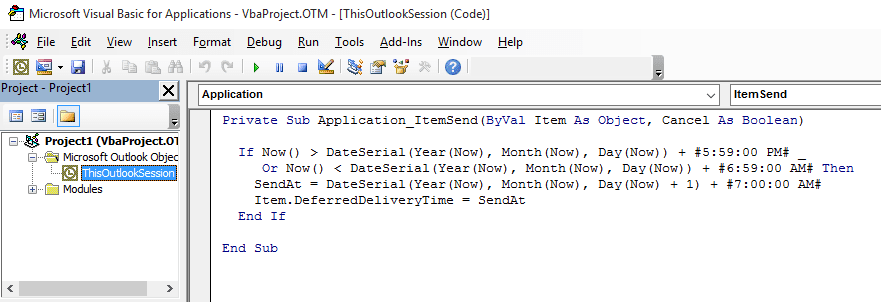
More information as well as screenshots are at How to use the VBA Editor.

Victor Ivanidze says
There exists the add-in for Outlook named OffHours that ensures that emails you write after business hours and on weekends are delayed and will only be sent at the start of the next business day: https://www.ivasoft.com/offhoursaddin.shtml
Adam says
This is super - thank you so much! All our student email addresses start with "ST0000". I would like to delay delivery to students only between 3pm-8:30am and at weekends for any emails sent to to addresses beginning with/containing "ST0000". Would this be possible? My knowledge of VBA is relatively basic.
Ahmad Banki says
Hi Diane & thanks a lot. Two questions:
Thanks again.
Diane Poremsky says
On the sent time macro - the one in your links sends all drafts when the reminder fires. I have similar macro that would sends drafts at different times. You put the time you want to send them messages in the subject and the macro runs on s schedule - anything with a date older than that will be sent when the macro runs.
This gives me an idea - instead of looking at the subject, add a defer until time and look at that in the draft. Off to find the macro and tweak it. :)
Jean-Marc says
Thank you so much Diane. Your post did exactly what I needed.
It was a while since Dom asked two years ago about SendAt not being defined. The trick is to define SendAt like this:
Dim SendAt As Date
The problem is caused by Option Explicit at the top (which is a good idea and should not be removed according to me)
Evaristo says
Would this be a good way to address the issues of sending e-mails on Friday and Saturday from 6PM to 11:59PM?
Private Sub Application_ItemSend(ByVal Item As Object, Cancel As Boolean)
Dim dayname As String
' If Friday after 6PM
If WeekdayName(Weekday(Now())) = "Friday" And Now() > DateSerial(Year(Now), Month(Now), Day(Now)) + #5:59:00 PM# Then
sendat = DateSerial(Year(Now), Month(Now), Day(Now) + 3) + #8:00:00 AM#
' If Saturday
ElseIf WeekdayName(Weekday(Now())) = "Saturday" Then
sendat = DateSerial(Year(Now), Month(Now), Day(Now) + 2) + #8:00:00 AM#
' If Sunday
ElseIf WeekdayName(Weekday(Now())) = "Sunday" Then
sendat = DateSerial(Year(Now), Month(Now), Day(Now) + 1) + #8:00:00 AM#
' If other week days after 6PM
ElseIf Now() > DateSerial(Year(Now), Month(Now), Day(Now)) + #5:59:00 PM# Then
sendat = DateSerial(Year(Now), Month(Now), Day(Now) + 1) + #8:00:00 AM#
' If other week days before 8AM
ElseIf Now() < DateSerial(Year(Now), Month(Now), Day(Now)) + #7:59:00 AM# Then
sendat = DateSerial(Year(Now), Month(Now), Day(Now)) + #8:00:00 AM#
End If
Item.DeferredDeliveryTime = sendat
End Sub
Diane Poremsky says
That should work. (I didn't test it though - but it looks good.)
Jaime Uribe says
Hi. It helped me a lot. Thank you
Jamie says
Hi Diane, I am just starting out with Macros -- have never had to do this before. This is exactly what I am looking for. I'm using Outlook 2016. Even though I copy/paste this macro into ThisOutlookSession, when I hit play, it brings up the Macros dialog box (with run, cancel, step intro) and there is nothing to select there. I am missing a step somehow. What am I doing wrong?
Jamie says
THis is my comment- Please reject it because it is awaiting moderation -- it seems to be working now -- I have a different question that I am going to post in your forums, which I just saw now.
Andi says
Hi Diane,
Thanks a lot for the great article. It is a bit older, but I still have a question. I tried your macro and it works perfectly, but the time the email is sent is still the time when I hit send. Meaning the receipient sees the time when I actually sent the message. Is there a way to set the time displayed in the message header to match the time it actually leaves my outbox or at least when the timer expires?
Thanks a lot,
Best Regards
Andreas
Diane Poremsky says
No, not using this method. If you use an appointment reminder to trigger the send, it will have the current time. The reminder will trigger a macro that sends a draft.
https://www.slipstick.com/developer/send-email-outlook-reminders-fires/#draft
Nanette Kalisvaart says
Hi Diane,
First off, thanks so much for this article; a huge timesaver!
My next challenge is that I want to make certain people an exeption, is this possible?
Thank you in advance.
Kind regards,
Nanette Kalisvaart (Netherlands)
Diane Poremsky says
The macro for 'Only Delay message Sent to Specific Addresses' can be switched around to delay all except those sent to certain people.
Daniel says
Thank you for the macros! I have a questions on how to deal with exceptions. How would I send a macro delayed e-mail immediately if I did not want a particular e-mail to be delayed?
Diane Poremsky says
You'd use an IF statement. I usually recommend using a category or keyword in the subject. The importance field works too.
If item.categories = "Send Now" then
item.categories =""
exit sub
end if
' code to set delay here
to use a keyboard the if would look something like this
if left(case(item.subject,6) = "[send]" then
item.subject = right(item.subject, len(item.subject) - 7)
' delay macro
end if
Dom says
Hi,
Sorry to open an old thread but I'm struggling to get this to work
this is my code:
Private Sub Application_ItemSend(ByVal Item As Object, Cancel As Boolean)
Dim dayname As String
If Now() > DateSerial(Year(Now), Month(Now), Day(Now)) + #5:59:00 PM# Then
SendAt = DateSerial(Year(Now), Month(Now), Day(Now) + 1) + #7:00:00 AM#
ElseIf Now() < DateSerial(Year(Now), Month(Now), Day(Now)) + #6:59:00 AM# Then SendAt = DateSerial(Year(Now), Month(Now), Day(Now)) + #7:00:00 AM#
End If
' We'll test the date of all messages
ElseIf WeekdayName(Weekday(Now())) = "Saturday" Or WeekdayName(Weekday(Now())) = "Sunday" Then
' this will be changed by the next part if a weekend
SendAt = DateSerial(Year(Now), Month(Now), Day(Now)) + #11:00:00 PM#
End If
dayname = WeekdayName(Weekday(SendAt))
Select Case dayname
Case "Saturday"
SendAt = DateSerial(Year(Now), Month(Now), Day(Now) + 2) + #7:00:00 AM#
Case "Sunday"
SendAt = DateSerial(Year(Now), Month(Now), Day(Now) + 1) + #7:00:00 AM#
End Select
Debug.Print Now(), dayname, SendAt
Item.DeferredDeliveryTime = SendAt
End Sub
------------------------------------------------
Results in:
Compile Error: Variable not defined
SendAt =
------------------------------------------------
Diane Poremsky says
add Dim SendAt after dim dayname.
Dom says
Thanks that helped but now got another issue.
Whenever I try and send any email I get
Run-time error '13':
Type mismatch
which highlights: "dayname = WeekdayName(Weekday(SendAt))"
Diane Poremsky says
did you customize any of the macro? It's working here without an error, which makes it hard to troubleshoot.
The error appears to say that dayname variable, or possibly sendat, contains the wrong type of data.
Dom says
Hi Diane, I really appreciate the help.
I have modified slightly as was finding my outlook was thinking today was Saturday when in fact it's Friday so amended to include System Date which when Msgbox shows the correct date.
My problem now is it now just sends the email regardless. Seems I do 1 thing and it creates another issue.
(Code attached)
Denise Shitara says
Is there a way to include e-mails sent on Fridays after 18h in the weekend delay rule?
Diane Poremsky says
Try
ElseIf WeekdayName(Weekday(Now())) = "Friday" AND Now() > DateSerial(Year(Now), Month(Now), Day(Now)) + #5:59:00 PM#
Alba says
Hi Diane, thanks so much for that useful code, it's amazing. I was also trying to amend the Friday after 6pm thing so email would be sent on Monday morning, and added this:
' If Friday after 6PM
ElseIf WeekdayName(Weekday(Now())) = "Friday" And Now() > DateSerial(Year(Now), Month(Now), Day(Now)) + #5:59:00 PM# Then
sendat = DateSerial(Year(Now), Month(Now), Day(Now) + 3) + #8:00:00 AM#
However it does not work, now it's friday after 6 and the emails are deferred until Sat morning. Any hints?
Thanks in advance!!
Alba
charles ranni says
you couldnt put the friday check as an else if, it would need to go before checking other days. Otherwise the first if that checks whether it's after 6pm fires true and you won't ever get to see the else if for fridays. . . just start with the friday check and make the part that says if say else if now. Easy Peasy.
Bertil says
Hi
I use mail merge and want each message to be sent with eg15 sec delay.
First message with 15 sec delay, next with 30 sec delay and so on.
Is that possible?
Regards
Bertil
Diane Poremsky says
It is if you use a macro to set a deferred delivery time. Send at = now + 15 seconds (needs to be properly formatted ) then update sendat after each message.
William says
Hi Diane,
Could you please provide code for this. It would be great helpful for our projecct.
Regards,
William
Diane Poremsky says
i have a sample somewhere that i tried for my own use - honestly, it doesn't work that great but i will see if i can find it.
Diane Poremsky says
this is one way - the only prolem is by the end of the day, the delay will be long. I had a different one that used a random delay from 'now' all it really did was push the pile back - it didn't solve the reason for wanting a delay in the first place.
Private Sub Application_ItemSend(ByVal Item As Object, Cancel As Boolean)
SendAt = Now + delay
Item.DeferredDeliveryTime = SendAt
delay = delay + 15 / 86400
End Sub
PSingh says
Hi Diana,
Firstly thanks for the macro.
I am getting this problem where my email is delayed one day further if the emails are sent after 12am. That means the delay is for 1day and 7hrs instead of 7hrs only. could you please help. Also could you please include the weekend delay along with the evening to morning delay. Many thanks
Diane Poremsky says
oh... is see the problem - if before 6AM, the delay is the same as if after 5pm.
If Now() > DateSerial(Year(Now), Month(Now), Day(Now)) + #5:59:00 PM# _
Or Now() < DateSerial(Year(Now), Month(Now), Day(Now)) + #6:59:00 AM# Then
sendat = DateSerial(Year(Now), Month(Now), Day(Now) + 1) + #7:00:00 AM#
End If
Diane Poremsky says
Try this - i thought there was a reason why i OR'd them to gether but don't recall what that was. if it's after 5, it won't be before 6, so it should work. (Can't believe no one asked about that earlier. Thanks)
If Now() > DateSerial(Year(Now), Month(Now), Day(Now)) + #5:59:00 PM# Then
SendAt = DateSerial(Year(Now), Month(Now), Day(Now) + 1) + #7:00:00 AM#
End If
If Now() < DateSerial(Year(Now), Month(Now), Day(Now)) + #6:59:00 AM# Then SendAt = DateSerial(Year(Now), Month(Now), Day(Now)) + #7:00:00 AM# End If Item.DeferredDeliveryTime = SendAt
Diane Poremsky says
making the same change to the top of the weekend version would work there too (if it works here) because you check the sendat date after setting it.
ETA: way too early for me today... the weekend only checks times at either end of the day, not all day. Need to fix that part.
Diane Poremsky says
It's fixed now (I think - works here for Sat. in a quickie test)
Fais says
Hi Diane
Thank you for this great article.
How i can use this script on a large scale to set an outgoing delay for 5 minutes?
Thank you
Diane Poremsky says
not sure what you mean by large scale, but to delay all mail 5 min, you can use a rule to delay delivery for 5 min (up to 120 min.)
To use a script, remove the IF lines and set the sendat time to now + 5 minutes:
SendAt = now + 5/1440 ' or now + 0.003472
Item.DeferredDeliveryTime = SendAt
End Sub
Lauren Rollins says
Hi, I was trying to prevent delivery to a list of specific recipients, and I used a combination of the macro you displayed above in the article and a the piece in the comments from Bafocx. My hours are a little different (8PM & 7AM), but when I send an email it still delays the delivery to any recipient. Can you help with the specific user portion of the macro? I am sure I have something entered incorrectly.
Sub UOL()
Dim objMsg As MailItem
Set objMsg = Application.CreateItem(olMailItem)
With objMsg
.To = "mcarnar@domain.com"
.CC = "mcarnar@domain.com"
.BCC = "mcarnar@domain.com"
.To = "bburns@domain.com"
.CC = "bburns@domain.com"
.BCC = "bburns@domain.com"
.To = "rchildars@domain.com"
.CC = "rchildars@domain.com"
.BCC = "rchildars@domain.com"
.To = "acrawford@domain.com"
.CC = "acrawford@domain.com"
.BCC = "acrawford@domain.com"
.To = "acurry@domain.com"
.CC = "acurry@domain.com"
.BCC = "acurry@domain.com"
.To = "fharnanda@domain.com"
.CC = "fharnanda@domain.com"
.BCC = "fharnanda@domain.com"
.To = "bburawic@domain.com"
.CC = "bburawic@domain.com"
.BCC = "bburawic@domain.com"
.Display
End With
Set objMsg = Nothing
End Sub
Sub Application_ItemSend(ByVal Item As Object, Cancel As Boolean)
If Now() > DateSerial(Year(Now), Month(Now), Day(Now)) + #7:59:00 PM# _
Or Now() < DateSerial(Year(Now), Month(Now), Day(Now)) + #6:59:00 AM# Then
SendAt = DateSerial(Year(Now), Month(Now), Day(Now) + 1) + #7:00:00 AM#
Item.DeferredDeliveryTime = SendAt
End If
End Sub
Diane Poremsky says
This - is just creating a new message with those addresses.
With objMsg
.To = "mcarnar@domain.com"
.CC = "mcarnar@domain.com"
-- snip --
add this to that macro, right before display, to delay the message. This will apply to every message you create using this macro.
-- snip --
SendAt = DateSerial(Year(Now), Month(Now) + 1, Day(5)) + #10:00:00 AM#

.DeferredDeliveryTime = SendAt
.Display
End With
if you want to delay all messages EXCEPT those sent to certain addresses, you need to change the address in the ItemSend macro. It will use a method similar to what is used in macros on this page - https://www.slipstick.com/how-to-outlook/prevent-sending-messages-to-wrong-email-address but because you have several addresses to check, it will be easier to use an arrary (unless that is everyone in your company, then you just check for domain).
This should work -
Sub Application_ItemSend(ByVal Item As Object, Cancel As Boolean)
Const PR_SMTP_ADDRESS As String = "http://schemas.microsoft.com/mapi/proptag/0x39FE001E"
Set recips = Item.Recipients
For Each recip In recips
Set pa = recip.PropertyAccessor
Address = LCase(pa.GetProperty(PR_SMTP_ADDRESS))
lLen = Len(Address) - InStrRev(Address, "@")
Select Case Right(Address, lLen)
Case "mcarnar@domain.com", "bburns@domain.com", "rchildars@domain.com", "curry@domain.com"
Case Else ' remove case else line to be warned when sending to the addresses
strMsg = strMsg & " " & Address & vbNewLine
End Select
Next
' delays these addresses only;
' use = to delay all but these addresses
If strMsg <> "" Then
If Now() > DateSerial(Year(Now), Month(Now), Day(Now)) + #7:59:00 PM# _
Or Now() < DateSerial(Year(Now), Month(Now), Day(Now)) + #6:59:00 AM# Then SendAt = DateSerial(Year(Now), Month(Now), Day(Now) + 1) + #7:00:00 AM# Item.DeferredDeliveryTime = SendAt End If End If End Sub
Kevin says
I am trying to use the second macro so that, as I understand, all emails after 6 will be delayed to the next day and all emails on the weekend will be delayed to Monday. When I paste the macro in VBA and press the run button, a window pops up and request the macro name. i cannot figure out how to get past this point and the delay is not working.
Diane Poremsky says
This macro isn't run manually. It's an automatic macro that runs when you hit send.
Heather says
First off thank you SO much!!! I love the delay from the evening to the morning!!! I was wondering is there a way to only send on the next morning for weekdays? I'm trying to reduce the stress from my staff by not having emails show up on a weekend if possible. Thank you in advance for your guidance! You're help is SO much appreciated
Diane Poremsky says
I added a second macro to the page that includes a day of week check and moves it forward to monday.
Magnus says
First of all, thank you. Secondly I have an issue with emails sent in the morning using this macro. An email i try to send 06:00 AM is stuck in Draft until the next day at 07:00 AM. Did some testing and figured out it is because of the Day(Now) + 1 in the SendAt line but I am far too inexperienced to know if I can just remove + 1 or is there a better solution?
Diane Poremsky says
Oh... I missed that (the person who wanted it was more concerned about evenings) - If you remove the 1, evening messages won't send the next day. it needs to be split into two sets of If statements.
If Now() > DateSerial(Year(Now), Month(Now), Day(Now)) + #5:59:00 PM# then
SendAt = DateSerial(Year(Now), Month(Now), Day(Now) + 1) + #7:00:00 AM#
elseif Now() < DateSerial(Year(Now), Month(Now), Day(Now)) + #6:59:00 AM# Then SendAt = DateSerial(Year(Now), Month(Now), Day(Now)) + #7:00:00 AM# end if
Bafocx says
Is there a way to create an email and delay it for a period of time? I'm trying to use your code but it's for all new messages.
I'm using this macro but I want to be applied only on the email I choose.
Sub UOL()
Dim objMsg As MailItem
Set objMsg = Application.CreateItem(olMailItem)
With objMsg
.To = "thebestboy_10@hotmail.com"
.CC = "thebestboy_10@hotmail.com"
.BCC = "thebestboy_10@hotmail.com"
.Display
End With
Set objMsg = Nothing
End Sub
Sub Application_ItemSend(ByVal Item As Object, Cancel As Boolean)
If Now() > DateSerial(Year(Now), Month(Now), Day(Now)) Then
SendAt = DateSerial(Year(Now), Month(Now) + 1, Day(5)) + #10:00:00 AM#
Item.DeferredDeliveryTime = SendAt
End If
End Sub
Thanks in advance
Diane Poremsky says
add .DeferredDeliveryTime before .display in the first macro - this will send the message created by the UOL macro at 10AM on the 5th of next month.
SendAt = DateSerial(Year(Now), Month(Now) + 1, Day(5)) + #10:00:00 AM#
.DeferredDeliveryTime = SendAt
Bafocx says
Can this be programm for an specific day an hour? what should I change?
Diane Poremsky says
Yes, it can use a specific day and hour - this should work -
SendAt = #7/15/2016 7:00:00 AM#
Jim says
Can this be used with Outlook.com so I don't have to leave my computer on to send the mail? I have mail that goes out at 3 a.m. and would prefer not to leave it on while I travel. Thanks.
Diane Poremsky says
No, you cant use it with outlook.com and turn the computer off as outlook.com doesn't use online mode, only cached mode. Cached mode requires you to keep outlook open to hand off the message.
len raphael says
Unrelated but related to timing of sending: created a rule to delay sending all emails for one minute to give me time to reconsider hasty emailing. Amazing how we've all come to expect instant emails. The one minute minimum delay is way too long for in house emails and even too long for outsiders. Is there a way to create say a 15 second delay?
Diane Poremsky says
try this on test messages - .00015 should be about 15 seconds. when you are happy with the setting, remove the item.subject and item.save lines - they just make it easier to check the timing.
Private Sub Application_ItemSend(ByVal Item As Object, Cancel As Boolean)
sendat = Now + 0.00015
Item.Subject = Item.Subject & " Defer:" & sendat & " Now:" & Now
Item.Save
Item.DeferredDeliveryTime = sendat
End Sub
Diane Poremsky says
btw, I've never timed the one minute rule with a stop watch, but the 15 sec delay takes anywhere from 2 seconds to 1 minute to send on my test exchange mailbox. I suspect Outlook ignores the seconds and sends it when the next minute rolls over. This might be a little faster than the minute rule, but not by much.