Because Office update has a habit of installing updates for Outlook, even if you are not using it, and then setting Outlook as the default email client, it's recommended that anyone not using Outlook uninstall it.
If you are using Outlook 2013 and newer, you cannot uninstall applications from the consumer subscriptions or retail versions. It's all or nothing. You can delete shortcuts to Outlook and set a different email client as default but not uninstall Outlook. (Businesses can use the ODT to selectively install Office apps.)
To Uninstall Outlook
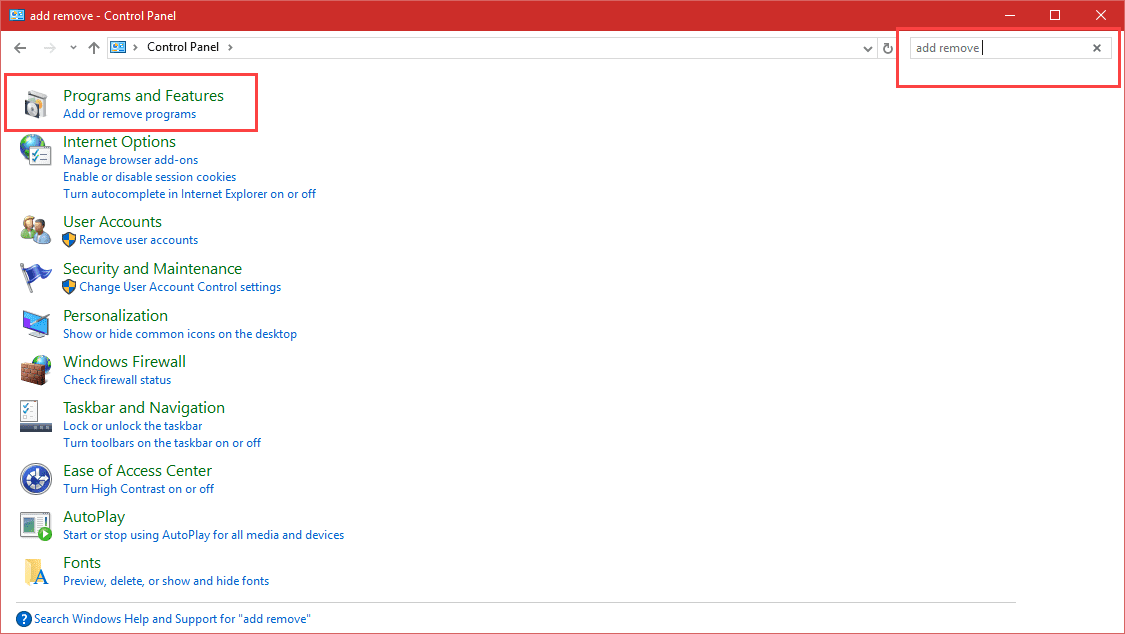
Go to Control Panel, Programs and Features (Vista and Windows 7/8/10) or Add/Remove Programs in using Windows XP. Tip: type Add Remove Programs in the search field in the Control Panel to find it (works in all versions of Windows).
Locate the entry for your Microsoft Office application and choose Change. Tip: Click on Name at the top of the list of programs to sort applications by name then click on an application and type M to jump down to the programs that start with M. (If you have a lot of M's, type N and scroll up.)
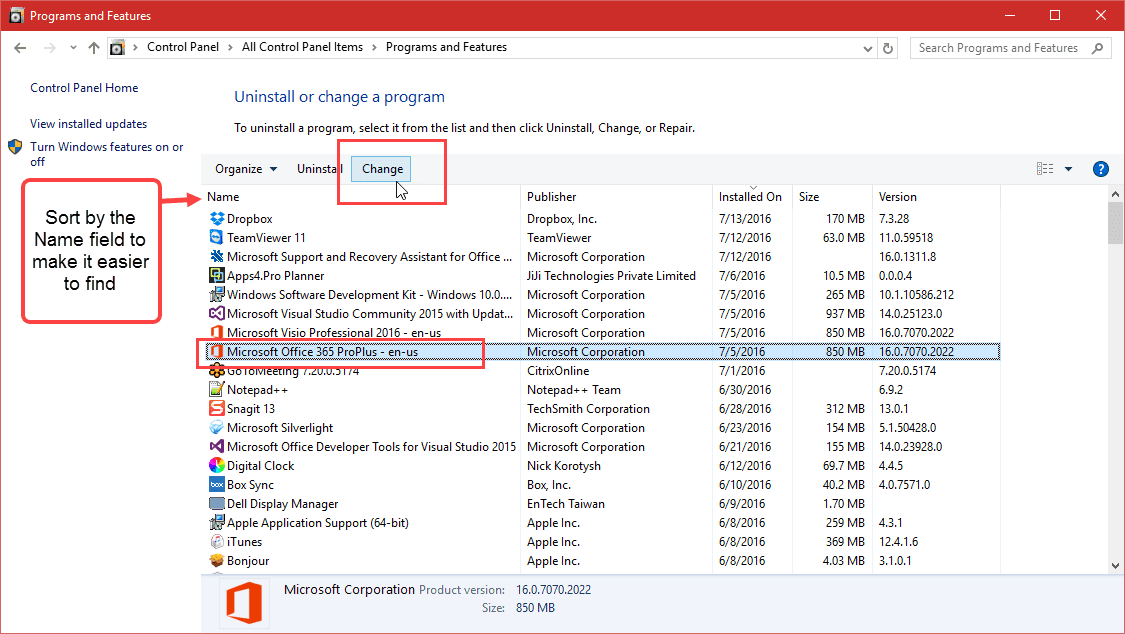
Reminder: Outlook 2013 and newer cannot be uninstalled from the subscription version of Office. You can delete the shortcuts to Outlook and set a different email client as default.
If using Outlook 2010 and older, follow these steps to uninstall Outlook.
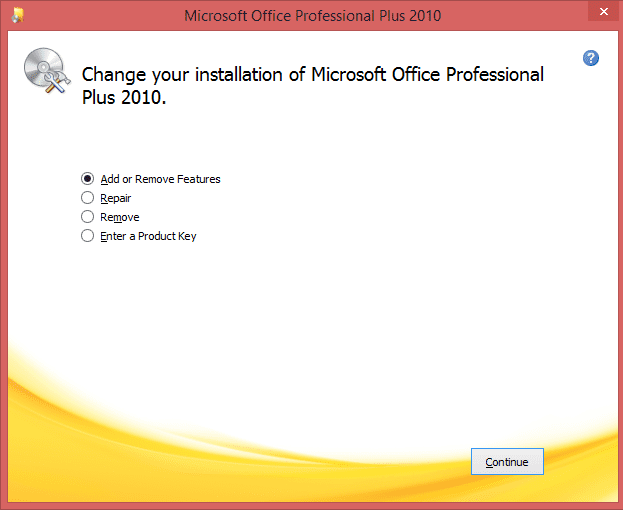
- Clicking Change will open the Office installation dialog with option to add or remove features or repair. You'll want to choose Add or Remove Features.

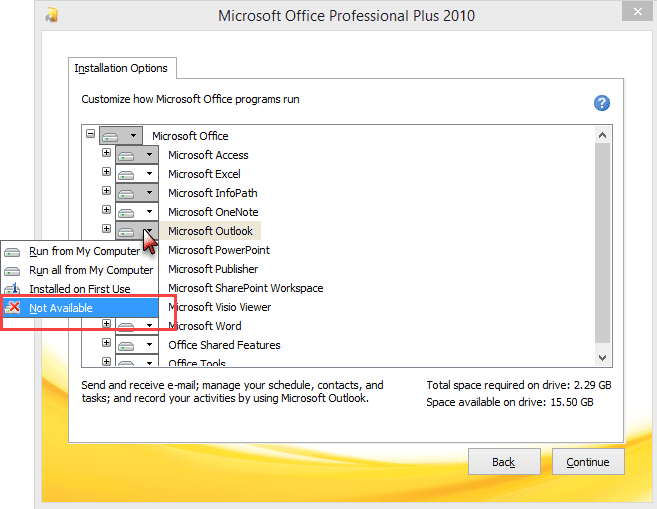
- Click Continue. The Installation options tree displays a white box if all features are installed and gray if some features are either "not available" or are installed on first use. An X on the icon indicates not available, a 1 means it is set to install the first time you use it.
- Click the + (plus signs) to expand the directories, if Outlook is not visible.
- Click the little down arrow on the box to choose different installation options for each feature.
Video Tutorial
To uninstall Outlook, click on the button beside the name and choose Not Available, then Continue. This will remove all Outlook components. If you want to remove some features but keep Outlook, expand the directory and remove just those features.
More Information
To add features, select the feature then choose Run all from my computer.
The method for other versions of Office is similar. Some older versions use a checkbox - check or uncheck to change the installation options and grayed boxes indicate options under that feature are not installed.

David Dennis says
Hello Diane,
I am on an iMac with MS Office 2016 installed. Last week, I noticed my Outlook account was not receiving email. However, on my iPhone, I was receiving email as usual. I remember that I was asked to verify my PW on my phone for Outlook, which I did. Did that cause the email on the iMAC to lock up? If so, how can I unlock it? If I go to Outlook.com on my browser, I can access my outlook account just as it is on my phone. I really don't know what happened. I would appreciate your help. I am having to use my backup gmail account for now.Thank you, David Dennis
sgsd says
Doesn't work.
Diane Poremsky says
This applies only to Office 2010 and older. The click to run versions do not support selective installations in the consumer versions. (Businesses can use ODT to control what gets installed.)
Warren Bolton says
I have a malware infestation in my outlook 2016. Kaspersky's technicians have worked on it for over a fortnight and can't resolve the issue
They have advised me to uninstall and reinstall Outlook
I have read your advice that this is impossible to do
If I uninstall and reinstall MS Office my understanding is that I will lose all the updates that have occurred since it was first activated
Do you know of any other solution?
Thank you
Pegi Bevins says
I just reinstalled Office 2019 and Outlook won't open; everything else works fine. Should I uninstall Outlook? I haven't done it because I'm afraid I'll lose Word, Excel, etc., if I do. And if I uninstall Outlook, can I download a free copy online? Thank you.
Diane Poremsky says
Any error messages? You might be able to fix it without uninstalling or repairing office.
You can't uninstall outlook only - it will uninstall all office apps but your data won't be touched.
Ted David says
I have a related issue.
Outlook 2016 is acting up: I cannot add my account back. An AOL tech, trying to fix an issue where it could not connect to the incoming server (IMAP) deleted my account. Now I can't create a new account. It complains about encryption. Then, when I go back to look at the settings, the server settings somehow changed from AOL to to imap.mail.yahoo.com and smtp.yahoo.com.
So I tried to delete the app. It is part of a download version of Microsoft Office 2019 that I purchased. I still have access to the download but I don't see any way to delete Outlook.
Diane Poremsky says
Yahoo requires an app password to add the account to Outlook, even if you don't have their extra security features enabled.
To generate an app password to use in place of your "real" password:
Log into your account security settings in Yahoo or AOL and click on Manage app passwords.
Select your app from the list and click Generate. (Choosing the app is to make it easier to delete (revoke) a specific password if you need to later. You can use the app password in any application.)
Copy the password and paste it into Outlook’s password dialog. If you type it in, don’t include the spaces, they just make the password easier to read.
To change the password in Outlook 2016 and newer, use the File > Account Settings > Server settings menu.
https://www.slipstick.com/outlook/yahoo-aol-accounts-outlook/
Tom says
How do I completely remove Outlook 2010. When I uninstall, remove all .pst files and reinstall Outlook 2010 it tries to set up all of my old accounts. I want to completely uninstall. There must be setting that exist in the registry. How do I remove all registry entries?
Rick says
Hi Diane -
I have an odd one here! Perhaps you can help. I am in support at a managed services company and we have a client witt the follwoing Outlook issue:
Outlook 2016 Business Premium - Two profiles, one work account and one outlook.com account. We set it up and all works well for a few days but then suddenly in the account list in Outlook it shows the work account twice in the sidebar but you can’t rename it unless you remove it. If I remove it and add it back it works for a few days and does it all over again. They are two different accounts with their own emails. Outlook is renaming the account itself! As you can imagine then, the problem is trying to differentiate between them in the contacts or calendars sections of outlook and even the email mailboxes.
Ever heard of anything like this?
Thanks!
Rick
Nagi Couzi says
When i right-click on a file to send it through windows mail which is my Default program, the file goes attached to Outlook Compose (by clicking "Send to... Mail recipient" !!!) Why ? although "Windows mail" is my default program. I am using Windows 10 pro and Office 2016. I also have an outloook email account registered in my laptop.
MS Office Support says
I have uninstalled outlook but after opening the system, the system tries to launch it. Please help how to remove it.
Diane Poremsky says
What version of Office do you have installed? You cannot uninstall just outlook when you use Office 2013 and 2016 click to run installs, which pretty much everyone is using.
Roy says
When right clicking on Office 2016 I get options to uninstall or change.
When clicking on change as you said I only get the option to repair.
No list of components of the suite as your article suggests.
I don't use Outlook and get constant errors from it since it keeps trying to log in with old credentials from years ago when I used Office 2003.
Diane Poremsky says
Office 2013 and up don't support removing individual apps, it's all or nothing.
You shouldn't get errors, because outlook shouldn't be trying to open. Is it in the startup folder? Is Skype trying to open it? You can get rid of the outlook profile if you don't use outlook (or remove the bad account if you did).
Go to control panel, search for Mail. Open the applet and delete the profile. This will stop outlook from trying to log in. If you used outlook, you'd open the profile and delete the account.
ROBERT COSTA says
Outlook 16 is just a bear. I want to return to Outlook 365. If I delete Outlook 16, will I lose any emails, folders, etc.'s
Diane Poremsky says
Outlook 2016 is Outlook 365 desktop software... if you mean Outlook on the web, you can stop using Outlook desktop and delete the profile from outlook and everything will still be on the outlook.com server.
Chuah Geok hioh says
Lately encounter missing email from outlook. Saw the message on the phone when check on my desktop the message wasn't there anymore. It happen frequent lately. Did try to delete and recreate profile. That didn't help is there anything else I can do?
Diane Poremsky says
Is this with the hotmail account? Are all messages affected or just some? Which version of Outlook? Is the account in Outlook as Exchange or POP3?
DearWebby says
Is Microsoft Office 2016 Professional Plus crippled and won't work without Outlook? Is Office Libre the only Office, that is not handicapped with Outllook?
Diane Poremsky says
Office pro will work without outlook but you can't install some of the office programs like you could with older versions - you need to install all but can use other email clients. This change is due in part to 'click to run' model of software installation.
SHUVANKAR SANNYAMOT says
It has really worked :-)
Timothy Page says
There is something missing from these instructions for Windows 7. When I go to Programs in the Control Panel there is nothing like what you say in the instructions.
Programs and Features has the following: Uninstall, Turn Windows features on or off, View installed updates, Run programs..., and How to install a program. None of them list Microsoft Office. Clicking on Turn on Windows features doesn't list it either.
Please update this fix. Thanx. Tim
Diane Poremsky says
What version of Office do you have installed? You definitely should have Microsoft Office listed in Programs and Features > Add & Remove Programs, but can't uninstall Outlook if you use Office 2013 or 2106 subscriptions. With these two programs you'll only have the option of Uninstall or Change - and Change only offers repair options.
Kathleen says
I have uninstalled Outlook, but every time I click on an email link, my computer tries to launch it. How can I get rid of this?
Diane Poremsky says
Did you set another email client as the default handler for mailto links?
putri says
Hi.. im using outlook 2007
Sorry if my english poor..
I just change location of my .pts to D: and set default.. before that i do back up of my .pst..
Then after re open my outlook its like not responding.. but no "not responding" text displayed.. my mouse pointer are hidden if i move to the outlook windows.. so i cant click anything..
What should i do?
If i change the ms. Office enterprise 2007 then choose installed on first use on ms. Outlook it is like weeping data??
What happen after i do that?
Would outlook show up with nothing in here?
sharif says
HI
I bought office pro 2016 but need to uninstall outlook 2016 due to m exchange 2007 issue. I need outlook 2013? Can you guide me?
Diane Poremsky says
If you are using a subscription to Office 365, you'll need to call support at this time.
Users who were auto-upgraded to Office 2016 from Office 365 Personal, Home, or University who need to revert back to Outlook 2013 will need to contact Microsoft support by selecting Contact Answer Desk on the Microsoft support page.
Business subscribers should have time to block the upgrade using the registry key, if not, see Obtaining older versions of Office for the steps necessary to revert to Office 2013.
Blake Scott says
how do I uninstall and reinstall Oultook 2013? it does not show up in my control panel. I am using Windows 8.1
Thank you
Diane Poremsky says
You need uninstall the entire office suite, or use the repair option (under Change) - the Online Repair uninstalls and reinstalls office. Users settings and files are not touched so you shouldn't lose anything when you repair.
Blake Scott says
Hello Diane, i have a similar problem as the post from June 21 2015. I have outlook 2013 and it takes for ever to open and then when open it goes unresponsive. I was wondering how to fix this? This is the only program on my computer that has this issue. When I do get this to open it slows the entire computer down to the point that I have to shut the computer down and restart it. If I leave outlook unopened it don't have any problems. Can you give me some hints to help uninstall and reinstall this program? I have looked in my control panel and Outlook is not listed there for me to be able to uninstall it. I purchased it with my Microsoft office 365 suite so it is not separate from that program from what I can tell. I have called Microsoft and they were unable to help me as well. They wanted money to actually fix it they said. I have only had this program and the computer for 6-8 months and no one wants to warranty their product. Can you help? Thank you
Diane Poremsky says
You can't just uninstall/reinstall outlook - you can try Repair - in control panel, programs and features select office then click Change. However, i would start with scanpst if you are using POP3 or have a pst in your profile. If imap, outlook.com, or exchange mailbox remove the account and add it back. Warning: if it's IMAP and the calendar and contacts are in the imap file, in folders labeled 'this computer only' you need to export those folders to a pst file first.
KC says
Diane,
You seem to really know Microsoft Office.
I have Microsoft 2007 with Outlook, Word, PowerPoint and Access. Since upgrading to Windows 10 from Windows 7 on my HP, any received Word Documents and Word to PDF documents into Outlook emails, will preview fine, but when opened using Word as default, WORD opens with what appears to be a conversion box, and the body of the document in word is all gibberish, never looking as the Preview showed.
Any ideas why W10 upgrade would do this? I tried various language settings on the tab, the MS DOS selection and such, without any improvement. I tried saving the attached files to my desktop, then opened them after reopening Word and it didn't help. Seems as W10 has changed .doc and .docx files into this weird conversion process. Really strange.
W10 also created problems for the OEM installed Wi Fi which stopped working and of course I had to reinstall printer drivers in order to get printers to function as they had before. That I figured out, yet this Outlook email attachment no longer opening in word and the wi fi problems mystifies me.
Any ideas?
Thank you,
KC
Diane Poremsky says
It sounds like it is seeing it as corrupt and can't property open it. I would run sfc /scannow from an command prompt with admin permission (right click on start menu button, choose command prompt (admin)) - see if that fixes it.
Richard D Smith says
I have Outlook and Outlook.com when I go to e-mail it goes to a white screen and circle of dots around and around, stays on quite awhile most times.Can't get to my e-mails for a long time. Thank you
Diane Poremsky says
You have the outlook.com account configured in Outlook desktop or are you reading your mail in a browser? If you are using Outlook, what version of Outlook do you have?
Jamaar says
I have never installed Outlook from Microsoft Office Enterprise 2007, but I still get every time "important" updates for Outlook and for the junk-mail filter. I hide them of course, but some keep on returning. How to stop this?
Diane Poremsky says
Has it always done this or did it start doing this recently?
Daniel says
Hi, I have a follow-up problem:
After uninstalling (or not installing at all in the first place) MS Outlook in the MSO2010 or the MSO2013 professional edition, the effing Windows Update keeps on offering me updates of MS Outlook. No matter how many times I apply "hide update" on them, or so it seems. So:
1. Does anyone here know, why MS Windows Update does this?
2. Any advice, how to prevent WU from offering Outlook updates or from insisting on them after I have hidden them?
Many thanks.
Cheers!
Diane Poremsky says
There were some bits left behind that windows updates 'sees'. Hidden updates will be reoffered if there is an update to the update - which is, unfortunately, fairly common lately.
George Jerry says
or.......if your wish is to simply use another email provider and not have Outlook 2010 load up then just go to the commands and hit the 'work offline' tab. Outlook is now divorced from the web and your replacement provider takes over.
I did this and it works just fine.
Diane Poremsky says
I'd delete the email profiles if i didn't want to use it - this way you will be warned (by the create profile dialog) if a program tries to use outlook and an outgoing message won't be sitting in the outbox waiting for outlook to be opened.
Phil says
Hi Diane, I have a question, my Office 2013 is corrupt and I need to uninstall the full program and then reinstall, I know that Microsoft has a fix utility to do this or I can use the add remove programs, my question is before I uninstall Outlook, should I change the default folder name "Outlook Files" in My Documents where the PST is stored so that it does not get overwritten? Also I use several PST inboxes, when I reinstall Outlook do I have to start from scratch and import each PST? Will my Rules, Signatures and Junk Email Safe senders/recipient lists be intact or do I need to export each list to a file?
Diane Poremsky says
PST files won't be overwritten - you can (and should) back them up regularly, so this is a good time to make the backup but the pst files and your profile won't be touched. You won't need to start from scratch, unless you want to.
Charles J. Reid says
When trying to uninstall MS Office XP on my Win 8.1 system, I get an error message 2502, with a note that leads to a message to call MS paid support. Any better solution?
Diane Poremsky says
Try using run as administrator? Right click on the setup file and choose run as administrator then choose the uninstall option.
Den says
So easy when you know how
ethel wright says
Great instructions, thank you!!
Phil says
I have a weird issue occurring with my Outlook 2013, the menus, icons and folder lists are disappearing and the text & graphics in emails are shifting all over the place to make it hard to read. If I run my cursor over the icons and folder list, the items will reappear but still a little funky, or if I open Word, everything goes back to normal for a little while, then I need to close Word and reopen. It is becoming frustrating. I have already tried using the repair function and uninstall/re-install Word but that doesn't fix it, my last resort is to uninstall Outlook, I understand that I will need to backup my email profile accounts and then bring them back after reinstalling.
Mark Southern says
Diane,
I want to install office 2013 pro plus but NOT outlook 2013. What's the best way to do this, or can this be done? After days of chasing problems with outlook 2013 not opening with a hosted exchange server 2010, the only solution I found that worked was using outlook 2010. Outlook 2013 was connecting but not opening, could not figure it out. It will open in "outlook /safe" mode only, reasons unknown. Had both exchange server support and MS TechNet support working on this, conclusion: outlook 2013 is not compatible with hosted exchange server 2010. I now have to use outlook 2010 within my office 2013 suite. I don't want to revert back to full install of office 2010... unless I have to. Please reply with my options and instructions to make this work. Appreciate it.
Diane Poremsky says
1. Support is full of it. Outlook 2013 will work with hosted Exchange 2010.
2. Which office suite do you have? Is it a click to run or msi? If click to run, you can have both outlook's installed.
When outlook works in safe mode, it's usually the result of an addin. What addins are installed? Is outlook running in compatibility mode? That will cause problems.
Dennis Willard says
Very good! Thank-you
Michalis says
I find the solution just yesterday!
I deleted the outlook profile from control panel --> Mail and then I set google profile as default. Outlook started normally with my google account...
Micahlis says
I have the suscription version Office365. When I setup the Outlook I entered my exchange email from my company but doesn't work. It stop in the step of verification my email and then exit from outlook. Allways that I try it is loading the profile with exchange info and coming in the screen the verification window and then again exit me. I started in a safe mode and I entered my GMail account and works but only in the safe mode. When I try to start as normal show me the same problem it is loading the profile with exchange info and exit me again. I was in loop...
Please HELP me to resetup the outlook in the right way with my other email accounts...
Diane Poremsky says
What addins do you have installed? That gmail only works in safe mode tells me it's probably because of an addin.
Rubyforestecho says
Wow. Thanks for the info. I should never have installed Outlook in the first place and you quickly helped me get rid of it. You cannot currently access Outlook Web App from a smartphone for mail services like Yahoo, Comcast, etc. that use POP3.
Marcelle Bicker says
If I uninstall Outlook as you describe, does it leave my pst file in place? I want to try to reinstall Outlook (after I uninstall it) because I have am having problems. I have tried to use scanpst to fix, but can't find it or get it to work when I download a copy.
Diane Poremsky says
Yes, it leaves the pst and the profile in place.
What version of Outlook do you have?
shirley says
how uninstall outlook l want back old my email
Diane Poremsky says
What version of Office? If 2013, you need to uninstall the suite then reinstall your old version of office.
Paul says
Worked like a charm- thank you!
Paul says
Hi, I have the same problem as Adam above. I installed Office Professional Plus 2013 (the VLSC ISO) and Outlook 2013 doesn't work due to an older version of Exchange Server. When i try to uninstall Outlook 2013, the only option I see is to uninstall the entire Office 2013 suite.
a) Is this the only option i.e. uninstall the entire Suite?
b) I also have an ISO of Outlook 2010. If I try now to install this older version of just Outlook, will it work meaning will this now automatically remove Outlook 2013 (since there can be only 1 version of Outlook at a time on a PC) and install Outlook 2010?
Thanks
Diane Poremsky says
If you have the subscription version you can't uninstall Outlook but you can have two versions installed at once. You can only use one at a time though.
If you have the fully installed version, choose Change, then Add or remove features to uninstall Outlook before installing 2010.
Daniel says
Hi, I installed Microsoft office 2013 as well and it changed my email over to Outlook. I've been all over the internet since yesterday trying to find out how to uninstall Outlook and every one points to that "change" feature but when I do that the only option I get is to "repair"....I don't have the option to change or select anything. Help?
Diane Poremsky says
The subscription versions do not have an option to install only parts of the suite. Go into Control panel, Default programs and set your desired program as the default for mail, calendar, and contacts.
Adam says
Hi, I just install office 365 and found out that the outlook 2013 not working with my company 2003 exchange server. problem is my outlook 2003 also not working as it show that it could not locate the source. Now I am going to remove outlook 2013 but the option in add/remove program only can let me uninstall the completed 2013 office but not outlook alone. Anything I can do? thanks a lot.
Diane Poremsky says
Is that the Home Premium click to run version?
Briana says
just deleted all Office. still have Outlook. The Office click-and-run erased them from control panel. the other i think was Office starter English. been all over internet and on ph. with microsoft-want $100 for themselves to remove it. i only did a survey from Outlook that asked about the service, then it downloaded automatically at the end.i willnot ever click on anything with Outlook on it again. i may have to take it to Staples for removal, since i can't get rid of it.
Diane Poremsky says
Are you sure it's outlook? Can you send me a screenshot of what you see?
briana says
do i 'remove all Office user settings related to this product' in contr. panel/microsoft office starter 2010? or will it remove all Office prog. and not just Outlook? i can't find Outlook broken down in Microsoft Office. Office Starter 2010 is the only link that has a change' and uninstall' option.
Diane Poremsky says
Office starter does not include Outlook, only Word and Excel. What is your other office version? (the one that doesn't have Change)
SassySaritah says
This was the first site I clicked in my Google search and it was extremely helpful. Exactly what I needed. Thank you.
deanodeano82 says
Thanks for the great tip. Saved me a lot of time.
Usman says
thanks dude i spent almost 1 hour to uninstall my outlook then i did a Google and got your lovely post.
Thanks