You receive this Outlook error message: "Cannot start Microsoft Outlook. Cannot open the Outlook window. The set of folders cannot be opened."
This is typically caused by one of the following issues:
- Your data file or profile is corrupt.
- Another application or a COM Addin, such as a sync utility or "Skype", is accessing Outlook’s data file.
- The navigation pane is corrupt
Microsoft Office 365 business accounts that have two (or more) Microsoft Exchange accounts in the profile may see this error (and other issues, such as rules not working) when one account has delegate or full access permissions on the other account. Remove the delegated account from the profile to solve or ask the administrator to remove full access permissions from the account.
Microsoft 365 business subscribers can use the Support and Recovery Assistant to diagnose the problem.
The navigation pane is corrupt
I'm not sure what is causing the problem, but we're seeing a rash of complaints with the following error:
Cannot start Microsoft Office Outlook. Unable to open the Outlook window. Invalid XML, the view cannot be loaded.
The users run Office Diagnostics in an attempt to fix it on their own but it finds no errors.
To fix this you need to close Outlook and reopen it using the /resetnavpane switch or find and delete <profile_name>.xml and restart Outlook. Outlook will recreate a new file with the default navigation pane folders. You will lose any customizations on the navigation pane, such as folders on the Favorites folder list
This problem may occur if you are running Outlook in Compatibility mode. Compatibility mode is NOT needed with any version of Outlook on any versions of Windows (and can not be enabled on Outlook 2013 and newer).
How to use the /resetnavpane switch
- Close Outlook.
- Press Windows key + R to open the Run command.
- Type or paste this into the Open field: outlook.exe /resetnavpane

- Press Enter (or OK button) to restart Outlook.
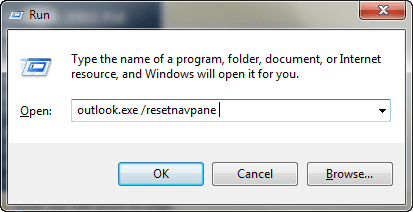
Note: Make sure there is a space between outlook.exe and the switch.
Video Tutorial
Delete the Navigation pane configuration file
If you are having problems using the switch, you can find and delete the XML file that holds the navigation pane settings. In the Start search or Run fields or in Windows Explorer's address bar, paste the following and press Enter:
%appdata%\Microsoft\Outlook
This will open Windows Explorer to the folder where many of Outlook configuration files are kept. Find and delete the file named for your profile with the extension XML. Note that we highly recommend using the switch instead of deleting the file directly.
More Information
From Outlook-tips.net:
See Error with the To-Do Bar's Task list if the error is "The operation failed. An object could not be found."

Zenifer says
To resolve issues with Outlook, not opening, some users have suggested turning off Compatibility mode. Here are the steps you can follow to do this:
Chris de Grasse says
The command: "outlook.exe /resetnavpane" does nothing.
Diane Poremsky says
It should reset the navigation page to the default. If you don't use Favorites in Mail module, you may not notice a change.
Which version and build of Outlook are you using? See File, Office Account for the information.
Doug says
When I launch Outlook, it starts up but when it gets as far as processing it disappears. I have tried launching it while holding the CTRL key, that doesn't work either. I have office 365. Any suggestions would be great. Thanks for your time.
Patrick says
I can't even open Outlook. I get this error message;
Cannot start Microsoft Outlook. Cannot open the Outlook window. The set of folders cannot be opened. File access is denied. You do not have permission required to access the file C:\users\username\Documents\OutlookFiles\emailaddress.pst
Toni Staton says
I can't get outlook to open, it say processing, help what I'm I to do
Diane Poremsky says
Close it and restart in Safe mode - see if it opens. To open Outlook in Safe mode: Close Outlook then hold Ctrl as you click on the Outlook icon. You'll get a message asking if you want to start in Safe mode. Click Ok.
What type of email account is configured in Outlook?
Debi Weaver says
I ended up going to the Microsoft store. They went in and did a repair twice and finally we had to re-install using my product key. They had no explanation as to what the problem was. This is the 2nd time I have had to do this. I think there is some kind of gliche in the Microsoft 2016 software.
barbara says
when trying to open outlook get message microsoft outlook has stopped working problem caused program to stop working correctly
Rob says
Running Windows 8.1 and Outlook 2013
Clicking on the Outlook icon does nothing.
when trying "outlook /safe" error message returned is
c:\program files\ microsoft office 15\ root\office15\outlook.exe
The volume for a file has been externally altered so that the opened file is no longer vaild.
How do get it started again ?
Diane Poremsky says
You'll need to repair the office installation.
Stephan Ashkenazy says
Hello Diane,
Thank you for your reply. On your questions:
- yes, the only problem was the navigation pane;
- yes, I tried the reset switch and it didn't worked;
- I deleted the profile.xml file as well - the same result;
KR,
Stephan
Stephan Ashkenazy says
Hi Diane,
I reinstalled my MS Office pack and then installed the MS Office 2010 SP2. After that I used manual setup and this way succeeded to complete the action.
Since this info might be helpful to other people with similar problem, I'd like to share the links, where I found it:
1) https://www.rackspace.com/knowledge_center/article/manually-configure-outlook-2010-for-email-hosted-on-exchange-2010
2) https://support.sherweb.com/Faqs/Show/manual-configuration-guide-for-outlook-2010-exchange-2013
Once again, thank you very much for your response and desire to help.
With kind regards,
Stephan Ashkenazy
Stephan Ashkenazy says
Hello dear Diane,
I am running Win7 professional and MO2010. The problem I have is with Outlook, which doesn't starts in normal mode, but only in safe mode. Tried from command line all the relevant switches, played with the add-ins, but with no result so far.
I will be very grateful to hearing your advice on possible solutions. Otherwise will need to install all from scratch.
The outlook is used with Office365 Exchange server. When started in normal mode, the navigation pane remains minimized and it is not possible to restore/maximize it. Besides this, everything works fine - it is possible to create new mail, appointment, task, etc.
Thank you very much in advance for your time and look forward to hearing from you.
With kind regards,
Stephan
Diane Poremsky says
The only problem is the navigation pane? You've tried the /resetnavpane switch? If so, try closing outlook and deleting the navigation pane xml file at %appdata%\microsoft\outlook - it's named profile-name.xml.
Ross says
Hi Diane
I am using MO2010 and use outlook for my email. I tried to delete one particular email and it would not respond and now it just hangs and continues to list the same webpage for ever.
I tried the repair with no success and MO just keeps on hanging on the same webpage.
Not sure what to do now and would appreciate any help.
Thank you
Kind regards
Ross (Perth, Western Australia)
LB says
Hi Diane, thanks for being so helpful! I bought MS Office 2013 to install on my Windows 7 laptop. All is working well after deleting an ABBYY Reader file my printer dropped in when i installed it. Outlook, however, will not open. Error msg: 'Cannot start MS Outlook. Cannot open Outlook Window. The path specified: C:\... .pst is not valid". Would you please guide me through the steps to set it up? Thanks so much!
Diane Poremsky says
What type of email account do you have configured? That message says there is a problem with the pst file, possibly due to using compatibility mode. https://www.slipstick.com/problems/say-no-to-compatibility-mode/ If you tried the troubleshooter before figuring out abbyy was the problem, this may be what happened. Right click on the outlook shortcut you use to open outlook, choose properties and disable run as administrator.
Martin J. Hagan (@MJ_Hagan) says
Outlook was not opening, nothing was working until I restarted my computer in safe mode. Just kept on clicking the F8 key. Then voila -- Outlook opened!
Diane Poremsky says
Does it only open in Safe mode? What antivirus security software do you use? They can interfere with Outlook.
Martin J. Hagan (@MJ_Hagan) says
norton 360
Diane Poremsky says
Disable the norton addin in the trust center and see if that solves the problem.
vince says
can only open one folder out of four in outlook. keep getting error message
c:\users\etc........
Diane Poremsky says
That error is often caused by using compatibility mode - http;//www.slipstick.com/problems/say-no-to-compatibility-mode/ - or the pst file is damaged or missing.
Atisha Del says
copy and paste or type "outlook.exe /resetnavpane" (without the commas of course) into the Start search bar, the file will then appear under "Programs". scroll arrow over "outlook.exe /resetnavpane" then right click and select "run as administrator". Enjoy!!!!!
Derek Owens says
Yes! Running "outlook.exe /resetnavpane" AS ADMINISTRATOR is what worked for me. Thanks a million.
(Outlook 2013 on Windows 7)
Roger Wilkes says
I have a problem too. Having eventually managed, with Microsoft's help, to uninstall Microsoft Office XP Professional and Front Page - after a marathon spell of downloading messages in Inbox and Sent - I have just installed Microsoft Office 2013 Home & Business. Like others above, I have had a problem with Outlook, and keep receiving this error message: "Cannot start Microsoft Outlook. Cannot open the Outlook window. The set of folders cannot be opened. The Outlook data file C\User\.....Microsoft\Outlook\Outlook.pst was not cleanly closed by the last program that used it. It cannot be opened until repaired". I am totally mystified - the XP Outook programme had stopped sending and delivering emails 6 months ago, but I cannot even open this new Office Outlook programme. I've used outlook.exe /resetnavpane twice, both times with absolutely no result. Help please (NB I am NOT savvy with all the computer jargon; please treat me as a dummy!)
Abel says
Thank you! It worked like magic with Outlook 2007 running under Vista and after bringing me close to a breakdown. The perspective of losing important was a catastrophic one in my case.
Alastair Page says
I have had numerous issues with Outlook 2007 including emails being stuck in the outbox and difficulty opening the program. I'm considering upgrading to the 2013 version - do you think that I will have less trouble with the new version?
Diane Poremsky says
No. Upgrading rarely fixes problems. You might like it for other reasons, but you should try to solve the problems before upgrading as the problems may follow you.
Raju Shrestha says
I couldn't say 'thank you' enough for your magic words. I contacted so called 'IT Administrators', tolerated their non-sense for days, did so many things but all to no avail. And then i came across this. 'Say No to Compatibility mode'. And magic happened. I am truly grateful for the advice.
Ronnie.Williams says
HI I know how to E-mail now I do have my contact list Call me [removed personal information] please and thank you Mr. Ronnie Williams
Diane Poremsky says
What do you need to do with it? If the contacts aren't showing in the address book, make sure it is enabled as an address book.
boy says
hello
I have office 2013
when run word 2013
Microsoft Word
Microsoft Word has stopped working
Windows can check online for a solution to the problem the next time you go online.
Check online for a solution later and close the program
Close the program
Debug the program
help me
Rachel Erwin says
Thank you so much for all of your help :)
Rachel Erwin says
Thank you. Unfortunately I don't have an outlook connector listed so maybe that's the problem.
Diane Poremsky says
Ah yes, that could be the problem. If you previously used it but uninstalled it, find and delete extend.dat.
Rachel Erwin says
Thanks. The only trick is that outlook is in my MS Office Professional Plus 2010 program. If I delete (uninstall) that then I don't want to lose my other programs. Also, will I be able to reinstall it since I already used the product key for the install? Thanks so much
Diane Poremsky says
Don't uninstall Office, uninstall the Outlook Connector.
Rachel Erwin says
How do I do that?
Diane Poremsky says
Control panel, Add Remove programs. If you don't use hotmail/outlook.com email, you don't need ot reinstall it. If you do use it, download a refresh copy from 32-bit Outlook Hotmail Connector
Rachel Erwin says
I also tried both the outlook.exe /resetnavpane and %appdata%MicrosoftOutlook & it didn't fix it. I just got a different error message than before. My original message said "can't open the window. The set of folders can't be opened. MAPI was unable to load the information service msncon.dll." I'm using MS Office Professional Plus 2010.
Diane Poremsky says
msncon is the outlook hotmail connector - try uninstalling it and reinstalling it.
Dominic Rooney says
If one is running another program that uses Outlook resources (Office Communicator at the office, Lync at home) then close this and try to start Outlook. Since I imagine this is only a minority of the audience I daresay it's merely a manifestation of a broader problem, characterised by another process locking an Outlook resource. I used Process Explorer from Systems Internals to try to isolate the resource concerned but I don't know enough about Windows internals to understand fully what I was looking at.
Diane Poremsky says
Outlook 2010 and 2013 are supposed to be better about forcing outlook closed when another program is accessing data, but I've noticed that it doesn't seem to work with Lync 100% of the time, especially within about 10 min of using Lync.
mahmoud diab says
problem solved
thank you
Richard Clark says
I have installed Microsoft Office Professional 2013 and cannot get outlook to setup or even open. I get an error that says Microsoft Outlook if offline and needs to be online. I don't know what to do.
Diane Poremsky says
What type of email account?
Go to control panel, search for mail and open your profile. Either make a new profile (keep the old profile for now) or edit the old profile and remove the email account then add it back.
Marty says
Figured it out!!!
Turned out that Outlook was running in Compatibility mode.
Go to: C:\Program Files\Microsoft Office\Office14
find Outlook and right click > Properties > compatibility tab
Unselect Compatibility mode and apply the changes. Worked like a charm!!!
Marty says
I forgot to mention that I also tried to run outlook without any extensions; however, that attempt was unsucessful as well.
Marty says
I'm having the same issue as gregory Kurth; except I'm running exchange2007.
I have a user that is on the domain, with a BellSouth.net email account already on outlook and I'm trying to add his email through our company on outlook and I'm getting the following errors, "cannot start microsoft office outlook. cannot open the outlook window. The set of folders cannot be opened. The information store could not be opened."
I tried doing outlook.exe /resetnavpane
I've tried deleting all .xml files (c:\users\username\appdata\roaming\microsoft\outlook)
I've used PSTSCAN and OST Scan on each PST/OST file to no avail.
I actually took out a spare computer that we just recieved but haven't allocated to anyone and put in the same emails and it worked just fine(the second computer had Exchange2010).
The BellSouth.net email is setup as Pop3 and of course I'm trying to setup my email as a regular exchange account.
I did try setting it up as a Pop3 acct as well to no avail; as well as, connecting it through our webmail. Our webmail is setup as https not http though. I know that was an issue in previous versions but wasn't sure if that was still the case.
Any help with this issue would be greatly appreciated.
I
Gregory Kurth says
My error message says. "Cannot start Microsoft Outlook. Cannot open the Outlook window. The set of folders cannot be opened. The information store could not be opened." I have 2010 not connected to Exchange.
I done the run error process several times but to no avail.
Susan says
Hi Dianne,
Thank you !!!
I tried Outlook.exe / resetnavpane, I deleted all the XML files still didn't work.
scanpst.exe worked - Many thanks
Susan
Sol Green says
I have vista business office 2007 & 2010 (tried both same thing). Outlook says "Cannot start Microsoft Office Outlook" tried above no help tried all safe modes not help. Have uninstalled and reinstalled several times. Tried clicking on Mail icon on control Panel says not enought memory. Saw an earlier post about Regedit that sounded helpful but can't find it now. Any more ideas?
Diane Poremsky says
Control panel mail error is a clue. Is the article you saw earlier?
https://www.slipstick.com/problems/error-opening-control-panels-mail-applet/
Lou Hamel says
I installed Windows 8 and now whenever I attempt to open my Outlook 2010 I receive the error message:
"Microsoft Outlook has stopped working."
How can I open Outlook 2010 and access my email?
Diane Poremsky says
Does it work in Safe mode? To open Outlook in Safe mode: Close Outlook then hold Ctrl as you click on the Outlook icon. You'll get a message asking if you want to start in Safe mode. Click Ok.
Morrie says
I was wondering if someone could help me pls. We run XP 2002 and this morning I opened MS Outlook and checked emails. I restarted the computer bc it looked up, and now I can't get back in to Outlook "Cannont start Microsofty Office Outlook. Unable to pen the Outlook window. The set of folders could not be opened. The server is not available. Contact your administrator if this condition persists." I have no idea what to do to rectify... Please help!
Jeremy says
Hello Diane,
I'm absolutely delighted to report that, after I ran scanpst twice, I attempted to open my original Outlook profile and like magic it was restored. Can't tell you how pleased I am. Thank you so much for your patience and brilliant advice.
With all my very best wishes, Jeremy.
Jeremy says
Hello Diane,
None of the smaller files had anything useful in them but when I tried to add the large one I got an error message saying errors were detected in the file and when you pres 'OK' the box dissapears but the file has not been added...
Sorry this is taking up so much of your time but I would really like my old emails back...
Many thanks, Jeremy.
Diane Poremsky says
That means its corrupt. Try running scanpst on it (or on a copy of it) - we usually recommend doing scanpst twice. If that fails, I can try repairing with tools I have.
Jeremy says
Hello Diane,
I deleted all the XML files as instructed but the old Outlook profile still gets the same error message.
Within the short cut you gave me above there are, amongst others, files called:
archive.pst 265kb
Outlook.pst 8201kb
Outlook1.pst 4906945kb and
virgin Outlook.pst 761kb
Can you advise me what to do. Perhaps remove my current .pst file which I seem to remember was only about 600kb and replace it with Outlook1.pst? If this is your advice can you perhaps be kind enough to remind me exactly how to do this...
Many thanks again, Jeremy.
Diane Poremsky says
The pst files hold your mail. The archive.pst is empty. I'm assuming the outlook1.pst is your active file since its so large.
You can add the old pst files one of two ways: with outlook close, go to control panel, mail and edit the profile, adding the pst files. At this point, I would add all 3 and see what is in them. After you do that, you can set the correct one as default and remove the others from your profile.
Jeremy says
Hello Diane,
I'm sort of there... The new profile opens Outlook which is great but I have no history (which is very important to me) and no contacts, calandar contents etc. I tried to associate a .pst file as your tutorial suggested but the only one the wizard found appears to have no contents?
I am not using compatibility mode and the old profile will still not open...
Just a little more help please, many thanks, Jeremy.
Diane Poremsky says
This tells us that the profile is either corrupt or a support file is corrupt. Paste %appdata%\microsoft\outlook into the address bar of windows explorer and delete the XML files. Restart outlook with the old profile - does it work?
If not: Is you old pst file in your My Documents folder or in %localappdata%\microsoft\outlook ? Find it (can move it to the Outlook folder in My Documents if its in localappdata) then open it in the profile.
Jeremy Tilden-Smith says
Diane,
I have the error - Cannot start Microsoft Outlook. Cannot open the Outlook window. The set of folders cannot b opened. Errors have been detected in the file C:\Users\Jeremy\AppData\Local\Microsoft\Outlook\Outlook1.pst I am running Vista and Outlook from Office14. Have tried the resetnavpane which didn't clear the problem but do not know how to change my profile etc??? Help please...
Diane Poremsky says
To make a new profile - close Outlook. Open Control panel and search for Mail. Open it - select Profiles and Add a new profile. Don't delete your current profile just yet, just make a second one with one account to see if it works. Full instructions are at Make a new profile
Are you using compatibility mode?
Stephen Turnock (@StephenTurnock) says
Thank you for the response Diane.
Sorry I just noticed another dialogue box in the background regarding unsupported exchange server! hence we need to move to Exchange 2013..
Diane Poremsky says
Yeah, that will do it too. :( If you want to try Outlook 2013 with Exchange 2013, you can get a trial account at Office365.com.
Stephen Turnock (@StephenTurnock) says
On win7 office 2010 and exchange server . I also tried everything here and does not work. Does outlook / 365 not read PST files?
Its a silly question maybe, but why do error messages not actually say what dosent work and why? That poor Administrator has to fix everything.
The initial install should check for issues and fix or list possible fixes. Also should do more on user experience as I think this is left to the techy coder people to devise mostly. I know... in an ideal world! but its 2013 not windows 3.1 land.
Diane Poremsky says
Pst files work in Outlook 2013, with one exception: you cannot deliver Exchange email to a pst file. You need to use rules to move the mail. If by chance you set a pst as default with an exchange account (i didn't think it was possible though), it could prevent outlook from starting.
What is the full text of the message?
Tess says
I installed Office 97 but I cant start Outlook. Windows is Vista Business. Error message " (X) - Cannot start Microsoft Outlook". I tried this but it does not work "Outlook.exe / resetnavpane". Is it not compatible with Vista Business edition?
There is Windows Mail installed on the desktop but I prefer Outlook. Is this part of the problem?
Diane Poremsky says
Outlook 97 or Outlook 2007? Outlook 97 is not supported on Vista and above. Outlook 2007 will - what is the exact error number?
Claudio says
Hi .. i am running windows 7 home premium and microsoft office home and business... am also having problems opening outlook .. keeps telling the file cant be opened and to try again... I have tried all of the suggestions given, as well as uninstall and install, safe mode, compatibility mode etc and still cant get it opened. Does anyone have any other suggestions short of doing away with windows altogether..
cheers
Patrick says
I ran a few PC clean ups and cannot find the PST file.. What is a good recover tool/method that i can use (especially if it got deleted)?
Diane Poremsky says
If the pst was deleted and the Recycle bin emptied, you'll need a windows recover deleted tool.
What version of Windows? Are you sure it's not in the %localappdata%\Microsoft\Outlook folder? (In Vista, windows 7,8; Paste that line in the Windows Explorer address bar and press Enter.) You may need to Enable the windows explorer option to show hidden files and folders.
Jon says
I was having the same problem.
Thanks, your reset advice worked!
Khaled Mansour says
While I'm making a mail setup on outlook,I made a check on manually after making it I can't open the outlook
T.Johnson Miller says
"Outlook.exe /resetnavpane" worked for me. Thanks.
Joyce Hinks says
Yea, it opened normally. Now I will turn off updates, when I fugure out how to do that. Thanks for your help.
Joy
Diane Poremsky says
If you know the update that is the problem, go to windows update and hide it. This will allow other updates to install automatically. Also, sometimes the reinstall works, so its not always necessary to hide them. But, in most cases the update is not critical so hiding them is fine.
Joyce Hinks says
After uninstalling the updates of today's date (ist update), I was able to open Outlook in safe mode. There were three to remove. I did that in the order last in first out. I now appear to ba able to open it and added a contact, as I had tried restoring to the previous day, without success. As a result I had lost the entries of today. Hopefully, it will work the next time.
There was only the one pst file and I restored that to the previous day, without successfully curing the problem, which appears to have come from one of the updates to Outlook.
Joyce Hinks says
I am unable to open Home and Business Outlook 2010 in Win7. Version is 14.06029.1000. It worked fine earlier today. I was entering contacts. The file size is 265 KB. I am unable to run the nav file, but did find the .pst file and restored it. Still no luck. The application icon does not open it. Safe mode does not work. I do not feel good enought to change any other programming.I am unable to access my mailboxes from this computer.
I checked the properties of the Outlook pst file and noticed that the attributes on this file show an Al and not A like the other office folder shortcut. The desktop shortcut is an A.
Help, please.
Joy
Diane Poremsky says
265KB means the file is empty.
Go to My Documents Outlook Files - how many pst files are there? What is the last modified date and large are they?
Paste %localappdata%microsoftoutlook in the address bar of windows explorer - check the file date and size of the pst files here.
Go to control panel, search for mail. Edit the profile by adding the largest pst file to your profile and removing the 256kb pst. Will outlook open? If so, do you have your recent email?
Curt Clausen says
outlook 2010 bliver ved med at spøre efter produtnøgle ,
Diane Poremsky says
When Outlook keeps asking for the product code, close it and restart using Run as Administrator - enter the code. The next time you restart it should be fine.
William A. Barrett says
Same as Thomas McKean above --
Message panel reads: Cannot start Microsoft Office Outlook. Cannot open the Outlook window. The set of folders cannot be opened. The file C:\Users\...\Outlook.pst is in use and cannot be accessed. (etc.)
Followed both of above, no effect. Logout/login does not affect this.
This problem only goes away by rebooting, which now takes about 15 minutes. It's happening daily and is a real nuisance.
There appears to be a file lock on the PST file, left over some some Outlook bug. Not sure how to release it, except through a reboot.
Outlook 2007. Vista OS.
alden says
tried all above, the problems started after a SW update from Mirosoft in December 2011, same exchange works on my laptop fine, but on the desktop it is only working when i use the outlook /safe switch..
Barbara says
I tried Cindy's (above) solution after trying everything else and it worked! Thanks Cindy - was about to give up
amy jo brumbaugh says
I can't open outlook either....and neither of these solutions worked...mine says errors have been detected in the outlook.pst files.....but I can't find them....or the scanpst.exe file to diagnose and repair......HELP!!???
Diane Poremsky says
See How to use Scanpst for step-by-step instructions to find scanpst and use it. If, by chance, you have Office 2010 Home and Business click to run you won't have scanpst.
Thomas McKean says
I tried both; outlook.exe /resetnavpane and %appdata%MicrosoftOutlook .
Everytime I delete the old xml files and pst from the Remote and local folders in outlook, they come back when I attempt to open outlook again. So I get the same error and cannot open outlook. I have uninstalled numerous times and reinstalled it with the same results.
Does anyone have any other ideas?
Diane Poremsky says
They are supposed to come back, but the error shouldn't. Is Outlook configured to run in compatibility mode? Did you try a new profile?
CINDY says
I TRIED EVERYTHING THE ONLY THING THAT WILL WORK....IS GO TO CONTROL PANEL THEN MAIL THEN SHOW PROFILES THEN PROPERTIES THEN E-MAIL ACCOUNTS AND REMOVE THE ACCOUNT THAT IS AN EXCHANGE ACCOIUNT.....IT WILL THEN WORK FINE!!!!
Diane Poremsky says
That isn't a solution if you need your Exchange account. If you don't have an exchange account and outlook created it in error, then yes, it will fix some issues that prevent outlook from restarting.
Larry Gabbitas says
I am using Windows 7 Professional with Outlook 2007. I am receiving the same error. I tried running the /resetnavpane command line and starting in safe mode. Still having the same issue.
Any suggestions?
Siphiwe says
Hi Diane, I have tried to run scan, tried to delete the .xml file, tried running / resetnavpanel, and i have also tried to run the compatibility mode by unchecking it...Kindly assist on on what i can do next....
SRIRAM K says
Try to note down the Outlook incoming/outgoing server settings in a file and go to control panel -> Mail -> and delete the profile. Make a New Profile by creating a new .pst and entering the email id and password and incoming and outgoing server details.
Import the old mails from previous .pst(profile) to the current .pst(profile).
Work done.
Diane Poremsky says
You don't need to import the old pst (unless it's a really old pst) - just open it in the new profile.